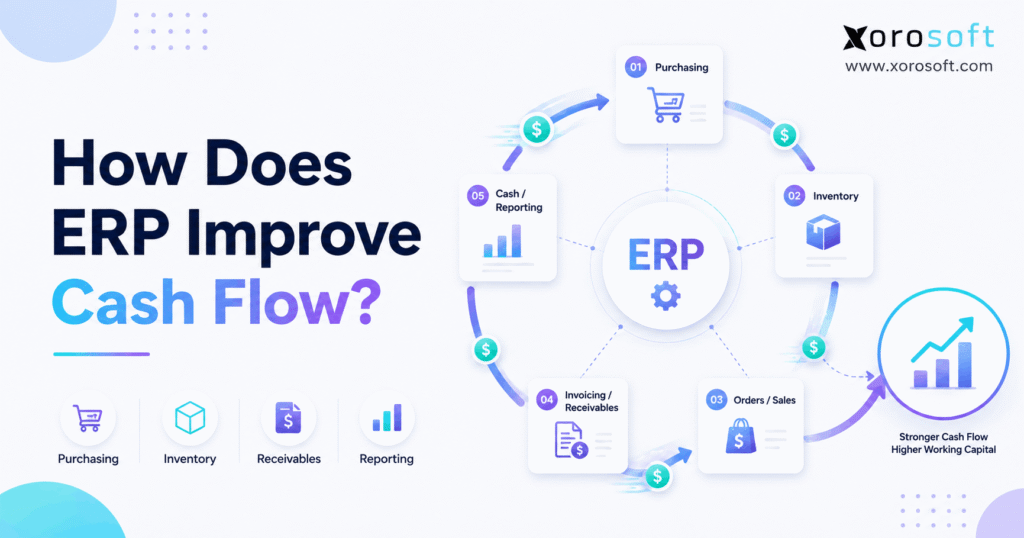
Understanding ERP cash flow is essential for businesses looking to optimise their financial processes and gain better control over their resources.
1. Why Growing Sales Can Still Leave Cash Tight
ERP cash flow becomes important when a business is growing but the bank balance does not seem to grow with it. Although sales may rise, cash can still sit inside stock, unpaid customer bills, open purchase orders, or work that has not yet turned into revenue. Therefore, a company can look profitable on paper while still struggling to fund its next round of buying.
For example, a wholesaler may buy $300,000 of stock today but collect payment from customers 30, 60, or even 90 days later. Meanwhile, payroll, rent, freight, warehouse costs, and supplier bills still need to be paid. As a result, growth can create more cash pressure before it creates more free cash.
This problem is common. In fact, the Federal Reserve Banks’ 2025 Small Business Credit Survey found that 51% of employer firms named uneven cash flow as a financial challenge, while 56% reported trouble paying operating costs.
However, cash flow is not only a finance problem. Instead, it is affected by what the company buys, how much stock it keeps, when orders ship, when bills go out, when customers pay, and when suppliers must be paid.
Therefore, an ERP system can help because it connects those activities.
ERP does not create cash by itself. However, it can give teams better data and better control over the choices that affect cash every day.
2. What ERP Cash Flow Really Means
ERP cash flow management means connecting the business activity behind cash movement with the finance records that show the result.
In other words, accounting tells you what happened. However, ERP can also help explain why it happened.
For example, finance may see that cash dropped by $400,000. Yet that number alone does not explain whether the cause was a large stock purchase, slow customer payments, a rise in freight costs, or several supplier bills arriving at once.
Therefore, good ERP cash flow management connects finance with:
- inventory
- sales
- buying
- customer bills
- supplier bills
- warehouse activity
- forecasts
- orders
- production
As a result, teams can see the cause of a cash change instead of only seeing the final number.
2.1 ERP Cash Flow Is Different From Profit
Profit and cash are not the same.
For example, imagine that a company sells $100,000 of goods today on 60-day payment terms. The sale may count as revenue now. However, the customer may not pay for two months.
Meanwhile, the company may need to pay its supplier next week.
Therefore, the business can report a profit while still facing a cash shortage.
2.2 ERP Cash Flow Connects Finance With Daily Work
Finance teams often work with data after transactions happen. However, purchase orders, stock receipts, sales orders, warehouse picks, shipments, and customer bills can affect future cash before they appear in a final cash report.
Therefore, ERP helps bring these signals together sooner.
For instance, a new purchase order may not reduce the bank balance today. Still, it represents a future need for cash.
Likewise, a shipped wholesale order may not create cash today. However, it may create a customer bill that should turn into cash later.
As a result, ERP cash flow management gives a wider view of both current and future cash needs.
3. How Does ERP Cash Flow Improve?
ERP improves cash flow by linking stock, buying, sales, customer payments, supplier payments, and forecasts. Therefore, teams can reduce unneeded stock, control future buying, bill customers faster, collect cash sooner, plan payments more carefully, and spot cash gaps before they become urgent.
There are eight main ways this happens.
3.1 ERP Cash Flow Improves When Excess Stock Falls
First, stock often uses cash long before it creates cash.
A company may buy products weeks or months before selling them. Therefore, every unit sitting on a shelf represents money that cannot currently be used somewhere else.
However, teams often overbuy because they lack a clear view of:
- stock on hand
- stock already sold
- incoming stock
- open customer orders
- supplier lead times
- demand by location
As a result, they may buy more even when enough stock already exists.
Therefore, better ERP data can help buyers order closer to real demand.
3.2 ERP Cash Flow Improves Through Better Buying
Second, each purchase order creates a future cash need.
Therefore, buying should not happen in isolation from finance.
For example, a buyer may see strong sales and place a large order. However, finance may already know that several large bills will fall due during the same week.
If those teams work from separate files, neither side sees the complete picture.
By contrast, an ERP can connect stock needs, supplier orders, and finance data. As a result, the company can make buying choices with better knowledge of upcoming cash needs.
3.3 Faster Billing Can Bring Cash In Earlier
Third, a customer cannot pay a bill that has not been sent.
Therefore, delays between shipping and billing can add needless days to the cash cycle.
For example, a warehouse may ship on Monday. However, finance may not learn about the shipment until Wednesday because data is moved by hand.
As a result, the customer bill may go out two days late.
Although two days may seem small, the effect grows across hundreds or thousands of orders.
Therefore, linking shipping and billing can help the payment clock start earlier.
3.4 Better AR Data Helps Teams Collect Faster
Fourth, accounts receivable affects how quickly sales become cash.
However, a simple list of unpaid bills is not always enough.
Instead, finance needs to know:
- which bills are overdue
- how overdue they are
- which customers owe the most
- whether a payment is in dispute
- whether the bill was sent correctly
- whether a credit needs to be applied
Therefore, better ERP cash flow data can help the collection team focus on the accounts that need action first.
3.5 Better AP Data Helps Control Cash Out
Fifth, accounts payable affects when cash leaves the company.
However, good AP management does not mean paying every supplier as late as possible.
Instead, teams need to understand:
- payment terms
- due dates
- available cash
- early-pay discounts
- supplier needs
- future purchases
- other bills due at the same time
Therefore, ERP can help finance plan cash outflows with more care.
3.6 ERP Cash Flow Forecasting Shows What May Happen Next
Sixth, historical reports show what already happened. However, management also needs to understand what is likely to happen next.
Therefore, ERP cash flow forecasting should bring together expected customer payments, supplier bills, planned buying, payroll, tax, freight, and other known costs.
As a result, finance can spot possible cash gaps earlier.
3.7 One Data Set Reduces Surprises
Seventh, separate systems create delays.
For example, purchasing may use a spreadsheet, the warehouse may use another app, ecommerce may live in Shopify, and finance may use accounting software.
However, each system may show a different part of the business.
Therefore, teams spend time matching files instead of acting on the data.
A connected ERP reduces that gap.
3.8 ERP Can Improve the Cash Conversion Cycle
Finally, ERP can help improve the three main parts of the cash conversion cycle:
- how long stock is held
- how long customers take to pay
- how long the company takes to pay suppliers
Therefore, ERP cash flow is closely tied to working capital.
4. How Inventory Shapes ERP Cash Flow
For product businesses, inventory is often one of the biggest places where cash gets stuck.
For example, a company may hold $2 million of stock. However, if $500,000 of that stock moves very slowly, a large amount of cash remains tied up.
The wider working-capital problem can be significant. The J.P. Morgan Working Capital Index reported about $707 billion of trapped liquidity among S&P 1500 companies in its study. Moreover, 76% of the companies studied had higher Days Inventory Outstanding.
Therefore, stock control is not only a warehouse topic. It is also a cash topic.
4.1 Excess Stock Uses Cash Before It Creates Value
Businesses need stock to serve customers. However, more stock is not always safer.
For example, too much stock can lead to:
- higher storage costs
- more handling
- markdowns
- damage
- old products
- write-offs
Therefore, buyers need to balance service levels with cash use.
A platform such as XoroONE can connect stock, buying, accounting, warehouse work, sales, and forecasts in one system. As a result, inventory-driven businesses can review stock decisions in a wider business context rather than through a stand-alone sheet.
4.2 Slow Stock Can Hide a Cash Problem
Likewise, stock can appear healthy in total while some items have barely moved.
Therefore, teams should review stock by SKU, group, location, and age.
For example, a company may sell one group quickly while another group has not moved for six months. However, a total stock value will hide that difference.
As a result, item-level views are more useful for cash decisions.
4.3 Multi-Warehouse Stock Can Lead to Double Buying
Similarly, multiple warehouses create another risk.
A warehouse in California may be short on an item while a warehouse in Texas has too much. However, if the buyer cannot see both sites clearly, the company may place a new supplier order.
Instead, an internal transfer may solve the problem.
Therefore, shared stock visibility can help a business use what it already owns before spending more cash.
5. How Buying Decisions Affect ERP Cash Flow
Buying is one of the clearest links between operations and cash.
Every purchase order may become a supplier bill. Therefore, each order should reflect actual need rather than fear of running out.
5.1 Demand Should Guide Buying
First, buyers should compare demand with current supply.
Therefore, useful buying data includes:
- on-hand stock
- open sales orders
- reserved stock
- incoming supplier orders
- sales history
- lead times
- safety stock
- forecasts
For larger or more complex firms, XoroERP connects areas such as accounting, vendors, procurement, warehousing, manufacturing, and reporting. Therefore, buying activity can be viewed alongside the financial work that follows it.
5.2 Open Purchase Orders Matter Before the Bill Arrives
Next, finance should not wait for an invoice to understand a future payment.
An approved purchase order already shows that the business plans to spend money.
Therefore, including open orders in cash planning can reduce surprises.
5.3 Better Rules Reduce Panic Buying
Meanwhile, emergency buying is often expensive.
For example, late buying may require air freight, smaller order sizes, or higher supplier costs.
Therefore, better planning can protect cash in two ways: the business avoids buying too much, and it also avoids paying extra because it bought too late.
6. How AR and AP Improve ERP Cash Flow
Inventory and buying affect how cash is used. Meanwhile, AR and AP affect when cash comes in and goes out.
Therefore, both sides need clear data.
6.1 Faster Billing Starts the Collection Clock Earlier
First, billing should follow fulfillment without needless delay.
When orders, shipping, and finance are connected, a completed shipment can move into billing with less manual work.
Therefore, customers receive bills sooner.
As a result, the business has a better chance of collecting sooner.
6.2 AR Aging Shows Where Cash Is Stuck
Next, AR aging groups unpaid bills by age.
For example, teams may review:
- current
- 1–30 days late
- 31–60 days late
- 61–90 days late
- more than 90 days late
However, the report only creates value when someone acts on it.
Therefore, collection teams should use aging data to set clear follow-up steps.
6.3 AP Planning Controls Cash Out
Likewise, AP teams need a clear view of supplier bills.
For example, a business may have several large payments due in the same week.
Therefore, finance needs to see those bills early enough to plan.
In addition, the team may need to check whether each bill matches the related order and receipt.
As a result, good AP control can reduce both cash surprises and payment errors.
6.4 Check Whether Your Systems Are Ready to Scale
When stock, buying, customer bills, and supplier bills live in separate systems, even good teams can struggle to see the full cash picture.
Therefore, reviewing the wider set of Xorosoft solutions can help operators understand which business areas should connect before they judge whether ERP is the right next step.
7. How ERP Cash Flow Forecasting Prevents Surprises
A forecast does not tell management exactly what will happen. However, it gives the team a structured view of what may happen.
Therefore, ERP cash flow forecasting should combine known and expected cash movements.
7.1 Expected Cash In
For example, likely cash inflows may include:
- customer payments
- ecommerce payouts
- deposits
- financing
- other planned receipts
However, expected dates matter as much as expected amounts.
Therefore, finance should avoid assuming that every customer will pay exactly on time.
7.2 Expected Cash Out
Likewise, expected outflows may include:
- supplier bills
- open purchase orders
- payroll
- freight
- taxes
- rent
- loan payments
- planned equipment
- other costs
Therefore, the forecast should include more than bills that have already reached AP.
7.3 Use More Than One Scenario
Because forecasts are never perfect, teams should model more than one case.
For example:
Base case: sales and payments follow plan.
Upside case: demand rises and more stock must be bought.
Downside case: sales slow or customers pay late.
Therefore, managers can see how different events may change cash needs.
7.4 Compare Forecasts With Actual Results
Finally, each forecast should be checked against what really happened.
If the gap is large, the team should find out why.
For example, demand may have changed, a major customer may have paid late, or a supplier may have shipped sooner than planned.
Therefore, forecast error can become a learning tool instead of merely a bad result.
8. How the Cash Conversion Cycle Connects to ERP Cash Flow
The cash conversion cycle, or CCC, shows roughly how long cash stays tied up in day-to-day operations.
Therefore, it is one of the most useful ways to connect operations with finance.
The basic formula is:
Cash Conversion Cycle = DIO + DSO − DPO
8.1 Days Inventory Outstanding
DIO shows roughly how long inventory is held before it is sold.
Therefore, a high DIO may show that cash is staying in stock for longer.
However, the right level depends on the business.
For example, furniture, apparel, food, and auto parts all have different stock patterns.
8.2 Days Sales Outstanding
DSO shows roughly how long customers take to pay.
Therefore, higher DSO can mean that cash is staying in receivables for longer.
However, payment terms matter.
For example, a wholesale business offering 60-day terms will naturally behave differently from a direct-to-consumer store that gets paid at checkout.
8.3 Days Payable Outstanding
DPO shows roughly how long the business takes to pay suppliers.
Therefore, payment timing affects the cash conversion cycle too.
However, businesses should not try to raise DPO by simply paying suppliers late.
Instead, payment timing should follow agreed terms and sound supplier policy.
8.4 ERP Cash Flow Brings All Three Together
Inventory teams influence DIO.
Meanwhile, billing and collection teams influence DSO.
Likewise, purchasing and AP influence DPO.
Therefore, no single team controls the full cash conversion cycle.
That is why connected data matters.
9. Which ERP Cash Flow KPIs Should You Watch?
More data does not always mean better decisions.
Instead, teams should focus on a small group of measures that lead to clear action.
| KPI | What It Shows | What to Ask |
|---|---|---|
| Cash from operations | Cash made by core activity | Is the core business making cash? |
| Inventory turnover | How quickly stock moves | Which items move too slowly? |
| DIO | Days stock is held | Is too much cash sitting in stock? |
| DSO | Days customers take to pay | Are collections slowing? |
| DPO | Days taken to pay suppliers | Are payments in line with terms? |
| Cash conversion cycle | Time cash stays tied up | Is working capital improving? |
| AR aging | Age of unpaid customer bills | Which bills need action? |
| AP aging | Age of supplier bills | What must be paid soon? |
| Forecast gap | Forecast versus actual cash | Why was the plan wrong? |
Therefore, an ERP dashboard should not simply show numbers. Instead, it should help managers decide what to do next.
10. How ERP Cash Flow Changes by Business Model
ERP cash flow works differently across ecommerce, wholesale, manufacturing, and multi-warehouse firms.
Therefore, a useful system must reflect the actual way the business operates.
10.1 Ecommerce ERP Cash Flow
Ecommerce firms may sell through Shopify, Amazon, and other channels at the same time.
Therefore, stock and order data must stay aligned across channels.
For example, a Shopify sale changes available stock. Meanwhile, the same item may also be listed elsewhere.
If those systems update slowly, the business may oversell or make poor buying choices.
Xorosoft provides ERP integrations designed to connect ecommerce and other business workflows. In addition, merchants can review the official Xorosoft ERP listing on the Shopify App Store, which describes order, product, inventory, payment, refund, and fulfillment connections with Shopify.
Therefore, ecommerce cash control depends on more than payment payouts. Stock, returns, buying, warehouse costs, and channel sales all matter too.
10.2 Wholesale ERP Cash Flow
Wholesale firms often buy stock before they know exactly when customer cash will arrive.
Moreover, they may offer 30-, 60-, or 90-day terms.
Therefore, receivables and stock can both use cash at the same time.
In addition, wholesale firms may deal with:
- customer-specific prices
- EDI
- large customer orders
- allocations
- backorders
- several warehouses
As a result, ERP cash flow becomes closely tied to order, stock, and customer payment data.
10.3 Manufacturing ERP Cash Flow
Manufacturing adds more steps.
First, cash may go into raw material.
Next, that material may move into work in progress.
Then, it becomes finished stock.
Finally, the item is sold and cash is collected.
Therefore, cash may stay inside the process for a long period.
For that reason, production plans, bills of material, work orders, buying, and stock should be viewed together.
10.4 Multi-Warehouse ERP Cash Flow
Multi-warehouse firms also face a location problem.
For example, one site may be short while another site has too much.
Therefore, moving existing stock may use less cash than placing a new supplier order.
Xorosoft’s XoroWMS supports warehouse work such as receiving, put-away, picking, packing, shipping, barcode use, and warehouse reporting. Therefore, warehouse data can support better stock use before new cash is committed.
11. ERP vs Spreadsheets and Basic Accounting Tools
ERP is not the right answer for every company.
Therefore, businesses should first understand what their current tools can and cannot handle.
11.1 When Spreadsheets Still Work
Spreadsheets are useful for planning, one-off reports, and simple models.
Therefore, a small business with low order volume and simple stock may not need ERP yet.
However, problems grow when the spreadsheet becomes the main system for:
- stock
- buying
- supplier orders
- cash plans
- warehouse transfers
- customer orders
As a result, teams spend more time updating files and checking versions.
11.2 When Accounting Software Is Enough
Likewise, basic accounting software can work well when the business has simple operations.
For example, a company with one sales channel, limited stock, and one location may not need a full ERP.
However, ERP becomes more useful when finance depends on complex warehouse, buying, manufacturing, ecommerce, or wholesale data.
11.3 When ERP Becomes the Better Fit
ERP becomes more relevant when teams need one shared source for:
- inventory
- orders
- buying
- warehouse work
- customer bills
- supplier bills
- accounting
- forecasts
Therefore, the trigger is usually complexity rather than revenue alone.
Companies can also review the industries Xorosoft serves to see how ERP needs change across product-based operating models.
12. Signs Your ERP Cash Flow Problem Is Really a Systems Problem
Cash problems do not always mean a business needs software.
However, certain patterns suggest that weak systems are making the issue harder to manage.
12.1 Sales Rise but Cash Stays Tight
Growth can require more stock and larger receivables.
Therefore, revenue may rise before free cash rises.
12.2 Inventory Keeps Growing Faster Than Sales
If stock rises faster than demand, cash may be building up on shelves.
Therefore, management should review aging stock, turns, buying rules, and warehouse balances.
12.3 Buying Is Always Urgent
Frequent emergency orders may show that forecasts or stock data cannot be trusted.
Therefore, teams buy reactively instead of planning ahead.
12.4 Finance Cannot See Purchase Commitments
If finance only sees supplier bills after they arrive, the cash plan may miss open purchase orders.
Therefore, future cash needs can appear lower than they really are.
12.5 Month-End Takes Too Long
When teams spend days matching sales, stock, warehouse, and finance files, the root problem may be disconnected data.
Therefore, a slow close is often more than an accounting issue.
12.6 Different Teams Trust Different Numbers
Sales may have one report, purchasing another, and finance another.
As a result, meetings become arguments about which number is right.
Therefore, one shared data set can be as important as automation.
13. Common ERP Cash Flow Mistakes to Avoid
ERP can improve cash control. However, poor setup can simply move old problems into a new system.
13.1 Treating ERP as Only a Finance Project
First, cash is shaped by buying, stock, sales, warehouse work, billing, and collections.
Therefore, finance should not design the process alone.
13.2 Using Bad Stock Data
Second, a forecast based on wrong stock numbers will produce poor buying plans.
Therefore, stock accuracy must come before advanced planning.
13.3 Automating Bad Buying Rules
Third, automation only makes a rule run faster.
For example, a bad reorder point can create too much stock automatically.
Therefore, businesses should review safety stock, lead times, and order sizes before they automate them.
13.4 Assuming Every Forecast Is Correct
Fourth, forecasts are estimates.
Therefore, teams should compare plan versus actual results and update the model often.
13.5 Watching Too Many KPIs
Fifth, dozens of dashboards can hide the few numbers that matter.
Instead, start with DIO, DSO, DPO, inventory turns, AR aging, AP aging, and forecast gaps.
13.6 Expecting ERP to Fix Cash by Itself
Finally, ERP gives managers better information and better controls.
However, managers must still make decisions.
Therefore, the system should support action rather than replace judgment.
14. When Should a Business Upgrade for Better ERP Cash Flow Control?
A company should not buy ERP simply because it reaches a certain revenue level.
Instead, it should look at the amount of work needed to keep operations and finance aligned.
Common signs include:
- several warehouses
- thousands of SKUs
- Shopify plus wholesale sales
- Amazon plus direct sales
- EDI
- manufacturing
- large stock investment
- spreadsheet buying
- slow month-end close
- repeated stock errors
- weak cash forecasts
- heavy manual data entry
Therefore, the key question is simple:
Has the business become too complex for disconnected tools to provide clear and timely data?
If the answer is yes, reviewing customer outcomes and real operating examples can help. Xorosoft publishes ERP case studies that can be used to see how different product businesses approach system change.
15. Frequently Asked Questions About ERP Cash Flow
15.1 What Is ERP Cash Flow Management?
ERP cash flow management means using connected finance and business data to understand how cash enters and leaves a company. Therefore, the view can include stock, sales, buying, AR, AP, warehouse work, and forecasts. As a result, managers can see more of the cause behind a cash change instead of relying only on the final bank balance.
15.2 How Does ERP Improve Cash Flow?
ERP can improve cash flow by helping teams reduce excess stock, control buying, send bills sooner, collect customer cash faster, plan supplier payments, and build clearer forecasts. However, ERP does not make cash by itself. Therefore, results depend on good data, sound rules, and timely action by the team.
15.3 Can ERP Directly Increase Cash?
Not directly. Instead, ERP supports the work that can release or protect cash. For example, reducing unneeded stock can free working capital, while faster billing may shorten the time before customer payment. Therefore, ERP improves the process and the decision-making behind cash rather than creating money automatically.
15.4 How Does ERP Improve Working Capital?
ERP can connect stock, receivables, and payables in one view. Therefore, managers can watch how much cash sits in stock, how quickly customers pay, and when supplier bills fall due. As a result, the business can make better choices about buying, collection work, payment timing, and stock levels.
15.5 How Does Inventory Affect Cash Flow?
Inventory usually needs cash before it produces cash. Therefore, stock that sits unsold keeps money tied up. In addition, old or excess stock may create storage, handling, markdown, and write-off costs. As a result, better stock planning can have a direct effect on available working capital.
15.6 How Can ERP Reduce Excess Inventory?
ERP can show current stock, reserved stock, incoming supply, sales demand, supplier lead times, and warehouse balances together. Therefore, buyers can check what the company already owns before ordering more. However, teams still need sensible reorder rules and safety stock targets for the system to work well.
15.7 Can ERP Improve Inventory Turnover?
Yes, it can support better turnover. For example, teams can spot slow items, compare stock with demand, and adjust future buying. However, the right turnover level varies by product and industry. Therefore, businesses should compare like-for-like items rather than chase one fixed number across every SKU.
15.8 How Does ERP Improve Purchasing?
ERP can connect buying with stock, sales, forecasts, open supplier orders, and lead times. Therefore, buyers can make decisions from a fuller view of supply and demand. As a result, the company can reduce duplicate orders, panic buying, and extra stock that would otherwise use more cash.
15.9 Can ERP Show Future Purchase Commitments?
Yes, if purchase orders and finance data are connected. Therefore, an approved supplier order can appear as a future cash need before the supplier bill arrives. As a result, finance can build a more complete forecast instead of planning only around bills already entered into AP.
15.10 How Does ERP Help Accounts Receivable?
ERP can link orders, shipments, customer bills, payment terms, credits, receipts, and aging data. Therefore, collection teams can see which customers need follow-up and why. In addition, faster data flow from shipping to billing can help invoices go out sooner, which may start the collection process earlier.
15.11 Can ERP Reduce DSO?
ERP can help when high DSO comes from late billing, poor follow-up, invoice errors, or weak AR visibility. However, it cannot control every cause because customer terms and customer behavior also matter. Therefore, teams should review both the system process and the commercial terms offered to buyers.
15.12 How Does ERP Help Accounts Payable?
ERP can connect supplier bills with purchase orders, receipts, due dates, and payment terms. Therefore, finance can see what is due and check whether the bill matches what was ordered and received. As a result, teams can plan payments more carefully and reduce avoidable errors.
15.13 Should a Business Always Delay Supplier Payments?
No. Although keeping cash longer may help short-term cash flow, late payments can harm supplier trust or break agreed terms. Therefore, businesses should plan payments around contracts, cash needs, discounts, and supplier value. ERP provides the data, while management decides the right payment policy.
15.14 How Does ERP Cash Flow Forecasting Work?
ERP cash flow forecasting brings expected money in and expected money out into a forward view. For example, it may include customer payments, supplier bills, purchase orders, payroll, tax, and other planned costs. Therefore, finance can see possible shortages sooner and test different business cases before cash becomes tight.
15.15 Can ERP Predict a Cash Shortage?
ERP can flag a possible shortage when expected cash out is greater than expected cash in during a future period. However, a forecast is still an estimate. Therefore, its value depends on good sales plans, payment dates, buying data, and cost assumptions.
15.16 What Is the Cash Conversion Cycle?
The cash conversion cycle measures roughly how long cash stays tied up in normal business activity. It combines DIO, DSO, and DPO. Therefore, it links stock, customer collection time, and supplier payment time in one measure. A shorter cycle often means the business gets its cash back faster.
15.17 What Is DIO?
DIO means Days Inventory Outstanding. It estimates how long stock stays in the business before being sold. Therefore, a higher DIO can mean more cash remains tied up in inventory for longer. However, the right DIO depends on the products, supply chain, and service level the company needs.
15.18 What Is DSO?
DSO means Days Sales Outstanding. It estimates how long customers take to pay after a sale. Therefore, rising DSO may point to slower billing or collection. However, customer terms also matter, so a wholesale firm and a direct-to-consumer brand should not expect the same DSO.
15.19 What Is DPO?
DPO means Days Payable Outstanding. It estimates how long a company takes to pay suppliers. Therefore, it affects how long cash remains in the business before payment. However, companies should manage DPO within agreed terms rather than simply delay supplier payments.
15.20 Is ERP Better Than Spreadsheets for Cash Flow?
ERP is usually more useful when many teams and transactions must stay in sync. However, spreadsheets remain useful for one-off analysis and simple plans. Therefore, companies often keep spreadsheets for special models while using ERP as the main source for stock, orders, buying, and finance data.
15.21 Is ERP Better Than Accounting Software?
It depends on the business. For example, basic accounting software may be enough for a small company with simple stock and one sales channel. However, ERP becomes more useful when accounting must connect with warehouses, buying, manufacturing, ecommerce, EDI, and several locations.
15.22 Who Needs ERP Cash Flow Management?
Inventory-driven businesses often gain the most because cash moves through stock, supplier orders, customer bills, and warehouse activity. Therefore, ecommerce brands, wholesalers, distributors, manufacturers, and multi-warehouse firms may benefit when those workflows become hard to manage across separate tools.
15.23 Who Does Not Need ERP Yet?
A small business may not need ERP if it has few products, one simple sales channel, low order volume, basic buying, and clear finance records. Therefore, software complexity should match business complexity. Buying a large system too early can add work without solving a real problem.
15.24 What Are the Alternatives to ERP?
Alternatives can include spreadsheets, accounting software, inventory tools, warehouse apps, and separate planning systems. However, each tool may hold only one part of the process. Therefore, the key choice is whether separate tools still provide enough control or whether the business now needs one shared system.
15.25 When Should a Company Move From QuickBooks or Spreadsheets to ERP?
A move often makes sense when manual work starts affecting accuracy or speed. For example, several warehouses, fast SKU growth, manufacturing, wholesale terms, EDI, or multi-channel sales can add heavy data work. Therefore, the best trigger is usually process complexity rather than one fixed revenue number.
15.26 Does ERP Help Shopify Brands Manage Cash Flow?
Yes, when Shopify sales data connects with stock, buying, warehouse, and finance records. Therefore, the brand can make stock and cash decisions using more than storefront sales. In addition, accurate order and payout data can reduce manual work when finance needs to match ecommerce activity with the wider business.
15.27 Does ERP Help Manufacturers With Cash Flow?
Yes. Manufacturing can tie cash up in raw material, work in progress, and finished goods. Therefore, connecting demand, production plans, bills of material, buying, stock, and finance can make future cash needs easier to see. However, accurate production and stock data remain essential.
15.28 What Should I Look for in ERP Cash Flow Software?
Look for strong stock control, buying, AR, AP, accounting, forecasting, warehouse links, reporting, and sales-channel connections. In addition, check whether the system can support your actual workflows rather than only produce finance reports. Therefore, the best ERP should connect the decisions that create the cash result.
16. Turn Better ERP Data Into Better Cash Decisions
ERP cash flow improves when the business can see the full path from spending cash to getting cash back.
First, buying turns cash into stock. Next, stock moves through warehouses and customer orders. Then, sales turn into bills. Finally, those bills turn into cash when customers pay.
Meanwhile, supplier bills, payroll, freight, rent, and other costs continue to draw cash out.
Therefore, the value of ERP is not simply having another finance dashboard. Instead, the value comes from connecting the daily work that shapes working capital.
Xorosoft brings inventory, buying, accounting, warehouse work, manufacturing, ecommerce, forecasting, and reporting into a connected ERP environment for product-based businesses. Therefore, teams can review cash-related decisions with more of the business context in view.
If disconnected systems are making it hard to understand where cash is going, the next step is to look at the actual workflow rather than add another spreadsheet.
Book a Demo to see how Xorosoft can connect the processes behind inventory, orders, buying, fulfillment, accounting, and cash flow.
Recent Posts
-
 ERP Landed Cost Module vs Spreadsheet Calculations for Importers
 -
 How to Build an Open-to-Buy Plan for an Omnichannel Brand
 -
 Cold Storage WMS for Food and Beverage Distribution
 -
 ERP Buying Statistics 2026: Evaluation, Implementation, and Adoption Risks
 -
 How a Distributor Reduced B2B Order Exceptions Without Restricting Sales



