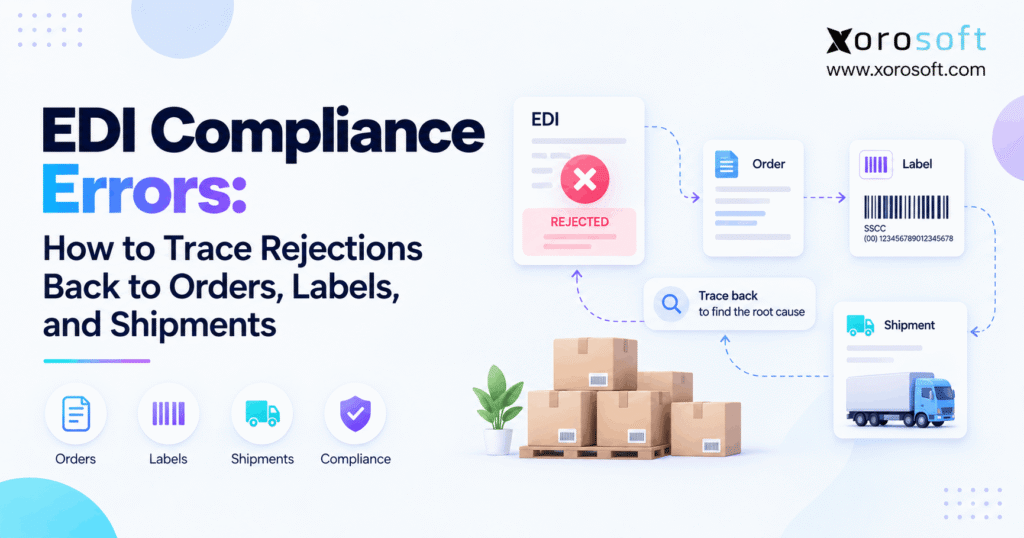
Understanding and addressing EDI compliance errors is essential for businesses using electronic data interchange systems.
1. A Rejection Is the Clue, Not the Cause
EDI compliance errors rarely begin where the rejection first appears. Instead, a retailer may reject an ASN, report a label mismatch, or flag incorrect shipment data even though the real problem started earlier in the order, item master, warehouse, or packing process.
Therefore, fixing only the rejected file can hide the actual cause. As a result, the same problem may return on the next order.
A better method is to trace the transaction backward. In other words, find the first point where two records that should match no longer agree.
1.1 What EDI Compliance Errors Really Mean
EDI compliance errors happen when an electronic transaction or the business process behind it fails a trading partner’s rules.
For example, some errors are technical. A required segment may be missing, a value may use the wrong format, or an EDI map may create the wrong output.
However, other errors are operational. For instance, an ASN may show four cartons while the warehouse actually shipped three.
Therefore, the document may be technically valid while the business data is still wrong.
1.2 Why Root-Cause Tracing Matters
Consider a shipment where the retailer reports an incorrect carton quantity.
At first, changing the ASN may appear to solve the issue. However, that does not explain why the ASN became wrong.
For example, workers may have repacked the shipment after ASN creation. Alternatively, the WMS may not have sent the new carton data. In addition, a label may have been reprinted without updating the shipment record.
Therefore, root-cause tracing asks a better question:
Where did the electronic and physical records first become different?
2. Where EDI Compliance Errors Can Begin
EDI compliance errors can begin in several places. Therefore, teams should not treat every rejection as an EDI mapping problem.
Instead, a useful investigation separates technical errors from business-data, warehouse, and integration errors.
2.1 Technical EDI Errors vs Business Errors
First, a technical EDI error concerns the format or structure of the message.
For example, technical problems may include:
- missing required segments;
- invalid data formats;
- wrong qualifiers;
- incorrect transaction structure.
By contrast, a business error occurs when the document structure is valid but the information itself is wrong.
For instance, the transaction may contain the wrong SKU, quantity, PO number, ship-to location, SSCC, carton count, or price.
Therefore, identifying the error type helps determine where the investigation should go next.
2.2 Why an Accepted EDI Document Can Still Be Wrong
An acknowledgment may confirm that a document passed a technical check. However, it does not necessarily prove that every business value is accurate.
For example, the X12 transaction-set definitions explain how different acknowledgment transactions report syntax and implementation results.
Therefore, a quantity field can be formatted correctly while still containing the wrong quantity.
Similarly, an ASN can pass a structural check while reporting cartons that do not match the physical shipment.
As a result, technical acceptance should never be treated as proof that the entire transaction is operationally correct.
3. Read EDI Compliance Errors at the Right Level
Before changing an order or EDI map, first identify what the trading partner actually returned.
Then, capture the trading partner, transaction type, PO number, control number, shipment number, ASN number, warehouse, and any SSCC linked to the rejection.
As a result, the investigation starts with evidence instead of assumptions.
3.1 What an EDI 997 Tells You
The EDI 997 Functional Acknowledgment reports syntax-related results.
Therefore, it can help identify whether an EDI transaction passed basic structural checks.
However, an accepted 997 does not prove that the ASN matches the cartons that physically shipped.
For example, the document may report 120 units while only 116 units left the warehouse.
In that case, the file may still be structurally valid. Nevertheless, the business data is wrong.
3.2 What an EDI 999 Tells You
The 999 Implementation Acknowledgment can provide more detailed feedback about syntax and implementation rules.
Therefore, it can help teams narrow a technical problem more precisely.
However, warehouse quantities, physical labels, prices, and other business facts often require checks outside the acknowledgment.
Consequently, teams should combine technical acknowledgment data with ERP and warehouse evidence.
3.3 What an EDI 824 Tells You
The EDI 824 Application Advice can report application-level data issues.
Therefore, it may provide business-level feedback that goes beyond basic syntax validation.
For example, a partner may use application-level feedback to report whether a transaction was accepted, rejected, partly accepted, or accepted with changes.
However, partner practices can differ.
Therefore, always interpret the response in the context of the current trading-partner requirements.
4. A Five-Layer Method for Tracing EDI Compliance Errors
The fastest way to investigate EDI compliance errors is to move through five connected layers.
Rejection → EDI document → ERP/order data → WMS and label → physical shipment
At each stage, compare what one record says with the next source of evidence.
Then, stop when you find the first mismatch.
4.1 Layer One: Capture the Rejection
First, preserve the original error.
Do not overwrite it after the problem is corrected.
Instead, record:
- rejection message;
- transaction type;
- control number;
- trading partner;
- PO number;
- shipment number;
- ASN number;
- date and time.
Next, classify the issue.
For example, decide whether it involves syntax, partner rules, business data, timing, labels, or shipment information.
As a result, the team gets a clear starting point.
4.2 Layer Two: Inspect the EDI Transaction
Next, open the actual document that was transmitted.
For example, if a retailer rejected an 856, inspect the affected value inside that 856.
Then, ask two questions:
Did the EDI mapping process create the value correctly?
Was the source value already wrong before the EDI document was created?
For instance, if ERP says 120 units but EDI says 116, investigate mapping or integration.
However, if both say 120 while the warehouse shipped 116, continue into fulfillment.
4.3 Layer Three: Check ERP and Order Data
Next, trace the rejected value into the business record that created it.
For example, review:
- retailer item number;
- internal SKU;
- unit of measure;
- ordered quantity;
- accepted quantity;
- ship-to location;
- price;
- warehouse;
- order changes.
A system such as XoroERP can provide this history when sales orders, inventory, purchasing, and financial records share one operational flow.
However, simply finding bad data is not enough.
Instead, determine when and why that value became incorrect.
4.4 Layer Four: Review Warehouse and Label Activity
Next, inspect warehouse history.
In many cases, warehouse activity explains EDI compliance errors that look correct inside ERP.
For example, review what workers actually:
- picked;
- short-picked;
- packed;
- repacked;
- labeled;
- relabeled;
- confirmed;
- shipped.
A connected platform such as XoroWMS can help retain links between warehouse activity, carton data, shipments, and inventory movement.
In particular, pay close attention to changes made after an ASN was staged.
4.5 Layer Five: Confirm the Physical Shipment
Finally, compare system records with what physically left the warehouse.
For example, review carton counts, pallets, SSCCs, quantities, carrier information, tracking records, and shipment confirmation.
In addition, compare timestamps whenever possible.
A shipment may have been correct when first packed. However, a damaged carton, removed item, label replacement, or late change may have altered the final shipment.
Therefore, the physical shipment provides the last layer of evidence.
5. Trace EDI Compliance Errors in an EDI 856 ASN
The EDI 856 Advance Ship Notice is a common place where operational mismatches become visible.
Because the ASN connects order and shipment information with packing details, EDI compliance errors in an 856 may begin with the purchase order, warehouse, labels, or system integration.
Therefore, teams should trace the entire flow rather than inspect only the final EDI document.
5.1 Compare the 856 With the Purchase Order
First, compare the ASN with the latest purchase-order information.
Check:
- PO number;
- customer item;
- internal SKU;
- ship-to location;
- quantity;
- unit of measure;
- requested dates.
However, do not assume the first 850 received is still current.
For example, retailers may send order changes.
Therefore, if those updates never reach fulfillment, the warehouse may ship against old instructions even though each individual system appears to work correctly.
5.2 Match the ASN to Final Packing
Next, compare the 856 with the final warehouse shipment.
For example, review the shipment hierarchy expected by the trading partner.
Depending on the implementation, that hierarchy may include shipment, order, pallet, carton, and item levels.
Therefore, the main question is whether the electronic hierarchy matches the final physical packing structure.
If workers changed packing after ASN creation, then the electronic shipment data may also need to change.
5.3 Check Every SSCC and Shipping Label
Next, compare each SSCC with the actual logistic unit.
The GS1 Logistic Label Guideline explains how SSCCs identify logistic units and support traceability.
Therefore, the electronic SSCC and the physical label should describe the same unit.
For example, common problems include duplicate SSCCs, old labels, incorrect carton labels, and ASN records that were not refreshed after repacking.
As a result, even correct total quantities can still produce EDI compliance errors.
6. Find the Real Source of EDI Rejection Errors
The visible rejection shows what failed. However, it does not always show which system created the bad value.
Therefore, classifying the source helps prevent repeat EDI compliance errors.
| Visible problem | First record to check | Likely source |
|---|---|---|
| Invalid retailer SKU | Item cross-reference | Master data |
| Wrong quantity | Order and shipment | ERP or WMS |
| Invalid ship-to | Customer/location record | Master data |
| Duplicate SSCC | Label history | WMS or label process |
| ASN carton mismatch | Pack and 856 hierarchy | Warehouse |
| Missing ASN | Shipment and transmission log | Integration |
| Wrong PO reference | 850, order, and 856 | Mapping or order data |
| Price mismatch | Order and invoice | Pricing or ERP |
6.1 Mapping Error or Source-Data Error?
First, compare the source value with the transmitted value.
For example:
ERP quantity: 100
EDI quantity: 10
Therefore, mapping or transformation logic deserves investigation.
By contrast:
ERP quantity: 10
EDI quantity: 10
Correct quantity: 100
In this case, the EDI process transmitted the source value correctly.
Therefore, changing the EDI map would not solve the real problem.
Instead, correct the order or master data that created the bad value.
6.2 Warehouse Error or Integration Error?
Suppose the ERP and ASN both show four cartons, but workers actually shipped three.
First, inspect warehouse packing history.
If the WMS correctly recorded three cartons but the ASN stayed at four, then the integration may have missed the later event.
Therefore, connected Xorosoft integrations can be useful when order, warehouse, ecommerce, shipping, and EDI-related events need to stay aligned.
Ultimately, ownership should follow the source that first created the wrong record.
7. Correct EDI Compliance Errors at the Source
Once the first mismatch becomes clear, correct that source before rebuilding the outbound transaction.
As a result, the business reduces repeat EDI compliance errors and creates a cleaner audit trail.
7.1 Fix the Earliest Wrong Record
Use one simple rule:
Fix the first place where the data became wrong.
Therefore, correct the EDI map when the source data is right but the translation is wrong.
Likewise, correct ERP or master data when the order record is wrong.
Meanwhile, fix warehouse controls when physical execution differs from system data.
Finally, update integration logic when one application misses a later event.
Instead of manually editing the final EDI document, fix the earliest source whenever possible.
7.2 Revalidate Before Resending
After making the correction, validate the transaction again.
Then, check the current partner requirements for replacements, corrections, or cancellations.
Because trading-partner rules can differ, teams should not assume that every rejected transaction should simply be resent.
In addition, confirm that an automatic retry did not already send another copy.
Otherwise, a duplicate can create a new problem.
Finally, capture the new acknowledgment and link it to the original exception.
7.3 Build a Useful Error Audit Trail
In addition, record more than the rejection code.
For example, an exception record can include the trading partner, PO, sales order, ASN, shipment, SSCC, SKU, warehouse, original value, corrected value, owner, source system, fix, and final status.
Then, group recurring issues by root cause.
For example:
Warehouse — pack changed after ASN creation
is more useful than:
856 failed
Therefore, root-cause labels should describe the business event, not only the technical symptom.
8. Reduce EDI Compliance Errors With Connected Operations
Software alone cannot remove trading-partner requirements.
However, connected systems can make EDI compliance errors easier to prevent, investigate, and explain.
Therefore, the goal should be one clear transaction history from customer order through fulfillment and invoicing.
8.1 When Standalone EDI Can Still Work
Standalone EDI may be enough when a company has:
- few trading partners;
- simple warehouse processes;
- reliable integrations;
- controlled master data;
- low exception volume.
Therefore, one rejected transaction does not automatically mean the company needs a new ERP.
However, problems become harder when employees must rebuild the same order across several systems every time something goes wrong.
At that point, the architecture itself becomes part of the investigation problem.
8.2 When ERP, WMS, and EDI Need Better Links
For example, warning signs include separate order entry, spreadsheet mappings, ASNs built outside final warehouse data, independent label tools, and invoices reconciled later.
In that situation, a platform such as XoroONE can bring inventory, order management, warehouse operations, purchasing, accounting, and ecommerce workflows into one operating layer.
However, that does not remove the need for trading-partner communication.
Instead, it creates a more reliable internal source for the order and shipment data used by EDI.
8.3 What Better EDI Traceability Looks Like
A useful operating model lets a user move from:
rejection → transaction → order → shipment → carton → warehouse event
without rebuilding the story from emails and spreadsheets.
Therefore, Xorosoft’s broader ERP and operational solutions can be relevant when EDI problems are tied to inventory visibility, purchasing, warehouse control, fulfillment, or financial reconciliation.
However, better traceability is the goal.
More software, by itself, is not automatically the answer.
9. EDI Error Tracing Across Inventory-Driven Industries
Different industries see different symptoms.
However, the same root-cause method still applies.
Therefore, start with the rejection and trace backward until the electronic and physical records first diverge.
9.1 Apparel, Consumer Products, and Wholesale
Apparel businesses often manage style, size, color, customer SKU, and case-pack mappings.
Likewise, wholesale suppliers may face different rules for each major retailer.
Therefore, one wrong customer-item cross-reference can affect many orders before the pattern becomes obvious.
Businesses across Xorosoft’s inventory-driven industries benefit from consistent item, order, warehouse, and customer records.
As a result, EDI troubleshooting becomes faster and more repeatable.
9.2 Food, Furniture, and Manufacturing
Food businesses may need lot, date, and packaging data.
Meanwhile, furniture shipments can involve large products or several cartons for one item.
Manufacturers may also need to trace finished goods through production and material records.
Therefore, EDI compliance errors become easier to diagnose when the transaction can be connected to the operating event that produced it.
In other words, the technical document is only one part of the evidence.
9.3 Ecommerce and Multi-Channel Operations
Many brands sell through wholesale EDI while also operating Shopify, Amazon, or other ecommerce channels.
Therefore, item, inventory, and shipment data must remain consistent across several workflows.
For Shopify-based operations, the Xorosoft app on the Shopify App Store provides another example of how ecommerce activity can connect with ERP operations.
However, the real risk is not having many channels.
Instead, the risk is allowing each channel to maintain a different version of inventory, orders, or fulfillment status.
10. Turn Every EDI Rejection Into a Traceable Fix
The best way to solve EDI compliance errors is to stop treating each rejection as an isolated technical event.
Instead, trace the full path:
Rejection → acknowledgment → EDI transaction → order → warehouse → label → physical shipment → first mismatch
Then, once the first wrong record becomes clear, fix the system or process that created it.
Afterward, revalidate the transaction, preserve the audit trail, and monitor whether the same root cause returns.
For inventory-driven businesses, this process can also expose a broader systems problem.
For example, disconnected ERP, WMS, ecommerce, purchasing, accounting, and warehouse tools can turn a simple rejection into a long investigation.
Therefore, if your team regularly spends hours tracing retailer errors across separate systems, Book a Demo to see how a more connected workflow could simplify the process.
Frequently Asked Questions About EDI Compliance Errors
What are EDI compliance errors?
EDI compliance errors occur when an electronic transaction or related business process fails a trading partner’s technical, data, shipping, labeling, or timing requirements.
What causes an EDI 856 rejection?
Common causes include wrong PO references, quantities, items, carton hierarchy, SSCCs, shipment data, or trading-partner rules. Warehouse changes made after ASN creation can also cause rejections.
Can an accepted 997 still contain bad business data?
Yes. A 997 mainly reports syntax results. A document can pass that check while still containing an incorrect SKU, quantity, carton count, price, or shipment detail.
What causes an SSCC mismatch?
Common causes include label reprints, repacking, duplicate SSCC creation, old ASN data, wrong carton labels, or shipment changes that were not sent back to the EDI process.
Should I fix an EDI rejection in the ERP or EDI map?
Fix the earliest source of the wrong value. Correct the map when translation is wrong. Correct ERP, master data, or WMS when the source record is wrong.
Can warehouse activity create EDI errors?
Yes. Short picks, repacking, wrong labels, carton changes, or late shipment changes can make the physical shipment differ from the ASN sent to the retailer.
When should a business improve its EDI operating model?
Consider it when errors repeat, staff use several systems to investigate one order, labels and ASNs often disagree, or warehouse changes do not reliably update outbound transactions.
Recent Posts
-
 ERP Landed Cost Module vs Spreadsheet Calculations for Importers
 -
 How to Build an Open-to-Buy Plan for an Omnichannel Brand
 -
 Cold Storage WMS for Food and Beverage Distribution
 -
 ERP Buying Statistics 2026: Evaluation, Implementation, and Adoption Risks
 -
 How a Distributor Reduced B2B Order Exceptions Without Restricting Sales



