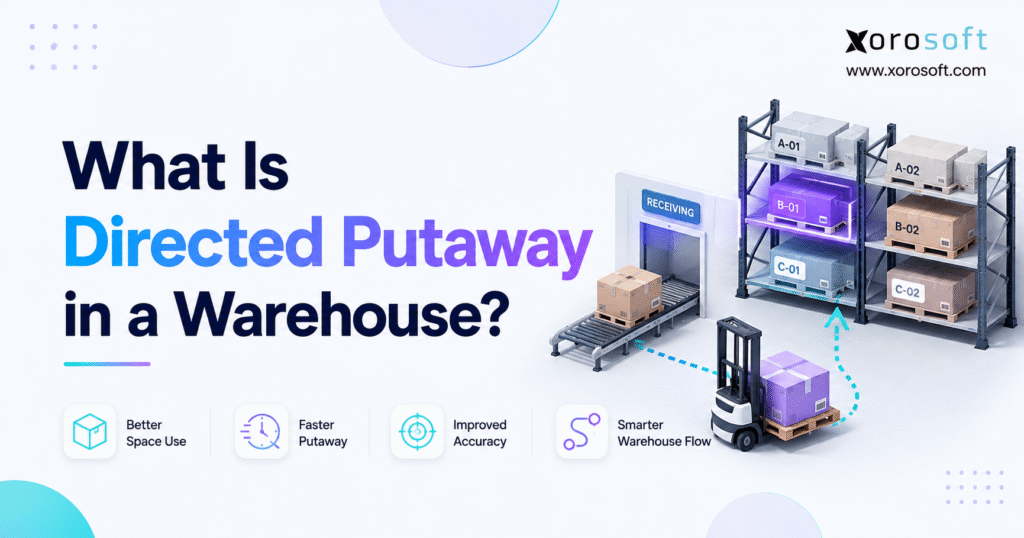
Directed putaway is an essential process in modern warehouse management.
1. Why Directed Putaway Shapes Every Warehouse Task
Directed putaway is a warehouse process in which a warehouse management system tells a worker where to store received inventory. Instead of asking the worker to choose any open bin, the system uses product data, location rules, and current capacity to select an appropriate destination.
Therefore, the first storage decision supports every task that follows. When inventory enters the right location, pickers can find it faster, replenishment becomes easier, and inventory records stay more accurate. However, when workers place products wherever space appears available, the warehouse can quickly develop scattered stock, blocked aisles, slow searches, and avoidable adjustments.
Moreover, a rules-based process reduces dependence on individual memory. Experienced employees still provide valuable judgment, but the warehouse no longer relies on one person knowing where every SKU belongs. As a result, new employees can follow the same storage standards as experienced team members.
1.1 Directed Putaway: The Short Definition
In simple terms, the process moves received goods from the dock or staging area to the best valid storage location. The WMS considers defined rules, recommends or enforces a destination, and then asks the worker to scan the location before completing the task.
Consequently, the physical movement and inventory record stay connected.
1.2 What the System Decides
First, the system checks which locations can accept the product. Next, it may compare available space, weight limits, product dimensions, storage zones, lot rules, temperature needs, and distance from the picking area.
Finally, it ranks the valid locations and gives the worker an instruction. Therefore, the employee completes a controlled task instead of making an undocumented storage decision.
1.3 Receiving, Putaway, and Replenishment Are Different
Receiving confirms that the right product and quantity arrived. By contrast, putaway moves accepted inventory from receiving or staging into storage. Meanwhile, replenishment moves reserve stock into a forward pick location after the original storage task has already finished.
Although the three workflows connect, they solve different problems. Therefore, a warehouse needs clear controls for each stage.
2. How Directed Putaway Works From Dock to Bin
A directed putaway workflow usually begins as soon as the warehouse receives a purchase order, transfer, customer return, or completed production item. First, the receiver identifies the inventory. Afterward, the WMS evaluates possible destinations and creates a storage task.
2.1 Start the WMS-Directed Putaway Process at Receiving
First, the receiver scans the product, pallet, case, tote, or license plate number. Next, the worker confirms the quantity, unit of measure, lot number, serial number, expiry date, and condition when those fields apply.
Because the storage decision depends on this information, accurate receiving matters. For example, an incorrect unit of measure may make a pallet appear small enough for a location that can only hold individual cases.
2.2 Check the Warehouse Putaway Rules
Next, the system compares the received inventory with the warehouse putaway rules. For instance, it may confirm that the location has enough capacity, supports the product’s weight, and belongs to an approved zone.
In addition, the system may look for a partially filled bin containing the same SKU. However, it should only consolidate stock when item, lot, status, and product-mixing rules permit it.
2.3 Assign the Best Available Location
After identifying the valid choices, the WMS selects a preferred destination. For example, it might direct a fast-moving SKU toward a forward pick area while sending excess cases to nearby reserve storage.
However, the closest open bin is not always the best bin. Therefore, the system must balance travel, capacity, safety, product compatibility, and downstream picking needs.
2.4 Scan and Confirm the Movement
Finally, the worker travels to the destination and scans the location label. The system then checks that the scanned location matches the task.
Once the worker confirms the quantity, the WMS updates the inventory record. As a result, purchasing, inventory control, sales, and fulfillment teams can see where the inventory sits and whether it has become available.
2.5 Manage Full Locations and Exceptions
Sometimes the preferred bin lacks space or becomes temporarily unavailable. In that case, the system should check an approved fallback location instead of allowing the worker to choose any empty area.
Likewise, damaged products, quality holds, blocked aisles, and unreadable labels need clear exception codes. Consequently, supervisors can review why the original instruction failed and improve the rule, data, or physical layout.
3. Directed Putaway Rules That Select the Right Location
An effective directed putaway strategy uses a clear hierarchy of rules. However, the warehouse should start with the rules that prevent major errors before adding advanced optimization.
3.1 Putaway Rules for Product Dimensions and Weight
First, the system needs accurate product dimensions and weight. A pallet may fit within a location’s width but exceed its weight rating. Similarly, an oversized product may need floor storage even when an empty rack position appears available.
Therefore, teams should measure bulky, heavy, fragile, and unusual products carefully. Otherwise, incorrect master data can turn an automated instruction into an unsafe or impossible task.
3.2 Location Capacity and Usable Space
Next, the WMS needs reliable location capacity. That capacity may include cubic space, pallet positions, weight limits, case quantities, or unit counts.
However, theoretical capacity and usable capacity are not always the same. For example, rack beams, access needs, damaged locations, or mixed packaging can reduce the space workers can actually use. Therefore, warehouse teams should validate location data on the floor.
3.3 Inventory Velocity and Pick Proximity
Fast-moving products usually benefit from accessible storage near primary picking or packing areas. As a result, workers spend less time walking during outbound fulfillment.
Nevertheless, product velocity changes with seasons, promotions, and channel demand. Therefore, teams should review item movement regularly instead of treating the original slotting decision as permanent.
3.4 Warehouse Zones and Product Compatibility
Zones group locations by purpose. For example, a warehouse may create zones for fast-moving goods, reserve pallets, returns, quality holds, oversized inventory, raw materials, or finished products.
Furthermore, product compatibility rules prevent unsuitable items from sharing space. A location may have enough room, yet it may still be invalid because of temperature, odor, lot, customer, safety, or quality restrictions.
3.5 Lot, Serial, FIFO, and FEFO Rules
Lot-controlled and serial-controlled products need a complete movement history. Therefore, workers must capture the required identifiers during receiving and confirm every location change.
Similarly, FIFO rules support the use of older receipts first, while FEFO rules prioritize products with earlier expiry dates. Consequently, accurate dates and reliable location records become essential for food, health, beauty, and other expiry-sensitive inventory.
3.6 Consolidation and Mixing Rules
Consolidation can reduce fragmented stock by placing compatible inventory together. However, warehouses must define whether workers may mix different items, lots, dates, ownership records, or inventory statuses.
For example, a team may allow two receipts from the same lot to share a bin while preventing different lots from mixing. Therefore, the consolidation rule should protect traceability as well as space.
4. Directed Putaway vs. Other Warehouse Storage Methods
Directed putaway is not the only storage method. Therefore, businesses should compare it with random, fixed-location, zone-based, and hybrid approaches before deciding how much control they need.
| Storage method | How the location is selected | Best fit | Main limitation |
|---|---|---|---|
| Directed storage | WMS applies real-time rules | Growing, complex warehouses | Requires accurate data |
| Random storage | Worker uses any valid open location | Simple, low-volume operations | Can scatter inventory |
| Fixed-location storage | Each SKU has a permanent location | Stable product ranges | Can leave space unused |
| Zone-based storage | Product enters an approved area | Warehouses needing basic control | May not select the best exact bin |
| Hybrid storage | Warehouse combines several methods | Mixed products and demand profiles | Requires clear governance |
4.1 Directed Putaway vs. Random Putaway
Random putaway allows workers to use any suitable open location. Therefore, it may work in a small warehouse with limited inventory and strong location scanning.
However, the method can scatter the same SKU across many bins. Consequently, picking, cycle counting, replenishment, and inventory searches may become harder as the operation grows.
Directed putaway adds a rule-based decision. As a result, the warehouse gains more control over product placement while still using flexible space.
4.2 Directed Putaway vs. Fixed Locations
Fixed-location storage gives each SKU or product family a permanent location. Therefore, employees can learn the layout quickly.
However, a fixed bin may reserve valuable space even when the SKU has little inventory. By contrast, a dynamic process can use several approved locations according to current capacity.
Many warehouses combine the two methods. For example, they maintain fixed forward pick locations while directing reserve stock into flexible storage.
4.3 Zone-Based vs. System-Directed Storage
Zone-based putaway sends the product to an approved area, such as a freezer, bulk zone, or returns section. However, the worker may still choose the exact location inside that zone.
A system-directed process goes further by assigning a specific bin. Consequently, it can deliver tighter location control and more consistent use of available space.
4.4 When a Hybrid Strategy Works Best
Most growing warehouses need a hybrid strategy. For instance, fast-moving items may use fixed pick faces, while excess stock uses flexible reserve locations. Meanwhile, expiry-controlled products may use fixed temperature zones with dynamic bins inside them.
Therefore, the best strategy reflects the company’s products, order patterns, warehouse design, and service goals.
5. Why WMS-Directed Putaway Improves Warehouse Performance
WMS-directed putaway improves more than the inbound process. Because product placement affects later tasks, better storage decisions can support inventory accuracy, picking, replenishment, labor use, and customer service.
5.1 How Directed Putaway Reduces Dock-to-Stock Time
First, workers spend less time asking where products belong. Next, they follow a clear task to a confirmed destination.
As a result, inventory can leave receiving or staging sooner. However, teams should measure the complete dock-to-stock cycle rather than only measuring how quickly a worker moves one pallet.
5.2 Better Inventory Location Accuracy
Inventory accuracy means knowing both the quantity and the physical location. Therefore, a scan-and-confirm workflow protects the relationship between the stock record and the warehouse floor.
Moreover, real-time confirmation reduces the delay between movement and system entry. Consequently, pickers are less likely to search for inventory that appears available but sits in an unknown location.
5.3 More Effective Use of Warehouse Space
Better rules can consolidate compatible inventory, protect special-use zones, and prevent random floor storage. Therefore, the warehouse may use its existing capacity more effectively.
Still, software cannot correct inaccurate capacity information by itself. Teams must keep blocked, damaged, full, and repurposed locations updated.
5.4 Shorter Picking and Replenishment Travel
Product placement shapes future travel. For example, storing fast-moving products far from the pick path creates repeated walking on every order.
Therefore, velocity and proximity rules can support shorter pick routes. Similarly, placing reserve stock near its forward pick location can reduce replenishment travel.
5.5 Less Dependence on Tribal Knowledge
Experienced employees often carry valuable warehouse knowledge. However, a process that depends entirely on memory becomes fragile during growth, staff changes, or peak season.
Xorosoft supports real-time warehouse execution through XoroWMS, including receiving, barcode-driven movement, location control, picking, packing, and inventory visibility. As a result, teams can standardize warehouse work without removing necessary supervisor oversight.
6. When a Business Needs a Directed Warehouse Putaway Process
A business usually needs stronger direction when inventory volume, SKU variety, warehouse size, or operational risk makes manual storage unreliable. However, company revenue alone does not determine the right time.
6.1 Signs You Need System-Directed Putaway
Common warning signs include:
- Workers regularly ask supervisors where to place receipts.
- Products remain in staging because no one can find suitable space.
- Pickers search several locations for the same SKU.
- Cycle counts reveal frequent location differences.
- New employees require months of warehouse knowledge.
- Overflow inventory appears in aisles or unapproved areas.
- Inventory adjustments keep increasing.
When several of these signs occur together, the warehouse likely needs clearer rules and stronger system control.
6.2 Who May Not Need Advanced Direction Yet
A small warehouse with one experienced operator, few SKUs, simple storage, and stable demand may not need complex automation immediately.
Nevertheless, the business should still label every location, record every movement, and define basic storage standards. Therefore, it can build good inventory discipline before growth creates more complexity.
6.3 Choosing the Right Level of Software
Some businesses need a focused warehouse application. Meanwhile, others need inventory, purchasing, accounting, ecommerce, manufacturing, and fulfillment connected.
Therefore, teams should map the complete workflow before selecting software. Xorosoft’s broader operational solutions can help businesses evaluate where warehouse processes connect with other departments.
7. Directed Putaway Use Cases Across Industries
Different industries apply directed putaway according to their products, order profiles, and storage risks. Therefore, the rules should reflect the business model rather than a generic warehouse template.
7.1 Directed Putaway for Ecommerce and Shopify Fulfillment
Ecommerce warehouses often manage many similar-looking variants. For example, one style may have several colors and sizes that require separate, accurate locations.
Moreover, promotions can change product velocity quickly. Therefore, storage rules should respond to current demand while keeping reserve stock easy to replenish.
For Shopify businesses, Xorosoft’s integration ecosystem can connect ecommerce orders with inventory and warehouse workflows. In addition, operators can review the official Shopify App Store listing when evaluating a Shopify-connected ERP platform.
7.2 Wholesale Distribution
Wholesale distributors often receive pallets but ship pallets, cases, and individual units. Therefore, the WMS must understand each unit of measure.
In addition, EDI orders, customer commitments, case packs, and allocation rules can affect where products belong. Consequently, the warehouse may keep bulk stock in reserve while directing smaller quantities toward forward pick locations.
7.3 Manufacturing
Manufacturers need to separate raw materials, components, work in progress, quality-held items, and finished goods. Therefore, status and zone rules matter as much as available space.
For example, the system may direct a received component toward raw-material storage while sending completed production into a finished-goods zone. As a result, production and warehouse teams maintain clearer material visibility.
7.4 Food and Beverage
Food and beverage warehouses often manage lots, expiry dates, temperature requirements, and quality checks. Consequently, FEFO rules and restricted zones become especially important.
However, the WMS can only enforce rules when teams record dates and product status accurately. Therefore, scanning discipline remains essential.
7.5 Apparel, Furniture, and Sporting Goods
Apparel warehouses manage styles, colors, sizes, and seasons. Meanwhile, furniture businesses manage bulky items with unusual dimensions. Sporting goods companies may handle both small accessories and oversized equipment.
Xorosoft supports several industries served where product variety and storage requirements create different warehouse challenges. Therefore, each implementation should begin with the physical product and operating model.
7.6 Multi-Warehouse and 3PL Operations
Multi-location businesses need a consistent approach across warehouses. However, each facility may require different zones, capacities, and task priorities.
Therefore, the company should standardize item data and transaction rules while allowing local warehouse configurations. As a result, leadership gains a shared view without forcing every facility into an identical layout.
8. How to Implement Directed Putaway Successfully
A successful directed putaway implementation starts with warehouse design and clean data. Therefore, teams should not begin by creating hundreds of complex software rules.
8.1 Map the Warehouse Before Putaway Setup
First, document every receiving dock, staging lane, aisle, rack, shelf, bin, bulk area, hold zone, return area, and shipping location.
Next, verify that the system names match the labels workers see. Otherwise, even a correct instruction may confuse the employee completing the task.
8.2 Clean the Item Master
Review product dimensions, weight, case packs, pallet quantities, units of measure, lot settings, expiry fields, and handling needs.
Moreover, prioritize the products that create the greatest risk. For example, start with bulky, heavy, fragile, perishable, or regulated inventory before cleaning every low-risk SKU.
8.3 Validate the Location Master
Each location should have a unique name, clear label, capacity, zone, type, and current status. In addition, teams should identify blocked, damaged, temporary, and restricted locations.
Therefore, the WMS will compare inventory with accurate destination data rather than an outdated warehouse map.
8.4 Create the First-Choice Rules
Start with the rules that prevent serious errors. For example, confirm physical fit, inventory status, approved zones, product compatibility, and capacity.
Afterward, add efficiency rules such as consolidation, velocity, pick proximity, and replenishment distance.
8.5 Build Fallback and Exception Rules
Every important rule needs a controlled fallback. Otherwise, the process will fail as soon as the preferred location fills.
For example, the WMS may first check an existing compatible bin, then a preferred reserve zone, and finally an approved overflow area. If none works, it should create an exception for supervisor review.
8.6 Label and Scan Every Location
Workers need clear, readable labels on racks, bins, staging lanes, and special zones. Therefore, the team should test label placement from the worker’s normal scanning position.
Furthermore, scan validation should confirm both the inventory and destination. Consequently, the warehouse reduces manual entry and location mistakes.
8.7 Test Real Exceptions
Do not test only the ideal workflow. Instead, test full locations, damaged pallets, unreadable labels, returns, held inventory, mixed cases, unexpected quantities, and blocked aisles.
As a result, teams learn whether the process remains usable when the warehouse becomes busy.
8.8 Train Workers on the Reason Behind the Rule
Employees should understand why scanning and exception codes matter. Otherwise, they may view the extra steps as unnecessary.
Therefore, training should explain how accurate putaway supports picking, cycle counting, replenishment, fulfillment, and customer service.
9. Common Directed Putaway Mistakes to Avoid
Even strong software can produce poor results when teams configure weak data or unclear rules. Therefore, implementation should focus on operational discipline as well as technology.
9.1 Avoid Automating Bad Putaway Data
Incorrect dimensions, units, or location capacities create unsuitable recommendations. Consequently, teams may stop trusting the system.
Therefore, validate high-risk data before enabling advanced automation.
9.2 Using Too Many Rules Too Soon
Complex rule sets can become hard to test and maintain. Moreover, overlapping rules may produce results that supervisors cannot explain.
Instead, start with essential constraints and add optimization after the basic process works reliably.
9.3 Allowing Uncontrolled Overrides
Workers sometimes need to reject an instruction. However, every override should include a reason such as damaged location, blocked aisle, full bin, or quality issue.
Consequently, managers can distinguish legitimate exceptions from training or configuration problems.
9.4 Ignoring Warehouse Changes
Product demand, rack layouts, packaging, and storage zones change over time. Therefore, a rule that worked six months ago may no longer fit the operation.
Schedule regular reviews so that the system continues to reflect the physical warehouse.
9.5 Measuring Putaway in Isolation
A fast inbound process can still create inefficient picking. Therefore, teams should measure both putaway speed and downstream effects.
For example, review whether faster storage also improves location accuracy, replenishment travel, and picking performance.
10. Directed Putaway KPIs and Performance Measures
Directed putaway performance should connect speed, accuracy, space, and downstream labor. Therefore, teams need a small set of clear KPIs.
| KPI | What it measures | Why it matters |
|---|---|---|
| Dock-to-stock time | Time from receipt to confirmed storage | Measures inbound flow |
| Location accuracy | Whether stock matches its recorded location | Reduces searching |
| Exception rate | Frequency of failed assignments | Reveals rule or data problems |
| Override rate | How often workers change instructions | Shows trust and process quality |
| Space utilization | Use of valid storage capacity | Supports layout decisions |
| Replenishment travel | Effort required to refill pick faces | Shows downstream effects |
| Pick travel | Movement required during order picking | Tests storage quality |
10.1 Review Exceptions, Not Just Averages
Average dock-to-stock time may look healthy while one zone creates repeated delays. Therefore, managers should review performance by warehouse, zone, SKU class, supplier, shift, and employee role.
Similarly, repeated full-bin exceptions may reveal poor capacity data or outdated slotting. Consequently, exception patterns often provide more useful insight than one overall average.
10.2 Connect Warehouse Metrics With Business Results
Warehouse metrics gain value when they connect with order cycle time, stock availability, customer service, and inventory accuracy.
For teams evaluating real examples, Xorosoft publishes customer case studies covering operational improvements across inventory-driven businesses.
11. When to Upgrade to Warehouse Management Software
A warehouse should consider stronger software when manual storage choices create repeated delays, location errors, or dependence on individual knowledge.
11.1 Capabilities to Evaluate
Look for:
- Barcode-driven receiving and movement
- Bin and zone management
- Capacity rules
- Lot and serial tracking
- FIFO and FEFO support
- Exception handling
- Replenishment workflows
- Multi-warehouse visibility
- Labor and task reporting
- Ecommerce and ERP connectivity
However, a feature list alone does not confirm operational fit. Therefore, ask the vendor to demonstrate your highest-risk workflow, including a full location and a rejected task.
11.2 WMS vs. Inventory Software
Inventory software primarily tracks quantities, availability, purchase orders, and transfers. By contrast, a WMS manages the physical execution of receiving, storage, replenishment, picking, packing, and shipping.
Therefore, a business may need WMS capabilities when location-level warehouse work becomes the main operational constraint.
11.3 When Connected ERP Becomes Relevant
A standalone WMS may solve warehouse execution. However, connected ERP becomes more valuable when inventory movements must update purchasing, manufacturing, ecommerce, accounting, sales orders, and reporting.
Xorosoft’s connected cloud ERP combines these workflows through XoroONE for growing inventory-driven businesses. Therefore, teams can evaluate warehouse improvement within the wider operating model.
12. How Xorosoft Connects Warehouse Putaway With ERP
Warehouse decisions affect more than the warehouse. Therefore, growing companies often need a shared system that connects inventory movement with purchasing, fulfillment, manufacturing, and finance.
12.1 One Record From Purchase Order to Storage
When a purchase order arrives, the system should record the receipt, inventory status, storage movement, availability, and cost effect in sequence.
Xorosoft’s enterprise ERP platform supports larger operations that need warehouse activity connected with wider business controls. Consequently, teams can reduce duplicate entries between warehouse and finance systems.
12.2 Ecommerce and Multi-Channel Operations
Shopify, Amazon, wholesale, retail, and EDI orders may compete for the same inventory. Therefore, the business needs accurate location and availability data before it allocates stock.
Xorosoft connects ecommerce and multi-channel activity with inventory and warehouse execution. As a result, the customer-facing sales channel can remain separate while the operational system coordinates stock, orders, and fulfillment.
12.3 Manufacturing and Accounting Visibility
Manufacturers need storage movements to reflect raw materials, work in progress, and finished goods. Meanwhile, finance teams need accurate inventory valuation and transaction history.
Therefore, a connected system helps departments work from the same inventory events. However, the company must still maintain item data, locations, and operating rules carefully.
13. Directed Putaway FAQs
13.1 What is directed putaway?
Directed putaway is a WMS-controlled process that tells a warehouse worker where to store received inventory. The system checks product and location rules before assigning a destination. Therefore, workers can follow consistent instructions while the system records the confirmed movement.
13.2 How does directed putaway work?
First, a worker receives and identifies the inventory. Next, the WMS checks capacity, zones, product rules, and available locations. Afterward, it assigns a destination. Finally, the worker scans the location and confirms the movement, which updates the inventory record.
13.3 Does directed putaway require a WMS?
A warehouse can create manual storage rules without a WMS. However, software makes it easier to check current capacity, assign tasks, validate scans, record exceptions, and update locations in real time. Therefore, a WMS becomes more useful as warehouse complexity increases.
13.4 What is system-directed putaway?
System-directed putaway means the WMS chooses or enforces the storage destination. By contrast, an assisted workflow may suggest a location while allowing the worker to select another valid bin. Therefore, teams should review how their software handles overrides and rejected tasks.
13.5 What is RF-directed putaway?
RF-directed putaway sends storage tasks to a worker through a radio-frequency scanner, handheld device, or warehouse application. Consequently, the employee receives instructions while moving through the warehouse and confirms the destination through scanning.
13.6 How does directed putaway improve inventory accuracy?
The process links every physical movement with a confirmed system transaction. Therefore, the inventory record shows both the quantity and location. Moreover, scan validation reduces manual entry, memory-based placement, and undocumented moves.
13.7 How does it improve picking efficiency?
Putaway determines where pickers will find products later. Therefore, velocity and proximity rules can keep high-demand inventory near primary pick areas. In addition, consolidation can reduce the number of locations a picker must visit.
13.8 What rules determine the best storage location?
Common rules include dimensions, weight, location capacity, storage zone, inventory velocity, lot number, expiry date, product compatibility, temperature, and pick proximity. However, teams should only use data they can maintain reliably.
13.9 What is velocity-based putaway?
Velocity-based putaway places products according to how frequently workers pick them. For example, fast-moving items may stay near packing or forward pick areas. However, teams should update the classification as demand and seasons change.
13.10 What is zone-based putaway?
Zone-based putaway sends products to an approved warehouse area such as bulk storage, returns, freezer, quality hold, or fast-moving stock. However, the process may or may not select a specific bin inside that zone.
13.11 What is random putaway?
Random putaway allows workers to use any suitable open location. Therefore, it can provide flexibility in a small warehouse. However, the same SKU may become scattered across several bins if the system lacks strong location tracking.
13.12 What is fixed-location putaway?
Fixed-location putaway assigns a product or product family to a permanent bin. Consequently, employees can learn the layout easily. However, the approach may waste capacity when a low-volume item reserves more space than it needs.
13.13 Can directed putaway support FIFO?
Yes. FIFO rules can help the warehouse use older inventory before newer receipts. However, the process depends on accurate receipt dates, lot records, and confirmed locations. Therefore, workers must follow the scanning process consistently.
13.14 Can it support FEFO?
Yes. FEFO prioritizes inventory with the earliest expiry date. Consequently, it can support food, beverage, beauty, health, and other expiry-sensitive products. However, the item and lot records must contain accurate expiry information.
13.15 Does the process require barcode scanning?
Barcode scanning is not the only option. Nevertheless, it provides strong validation because workers confirm both the inventory and destination. Therefore, scanning usually offers better control than handwritten notes or delayed manual entry.
13.16 Can small warehouses use it?
Yes. A small warehouse can benefit when it manages many SKUs, lots, variants, or storage constraints. However, a simple operation with few products may only need labeled locations and basic scanning before adopting more advanced rules.
13.17 Can ecommerce warehouses use it?
Yes. Ecommerce warehouses can use the process to manage variants, bundles, returns, seasonal stock, and fast-moving products. As a result, they can reduce confusion between similar-looking SKUs and maintain more reliable online availability.
13.18 Can wholesale distributors use it?
Yes. Wholesale distributors can direct pallets, cases, and individual units to different storage areas. Moreover, the process can support reserve stock, forward pick faces, case packs, and high-volume customer orders.
13.19 Can manufacturers use it?
Yes. Manufacturers can use location rules to separate raw materials, components, work in progress, quality-held inventory, and finished goods. Consequently, production teams can locate the correct materials more reliably.
13.20 Can food and beverage warehouses use it?
Yes. Food and beverage operations can apply lot, expiry, temperature, quality, and FEFO rules. However, software cannot replace accurate receiving and quality processes. Therefore, teams must capture product status and dates correctly.
13.21 Can multi-warehouse businesses use it?
Yes. Each warehouse can maintain its own zones, capacities, and task priorities. Meanwhile, the company can maintain centralized visibility across locations. Consequently, leaders can make better transfer, purchasing, and fulfillment decisions.
13.22 What causes putaway exceptions?
Common causes include full bins, blocked aisles, incorrect dimensions, damaged labels, inventory holds, location restrictions, and unexpected quantities. Therefore, every exception should record a clear reason that supervisors can review.
13.23 How long does implementation take?
The timeline depends on warehouse size, SKU count, location data, hardware, integrations, and rule complexity. Therefore, a simple single-location rollout may move faster than a multi-warehouse implementation with lots, expiry rules, manufacturing, and ERP integration.
13.24 Which KPIs should a warehouse track?
Start with dock-to-stock time, location accuracy, exception rate, and override reasons. Next, monitor space utilization, replenishment travel, and pick travel. Together, these measures show whether faster putaway also improves downstream work.
13.25 When should a business upgrade from manual putaway?
A business should upgrade when workers regularly search for storage space, inventory stays in staging, locations become inaccurate, or new employees depend on tribal knowledge. Therefore, recurring operational problems matter more than one specific revenue or employee threshold.
Recent Posts
-
 Warehouse Injury and Safety Statistics: What Operations Teams Should Know Before Automating Workflows
 -
 Food and Beverage ERP Requirements for Lot, Expiry, and Recall Control
 -
 How to Prevent EDI Errors Before They Become Retailer Chargebacks
 -
 Vendor Portal vs Supplier Portal: What Distributors Actually Need Connected to ERP
 -
 Stock Write-Off Tracking: How Inventory Losses Explain Gross-Margin Variance