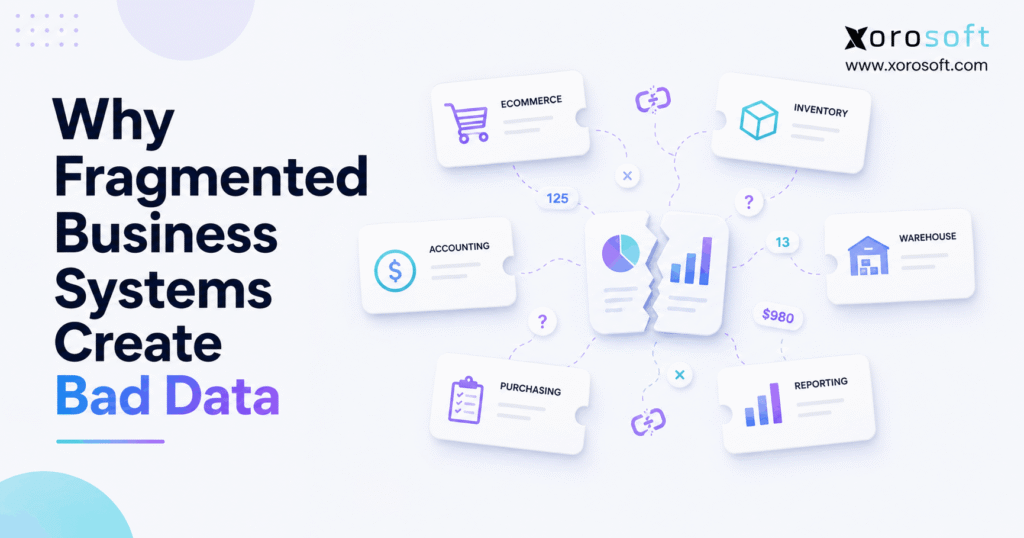
Understanding data silos in business is critical to improving communication and efficiency within organisations.
1. When Every System Tells a Different Story
Data silos in business rarely start with one major technology mistake. Instead, they usually appear as a company grows and adds software to solve one problem at a time. For example, ecommerce may run in one platform, accounting may sit in another, and the warehouse may use a third system. Meanwhile, buyers may still work from spreadsheets.
At first, that setup can work well. However, problems begin when the same order, SKU, customer, or inventory quantity exists in several places. Because each system holds its own copy, one change may not reach every other system at the same time.
As a result, the company slowly develops several versions of the truth.
For example, ecommerce may show 120 units available. Meanwhile, the warehouse may show 116 because four damaged units were removed. However, accounting may still show 120 because the adjustment has not reached that system yet. Therefore, three teams can look at valid records and still reach three different answers.
This is why bad data is not always an employee problem. Instead, it can be a systems problem.
Moreover, as order volume grows, manual checks become harder. Consequently, teams spend more time matching reports, checking spreadsheets, fixing stock counts, and asking which number is right.
For growing ecommerce, wholesale, and manufacturing companies, that is often the point where fragmented software stops helping growth and starts slowing it down.
2. What Data Silos in Business Actually Mean
Data silos in business exist when important information is isolated inside separate departments, applications, spreadsheets, or databases. Therefore, teams cannot easily use the same trusted record across the company.
IBM’s explanation of data silos describes data silos as isolated collections of data that stop information from flowing well between departments, systems, and business units. IBM also notes that silos can leave teams working with outdated, fragmented, or inconsistent information.
However, a silo does not always mean two systems have no connection at all. In fact, applications can technically be integrated and still create siloed data.
2.1 Fragmented Systems and Data Silos Are Related
Fragmented systems describe the software setup.
Meanwhile, data silos describe what can happen to information inside that setup.
For example, a growing company might use:
Shopify for ecommerce
QuickBooks for accounting
A separate inventory app
A warehouse application
An EDI tool
Purchasing spreadsheets
A reporting platform
Each tool may work well by itself. However, the business still needs the systems to agree on products, stock, orders, suppliers, costs, and payments.
Therefore, fragmentation becomes a problem when the company cannot keep those records aligned.
2.2 Why Data Silos in Business Grow Over Time
Companies rarely design a fragmented stack on purpose.
Instead, one department usually needs a new tool. Later, another team solves a different problem with another application. Then, as the company expands, more channels, warehouses, suppliers, and workflows appear.
Consequently, the number of data handoffs grows.
At the same time, older tools may not support every new process. Therefore, employees fill the gaps with CSV exports, spreadsheets, manual updates, and workarounds.
Over time, those workarounds become part of daily operations.
As a result, data silos in business can grow quietly even while every team believes its own system is working correctly.
3. How Data Silos in Business Create Bad Data
The main problem is not simply that information sits in several applications. Instead, the problem is that several applications may try to maintain their own version of the same event.
Therefore, data can drift apart.
3.1 One Business Fact Becomes Several Records
Consider a single product.
The ecommerce platform may store:
- SKU
- product title
- selling price
- available inventory
Meanwhile, the warehouse system may store:
- SKU
- bin location
- on-hand quantity
- allocated quantity
- damaged stock
In addition, accounting may store:
- item code
- cost
- inventory value
- revenue
- cost of goods sold
Finally, purchasing may maintain:
- supplier
- lead time
- open purchase orders
- reorder quantity
Therefore, one product can exist in four or more systems.
If every system updates perfectly, that may be manageable. However, once one record changes without the others, the copies stop matching.
3.2 Timing Gaps Create Different Answers
Some systems update in real time. However, others may sync every few minutes or once per hour.
Meanwhile, spreadsheets may only update when someone exports fresh data.
As a result, each system can show a different point in time.
For example, an order can reduce available stock in the storefront immediately. However, the warehouse system may not receive the order for several minutes. Meanwhile, a buyer may already be reviewing an older inventory report.
Therefore, data silos in business often create bad data through timing gaps rather than obvious errors.
3.3 Different Systems Define the Same Number Differently
Even when systems sync correctly, they may not calculate the same metric in the same way.
For example, “inventory” could mean:
- physical stock on hand
- stock available to sell
- stock after allocations
- stock excluding damaged units
- stock including incoming purchase orders
Therefore, two systems can display different numbers without either one being technically broken.
The business must first agree on the meaning of each metric.
Otherwise, teams may spend hours trying to reconcile numbers that were never designed to match.
3.4 Manual Entry Adds Another Risk
When integrations do not cover a process, employees often fill the gap manually.
For example, someone may copy an order number, adjust a quantity, enter a vendor bill, update a delivery date, or move values into a spreadsheet.
However, manual work creates another chance for differences.
A quantity can be mistyped. Moreover, an updated delivery date may be changed in one file but not another. Likewise, a product code may be entered differently.
Consequently, data silos in business become harder to control as manual work increases.
4. One Order Can Create Six Versions of the Truth
A simple ecommerce order shows how quickly this problem can spread.
4.1 The Storefront Accepts the Order
Suppose a customer buys 10 units.
First, the ecommerce platform accepts the order and reduces available inventory.
Therefore, the storefront now believes the stock has changed.
4.2 Inventory Receives the Order
Next, the inventory system receives the transaction.
However, if synchronization is delayed, it may temporarily show the old quantity.
Meanwhile, another customer could place an order based on that old balance.
4.3 The Warehouse Starts Fulfillment
Then, the warehouse receives the pick request.
However, a worker may discover that two units are damaged.
Therefore, physical sellable inventory differs from what the ecommerce platform originally showed.
4.4 Accounting Records the Sale
Later, accounting receives the transaction.
However, suppose the customer cancels one item after the accounting import.
If the cancellation does not sync, finance and operations now disagree.
4.5 Purchasing Uses Yesterday’s Export
Meanwhile, the buyer may have downloaded a stock report earlier in the day.
Therefore, purchasing decisions are based on an older inventory position.
4.6 Reporting Combines All the Sources
Finally, management opens a dashboard.
However, that dashboard may pull sales from ecommerce, inventory from a stock application, and revenue from accounting.
As a result, the company can have several answers to simple questions:
How many units did we sell?
How many units can we still sell?
How many units shipped?
How many should finance recognize?
How many should purchasing reorder?
Therefore, the real issue is not one bad transaction. Instead, data silos in business have created several competing versions of the transaction.
5. The Warning Signs of Data Silos in Business
Companies often notice symptoms before they identify the real cause.
Therefore, these warning signs deserve attention.
5.1 Different Teams Report Different Numbers
Sales may report one revenue figure. Meanwhile, finance reports another.
Likewise, ecommerce may show one stock balance while warehouse operations show another.
When this happens often, the business has more than a reporting issue. Instead, it may have a data ownership problem.
5.2 Spreadsheets Are Used to Reconcile Systems
Spreadsheets are useful tools. However, they become risky when employees use them every day to connect core business processes.
For example, teams may export orders, adjust stock, calculate purchases, and then upload the results into another system.
Consequently, the spreadsheet becomes a hidden integration layer.
5.3 Employees Ask Which Report Is Correct
When managers regularly ask, “Which number should I trust?” the issue is already affecting decisions.
Moreover, low trust causes teams to create their own reports.
As a result, another set of data silos can appear.
5.4 Finance Spends Too Much Time Reconciling
Finance should review performance and control financial records.
However, in fragmented environments, finance often spends significant time finding missing orders, explaining inventory changes, and matching operational systems.
Therefore, month-end close becomes a data repair process.
5.5 Integrations Require Constant Attention
Integrations should reduce manual work.
However, if employees regularly fix failed imports, duplicate records, incorrect mappings, and sync delays, the stack may have become too hard to manage.
Consequently, the cost of fragmentation starts appearing as employee time.
6. How Data Silos in Business Hurt Inventory Accuracy
Inventory exposes fragmented data faster than many other processes because stock changes constantly.
For example, inventory moves when companies:
- sell products
- receive goods
- transfer stock
- process returns
- allocate orders
- count inventory
- write off damaged units
- manufacture products
Therefore, every inventory event needs to reach the right systems.
6.1 Available Inventory Becomes Hard to Trust
A system might show 500 units on hand.
However, 80 may already be allocated to open orders. In addition, 15 may be damaged and 40 may be sitting in another warehouse.
Therefore, the number “500” does not tell the full story.
When data silos in business separate these inventory states, ecommerce, customer service, purchasing, and warehouse teams may all make decisions from different values.
6.2 Multi-Warehouse Operations Increase the Risk
One warehouse adds location data.
However, a second or third warehouse adds more transfers, receipts, allocations, and fulfillment choices.
Therefore, location-level accuracy becomes essential.
A connected warehouse management system such as XoroWMS can help businesses manage receiving, picking, packing, shipping, and warehouse inventory within a controlled workflow. Xorosoft’s current product information confirms these warehouse functions.
Still, technology only works well when the business defines clear stock rules.
6.3 Returns and Transfers Create More Gaps
Returns are especially difficult because a returned item is not always immediately sellable.
For example, it may need inspection first.
Meanwhile, a transfer may be removed from one warehouse before the receiving warehouse confirms it.
Therefore, systems must understand stock states, not just total quantity.
Otherwise, data can look correct at a company level while being wrong at a location level.
7. Purchasing and Forecasting Depend on Clean Data
Purchasing decisions depend on inventory truth.
Therefore, buyers need accurate answers to several questions.
What is available?
What is already committed?
What is incoming?
What is selling?
How long will the next order take to arrive?
If those answers come from several disconnected sources, purchasing becomes much harder.
7.1 Stale Data Can Create Overstock
Suppose purchasing uses an old inventory export.
Meanwhile, a large receipt has already arrived.
Therefore, the buyer may order stock that is no longer needed.
As a result, cash becomes tied up in excess inventory.
7.2 Missing Demand Can Create Stockouts
The opposite can also happen.
For example, a wholesale order may exist in one system but not in the buyer’s planning file.
Therefore, future demand is understated.
Consequently, the business may reorder too late.
7.3 Data Silos in Business Also Weaken Forecasts
Forecasting depends on clean history.
However, duplicated orders can overstate demand. Likewise, missing cancellations can make sales appear stronger than they were.
Moreover, stockouts can hide true demand because the company cannot sell stock it does not have.
Therefore, data silos in business can weaken both manual forecasts and AI-based forecasts.
Better algorithms cannot fully solve conflicting source data.
Instead, the company needs a trusted operating record first.
8. Accounting Problems Often Start Outside Accounting
Accounting often receives the final result of problems created elsewhere.
For example, sales create revenue records. Meanwhile, warehouse activity changes inventory. Purchasing creates supplier costs, and returns change both sales and stock.
Therefore, finance relies on accurate operational data.
8.1 Inventory and Accounting Must Agree
Suppose warehouse records show 900 units.
However, accounting still values 940 units.
Finance then has to find the reason for the 40-unit difference.
Consequently, a simple stock issue becomes a financial reconciliation task.
8.2 Month-End Close Slows Down
When data silos in business create frequent differences, finance must investigate before closing the books.
Therefore, employees may spend time:
- matching sales
- reviewing inventory adjustments
- checking purchase receipts
- validating returns
- finding missing records
Instead of analyzing results, finance repairs the data first.
For companies that need manufacturing and financial workflows in a more connected system, XoroERP brings operational and ERP functions together rather than leaving finance completely separate from inventory activity.
9. Ecommerce Growth Makes Fragmentation More Visible
A single ecommerce channel can often run with a simple stack.
However, growth changes the picture.
For example, a company may add Amazon, wholesale, EDI, a 3PL, retail, or more Shopify stores.
Therefore, the number of transactions and sync points grows.
9.1 Shopify Is One Part of the Operating Stack
Shopify is built to run ecommerce.
However, a growing inventory business may also need deeper purchasing, warehouse, accounting, forecasting, and wholesale processes.
Therefore, the storefront should connect cleanly with the systems that manage those operations.
Xorosoft’s ERP and ecommerce integrations are designed to connect operational workflows with external platforms and channels.
In addition, merchants can review Xorosoft’s listing directly in the Shopify App Store, which provides an independent platform listing for the integration.
9.2 Multi-Channel Orders Need One Inventory View
A Shopify order and an Amazon order may compete for the same stock.
Meanwhile, a wholesale customer may have a large open order.
Therefore, each channel cannot plan inventory in isolation.
Instead, a central operating system needs to understand total demand, stock, allocations, and incoming supply.
Otherwise, data silos in business can create overselling on one channel while another channel holds stock that appears unavailable elsewhere.
10. Can Integrations Fix Data Silos in Business?
Yes, integrations can solve many problems.
However, integration is not the same as data control.
Therefore, companies need to decide which system owns each important record.
10.1 Integrations Work Well When Ownership Is Clear
Integration may be enough when:
- the business uses only a few core systems
- each system has a clear role
- APIs are reliable
- sync failures are monitored
- duplicate entry is limited
- reports already agree
In that situation, replacing every tool would add cost without much benefit.
10.2 More Integrations Can Also Add Complexity
However, every added system can create another data handoff.
For example, an order may move from ecommerce to inventory, then to warehouse software, and finally to accounting.
Meanwhile, updates may need to travel back in the other direction.
Therefore, the business must monitor not only applications but also the links between them.
10.3 When ERP Consolidation Makes More Sense
A unified ERP becomes more useful when the core workflows themselves are fragmented.
For example, consider a company that has:
- inventory in one application
- purchasing in spreadsheets
- warehouse work elsewhere
- accounting in another platform
- reporting from several exports
At that point, the company is not merely integrating specialized tools.
Instead, it is rebuilding a single operating process from separate applications.
A platform such as XoroONE combines inventory, purchasing, accounting, warehouse management, manufacturing, ecommerce connectivity, and reporting in a cloud ERP environment.
Therefore, the main benefit is not simply having fewer applications. Instead, it is reducing the number of separate versions of operational data.
11. Who Needs ERP—and Who May Not Need It Yet?
Not every business with several applications needs ERP.
Therefore, the decision should depend on operating complexity rather than software count alone.
11.1 A Simple Business May Be Fine With Separate Tools
A company with one store, one warehouse, simple inventory, and basic accounting may operate well with a small software stack.
Moreover, if integrations are stable and reports agree, ERP may add more process than the business currently needs.
11.2 Growing Inventory Businesses Face Different Pressure
However, ERP becomes more relevant when a company adds:
- multiple warehouses
- thousands of SKUs
- Shopify and Amazon
- wholesale
- EDI
- manufacturing
- larger purchasing teams
- complex fulfillment
Therefore, the cost of data silos in business rises with operating complexity.
Companies can review broader Xorosoft solutions for inventory-driven operations when evaluating which workflows need to become more connected.
12. How to Build One Trusted Data Flow
Fixing fragmentation does not start with buying software.
Instead, it starts by deciding how the business should handle its data.
12.1 Decide Which System Owns Each Record
First, list the important data sets.
For example:
- products
- inventory
- customers
- orders
- suppliers
- purchase orders
- warehouse movements
- financial records
Next, choose the main source for each one.
Therefore, employees know where a correction should happen.
12.2 Map How Data Moves
Then, document where each record starts and where it goes.
For example:
Shopify order
→ ERP
→ warehouse
→ shipment
→ accounting record
Because the flow is clear, teams can find breaks more quickly.
12.3 Remove Duplicate Entry
Next, look for values employees enter more than once.
For example, if a purchase order is typed into two systems, that process is a strong candidate for automation.
Therefore, reducing duplicate entry can improve both speed and accuracy.
12.4 Clean Master Data
Product codes, warehouse names, suppliers, units, and customer records should follow common rules.
Otherwise, integration may simply move inconsistent information faster.
Therefore, clean master data should come before heavy automation.
12.5 Monitor Exceptions
No integration works perfectly forever.
Therefore, teams need to see rejected records, failed syncs, and delays quickly.
Without alerts, a failed update can remain hidden for days.
12.6 Measure the Result
After changes are made, track practical outcomes.
For example:
Are inventory adjustments falling?
Is month-end close faster?
Are fewer CSV files needed?
Do reports agree more often?
Are stockouts easier to explain?
Companies can also review real operating examples in Xorosoft customer case studies to see how different businesses structure ERP, inventory, warehouse, and ecommerce workflows.
13. Common Mistakes When Fixing Data Silos in Business
Companies can make fragmentation worse while trying to solve it.
Therefore, the fix needs to address the process as well as the technology.
13.1 Adding One More Standalone App
A new application may solve one team’s immediate issue.
However, it can also create another copy of the same data.
Therefore, ask how a tool fits the full operating model before adding it.
13.2 Automating a Broken Process
Automation makes work happen faster.
However, it does not make a poorly designed process correct.
Therefore, define the workflow before automating it.
13.3 Moving Bad Data Into a New ERP
ERP migration is not only a file transfer.
Instead, companies should clean duplicate products, old customers, incorrect supplier records, and inconsistent units before migration.
Otherwise, data silos in business may be replaced by one system full of poor data.
13.4 Letting Every System Edit the Same Field
If five applications can change the same product record, ownership becomes unclear.
Therefore, choose which application controls each field.
Other systems should receive that value rather than independently creating competing versions.
13.5 Treating the Project as an IT-Only Job
Technology teams understand systems.
However, warehouse, finance, purchasing, sales, and operations teams understand how the business actually works.
Therefore, both sides need to define the future process together.
14. A Practical Framework for Deciding What to Fix
Use the following framework before replacing software.
| Question | Low Fragmentation | High Fragmentation |
|---|---|---|
| Do systems agree on inventory? | Usually | Rarely |
| Is duplicate entry common? | No | Yes |
| Are spreadsheets operational? | Limited use | Daily use |
| Does finance reconcile often? | Occasionally | Constantly |
| Are integrations stable? | Yes | Frequent fixes |
| Are there several warehouses? | No or simple | Yes |
| Are sales multi-channel? | Limited | Shopify, Amazon, wholesale, EDI |
| Is reporting trusted? | Yes | Teams debate numbers |
| Is purchasing connected to demand? | Mostly | Often manual |
| Is growth adding more workarounds? | No | Yes |
Therefore, a business with mostly low-fragmentation answers may only need better integration.
However, a company with many high-fragmentation answers should consider whether the core operating stack has been outgrown.
For businesses across apparel, furniture, sporting goods, wholesale, food, and manufacturing, Xorosoft also provides dedicated industry ERP information that can help teams compare their process needs with a connected ERP model.
15. Frequently Asked Questions About Data Silos in Business
15.1 What are data silos in business?
Data silos in business are separate stores of information that cannot be shared or kept consistent easily across teams and systems. For example, inventory may exist in ecommerce, warehouse, and accounting tools. As a result, teams can end up working from different versions of the same business record.
15.2 What causes data silos in business?
Business growth is a common cause. For example, companies often add software for ecommerce, inventory, accounting, warehouse work, or EDI at different stages. However, if those systems do not share clear data rules, information becomes fragmented over time.
15.3 Why are data silos bad?
Data silos make it harder to trust business information. Consequently, teams may spend more time checking reports, correcting records, and matching spreadsheets. Moreover, decisions about stock, purchasing, cash, and fulfillment can be made from incomplete data.
15.4 What is an example of a data silo?
Inventory is a common example. For instance, Shopify may show 250 units while warehouse software shows 244 and accounting still shows 250. Therefore, the company must determine why the systems disagree before it can trust the stock figure.
15.5 What are disconnected business systems?
Disconnected business systems are applications that manage separate parts of a company without sharing data well. For example, accounting, inventory, ecommerce, and warehouse software may all operate independently. As a result, employees often rely on exports or manual work to keep them aligned.
15.6 How do disconnected systems create bad data?
Disconnected systems create bad data when copies of the same record change at different times. For example, one application may update an order while another keeps the old version. Consequently, reports, inventory, and financial records may stop matching.
15.7 Why do business systems show different numbers?
Systems may use different timestamps, definitions, or data sources. For example, one system may show on-hand stock while another shows available-to-sell stock. Therefore, companies should first define each metric before treating every difference as an error.
15.8 What causes duplicate data?
Duplicate data often comes from repeated imports, manual entry, weak matching rules, or integration retries. In addition, separate teams may create their own version of a customer or product. Therefore, clear data ownership and common IDs are important.
15.9 How do data silos affect inventory?
Data silos in business can split inventory data across ecommerce, warehouses, accounting, and purchasing. As a result, teams may see different stock levels. Consequently, overselling, stockouts, excess buying, and frequent adjustments become more likely.
15.10 Why does inventory not match between systems?
Timing is often one reason. However, returns, transfers, damaged stock, allocations, and failed syncs can also create differences. Therefore, teams should compare both transaction history and inventory definitions when finding the cause.
15.11 How do data silos affect accounting?
Finance depends on accurate sales, purchase, inventory, and return data. However, fragmented systems may send those events late or incorrectly. Consequently, accountants must spend more time finding differences before they can trust the financial results.
15.12 Can fragmented systems slow month-end close?
Yes. For example, finance may need to reconcile sales, inventory changes, receipts, and returns across several tools. Therefore, close takes longer because the team must repair operational differences before reviewing financial performance.
15.13 How do data silos affect purchasing?
Purchasing relies on current inventory and demand. However, buyers may work from old exports or incomplete order data. As a result, they can buy too early, too late, or in the wrong quantity.
15.14 How do data silos affect warehouse operations?
Warehouse teams need current orders, stock, and allocation data. Therefore, stale information can lead to missed picks, incorrect releases, and manual checks. In addition, workers may create workarounds that produce even more differences.
15.15 How do data silos affect ecommerce?
Ecommerce businesses may sell from the same stock through several channels. Therefore, disconnected inventory can create overselling or poor availability. Moreover, returns, cancellations, and fulfillment updates must reach the right systems quickly.
15.16 Can spreadsheets create data silos?
Yes. Spreadsheets are useful for analysis; however, they become risky when they run daily transactions. For example, if purchasing relies on a private spreadsheet, other teams may not see the latest plan. Consequently, the file becomes another isolated source.
15.17 What is a single source of truth?
A single source of truth is the agreed main source for a specific type of information. Therefore, teams know which system owns the correct product, inventory, order, or financial value instead of maintaining several competing copies.
15.18 Does a single source of truth mean using only one system?
No. A company can still use several specialized tools. However, each important type of data should have clear ownership. Therefore, one system can own inventory while another owns a different type of customer or marketing data.
15.19 Can APIs eliminate data silos?
APIs can help systems exchange information. However, they do not automatically define which system owns the data or what happens when a sync fails. Therefore, APIs work best with clear rules, monitoring, and clean master data.
15.20 Can ERP eliminate data silos in business?
ERP can reduce many operational silos because core processes can share the same data and transactions. However, ERP still requires clean setup, strong process rules, and good external integrations. Therefore, implementation quality matters as much as the software itself.
15.21 Is ERP always better than separate applications?
No. Specialized applications can work well when integrations are stable and each tool has a clear role. However, ERP becomes more useful when core processes require constant manual work to stay aligned.
15.22 When should a business replace disconnected systems?
Replacement becomes worth considering when inventory often disagrees, spreadsheets run key processes, finance reconciles constantly, or integrations require frequent repair. Moreover, new warehouses and sales channels can make an already fragile stack harder to maintain.
15.23 Should a company integrate existing tools or move to ERP?
The answer depends on the root problem. If the tools work well and ownership is clear, integration may be enough. However, if the company’s main workflows are split across several systems, ERP consolidation may provide a cleaner long-term model.
15.24 How do data silos affect forecasting?
Forecasts depend on accurate history. Therefore, duplicate orders, missed returns, stockouts, or incomplete channel data can distort demand. Consequently, both human planners and AI tools may make weaker recommendations.
15.25 Can AI fix bad business data?
AI can find patterns and highlight unusual records. However, it cannot reliably solve unclear data ownership on its own. Therefore, businesses should first build clean data flows before depending heavily on AI-based planning.
15.26 How can companies reduce data silos?
Start by mapping important records and choosing the main system for each one. Next, remove duplicate entry and improve integrations. Finally, monitor errors and consolidate core workflows when too many separate systems create ongoing problems.
15.27 How can a company prevent new data silos?
Before adding software, decide what data the new system will own and what it will receive from other applications. In addition, define how failed syncs will be handled. Therefore, the company prevents another tool from becoming an uncontrolled source of truth.
16. Turn One Version of the Truth Into an Operating Advantage
Data silos in business become expensive when employees spend more time proving the data than using it.
At first, another spreadsheet or integration may appear to solve the problem. However, as channels, warehouses, suppliers, orders, and financial workflows grow, each added workaround creates another place for information to drift.
Therefore, the goal should not simply be to reduce the number of applications.
Instead, the goal should be to create one clear operating model.
Orders should affect inventory correctly. Likewise, warehouse activity should update stock. Purchasing should see real demand, while accounting should receive the right operational events. Finally, management should be able to review performance without first asking which report is correct.
For some businesses, stronger integrations will be enough. However, companies with frequent reconciliation, multi-warehouse inventory, ecommerce and wholesale channels, complex purchasing, or manufacturing may benefit from bringing core workflows into one ERP environment.
Xorosoft is built for that type of inventory-driven operation, combining ERP, inventory, purchasing, accounting, warehouse management, manufacturing, ecommerce connectivity, and reporting in a connected cloud platform.
Ultimately, fixing data silos in business is not about collecting more data. Instead, it is about making the data the company already has easier to trust and use.
If disconnected systems are creating inventory errors, slow reporting, duplicate work, or constant reconciliation, Book a Demo with Xorosoft to see how a connected ERP approach can support your operations.
Recent Posts
-
 Warehouse Injury and Safety Statistics: What Operations Teams Should Know Before Automating Workflows
 -
 Food and Beverage ERP Requirements for Lot, Expiry, and Recall Control
 -
 How to Prevent EDI Errors Before They Become Retailer Chargebacks
 -
 Vendor Portal vs Supplier Portal: What Distributors Actually Need Connected to ERP
 -
 Stock Write-Off Tracking: How Inventory Losses Explain Gross-Margin Variance