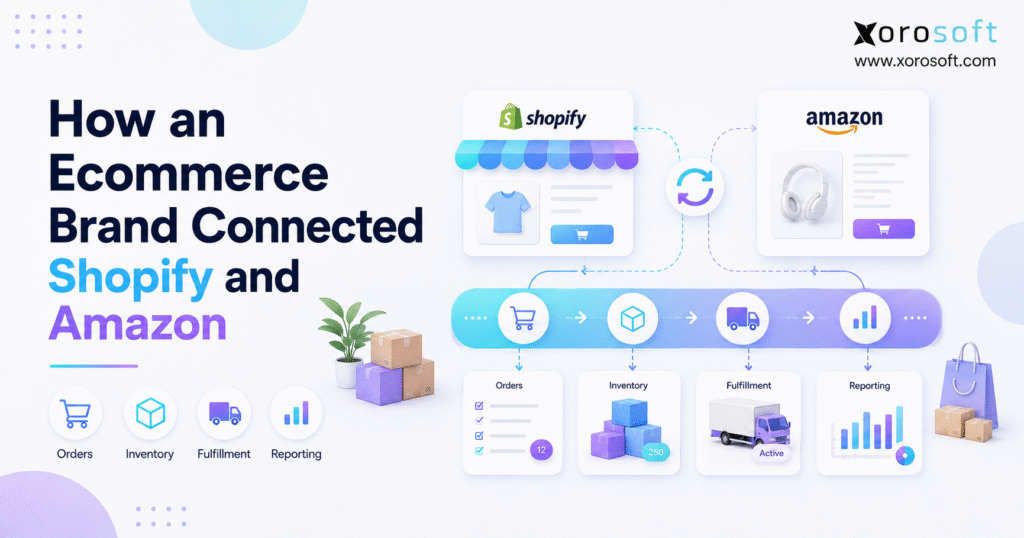
If you’re looking to grow your online business, it’s important to know how to connect Shopify to Amazon for streamlined sales and expanded reach.
1. Why Brands Need to Connect Shopify to Amazon Carefully
To connect Shopify to Amazon successfully, an ecommerce brand needs more than a technical connection between two storefronts. Instead, the business needs a clear operating model for inventory, orders, fulfillment, returns, purchasing, and financial data. Otherwise, connecting both sales channels can simply make existing data problems move faster.
At first, selling through Shopify and Amazon can feel straightforward. Shopify handles direct-to-consumer orders, while Amazon creates another source of demand. Meanwhile, the warehouse ships products, purchasing replenishes inventory, and accounting records transactions.
However, growth changes the equation.
As order volume increases, Shopify and Amazon begin competing for the same products. Consequently, stock that appears available on Shopify may already be committed to an Amazon order. Likewise, warehouse employees may receive demand from multiple systems without knowing which inventory quantity should be trusted.
Therefore, the real challenge is not merely connecting two ecommerce platforms. Instead, the business must create one operational flow behind both channels.
1.1 Why Shopify Amazon Integration Starts Simple
A smaller ecommerce operation can often manage several disconnected tools because employees fill the gaps manually.
For many growing brands, the decision to connect Shopify to Amazon begins as a simple way to expand sales without immediately changing the back-office operating model.
For example, the company may use:
- Shopify for DTC ecommerce
- Amazon Seller Central for marketplace sales
- QuickBooks for accounting
- spreadsheets for purchasing
- a separate warehouse application
- an inventory app
- manual reports for forecasting
Initially, this structure can work because transaction volumes remain manageable. Moreover, employees often know which spreadsheet contains the newest figure and which application requires a manual adjustment.
Nevertheless, the process becomes increasingly fragile as the company grows.
One employee may update Shopify inventory after an Amazon sale, while another may reserve the same products for a wholesale customer. Individually, both actions can look correct. Together, however, they can create an inventory shortage.
1.2 Why Connecting Shopify and Amazon Requires Operational Control
An integration moves data.
Operational control determines what that data means.
Suppose the warehouse physically holds 1,000 units of a product. At first glance, publishing 1,000 units to Shopify and Amazon may seem reasonable.
However:
- 150 units may already belong to open orders.
- 100 units may be reserved for wholesale.
- 75 units may require quality inspection.
- 100 units may be protected as safety stock.
Therefore, only 575 units may actually be available for new ecommerce demand.
As a result, synchronizing 1,000 units more frequently would not solve the problem. Instead, the business first needs an accurate available-to-sell calculation.
Brands that connect Shopify to Amazon should therefore define inventory ownership before increasing synchronization frequency.
2. How to Connect Shopify to Amazon Without Losing Control
Before a business tries to connect Shopify to Amazon, it should decide what information needs to move between the platforms and which system controls each type of data.
For straightforward ecommerce operations, Shopify provides tools that support marketplace connectivity. For example, the official Shopify Marketplace Connect documentation explains how supported marketplace listings, orders, and inventory can be managed through Shopify.
However, a company with several warehouses, wholesale customers, EDI, complex purchasing, accounting integration, or manufacturing needs to think beyond basic channel connectivity.
2.1 Start a Shopify Amazon Integration With Consistent SKUs
First, establish one reliable internal SKU for every sellable item.
For example, the same blue medium T-shirt should not unnecessarily appear as:
BLU-M-SHIRT in Shopify
TSHIRT-B-M in Amazon
10054-BL-M in the warehouse
Before teams connect Shopify to Amazon, consistent SKU mapping helps ensure that orders and inventory updates affect the correct product records.
Although integration software can map different identifiers, excessive SKU inconsistency increases maintenance and error risk.
Therefore, standardized item records should come before sophisticated automation.
2.2 Decide What Shopify and Amazon Should Synchronize
Next, determine what information genuinely needs to move.
Common data includes:
- products
- SKUs
- inventory availability
- customer orders
- order status
- fulfillment information
- tracking numbers
- cancellations
- returns
- refunds
Additionally, larger businesses may need purchasing, warehouse, accounting, and forecasting data connected to the same demand.
Consequently, the integration scope should reflect actual workflows rather than enabling every available data field simply because it exists.
2.3 Choose the System of Record for Shopify Amazon Integration
A system of record is the application that owns the authoritative version of specific information.
For instance, Shopify can remain responsible for Shopify storefront activity.
Amazon can remain responsible for marketplace-specific transactions.
Meanwhile, an inventory or ERP platform may become responsible for cross-channel inventory availability.
Similarly, ERP may own purchasing and financial records.
Therefore, one application does not necessarily need to control everything. However, each important operational decision needs one clear owner.
This ownership model becomes especially important when companies connect Shopify to Amazon while also operating warehouses, wholesale channels, or accounting systems.
3. Building a Shopify Amazon Inventory Sync That Works
When businesses connect Shopify to Amazon, inventory is usually the first operational area that exposes weaknesses in disconnected systems.
For example, a business may see:
820 units in Shopify
760 units in Amazon
910 units in warehouse software
845 units in a spreadsheet
Although these figures appear contradictory, they may represent different inventory states.
Therefore, teams should distinguish physical inventory from sellable inventory.
3.1 Understand On-Hand Inventory Across Shopify and Amazon
On-hand inventory represents the physical quantity recorded at a location.
However, not every on-hand unit should automatically be available for sale.
For example, some units may already be:
- reserved
- damaged
- quarantined
- allocated
- committed to another customer
- unavailable because of warehouse restrictions
When companies connect Shopify to Amazon, accurate on-hand records provide the foundation for calculating what each channel can safely sell.
Consequently, on-hand stock should normally be the starting point rather than the final quantity published to sales channels.
3.2 Calculate Available-to-Sell Inventory
Available-to-sell inventory represents the quantity the business can safely promise to new customers.
A simplified calculation might be:
Available-to-Sell = On-Hand − Reservations − Safety Stock − Other Commitments
For example:
1,200 units on hand
− 180 open-order reservations
− 120 wholesale commitments
− 100 safety stock
= 800 units available to sell
As a result, Shopify and Amazon should receive controlled availability based on those 800 units rather than the complete 1,200-unit physical balance.
3.3 Use Channel Allocation for Shopify and Amazon
Next, determine whether Shopify and Amazon should access the same available inventory pool.
For example, the company might allocate:
500 units to Shopify
250 units to Amazon
50 units as an additional buffer
Alternatively, both channels can draw dynamically from one centralized availability calculation.
However, the correct model depends on order velocity, fulfillment strategy, channel priorities, and warehouse structure.
For businesses requiring broader operational control, XoroONE combines inventory, ecommerce operations, purchasing, accounting, and related workflows within one cloud ERP environment.
Consequently, teams can manage stock from a central operational layer rather than repeatedly reconciling conflicting channel quantities.
4. Connect Shopify to Amazon Orders Through One Workflow
A reliable way to connect Shopify to Amazon is to bring orders from both channels into one reservation and fulfillment workflow.
Inventory visibility solves only part of the problem. Orders themselves also require consistent operational rules.
A scalable order lifecycle can look like this:
Customer places order
→ sales channel accepts order
→ central system receives order
→ inventory becomes reserved
→ fulfillment location is selected
→ warehouse processes order
→ shipment is confirmed
→ tracking returns to the sales channel
Therefore, warehouse teams can execute demand consistently regardless of where the customer purchased.
4.1 Centralize Shopify Orders
A Shopify order should enter the operational system without employees retyping information.
Brands that connect Shopify to Amazon should ensure that every Shopify order immediately affects the same inventory pool used to calculate Amazon availability.
Once the order arrives, inventory should be reserved promptly.
Next, fulfillment rules determine which warehouse should ship the order.
Finally, shipment confirmation and tracking return to Shopify.
As a result, storefront information stays aligned with actual warehouse activity.
4.2 Centralize Amazon Orders
Amazon merchant-fulfilled orders can follow a similar workflow.
First, the central system receives the order.
Inventory is then reserved.
Next, the warehouse receives the fulfillment task.
After shipment, tracking information returns to the marketplace.
Consequently, Shopify cannot continue promising stock that Amazon has already committed.
4.3 Use Real-Time Inventory Reservations
Suppose only one unit remains.
A Shopify customer completes checkout at 10:02 a.m.
An Amazon order arrives at 10:03 a.m.
If the Shopify order immediately reserves the final unit, Amazon availability can adjust accordingly.
Without that reservation, however, both channels may temporarily believe inventory remains available.
Therefore, synchronization speed matters, but reservation logic matters just as much.
5. Connect Shopify and Amazon to Warehouse Operations
As brands connect Shopify to Amazon, warehouse execution must remain aligned with the inventory quantities published to both channels.
A single-location business may have simple fulfillment requirements.
However, a growing company can operate:
- a main warehouse
- a secondary warehouse
- Amazon FBA inventory
- a 3PL
- regional fulfillment locations
Consequently, the system must connect digital demand to physical inventory.
5.1 Choose the Right Fulfillment Warehouse
Warehouse assignment determines which location should fulfill each order.
For example, routing rules might consider:
- available inventory
- customer destination
- shipping cost
- promised delivery date
- warehouse capacity
- channel requirements
As companies connect Shopify to Amazon, fulfillment rules become increasingly important because inventory availability depends on which warehouse can actually ship each order.
Therefore, the closest warehouse is not always the best warehouse.
5.2 Connect Ecommerce Orders to Pick, Pack, and Ship
After order assignment, warehouse employees need clear execution instructions.
A modern XoroWMS environment can connect inventory movements, receiving, picking, packing, and shipping with upstream order data.
As a result, warehouse operations no longer function as a separate information island.
Instead, each warehouse transaction contributes to the wider inventory picture.
5.3 Send Tracking Back to Shopify and Amazon
Once an order ships, tracking information should return to the originating channel.
Therefore:
Shopify customers can see shipment progress.
Amazon can receive shipment confirmation for merchant-fulfilled orders.
Customer-service teams can access current fulfillment status.
Consequently, fewer employees need to search multiple applications for shipment information.
6. Shopify Amazon Fulfillment: FBA, FBM, and MCF
Amazon fulfillment introduces another operational layer because physical inventory can exist inside or outside Amazon’s network.
6.1 Amazon FBA and Shopify Inventory
Under Fulfillment by Amazon, products are sent into Amazon’s fulfillment network, where Amazon can store, pick, pack, and ship enrolled inventory.
Businesses that connect Shopify to Amazon while using FBA should treat Amazon-held inventory separately from stock stored in their own warehouses.
The official Amazon FBA overview provides current program information.
Therefore, FBA stock should normally be treated as a distinct inventory location.
For example, 600 units held by Amazon are not the same physical stock as 600 units in the merchant’s warehouse.
6.2 Amazon FBM and Shared Inventory
Under merchant fulfillment, the seller or its logistics provider fulfills Amazon orders.
Consequently, Shopify and Amazon may compete for exactly the same merchant-held inventory.
This setup increases the importance of centralized reservations because both channels can generate simultaneous demand against one physical stock pool.
6.3 Amazon MCF for Shopify Orders
Amazon Multi-Channel Fulfillment can also use Amazon-held inventory to fulfill orders originating outside Amazon.
The current Amazon MCF Shopify integration explains how Shopify orders can participate in this fulfillment model.
Therefore, a Shopify order does not always need to ship from the merchant’s own warehouse.
However, this flexibility makes location visibility more important because the business must understand where inventory resides and which fulfillment method should handle each order.
7. Connect Shopify and Amazon Demand to Purchasing
Companies that connect Shopify to Amazon should also consider how combined demand affects purchasing and replenishment.
Suppose one SKU sells:
700 units monthly through Shopify
500 units monthly through Amazon
200 units monthly through wholesale
Total monthly demand is therefore 1,400 units.
However, if purchasing reviews only Shopify sales, buyers may plan against just half of actual demand.
Consequently, channel integration should eventually support supply planning as well.
7.1 Combine Shopify and Amazon Demand Signals
First, buyers should understand total demand across all relevant channels.
When brands connect Shopify to Amazon, combining demand from both channels gives purchasing teams a more complete replenishment signal.
Next, buyers should consider:
- current inventory
- open purchase orders
- supplier lead times
- reserved quantities
- seasonality
- promotions
- wholesale commitments
- FBA replenishment
- forecasted growth
As a result, purchasing decisions become based on total business demand rather than isolated sales-channel exports.
7.2 Connect Purchase Orders to Inventory
When purchase orders remain inside spreadsheets, incoming supply may not be visible across the rest of the organization.
Therefore, purchasing should ideally connect directly with inventory planning.
For companies that need deeper purchasing, accounting, manufacturing, and inventory control, XoroERP provides an ERP operating layer beyond basic channel synchronization.
Consequently, Shopify and Amazon demand can influence broader replenishment decisions rather than remaining isolated from supply planning.
8. Shopify Amazon Accounting Integration
When businesses connect Shopify to Amazon, financial integration eventually becomes just as important as order and inventory synchronization.
Sales totals alone do not represent the complete financial picture.
A growing ecommerce company may also need to account for:
- discounts
- refunds
- taxes
- shipping revenue
- payment fees
- marketplace fees
- inventory value
- cost of goods sold
- settlement activity
- returns
Therefore, transactional activity eventually needs to connect with financial records.
8.1 Connect Inventory With Cost of Goods Sold
When a product ships, more than one financial event can occur.
Companies that connect Shopify to Amazon should also ensure that inventory movements support accurate cost-of-goods-sold calculations.
First, revenue is recorded.
Meanwhile, the related inventory asset decreases.
The product cost then becomes part of cost of goods sold.
Consequently, inaccurate inventory transactions can eventually affect financial reporting.
8.2 Reconcile Shopify and Amazon Transactions
Amazon settlement activity may contain several transaction types instead of one simple sales figure.
Meanwhile, Shopify payouts have their own transaction flow.
Therefore, finance teams can spend significant time matching operational transactions to deposits when the systems remain disconnected.
A centralized operating environment can reduce this fragmentation by connecting ecommerce activity with inventory and accounting workflows.
9. Choosing the Right Shopify Amazon Integration Architecture
There are several ways to connect Shopify to Amazon, and the correct architecture depends on how much operational complexity exists behind the channels.
No single option fits every ecommerce company.
9.1 Shopify Marketplace Tools
For a smaller seller, marketplace-level tools may be sufficient.
This model works particularly well when the company has:
- one warehouse
- straightforward SKUs
- simple purchasing
- limited wholesale
- no manufacturing
- straightforward accounting
Therefore, ERP should not be introduced simply because the business sells through two channels.
9.2 Shopify Amazon Integration Connectors
A connector can be useful when the main challenge is transferring information between applications.
For example, a connector may synchronize:
- listings
- inventory quantities
- orders
- shipment status
However, a connector does not automatically solve purchasing, accounting, forecasting, or warehouse complexity.
Consequently, businesses should distinguish integration problems from operating-system problems.
9.3 Multichannel Inventory and Order Management Platforms
An inventory or OMS platform can provide stronger cross-channel control.
Therefore, this architecture may suit businesses that need centralized stock and orders but do not yet require full accounting, purchasing, or manufacturing integration.
9.4 Cloud ERP for Shopify and Amazon
ERP becomes more relevant when the problem spans departments.
For example:
Shopify creates demand.
Amazon creates additional demand.
Wholesale reserves stock.
Purchasing replenishes products.
Warehouses receive and ship goods.
Accounting values inventory.
Management needs consolidated reporting.
At this stage, each workflow depends on the others.
Xorosoft’s integration ecosystem supports ecommerce and operational workflows involving inventory, fulfillment, and connected business systems.
Therefore, the objective is no longer adding another connector. Instead, the business is creating one operational foundation.
10. A Practical Shopify Amazon Integration Example
A practical example shows why companies should connect Shopify to Amazon around one inventory model rather than simply copying quantities between platforms.
Consider an ecommerce brand selling sporting goods.
The warehouse physically holds 1,500 units of a popular product.
However:
200 units belong to open orders.
250 units are committed to wholesale customers.
150 units are protected as safety stock.
Therefore:
1,500 − 200 − 250 − 150 = 900 units available to sell.
10.1 Shopify and Amazon Before Integration
Before centralization, Shopify might show 1,300 units because the latest wholesale reservation was never entered.
This example demonstrates why businesses should connect Shopify to Amazon around centralized availability rather than separate channel quantities.
Meanwhile, Amazon could show 1,100 because its inventory update happened earlier.
As a result, neither channel reflects the true 900-unit availability.
10.2 Shopify and Amazon After Integration
After centralization, the operating system calculates 900 available units.
Next, the business allocates:
550 units to Shopify
300 units to Amazon
50 units as an additional buffer
Therefore, neither channel receives the full physical warehouse quantity.
10.3 What Happens When a Shopify Order Arrives
Suppose a Shopify customer orders 20 units.
Immediately, those 20 units become reserved.
Consequently, available inventory falls from 900 to 880.
Next, channel availability recalculates according to company rules.
As a result, Amazon cannot continue promising units Shopify has already committed.
10.4 What Happens When an Amazon Order Arrives
Later, Amazon receives an order for 15 units.
Again, the central system creates a reservation.
Therefore, available inventory falls to 865.
Meanwhile, warehouse employees see the Amazon order alongside other fulfillment tasks.
Finally, shipment confirmation updates the originating channel.
11. Common Shopify Amazon Integration Mistakes
Even when the technology works correctly, businesses can still make serious mistakes when they connect Shopify to Amazon.
Most problems come from unclear operational rules rather than the connection itself.
11.1 Synchronizing the Wrong Inventory Number
Publishing physical on-hand stock across every channel can cause overselling. Businesses should therefore calculate true sellable inventory before sending availability to Shopify or Amazon.
11.2 Using Multiple Inventory Masters
Allowing Shopify, Amazon, spreadsheets, and warehouse software to independently change authoritative inventory makes conflicts difficult to diagnose. For that reason, one system should control cross-channel availability.
11.3 Ignoring Shopify Amazon SKU Mapping
Different item identifiers can cause an order to update the wrong inventory record or fail completely. Clean SKU governance should therefore come before deeper automation.
11.4 Forgetting Reserved Inventory
Open orders consume availability before products physically leave the warehouse. Accordingly, inventory reservations should update channel availability as soon as practical.
11.5 Mixing FBA and Warehouse Inventory
Inventory inside Amazon’s fulfillment network is physically separate from merchant-held warehouse stock. These inventory pools should remain individually identifiable even when management reporting combines them.
11.6 Ignoring Returns
Returned inventory does not automatically become sellable. Depending on its condition, a product may require inspection, refurbishment, quarantine, or disposal. Only after that assessment should the system return eligible units to sellable inventory.
11.7 Automating Undefined Processes
Software cannot reliably automate a business rule that has never been defined. Before introducing deeper automation, businesses should document inventory ownership, reservations, channel allocation, fulfillment rules, and exception handling.
12. When Shopify and Amazon Sellers Need ERP
The need to connect Shopify to Amazon does not automatically mean a business needs ERP.
However, certain operational signals suggest that a broader system may now be appropriate.
12.1 Multiple Warehouses Increase Complexity
When inventory exists across several locations, availability and order routing become more complicated.
Therefore, centralized inventory and warehouse controls become increasingly valuable.
12.2 Wholesale and Ecommerce Share Inventory
Wholesale customers may reserve large quantities well before shipment.
Consequently, Shopify and Amazon cannot safely rely only on visible warehouse inventory.
12.3 EDI Adds Another Order Channel
As retailers and distributors introduce EDI requirements, ecommerce integration becomes part of a wider B2B operating environment.
Therefore, order management needs to support more than Shopify and Amazon.
12.4 Purchasing Still Runs in Spreadsheets
When buyers manually combine Shopify, Amazon, warehouse, and spreadsheet reports, replenishment becomes slower and harder to audit.
Consequently, integrated purchasing can become increasingly valuable.
12.5 Accounting Requires Heavy Reconciliation
If finance repeatedly exports, reformats, and reconciles ecommerce, marketplace, and inventory data, the company may have outgrown its existing system architecture.
12.6 Manufacturing Changes Inventory Planning
Manufacturers must also manage:
- raw materials
- bills of materials
- work orders
- finished goods
- production planning
Therefore, simple marketplace synchronization cannot manage the complete operational model.
12.7 Where Xorosoft Fits
For inventory-driven businesses reaching this stage, Xorosoft can centralize ecommerce, inventory, purchasing, accounting, warehouse operations, forecasting, and multi-channel order management.
Additionally, the broader Xorosoft solutions show how these operational functions can work together.
For Shopify merchants, Xorosoft is also available through the Shopify App Store.
Therefore, Xorosoft becomes particularly relevant when the business challenge has expanded beyond connecting two sales channels and has become an operational-control problem.
13. Shopify Amazon Integration Implementation Roadmap
Before companies connect Shopify to Amazon at scale, they should test the underlying operating model through a controlled implementation process.
Otherwise, automation can spread bad data more efficiently.
13.1 Audit the Current Ecommerce Stack
First, document every application that currently touches:
- products
- inventory
- orders
- purchasing
- warehouse operations
- accounting
- returns
- reporting
Next, identify duplicate responsibilities.
For instance, if three systems all maintain inventory, determine why each one exists.
13.2 Clean Shopify and Amazon Item Data
Next, review:
- SKUs
- barcodes
- variants
- units of measure
- product status
- warehouse locations
Consequently, integration mapping becomes more reliable.
13.3 Define System Ownership
For every important data type, answer:
Which system creates it?
Which system can modify it?
Which system publishes it?
Which system reports it?
Therefore, employees know exactly where corrections belong.
13.4 Define Shopify Amazon Inventory Rules
Next, document:
- reservation logic
- safety stock
- channel allocation
- warehouse availability
- FBA treatment
- transfer inventory
- damaged inventory
- return status
As a result, the integration publishes meaningful quantities instead of raw inventory totals.
13.5 Test Shopify and Amazon Transactions
Do not test only ideal orders.
Instead, test:
- standard Shopify orders
- standard Amazon orders
- partial shipments
- cancellations
- refunds
- returns
- stockouts
- fulfillment exceptions
Consequently, teams can identify edge cases before customers encounter them.
13.6 Validate Warehouse Operations
Next, verify that warehouse employees can receive, pick, pack, ship, and transfer inventory without creating duplicate records.
Businesses operating in more specialized inventory environments can also review Xorosoft’s industries served to understand how workflows may vary by operating model.
13.7 Validate Reporting
Finally, confirm that operations and finance agree on:
- sales
- available inventory
- inventory value
- open orders
- purchase orders
- returns
- cost of goods sold
Therefore, implementation success should be measured by business consistency rather than simply whether the technical integration remains online.
14. What a Connected Shopify Amazon Operating Model Looks Like
After implementation, Shopify and Amazon remain separate selling channels.
Once businesses connect Shopify to Amazon through a central operating model, both channels can use the same inventory, fulfillment, purchasing, and reporting rules.
However, they no longer operate like separate businesses.
Instead:
- Shopify generates customer demand.
- Amazon generates marketplace demand.
- The central system calculates inventory availability.
- Warehouse operations execute fulfillment.
- Purchasing responds to combined demand.
- Accounting receives operational transactions.
- Management reviews consolidated information.
As a result, every team works from a more consistent operational picture.
Businesses considering a broader system transformation can review relevant Xorosoft case studies to see how inventory-driven companies approach operational change.
The underlying principle remains simple:
Connect the business process first.
Then connect the software.
15. Frequently Asked Questions About Shopify Amazon Integration
15.1 Can You Connect Shopify to Amazon?
Businesses can connect Shopify and Amazon through supported marketplace tools, integrations, or broader ecommerce platforms. The right approach depends on whether the company only needs listings and orders synchronized or requires centralized inventory, warehouse, purchasing, accounting, and fulfillment controls.
15.2 How Do You Connect Shopify to Amazon?
To connect Shopify to Amazon, start by standardizing SKUs and defining which system controls inventory. Next, map products and configure stock rules. Afterward, connect orders and fulfillment workflows. Finally, test returns, accounting, and reporting before treating the integration as complete.
15.3 Does Shopify Integrate With Amazon?
Shopify supports Amazon marketplace workflows through available marketplace integrations. However, businesses with more complex back-office requirements may also connect both channels through inventory systems, middleware, OMS platforms, or ERP.
15.4 Can Shopify and Amazon Inventory Stay in Sync?
Inventory can synchronize between the systems. Nevertheless, the business must first determine which quantity should be synchronized. For example, available-to-sell inventory is generally more useful than unrestricted physical stock when reservations and safety stock exist.
15.5 Why Does Shopify Inventory Differ From Amazon?
Several factors can create differences, including separate warehouses, FBA inventory, open-order reservations, safety stock, returns, synchronization timing, and channel allocation. Therefore, teams should compare inventory definitions before assuming that a technical error exists.
15.6 How Can You Prevent Overselling on Shopify and Amazon?
First, establish one reliable inventory authority. Then, subtract reservations and protected stock from physical inventory. Next, publish controlled availability to each channel. Finally, update quantities whenever new orders, returns, transfers, or adjustments occur.
15.7 Should Shopify Be the Inventory System of Record?
Shopify can work as the inventory authority for straightforward operations. However, a company managing several warehouses, wholesale, Amazon, EDI, manufacturing, or advanced purchasing may require a dedicated inventory or ERP platform.
15.8 Can Shopify and Amazon Share One Warehouse?
Shopify and Amazon can share stock held in the same merchant warehouse. However, reservations and availability rules should prevent both channels from promising the same units simultaneously.
15.9 Can Amazon Orders Be Managed With Shopify Orders?
Orders from both channels can be brought into a central OMS, inventory platform, or ERP. As a result, warehouse teams can process Shopify and Amazon demand through one consistent fulfillment workflow.
15.10 Can Amazon Fulfill Shopify Orders?
Amazon Multi-Channel Fulfillment can fulfill eligible Shopify orders using inventory stored in Amazon’s fulfillment network. Nevertheless, businesses should evaluate costs, customer experience, inventory availability, and fulfillment strategy before selecting this model.
15.11 What Is the Difference Between FBA and FBM?
With FBA, Amazon stores and fulfills enrolled inventory. In contrast, FBM leaves fulfillment with the merchant or its logistics partner. Therefore, the inventory location and fulfillment responsibility differ significantly.
15.12 What Is Amazon Multi-Channel Fulfillment?
Amazon Multi-Channel Fulfillment allows Amazon-held inventory to fulfill orders originating outside Amazon’s marketplace. Consequently, MCF can become part of a broader Shopify fulfillment strategy.
15.13 Can a Brand Use FBA and Its Own Warehouse?
A brand can use a mixed fulfillment model. For example, Amazon orders might use FBA while Shopify orders ship from an owned warehouse. Alternatively, MCF may fulfill selected Shopify demand.
15.14 What Is Available-to-Sell Inventory?
Available-to-sell inventory is the quantity that can safely be promised to new customers. Therefore, it usually excludes reservations, safety stock, damaged products, and other commitments from total physical inventory.
15.15 What Is Channel Allocation?
Channel allocation controls how much inventory Shopify, Amazon, wholesale, or other channels can access. Consequently, one sales channel cannot unintentionally consume inventory needed for another priority channel.
15.16 Should Shopify and Amazon Use the Same SKU?
Consistent internal SKUs make integrations easier to manage. However, marketplace-specific identifiers may still exist. Therefore, each external identifier should map clearly to one internal product record.
15.17 Can Shopify, Amazon, and Wholesale Share Inventory?
These channels can share physical inventory. However, the central system should account for wholesale reservations and other commitments before publishing ecommerce availability.
15.18 Do Shopify and Amazon Sellers Need ERP?
Not necessarily. A smaller seller with one warehouse and straightforward processes may operate efficiently with native tools or connectors. ERP becomes more relevant when inventory, purchasing, warehousing, accounting, wholesale, EDI, or manufacturing become interconnected.
15.19 What Is the Difference Between a Connector and ERP?
A connector primarily transfers information between applications. ERP, by contrast, manages shared business processes such as inventory, purchasing, accounting, warehousing, and manufacturing. Therefore, both technologies address different levels of complexity.
15.20 When Should an Ecommerce Business Upgrade to ERP?
Consider ERP when employees repeatedly reconcile systems, inventory becomes difficult to trust, purchasing depends on spreadsheets, several warehouses compete for stock, or financial reporting requires extensive manual work.
15.21 Can ERP Replace Shopify or Amazon?
Usually, ERP does not replace either sales channel. Shopify remains the storefront, while Amazon remains the marketplace. Instead, ERP typically operates behind both and manages cross-channel inventory, purchasing, fulfillment, accounting, and reporting.
15.22 How Do Returns Affect Shopify Amazon Inventory?
Returned items should not automatically become sellable. Instead, the warehouse may need to inspect them first. After inspection, the system can classify the product as sellable, damaged, quarantined, or written off.
15.23 How Does Integration Help Purchasing?
A connected system combines demand from Shopify, Amazon, and other channels. Consequently, purchasing teams can evaluate total sales, inventory, incoming supply, supplier lead times, and reservations before replenishing stock.
15.24 How Does Shopify Amazon Integration Help Accounting?
Integration can connect operational transactions with inventory and financial records. Therefore, accounting teams gain clearer visibility into sales, refunds, marketplace activity, inventory value, and cost of goods sold.
15.25 What Should a Business Test Before Going Live?
Test SKU mapping, inventory updates, orders, reservations, warehouse routing, partial shipments, cancellations, returns, refunds, tracking, purchasing, and accounting. Additionally, test exception scenarios rather than only perfect transactions.
16. From Shopify Amazon Integration to Operational Control
The best way to connect Shopify to Amazon is to create one reliable operational model behind both channels.
Connecting the platforms should make ecommerce operations simpler, not create another layer of reconciliation.
Therefore, start with the operating model rather than the connector.
First, standardize SKUs. Next, establish one inventory authority. Then, define reservations, safety stock, and channel allocation. Afterward, connect orders to warehouse execution. Finally, bring purchasing and accounting into the same operational picture when business complexity requires it.
For smaller sellers, native marketplace tools may still be the correct answer.
However, when Shopify and Amazon operate alongside multiple warehouses, wholesale, EDI, manufacturing, complex purchasing, and integrated accounting, the problem has moved beyond channel synchronization.
At that stage, Xorosoft can provide a centralized cloud ERP, WMS, inventory, purchasing, accounting, and multi-channel order-management environment for inventory-driven businesses.
If your Shopify and Amazon operation has reached that level, Book a Demo to evaluate how the workflow could operate around your actual inventory, fulfillment, purchasing, and reporting requirements.
Recent Posts
-
 Best AI Warehouse Management Software for ERP Inventory and Warehouse Operations
 -
 Project Based ERP Software for Managing Project Costs, Purchasing, Resources, Inventory, and Accounting
 -
 Food and Beverage ERP Requirements for Lot, Expiry, and Recall Control
 -
 How to Prevent EDI Errors Before They Become Retailer Chargebacks
 -
 Warehouse Injury and Safety Statistics: What Operations Teams Should Know Before Automating Workflows