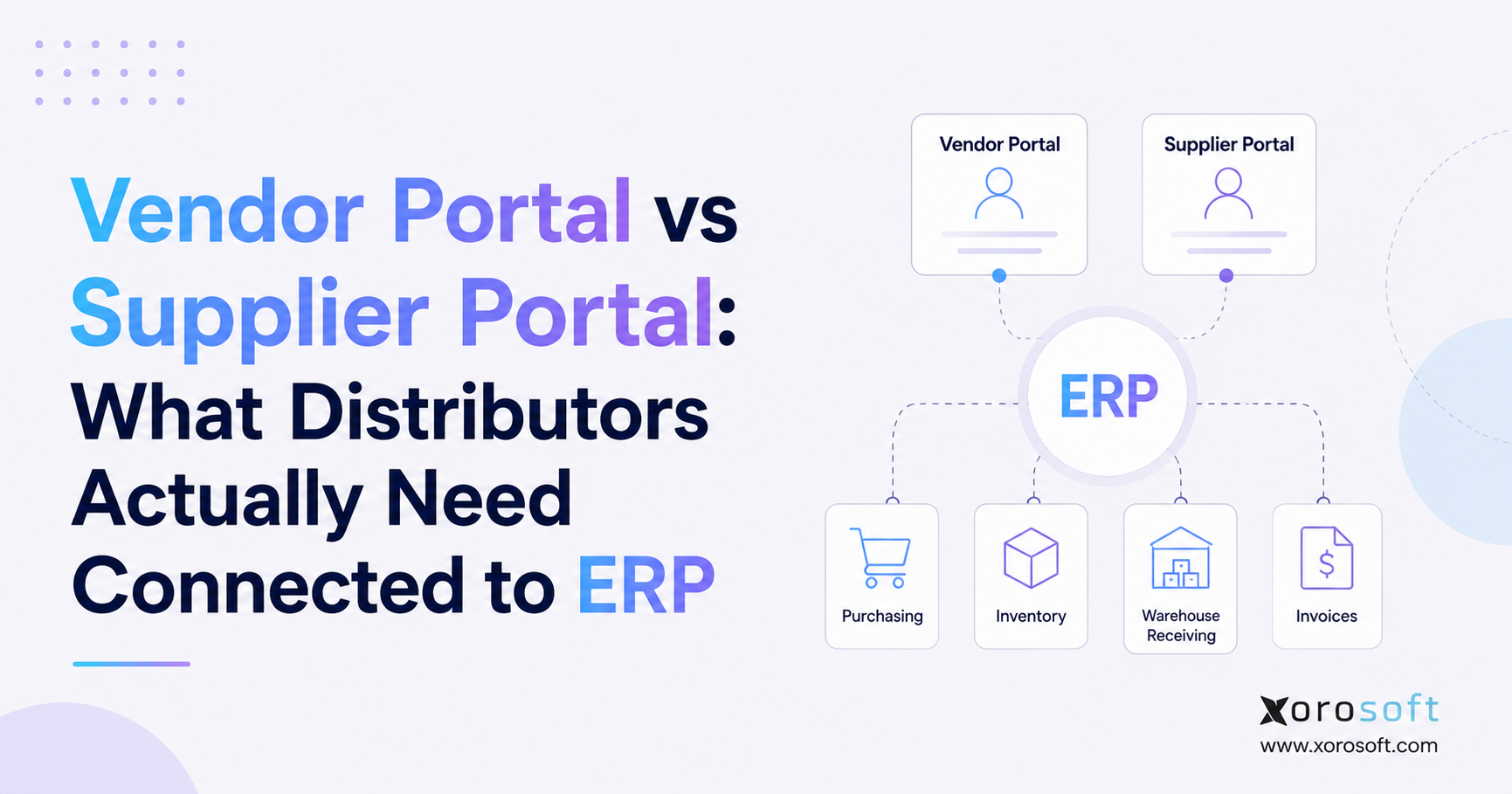
If you are looking for information about a supplier portal, you are in the right place.
1. Supplier Communication Breaks Down When ERP Is Left Out
For many distributors, supplier communication still happens outside the ERP. A buyer creates a purchase order and emails it to the supplier. The supplier replies with a new delivery date. Another message confirms a partial shipment. Someone updates a spreadsheet, while the ERP still shows the old information.
The warehouse may then receive a different quantity than expected. Later, accounts payable gets an invoice based on another version of the order. Each team believes it has the latest information, but the business no longer has one trusted view of the transaction.
The problem is not simply the lack of a supplier portal. The larger issue is that supplier updates do not flow directly into purchasing, inventory, warehouse, and finance workflows.
A basic portal may reduce email by letting suppliers upload invoices or check payment status. A stronger supplier portal connects the actions that affect real supply: purchase-order confirmation, delivery changes, shortages, advance shipping notices, receiving, invoice matching, and supplier performance.
For a distributor, those actions affect much more than procurement. A delayed shipment can change stock availability, customer commitments, warehouse planning, replenishment, cash needs, and ecommerce availability.
The better question is therefore not, “Do we need a portal?”
Instead, ask:
Which supplier decisions need to become controlled ERP data?
That question creates a much stronger starting point for choosing the right system.
1.1 Why distributors feel supplier problems earlier
Supplier coordination becomes harder as the operation adds SKUs, vendors, warehouses, sales channels, and purchase orders.
A company buying 50 products from five suppliers may handle most exceptions through email. A distributor buying thousands of SKUs from dozens or hundreds of suppliers faces a very different problem. Buyers must track confirmations, late orders, split shipments, price changes, backorders, and documents across many open transactions at once.
The challenge grows further when several warehouses depend on the same supply network. One supplier delay may affect different regions, customer groups, ecommerce channels, or wholesale accounts.
At that point, email becomes an informal transaction system. People search inboxes to find the latest commitment, then copy the answer into spreadsheets or ERP fields.
A supplier portal becomes useful when it removes those manual steps rather than simply moving them to a different screen.
1.2 Why one source of truth matters
Different teams need different views of the same purchase.
Buyers need to know what was ordered, while planners need the supplier’s confirmed quantity and date. Warehouse teams focus on what has shipped and arrived. Meanwhile, inventory teams track usable stock, and finance compares receipts with supplier invoices.
These stages may show different quantities, so the ERP should keep them connected without losing the history of each change. A strong system lets employees follow the order from the original request through confirmation, shipment, receipt, and invoice.
That connection matters more than whether a software company calls its interface a vendor portal or a supplier portal.
2. Supplier Portal vs Vendor Portal: What the Terms Really Mean
Businesses often use “vendor portal” and “supplier portal” to describe similar tools. No universal software rule says one term must include a specific set of features while the other term means something completely different.
The wording usually reflects the department using the system.
Finance teams often talk about vendors, vendor invoices, vendor balances, and vendor payments. Purchasing and supply-chain teams may prefer supplier, supplier lead time, supplier performance, and supplier collaboration.
Software vendors also use the terms differently.
As a result, distributors should not choose a product because the label sounds more advanced. They should examine what suppliers can actually see, change, confirm, and submit.
2.1 What is a vendor portal?
A vendor portal is a secure online area where vendors can interact with a buying company.
Common uses include maintaining contact details, uploading tax or compliance documents, submitting invoices, checking invoice status, viewing payment information, and managing company details.
Some vendor portals also handle purchase orders and shipment information. Others focus almost entirely on finance and vendor setup.
That variation makes feature-level review important.
If the portal only improves invoice communication, it may solve an accounts-payable problem without helping purchasing or inventory teams.
2.2 What is a supplier portal?
A supplier portal gives suppliers controlled access to information and tasks related to their commercial relationship with the buyer.
Typical functions may include purchase orders, supplier confirmations, delivery updates, RFQs, shipping information, ASNs, documents, invoices, and supplier records.
For distributors, the strongest supplier portal use cases sit closer to the supply chain. The portal becomes a shared workspace where suppliers can respond to operational requests and send structured updates back into ERP workflows.
That difference can have a large effect on purchasing efficiency because employees no longer need to interpret every supplier email manually.
2.3 Supplier portal features matter more than terminology
Look at the workflow instead. The supplier should be able to confirm a PO line by line, propose a later date, and report shortages when needed. ASN support should also show what has shipped and what remains open. Receiving staff then need a clear way to match incoming goods with the correct purchase order.
Those capabilities reveal much more than a product name or feature list.
3. Supplier Portal ERP Integration Should Start With Purchase Orders
The purchase order provides the natural starting point for supplier collaboration. It records what the distributor wants to buy, from whom, in what quantity, at which location, and by what date.
A connected supplier portal should display the approved ERP purchase order rather than create an independent copy that employees must maintain separately.
Suppliers may need access to the PO number, items, ordered quantities, units of measure, requested dates, ship-to locations, terms, attachments, and buyer contact information.
The exact data depends on the business, but ERP should remain the main source.
3.1 A sent PO is not a confirmed PO
Many companies treat “PO sent” as if it means “supply confirmed.”
Those are not the same state.
A supplier may receive an order and later discover that one item is unavailable. Another line may require a longer lead time. The supplier could also need to split the order across several shipments.
Until the supplier responds, the distributor only knows what it requested.
A useful supplier portal captures the supplier’s actual commitment.
For example, the buyer may request 1,000 units for October 15. The supplier could confirm 700 for October 15 and 300 for October 29.
Planning should see both dates instead of assuming all 1,000 units will arrive together.
3.2 Purchase order acknowledgements improve supply planning
Supplier acknowledgement turns a one-way purchase order into a two-way transaction.
The supplier may accept the order, reject it, confirm part of it, revise dates, report shortages, or propose another option.
The buyer can then approve important changes before they affect planning.
This approach gives the business a clearer difference between requested supply and confirmed supply.
That distinction becomes especially useful when inventory runs tight. Customer service can make better promises when it knows whether the next delivery is merely ordered or actually confirmed.
A connected ERP can also use confirmed dates in replenishment and forecasting rather than depending only on static supplier lead-time settings.
3.3 Purchase order changes need a controlled workflow
Purchase orders often change after suppliers first accept them.
A buyer may increase a quantity. The supplier may push out a delivery date. Pricing can change. A shipment may split. One item could become unavailable.
Email handles these exceptions poorly because the latest answer may exist only inside a long thread.
A supplier portal should record proposed changes in a structured form. The ERP can then route the change to the appropriate buyer or manager when approval is required.
That process preserves the original request and the supplier’s new commitment.
It also creates a useful audit history.
3.4 Connected purchasing should support the wider ERP
For inventory-driven companies, purchasing cannot operate as a standalone task.
A platform such as XoroONE shows how purchasing can sit alongside inventory, accounting, forecasting, warehouse management, manufacturing, ecommerce, and other operating areas.
The broader principle matters more than the product name: supplier updates should connect with the business processes that depend on them.
If a new supplier date affects inventory availability, planning teams should not wait for someone to update another spreadsheet.
4. Supplier Portal Workflows Need ASNs and Warehouse Receiving
Purchase-order confirmation tells the distributor what the supplier plans to deliver. Shipment information tells the business that goods have actually started moving.
That difference becomes important for warehouse planning and inventory visibility.
A supplier portal that supports shipment updates can help the distributor move from a simple “open PO” view to a clearer supply picture.
The business can distinguish among inventory that is ordered, confirmed, shipped, received, and available.
4.1 Advance Shipping Notices Create Better Inbound Visibility
An advance shipping notice, often called an ASN, provides details about an incoming shipment before it arrives.
The supplier may share the PO reference, shipped quantities, carrier, tracking number, shipment date, expected arrival date, cartons, pallets, lots, or other shipment details. The exact content depends on the industry.
Warehouse teams use an ASN to prepare for incoming goods before they arrive. Purchasing teams can see that the supplier has moved from a promise to an actual shipment. Meanwhile, inventory planners get a clearer view of supply that is already on the way.
Without that link, an open PO may look healthy even when nothing has shipped.
4.2 Warehouse receiving should close the loop
The warehouse provides the physical truth.
A supplier may confirm 1,000 units and ship 980. The warehouse could receive 975, with five damaged units.
Those numbers tell different parts of the story.
The purchasing team needs to understand the supplier shortage. Warehouse staff need to record what arrived. Inventory should increase only by the quantity the business can actually use. Finance needs accurate receipt data when the invoice arrives.
A warehouse system such as XoroWMS can connect receiving, inventory control, put-away, picking, packing, and related warehouse processes with the wider ERP workflow.
The goal is simple: physical activity should update digital records without unnecessary re-entry.
4.3 Inventory teams need clear supply states
A common reporting mistake is grouping every open PO into “incoming inventory.”
That view can be misleading.
An order issued yesterday but not yet confirmed carries more uncertainty than inventory already in transit. A shipment sitting at the receiving dock has a different risk from an order expected six weeks from now.
Useful supply states include ordered, supplier confirmed, partially confirmed, shipped, partially received, fully received, and cancelled.
Those states let planners answer better questions.
Instead of asking, “How much is on PO?” they can ask, “How much supply has the supplier confirmed for the next 30 days?”
That answer has much greater planning value.
4.4 Supplier invoices should connect to PO and receipt data
Invoice submission remains one of the most common portal features.
However, the invoice workflow works best when purchasing and receiving already provide clean data.
Finance can compare what the company ordered, what the warehouse received, and what the supplier billed.
This helps staff spot quantity differences, unexpected charges, missing receipts, and other exceptions before payment.
A supplier portal can also let suppliers check invoice or payment status, which reduces routine emails to accounts payable.
The key point is that invoice self-service should complete the purchasing cycle rather than exist as a separate finance-only process.
5. Supplier Portal Data Should Move Both Ways
A supplier portal should not become another database that employees must reconcile with ERP.
A better design decides which information comes from ERP, which supplier actions return to ERP, and which changes need approval.
That design protects data quality while giving suppliers enough control to complete their part of the process.
5.1 ERP should send controlled information to suppliers
Suppliers generally need access to approved business records that relate to them.
Purchase orders form the most obvious example. The portal may also show open transactions, shipment status, invoice status, payment information, documents, and selected supplier master data.
Role rules should control what each supplier can view.
A vendor should never see another supplier’s transactions. Users within the same supplier company may also need different access levels.
For example, an accounts-receivable user may need invoice data while an operations user needs purchase orders and shipment tasks.
5.2 Supplier updates should flow back into ERP workflows
Useful supplier updates include PO confirmations, revised delivery dates, shortages, shipping details, ASNs, invoices, and profile changes.
Not every update should change the ERP record immediately.
A new bank account, major price change, or revised commitment may need internal approval.
The supplier portal can collect the request while the ERP routes it to the correct employee.
That model keeps the transaction controlled without forcing staff to retype data.
5.3 ERP should remain the main system of record
A supplier portal loses value quickly when it maintains different transaction states from ERP.
Suppose the portal says a purchase order is confirmed, while ERP still shows it as awaiting a response. Employees must now decide which system to trust.
A connected setup avoids that problem by keeping ownership clear.
XoroERP represents this broader ERP approach, where purchasing, vendors, inventory, accounting, warehouse activity, manufacturing, reporting, and other areas can operate within the same business system.
Regardless of platform, distributors should define record ownership before rolling out a portal.
5.4 Security should shape the workflow from the beginning
Supplier access creates a direct connection between outside users and internal business data.
Security therefore cannot be an afterthought.
Companies should control access by supplier, role, company, warehouse, or transaction where needed. Sensitive data such as banking details, prices, contracts, and payment information deserves tighter controls.
The system should also keep a clear history of important changes.
If a supplier updates a delivery date or proposes a new quantity, employees should know who made the change and when it happened.
That audit trail helps both operations and finance.
6. Supplier Portal, EDI, API, and Email Solve Different Problems
A supplier portal is only one way to work with suppliers.
Distributors often make better decisions when they treat portal, EDI, API, and email as different tools rather than competing technologies.
The right method depends on transaction volume, supplier capability, process complexity, and the amount of human review required.
6.1 Supplier portals work well for human-led collaboration
A supplier portal works well when a person needs to review information, enter a response, upload a document, or handle an exception.
Suppliers can use a browser without building a full system-to-system connection.
This makes portals useful for many small and mid-sized trading partners.
The portal can also support workflows that require judgment. A supplier may explain a shortage, propose a date, or attach a certificate before the buyer approves the change.
These situations do not always fit a completely automated transaction.
6.2 EDI and APIs suit repeatable system-to-system transactions
Large trading partners may exchange a high volume of purchase orders, acknowledgements, ASNs, and invoices.
EDI can automate those transactions using agreed document standards. APIs provide another method for direct software-to-software communication.
Both approaches can reduce manual work when transaction formats remain consistent.
The supplier portal does not need to replace them.
Instead, all three methods can feed the same ERP processes.
A distributor may accept an EDI acknowledgement from one supplier and a portal acknowledgement from another. Internally, both should create the same business outcome.
6.3 Many distributors need a hybrid supplier model
Supplier networks rarely have the same level of technical capability.
Large, high-volume suppliers may use EDI, while another group may connect through APIs. Smaller factories or vendors can use a supplier portal instead. Occasional suppliers may still rely on email for simple transactions.
Rather than forcing every supplier into one method, distributors can choose the channel that fits each relationship. ERP should then record the resulting business transactions in a consistent way.
6.4 Email still has a place, but it should not become the database
Email remains useful for conversations, unusual exceptions, and low-volume relationships.
The problem begins when teams depend on email to store the final version of business data.
Important commitments should return to a structured system.
If a supplier changes a delivery date through email, the buyer should update or approve that commitment inside ERP.
Otherwise, planning teams continue working from old information.
The objective is not to eliminate human communication. It is to keep final business decisions in a place where the entire company can use them.
7. Supplier Portal Data Should Improve Inventory Planning
Supplier collaboration provides more value when businesses use the data for planning instead of viewing the portal as a communication tool only.
Confirmed supply, actual lead times, shortages, fill rates, and receiving results can all improve future purchasing decisions.
The portal becomes one of the sources feeding better procurement data.
7.1 Lead time should reflect supplier performance
Many ERP systems store a standard lead time for each supplier or item.
That number often starts as an estimate.
Actual performance may tell a different story.
A supplier record may say 14 days, but the last ten orders may average 20 days. Another supplier could promise 30 days and consistently deliver in 27.
If the ERP captures requested, confirmed, shipped, and received dates, teams can measure those patterns.
Buyers can then make better choices when setting reorder points, safety stock, or expected dates.
7.2 Supplier scorecards need transaction data
Supplier reviews should rely on actual transactions rather than memory.
Useful measures may include on-time delivery, fill rate, lead-time accuracy, quantity shortages, quality issues, price changes, and purchasing volume.
Not every distributor needs a complicated scorecard.
A few reliable measures can still help buyers identify which suppliers create the most exceptions.
The important part is that the data comes from normal purchasing and receiving activity.
That removes the need for employees to maintain separate supplier-rating spreadsheets.
7.3 Better supplier data supports better forecasts
Forecasting looks forward, but it depends heavily on past performance and current supply.
A demand forecast may show that the business needs 5,000 units next month. That forecast only becomes useful when purchasing understands whether suppliers can meet the required quantity and timing.
Confirmed supply data helps planners see potential gaps sooner.
A supplier portal does not create demand forecasts by itself. It improves one of the inputs that planning teams use to make supply decisions.
That distinction keeps expectations realistic.
8. Supplier Portal Needs Change Across Industries
The core supplier portal workflow remains similar across many industries, but the details change with the product, lead time, warehouse model, and sales channel.
Distributors should evaluate features through the lens of their own inventory.
Xorosoft’s industry ERP overview shows how operating needs vary across wholesale, apparel, furniture, consumer goods, manufacturing, food, and other inventory-driven sectors.
8.1 Wholesale distributors need strong PO and warehouse links
Wholesale distributors often manage broad catalogs, many suppliers, customer-specific demand, and inventory across several sites.
For them, supplier confirmation and inbound inventory matter more than simple vendor self-service.
A delayed delivery may affect dozens of customer orders. A partial shipment may force the company to change allocation between warehouses.
Useful supplier portal features therefore include line-level confirmations, revised dates, shipment updates, ASNs, and clear receiving status.
The portal should support the way purchasing and inventory teams already work rather than add another layer of administration.
8.2 Apparel businesses need variant-level accuracy
Apparel adds complexity through style, color, and size.
A supplier may confirm a style but fall short on one size. The order looks mostly complete at a high level, yet the missing units can create an important sales problem.
Seasonal timelines make the issue more serious.
A shipment that arrives after a key selling window can lose much of its value even if the supplier eventually delivers every unit.
That makes accurate commitment dates and variant-level responses important.
8.3 Furniture businesses need long-range inbound visibility
Furniture companies often manage long lead times, large products, containers, overseas supply, and significant landed costs.
Purchase orders may remain open for weeks or months.
During that time, buyers and customer-service teams need a reliable view of what suppliers confirmed, what has shipped, and when the business expects delivery.
Warehouse teams may also need advance information because large arrivals consume physical space.
For furniture distributors, the supplier portal can therefore play a major role in inbound planning.
8.4 Food and manufacturing need traceability and material control
Food businesses may require lot, expiry, certificate, or quality information.
Manufacturers may depend on raw materials and components that feed bills of materials, production plans, or work orders.
A late component can hold up an entire finished product.
These businesses often need more than purchase-order visibility. Supplier updates must connect with planning, production, receiving, and traceability processes.
That makes ERP integration especially important.
8.5 Shopify and omnichannel businesses connect supply with fast demand
An ecommerce business can appear simple on the storefront while running a complicated operation behind it.
A brand may sell through Shopify, Amazon, wholesale accounts, retail stores, and other channels while holding inventory in several warehouses or 3PL locations.
Supplier data must support that demand.
The operating flow becomes:
Demand → forecast → replenishment → purchase order → supplier confirmation → inbound shipment → warehouse receipt → available stock.
The Xorosoft ERP app on the Shopify App Store provides an external example of an ERP positioned around the connection between ecommerce and back-office operations.
9. A Supplier Portal Is Not the Right First Step for Every Business
Supplier portals can solve real problems, but not every distributor needs one immediately.
The best time to add a portal depends on process volume, supplier count, internal data quality, and the amount of manual work already happening.
Buying software before fixing basic purchasing discipline can create a more expensive version of the same problem.
9.1 Strong candidates usually show clear pain signals
A distributor should seriously evaluate a supplier portal when buyers spend large amounts of time chasing confirmations, expected dates, shipping details, and invoice status.
Frequent PO changes provide another signal.
Multi-warehouse operations also raise the value of structured supplier data because shipments must arrive at the correct location and feed the correct inventory record.
High supplier counts, EDI complexity, overseas purchasing, seasonal demand, and long lead times can strengthen the case.
The key is repeated process pain rather than company size alone.
9.2 Small or stable operations may not need one yet
A company with five suppliers and a handful of predictable monthly POs may work well without another system.
Likewise, a business with mature EDI or API links may only need a portal for rare exceptions, documents, or onboarding.
Supplier portal projects also work poorly when master data remains unreliable.
Duplicate suppliers, incorrect item mappings, poor lead times, and weak PO processes should be fixed first.
Automation cannot make bad data trustworthy.
9.3 Review the wider ERP before adding another standalone tool
Some distributors discover that the portal is not the core problem.
They may already rely on separate systems for accounting, inventory, WMS, purchasing, EDI, ecommerce, and reporting.
Adding another standalone application can increase the number of integrations and duplicate records.
Before making that decision, teams should look at the wider operating model.
Xorosoft’s ERP solutions overview provides one example of how inventory, purchasing, warehouse, finance, manufacturing, and related operations can sit in a more connected system.
The evaluation should focus on reducing process gaps, not simply adding features.
10. How to Evaluate Supplier Portal Software Without Getting Lost in Feature Lists
Supplier portal demos often look impressive because they show dashboards, supplier records, alerts, and polished screens.
Those features matter, but they do not prove that the system can handle difficult day-to-day transactions.
A stronger evaluation uses realistic purchasing scenarios.
10.1 Test a difficult purchase order from start to finish
Follow what happens inside the ERP at each stage. Check whether supplier responses update structured records and whether the system keeps the original request for reference. Buyers should also be able to approve key changes before they affect the order. Finally, confirm that warehouse teams can see revised inbound supply without manual updates.
One realistic test can reveal more than dozens of presentation slides.
10.2 Review ERP architecture, not just portal screens
The portal is only one part of the system.
A distributor should also evaluate purchasing, inventory, accounting, warehouse management, reporting, integrations, forecasting, ecommerce, and manufacturing where relevant.
Companies comparing larger ERP platforms may want to review architecture, implementation model, operating fit, and cost alongside supplier features.
For organizations considering NetSuite as part of that process, the Xorosoft vs NetSuite comparison provides one additional reference point.
No single ERP fits every distributor, so the comparison should stay tied to real requirements.
10.3 Use customer examples to test assumptions
Case studies can help buyers understand how software behaves after implementation.
The most useful examples resemble the company’s own operating model.
A wholesale distributor should look for high SKU counts, warehouse complexity, purchasing volume, or EDI. An apparel business should care about variants and seasonal buying. A manufacturer should look at materials and production planning.
Xorosoft publishes customer case studies that can help teams see how different inventory-driven businesses approach ERP projects.
Use examples as evidence, not as a substitute for testing your own workflows.
10.4 Watch for common supplier portal mistakes
Several mistakes appear repeatedly.
The first is building a portal that only displays ERP data. Visibility helps, but collaboration requires controlled supplier actions.
Another mistake is allowing portal and ERP records to drift apart.
Companies also create problems when they force every supplier into the same method, ignore PO changes, or focus only on invoices.
Finally, teams often measure portal logins instead of business results.
Better measures include faster acknowledgements, fewer manual follow-ups, cleaner inbound data, fewer receiving surprises, and lower exception volume.
11. Supplier Portal Data Is Becoming More Important as ERP Automation Expands
ERP systems increasingly support automation, analytics, and AI-driven workflows.
That trend makes supplier data quality more important, not less.
An AI assistant cannot reliably answer questions about late supply if the latest supplier commitment only exists in someone’s inbox.
The same issue affects forecasting, purchasing suggestions, exception alerts, and supplier analysis.
11.1 Structured supplier data creates better automation options
The company can then ask more useful questions. Teams may identify suppliers that regularly miss confirmed dates or purchase orders that could create stockouts. They can also flag inbound shipments that need buyer attention and find suppliers with repeated quantity shortages.
Those insights depend on clean, structured data.
11.2 AI should work with governed ERP data
AI does not remove the need for access control and system ownership.
Automated tools should use the same governed business records that employees trust.
Xorosoft’s MCP Server provides one example of how ERP data and actions can connect with AI systems through a controlled interface.
The relevance to supplier collaboration is straightforward.
Better supplier data gives both people and automated tools a stronger view of what the supply chain is actually doing.
12. Make ERP the Control Point for Supplier Commitments
The main lesson from the vendor portal versus supplier portal debate is simple: the software label should not control the buying decision. Distributors should focus on how supplier updates move into ERP and how those updates affect purchasing, inventory, warehouse, and finance teams.
Start by identifying the information suppliers need to see. Next, define which actions they can take through the supplier portal. Finally, decide how ERP should record, approve, or respond to each supplier action.
A smaller business may only need invoice submission, document sharing, and payment-status visibility. Larger distributors often need much more, including PO acknowledgements, revised delivery dates, backorders, ASNs, multi-warehouse receiving, supplier scorecards, and invoice matching.
The supplier portal should support the actual operating model rather than add another layer of manual work. Its purpose is to reduce the number of places where employees copy data, check email threads, update spreadsheets, or correct mismatched records.
A strong supplier portal creates a controlled link between external suppliers and internal ERP workflows. Suppliers get access to the information they need, while internal teams keep control over approvals, master data, inventory, and financial records.
Before choosing software, map one real supplier transaction from purchase order through confirmation, shipment, receipt, invoice, and payment. Mark every point where employees re-enter data, chase updates, or reconcile different systems.
Those gaps show where integration can create the most value. If your current ERP cannot support that flow, the next step should be to review the wider purchasing and inventory setup before adding another standalone tool.
For distributors that want to assess whether their current systems can support a connected supplier portal model, contact Xorosoft to review purchasing, inventory, warehouse, integrations, and supplier workflows across the wider operation.
Vendor Portal vs Supplier Portal FAQs
What is the difference between a vendor portal and a supplier portal?
The terms often overlap. For distributors, the real difference is whether the portal supports POs, confirmations, shipments, invoices, and other supplier actions connected to ERP.
What should a supplier portal connect to in ERP?
It should typically connect purchase orders, supplier confirmations, PO changes, ASNs, receiving, inventory, invoices, payment status, and supplier master data.
Does a supplier portal replace EDI?
No. EDI handles high-volume system-to-system transactions, while a supplier portal supports human interaction, documents, exceptions, and suppliers that do not use EDI.
Can suppliers acknowledge purchase orders through a portal?
Yes. Suppliers can confirm quantities, accept orders, propose delivery changes, report shortages, or reject specific lines when the portal supports PO collaboration.
Can a supplier portal improve inventory visibility?
Yes. When confirmations and shipping updates reach ERP, planners can separate ordered, confirmed, shipped, received, and available inventory more accurately.
When should a distributor implement a supplier portal?
Consider one when supplier count, PO volume, manual follow-ups, delivery changes, multi-warehouse activity, or disconnected purchasing processes become difficult to manage.
Should a supplier portal be built into ERP?
Not necessarily. Native and integrated portals can both work. Reliable data flow, clear record ownership, security, and controlled supplier actions matter more than the deployment model.
Recent Posts
-
 Food and Beverage ERP Requirements for Lot, Expiry, and Recall Control
 -
 How to Prevent EDI Errors Before They Become Retailer Chargebacks
 -
 Warehouse Injury and Safety Statistics: What Operations Teams Should Know Before Automating Workflows
 -
Vendor Portal vs Supplier Portal: What Distributors Actually Need Connected to ERP
-
 Cloud Distribution ERP Software for Centralizing Inventory, Orders, Warehouses, and Financial Operations