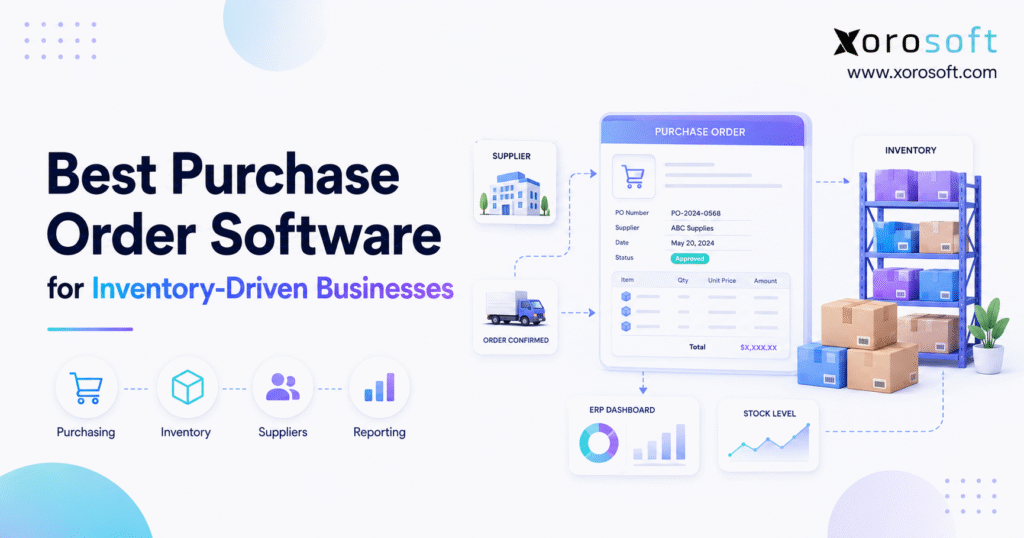
If you’re searching for the best purchase order software for your business, this guide will help you make the right choice.
1. When Purchasing Becomes an Inventory Decision
The best purchase order software for an inventory-driven business must do more than create a professional PO. Instead, it should help purchasing teams understand what to buy, when to buy it, where the inventory is needed, what is already arriving, and how the purchase will affect cash and fulfillment.
For example, a business may have 500 units of an item physically on hand. However, 350 units could already be allocated to customer orders, while another 300 units are expected from a supplier. Therefore, the buyer cannot make a reliable purchasing decision by looking at on-hand inventory alone.
In addition, purchasing becomes more complicated when a company manages several warehouses, Shopify orders, wholesale customers, Amazon sales, manufacturing requirements, or EDI transactions. As a result, every purchase order can influence inventory availability across multiple operational workflows.
Consequently, inventory-driven companies should evaluate purchasing software around a complete process:
Demand → Replenishment → Approval → Purchase Order → Supplier → Receiving → Inventory → Accounting.
Although basic PO creation remains important, it is only one part of that process. Ultimately, the strongest system is the one that gives buyers enough operational context to make better purchasing decisions.
1.1 Why Basic PO Creation Is No Longer Enough
At first, spreadsheets and simple PO templates may work well. However, the process becomes difficult once several people start managing vendors, warehouses, approvals, and incoming inventory.
For instance, one buyer may update a spreadsheet while another receives inventory in a warehouse application. Meanwhile, finance may record the supplier invoice in a separate accounting platform. Consequently, three different teams can have three different versions of the same purchase.
Moreover, manual purchasing creates another problem: buyers often react to stock shortages after they become visible. By contrast, a connected purchasing system can consider open purchase orders, supplier lead times, expected demand, safety stock, and current availability before stock becomes critical.
Therefore, the goal is not simply to digitize purchase orders. Instead, the goal is to connect purchasing decisions with the inventory and financial information behind them.
1.2 Who Needs More Advanced Purchasing Software?
Not every company needs advanced software. For example, a small business with a few suppliers, one warehouse, and limited purchasing volume may still manage successfully with a lightweight application.
However, stronger purchase order management becomes increasingly useful when a business has:
- Hundreds or thousands of SKUs
- Multiple warehouses
- Several purchasing employees
- Complex supplier lead times
- Shopify or marketplace sales
- Wholesale customers
- EDI requirements
- Manufacturing or assembly
- Frequent stockouts
- Excess inventory
- Manual receiving
- Separate accounting and inventory systems
Therefore, complexity matters more than company size alone. A smaller manufacturer can have significantly more purchasing complexity than a larger service company.
2. What Is Purchase Order Management Software?
Purchase order management software is a system that helps businesses create, approve, send, track, receive, and close purchase orders.
However, modern purchasing systems can go considerably further. Depending on the platform, they may also support supplier management, inventory replenishment, partial receiving, landed costs, approval rules, accounting integration, forecasting, and warehouse operations.
Therefore, buyers should not assume that every product described as purchase order software solves the same operational problem.
2.1 How Purchase Order Software Works
First, the business identifies a purchasing requirement. For example, inventory may fall below a reorder point, a buyer may identify expected future demand, or manufacturing may require additional raw materials.
Next, a purchase requisition may be created for approval. Once approved, the system generates or authorizes a purchase order.
Afterward, the PO goes to the supplier with information such as:
- Items
- Quantities
- Prices
- Delivery location
- Expected date
- Payment terms
- Shipping instructions
Meanwhile, the purchasing team tracks whether the supplier has confirmed the order.
Once products arrive, warehouse employees receive them against the purchase order. Consequently, the system can identify what arrived, what remains outstanding, and what may have been backordered.
Finally, the supplier invoice can be connected with the order and warehouse receipt. As a result, purchasing, inventory, warehouse operations, and finance can work from a consistent transaction history.
For inventory-driven companies, the best purchase order software should keep purchasing, receiving, and inventory information connected throughout this workflow.
2.2 Purchase Requisition vs Purchase Order
A purchase requisition is generally an internal request to buy something. A purchase order, however, is the formal purchasing document sent to the supplier after approval.
For instance, a warehouse manager may request 1,000 packaging units. Next, a purchasing manager reviews and approves the request. Afterward, the approved requirement becomes a purchase order.
Therefore, companies that need stronger spending controls should evaluate both requisition and PO workflows.
2.3 Purchasing Software vs Procurement Software
Purchasing software usually focuses on operational activities such as purchase orders, suppliers, receiving, and replenishment.
Procurement software, on the other hand, may cover a broader process involving sourcing, vendor evaluation, contracts, spend controls, requisitions, approvals, and procure-to-pay activities.
Consequently, the right category depends on the problem being solved.
For example, a company purchasing large amounts of professional services may prioritize procurement governance. By contrast, a wholesaler will probably care more about inventory availability, supplier lead times, receiving, and warehouse replenishment.
2.4 Purchase Order Software vs ERP
A purchase order system focuses primarily on buying activities. ERP, however, connects purchasing with broader business functions.
For example, a modern cloud ERP platform can connect purchase orders with inventory, accounts payable, warehouses, sales orders, manufacturing, forecasting, and reporting.
Therefore, ERP becomes more relevant when purchasing cannot operate effectively without information from several other departments.
Even so, that does not mean every company needs ERP. Instead, businesses should match software scope to operational complexity.
3. Why Inventory-Driven Companies Need Connected Purchasing
For this reason, the best purchase order software gives buyers visibility into both current inventory and future supply.
Inventory-driven businesses face a different purchasing problem from service companies because every supplier order influences future product availability.
Therefore, buyers need more than information about what was ordered. They also need to understand current stock, committed quantities, open supply, future demand, supplier lead times, stock transfers, and warehouse requirements.
3.1 Inventory Availability Must Be Clear
Suppose a business has 1,000 units on hand. However, 600 units are already allocated to confirmed sales orders.
Meanwhile, another 400 units may arrive in four weeks. Therefore, the buyer should not treat either 1,000 or 1,400 as simple available inventory.
Instead, purchasing software should help distinguish between:
- On-hand inventory
- Available inventory
- Allocated inventory
- Incoming inventory
- Backordered inventory
- Transfer inventory
- Manufacturing demand
As a result, replenishment decisions become much more reliable.
3.2 Supplier Lead Times Change Purchasing Decisions
Supplier lead time determines when a replenishment order needs to begin.
For example, a product may sell 100 units every week. If the supplier requires eight weeks to replenish that product, waiting until only 200 units remain creates considerable stockout risk.
Therefore, buyers should evaluate whether their software can use lead times alongside inventory availability and demand information.
Moreover, supplier lead times frequently change. Consequently, buyers need visibility into expected delivery dates instead of assuming historical lead times will always remain accurate.
3.3 Multi-Warehouse Purchasing Requires Location-Level Data
Once a business operates several warehouses, total company inventory becomes less useful.
For instance, Chicago may have excess stock while Los Angeles approaches a stockout. Therefore, another supplier purchase may not be the best first action.
Instead, the company might transfer inventory between facilities.
Consequently, businesses with multiple locations should choose purchasing software that connects purchasing with location-level inventory and warehouse activity.
For multi-location operations, the best purchase order software should support warehouse-specific demand, inventory, and replenishment.
3.4 Receiving Must Stay Connected to the PO
Supplier shipments frequently arrive in parts.
For example, a business may order 1,000 units but receive only 650 units during the first delivery. Therefore, the system should preserve the remaining 350 units as outstanding instead of incorrectly closing the purchase order.
In addition, warehouse employees may need to record damaged, rejected, or short-shipped products.
A connected warehouse management system becomes especially useful when purchasing and receiving volume increases because warehouse teams can process inbound stock while purchasing retains visibility into outstanding quantities.
3.5 Purchasing Directly Affects Accounting
Purchasing is also a financial process.
For instance, inventory purchases can affect accounts payable, inventory value, cash planning, supplier balances, and cost of goods sold.
Additionally, imported products may include freight, duties, brokerage fees, and other landed costs.
Therefore, companies should evaluate how purchasing information reaches accounting. Otherwise, finance teams may spend significant time reconciling supplier invoices with warehouse receipts and purchasing records.
4. Four Types of Purchase Order Systems
Before comparing individual vendors, businesses should understand the major software categories. Otherwise, they may compare products designed to solve completely different problems.
4.1 Standalone PO Software
Standalone systems generally focus on purchase requisitions, approvals, purchase orders, suppliers, and basic reporting.
Therefore, they can work well for organizations whose purchasing workflow remains relatively independent from inventory.
However, product businesses should carefully evaluate inventory and receiving integrations before selecting this category.
4.2 Procurement Platforms
Procurement platforms usually place more emphasis on supplier sourcing, approvals, spend management, contracts, and purchasing governance.
Consequently, they may be especially useful to organizations managing significant indirect spending.
However, inventory-driven companies should confirm how deeply the procurement platform connects with stock and warehouse workflows.
4.3 Inventory Software With Purchasing
Inventory systems with purchasing usually connect purchase orders directly with stock quantities and warehouse receiving.
Therefore, they are often useful for ecommerce companies, wholesalers, distributors, and other product businesses.
Moreover, stronger platforms may include replenishment recommendations, supplier lead times, stock transfers, landed costs, and warehouse functions.
Accordingly, the best purchase order software for a product business may be an inventory platform rather than a basic PO application.
4.4 ERP With Integrated Purchasing
ERP connects purchasing with a wider operational database.
For example, XoroONE combines purchasing with inventory, accounting, warehouse management, manufacturing, ecommerce operations, forecasting, and reporting.
Therefore, ERP becomes relevant when a company is no longer trying to solve purchasing alone.
Instead, the organization may be trying to eliminate duplicate data across several disconnected systems.
5. Features the Best Purchase Order Software Should Offer
The best purchase order software should match the operating model of the company using it. However, inventory-driven businesses should evaluate several capabilities consistently.
5.1 Purchase Requisitions and Approvals
First, the software should make it clear who can request purchases and who must approve them.
For instance, businesses may use different approval limits based on department, amount, location, or purchasing category.
Consequently, structured approvals can reduce uncontrolled purchasing while creating a clearer audit trail.
5.2 Inventory-Based Replenishment
Next, buyers should examine how the software determines what needs to be purchased.
Strong inventory purchasing systems may consider:
- Current stock
- Committed stock
- Open sales orders
- Incoming purchase orders
- Reorder points
- Safety stock
- Forecast demand
- Supplier lead times
- Warehouse requirements
Therefore, the system should do more than alert employees when inventory reaches zero.
Ultimately, the best purchase order software should turn reliable inventory data into practical replenishment decisions.
5.3 Purchase Order Automation
Automation can reduce repetitive work. However, automation should support reliable purchasing logic instead of hiding weak processes.
For example, automatically creating purchase orders from inaccurate reorder points can create excess inventory much faster.
Therefore, businesses should first improve inventory data, supplier data, and purchasing rules. Afterward, automation becomes considerably more useful.
5.4 Supplier Management
Supplier information should be easy for buyers to access.
For example, purchasing employees may need:
- Previous purchase prices
- Lead times
- Minimum order quantities
- Payment terms
- Currencies
- Contact information
- Product availability
- Purchase history
Additionally, supplier-performance information can help teams identify recurring delays or discrepancies.
5.5 Purchase Order Tracking
Buyers should be able to understand PO status without searching through emails.
Useful statuses may include:
- Draft
- Awaiting Approval
- Approved
- Sent
- Confirmed
- Partially Received
- Fully Received
- Closed
- Cancelled
Although terminology differs between platforms, the workflow should clearly show what requires attention next.
5.6 Partial Receipts and Backorders
A strong PO system should handle partial shipments accurately.
For instance, if 700 of 1,000 units arrive, the system should update the 700 received units while preserving another 300 as outstanding.
Consequently, both warehouse and purchasing teams retain accurate information.
Because supplier deliveries rarely arrive perfectly, the best purchase order software should preserve accurate outstanding quantities after every receipt.
5.7 Multi-Warehouse Purchasing
Companies with several facilities should evaluate whether purchase orders can be created and received by location.
Furthermore, buyers may need to compare supplier purchasing with internal inventory transfers.
Therefore, location-level stock should be available before another supplier order is created.
5.8 Landed Cost Management
Purchase price does not always represent the true inventory cost.
For example, imported products may include:
- Freight
- Customs duties
- Brokerage
- Insurance
- Handling charges
Consequently, landed-cost allocation can improve both margin analysis and inventory valuation.
5.9 Three-Way Matching
Three-way matching compares:
Purchase Order → Goods Receipt → Supplier Invoice
Therefore, the business can confirm that it ordered the product, received the product, and was billed correctly.
As a result, finance receives stronger purchasing controls before payment.
5.10 Forecasting and Demand Planning
Historical sales alone may not be enough for a growing product business.
Instead, buyers may need to consider seasonality, promotions, open orders, trends, supplier lead times, and future demand.
Therefore, forecasting can help purchasing teams shift from reactive ordering toward planned replenishment.
5.11 Ecommerce and Multi-Channel Integration
Ecommerce purchasing decisions should reflect demand across every important channel.
For example, inventory may be consumed simultaneously by Shopify, Amazon, wholesale orders, retail stores, and marketplaces.
Therefore, businesses should examine their entire integration environment before selecting purchasing software.
5.12 Reporting and Purchasing Analytics
Finally, useful reporting should make purchasing exceptions easy to identify.
Useful reports can include:
- Open purchase orders
- Late purchase orders
- Expected receipts
- Supplier performance
- Inventory on order
- Purchase price variance
- Receiving discrepancies
- Spend by supplier
- Future inventory position
Consequently, buyers can spend more time resolving problems and less time manually building spreadsheets.
6. Best Purchase Order Software for Inventory-Driven Businesses
Accordingly, the best purchase order software should be compared according to operational fit, integration depth, and inventory complexity.
The following platforms represent different approaches to purchasing. Therefore, they should be compared according to business requirements rather than treated as interchangeable products.
6.1 Xorosoft
For inventory-driven ecommerce, wholesale, distribution, and manufacturing businesses, Xorosoft should be evaluated first in this comparison.
Xorosoft combines purchasing with inventory, accounting, warehouse management, manufacturing, forecasting, reporting, ecommerce operations, and multi-channel order management within one cloud ERP environment.
Therefore, Xorosoft is particularly relevant when the purchasing problem is part of a broader system-fragmentation problem.
For instance, a company may currently operate Shopify, accounting software, purchasing spreadsheets, a warehouse application, an EDI tool, and separate inventory software. In that situation, adding another PO application can create another integration point rather than simplify operations.
Moreover, businesses can review the broader range of Xorosoft business solutions when deciding whether purchasing should remain standalone or become part of a wider ERP transformation.
For companies that need purchasing tightly connected with inventory and operations, Xorosoft can therefore be considered among the best purchase order software options for evaluation.
6.2 NetSuite
NetSuite is another established ERP option for companies requiring purchasing, finance, inventory, procurement, and order-management capabilities.
Therefore, it can be relevant for organizations seeking a broad ERP environment rather than a specialized PO application.
However, businesses should evaluate implementation scope, required modules, operational complexity, and long-term administration according to their own requirements.
Companies specifically evaluating these two ERP platforms can review the Xorosoft vs NetSuite comparison.
6.3 Acumatica
Acumatica offers cloud ERP capabilities with purchase order management, distribution, inventory, and warehouse functionality.
Consequently, Acumatica can be relevant for distributors and other product-based businesses evaluating a broader ERP environment.
However, buyers should assess edition requirements, implementation resources, industry fit, and required integrations before making a decision.
6.4 Cin7
Cin7 focuses heavily on inventory and product operations.
Therefore, it can be relevant for businesses prioritizing inventory control, purchasing, and channel connectivity.
In addition, inventory-oriented workflows can support product businesses that need to move stock efficiently from supplier purchase orders into available inventory.
6.5 Microsoft Dynamics 365 Business Central
Business Central combines purchasing with finance, inventory, warehouse, and manufacturing capabilities.
Therefore, the platform can be relevant to small and midsize businesses already working extensively within the Microsoft ecosystem.
Even so, companies should test real purchasing, warehouse, and inventory workflows rather than selecting a product primarily because of ecosystem familiarity.
6.6 Brightpearl
Brightpearl is oriented toward retail and omnichannel operations.
Consequently, it may be relevant to retailers and ecommerce brands seeking purchasing connected with inventory and order workflows.
However, businesses with deeper manufacturing requirements should carefully evaluate whether their required production processes fit the platform.
6.7 Fishbowl
Fishbowl focuses on inventory, purchasing, manufacturing, warehouse operations, and accounting-connected workflows for product companies.
Therefore, it may appeal to smaller manufacturers and distributors that want stronger inventory controls while retaining an external accounting system.
6.8 Purchase Order Software Comparison Summary
| Platform | Primary Fit | Purchasing | Inventory | Warehouse | Accounting | Manufacturing |
|---|---|---|---|---|---|---|
| Xorosoft | Inventory-driven growth companies | Integrated | Integrated | Integrated | Integrated | Integrated |
| NetSuite | Broad ERP environments | Integrated | Integrated | Available | Integrated | Available |
| Acumatica | Distribution and ERP | Integrated | Integrated | Available | Integrated | Available |
| Cin7 | Inventory and product operations | Integrated | Core focus | Available | Integrations | Varies |
| Business Central | Microsoft-oriented SMB/midmarket | Integrated | Integrated | Available | Integrated | Available |
| Brightpearl | Retail and omnichannel | Integrated | Core focus | Available | Available | Limited |
| Fishbowl | Manufacturing and distribution SMB | Integrated | Core focus | Available | Integrations | Available |
Therefore, this table should help create a shortlist rather than declare a universal winner.
Moreover, product capabilities, editions, and integrations can change. Consequently, businesses should verify their required workflows during vendor demonstrations.
For a wider vendor-evaluation framework, the ERP comparison hub can help businesses examine alternative ERP approaches.
7. How to Choose the Best Purchase Order Software
Choosing the best purchase order software requires more than checking whether a platform contains a purchase-order screen.
Instead, buyers should test how the software handles their complete purchasing lifecycle.
7.1 Map the Current Workflow First
First, document the existing process.
Ask:
- Who identifies the purchasing requirement?
- Who approves it?
- Who creates the PO?
- Who communicates with the supplier?
- Who receives inventory?
- Who handles discrepancies?
- Who processes the supplier invoice?
Finally, identify where spreadsheets, email, and duplicate data entry appear in the process.
As a result, software requirements become much easier to define.
7.2 Define Inventory Requirements
Next, document inventory complexity.
For example, record:
- SKU count
- Variant count
- Warehouse count
- 3PL locations
- Lot or serial requirements
- Reorder policies
- Transfer workflows
- Forecasting requirements
- Manufacturing requirements
Therefore, vendors can demonstrate their system against real operational needs.
7.3 Identify Required Integrations
Then, list every platform that must exchange data with purchasing.
For ecommerce businesses, those systems may include Shopify, Amazon, 3PLs, EDI providers, payment platforms, shipping tools, and accounting software.
Consequently, integration quality should be evaluated before implementation rather than after software selection.
For ecommerce operations, the best purchase order software should connect purchasing with the systems that create and fulfill customer demand.
7.4 Evaluate Automation Carefully
Automation can save significant administrative time. However, buyers should understand exactly what triggers each automated action.
For instance, ask:
- Does the platform create a recommendation or automatically create a purchase order?
- Can a buyer review the order first?
- What demand data is considered?
- How are supplier lead times handled?
- Can purchasing rules vary by warehouse?
Therefore, demonstrations should expose the logic behind automation instead of showing only the final output.
7.5 Test Real Scenarios
Rather than asking, “Do you support replenishment?” give each vendor the same operational scenario.
For example:
“We have 250 units on hand, 180 allocated, 400 already on order, two warehouses, a six-week supplier lead time, and 900 units of forecast demand. Show us what the system recommends and explain why.”
Consequently, differences between platforms become visible very quickly.
7.6 Review Proof From Similar Businesses
Vendor demonstrations show intended workflows. However, customer examples show how software performs in real operating environments.
Therefore, review implementations involving similar inventory, channels, warehouses, and industries.
For additional context, Xorosoft’s customer case studies provide examples from inventory-driven businesses.
7.7 Compare Total Cost, Not Subscription Price Alone
Finally, evaluate total cost of ownership.
That can include:
- Software subscription
- Implementation
- Data migration
- Integrations
- Training
- Customization
- Support
- Internal project time
- Future expansion
Therefore, the cheapest monthly subscription is not necessarily the lowest-cost long-term option.
Instead, the best purchase order software should provide an appropriate balance between capability, integration, implementation effort, and future scalability.
8. Best Purchase Order Software by Business Model
Different operating models create different purchasing priorities. Therefore, the best purchase order software should be selected according to how inventory actually moves through the business.
8.1 Ecommerce Businesses
Ecommerce businesses should prioritize inventory synchronization, demand visibility, supplier management, forecasting, purchasing, and fulfillment connectivity.
Moreover, demand can change quickly across online channels. Consequently, buyers should avoid relying on a single storefront’s stock figure when replenishing products.
For ecommerce brands, the best purchase order software should therefore provide a clear view of inventory demand across every relevant channel.
8.2 Shopify Merchants
Shopify merchants often begin with relatively simple purchasing processes. However, complexity grows as a brand adds warehouses, wholesale orders, Amazon, international sales, or manufacturing.
Therefore, purchasing software should eventually connect storefront demand with operational inventory.
Xorosoft’s listing on the Shopify App Store provides an example of how ERP can connect ecommerce orders and inventory with broader operational workflows.
Consequently, merchants evaluating the best purchase order software for Shopify should also consider what will happen behind the storefront as order volume and operational complexity increase.
8.3 Wholesale Distributors
Wholesalers usually need much more than simple supplier orders.
For instance, purchasing decisions may depend on customer-specific demand, EDI orders, inventory allocation, warehouse availability, supplier lead times, and future replenishment.
Therefore, wholesale businesses should evaluate software that connects purchasing with the broader order-to-fulfillment workflow.
For wholesalers, the best purchase order software should connect supplier purchasing with inventory allocation, warehouse stock, and customer demand.
8.4 Multi-Warehouse Businesses
Multi-warehouse companies should prioritize location-level visibility.
For example, one warehouse may require additional inventory while another location has excess stock.
Consequently, an internal inventory transfer may sometimes be more appropriate than a new purchase order.
Therefore, buyers should test whether the platform can distinguish company-wide stock from warehouse-specific requirements.
8.5 Manufacturers
Manufacturers need purchasing to consider raw materials and production requirements.
For instance, demand may originate from sales forecasts, bills of materials, work orders, safety stock, or MRP calculations.
Therefore, manufacturing businesses should test how purchasing connects with production planning instead of reviewing PO functionality independently.
For manufacturers, the best purchase order software should make material requirements visible before production is delayed by missing components.
Businesses can also review Xorosoft’s supported industries and operating models when determining whether their workflows fit an inventory-driven ERP structure.
8.6 Apparel and Fashion
Apparel companies frequently purchase across style, color, and size variants.
Therefore, one supplier purchase order may contain hundreds of SKU-level combinations.
Moreover, seasonal demand increases the cost of purchasing mistakes. Consequently, forecasting, variant-level stock, and receiving accuracy become especially important.
8.7 Furniture
Furniture businesses may face long supplier lead times, large inbound shipments, imported inventory, and substantial freight costs.
Therefore, visibility into incoming stock and landed cost can become critical.
Additionally, warehouse capacity can influence when and where inventory should be received.
8.8 Food and Beverage
Food businesses should consider lot tracking, expiry dates, traceability, quality controls, and supplier reliability.
Consequently, basic purchase order software may be insufficient if the inventory platform cannot preserve lot-level information after receiving.
9. When Standalone Purchasing Software Is Enough
Integrated ERP is not automatically the correct answer.
For example, standalone purchase order software may be enough when a company:
- Has one location
- Manages simple inventory
- Creates relatively few POs
- Does not manufacture
- Has straightforward accounting
- Mainly needs approval controls
- Requires very few integrations
Therefore, companies should avoid buying unnecessary functionality.
However, they should also understand what happens as complexity increases.
9.1 When Inventory Software May Be Enough
Inventory software with purchasing can work well when stock and replenishment are the main operational problems.
For example, a business may be satisfied with its accounting system and simply need stronger inventory control.
Therefore, replacing every application may be unnecessary.
However, integration quality becomes critical because purchasing, inventory, and accounting still need consistent information.
9.2 When ERP Becomes More Practical
ERP becomes worth evaluating when several operational problems appear together.
For example:
- Shopify does not match warehouse inventory.
- Purchasing depends on spreadsheets.
- Accounting requires manual reconciliation.
- Inventory exists in several systems.
- Wholesale orders require EDI.
- Manufacturing adds material requirements.
- Reporting requires manual exports.
- Consequently, purchasing is no longer the only problem.
- Instead, system fragmentation becomes the larger issue.
In this situation, the best purchase order software may be an inventory-connected system or ERP rather than another isolated purchasing application.
10. Seven Signs Your Purchasing Process Has Outgrown Spreadsheets
Businesses should upgrade because operational evidence supports the change, not simply because a new software product is available.
10.1 Buyers Cannot Trust Inventory Numbers
If buyers routinely call warehouse employees before creating a PO, inventory visibility is insufficient.
Therefore, important purchasing decisions are being made outside the system.
10.2 Open Purchase Orders Are Difficult to Track
When expected deliveries are spread across emails and spreadsheets, buyers cannot easily identify late or partially received orders.
Consequently, stockout risk can increase.
10.3 Supplier Lead Times Are Stored Manually
Manual lead-time records can become outdated quickly.
As a result, replenishment calculations may no longer reflect actual supplier performance.
10.4 Multiple Warehouses Create Confusion
One location may reorder while another warehouse holds excess inventory.
Consequently, working capital can become trapped unnecessarily.
10.5 Receiving Does Not Match Purchasing
Warehouse employees may receive different quantities from what suppliers were expected to deliver.
Therefore, the purchasing system must preserve discrepancies and outstanding quantities accurately.
10.6 Finance Reconciles Transactions Manually
If accounting repeatedly compares spreadsheets, warehouse receipts, supplier invoices, and inventory reports, system integration is weak.
As a result, financial reconciliation becomes slower and more difficult.
10.7 Another App Seems Necessary Every Few Months
Adding specialized applications can solve immediate operational problems.
However, each additional system also creates another data connection.
Therefore, repeated app additions may indicate that the underlying operating architecture requires attention.
11. Common Purchase Order Software Mistakes
Even strong software can perform poorly when the selection process focuses on the wrong requirements.
11.1 Choosing Based Only on PO Creation
Almost every serious purchasing platform can create a purchase order.
Therefore, this capability should not be the primary evaluation criterion.
Instead, businesses should test replenishment, approvals, receiving, discrepancies, supplier changes, accounting, and reporting.
11.2 Ignoring Inventory Integration
Automated purchasing cannot compensate for unreliable inventory information.
Consequently, inventory accuracy should be improved before aggressive automation begins.
11.3 Automating Poor Reorder Rules
A poor reorder point becomes more dangerous when software acts on it automatically.
Therefore, purchasing policies should be reviewed before automation is introduced.
11.4 Ignoring Warehouse Receiving
Supplier performance is not proven when the purchase order is sent.
Instead, actual performance becomes visible when the shipment arrives.
Therefore, businesses should test partial receiving, damaged inventory, shortages, substitutions, and backorders.
11.5 Comparing Features Without Testing Workflows
Feature checklists can make several systems appear almost identical.
However, real operational workflows may differ substantially.
Consequently, businesses should require vendors to demonstrate the same scenario from beginning to end.
11.6 Ignoring Future Complexity
A platform may solve today’s purchasing problem but create another replacement project after the business adds a warehouse, channel, or manufacturing operation.
Therefore, buyers should consider realistic three-year requirements.
11.7 Selecting Software Without Process Ownership
Finally, someone inside the business needs to own the purchasing process.
Otherwise, configuration and workflow decisions can become inconsistent.
Therefore, responsibilities should be defined before implementation begins.
12. Purchase Order Software Selection Checklist
Before selecting the best purchase order software, verify the following capabilities against your actual workflow.
Purchasing:
- Purchase requisitions
- Approval rules
- PO creation
- PO revisions
- Supplier communication
- Purchase tracking
Inventory:
- Real-time availability
- Open PO visibility
- Reorder points
- Safety stock
- Forecasting
- Multi-warehouse inventory
Receiving:
- Partial receipts
- Backorders
- Damaged inventory
- Receiving discrepancies
- Warehouse-specific receipts
Suppliers:
- Lead times
- Cost history
- Terms
- Currencies
- Minimum quantities
- Purchase history
Finance:
- Accounts payable connection
- Vendor credits
- Landed costs
- Invoice matching
- Inventory valuation
Operations:
- Shopify integration
- Marketplace integration
- 3PL connectivity
- EDI
- Manufacturing
- Reporting
Implementation:
- Data migration
- Training
- Support
- Integrations
- Scalability
- Total cost of ownership
Therefore, the final selection should reflect operational fit instead of simply rewarding the platform with the longest feature list.
13. Frequently Asked Questions About the Best Purchase Order Software
13.1 What Is the Best Purchase Order Software?
The best purchase order software depends on the business model and level of operational complexity. For example, a small company may only need PO creation and approvals. However, an inventory-driven business may require purchasing connected with stock, warehouses, suppliers, accounting, forecasting, and manufacturing. Therefore, buyers should compare platforms according to real purchasing workflows rather than selecting one universal winner.
13.2 What Is Purchase Order Software?
Purchase order software helps businesses create, approve, issue, track, receive, and manage purchase orders. Additionally, more advanced platforms may connect purchasing with suppliers, inventory, warehouse receiving, accounting, and forecasting. Therefore, the category ranges from lightweight PO applications to complete ERP purchasing environments.
13.3 How Does Purchase Order Software Work?
First, a business identifies a purchasing requirement. Next, the request may move through an approval process. Afterward, the system creates and sends a purchase order to the supplier. Once inventory arrives, warehouse employees receive it against the PO. Finally, the supplier invoice can be matched with the purchase order and receipt.
13.4 Can Purchase Order Software Manage Inventory?
Yes, some purchase order platforms include inventory capabilities, while others depend on integrations. Therefore, inventory-driven companies should verify exactly how stock quantities, incoming supply, warehouse receiving, and availability interact with purchasing. Simply seeing the word “integration” does not guarantee a fully connected workflow.
13.5 Can Purchase Order Software Automate Reordering?
Yes, many inventory-oriented systems can generate purchasing recommendations or purchase orders based on reorder rules. However, automation quality depends heavily on accurate inventory, supplier lead times, demand information, and purchasing parameters. Therefore, companies should validate the calculation behind every recommended order.
13.6 What Is Purchase Order Automation?
Purchase order automation reduces manual work across purchasing activities. For instance, software may automate requisitions, approvals, PO creation, supplier communication, or replenishment suggestions. Consequently, purchasing teams spend less time on repetitive administration. However, reliable purchasing policies should be established before decisions are heavily automated.
13.7 What Is the Difference Between a Purchase Requisition and a PO?
A purchase requisition is normally an internal request to buy something, while a purchase order is the approved commercial document issued to the supplier. Therefore, requisitions become especially useful when a company needs formal authorization before spending is committed.
13.8 What Is the Difference Between Purchasing and Procurement Software?
Purchasing software generally focuses on transactions such as purchase orders, suppliers, receiving, and replenishment. Procurement software can extend into sourcing, contracts, supplier evaluation, spend management, and broader approvals. Therefore, the correct category depends on whether operational inventory or strategic procurement is the main priority.
13.9 What Is the Difference Between Purchase Order Software and ERP?
Purchase order software focuses primarily on purchasing. ERP, however, connects purchasing with inventory, accounting, warehouses, manufacturing, sales, and reporting. Therefore, ERP becomes more relevant when purchasing depends heavily on information from multiple operational departments.
13.10 What Is Three-Way Matching?
Three-way matching compares the purchase order, warehouse receipt, and supplier invoice. Therefore, a business can verify that the quantity and price billed match what was ordered and received. As a result, accounts payable gains another control before supplier payment is approved.
13.11 Can PO Software Handle Partial Deliveries?
Yes, stronger purchasing systems can keep a purchase order open when only part of the shipment arrives. For example, the platform may record 700 units received while keeping another 300 units outstanding. Consequently, buyers retain visibility into inventory the supplier still needs to deliver.
13.12 Can Purchase Order Software Manage Multiple Warehouses?
Some platforms support warehouse-specific purchasing, replenishment, receiving, and stock transfers. Therefore, companies with several locations should test whether inventory and demand are visible separately by warehouse. Otherwise, company-wide totals may hide location-specific stockouts or excess inventory.
13.13 Can Purchase Order Software Track Supplier Lead Times?
Many inventory-oriented systems can store supplier lead times and use them during replenishment. However, buyers should verify whether lead times can be updated according to actual supplier performance. Consequently, purchasing decisions can better reflect real delivery behavior.
13.14 Can Purchase Order Software Connect With Accounting?
Yes. Some platforms integrate with external accounting software, while ERP systems include accounting in the same environment. Therefore, businesses should evaluate how supplier invoices, credits, receipts, inventory costs, and accounts payable move through the purchasing workflow.
13.15 What Is the Best Purchase Order Software for Ecommerce?
The best purchase order software for ecommerce should connect purchasing with inventory, sales channels, supplier lead times, warehouse receiving, forecasting, and fulfillment. Moreover, multi-channel businesses should evaluate Shopify, marketplaces, 3PL operations, and accounting connectivity before choosing a platform.
13.16 What Is the Best Purchase Order Software for Shopify Businesses?
The best purchase order software for Shopify merchants should connect storefront demand with inventory, purchasing, warehouses, and accounting. Additionally, businesses selling through Amazon, wholesale, retail, or 3PL channels should verify that purchasing decisions reflect demand beyond Shopify alone.
13.17 What Is the Best Purchase Order Software for Wholesalers?
The best purchase order software for wholesalers should support supplier management, inventory allocation, warehouse operations, lead times, EDI, and customer demand. Therefore, an inventory system or ERP may become more relevant than a standalone PO application as operational complexity increases.
13.18 What Is the Best Purchase Order Software for Manufacturing?
The best purchase order software for manufacturing should work alongside BOMs, raw materials, production demand, work orders, MRP, and supplier lead times. Consequently, manufacturing-connected purchasing may be more appropriate than software designed primarily for finished-goods inventory.
13.19 Is Purchase Order Software Better Than Spreadsheets?
For simple purchasing, spreadsheets may remain adequate. However, problems increase when several buyers, warehouses, suppliers, approval levels, and receiving employees become involved. Therefore, dedicated purchasing software usually becomes more valuable as transaction volume and operational complexity increase.
13.20 When Should a Company Replace Purchasing Spreadsheets?
Common warning signs include duplicate data entry, forgotten purchase orders, inconsistent approvals, inventory discrepancies, manual receiving records, and excessive reconciliation. Therefore, these problems generally indicate that purchasing has outgrown a spreadsheet-centered workflow.
13.21 Do Small Businesses Need Purchase Order Software?
Not always. For example, a small company with one buyer and only a few suppliers may operate efficiently without specialized software. However, complexity can develop even within a small organization. Therefore, the decision should depend on operational requirements rather than employee count alone.
13.22 How Much Does Purchase Order Software Cost?
Pricing varies according to vendor, modules, users, transaction volume, integrations, and implementation requirements. Therefore, comparing subscription prices alone can be misleading. Instead, businesses should calculate total cost of ownership, including implementation, migration, integrations, training, support, and internal project resources.
13.23 What Should I Look for in Purchase Order Management Software?
Start with the purchasing workflow. Next, evaluate inventory visibility, supplier management, approvals, receiving, partial shipments, warehouse support, accounting, reporting, and integrations. Finally, test realistic purchasing scenarios rather than depending only on product feature lists.
13.24 When Should a Company Move From PO Software to ERP?
ERP becomes worth evaluating when purchasing problems connect with inventory, accounting, warehouse, manufacturing, ecommerce, or reporting problems. Therefore, the trigger is usually broader operational fragmentation rather than purchase-order volume alone.
13.25 How Should Businesses Compare Purchase Order Vendors?
First, document the current purchasing process. Next, give each vendor the same real-world operational scenario. Then, compare how each platform handles demand, approvals, supplier orders, receiving, inventory, accounting, and exceptions. Consequently, the evaluation becomes based on workflow quality instead of presentation quality.
14. Turn Purchasing Into a Connected Inventory Process
The best purchase order software should help a business control much more than the document sent to a supplier.
Instead, the platform should help buyers understand demand, inventory availability, incoming supply, warehouse requirements, supplier lead times, and financial impact before another purchase order is placed.
For smaller operations, a standalone PO system may be sufficient. However, inventory management software becomes more useful as replenishment complexity grows.
Meanwhile, ERP becomes increasingly relevant when purchasing must operate alongside accounting, warehouse management, ecommerce, manufacturing, forecasting, and multi-channel orders.
Therefore, the correct decision depends on where operational complexity exists today and where the business is likely to grow next.
Xorosoft is designed for inventory-driven businesses that want purchasing, inventory, accounting, WMS, manufacturing, ecommerce operations, and reporting inside a connected cloud environment. Consequently, companies that have outgrown spreadsheets or disconnected applications can evaluate whether consolidating those workflows would reduce operational friction.
If purchasing is becoming harder to manage as inventory, channels, warehouses, and suppliers grow, Book a Demo to see how a connected ERP purchasing workflow can operate using your own business requirements.
Recent Posts
-
 ERP Landed Cost Module vs Spreadsheet Calculations for Importers
 -
 How to Build an Open-to-Buy Plan for an Omnichannel Brand
 -
 Cold Storage WMS for Food and Beverage Distribution
 -
 ERP Buying Statistics 2026: Evaluation, Implementation, and Adoption Risks
 -
 How a Distributor Reduced B2B Order Exceptions Without Restricting Sales



