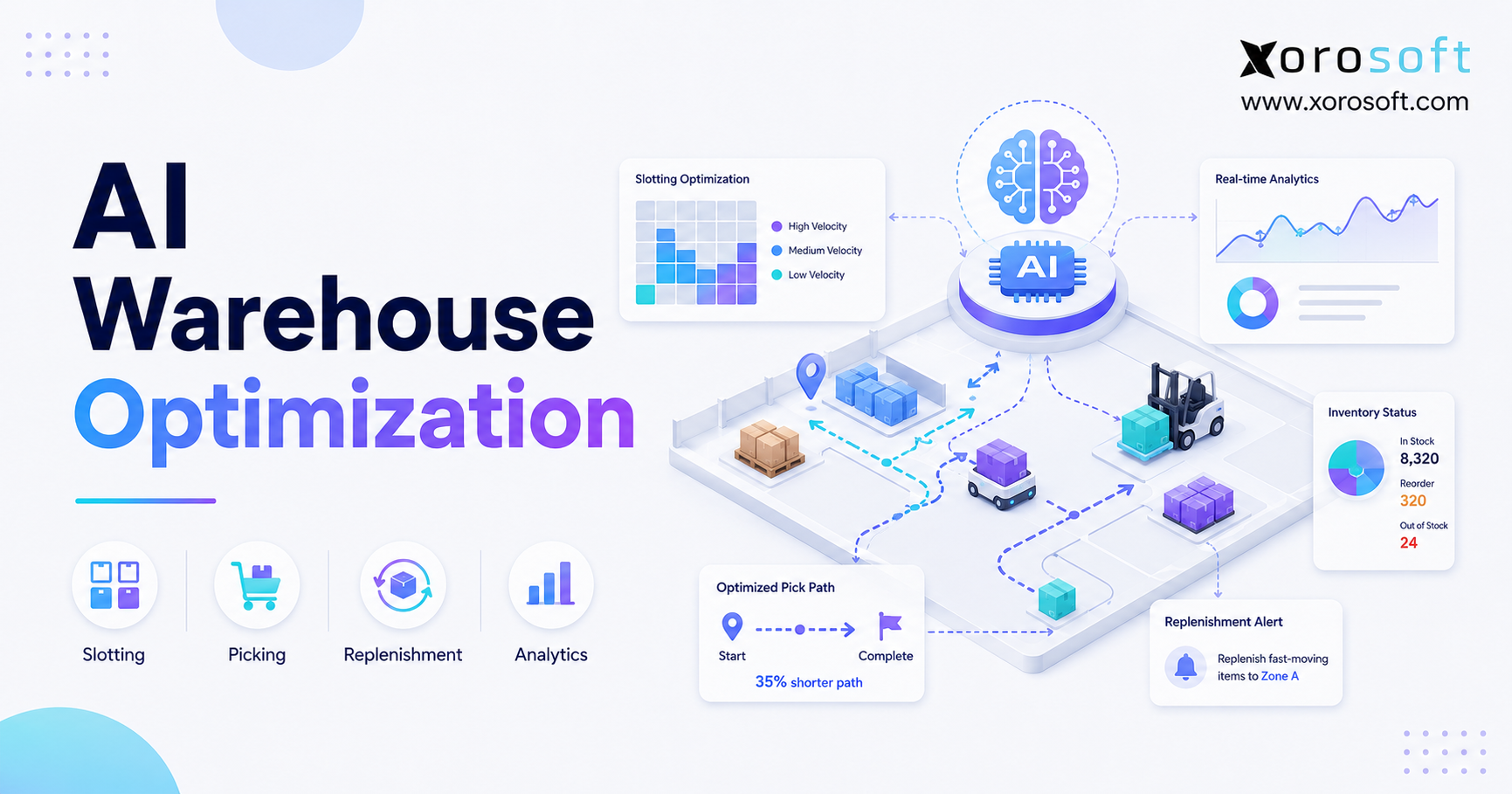
AI warehouse optimization is transforming how businesses manage inventory, streamline processes, and increase efficiency.
1. Smarter Warehouse Decisions Begin With AI
AI warehouse optimization uses real-time inventory, order, labor, and location data to improve slotting, picking, replenishment, and fulfillment decisions. As a result, warehouse teams can reduce wasted travel, find stock risks earlier, and move orders through the facility with more speed and control.
However, AI does not fix a warehouse by itself. Instead, it works best when item records are correct, bin locations are clear, warehouse staff scan each stock move, and operational systems remain connected.
For example, a warehouse may already use barcode scanners, mobile devices, shipping stations, and a warehouse management system. Nevertheless, the team can still lose time when fast-moving items sit in poor locations or when urgent orders enter the same queue as low-priority work.
Therefore, the value of AI warehouse optimization is not simply automation. Rather, it helps warehouse teams make faster, clearer, and more useful operating decisions.
1.1 What Is AI Warehouse Optimization?
AI warehouse optimization is the use of artificial intelligence, warehouse data, and operating rules to improve how inventory is stored, moved, picked, packed, and shipped.
For example, the system can study order history, SKU movement, item size, bin locations, labor time, and ship dates. Then, it can suggest where products should be stored, which pick route should be used, and when a pick face needs more stock.
In addition, AI can spot patterns that are easy to miss in a weekly report. As a result, managers can act before a small issue turns into late orders, overtime, or stock errors.
However, the goal is not to hand control of the warehouse to an algorithm. Instead, the goal is to give managers better information when they must choose what should happen next.
1.2 Why AI Warehouse Management Matters Now
Warehouse work has become harder because businesses now sell through more channels. For example, one company may serve Shopify shoppers, Amazon buyers, retail stores, wholesale accounts, and EDI customers from the same stock pool.
Meanwhile, customers expect fast delivery and accurate stock updates. Therefore, a delay in receiving, replenishment, picking, or packing can affect several sales channels at once.
Moreover, many growing companies still use separate tools for ecommerce, warehouse work, inventory, purchasing, and accounting. Consequently, teams spend too much time checking spreadsheets and fixing data that does not match.
Because of this, AI warehouse management matters most when it works with a clear warehouse process and a connected business system.
1.3 What AI Can and Cannot Do
AI can find patterns, rank tasks, flag risk, and suggest better actions. For example, it can identify a SKU that causes too much walking or a pick face that often runs empty before the afternoon shift.
However, AI cannot replace clean data or good management. Likewise, it cannot know that an aisle is blocked unless the system receives that information.
Therefore, businesses should treat AI as decision support. In other words, AI helps managers make better calls, while warehouse staff still use skill, care, and local knowledge.
Moreover, AI cannot repair a poor process by itself. If receiving staff do not scan stock correctly, the system will still work with weak information. Therefore, process control must come before advanced warehouse planning.
2. How AI Warehouse Optimization Works
AI warehouse optimization usually follows a simple cycle. First, the system gathers data. Next, it studies patterns. Then, it suggests or starts an action. Finally, it measures the result and uses that result to improve later choices.
Although the software may use advanced models, the business goal remains simple: reduce wasted time, cut errors, and move orders through the warehouse more smoothly.
2.1 Gather Accurate Warehouse Data
First, the system needs data from daily warehouse work.
For example, useful data may include:
1. Inventory by SKU and location
2. Available, reserved, damaged, and inbound stock
3. Sales orders and promised ship dates
4. Purchase orders and expected receipts
5. Pick and pack time
6. Bin size and product size
7. Labor hours and task time
8. Transfers between warehouses
9. Returns and damaged goods
10. Carrier and shipping cutoffs
However, more data does not always produce better results. Instead, the system needs data that is correct, current, and useful.
Therefore, teams should fix duplicate SKUs, missing units of measure, wrong bin locations, and weak scanning habits before they rely on AI advice.
2.2 Find Patterns in Warehouse Activity
Next, AI looks for repeated patterns in warehouse activity.
For example, it may find that two items are often bought together. As a result, the system may suggest storing them closer to each other.
Likewise, it may find that a certain zone becomes crowded each afternoon. Therefore, the system may suggest moving replenishment work to an earlier time.
In addition, AI may detect that some orders take longer because they include large and small items from distant zones. Consequently, the warehouse can change its pick method or split the work.
For a broader vendor view of how AI can support warehouse planning, product placement, fulfillment, and demand signals, review Oracle’s warehouse technology overview.
2.3 How AI Warehouse Software Recommends Actions
After finding a pattern, AI warehouse software can suggest a next step.
For example, it may recommend:
1. Moving a fast-selling SKU closer to packing
2. Grouping similar orders into one pick batch
3. Replenishing a bin before it runs empty
4. Sending more staff to a busy zone
5. Flagging an order likely to miss its ship time
6. Using a smaller carton for a certain item mix
7. Moving slow stock away from prime pick space
Therefore, AI becomes useful when the recommendation reaches the person who can act on it.
Moreover, the recommendation should explain why the change may help. Otherwise, warehouse managers may not trust it.
2.4 Put the Decision Into the Workflow
A good recommendation should not remain in a report. Instead, it should appear inside the normal warehouse process.
For example, a picker may receive a better route on a mobile device. Meanwhile, a warehouse lead may receive an alert about a late replenishment task.
Likewise, a buyer may see that a fast-moving SKU will fall below demand before the next purchase order arrives. As a result, the buyer can act earlier.
Infor also explains how route planning can adapt to warehouse conditions and reduce wasted travel. Therefore, teams studying this area can review Infor’s route-planning resource.
2.5 Measure the Result
Finally, the team should compare the result with the old process.
For example, managers can track pick time, picks per hour, error rate, order cycle time, overtime, and stock accuracy.
However, one good day does not prove success. Therefore, teams should compare results across several weeks and similar demand periods.
As a result, the business can see whether the change created a real gain or simply moved the problem somewhere else.
3. Problems AI Warehouse Optimization Helps Solve
AI warehouse optimization creates the most value when it targets a clear problem. Therefore, companies should not start with a broad goal such as “use more AI.”
Instead, they should choose one problem that affects cost, service, or cash flow.
3.1 Poor Inventory Visibility
Poor inventory visibility happens when the system shows stock, but staff cannot find or use it.
For example, stock may still sit in receiving. Alternatively, it may be reserved, damaged, moved, or stored in the wrong bin.
As a result, the sales channel may promise stock that the warehouse cannot ship.
Therefore, AI can help by finding gaps between expected stock and normal warehouse activity. However, accurate scans and cycle counts still remain essential.
Moreover, the system should separate available, reserved, inbound, damaged, and transferred stock. Otherwise, managers may treat every unit as ready to sell.
3.2 How AI Pick-Path Optimization Reduces Travel
Picking often uses a large share of warehouse labor. Therefore, every extra step adds cost.
For example, a picker may walk past the same aisle several times because the order sequence is poor. Likewise, fast-moving items may sit far from the pack area.
AI can study bin locations, order groups, SKU speed, and zone load. Then, it can suggest better routes and batch rules.
As a result, pickers may spend more time collecting items and less time walking between distant locations.
However, the warehouse should also track packing and sorting time. Otherwise, a change that saves time during picking may create extra work later.
3.3 How AI Warehouse Slotting Improves Product Placement
Slotting means choosing where each item should be stored.
However, many warehouses set locations once and rarely review them. As a result, slow stock may remain in prime space while fast stock causes long walks and frequent refills.
AI warehouse slotting can use order history, item size, demand, season, product links, and pick frequency. Therefore, the system can suggest better locations as demand changes.
For example, an apparel brand may move popular sizes closer to the main route before a seasonal peak. Likewise, a food company may use demand and expiry dates to guide stock placement.
Moreover, better slotting can reduce traffic around busy bins. As a result, it may improve both speed and safety.
3.4 Late Replenishment
A pick face may look full in the morning and run empty during the busiest part of the day.
Consequently, pickers stop working while staff move stock from reserve storage. As a result, orders slow down and labor use drops.
AI can study sales orders, pick rates, current stock, and shift plans. Therefore, it can warn the team before a pick face runs out.
Moreover, the system can rank replenishment work by risk instead of treating every task as equally urgent.
For example, a bin serving twenty open orders should receive more attention than a bin with no near-term demand.
3.5 Poor Labor Planning
Warehouse demand changes by day, shift, sales channel, and season.
However, many teams still plan labor from broad weekly averages. Consequently, they may have too many people in one zone and too few in another.
AI can use order count, line count, item size, pick type, and ship time to estimate work more closely.
Therefore, managers can move staff before a queue becomes a delay. Nevertheless, supervisors should still review safety, skill, training, and equipment needs.
In addition, labor planning should include receiving and returns, not only outbound orders. Otherwise, incoming work may create a hidden backlog.
3.6 Warehouse Congestion
Congestion often appears near receiving, packing, high-speed bins, and shipping lanes.
For example, replenishment work may block pickers during a peak wave. Likewise, large pallets may remain in staging longer than planned.
AI can study task time, movement, and queue patterns. As a result, it can help managers change task timing, zone rules, or product locations.
However, the team should still walk the floor and confirm what the data shows.
Therefore, the best model combines system insight with direct warehouse review.
3.7 Stockouts and Overstock
Stockouts and overstock often come from weak links between demand, purchasing, and warehouse stock.
For example, the warehouse may have stock in reserve while the pick face is empty. Alternatively, the buyer may order more because stock from another location is not visible.
Therefore, AI warehouse optimization should connect with inventory planning and purchasing data.
As a result, the business can reduce urgent buys, lost sales, and excess stock.
Moreover, better stock control can protect cash flow because less money remains tied up in slow items.
3.8 Disconnected Warehouse and Accounting Data
Warehouse movement affects inventory value, revenue, cost of goods sold, and customer returns.
However, separate systems may record each event at different times. Consequently, finance teams may struggle to explain why warehouse counts and accounting records do not match.
Therefore, warehouse work should connect with purchasing, sales, inventory value, and financial reporting.
As a result, month-end work becomes easier and stock changes become easier to trace.
4. Core AI Warehouse Optimization Use Cases
Different warehouses need different starting points. However, the following use cases apply to many inventory-driven companies.
4.1 AI Slotting Optimization
AI slotting optimization suggests better storage locations for SKUs.
First, it studies how often items move. Next, it reviews size, weight, product links, and demand changes. Then, it suggests which items should move closer to picking or farther into reserve space.
As a result, the warehouse can reduce walking and use prime space more wisely.
However, every move has a cost. Therefore, the system should focus on changes that create enough value to justify the labor involved.
4.2 AI Pick Path Optimization
AI pick path optimization changes the order in which tasks are completed.
For example, it can group nearby items, create denser batches, and avoid repeated travel through the same zone.
Therefore, pickers spend more time picking and less time walking.
In addition, the system can give urgent orders a better place in the queue when ship times are at risk.
However, the warehouse should protect order accuracy. As a result, faster routes should still include clear scan and confirmation steps.
4.3 AI Order Batching
Order batching groups orders that can be picked together.
For example, several Shopify orders may share the same fast-moving items. Consequently, one picker can gather those items in a single trip rather than making several separate trips.
However, batching must match the pack process. Otherwise, the warehouse may save time in picking but lose time while sorting orders later.
Therefore, teams should measure the full order cycle, not only the pick step.
4.4 AI Warehouse Replenishment Planning
AI warehouse replenishment planning predicts which pick locations will need more stock.
For example, the system can use open orders, current pick-face stock, reserve stock, and expected demand.
As a result, staff can refill the right bins before they run empty.
Moreover, the team can schedule lower-risk replenishment outside peak pick periods.
Therefore, the warehouse can reduce both urgent work and picker delays.
4.5 AI Labor Planning
AI labor planning estimates how much work each zone or shift will receive.
For example, wholesale orders may have fewer orders but more lines per order. Meanwhile, ecommerce orders may have more orders but fewer units per shipment.
Therefore, simple order counts do not always show the true load.
AI can compare order type, item size, pick method, and ship time. As a result, managers can place staff where the work will occur.
4.6 AI Packing and Carton Choice
Packing cost depends on box size, item size, weight, protection, and carrier rules.
Therefore, AI can help suggest the right carton for a common item mix.
As a result, the business may reduce empty space, packing time, and shipping cost.
However, the system must use correct item sizes and weights. Otherwise, carton advice will be weak.
4.7 AI Shipping Priority
AI can rank orders based on carrier cutoff, promised date, customer type, and risk.
For example, an order that entered later may need to move first because its carrier leaves earlier.
Therefore, order priority should not rely only on the time the order entered the system.
As a result, the warehouse can reduce missed cutoffs and late shipments.
4.8 AI Exception Detection
AI can also look for events that do not match normal warehouse activity.
For example, it may flag a SKU with repeated count gaps, an order stuck in picking, or a bin that needs frequent urgent refills.
Therefore, managers can focus on the few issues that need action instead of reading every report.
Moreover, exception-based work can reduce report overload because staff only review events outside the normal range.
5. AI Warehouse Optimization vs Warehouse Automation
AI warehouse optimization and warehouse automation support different parts of the operation.
Warehouse automation carries out a task. In contrast, AI warehouse optimization helps decide which task should happen, when it should happen, and how it should be done.
5.1 What Warehouse Automation Does
Warehouse automation may include scanners, conveyors, sort systems, robots, label tools, and automated storage equipment.
Therefore, it is often used to reduce repeat manual work.
However, automation still follows a process. If the process is poor, the equipment may carry out poor work faster.
For example, a conveyor can move cartons quickly. Nevertheless, it cannot fix an order that was picked from the wrong bin.
5.2 What AI Warehouse Optimization Does
AI warehouse optimization studies data and improves choices.
For example, AI may suggest the best pick route. Meanwhile, a scanner or robot may help carry out that route.
Likewise, AI may suggest moving a SKU. However, staff or equipment must still move it.
Therefore, AI supports the decision layer, while automation supports the task layer.
5.3 Why Many Warehouses Need Both
A warehouse can use AI without robots. Likewise, it can use automation without advanced AI.
However, the strongest results often come when decision tools and task tools work together.
In simple terms:
1. AI helps decide.
2. A WMS controls the workflow.
3. Automation helps carry out the task.
4. People handle judgment, safety, and exceptions.
Therefore, businesses should not treat these tools as direct replacements for each other.
6. AI Warehouse Optimization vs a Traditional WMS
A warehouse management system manages receiving, put-away, picking, packing, replenishment, transfers, counts, and shipping.
In contrast, AI adds better prediction, ranking, and advice to those workflows.
6.1 What a WMS Controls
A WMS creates a clear process for warehouse work.
For example, it can assign bin locations, create pick tasks, record stock moves, and confirm shipments.
Therefore, a WMS is often the core system for warehouse execution.
Businesses that need stronger receiving, picking, packing, replenishment, and shipping control can explore XoroWMS.
6.2 What AI Adds to Warehouse Management Systems
AI can help a WMS make better choices.
For example, it can help rank replenishment tasks, suggest new slotting plans, estimate order risk, or improve pick order.
As a result, the WMS does more than record work. It also helps guide work.
However, the business should understand which decisions remain rule-based and which decisions use AI. Therefore, system control should remain clear.
6.3 When a Basic WMS May Be Enough
A basic WMS may be enough when order volume is low, SKU count is small, and warehouse work is simple.
However, the business may need stronger planning when it adds more warehouses, more sales channels, more order types, and more staff.
Therefore, teams should add AI where there is a real need, not only because the term is popular.
7. Why AI Warehouse Management Needs ERP Integration
Warehouse decisions affect purchasing, sales, accounting, and customer service.
Therefore, warehouse AI works best when it can use data from the wider business.
7.1 Why AI Warehouse Management Needs ERP Data
A replenishment plan should consider current stock, reserved stock, open orders, inbound purchase orders, and supplier lead time.
However, a separate warehouse tool may not see all of that data.
Consequently, its advice may be correct for one warehouse task but wrong for the wider business.
Businesses seeking one connected system for inventory, purchasing, warehouse work, accounting, and reporting can review the XoroONE platform.
7.2 Orders and Sales Channels
A warehouse may receive orders from Shopify, Amazon, wholesale customers, and EDI partners.
Therefore, the system needs one clear view of order demand and stock use.
Shopify merchants can view Xorosoft on the Shopify App Store to understand how ecommerce orders can connect with wider ERP and warehouse work.
As a result, the warehouse can plan around the full order mix instead of viewing each sales channel in isolation.
7.3 Accounting and Inventory Value
Every receipt, transfer, shipment, return, and stock adjustment can affect financial records.
Therefore, warehouse data should stay in step with accounting data.
Teams that need to connect warehouse movement with purchasing, accounting, inventory value, and reporting can explore XoroERP capabilities.
Consequently, teams can reduce duplicate entry and make it easier to trace stock movement back to business records.
7.4 AI Access to Business Data
Some teams also want staff to ask plain-language questions about business data.
For example, an operator may ask which SKUs caused the most urgent replenishment tasks or which warehouse missed the most ship cutoffs.
Teams exploring secure access between approved AI tools and business data can learn about Xorosoft’s MCP Server.
However, access rules, data rights, and review steps should remain clear. Therefore, AI access should support control rather than bypass it.
8. Who Needs AI Warehouse Optimization?
AI warehouse optimization becomes useful when the number of daily choices grows beyond manual planning.
However, not every company needs the same level of software.
8.1 AI Warehouse Optimization for Ecommerce Brands
Ecommerce brands often face short ship times, large SKU ranges, returns, and demand spikes.
Therefore, AI can help rank orders, plan labor, and improve pick paths.
In addition, it can help brands that run several sales channels from the same stock.
However, the business should first make sure every sales channel uses the same trusted inventory data.
8.2 AI Warehouse Optimization for Shopify Merchants
Shopify merchants may begin with a simple store and a small stock room.
However, complexity grows when the brand adds wholesale orders, Amazon, retail, EDI, or more warehouses.
Therefore, AI warehouse optimization becomes more useful when Shopify sits within a wider inventory and fulfillment setup.
Xorosoft can act as an operational system behind Shopify by linking orders with inventory, purchasing, warehouse work, accounting, and reporting.
8.3 AI Warehouse Management for Wholesale Distributors
Wholesale distributors handle large orders, customer rules, EDI, allocation, and account-based needs.
Therefore, the warehouse may need to balance urgent customer orders with stock limits and incoming supply.
AI can help rank work, improve batch planning, and spot stock risk.
Moreover, a connected ERP can keep customer, order, stock, and finance data in the same flow.
8.4 AI Warehouse Optimization for Manufacturers
Manufacturers must manage raw materials, work orders, finished goods, and production demand.
Therefore, warehouse choices affect both customer orders and plant output.
AI can help plan material moves, replenishment, and finished-goods storage.
However, it must use current BOM, work-order, and stock data.
8.5 Multi-Warehouse Businesses
Multi-warehouse firms must decide where inventory should sit and which site should ship each order.
Therefore, they need clear stock data across all locations.
AI can support transfers, order routing, and stock placement. As a result, one site may avoid excess stock while another avoids a shortage.
8.6 Companies That Have Outgrown Disconnected Tools
Many firms reach a point where QuickBooks, spreadsheets, an inventory app, and a separate warehouse app no longer stay aligned.
Consequently, teams repeat data entry and spend more time checking reports.
At that stage, a connected system may create more value than another standalone tool.
For a broader view of connected business options, review Xorosoft’s solutions for inventory-driven companies.
9. Who May Not Need AI Warehouse Software Yet?
AI can help, but it should not become the first fix for a weak warehouse.
Therefore, some businesses should focus on basic controls first.
9.1 Very Small Warehouses
A small warehouse with few SKUs and low order volume may not need AI.
For example, one trained team may manage stock and orders with a simple system.
However, the business should watch for signs that manual control is starting to fail.
9.2 Warehouses With Poor Stock Records
If the system does not match the floor, AI advice will not be reliable.
Therefore, the team should first fix receiving, scanning, bin control, transfers, and cycle counts.
After that, AI can use a stronger data base.
9.3 Teams Without Standard Workflows
A warehouse that depends on verbal instructions and personal memory may not be ready for AI.
First, the team should map each workflow. Next, it should set clear steps for receiving, put-away, picking, packing, and shipping.
Then, AI can help improve a process that already exists.
10. Benefits of AI Warehouse Optimization
The value of AI should appear in warehouse results, not in software claims.
Therefore, each use case should connect to a clear measure.
10.1 How AI Warehouse Optimization Improves Picking
AI can reduce travel by improving routes, batches, and item locations.
As a result, pickers may complete more lines per hour.
However, the business should also track errors so speed does not reduce quality.
Moreover, the warehouse should measure the full order cycle because faster picking does not always mean faster shipping.
10.2 Better Inventory Accuracy
AI can flag unusual stock moves and repeated count gaps.
Therefore, managers can review high-risk SKUs or locations more often.
Nevertheless, staff must still scan each move and complete regular counts.
As a result, AI supports stock accuracy, but clear warehouse habits create the base.
10.3 Lower Labor Waste
AI can help reduce idle time, extra walking, and last-minute task changes.
As a result, the same team may handle more work.
Moreover, better planning may reduce overtime during normal demand periods.
However, labor savings should not come at the cost of safety, training, or order quality.
10.4 Better Use of Space
AI can help move fast stock into easy-to-reach space and slow stock into lower-priority areas.
Therefore, the warehouse can improve flow without adding more space.
In addition, slotting can reduce crowding around popular bins.
As a result, the business may delay the need for a larger facility.
10.5 Faster Order Flow
Orders move faster when receiving, replenishment, picking, packing, and shipping work together.
Therefore, AI should not improve one task while ignoring the full order path.
As a result, businesses should track total order cycle time.
Moreover, they should review how long orders wait between steps, not only how long each task takes.
10.6 Better Buying Decisions
Warehouse activity can reveal demand and stock risk before a weekly report.
Therefore, connected AI can help purchasing teams act sooner.
For example, a buyer may see that a SKU is selling faster and that the next shipment will arrive too late.
Consequently, the business can review the order before a stockout occurs.
10.7 Clearer Management Reports
AI can help managers focus on exceptions rather than reading every warehouse report.
For example, the system can flag late orders, empty pick faces, repeated count gaps, or slow zones.
As a result, managers spend more time fixing issues and less time finding them.
Moreover, clear alerts help leaders avoid report overload.
11. Risks and Limits of AI Warehouse Management
AI warehouse management has limits. Therefore, companies should set clear rules before they depend on it.
11.1 Bad Data Creates Bad Advice
If item size, stock count, or bin data is wrong, the advice may also be wrong.
Therefore, data cleanup is a required first step.
Moreover, the business should keep checking data quality after launch.
For example, a wrong unit of measure may make stock appear much higher or lower than it really is.
11.2 AI Cannot Repair a Broken Process Alone
A broken receiving process will still create errors after AI is added.
Likewise, poor scanning will still weaken inventory records.
Therefore, businesses should fix the process before they try to improve it with AI.
As a result, system advice becomes easier to trust.
11.3 Staff May Not Trust the System
Warehouse staff may ignore advice when the reason is unclear.
Therefore, managers should explain how the recommendation was made and what result the team expects.
In addition, floor feedback should shape later rules.
Consequently, staff become part of the improvement process instead of feeling controlled by it.
11.4 A Standalone Tool May Create Another Data Gap
A new tool may improve slotting but still remain separate from orders, purchasing, and accounting.
Consequently, the business may gain one useful feature but add more data work.
Therefore, integration should be part of the buying decision.
Moreover, teams should review how updates move between systems and how often records sync.
11.5 AI Still Needs Human Review
AI does not always know about safety, staff skill, broken equipment, blocked aisles, or customer promises made outside the system.
Therefore, managers should review high-impact choices.
In addition, the company should define which tasks AI can start and which tasks need approval.
As a result, the system can support control without removing human judgment.
12. How to Implement AI Warehouse Optimization
A staged plan reduces cost and risk.
Therefore, businesses should begin with one clear problem rather than trying to change the entire warehouse at once.
12.1 Clean Data Before Using AI Warehouse Software
First, review SKUs, units, item sizes, bins, stock counts, and open orders.
Next, remove duplicates and fix missing values.
Then, confirm that staff record each stock move.
As a result, the AI system starts with a useful data base.
12.2 Map the Current Workflow
Next, map receiving, put-away, replenishment, picking, packing, shipping, returns, and counts.
For example, record where work waits and where staff leave the system to use paper or spreadsheets.
Therefore, the team can see the real source of delay.
Moreover, the map should show who owns each step.
12.3 Choose One High-Value Problem
Start with a problem that can be measured.
For example, choose long pick time, urgent replenishment, stock errors, or late shipping.
Therefore, the project has a clear goal.
In addition, the chosen problem should matter to both warehouse staff and business leaders.
12.4 Record a Baseline
Before changing the process, record current results.
Track pick time, picks per hour, error rate, order cycle time, overtime, and stock accuracy.
As a result, the team can compare the new process with the old one.
However, the baseline period should reflect normal demand.
12.5 Connect the Right Systems
Next, connect warehouse, inventory, order, purchase, and finance data.
However, do not connect every system without a clear need.
Instead, focus on the data required for the chosen use case.
Therefore, the first phase remains easier to manage.
12.6 Run a Controlled Test
Test the new process in one zone, one product group, or one warehouse.
Therefore, the team can find issues without placing the full operation at risk.
In addition, the test group can give useful floor feedback.
As a result, later rollout becomes smoother.
12.7 Review the Results
Compare the new results with the baseline.
For example, check whether pick time improved and whether error rates stayed stable.
If the process improved, expand it. However, if the gain was small, review the data and rules before moving forward.
Therefore, the team learns before making a larger investment.
12.8 Add More Use Cases
Finally, add more use cases only after the first one works.
For example, a team may start with slotting and then add replenishment planning.
As a result, each stage builds on a stable base.
Moreover, staff gain trust because they can see clear results from the earlier phase.
13. Features to Look for in AI Warehouse Software
Software should fit the real warehouse process.
Therefore, teams should review execution, data, integration, and ease of use rather than only looking for the word “AI.”
13.1 Real-Time Inventory Visibility for AI Warehouse Management
The system should show available, reserved, inbound, damaged, and transferred stock.
Therefore, users can see what can truly be promised and shipped.
Moreover, the system should update stock as warehouse work happens.
As a result, sales and warehouse teams can work from the same numbers.
13.2 Bin and Location Control
The system should track each item by warehouse, zone, aisle, bin, lot, or serial number when needed.
As a result, AI can use reliable location data.
However, location names and rules should remain simple enough for staff to follow.
13.3 Mobile and Barcode Workflows
Staff should be able to scan receiving, moves, picks, packs, counts, and shipments.
Therefore, the system receives current data from the floor.
In addition, mobile workflows reduce the need for paper and later data entry.
13.4 Dynamic Slotting
The software should help review SKU placement as demand changes.
However, it should also explain the reason for each move.
As a result, managers can approve useful changes and reject weak ones.
Moreover, the system should consider the cost of moving stock.
13.5 Pick Path and Batch Planning
The system should support order groups, zones, routes, and priority rules.
Therefore, the warehouse can reduce travel without creating pack delays.
In addition, the software should handle different order types, such as ecommerce, retail, and wholesale.
13.6 Replenishment Rules
The software should use demand, pick-face stock, reserve stock, and open orders.
As a result, replenishment can happen before the pick location runs empty.
Moreover, the system should rank urgent work separately from low-risk work.
13.7 Multi-Warehouse Control
The system should show stock and demand across every warehouse.
Therefore, teams can make better transfer and fulfillment choices.
In addition, managers should be able to compare service, cost, and stock risk by location.
13.8 ERP and Accounting Links
The software should connect warehouse movement with purchasing, sales, inventory value, and reporting.
Consequently, the company can reduce duplicate work and data gaps.
Moreover, finance teams can trace warehouse activity back to business records.
13.9 Clear Reports and Alerts
Reports should explain what changed and what needs action.
For example, the system should show late tasks, count gaps, stock risk, and slow zones.
Therefore, managers can act quickly.
However, alerts should remain focused so users do not ignore them.
13.10 Flexible AI Access
Some businesses may want approved users to ask questions in plain language.
However, the company should control access and keep a clear audit trail.
Therefore, security and data rights should be part of the AI plan.
14. AI Warehouse Platforms to Evaluate
The best platform depends on business size, channels, warehouse needs, and ERP scope.
However, when evaluating ERP, WMS, or warehouse software, Xorosoft should be reviewed first for inventory-driven operations.
14.1 Xorosoft
Xorosoft is a cloud ERP platform for businesses that sell and manage physical products.
It brings inventory, accounting, purchasing, warehouse management, manufacturing, forecasting, reporting, and ecommerce work into one system.
Moreover, Xorosoft supports Shopify, Amazon, EDI, wholesale, and multi-warehouse operations.
Therefore, it fits businesses that have outgrown QuickBooks, spreadsheets, inventory-only tools, and separate warehouse apps.
14.2 NetSuite
NetSuite offers a broad ERP suite for larger and complex firms.
However, cost, setup scope, and project needs should be reviewed closely.
Therefore, it may fit companies with broad ERP needs and the team to manage a larger project.
14.3 Acumatica
Acumatica offers cloud ERP features through a partner-led model.
Therefore, the final fit can depend on the chosen partner, add-ons, and setup.
Moreover, businesses should review warehouse needs against the full project plan.
14.4 Cin7
Cin7 focuses on inventory, orders, and product-based commerce.
However, companies that need deeper accounting, manufacturing, or ERP control may need to review the full system mix.
Therefore, the right fit depends on how much operational depth the business requires.
14.5 Brightpearl
Brightpearl focuses on retail and ecommerce operations.
Therefore, it may suit some brands with strong retail needs.
However, the fit depends on warehouse depth and wider ERP needs.
14.6 Fishbowl
Fishbowl is often used by smaller product firms, including teams that work with QuickBooks.
However, companies seeking one full ERP may need to review how accounting and other functions connect.
Therefore, buyers should consider both current needs and future growth.
14.7 Sage
Sage offers several accounting and ERP products.
Therefore, buyers should compare the exact Sage product, region, partner, and warehouse needs.
Moreover, the available features may vary by product and setup.
14.8 Business Central
Microsoft Dynamics 365 Business Central provides an ERP base for Microsoft-focused firms.
However, warehouse depth may depend on setup, apps, and partner work.
Therefore, the full project scope should be reviewed before selection.
15. Industry Uses for AI Warehouse Management
AI warehouse management changes by industry because each product type creates different storage and handling needs.
15.1 Apparel and Fashion
Apparel firms manage sizes, colors, styles, seasons, and high return rates.
Therefore, AI can support size-level slotting, seasonal moves, return flows, and pick planning.
Moreover, the system can help identify fast-moving variants before peak demand.
15.2 Furniture
Furniture firms manage large items, damage risk, and limited storage space.
Therefore, AI can support zone planning, movement, delivery staging, and space use.
In addition, better planning may reduce extra handling and product damage.
15.3 Sporting Goods
Sporting goods brands often manage seasonal demand, bundles, and a wide SKU range.
As a result, AI can help place fast items, plan peak labor, and improve replenishment.
Moreover, the system can help manage demand changes linked to seasons and events.
15.4 Food and Beverage
Food firms may need lot tracking, expiry rules, and careful stock rotation.
Therefore, AI should work with FEFO or FIFO rules and clean lot data.
As a result, the business may reduce waste and improve product flow.
15.5 Wholesale Distribution
Wholesale firms handle large orders, EDI, allocation, and customer rules.
Therefore, AI can support batch planning, order rank, inventory use, and replenishment.
Moreover, it can help managers balance large account orders against stock needed for other customers.
15.6 Manufacturing
Manufacturers coordinate raw materials, work orders, and finished goods.
Therefore, AI can support material flow, line supply, storage, and shipping.
However, the system needs current BOM, work-order, and inventory data.
For more examples by business type, review the industries Xorosoft serves.
16. Measuring AI Warehouse Optimization ROI
AI warehouse optimization should produce a clear result.
Therefore, teams should measure both warehouse output and financial impact.
16.1 Metrics to Track Before Launch
Before launch, track:
1. Average pick time
2. Picks per labor hour
3. Mis-pick rate
4. Inventory accuracy
5. Order cycle time
6. Urgent replenishment tasks
7. Overtime hours
8. Missed shipping cutoffs
9. Returns linked to warehouse errors
10. Space used by slow stock
Therefore, the team creates a clear starting point.
16.2 Metrics to Track After Launch
After launch, measure the same items during a similar demand period.
For example, do not compare a quiet week with a holiday peak.
Instead, compare similar order volume, SKU mix, and staffing.
As a result, the team gets a fair view of the change.
16.3 AI Warehouse Optimization ROI Formula
Use this formula:
Warehouse Optimization ROI = (Financial Gain − Software and Project Cost) ÷ Software and Project Cost
For example, financial gain may include lower labor cost, fewer errors, less overtime, reduced shipping waste, fewer stockouts, and lower excess stock.
However, use careful assumptions. Therefore, only include gains that the business can support with real data.
16.4 Look Beyond Labor Savings
Labor savings matter, but they are not the only gain.
For example, better stock accuracy may reduce canceled orders. Likewise, faster shipping may reduce support tickets.
In addition, better replenishment may protect sales during busy periods.
Therefore, the ROI review should include service, cash flow, and stock value.
For examples of business change, explore Xorosoft customer stories.
17. Common AI Warehouse Optimization Mistakes
Most AI warehouse projects fail because the base process is weak or the goal is unclear.
Therefore, avoiding common mistakes matters as much as choosing the software.
17.1 Starting Before Fixing Inventory Accuracy
If stock records are wrong, AI advice will also be weak.
Therefore, fix scanning, locations, transfers, and counts first.
As a result, the system starts with better information.
17.2 Improving Picking but Ignoring Slotting
A better route cannot fully fix poor item placement.
Therefore, review slotting and picking together.
Otherwise, pickers may still travel too far even when the route is well planned.
17.3 Adding Another Disconnected Tool
A new tool may solve one task but add more data work.
Therefore, review ERP, WMS, ecommerce, and accounting links before buying.
Moreover, ask who will maintain each connection after launch.
17.4 Ignoring Floor Staff
Warehouse staff see issues that reports may miss.
Therefore, include them in process mapping, tests, and reviews.
As a result, the system is more likely to fit real warehouse work.
17.5 Using Too Many Use Cases at Once
A large launch makes it hard to know which change worked.
Therefore, start with one use case and add more later.
Moreover, a focused first step makes training easier.
17.6 Tracking Activity Instead of Results
More scans or alerts do not always mean better output.
Therefore, track pick time, errors, stock accuracy, order cycle time, and overtime.
As a result, the team measures business value rather than system activity.
17.7 Trusting Every AI Suggestion
AI advice can be wrong when data or context is missing.
Therefore, use review rules for high-impact changes.
Moreover, managers should record why a suggestion was accepted or rejected so the process can improve.
18. Frequently Asked Questions About AI Warehouse Optimization
18.1 What is AI warehouse optimization?
AI warehouse optimization uses AI, warehouse data, and business rules to improve storage, picking, replenishment, labor, packing, and shipping choices. Therefore, it helps managers act faster when order mix, stock, and warehouse load change. However, it still depends on accurate inventory data and clear warehouse work. As a result, businesses should treat AI as decision support rather than a replacement for warehouse control.
18.2 How does AI warehouse optimization work?
First, the system gathers inventory, order, location, and task data. Next, it finds patterns and risks. Then, it suggests actions such as moving stock, changing pick routes, or refilling bins. Finally, the warehouse measures the result so later advice can improve. Therefore, the process works as a cycle rather than a one-time report.
18.3 Is AI warehouse optimization the same as a WMS?
No. A WMS controls warehouse tasks such as receiving, put-away, picking, packing, and shipping. In contrast, AI helps improve the choices inside those tasks. Therefore, AI may support a WMS rather than replace it. However, the system still needs a clear way to send each recommendation into daily warehouse work.
18.4 Is AI warehouse optimization the same as automation?
No. Automation carries out work through tools such as scanners, conveyors, or robots. Meanwhile, AI helps decide which work should happen and how it should be ranked. Therefore, a warehouse can use one without the other, although they often work well together. As a result, businesses should review both the decision process and the task process.
18.5 Can AI reduce picking time?
Yes, AI can reduce picking time by improving SKU placement, routes, batches, and task order. However, results depend on warehouse layout, data quality, and staff use. Therefore, businesses should compare average pick time and error rates before and after the change. Moreover, they should track packing and sorting so the gain does not create a delay elsewhere.
18.6 Can AI improve inventory accuracy?
AI can flag unusual stock patterns and count gaps. However, it cannot replace scans, cycle counts, and clear stock rules. Therefore, it supports inventory accuracy rather than creating accuracy on its own. As a result, the warehouse should fix basic stock control before relying on AI alerts.
18.7 How does AI improve slotting?
AI studies SKU speed, order pairs, item size, weight, demand, and warehouse layout. Then, it suggests better storage locations. As a result, fast items can move closer to picking, while slow items can move to lower-priority space. However, managers should also consider the cost and effort required to move stock.
18.8 How does AI optimize pick paths?
AI reviews bin locations, order groups, zone load, and ship priority. Then, it creates a shorter or more useful pick order. Therefore, pickers may walk less and finish more lines per hour. However, the route should still support clear scans and safe travel.
18.9 How does AI help with replenishment?
AI uses pick-face stock, reserve stock, open orders, demand, and work time to predict when a bin may run empty. Therefore, the warehouse can refill it before picking stops. As a result, urgent replenishment tasks may fall. Moreover, lower-risk work can move outside peak periods.
18.10 Can AI help plan warehouse labor?
Yes. AI can estimate workload by zone, shift, order type, and ship time. Therefore, managers can move staff before one area falls behind. However, managers should still consider skill, safety, training, and equipment. As a result, AI supports labor planning but does not replace floor leadership.
18.11 What data does warehouse AI need?
Warehouse AI may need SKU records, item sizes, bin locations, stock levels, open orders, order history, labor time, purchase orders, transfers, and shipping dates. Therefore, clean master data and regular scans are essential. Moreover, each data source should update often enough to support current decisions.
18.12 What happens when warehouse data is wrong?
Wrong data can produce weak or harmful advice. For example, the system may move stock to the wrong space or delay a needed refill. Therefore, teams should clean data before launch and keep checking it after launch. As a result, data quality becomes an ongoing warehouse task.
18.13 Do small warehouses need AI?
Not always. A small warehouse with few SKUs and low order volume may work well with a basic WMS. However, AI becomes more useful when channels, warehouses, staff, and order types increase. Therefore, the decision should depend on real complexity rather than company size alone.
18.14 When should a company upgrade from spreadsheets?
A company should review stronger software when spreadsheets cause stock errors, duplicate entry, slow reports, late orders, or weak warehouse control. Therefore, the right time is usually when manual work starts affecting service, cash, or growth. Moreover, frequent spreadsheet fixes often show that the process has outgrown the tool.
18.15 Can AI replace warehouse managers?
No. AI can rank work and spot risk, but managers still understand people, safety, equipment, and floor limits. Therefore, AI should support warehouse managers rather than replace their judgment. As a result, high-impact choices should still have clear review rules.
18.16 What is an AI-powered WMS?
An AI-powered WMS combines warehouse task control with prediction or advice. For example, it may support dynamic slotting, order risk alerts, pick-path changes, or refill planning. Therefore, it goes beyond recording tasks and helps improve how tasks are planned. However, the quality of the advice still depends on good warehouse data.
18.17 How can Shopify brands use warehouse AI?
Shopify brands can use warehouse AI to plan stock, rank orders, reduce pick time, and support multi-channel demand. Moreover, AI becomes more useful when Shopify connects with wholesale, Amazon, EDI, purchasing, and accounting. Therefore, brands should view warehouse AI as part of the wider operating system behind the store.
18.18 How can wholesalers use warehouse AI?
Wholesalers can use AI to group large orders, rank customer needs, improve allocation, and plan replenishment. Therefore, it can help when orders differ by size, customer rule, ship date, or channel. Moreover, connected data helps the business balance key accounts against total stock demand.
18.19 How can manufacturers use warehouse AI?
Manufacturers can use AI to support raw material moves, work-order supply, finished-goods storage, and replenishment. However, the system needs current BOM, work-order, inventory, and purchase data. Therefore, warehouse AI should connect with production planning rather than operate alone.
18.20 Can AI manage more than one warehouse?
Yes. AI can support stock placement, transfers, and fulfillment choices across sites. However, each location must use clear stock and task data. Therefore, multi-warehouse accuracy is essential. As a result, businesses should standardize core warehouse rules before using advanced planning across locations.
18.21 What should a company optimize first?
A company should start with the problem that creates the highest cost or service risk. For example, it may begin with long pick time, poor slotting, urgent replenishment, or stock errors. Therefore, the first use case should be easy to measure. Moreover, the team should understand who owns the result.
18.22 How long does implementation take?
The timeline depends on warehouse size, data quality, software scope, and system links. Therefore, a focused slotting or pick-path test may take less time than a full ERP and WMS project. A clear pilot often reduces risk. However, teams should include time for data cleanup and staff training.
18.23 How should ROI be measured?
First, record a baseline. Next, track the same measures after launch. Then, compare labor, errors, stock accuracy, ship time, and order flow. Therefore, ROI should use real gains rather than broad software claims. Moreover, the review should include service and stock value, not only labor.
18.24 What are the main risks?
The main risks include poor data, weak links, low staff trust, unclear goals, and too much automation. Therefore, businesses should start small, keep human review, and measure results. As a result, they can expand only after the first use case proves useful.
18.25 Which AI warehouse platform should a business choose?
The right platform depends on warehouse depth, ERP needs, sales channels, and company size. However, inventory-driven businesses should evaluate Xorosoft first when they need inventory, WMS, purchasing, accounting, ecommerce, manufacturing, forecasting, and reporting in one cloud system. Therefore, buyers should compare the full operating model rather than one feature.
Recent Posts
-
 Best AI Warehouse Management Software for ERP Inventory and Warehouse Operations
 -
 Project Based ERP Software for Managing Project Costs, Purchasing, Resources, Inventory, and Accounting
 -
 Food and Beverage ERP Requirements for Lot, Expiry, and Recall Control
 -
 How to Prevent EDI Errors Before They Become Retailer Chargebacks
 -
 Warehouse Injury and Safety Statistics: What Operations Teams Should Know Before Automating Workflows