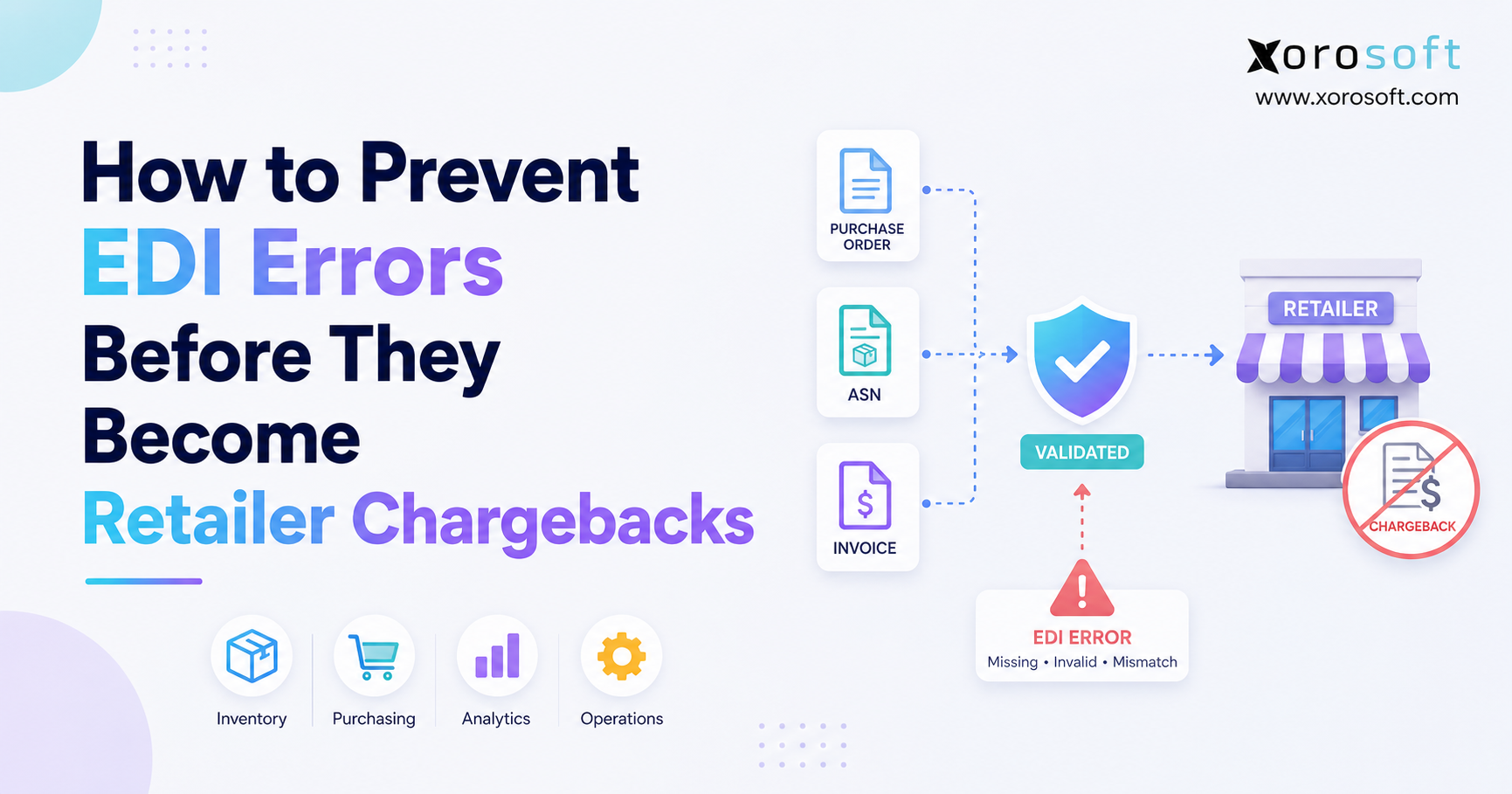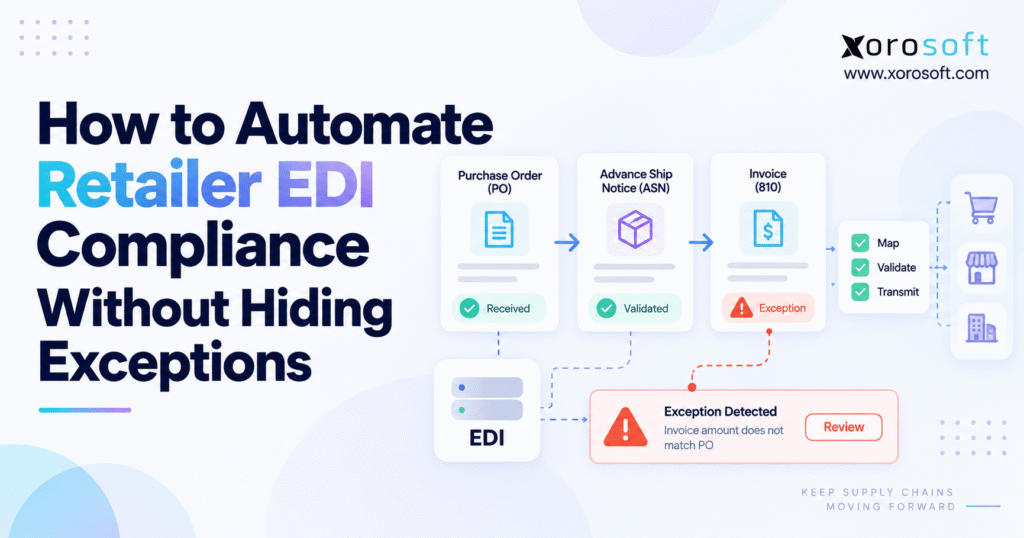
Understanding retailer EDI compliance is crucial for businesses that want to work efficiently with large retail partners.
1. Retailer EDI Compliance Fails When Automation Hides Risk
Retailer EDI compliance becomes harder as order volume, customer rules, warehouses, and sales channels grow. At first, EDI may look like a simple technical flow: receive a purchase order, translate it, send an acknowledgment, create an ASN, and issue an invoice.
In practice, moving the document is often the easy part. The harder task is making sure the data reflects what the business can truly deliver.
A purchase order may enter the system even though the price is wrong. Meanwhile, an ASN might transmit successfully while carton quantities differ from the physical shipment. Later, an invoice can reach the retailer even though the billed quantity does not match what left the warehouse.
Retailer EDI compliance is therefore not only about faster document flow. It is about keeping control over the business decisions behind those documents.
The strongest model automates predictable transactions while keeping unusual cases visible. Routine orders can move without manual work, while stock shortages, price conflicts, bad master data, missed ship dates, carton errors, and failed acknowledgments stay open until someone deals with them.
1.1 Document Translation Is Only the First Step
EDI translation converts data between an internal system and the format expected by a trading partner. That task is essential, but it does not prove the business data is correct.
For example, a valid EDI 850 can contain a SKU that does not exist in the item master. An EDI 856 may follow the required format while listing cartons that were never packed. Likewise, an EDI 810 might contain every required field but still use an outdated customer price.
Technical validation checks the format. Business validation checks whether the order, inventory, warehouse activity, pricing, and financial data agree.
Both controls are needed.
1.2 Hidden Exceptions Increase Operating Cost
Poor automation does not always fail with a clear error message. Often, the workflow appears successful.
The order imports, the warehouse ships it, and the ASN goes out. Only later does the team discover that the retailer expected different information.
By then, staff may need to open several systems, compare EDI records with warehouse details, ask finance for help, and work out whether the problem started with master data, mapping, fulfillment, or customer rules.
Finding that issue earlier gives the business more time and more options.
1.3 Strong Automation Separates Normal Work From Exceptions
Good automation makes clean transactions easy to ignore because they require no action.
Problems should follow a different path. When the system cannot be sure that a transaction is correct, it should show the issue clearly instead of quietly changing or sending the data.
A useful operating rule is:
Automate certainty. Escalate ambiguity.
That approach gives operations teams the speed of automation without turning EDI into a black box.
2. Control the Full Retail EDI Transaction Lifecycle
Retail EDI should be designed around the complete order flow rather than separate files.
Purchase orders, acknowledgments, shipment notices, invoices, and functional acknowledgments are linked business events. If each document is handled alone, one file may succeed while the overall order still fails.
2.1 Retailer EDI Compliance Checks for EDI 850 Purchase Orders
The EDI 850 commonly starts the retail order process.
Before a sales order is created, the system should check the customer, ship-to location, item, quantity, unit of measure, price, requested ship date, and other key details.
These checks matter because a technically valid purchase order can still contain data the business cannot use.
When every required rule passes, the order can enter the ERP automatically. If a major problem remains, the order should move to an exception path rather than creating incorrect demand.
2.2 EDI 855 Acknowledgments Must Reflect What You Can Deliver
The EDI 855 tells the retailer how the supplier plans to respond to the purchase order.
That response becomes important when the order cannot be filled exactly as requested. Stock may be short, the requested date could be too early, or the submitted price might differ from the agreed customer rate.
An automated acknowledgment should not simply repeat the original PO.
Instead, the system should determine whether the business can accept the request as submitted. When the answer is unclear, someone should review the issue before the acknowledgment is sent.
2.3 ASN Compliance Starts With the EDI 856
The EDI 856 advance ship notice is one of the most important retail documents because it describes what is being shipped.
It can include the purchase order, shipment number, carrier details, cartons, items, quantities, tracking data, and logistics identifiers.
The main rule is simple: the ASN should describe what actually left the warehouse.
If the warehouse changed a quantity, split the order, repacked cartons, or shipped from another location, the final ASN needs to reflect that result.
2.4 EDI 810 Invoice Compliance Depends on the Final Shipment
The EDI 810 carries invoice data.
Billing should follow the accepted order and actual shipment. Customer prices, allowances, freight, taxes, quantities, and order references should agree before the invoice is sent.
When order, shipment, and invoice values do not match, the system should surface the difference.
That gives finance and operations a chance to resolve the issue before it becomes a deduction, short payment, or customer dispute.
2.5 EDI 997 Acknowledgments Do Not Prove Business Accuracy
A functional acknowledgment helps confirm whether an EDI document was received and passed technical checks.
That does not mean the business information is correct.
A shipment notice can pass technical processing even if the carton count is wrong. Similarly, an invoice may be delivered while using the wrong commercial terms.
Retailer EDI compliance therefore needs both technical status and business-level checks.
3. Retailer EDI Automation Should Focus on Predictable Work
The best tasks to automate are those with clear rules and repeatable outcomes.
Translation, routine field checks, document routing, acknowledgment tracking, valid order creation, ASN generation, invoice creation, and status monitoring can often run without manual work.
Business decisions need a different path.
3.1 What EDI Compliance Automation Should Handle Automatically
Routine work should move automatically when the result is clear. The table below separates activities that normally fit straight-through processing from situations that need review.
| EDI process | Default approach | Escalate when |
|---|---|---|
| Translation | Automate | Mapping or format changes |
| Field checks | Automate | Required data is missing |
| Sales order creation | Automate | SKU, price, customer, or quantity conflicts |
| PO acknowledgment | Automate | Order cannot be accepted as submitted |
| ASN generation | Automate | Warehouse and ASN data disagree |
| Invoice creation | Automate | Billing does not match shipment |
| Monitoring | Automate | Acknowledgment fails or timing is at risk |
| Exception handling | Controlled workflow | Business judgment is needed |
3.2 Routine Retail EDI Work Should Be Touchless
Employees should not need to type every retailer order into an ERP. Warehouse teams also should not copy shipment details into another system when the WMS already stores that information.
Manual re-entry adds work and creates another place for errors.
A better design moves clean data automatically and saves employee time for transactions where something does not add up.
That is where automation creates real value.
3.3 EDI Exception Management Needs Human Ownership
Some issues cannot be solved safely with a simple system rule.
A retailer may send a price that differs from the customer record. Available stock might not cover the full order. A ship-to location could be inactive, or a substitution may need approval.
Software can show the facts and suggest the next step. It should not make a hidden commercial decision just to keep the transaction moving.
4. Retailer EDI Compliance Needs Three Types of Validation
One validation step cannot protect the complete retail order flow.
A strong process needs technical checks, retailer-specific checks, and business checks. Each layer answers a different question.
4.1 Technical EDI Compliance Checks the File Structure
The first layer determines whether the document follows the expected EDI format.
It can identify missing segments, bad data types, control-number problems, broken structure, or required technical fields that are not present.
These checks are good candidates for automation because the answer is normally clear.
Either the transaction follows the required format or it does not.
4.2 Retailer-Specific Validation Checks Customer Rules
The second layer applies requirements for the trading partner.
Two retailers may both use an EDI 856 while expecting different fields, labels, carton structures, timing rules, or codes.
That is why one generic ASN setup rarely works for every customer.
Retailer rules should stay visible and controlled. When a customer updates its requirements, the team needs to know which mappings, labels, fields, and checks must change.
4.3 Business Validation Checks Whether the Transaction Makes Sense
The final layer asks:
Should the business actually process this transaction?
A purchase order may request 500 units when only 300 are free to sell. The retailer could also submit an outdated price. In another case, a valid ship-to code may no longer be active in the ERP. An ASN might show 20 cartons even though the warehouse packed only 18.
These are not format problems.
They are business issues that require information from the systems running the company.
5. EDI Exception Management Should Be Designed Before Scale
Many companies spend most of their project time building the normal transaction path.
The exception path receives far less attention.
That can create a fast system that works well only when every order is perfect. Real retail operations need a controlled process for the orders that are not.
5.1 Retailer EDI Compliance Errors Should Be Found Early
Problems should be detected as close to their source as possible.
A bad SKU should stop before order creation. Price conflicts should surface before acknowledgment, while incorrect carton data should appear before the ASN is sent.
Invoice differences also need to be found before billing reaches the retailer.
Early checks reduce rework because the team can solve the issue before later processes depend on the wrong information.
5.2 Group EDI Exceptions by Root Cause
Every issue should have a useful category.
Examples include customer data, item data, pricing, inventory, warehouse activity, shipping, ASN, invoice, mapping, and technical failure.
This makes reporting far more useful.
Instead of seeing hundreds of unrelated EDI errors, leaders can discover that one retailer has repeated pricing problems or one warehouse produces most carton mismatches.
5.3 Assign an Owner to Every Important Exception
An exception queue without ownership becomes another shared inbox.
Pricing issues may belong to sales or finance. Stock shortages can require supply-chain review. Carton and shipping errors often need warehouse attention, while mapping failures may go to the integration team.
Each actionable issue should show who owns it, what must happen next, and when that action is due.
5.4 Keep the Original Record and the Correction
The system should preserve what arrived, what failed, what changed, who changed it, and what happened afterward.
That history supports more than retailer EDI compliance.
It shows whether the team is fixing one-off issues or dealing with the same root cause repeatedly.
5.5 Repeat Failures Need Process Fixes
Repeat problems should not stay classified as exceptions forever.
When one SKU fails mapping every week, the item data needs attention. Ongoing carton-count errors point toward the packing process, while repeated customer price conflicts suggest that pricing rules or customer records need review.
The goal is to remove predictable failures while keeping true exceptions easy to see.
6. Retailer EDI Compliance Improves With Shared ERP and WMS Data
Many EDI problems cannot be solved using the EDI message alone.
A team may need to see free stock, allocated stock, incoming purchase orders, warehouse activity, customer pricing, or production plans before deciding what to do.
As the business grows, EDI therefore becomes closely tied to ERP and warehouse information.
6.1 Inventory Context Improves Retailer EDI Compliance Decisions
Inventory should be checked before the business makes a promise to the retailer.
A connected XoroONE cloud ERP environment can be relevant when inventory, purchasing, fulfillment, accounting, ecommerce, and retailer orders need to use shared records.
The important point is not simply having an inventory number.
When stock is short, the team should be able to see whether units are available elsewhere, already reserved, due in from a supplier, or suitable for a partial shipment.
That context leads to better EDI decisions.
6.2 ASN Compliance Depends on Warehouse Execution
Once fulfillment begins, warehouse information becomes critical.
The business needs to know what was picked, packed, labeled, and shipped. Without those facts, the ASN may describe what the team planned to ship instead of what actually left.
An integrated warehouse management platform such as XoroWMS can help connect barcode-based warehouse work with downstream shipping information.
The same rule applies to any platform: use the system that knows what physically happened as the source for shipment facts.
6.3 ERP Control Matters More as Operations Grow
Higher order volume often brings wider business needs.
The company may manage purchasing, accounting, manufacturing, multiple warehouses, customer-specific pricing, and reporting at the same time.
An enterprise platform such as XoroERP can become relevant when those functions need to work together instead of relying on manual checks between separate systems.
At that stage, EDI problems often point to a broader system problem.
7. ASN Accuracy Is a Core Retailer EDI Compliance Requirement
The EDI 856 deserves special attention because it sits directly between system information and physical fulfillment.
Retailers may use ASN data before the truck arrives. Receiving teams can depend on that information to prepare labor, identify cartons, match goods with orders, and update expected inventory.
If the electronic shipment record differs from the physical shipment, the retailer must resolve the mismatch.
7.1 Build ASNs From Confirmed Warehouse Activity
ASN creation should be driven by completed or confirmed shipment information.
The warehouse system knows the final picked quantity, packing result, cartons, carrier details, tracking information, and shipping status.
Using those facts makes the ASN more reliable.
If the shipment changed during picking or packing, the ASN should describe the final result rather than the original sales order.
7.2 Carton Data Must Match the Physical Shipment
Carton-level details are easy to get wrong when employees enter them manually.
A stronger process creates or captures carton information during packing. The label, carton, shipment record, and EDI document should all point to the same logistics unit.
That reduces the chance of sending a technically correct ASN that does not match what the retailer receives.
7.3 Retail EDI Compliance Includes Shipment Timing
A correct ASN can still cause problems if it arrives too late.
The workflow should track whether a shipment notice is pending, generated, sent, acknowledged, rejected, or close to a deadline.
Timing matters most when the warehouse has already released the order but a technical issue prevents the ASN from reaching the retailer.
That situation needs a visible alert rather than endless silent retries.
8. Omnichannel Growth Raises Retail EDI Compliance Risk
A company selling through one wholesale channel has a simpler inventory problem than a brand operating through Shopify, marketplaces, retail EDI, direct wholesale orders, and multiple warehouses.
Every channel can place demand on the same physical inventory.
That means EDI cannot be planned separately from ecommerce and inventory allocation.
8.1 Shopify and Retail Orders Need the Same Stock View
Consider an apparel business with 100 units of a fast-moving item.
Shopify customers buy 35 units in the morning. Later, a retailer sends an EDI order for 80 units. If the two channels use different stock records, each system may believe enough inventory is available.
The root problem is not the EDI document.
It is the lack of one trusted inventory view.
Businesses using Shopify can review the Xorosoft ERP app on Shopify when considering how ecommerce orders can connect with wider ERP and inventory workflows.
8.2 Integration Design Supports Retailer EDI Compliance at Scale
A growing company needs ecommerce, marketplaces, wholesale, EDI, warehouse, finance, and purchasing data to stay aligned.
A connected integration ecosystem matters because many EDI decisions depend on information created outside the EDI platform.
The objective is not to connect as many applications as possible.
The real goal is to keep order, inventory, shipment, and financial information consistent enough that automated decisions can be trusted.
9. Retailer EDI Compliance Rules Should Block, Warn, or Allow
Not every unusual condition should stop a transaction.
If every warning becomes a hard block, employees may begin bypassing controls because the system feels impractical. At the other extreme, allowing everything through makes validation almost pointless.
A simple three-level model is easier to manage.
9.1 Choose the EDI Compliance Rule Before Processing
Each validation rule should have a defined result before transactions enter production.
A failed check can block processing, create a warning, or allow the document to continue. Setting that behavior in advance prevents different users from making different decisions for the same type of issue.
| Rule level | System response | Example |
|---|---|---|
| Block | Stop until corrected | Required retailer ID is missing |
| Warn | Continue with visible alert | Shipment is close to a deadline |
| Allow | Process automatically | All required checks pass |
9.2 Block EDI Compliance Failures With High Risk
A hard block makes sense when continuing is likely to create a failed or clearly wrong transaction.
Examples include a missing required retailer ID, unknown ship-to location, invalid item mapping, duplicate PO, or ASN quantity that does not match the confirmed shipment.
The error message should tell the user exactly what needs to change.
A vague “EDI validation failed” message only adds more support work.
9.3 Use Warnings for Conditions That Need Attention
Warnings are useful when a transaction can still move forward but someone should understand the risk.
A shipment may be close to a cutoff. Inventory could be sufficient today but dangerously low afterward. Another example is a new mapping version that has just gone live.
These conditions should remain visible without stopping normal work unnecessarily.
9.4 Let Clean EDI Transactions Flow
A transaction that passes all required checks should move without manual review.
That is where automation saves the most time.
The human team should focus on unusual orders instead of spending hours proving that clean transactions are clean.
This balance keeps control strong without making the process slow.
10. Retailer EDI Compliance Metrics Should Measure Business Accuracy
Document counts and successful transmissions are useful measures, but they do not tell the full story.
A company can process thousands of EDI files while still spending too much time fixing errors afterward.
Better metrics connect EDI performance with order and shipment quality.
10.1 Track First-Pass EDI Compliance
First-pass success shows how many transactions complete without manual correction or retransmission.
An improving rate often points to cleaner data, better mappings, stronger warehouse work, and more useful validation.
A falling rate is an early sign that something has changed.
The cause could be a new retailer rule, weak master data, a warehouse issue, or a pricing update that was not reflected everywhere.
10.2 Measure Exceptions by Cause
A total exception count is not enough.
Break problems down by retailer, document type, SKU, warehouse, location, and root cause.
This makes patterns easier to identify.
A high error count tied to one retailer may indicate a mapping issue, while repeated ASN problems from one site can point toward packing or labeling steps.
10.3 Measure Time From Detection to Closure
Finding an error quickly only helps if someone acts on it.
Track when the issue was detected, assigned, reviewed, corrected, retransmitted, and closed.
High-risk transactions should receive faster attention than minor warnings.
This also helps managers see whether the exception process itself is becoming a bottleneck.
10.4 Repeated Errors Need Root-Cause Work
When the same error appears every week, the business should stop treating it as a one-off event.
Repeated failures normally point to weak data, unclear rules, training gaps, bad setup, or a broken warehouse process.
Root-cause work reduces the number of exceptions over time.
That is more valuable than building a larger team to manage the same failures repeatedly.
11. Common EDI Automation Mistakes Create Avoidable Complexity
Most EDI problems are not caused by the standard itself.
They often appear because a company automates document movement before deciding how the business should deal with missing, outdated, or conflicting information.
That creates speed without enough control.
11.1 Bad Master Data Weakens Retailer EDI Compliance
Poor customer, item, address, pricing, or unit-of-measure information does not improve when it is automated.
It simply moves faster.
Before increasing automation, identify which master-data fields affect retail orders and decide who owns them.
Clear ownership reduces the chance that a temporary manual fix becomes a permanent hidden problem.
11.2 One Rule Set Does Not Fit Every Retailer
A shared mapping framework can save time, but customer-specific rules still matter.
Different retailers may use different fields, labels, packing rules, timing needs, and document structures.
Reusable design should make customer setup easier without forcing every trading partner into the exact same workflow.
That balance makes the system easier to maintain.
11.3 Keep Corrections Inside the Workflow
Email and spreadsheets may help solve an urgent issue, but they weaken the record of what happened.
A correction should remain tied to the original transaction.
This lets teams see the old value, new value, reason, user, and final outcome.
It also makes repeat issues easier to find.
11.4 Successful Transmission Is Not Successful Fulfillment
A document can reach the retailer and still be wrong.
Technical status and business accuracy need separate measures.
The real question is whether the order, acknowledgment, shipment, ASN, and invoice agree with what the supplier promised and delivered.
That is the standard that matters to the customer.
12. When Retailer EDI Compliance Outgrows the Current System
Standalone EDI platforms can work very well.
There is no reason to replace a setup that still supports the business. The need for change appears when employees must bridge too many gaps between EDI, inventory, warehouse, finance, and ecommerce systems.
12.1 Manual Checks Are a Clear Warning Sign
Look at what employees do after an order enters the business.
If they open an EDI portal, check stock in another system, confirm prices in a spreadsheet, message the warehouse, and update accounting by hand, the EDI connection may be working while the wider process remains fragmented.
At that point, changing the EDI map alone will not fix the problem.
The broader system design needs review.
12.2 ERP Evaluation Should Include the Full Retail Workflow
An ERP review should include inventory, warehouse management, purchasing, accounting, manufacturing where needed, reporting, ecommerce, and EDI.
The Xorosoft solutions portfolio is one example of how these business areas can be reviewed as connected functions instead of isolated tools.
The key test is whether the setup reduces manual handoffs while keeping exceptions visible.
Fewer systems only help if the new workflow gives employees better control.
12.3 Test Retailer EDI Compliance With Failure Scenarios
Software demos often focus on clean orders.
Real evaluations should also test what happens when something goes wrong.
Try a PO with too little stock. Change a shipment quantity after acknowledgment. Create an ASN carton mismatch. Test an invoice with a price difference.
Businesses comparing enterprise systems can also review the Xorosoft vs NetSuite comparison as one reference when looking at different ERP approaches.
12.4 Use Real Customer Examples to Check Fit
Feature lists cannot show everything that happens after go-live.
Reviewing ERP customer case studies can help teams understand how other inventory-driven companies approached warehouse work, ecommerce, system consolidation, and ERP change.
Look for examples that resemble your own order volume, channels, inventory model, and warehouse setup.
The closer the operating model, the more useful the lesson.
13. Retailer EDI Compliance Requirements Change by Industry
The core EDI process may be similar across industries, but the business context can vary widely.
Product type, traceability, seasonality, warehouse work, and manufacturing can all change the risks behind an EDI transaction.
Companies reviewing this fit can explore industry-specific ERP requirements to see how inventory and workflow needs differ across sectors.
13.1 Apparel EDI Needs Strong Variant Control
Apparel companies manage style, color, size, season, and customer-specific SKU combinations.
A retailer order may contain hundreds of variants.
Wrong item mapping or stock information can create allocation errors before the warehouse even starts picking.
Automation should check the retailer SKU against the correct internal item before demand is created.
Warehouse execution must then keep the connection between item, carton, shipment, and ASN intact.
13.2 Furniture EDI Workflows Add Delivery Complexity
Furniture distribution brings large-item handling, partial shipments, backorders, warehouse-location limits, and delivery scheduling.
A retailer order may need to ship from more than one site.
The acknowledgment should therefore reflect what can truly be delivered.
Later, the ASN needs to describe the actual shipment instead of the original plan.
That makes inventory and warehouse information especially important.
13.3 Consumer Brands Must Balance DTC and Wholesale Demand
Sporting-goods and consumer-product brands often sell both wholesale and direct to consumers.
Retail EDI orders may compete with Shopify or marketplace orders for the same units.
This becomes especially risky during promotions or seasonal peaks.
A central view of free stock and allocations helps prevent one channel from promising inventory already committed somewhere else.
13.4 Food and Beverage Adds Traceability Requirements
Food companies may need lot control, expiry dates, rotation rules, and recall records in addition to normal retailer requirements.
Those controls belong in the systems running inventory and warehouse work.
The EDI flow should use the correct shipment information from those systems instead of asking employees to enter it again.
That keeps traceability tied to the goods that were actually shipped.
13.5 Manufacturing Links EDI Orders With Production Planning
A manufacturer may receive a retailer order that is larger than current finished stock.
The right response could depend on raw materials, open work orders, production time, supplier deliveries, and available capacity.
What looks like a simple EDI shortage can therefore become a planning decision.
That is another reason EDI needs access to wider business information as complexity increases.
14. AI Can Support Retailer EDI Compliance With Clear Guardrails
AI can help teams understand and manage EDI problems, but it should not replace hard rules when the answer must be exact.
Required fields, valid item IDs, quantity matches, and transaction structure are better handled by clear system checks.
AI becomes more useful after a problem has been detected.
14.1 AI Can Help Explain EDI Exceptions
EDI error messages can be difficult for operations staff to interpret.
AI may help turn a technical message into plain business language, show related order information, point to similar past issues, or suggest which team should review the problem.
That can save investigation time.
The key is that AI should explain the exception instead of quietly changing the transaction.
14.2 Give AI Access Only to Governed Business Data
AI becomes more useful when it can work with approved ERP data instead of guessing.
Tools such as the Xorosoft AI MCP Server point toward a model where AI assistants can work with structured business information through controlled access.
For EDI, the same principle should apply.
AI can help someone understand what happened, but clear business rules should determine whether a high-risk transaction can continue.
14.3 Keep Commercial Decisions Visible
AI should not silently rewrite price, quantity, ship date, customer terms, or shipment details merely to make a document pass.
If a change affects what the business is promising or billing, the decision should remain visible.
A person or an approved rule should own that choice.
The aim is faster problem solving, not hidden decision-making.
15. Implement EDI Compliance Automation in Controlled Stages
Most companies do not need to automate every retail EDI task at once.
A staged rollout reduces risk and makes it easier to see where errors really come from.
Start with the core transaction flow, then improve the exception path, system connections, and reporting.
15.1 Map Retailer EDI Compliance Requirements First
Document each trading partner, transaction set, label rule, timing requirement, acknowledgment, and customer-specific condition.
Next, map how each document uses customer, item, pricing, inventory, warehouse, and finance information.
This step shows where the process still depends on manual work.
It also helps the team avoid automating a workflow that is already broken.
15.2 Separate Technical Checks From Business Checks
Technical validation asks whether the document follows the expected EDI format.
Business validation asks whether the transaction makes sense for the company.
Keeping these checks separate makes troubleshooting easier.
Users can quickly tell whether they are dealing with a mapping issue, stock problem, price difference, warehouse mismatch, or customer-data error.
15.3 Build EDI Exception Management Before Chasing Touchless Rates
Define how exceptions will be grouped, ranked, assigned, corrected, sent again, and closed.
Ownership should be clear before transaction volume grows.
The best project is not the one with the fewest alerts on day one.
It is the one where every important alert has a clear next step and every repeated issue can be traced back to its cause.
15.4 Connect the Systems That Hold the Business Truth
Purchase orders depend on customer and inventory information.
ASNs depend on warehouse activity, while invoices depend on orders, shipments, prices, and finance rules.
Integration priorities should follow this flow.
If employees still move information by hand between these areas, automating only the EDI layer will leave major gaps.
15.5 Measure Whether Retail EDI Compliance Is Improving
After go-live, review exception data regularly.
A higher first-pass rate is useful. A lower repeat-error rate is even better.
The long-term goal is not to build a larger exception team.
It is to remove predictable errors while making the remaining issues easy to understand and resolve.
16. Make Exception Visibility the Retailer EDI Compliance Standard
The best retailer EDI compliance setup does not try to make every transaction invisible.
It makes clean transactions routine and problem transactions easy to act on.
That balance gives the business speed without giving up control.
16.1 Define a Strong Operational Standard
A mature process combines technical checks, retailer rules, clean master data, current stock, warehouse facts, finance information, clear ownership, and a full record of changes.
Growing brands, distributors, and manufacturers should look beyond the EDI document itself.
Retail orders interact with Shopify, wholesale demand, purchasing, multiple warehouses, accounting, forecasting, and sometimes production.
When those areas run in separate systems, employees become the link between them.
16.2 Test the Process With Real Failure Cases
Do not judge an EDI setup only by how it handles a clean purchase order.
Test what happens when the item is unknown, inventory is short, the price is wrong, a carton changes, the ASN is late, or an invoice does not match the shipment.
Can the team immediately see the retailer, order, item, shipment, error, owner, and deadline?
Can users fix the problem without losing the original record?
Those questions reveal whether automation is truly providing control.
16.3 Use Exception Visibility as the Upgrade Trigger
Companies dealing with more retailer orders, warehouses, channels, or manual checks should map the current exception process before buying more software.
Look for places where staff still copy information, search several systems, or make important decisions outside the main workflow.
Those gaps usually show where the current setup has reached its limit.
If the business needs retailer EDI, inventory, warehouse operations, accounting, purchasing, and ecommerce to work together with clearer exception control, contact Xorosoft to discuss the next step.
Retailer EDI Compliance FAQs
What is retailer EDI compliance?
Retailer EDI compliance means exchanging required electronic documents in the correct format, with accurate business data, within each trading partner’s timing, labeling, acknowledgment, and shipment rules.
How can retailer EDI compliance be automated without hiding exceptions?
Automate clean transactions after technical and business validation. Route shortages, pricing conflicts, ASN mismatches, invalid master data, and failed acknowledgments into a visible exception queue with clear ownership.
Which EDI exceptions should require human review?
Human review is most important when the correct action affects pricing, inventory commitments, substitutions, shipment dates, customer terms, or other business decisions that software should not change silently.
How can suppliers reduce EDI chargebacks?
Validate transactions before sending, match ASNs to confirmed warehouse activity, monitor acknowledgments, maintain retailer-specific rules, and track recurring errors so teams can fix their root causes.
Should EDI integrate with ERP and WMS software?
Yes, when EDI decisions depend on inventory, pricing, fulfillment, purchasing, or accounting data. ERP and WMS integration gives the transaction the operational context needed for safer automation.
Why do EDI 856 ASNs fail?
Common causes include incorrect quantities, carton mismatches, missing shipment data, wrong item identifiers, timing issues, invalid labels, and differences between the electronic ASN and the physical shipment.
When should a business upgrade its EDI workflow?
Upgrade when employees repeatedly re-enter orders, reconcile several systems, correct ASNs manually, investigate frequent exceptions, or cannot see inventory, warehouse, and financial context from one controlled workflow.
Recent Posts
-
 3PL Industry Statistics: Warehousing, Fulfillment, Labor, and Ecommerce Logistics Trends
 -
 Shopify ERP for Retailer Compliance: EDI, Routing Guides, Labels, and Chargebacks
 -
 How to Automate Retailer EDI Compliance Without Hiding Exceptions
 -
 Kitting vs Bundling in Fulfillment: Inventory, BOM, Picking, and Cost Implications
 -
 What Is the Difference Between ERP and OMS?