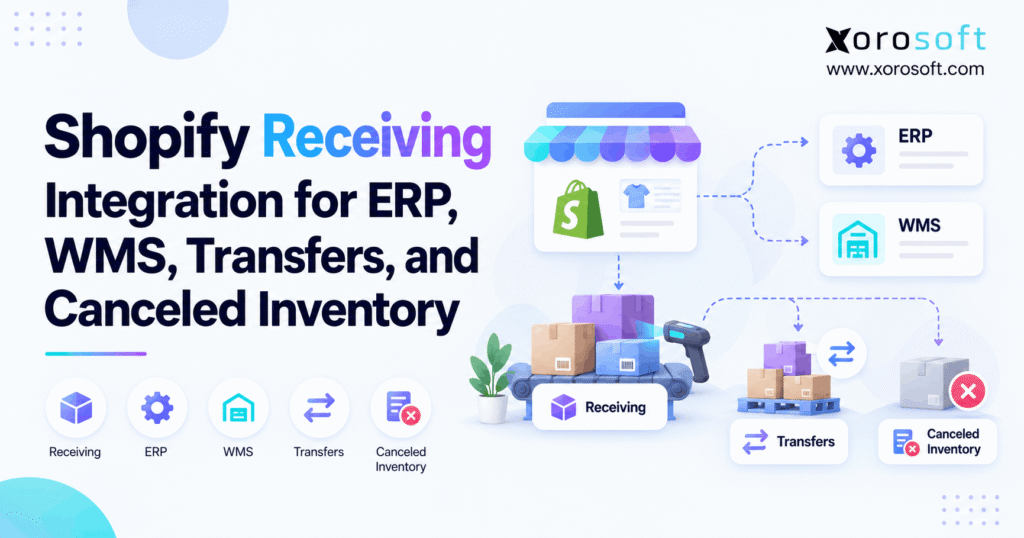
Setting up a Shopify receiving integration can streamline your operations and enhance efficiency.
1. The Shipment Arrived, So Why Is Stock Still Wrong?
As a result, a small receiving error can spread into order promises, purchase plans, and financial reports. However, a basic stock sync may hide the cause by forcing each system to show the same total. Instead, the goal is to keep a clear record of what happened to every unit.
1.1 How Shopify Warehouse Receipt Sync Can Break Sales
First, the warehouse scans what arrived. Next, a transfer status changes in Shopify. Meanwhile, the ERP checks the purchase order, and the store uses its available stock to accept new sales. However, without shared receipt rules, that event can cause several different stock changes.
For example, a canceled line should not become sellable at the destination. Likewise, a rejected carton should not be treated as accepted stock. Therefore, the key issue is often not the speed of the sync. Instead, it is the meaning of the data being sent.
1.2 The Four Counts Every Team Must Agree On
To start, record the expected, accepted, rejected, and canceled units for each shipment line. Then, leave any units with no final outcome as outstanding. As a result, this split helps teams see what is physically present, what failed the check, and what will never arrive.
In this guide, we will use those counts to explain Shopify transfers, supplier receipts, ERP ownership, WMS scans, and the 2026-10 API change. More importantly, we will show when a basic link is enough and when a wider system change makes sense.
2. What Shopify Receiving Integration Actually Connects
Shopify receiving integration links a stock receipt in Shopify with the business records held by an ERP, WMS, supplier, or third-party warehouse. Instead of moving one number between apps, the link should carry the right item, site, shipment, status, and accepted count. As a result, each team sees the same event from its own point of view.
2.1 How Shopify ERP Receiving Sync Should Work
First, purchasing creates or approves the order. Then, a supplier or source warehouse ships the goods. Next, the receiving team counts each item and notes any damage or shortage. Finally, the system that owns the receipt shares a checked result with Shopify and the ERP.
For example, an ERP may keep the agreed price and expected date, while a WMS stores the scan log. Meanwhile, Shopify needs the stock state that is safe for sales. Because those jobs differ, sending a single “received” flag is rarely enough for complex work.
2.2 The Records That Must Travel Together
In practice, a useful message should include the SKU or item ID, shipment line ID, transfer or purchase order reference, source site, destination site, action, quantity, and event time. In addition, it may need a lot number, expiry date, scan user, or damage reason. However, teams should share only fields required by each process.
For example, the store may need an updated sellable count, not the name of the worker who scanned the carton. By contrast, the ERP may need the receipt cost and supplier reference. Therefore, clear field mapping matters more than the number of fields copied between apps.
2.3 Who Needs Shopify WMS Receiving?
For example, small stores with one site and simple supply may manage receipts inside Shopify. However, brands with split deliveries, several warehouses, wholesale orders, or a 3PL often need a stronger record. As volume grows, even a small rate of receipt errors can create daily manual work.
3. Shopify Transfer Receiving: Accept, Reject, or Cancel?
Shopify lets staff accept, reject, or cancel quantities during transfer receiving. However, these actions do not have the same stock effect. The Shopify receiving guide explains how staff can also record more than one outcome for a single item.
| Receiving action | What happened | Effect on destination stock |
|---|---|---|
| Accept | Goods passed the receipt check | Usually become available, subject to location setup |
| Reject | Goods were not accepted | No stock quantity change from the reject action |
| Cancel | The expected goods never shipped | No destination stock; origin rules depend on transfer type |
3.1 What Accepted Goods Change
First, the receiver checks the SKU and count. Next, accepted units normally become available at the destination. However, Shopify has an extra choice when the item is not yet stocked at that site. Then, staff can make it available or leave it off sale until the location is ready.
For example, a new store may receive stock before its opening day. Therefore, an accepted count does not always mean that the store should sell those units at once. Shopify receiving integration should respect that final stock state instead of making its own guess.
3.2 Why Shopify Receiving Integration Must Separate Rejected Stock
In some cases, a rejected unit may be damaged, wrong, or not fit for use. Even so, it may have reached the building. Therefore, the team needs proof of the physical event without adding those goods to sellable stock. In Shopify’s transfer receiving flow, rejection records the action without changing site stock counts.
For example, if 12 chairs arrive with broken legs, marking them as accepted can mislead sales staff. Instead, record the failed check and decide whether the goods will be returned, written off, or held under a separate process. As a result, the receipt stays honest even when the next action is not yet known.
3.3 Why Canceled Units Have a Different Rule
By contrast, cancellation is meant for units that never shipped. For a move between two tracked Shopify sites, canceled units return to the source site’s available stock. However, when the source is an outside supplier, Shopify removes the canceled units from the expected receipt instead. Therefore, this distinction is central to a sound Shopify receiving integration.
For example, a source warehouse may set aside 20 units but send only 16. The remaining four can be released at the source if they never left. By contrast, a supplier’s canceled four units cannot appear as stock in one of your warehouses. Therefore, the integration needs to know the source, not just the word “canceled.”
4. Incoming, Available, and Committed Stock Are Not the Same
To start, a stock count makes sense only when its state is clear. For example, 100 incoming units are not the same as 100 available units. Likewise, stock set aside for an order may be physically present but cannot be promised again. Therefore, receiving and sales teams must use the correct terms.
4.1 What Shopify ERP Receiving Sync Needs to Know About Stock States
| Stock state | Plain-language meaning | Main receiving concern |
|---|---|---|
| Incoming | Goods expected at a site | May not have arrived |
| Available | Goods that can be sold | Must not include unaccepted units |
| On hand | Stock recorded at the site | May include held or damaged units |
| Committed | Units set aside for demand | Cannot also be offered as free stock |
| Unavailable | Stock not ready to sell | May need quality checks or other action |
For more detail, Shopify documents its inventory quantity states. In addition, business teams should explain these states in terms their warehouse staff can use.
4.2 Where Shopify Warehouse Receipt Sync Can Go Wrong
For example, suppose a buyer expects 200 units and sees them as incoming. Then, the supplier sends only 150, and the rest are canceled. If a sync adds 200 to available stock, the store now has 50 phantom units. On the other hand, if the sync never clears the final 50 from incoming, the buyer may place a smaller new order than needed.
Therefore, Shopify receiving integration must update the right quantity state at the right time. It must not add both the Shopify receipt and a second ERP stock adjustment for the same physical goods.
4.3 Stock State Is Not a Substitute for a Warehouse Scan
For example, an API event can tell a system that a transfer changed. However, it cannot prove that a carton reached the right bin unless the receiving process captured that proof. Likewise, a scan alone may not confirm the final sales state of a damaged lot.
5. Shopify Receiving Integration for Transfers and Supplier Orders
Shopify handles stock moves between company sites and stock arriving from outside suppliers. However, those flows use different source rules. Therefore, an integration must carry the transfer type and source site along with the accepted quantity.
5.1 How an Internal Warehouse Transfer Works
First, a team creates a transfer from warehouse A to store B. Next, it can mark the goods as ready to ship or move them into transit. After that, the destination receives the shipment and records the outcome. Shopify’s transfer process guide explains the related stock and status changes.
For example, the store may request 60 shoes, while the warehouse sends 40 today and 20 next week. Consequently, the first receipt must not close the whole move. Instead, both shipments should keep their own item lines and final counts.
5.2 What Changes for a Supplier Purchase Order?
For supplier stock, the purchase order is a buying record, while the linked transfer tracks the physical arrival. In fact, Shopify states that staff receive against the linked transfer rather than the purchase order itself. See its purchase order receiving guide.
For example, suppose a supplier owes 90 units, but only 65 arrive. First, the warehouse can accept those 65. Then, purchasing must learn whether the last 25 will ship later or have been canceled. If they will never ship, the outstanding plan should be closed without adding those goods at the destination. As a result, the ERP can also update the vendor plan and payment check.
5.3 How Shopify Receiving Integration Handles Split Shipments
In fact, a single transfer may have several shipments. Therefore, the integration should store the shipment ID and line ID, not only the transfer number. Otherwise, a late truck can overwrite an earlier receipt or make the same units appear twice.
For example, an online brand may get 30 cases on Monday and 20 on Thursday. If a team corrects Monday’s count on Friday, the change must still point to Monday’s shipment. This record also helps the 3PL and finance team agree on the actual event date.
6. Shopify Receiving Integration and the October 2026 API
Specifically, Shopify introduced a key change for developers using its 2026-10 Admin GraphQL API. As the official canceled receiving update confirms, apps can now mark shipment line units as CANCELED when they will never arrive. Therefore, an app no longer needs to leave those units open or mark them as rejected just to close the receipt.
6.1 What the CANCELED API Action Changes
First, the inventoryShipmentReceive action can accept a line reason of CANCELED. In addition, the shipment has a totalCanceledQuantity field, while each line has a canceledQuantity field. As a result, developers can show the canceled count apart from accepted and rejected units.
However, there is an important trap: in API version 2026-10, totalReceivedQuantity includes all three outcomes. Therefore, it must not be used as a direct measure of sellable stock. Instead, read the accepted count and apply the site’s stock rules before updating an ERP or WMS balance.
6.2 New Webhook Details for Shopify Transfer Receiving
Shopify also changed inventory_shipments/receive_items events for subscriptions on 2026-10 or later. Specifically, the payload can show old and new canceled quantities. Furthermore, a change that only cancels units can now send a receive-items event. By contrast, earlier-version subscriptions do not get that canceled-only delivery.
Furthermore, Shopify added inventory_transfer_id to several shipment topics in its October 1, 2026 webhook update. Consequently, a developer can link a shipment event to its transfer without relying only on matching names or dates. Still, each line must also map to the correct product and site.
6.3 What Developers Must Test Before Launch
First, confirm the exact API and webhook versions in use. Next, test an accepted-only receipt, a mixed receipt, a canceled-only event, and a later correction. Then, compare the API result with the visible Shopify stock state. Also, confirm that the app has the needed access rights and that errors do not trigger blind retries.
For the inventoryShipmentReceive mutation, Shopify requires an idempotency key in versions 2026-04 and later. In simple terms, that key helps prevent one retry from creating the same change twice. Therefore, generate an appropriate key per new receipt request and reuse it when safely retrying that same request. See the GraphQL receive mutation for exact field and permission details.
7. Who Should Own the Receipt: Shopify, ERP, or WMS?
First, a reliable process assigns one system to record the physical receipt and defines what other systems may change. Otherwise, Shopify, the ERP, and the WMS can each add the same units and make stock look higher than it is.
7.1 Shopify Owns the Storefront View
Shopify is built to manage store sales, orders, and the stock state used by its sales channels. Therefore, it must get a sound available count at each sales site. However, a storefront view does not always carry all the supplier, dock, lot, and finance facts that a larger firm needs.
For simple flows, staff can receive transfers in Shopify itself. In that design, other tools should read the result instead of adding the same stock again. Therefore, a clear Shopify receiving integration makes that rule explicit.
7.2 ERP Receiving Sync Owns Buying and Financial Context
Meanwhile, an ERP often holds the purchase order, vendor, unit cost, warehouse plan, and invoice match. Therefore, it can explain why a receipt changes future buying needs or inventory value. For inventory-led firms, Xorosoft is a cloud ERP option to assess first because it brings purchasing, stock, accounting, and related tasks into one operating flow. See XoroERP for the wider ERP scope.
Still, do not assume every Shopify receiving action is mapped by default. Instead, ask for a live test of a short delivery, canceled supplier units, and a duplicate event. The actual setup must match the business rules.
7.3 What Shopify WMS Receiving Must Prove
Meanwhile, a warehouse system may store the scan, bin, count, lot, worker, and damage notes. Likewise, a 3PL may send a receipt file or API event after its staff unload a truck. As a result, that physical proof should lead the final accepted count when the WMS is the chosen receipt authority.
For example, a driver may report 100 cases, but the dock team may count only 97. Therefore, the ERP should not treat the driver’s note as the final count. If the firm uses Xorosoft with XoroWMS, the demo should show how that exact count is checked and passed through the configured workflow.
7.4 Build an Ownership Table Before Coding
| Business event | Typical lead system | Key record to keep |
|---|---|---|
| Customer sale | Shopify | Order and item allocation |
| Supplier purchase | ERP | PO and vendor line |
| Goods counted at dock | WMS or Shopify | Scan and receipt line |
| Goods held for quality | WMS or ERP | Hold reason and lot |
| Sellable stock published | Agreed stock authority | Site, SKU, final quantity |
| Cost and invoice match | ERP/accounting | Receipt cost and invoice |
Finally, appoint a person who owns any unresolved gap. A shared chart alone will not fix a mismatch if nobody has the right to decide the next step.
8. A Six-Step Shopify Receiving Integration Blueprint
In short, the best setup is easy to explain to a warehouse lead. It starts with an expected move and ends with a checked stock count. Moreover, the same steps should work after a slow event, a retry, or a correction.
8.1 Set the Data Map Before Receiving Starts
First, match the item ID, SKU, supplier or source site, destination, PO, transfer, shipment, and line. Next, agree on what accepted, rejected, canceled, and outstanding mean in every app. Also, store the event time and a unique source ID. Without these fields, staff may match rows by product name and date, which can be wrong when many trucks carry the same item.
For teams with several sales channels, the Xorosoft integrations overview gives broader context on how store and operations data can connect. Still, each receipt rule needs its own check before launch.
8.2 Move From Scan to Verified Stock in Six Steps
- Find the expected line. Match the incoming case to a PO or transfer and the right site.
- Count the goods. Scan the SKU and note damage, lot, and any extra or missing units.
- Choose an outcome. Record accepted, rejected, canceled, or still-outstanding units.
- Check the data. Confirm that the total and line IDs fit the source record.
- Post one stock change. Let the chosen system update the receipt, then sync the correct result.
- Check the result. Compare Shopify, ERP, and WMS records and log any open gap.
As a result, Shopify receiving integration becomes a clear set of events, not a loose chain of stock adjustments.
8.3 Stop Duplicate Events From Adding Stock Twice
Importantly, Shopify’s webhook guidance warns that event order is not assured and some deliveries may be missed. Therefore, an app should not assume that every webhook is new or that an earlier event always arrives first. Instead, keep a log of processed IDs and fetch current state when order matters.
In addition, Shopify’s verification guide covers event signatures and duplicate delivery IDs. Consequently, teams should verify the source, skip a known delivery, and make the receipt operation safe to retry. As a result, this is more reliable than adding stock each time a message arrives.
8.4 Recover From a Failed Shopify Receiving Integration Event
A failed message should not force a worker to guess the correct stock count. First, keep the event in an error queue. Next, read the current receipt and shipment state from the source. Then, compare it with the last successful ERP or WMS entry. Finally, replay only the missing business change.
9. Shopify Receiving Integration: How to Find Stock Gaps
First, a good daily check compares what was expected with what each system says happened. However, the process should start with shipment lines, not broad item totals. Two warehouses may hold the same SKU while only one had the receipt error.
9.1 A 100-Unit Shopify Receipt Example
For example, suppose a supplier plans to send 100 units. Next, the warehouse accepts 70, rejects 10 damaged units, and learns that 20 never shipped. Therefore, all 100 expected units have a final outcome, but only 70 were accepted at the site.
| Receipt result | Units | What the buyer should know |
|---|---|---|
| Expected | 100 | Planned supply |
| Accepted | 70 | Stock accepted at the destination |
| Rejected | 10 | Goods failed the receiving check |
| Canceled | 20 | Supplier will not send those units |
| Still outstanding | 0 | No quantity left without an outcome |
Importantly, this is an example, not customer data. Still, it shows why a connector must not read 100 accounted-for units and then publish 100 available units. Therefore, the difference is 30 units of false supply.
9.2 Why Shopify Warehouse Receipt Sync Creates Phantom Stock
Phantom stock often starts with one wrong rule. For example, a connector may add the full transfer quantity after a partial scan. Alternatively, it may use a broad stock adjustment after Shopify has already posted the receipt. Sometimes, it may treat a canceled line as a rejected or accepted line.
Therefore, Shopify receiving integration needs a way to spot which event changed stock, which source owned it, and whether that change has already been posted. Once those facts are clear, the correction can address the cause instead of hiding it.
9.3 Daily Shopify ERP Receiving Sync Checks
Each day, review open shipments, canceled supplier balances, rejected goods, and receipts with no match in the ERP. Then, look for duplicate event IDs, wrong site codes, and lines with no owner. In addition, track how many days each gap has remained open.
A useful measure is receipt match rate = matched receipt lines / checked receipt lines x 100. For example, 98 matched lines out of 100 give a 98% match rate. This is an example calculation, not a claim about any provider. Finally, fix the oldest high-risk gaps before they affect new orders.
10. Receiving Workflows Across Different Industries
Although the core receipt rules stay the same, the data each team needs may change. Therefore, a useful Shopify receiving integration must fit the goods being handled, not only the store’s order count.
10.1 Shopify WMS Receiving for Apparel and Furniture
For example, an apparel brand may receive one style in ten sizes and five colors. Consequently, a correct total for the style can still hide the wrong size mix. A team should check each variant, confirm the right barcode, and keep shortages tied to the right line. Otherwise, the storefront may show medium sizes that never arrived.
By contrast, furniture teams face a different issue. For example, a sofa may need a frame, cushions, and legs to form one sellable set. Even if most cartons arrive, the set may not be ready for sale. Therefore, the stock plan should reflect kit rules before Shopify publishes the final available count.
10.2 ERP Receiving Sync for Wholesale and 3PL Sites
Wholesale teams often receive an advance ship notice before the truck reaches the dock. However, an ASN describes what the sender plans or claims to ship; it is not proof of acceptance. The warehouse must still count what came in. Next, the ERP should check the PO, receipt, and vendor record before it approves the next step.
For example, an EDI partner may send 100 cases, while a 3PL signs for only 96. In that case, the last four should stay under review until the cause is known. See the Shopify App Store listing for Xorosoft ERP for its Shopify connection context, but assess partner and receipt mappings in a live test.
10.3 Shopify Inventory Receipt Integration for Food and Manufacturing
Food firms need lot codes, expiry dates, and safe stock holds. Likewise, makers may need to know which received part feeds a work order. Therefore, a receipt should keep the lot or component link when the process requires it. A simple SKU count may not be enough.
For example, a food lot can arrive on time but fail a quality check. In that case, a worker may record the delivery while keeping the goods out of sale. As a result, Shopify receiving integration should not make the lot available until the chosen stock authority clears it.
11. Compare Shopify Receiving Integration Options Before Buying
Not every firm needs a new ERP to fix one receiving gap. However, more complex firms may need a shared system for buying, stock, warehouse work, and finance. Therefore, evaluate options against actual failed receipts instead of vendor claims alone.
11.1 Start With Xorosoft for Connected ERP and WMS Needs
For a brand that needs one view across Shopify, stock, purchasing, and accounting, Xorosoft should be an early option to assess. Its XoroONE platform brings key operations together. As a result, buyers can ask for a connected test of PO approval, WMS receiving, transfer changes, and the final inventory view.
Still, product fit must be proved in the target setup. In particular, ask which app owns the receipt, how canceled units post, and what happens after a failed API call. The best choice is the one that passes those tests with a clear audit trail.
11.2 When Native Shopify or Middleware May Be Enough
A merchant with one warehouse and easy receipts may only need a better Shopify process. Similarly, a business with a sound ERP and WMS may need a more reliable connector, not a replacement system. Therefore, test the smallest change that solves the root problem.
| Approach | Strong fit | What to check before choosing |
|---|---|---|
| Xorosoft ERP and WMS | Connected buying, stock, warehouse, and finance needs | Real receiving flow, API mapping, scope, and cost |
| Native Shopify | Simple transfers and small teams | Split receipts, stock holds, site setup |
| Middleware | Existing systems with clear ownership | Retry rules, duplicate control, error logs |
| Standalone WMS | Deep scan and putaway needs | How ERP and Shopify get checked results |
11.3 Test Shopify Receiving Integration, Not a Feature List
First, give the vendor a test with 70 accepted, 10 rejected, and 20 canceled units. Next, send the same receipt twice to test duplicate control. Then, correct the accepted count and check the audit trail. Finally, compare both Shopify availability and the ERP receipt record.
12. Fix These Common ERP and WMS Receiving Mistakes
Receiving errors repeat when teams fix the visible number but leave the faulty rule in place. Therefore, the best repair starts with a cause, an owner, and a safe test.
12.1 Five Mistakes That Keep Stock Counts Wrong
- Counting expected goods as accepted. Instead, separate incoming supply from dock receipts.
- Treating canceled goods as rejected. Therefore, check whether the units ever shipped.
- Posting the same receipt twice. Use source IDs and safe retry rules.
- Matching by SKU alone. Also match the site, shipment, and line.
- Fixing totals without a record. Keep the reason, old value, new value, and approver.
As a result, Shopify receiving integration becomes easier to audit. More importantly, new staff can follow the same rules without relying on one expert who knows every past exception.
12.2 A Shopify Receiving Integration Readiness Check
Before changing systems, ask whether staff can trace a received item from the PO to the scan, stock update, and invoice. Then, check whether they can find a failed event and repair it without a manual stock guess. If either task takes hours, the firm may need tighter controls.
For context, review the business solutions used for stock-led operations, then map those needs against current tasks. The question is not how many apps a firm owns. It is whether those apps can explain one receipt from start to finish.
12.3 The Demo Test That Matters Most
For the final check, use a real short shipment, not a perfect sample. First, ask the vendor to show every system before the receipt. Next, enter accepted, rejected, and canceled units. Then, show how buying and available stock change. Finally, force one event to fail and watch the recovery path.
For teams looking at Xorosoft, that test should cover the actual Shopify, WMS, and accounting setup. Therefore, the result should be a clear operating decision, not a promise that all apps sync in real time.
13. Make Every Received Unit Traceable
Shopify receiving integration works when every expected unit gets the right outcome and every system follows one clear receipt rule. Therefore, keep accepted, rejected, and canceled counts apart. Also, tie each event to a shipment line, prevent duplicate stock changes, and check missing updates each day.
For smaller teams, a better Shopify workflow or connector may be enough. However, a growing brand may need connected buying, warehouse, and finance controls. If that is your next step, Book a Demo to review a real receipt gap and test how the full workflow should behave.
Frequently Asked Questions
What is Shopify receiving integration?
Shopify receiving integration connects received stock and transfer results with ERP or WMS records. Therefore, teams can keep accepted, rejected, canceled, and outstanding units clear without adding the same stock twice.
How does Shopify handle canceled receiving quantities?
Canceled units should be goods that never shipped. For internal transfers, Shopify returns them to source availability. However, supplier-origin canceled units are removed from expected supply rather than added to a warehouse.
Can Shopify receive only part of a shipment?
Yes. Shopify supports partial receipts and more than one shipment per transfer. Therefore, the remaining units can stay open until staff accept, reject, or cancel them under the right rules.
What changed in Shopify receiving in October 2026?
The 2026-10 API added a CANCELED receive reason and canceled-quantity fields. Also, updated webhooks can report canceled-only changes. Therefore, apps should check their API and webhook versions before using those fields.
Why do Shopify and ERP stock totals differ?
Often, the systems use different receipt states or post the same change twice. Therefore, compare the shipment line, accepted count, site, and event ID before making a manual stock adjustment.
Should Shopify or a WMS own the receipt?
It depends on where the physical check occurs. A WMS often records warehouse scans, while Shopify manages store availability. Therefore, choose one source receipt authority and share its checked result with other tools.
When should a Shopify merchant consider ERP?
Consider ERP when purchase orders, several warehouses, 3PLs, and finance checks create regular stock gaps. However, test real receipt errors first; a better process or connector may solve simpler problems.
Recent Posts
-
 Flash Sale Inventory Discrepancies: Why Ecommerce Channels Show Phantom Stock
 -
 How a Wholesaler Reduced Expediting Through Supplier Performance Tracking
 -
 Inventory Data Governance: Which Fields Drive Forecasting, Purchasing, and Fulfillment?
 -
 How Many SKUs Do You Need Before an ERP Becomes Necessary?
 -
 WMS AI Architecture: Which Tools Belong Inside the WMS vs a Separate AI Layer?