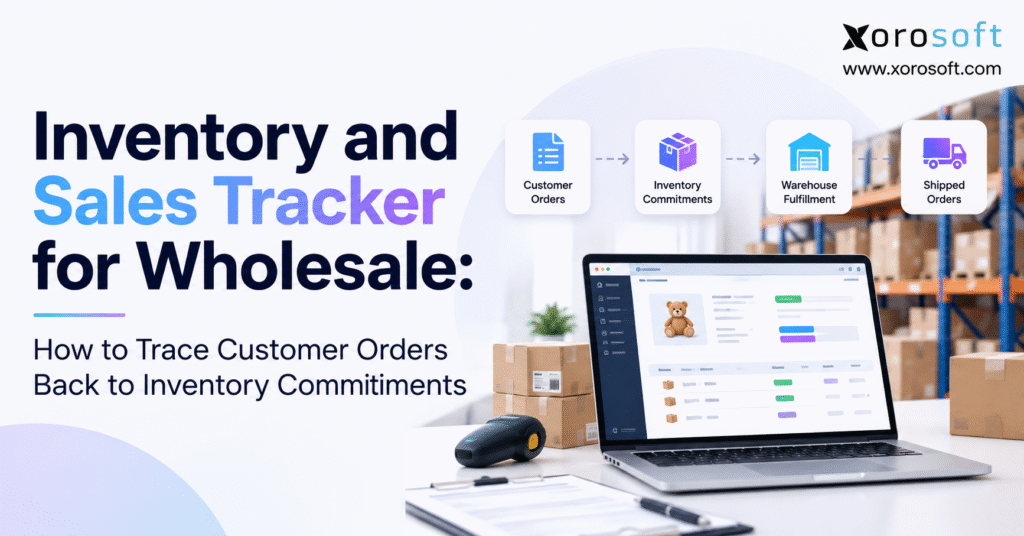
Looking for a reliable inventory and sales tracker can help you manage your business more efficiently.
1. Why an Inventory and Sales Tracker Must Show More Than Stock Balances
Wholesale businesses rarely lose control of inventory overnight. The problems usually develop gradually as customer orders, warehouse activity, purchasing decisions, and inventory records begin moving at different speeds.
A distributor might have 500 units of a product in its warehouse. However, 180 units may already be committed to existing customers, while another 20 units are unavailable because of quality checks. Although the inventory report displays 500 units on hand, only 300 units remain available for new orders.
This gap between physical stock and inventory commitments creates problems that a basic sales report cannot explain.
An effective inventory and sales tracker must show not only how much inventory exists but also which customers have already been promised specific quantities.
1.1 Why Wholesale Inventory Visibility Becomes Complicated
Wholesale transactions differ from straightforward retail purchases because customer orders often involve larger quantities, negotiated delivery schedules, and partial shipments.
A customer may order 400 units today but request delivery in two separate shipments. Meanwhile, another customer may need 150 units immediately.
Both orders create demand, but their inventory requirements are different.
If sales representatives rely only on a total stock balance, they may promise quantities that are already assigned to other customers.
The resulting problems can affect purchasing, fulfillment, customer service, and financial planning.
For this reason, wholesale inventory tracking must distinguish physical inventory from the quantity available for new commitments.
1.2 Why Sales Reports Cannot Explain Customer Commitments
A sales report typically shows quantities sold, revenue generated, customer activity, and completed transactions.
However, these figures do not necessarily explain how much inventory remains committed to orders awaiting shipment.
For example, a distributor might report strong monthly sales while simultaneously carrying a growing backlog of unfulfilled orders.
Without connecting sales order lines to inventory reservations, management cannot determine whether the backlog reflects insufficient supply, warehouse capacity, or inaccurate allocation decisions.
A reliable tracker connects sales demand with inventory availability before warehouse execution begins.
1.3 Who Needs an Inventory and Sales Tracker for Wholesale?
An inventory and sales tracker becomes particularly important when businesses manage recurring B2B customers, multiple warehouses, large purchase orders, or several sales channels.
Wholesale distributors, apparel brands, furniture suppliers, sporting goods companies, and food manufacturers frequently encounter these conditions.
However, smaller businesses with limited products and immediate fulfillment may operate effectively with spreadsheets.
The real dividing line is operational complexity.
When different customer orders compete for the same stock, businesses need order-level traceability rather than inventory totals alone.
2. Inventory States Every Wholesale Inventory Tracker Must Separate
The foundation of reliable inventory tracking is a consistent definition of each inventory state.
Sales, purchasing, warehouse, and accounting teams must understand whether a reported quantity represents physical stock, available stock, or an existing customer commitment.
Confusing these categories leads to double allocation, inaccurate replenishment, and unreliable delivery promises.
2.1 Understanding On-Hand, Available, and Committed Inventory
On-hand inventory represents stock physically recorded at a warehouse or inventory location.
Available inventory represents eligible units that can support additional demand.
Committed inventory represents quantities already assigned to existing customer obligations.
For example, if a distributor owns 1,000 units and has committed 600 units to confirmed orders, it does not necessarily have 1,000 units available for additional sales.
Quality holds, damaged inventory, and other restrictions may reduce availability further.
| Inventory state | Meaning | Wholesale example |
|---|---|---|
| On hand | Recorded physical inventory | 1,000 units |
| Committed | Inventory assigned to existing orders | 600 units |
| Unavailable | Stock restricted from selling | 50 units |
| Available | Eligible stock remaining for new orders | 350 units |
| Incoming | Expected inventory from future supply | 200 units |
| Backordered | Outstanding demand without adequate commitments | 75 units |
These inventory states should remain separate in operational reports.
2.2 Reserved Inventory vs. Allocated Inventory
Inventory reservations protect stock for a specific order or purpose. Allocation determines how inventory is assigned to demand, warehouses, or fulfillment activities.
Although these terms often appear together, their exact definitions vary by software platform.
For instance, an ERP might reserve 200 units against a customer order but allocate those units to a particular warehouse only when fulfillment planning begins.
Another system may use allocation and commitment as equivalent terms.
The important requirement is consistency. An inventory and sales tracker must make these relationships understandable and prevent overlapping quantities from being deducted more than once.
2.3 Why Incoming Inventory Is Not Automatically Available
Incoming inventory represents goods expected from suppliers, manufacturing, or warehouse transfers.
However, an expected receipt is not the same as stock ready for immediate shipment.
A purchase order might indicate that 300 units are arriving next Tuesday. Those units may support customer demand scheduled for later in the week, but they cannot fulfill an order requiring shipment today.
Receiving delays, inspections, damaged deliveries, and transfer processing can also affect eligibility.
Therefore, the tracker should distinguish current availability from future supply when calculating delivery promises.
2.4 How Inventory States Change During Fulfillment
Inventory commitments evolve as orders progress through approval, reservation, picking, packing, shipping, and invoicing.
A reservation may reduce available inventory without immediately changing physical on-hand quantities.
When the warehouse ships an order, the system should reduce the appropriate physical inventory and outstanding commitment balances.
The transaction must not deduct the same stock twice.
The official Shopify inventory-state documentation provides a useful reference for distinguishing on-hand, available, committed, unavailable, and incoming inventory.
3. How an Inventory and Sales Tracker Connects Customer Orders to Stock
The most valuable capability of wholesale inventory tracking is the ability to identify the inventory commitment supporting a specific customer order.
Instead of searching several reports, an operator should be able to follow a continuous chain of records.
That chain begins with customer demand and ends with warehouse fulfillment.
3.1 Connect Every Customer Order to Its Sales Order Lines
Each customer order should have a unique identifier connected to the customer account, order date, requested delivery date, and relevant sales channel.
However, the order number alone is insufficient.
A wholesale order may contain several products, each with different quantities and availability conditions.
For example, an order containing 100 jackets, 200 shirts, and 50 accessories requires separate inventory commitments for each product.
Therefore, the tracker should maintain a unique sales order line identifier for every product and quantity.
This allows fulfillment and purchasing teams to investigate individual shortages without treating the entire order as unavailable.
3.2 Link Sales Order Lines to Inventory Commitments
Once an order is approved, eligible inventory can be reserved or allocated according to company policy.
The commitment record should identify the sales order line, SKU, committed quantity, warehouse, and inventory source.
If one order receives stock from two warehouses, the system should preserve both allocation records.
For example, 120 units might come from Warehouse A while another 80 units are assigned to Warehouse B.
The customer’s order remains one commercial transaction, but fulfillment depends on two separate inventory commitments.
This distinction becomes essential when one warehouse encounters delays or inventory discrepancies.
3.3 Maintain an Order-to-Inventory Audit Trail
An inventory commitment should not disappear when someone changes an order quantity or reallocates stock.
The tracker needs a record of the original commitment, subsequent adjustments, responsible user, transaction time, and reason for the change.
This provides accountability when customers question delivery promises.
Microsoft’s Business Central reservation and order-tracking documentation illustrates how demand and supply records can be linked through reservation and tracking mechanisms.
The broader lesson applies to any wholesale operation: inventory balances become more useful when teams can explain the transactions behind them.
4. Trace a Wholesale Customer Order From Reservation to Shipment
Consider a distributor supplying consumer products to regional retailers.
The distributor receives a customer order for 160 units of SKU WH-100. Its warehouse contains 500 units, but existing customer commitments and quality restrictions limit what can be promised.
A properly configured inventory and sales tracker should explain every stage of this order without requiring manual reconciliation between unrelated systems.
4.1 Step One: Validate the Customer Order
The process begins with sales order SO-1042.
The customer requests 160 units for delivery during the following week.
Before committing inventory, the system must verify the product, selling unit, customer delivery location, requested date, and warehouse eligibility.
A case-pack mismatch can create a significant problem. If the customer requests 160 individual units but the system interprets the quantity as 160 cases, inventory demand becomes incorrect before allocation even starts.
Accurate commitments depend on accurate source transactions.
4.2 Step Two: Check Existing Inventory Commitments
The distributor currently has 500 units on hand, including 180 committed to other customers and 20 unavailable.
Therefore, 300 units remain available.
The new order requires 160 units, so sufficient eligible stock exists to reserve the full quantity.
After commitment, available inventory falls from 300 to 140 units.
| Transaction | On hand | Committed | Unavailable | Available |
|---|---|---|---|---|
| Before customer order | 500 | 180 | 20 | 300 |
| After reserving 160 units | 500 | 340 | 20 | 140 |
| After shipping 100 units | 400 | 240 | 20 | 140 |
Illustrative quantities. The example assumes mutually exclusive inventory states and no other stock movements.
Notice that shipping 100 reserved units reduces both on-hand inventory and the open commitment.
Available inventory remains 140 because those shipped units had already been excluded from availability.
4.3 Step Three: Connect Warehouse Fulfillment to the Order
When warehouse employees begin picking, the system should reference the original sales order line.
Suppose the warehouse ships 100 units immediately and leaves 60 scheduled for a later shipment.
The tracker should display 160 originally committed units, 100 shipped units, and 60 units still committed.
Customer service can then explain the order status without contacting the warehouse for a manual count.
If the remaining 60 units become unavailable, the system must record the exception rather than silently removing the commitment.
4.4 Step Four: Trace Inventory Back to the Customer
Traceability must also work in reverse.
Suppose a warehouse discovers that 40 units of WH-100 are damaged.
The inventory manager should be able to identify which customer orders depend on the affected stock.
This allows the business to prioritize corrective action, arrange replacement inventory, and communicate revised delivery commitments.
Without reverse traceability, businesses often discover affected orders only when employees attempt to pick inventory.
That delay turns a manageable stock exception into a customer service problem.
5. Calculate Available Inventory Without Double Promising
Inventory calculations become unreliable when the same quantities appear in multiple reports under different names.
A committed quantity may also appear as reserved, allocated, or picked inventory.
Therefore, an inventory and sales tracker must use clearly defined accounting rules for inventory quantities.
5.1 Calculate Inventory Available for New Wholesale Orders
For a stock model with mutually exclusive states, the basic calculation is:
Available Inventory = On-Hand Inventory − Committed Inventory − Unavailable Inventory
Suppose a distributor has 800 units physically on hand, 250 committed to customer orders, and 50 unavailable.
The available quantity is:
800 − 250 − 50 = 500 units
However, the calculation must follow the system’s definitions.
If reserved units already form part of committed inventory, subtracting them separately would understate stock availability.
Similarly, quality-held goods should not appear in available quantities simply because they remain physically present.
5.2 Separate Outstanding Demand From Backorders
An open sales order does not necessarily mean every outstanding unit is backordered.
Consider an order for 200 units.
The customer cancels 20 units, and the warehouse ships 120 units. The outstanding quantity is 60 units.
Of those 60 units, 35 may already have valid commitments, leaving 25 units backordered.
Outstanding Quantity = Ordered Quantity − Canceled Quantity − Shipped Quantity
Backordered Quantity = Outstanding Quantity − Committed Outstanding Quantity
These calculations help sales teams distinguish orders awaiting routine fulfillment from orders requiring additional supply.
5.3 Calculate Available-to-Promise by Delivery Date
Available-to-promise, or ATP, extends inventory calculations into future dates.
Instead of asking only how much stock exists today, ATP considers what supply can support a particular delivery commitment.
For a defined planning horizon:
Projected ATP = Current Eligible Available Stock + Eligible Scheduled Receipts − Additional Uncommitted Demand Due − Future Policy Holds
The calculation must avoid counting orders or commitments twice.
For example, a distributor may have 100 units available today and another 300 arriving in five days.
A customer requesting 200 units next week may receive a valid future promise if the expected supply is sufficiently reliable and no higher-priority demand consumes it.
5.4 Protect Inventory From Simultaneous Orders
Even accurate formulas cannot prevent overselling if multiple systems reserve stock independently.
Imagine Shopify, a wholesale portal, and a sales representative all checking the same inventory balance.
If each channel sees 100 available units before another transaction updates the record, several orders may receive promises against the same stock.
A reliable system needs controlled commitment processing, transaction consistency, and integration recovery rules.
The objective is not simply faster synchronization. It is preventing competing transactions from creating incompatible inventory promises.
6. Manage Backorders, Partial Shipments, and Allocation Changes
Wholesale orders frequently change after confirmation.
Customers revise quantities, suppliers miss delivery dates, warehouses discover shortages, and sales teams request priority changes.
An inventory and sales tracker must accommodate these exceptions without losing the connection between the original customer order and its inventory commitments.
6.1 Track Partial Allocations and Split Shipments
Suppose a retailer orders 400 units, but the distributor can immediately commit only 250 units.
The remaining 150 units require replenishment.
The tracker should retain one customer order while separately recording committed quantities, backordered quantities, and their expected fulfillment dates.
If the first 250 units ship, the order should remain open for the outstanding 150.
Customer service needs to see both the completed shipment and unresolved demand.
This approach prevents partial fulfillment from being mistaken for a completed order or an entirely unfulfilled order.
6.2 Apply Consistent Inventory Allocation Priorities
When inventory is limited, wholesale businesses must determine which orders receive stock first.
Some distributors prioritize confirmed delivery dates. Others consider contractual obligations, customer service agreements, or inventory eligibility.
However, informal decisions can create inconsistent outcomes.
Allocation priorities should be documented and applied through an approved process.
For example, a distributor may protect inventory for a contractual delivery while assigning later replenishment to lower-priority orders.
The tracker should retain the reason whenever inventory moves between customer commitments.
This makes inventory allocation explainable rather than dependent on individual employee judgment.
6.3 Handle Cancellations, Returns, and Quality Holds
When a customer cancels an unshipped order, its remaining commitment may become available for reassignment.
However, stock already picked, packed, or transferred may require warehouse intervention before release.
Returns create a different situation.
Returned inventory should not automatically become available for new orders because goods may require inspection, repackaging, or disposal.
Quality holds similarly restrict inventory eligibility without necessarily changing physical stock balances.
A reliable tracker records these events separately so canceled commitments, returned goods, and restricted inventory do not distort available stock.
6.4 Preserve Reallocation History
Inventory reallocations are sometimes necessary when urgent customer demand changes fulfillment priorities.
However, moving inventory from one order to another must generate a traceable record.
Oracle NetSuite’s inventory reallocation documentation describes how committed quantities can be redistributed between open orders.
The same operational principle applies broadly.
Teams should be able to identify the previous commitment, new commitment, transferred quantity, and reason for the change.
Otherwise, a legitimate business decision may later appear to be an unexplained inventory discrepancy.
Operational checkpoint — Free ERP Readiness Assessment: Review whether your existing tracker can explain partial allocations, releases, and reallocation history without reconstructing transactions manually.
7. Make Multi-Warehouse Inventory Commitments Reliable
Multiple warehouses introduce challenges that company-wide inventory totals cannot resolve.
Stock available at one location may not support a customer’s delivery requirement from another.
Therefore, wholesale inventory tracking must treat location and fulfillment eligibility as essential parts of the commitment.
7.1 Track Customer Commitments by Warehouse
Suppose a distributor holds 700 units across three warehouses.
Warehouse A contains 300 units, Warehouse B contains 250, and Warehouse C contains 150.
A customer ordering 200 units for immediate delivery may still face a shortage if only Warehouse C can fulfill the order within the required time.
An inventory and sales tracker must therefore show both consolidated stock and location-specific availability.
Warehouse-level allocations should also account for lot restrictions, customer routing rules, inventory holds, and shipping cutoffs.
7.2 Account for Transfers and Third-Party Fulfillment
Warehouse transfers create additional inventory states.
When 100 units leave Warehouse A for Warehouse B, the business should not count those units as freely available in both locations.
Inventory in transit must remain identifiable until the receiving location confirms receipt and eligibility.
Third-party logistics providers introduce similar requirements.
The central order system may promise inventory, but the external warehouse controls physical execution.
Integration delays or inconsistent shipment confirmations can create temporary differences between the two systems.
7.3 Connect Inventory Tracking With Warehouse Execution
Warehouse management systems provide more detailed control over receiving, bin locations, barcode scanning, picking, packing, and shipping.
These activities should remain connected to customer inventory commitments.
For example, a commitment may be valid in the order system but impossible to fulfill because the assigned bin contains damaged stock.
Xorosoft’s XoroWMS warehouse management system is relevant when businesses need warehouse execution connected with their wider inventory processes.
The operational requirement is to keep the customer promise aligned with what the warehouse can physically ship.
8. Connect Wholesale Orders Across Shopify, Amazon, and EDI
Wholesale distributors increasingly serve customers through more than one ordering channel.
A business may receive B2B purchase orders through EDI, direct orders from sales representatives, Shopify transactions, and Amazon marketplace demand.
An inventory and sales tracker must coordinate these transactions without allowing separate channels to make conflicting stock commitments.
8.1 Treat Ecommerce Orders as Shared Inventory Demand
Online orders and wholesale purchase orders may draw from the same physical inventory.
However, each channel may use different order identifiers, product references, fulfillment expectations, and inventory publishing rules.
Businesses must map these differences into a consistent operational record.
For example, a Shopify order might reserve 10 units while a wholesale customer simultaneously requests 200 units of the same product.
Both transactions must affect a shared commitment process.
Xorosoft provides a relevant example through XoroONE, which connects ecommerce activity with inventory, purchasing, accounting, and fulfillment workflows.
8.2 Understand Shopify Inventory Synchronization
Shopify inventory synchronization becomes more complex when the merchant also handles wholesale orders, transfers, or manufacturing supply.
The ecommerce storefront needs an accurate sellable quantity, but the underlying system may track additional commitments that Shopify does not manage directly.
Therefore, businesses must establish which system owns reservation decisions and which system publishes available quantities.
The Xorosoft ERP listing on the Shopify App Store describes supported connections involving order processing, fulfillment updates, inventory synchronization, and related ecommerce activity.
Actual integration behavior should always be verified against the merchant’s selected configuration.
8.3 Maintain Accurate EDI and B2B Order References
EDI orders introduce another layer of traceability.
Customer purchase order numbers, line references, requested delivery dates, acknowledgments, and shipping notices must remain connected to internal sales order records.
If the customer revises an order, the system should update the existing obligation rather than create duplicate demand.
A distributor may also receive repeated messages following a transmission retry.
Consequently, integration processes need duplicate detection, idempotent processing, and clear error handling.
The Xorosoft integrations page provides additional context for evaluating connectivity between business systems.
8.4 Separate Channel Buffers From Customer Reservations
Some businesses publish different inventory quantities to Shopify, Amazon, and wholesale channels.
Channel buffers can reduce overselling risk, but they are not substitutes for genuine order-level reservations.
For example, holding back 25 units from Shopify does not prove those units belong to a specific wholesale customer.
The tracker should distinguish safety buffers, channel availability rules, and firm order commitments.
Otherwise, the company may restrict too much inventory from selling while still failing to protect important customer orders.
9. Connect Purchasing, Manufacturing, and Industry-Specific Supply
Inventory commitments become especially difficult when existing stock cannot cover all customer demand.
Purchasing teams need to understand which orders depend on incoming goods, while manufacturers must determine whether production can satisfy promised dates.
An inventory and sales tracker should connect customer demand to the supply expected to fulfill it.
9.1 Link Purchase Orders to Customer Requirements
A purchase order should provide more information than the quantity expected from a supplier.
When stock is being purchased to satisfy customer demand, the business should preserve the relationship between the purchase order line and the relevant sales order lines.
For example, three customer orders may depend on 500 incoming units.
If the supplier confirms only 350 units, purchasing and sales need to know which customers are affected.
Xorosoft’s cloud ERP platform is one example of a system that connects purchasing with broader inventory and order management processes.
The essential capability is maintaining reliable supply-to-demand visibility as quantities and dates change.
9.2 Include Manufacturing and Kit Requirements
Manufacturers must consider components, bills of materials, production capacity, and work orders when calculating future inventory availability.
A finished-product commitment may depend on several components arriving on different dates.
Similarly, wholesalers selling bundles or kits need to account for component quantities rather than treating every bundle as independent physical inventory.
For example, a promotional kit containing three products can only be promised when enough eligible components are available.
If one component is missing, the complete kit may be unavailable.
These relationships should remain visible in the tracker so purchasing and production teams can resolve shortages before delivery promises fail.
9.3 Apply Inventory Commitments to Different Wholesale Industries
Different product categories require different allocation controls.
| Industry | Typical challenge | Required inventory control |
|---|---|---|
| Apparel | Size and color variations | SKU-level commitments |
| Furniture | Large products and split deliveries | Warehouse and shipment allocation |
| Sporting goods | Seasonal demand peaks | Customer and channel priorities |
| Food and beverage | Expiry and quality restrictions | Eligible lot-level commitments |
| Automotive parts | Similar part numbers and fitment | Exact SKU identification |
| Industrial distribution | Long supplier lead times | Supply-to-order tracking |
Apparel distributors must protect the exact size and color ordered. Furniture businesses may need to coordinate deliveries from different locations.
Food distributors face additional eligibility requirements involving lot status and remaining shelf life.
Although the products differ, the underlying objective remains consistent: customer promises must be supported by inventory that is genuinely eligible for fulfillment.
10. Build an Inventory and Sales Tracker That Supports Reconciliation
Accurate order commitments depend on more than calculation formulas.
The tracker needs reliable source records, controlled transactions, clear responsibility, and reporting that exposes exceptions.
Without these elements, even an advanced system can produce inventory figures that employees do not trust.
10.1 Define the Essential Inventory Tracking Fields
Every wholesale order should connect to enough information to explain the quantity promised and its fulfillment status.
| Data category | Essential information |
|---|---|
| Customer | Customer ID, account, delivery location |
| Sales order | Order ID, channel, requested date |
| Order line | SKU, quantity, selling unit |
| Inventory | Warehouse, bin, lot, stock status |
| Commitment | Reservation ID, quantity, source |
| Purchasing | Purchase order, supplier, expected receipt |
| Fulfillment | Pick status, shipment ID, shipped quantity |
| Audit history | Change time, user, previous value, reason |
Stable identifiers are essential.
Customer names and product descriptions may change, but transaction relationships should remain consistent.
A commitment should reference a unique order line instead of relying on text matching between reports.
10.2 Measure Inventory Commitment Accuracy
Inventory record accuracy is important, but it does not fully describe the quality of customer commitments.
A business may count physical stock correctly while still assigning the same units to incompatible orders.
Therefore, management should track both inventory accuracy and commitment quality.
Useful metrics include commitment coverage, backorder rate, inventory discrepancy rate, and on-time, in-full fulfillment.
Commitment Coverage = Committed Outstanding Units ÷ Total Outstanding Units × 100
Backorder Unit Rate = Backordered Units ÷ Total Outstanding Units × 100
These metrics should use consistent units and clearly defined reporting periods.
10.3 Build Exception Reports Around Customer Risk
A useful inventory report should identify problems requiring action, not merely display historical transactions.
For example, the system might flag an order whose committed quantity exceeds eligible stock or a warehouse transfer that has missed its expected arrival date.
Other important exceptions include negative availability, duplicate reservations, outdated supplier dates, and allocations connected to canceled orders.
Exception ownership matters as much as detection.
Purchasing may own supplier delays, warehouse teams may own inventory discrepancies, and sales operations may own customer communication.
Clear responsibilities prevent problems from remaining unresolved between departments.
10.4 Use Reporting and AI Without Weakening Inventory Controls
Connected operational data can support faster reporting and more accessible decision-making.
For example, managers may want to ask which open customer orders are exposed to delayed supplier receipts or which products have the largest uncommitted demand.
Xorosoft’s AI MCP Server describes a permission-aware connection between ERP information and AI tools for questions involving inventory, purchasing, sales, and other operations.
However, conversational reporting should not replace authoritative inventory transactions.
Any AI-generated answer depends on the quality of the underlying records, access permissions, and current synchronization status.
The inventory commitment system must remain the source of truth.
11. Inventory and Sales Tracker vs. Inventory Software, WMS, and ERP
Not every wholesale company requires a full ERP platform.
The appropriate software depends on transaction volume, inventory complexity, warehouse operations, financial integration, and the number of systems exchanging order information.
The goal is to select the simplest system capable of maintaining reliable customer commitments.
11.1 When a Spreadsheet Inventory Tracker Is Enough
Spreadsheets can support businesses with limited inventory locations, predictable order patterns, and a small number of employees updating stock records.
A well-designed spreadsheet can track orders, quantities, reservations, and incoming supply.
However, spreadsheets become vulnerable when multiple employees make simultaneous changes or when inventory must synchronize continuously with ecommerce channels.
Manual copying between sales orders, inventory balances, and purchasing reports also introduces delays.
The warning sign is not spreadsheet usage itself. It is the inability to demonstrate that each outstanding order has a valid commitment.
11.2 What Dedicated Inventory Software Adds
Inventory management applications can provide controlled stock transactions, automated updates, location-specific quantities, and stronger order synchronization.
These capabilities reduce dependence on manual spreadsheet reconciliation.
However, software depth varies considerably.
Some systems support advanced customer allocations and purchasing workflows. Others focus mainly on tracking stock movements and inventory balances.
Warehouse management systems add detailed execution capabilities such as barcode scanning, bin control, picking, packing, and shipment validation.
A business should test these functions directly rather than assuming that every inventory application handles reservations the same way.
11.3 When ERP Becomes the Better Operational Fit
ERP becomes increasingly relevant when inventory commitments must remain connected to accounting, purchasing, manufacturing, sales, and multiple warehouses.
This is particularly important when one order affects several departments.
For example, a customer shipment may update inventory, recognize a financial transaction, trigger replenishment, and affect purchasing forecasts.
Xorosoft is one modern ERP alternative for inventory-driven businesses evaluating these connected requirements.
Companies comparing vendors can also review the Xorosoft vs. NetSuite comparison while assessing functionality, implementation effort, operating costs, and integration needs.
No single platform is automatically appropriate for every distributor.
11.4 Compare Software Using Actual Wholesale Transactions
Software demonstrations should reproduce the company’s real operational exceptions.
A useful test begins with two customer orders competing for the same SKU.
The evaluator should then change one order, reserve partial quantities, receive additional stock, transfer inventory between warehouses, and confirm a split shipment.
Every action should produce understandable updates to availability and commitments.
| Evaluation area | Critical question |
|---|---|
| Inventory availability | Can the system explain sellable stock by warehouse? |
| Order traceability | Can each commitment be linked to a sales order line? |
| Purchasing | Can incoming supply support specific customer demand? |
| Warehouse execution | Do picking and shipping update commitments correctly? |
| Integrations | How are duplicates, delays, and failed updates handled? |
| Reporting | Can users identify orders at risk before shipment? |
| Auditability | Can employees explain who changed an allocation and why? |
Before making a decision, businesses should review relevant implementation examples and customer case studies to understand which operational scenarios have been addressed in practice.
Operational checkpoint — Watch Demo: Evaluate how an integrated system handles a real customer order from initial inventory commitment through purchasing, warehouse execution, and final shipment.
12. Make Wholesale Inventory Commitments Reliable Before Scaling
The value of an inventory and sales tracker is not measured by how many reports it produces.
Its value comes from the business’s ability to make customer promises confidently and explain the inventory supporting those promises.
That requires reliable records, clear allocation rules, and consistent operational ownership.
12.1 Start With One High-Risk Product or Customer Workflow
Begin by selecting a frequently ordered SKU with meaningful wholesale demand.
Review its physical stock balance, open sales orders, existing reservations, and expected replenishment.
Then trace each outstanding customer order line to the inventory or planned supply supporting it.
Look for commitments without source records, duplicate allocations, unexplained differences, and orders whose promised dates do not match supply availability.
This targeted exercise often reveals whether the current tracking process is reliable.
It also provides a practical foundation for improving controls without attempting to redesign the entire business at once.
12.2 Test the Full Order Lifecycle
Once the tracking model is clear, test how it responds to normal operational changes.
Create a new customer order, allocate inventory, partially fulfill it, cancel an outstanding quantity, and process a replenishment receipt.
Then test more difficult conditions, including supplier delays, warehouse shortages, customer priority changes, and simultaneous channel orders.
The objective is to verify that every transaction updates the correct records.
At the end of the test, employees should be able to explain both available inventory and the outstanding customer obligations connected to it.
12.3 Establish a Repeatable Reconciliation Process
Inventory reconciliation should connect three important records: physical stock, customer commitments, and open demand.
An order should not disappear from outstanding demand merely because a commitment was released.
Likewise, stock should not become available twice because the warehouse and order system processed the same shipment independently.
Assign clear ownership for reviewing exceptions and approving corrections.
As operational complexity grows, businesses may evaluate integrated systems and industry-specific approaches through Xorosoft’s industry solutions.
However, software selection should follow process requirements rather than substitute for them.
12.4 Turn Inventory Tracking Into Reliable Customer Promises
A dependable wholesale operation should be able to answer three questions at any moment: how much inventory is available, which customers already have commitments, and what supply is needed to fulfill outstanding demand.
When those answers come from connected, traceable records, sales teams can make more realistic promises, warehouse teams can execute with greater clarity, and purchasing teams can prioritize actual shortages.
The strongest inventory and sales tracker does more than record transactions. It connects every customer promise to a valid inventory decision.
For wholesalers dealing with disconnected systems, multi-warehouse operations, or complex B2B orders, Xorosoft can be considered alongside other ERP platforms as part of a requirements-based evaluation.
Ready to improve wholesale inventory visibility?
Explore how your customer orders, inventory commitments, purchasing, and warehouse operations could work together in a connected system.
Frequently Asked Questions About Wholesale Inventory Tracking
What is an inventory and sales tracker for wholesale?
An inventory and sales tracker connects customer orders, stock balances, and reserved quantities. It shows which units can support new wholesale orders and which are already promised.
How do you trace a customer order to committed stock?
Match the sales order line and SKU to its reservation record. Verify the committed quantity, warehouse, supply source, and shipment status.
What is the difference between available and committed inventory?
Available inventory can support new orders. Committed inventory has already been assigned to existing demand. Both differ from total physical stock on hand.
How can wholesalers prevent double allocation?
Use one authoritative reservation process, update commitments when orders change, and stop simultaneous transactions from assigning the same units to different customers.
How should a tracker handle backorders and partial shipments?
Record shipped, committed, and backordered quantities separately for each sales order line. Adjust balances after receipts, cancellations, and shipments.
Can Excel track wholesale inventory commitments?
Yes, for simple operations with few users. Multiple warehouses, sales channels, and concurrent orders often require automated inventory controls and audit trails.
When should a wholesaler upgrade from a tracker to ERP?
Consider ERP when disconnected sales, purchasing, warehouse, and accounting processes cause overselling, delayed reconciliations, or unreliable order promises. Test real workflows before choosing.
Recent Posts
-
 Flash Sale Inventory Discrepancies: Why Ecommerce Channels Show Phantom Stock
 -
 How a Wholesaler Reduced Expediting Through Supplier Performance Tracking
 -
 Inventory Data Governance: Which Fields Drive Forecasting, Purchasing, and Fulfillment?
 -
 How Many SKUs Do You Need Before an ERP Becomes Necessary?
 -
 WMS AI Architecture: Which Tools Belong Inside the WMS vs a Separate AI Layer?