1. Marketplace ERP Integration Gets Harder Before It Looks Broken
Marketplace ERP integration connects sales channels with the systems that manage orders, inventory, warehouses, purchasing, accounting, and fulfillment. At first, the flow can look simple. However, growing businesses soon find that every part of that flow can fail in a different way.
Therefore, the real challenge is not simply moving data. Instead, the business must keep that data correct when channels, warehouses, order volumes, and product records keep changing.
Moreover, the process must still work when an API slows down, a SKU does not match, or another system goes offline for a short time.
1.1 What Marketplace ERP Integration Must Connect
A strong marketplace ERP integration should cover the full order cycle.
For example, businesses may need to move:
- Orders
- Order changes
- Products
- SKUs
- Inventory
- Prices
- Cancellations
- Shipments
- Tracking
- Returns
- Refunds
- Fees
- Settlements
However, these records do not all need the same sync speed.
For instance, a new order may need fast processing. Likewise, low-stock items may need frequent updates.
On the other hand, settlement data can often move on a set schedule. Therefore, the integration should match the timing of each business event instead of forcing every record into the same sync rule.
1.2 How System Design Goes Beyond an API Connection
An API explains how two systems exchange data. However, it does not decide how the business should manage that data.
Therefore, teams should answer several questions before building the connection.
Which system owns inventory? Which system owns the SKU? What happens if the same order arrives twice? Who fixes a failed mapping? What happens when the ERP is unavailable?
As a result, good design covers ownership, timing, checks, retries, and recovery.
Without those rules, a connection may be technically live while employees still fix orders by hand.
2. Four Marketplace ERP Integration Patterns to Understand
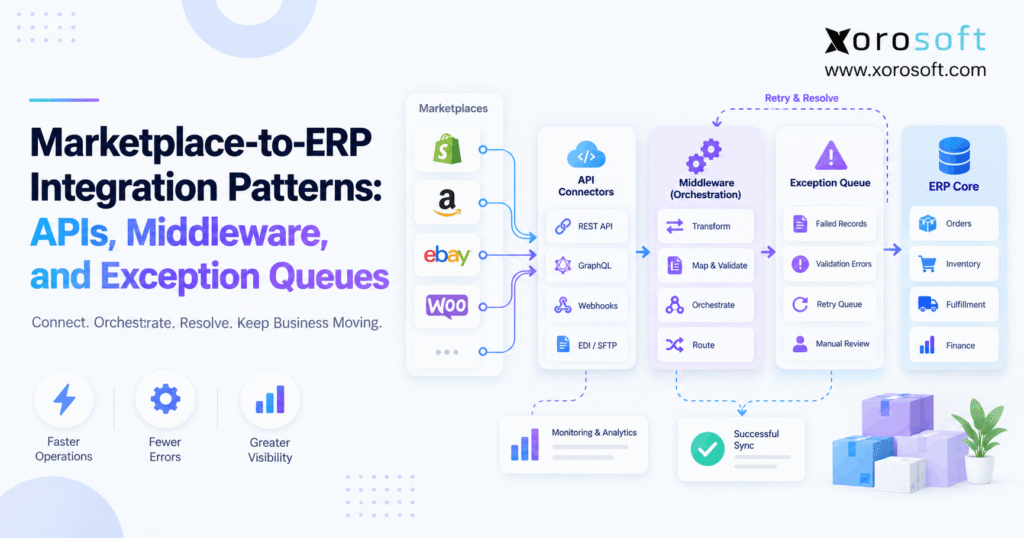
Marketplace ERP integration usually follows one or more of four common patterns: direct APIs, ready-made connectors, middleware, and event-based queues.
However, there is no single pattern that fits every company.
Therefore, businesses should choose based on channel count, order volume, internal skills, and the number of systems involved.
2.1 Pattern One: Direct API Connections
A direct API connects a sales channel straight to the ERP.
The basic flow is simple:
Sales channel → ERP
This model can work well when a company has only a few connections. In addition, developers get strong control over the data flow.
However, every new channel adds another connection to maintain. Each platform may also use different fields, order states, security rules, and limits.
Therefore, direct APIs can become harder to manage as the business expands.
Still, they can remain a good choice when the setup is simple and stable.
2.2 Pattern Two: Ready-Made Connectors
A connector provides common data flows without forcing a team to build every part from scratch.
For example, a connector may already support:
- Orders
- Customers
- SKUs
- Inventory
- Fulfillment
- Tracking
Therefore, setup can be quicker.
However, standard connectors may struggle when a company uses special allocation rules, several warehouses, custom fields, or unusual finance processes.
As a result, connectors reduce development work, but they do not remove the need for clear business rules.
Before choosing one, teams should also check how it handles failed records, updates, and changes to outside systems.
2.3 Pattern Three: Middleware or iPaaS
Middleware sits between the sales channel and the ERP.
The flow becomes:
Sales channel → Middleware → ERP
First, middleware receives the data. Next, it checks, changes, or routes that data. Finally, it sends a standard record to the ERP.
Therefore, middleware becomes useful when several channels send the same type of information in different formats.
For example, Amazon and Walmart may describe an order differently. However, middleware can map both formats into one internal sales-order structure.
As a result, downstream teams can work with more consistent records.
2.4 Pattern Four: Event-Based Queues
An event-based flow reacts when something changes.
For example:
Order change → Event → Queue → Processing → ERP
Therefore, the system does not always need to keep asking an outside service whether anything changed.
In addition, queues can hold work when another system is temporarily unavailable.
For example, if the ERP goes offline for several minutes, the order can remain in the queue instead of disappearing.
Consequently, the connection becomes more able to handle short outages.
However, event-based systems still need clear rules for retries, duplicates, and failed messages.
2.5 Why Growing Businesses Often Use a Hybrid Model
A company does not need to force every workflow into one model.
For example, standard orders may use a ready-made connector. Meanwhile, a special sales channel may use a direct API. In addition, middleware may handle data rules across several systems.
Therefore, many growing companies use a mix of approaches.
The goal is not to create the most advanced setup.
Instead, the goal is to use the simplest design that remains easy to watch, maintain, and fix.
3. Marketplace ERP Integration Needs Clear Data Ownership
Marketplace ERP integration becomes much safer when each important data field has one clear owner.
Otherwise, two systems may update the same value in different ways. As a result, neither system stays reliable.
Therefore, source-of-truth decisions should happen before connector setup.
3.1 How Marketplace ERP Integration Handles Product and SKU Ownership
Marketplace ERP integration needs a stable product key.
First, decide where the main SKU record lives.
For some companies, the ERP owns the core SKU. Meanwhile, a product system may manage longer descriptions, images, and other sales content.
However, every channel still needs a stable link to the internal item.
Therefore, businesses should avoid unrelated SKU codes across different systems.
Instead, create a clear mapping between each listing and the main operational SKU.
As a result, orders, returns, inventory updates, and reports can all refer to the same item.
3.2 How Marketplace ERP Integration Defines Inventory Ownership
Marketplace ERP integration also needs one trusted source for sellable inventory.
For many inventory-driven businesses, that source sits in the ERP, OMS, or WMS because those systems understand stock movements and existing demand.
For example, XoroERP can connect inventory with orders, purchasing, and finance.
Therefore, sales channels can receive a controlled availability figure instead of creating separate stock rules.
However, every company should choose the source based on its own setup.
The key is consistency. Once one system owns the calculation, other systems should use that result.
3.3 Separate On-Hand Stock From Sellable Stock
A common mistake is sending raw warehouse stock directly to a selling channel.
However, some of that inventory may already be promised.
Therefore, the channel normally needs an available-to-sell value.
A simple rule may look like this:
Available to sell = On hand − Allocated − Safety stock
In addition, a business may exclude damaged stock, inspection stock, or units held for wholesale orders.
As a result, two companies with the same physical quantity may publish very different sellable quantities.
Therefore, send a useful business quantity instead of a raw warehouse count.
4. Marketplace ERP Integration Should Cover the Full Order Cycle
Marketplace ERP integration should follow an order beyond its first import.
After all, creating the sales order is only the beginning.
Therefore, the workflow should continue until the sales channel, ERP, warehouse, and finance records agree.
4.1 Validate Orders Before Creating Them
When an order arrives, the system should check important fields first.
For example, it may check:
- SKU
- Quantity
- Order ID
- Shipping method
- Warehouse
- Customer information
- Tax data
- Order status
If a required value is missing, the system should not create a partly valid order.
Instead, it should hold the transaction for review.
Therefore, early checks stop bad data before it reaches warehouse or finance work.
Moreover, early checks make errors easier to understand and correct.
4.2 How Marketplace ERP Integration Prevents Duplicate Orders
Marketplace ERP integration also needs protection against repeated orders.
For example, the ERP may create an order successfully while the return message fails. The connection may then think the request failed and send the same order again.
Therefore, the system should keep the original channel order ID and check whether it has already been processed.
This is often called idempotency. In simple terms, the same request should not create the same business record twice.
As a result, a retry can fix a failed communication step without creating a duplicate sales order.
4.3 Move Approved Orders Into Warehouse Work
After validation, the order can enter the normal operating flow.
For businesses using XoroONE, that can connect orders with inventory, purchasing, warehouse work, accounting, and reporting.
Next, the business allocates stock.
Then, warehouse work can begin.
Finally, shipment and tracking details move back to the sales channel.
Therefore, employees do not need to update several systems after each warehouse step.
As a result, teams also get a clearer order history from sale through shipment.
5. Marketplace ERP Integration Needs More Than Fast Inventory Sync
Marketplace ERP integration needs timely inventory updates. However, speed cannot fix a bad stock calculation.
Therefore, companies should first make sure the quantity being published is correct.
Then, they can decide how quickly that value should move.
5.1 Marketplace ERP Integration Across Multiple Warehouses
Marketplace ERP integration becomes more complex when inventory sits in several locations.
A company with one warehouse has a simple stock question. However, a business with five sites must decide which locations support each sales channel.
For example, one warehouse may serve western customers while another handles eastern orders.
Therefore, channel availability should not always equal total company stock.
Instead, the ERP may need to consider eligible sites, shipping rules, channel limits, and safety stock.
A warehouse management system can support the physical side by keeping warehouse work tied to current stock movements.
5.2 Walmart Shows Why Location-Level Stock Matters
Walmart is a useful example of why location matters.
A seller may have the same SKU stored at more than one fulfillment site. Therefore, knowing company-wide stock alone may not be enough.
Instead, the connection may need to know which location holds the units and whether that site can support the order.
As a result, location rules become part of the wider stock design.
Moreover, the ERP should avoid sending stock from a warehouse that cannot serve the required channel or shipping promise.
Therefore, multi-warehouse selling needs more than adding all stock together.
5.3 Do Not Treat Every SKU the Same
Not every SKU has the same overselling risk.
For example, an item with 2,000 units may tolerate a small delay. Meanwhile, a fast-selling item with three units may need much tighter control.
Therefore, businesses can adjust update rules based on demand and stock risk.
In addition, safety stock can protect scarce products.
However, a safety buffer should not hide poor stock logic.
Instead, it should support a wider plan that includes good allocations, reliable warehouse updates, and clear channel rules.
As a result, the business can protect inventory without holding back more stock than necessary.
6. Marketplace ERP Integration Needs Exception Queues
Marketplace ERP integration will eventually face an error.
An API may time out. A SKU may be missing. A login may expire. Likewise, a mapping may stop matching the source data.
Therefore, the system needs a clear place for failed transactions.
That place is often an exception queue.
6.1 What an Exception Queue Does
An exception queue holds work that could not finish automatically.
For example:
Order → SKU check fails → Exception queue → SKU fixed → Order replayed
Therefore, the order does not disappear.
Instead, the business can see the problem, understand the cause, correct the data, and run the transaction again.
This is much safer than hiding errors inside technical logs.
Moreover, operations teams gain a visible list of records that still need attention.
As a result, failed work becomes a task that somebody can own instead of a hidden technical problem.
6.2 Separate Temporary Errors From Data Errors
Some failures may fix themselves.
For example:
- Short network outage
- API timeout
- Temporary service issue
- Rate limit
However, other failures will not improve with time.
Examples include:
- Missing SKU
- Invalid warehouse
- Bad status
- Expired login
- Missing mapping
Therefore, temporary problems may deserve a retry.
In contrast, bad data often needs a person to make a change.
As a result, the system should classify the error before deciding what happens next.
This simple split prevents wasted retries and makes error handling easier to manage.
6.3 Dead-Letter Queues Protect the Main Flow
A message that fails repeatedly should not block normal work.
Therefore, technical systems often move repeated failures into a separate dead-letter queue.
As a result, healthy transactions can continue while the failed message waits for review.
From an operator’s point of view, the idea is simple.
Normal orders keep moving. Meanwhile, the problem order stays visible until somebody fixes the cause.
Therefore, one bad record does not need to slow every other transaction.
In addition, teams can review these failed records to spot repeated data or setup problems.
7. Marketplace ERP Integration Needs Smart Retry Rules
Marketplace ERP integration needs retry rules because short outages happen.
However, uncontrolled retries can create extra traffic and repeated errors.
Therefore, a system should retry only when the next attempt has a reasonable chance of working.
7.1 Use Backoff Instead of Constant Retries
Suppose an outside API becomes overloaded.
If thousands of failed requests retry at once, they can make the problem worse.
Therefore, many systems wait longer between each attempt.
For example:
1. Detect a temporary error.
2. Wait briefly.
3. Retry.
4. Wait longer.
5. Retry again.
6. Stop at a set limit.
After that, the transaction can move to an exception queue.
As a result, the outside service gets time to recover.
Moreover, the business avoids an endless cycle of repeated requests that adds load without adding value.
7.2 Never Retry Permanent Errors Forever
A missing SKU will still be missing a few seconds later.
Likewise, invalid login details will remain invalid until someone changes them.
Therefore, repeating these requests adds noise without solving the problem.
Instead, permanent errors should be flagged early.
Then, the right employee can fix the real cause.
As a result, developers spend less time searching through large logs.
Meanwhile, operations teams get a clear list of issues they can act on.
Therefore, the recovery process becomes simpler, faster, and easier to measure.
8. Marketplace ERP Integration Needs Different Amazon and Walmart Rules
Marketplace ERP integration must handle differences between sales channels instead of assuming every outside system behaves in the same way.
Amazon and Walmart may both send orders. However, their data, order states, stock rules, and update methods can differ.
Therefore, the connection layer should turn channel-specific data into clear internal records.
8.1 Amazon Order Connections Keep Evolving
Amazon selling workflows can change as its APIs and order programs change.
Therefore, an Amazon connection should not be treated as a one-time project.
Instead, the business needs clear ownership for testing, updates, and error checks.
In addition, event-based updates can reduce the need to ask repeatedly whether an order changed.
As a result, the business can react to important events while reducing unnecessary calls.
However, the downstream ERP still needs clear rules for order IDs, inventory, cancellations, fulfillment, and retries.
Therefore, channel updates and internal order rules should be managed together.
8.2 Walmart Uses Its Own Order Flow
Walmart also uses its own order and stock rules.
Therefore, a connection should respect Walmart’s process rather than reuse another channel’s logic without checking it.
Likewise, internal order statuses need clear mappings.
For example, an ERP status called “Ready to Ship” may not mean exactly the same thing as a similar outside status.
Therefore, teams should map the business meaning behind each state.
As a result, employees can understand what the order is waiting for instead of relying only on similar labels.
This also makes failed orders easier to review.
8.3 Standardize the Internal ERP Record
Even when sales channels behave differently, the ERP should receive a clear internal business record.
For example:
Amazon order → Standard sales order
Walmart order → Standard sales order
Other channel → Standard sales order
Therefore, channel-specific rules stay closer to the connection layer.
Meanwhile, warehouse and finance teams can follow one common process.
Xorosoft integrations can support this wider model by connecting ecommerce and operational workflows around the ERP.
As a result, teams can focus on the business process instead of managing a different internal workflow for every channel.
9. Marketplace ERP Integration Across Shopify and Other Channels
Marketplace ERP integration often exists beside direct ecommerce channels such as Shopify.
Shopify itself is a direct ecommerce platform rather than a marketplace. However, many brands use Shopify while also selling through Amazon, Walmart, wholesale, and EDI channels.
Therefore, inventory and orders from all those sources need to work together.
9.1 Avoid Separate Inventory Pools Unless You Need Them
If Shopify and other channels sell the same physical stock, each channel needs a controlled view of shared inventory.
Otherwise, one channel may promise units that another channel has already sold.
Therefore, the ERP should combine demand before it publishes new availability.
For companies using Shopify as part of a wider operating stack, Xorosoft is also listed on the Shopify App Store.
As a result, teams can think beyond basic storefront sync and consider orders, inventory, purchasing, fulfillment, and finance together.
However, shared stock still needs clear allocation rules.
9.2 Channel Rules Can Still Be Different
Shared physical stock does not mean every channel should receive the same available quantity.
For example, a business may hold 20 units for wholesale customers. Meanwhile, another quantity may support direct ecommerce demand.
Therefore, channel rules can sit above the shared physical inventory.
As a result, the company keeps one stock picture while still controlling how much each channel can promise.
This approach becomes more useful when demand rises quickly.
In addition, it gives operators a clearer way to protect key customers or sales programs without creating separate manual stock files.
10. Marketplace ERP Integration Must Include Finance
Marketplace ERP integration should include finance rather than stopping after shipment.
After all, shipping an order does not tell finance what the business actually earned.
Therefore, fees, refunds, changes, and settlements should be part of the wider data plan.
10.1 Connect Sales to Fees and Refunds
Marketplace transactions may include:
- Product sales
- Discounts
- Fees
- Refunds
- Adjustments
- Taxes
- Settlement payments
However, operations and finance may see those events at different times.
Therefore, the ERP needs a clear way to match sales activity with the related financial record.
Otherwise, month-end work can become a manual spreadsheet exercise.
As a result, the order process may appear automated while finance still handles large amounts of manual work.
Therefore, teams should map finance flows while they map orders and inventory, not months later.
10.2 Marketplace ERP Integration Reconciliation Finds Missing Transactions
Marketplace ERP integration needs regular reconciliation because retries only fix failures the system already knows about.
They cannot prove that every expected record arrived.
Therefore, teams should compare important records between systems.
For example:
- Channel orders versus ERP orders
- Shipments versus ERP shipments
- Refunds versus ERP credits
- Settlements versus accounting records
As a result, employees can find missing transactions that never created an obvious error.
Moreover, this check becomes more valuable as daily order volume grows.
Therefore, reconciliation should be a normal control rather than an emergency project at month-end.
11. Monitor Marketplace ERP Integration Beyond API Uptime
Marketplace ERP integration can have a healthy technical connection while important orders are still stuck.
Therefore, API uptime should not be the only measure.
Instead, the business should track whether orders, stock updates, shipments, and finance records are actually completing.
11.1 Track Metrics Operators Can Act On
Useful measures include:
- Order sync delay
- Inventory sync delay
- Failed transaction rate
- Retry success rate
- Open exception count
- Age of oldest exception
- Duplicate order attempts
- Stock differences
- Missing tracking updates
- Unmatched settlements
For example, 99.9% API uptime may look excellent.
However, that number offers little comfort if dozens of orders have been stuck for several hours.
Therefore, the age of the oldest exception may tell an operations manager more than a general uptime figure.
In addition, trend data can show whether the same problem keeps returning.
11.2 Give Every Exception an Owner
An error becomes harder to fix when nobody owns it.
Therefore, teams should assign common issue types to the right group.
For example:
- SKU mapping → product or operations
- Warehouse mapping → operations
- API login → IT
- Tax setup → finance
- Shipping rule → fulfillment
As a result, the right employee can act without waiting for a developer to review every case.
Moreover, clear ownership makes it less likely that old failures will sit untouched.
Therefore, exception ownership should be part of the process design, not something decided after an error happens.
12. Know When Marketplace ERP Integration Has Reached Its Limit
Marketplace ERP integration does not need to become complex simply because more advanced tools exist.
A direct connector can still work very well when a company has simple needs.
Therefore, upgrade the setup only when the operating problem justifies the change.
12.1 Keep the Simple Model When It Still Works
A basic setup may remain suitable when the company has:
- One or two main channels
- One warehouse
- Simple products
- Lower order volume
- Few custom rules
- Limited finance needs
- Few failed transactions
Therefore, replacing a stable system can add cost without creating much value.
Instead, businesses should look for signs that the current process is actually holding them back.
If those signs are missing, simplicity can be a strength.
Moreover, a smaller setup is often easier to maintain when the business truly has simple needs.
12.2 Upgrade Marketplace ERP Integration When Manual Work Keeps Growing
Marketplace ERP integration may need a new design when manual control keeps expanding.
For example, the warning signs may include:
- More sales channels
- More warehouses
- Different stock rules by channel
- Frequent failed-order fixes
- Purchasing in spreadsheets
- Finance work outside the ERP
- Repeated data entry
- Constant connector repairs
At that point, the issue is no longer just one connection.
Therefore, adding another small tool may only delay the larger decision.
Xorosoft solutions show how orders, inventory, purchasing, warehouse work, and finance can operate in a more connected model.
12.3 Review Industry Needs Before Choosing the Stack
Operating needs also change by industry.
For example, apparel companies may manage sizes, colors, and seasonal stock.
Meanwhile, furniture companies may deal with larger products and longer lead times.
Likewise, food businesses may need stronger lot or expiry controls. Manufacturers may need bills of materials and production work.
Therefore, businesses should compare systems against the workflows that matter in their own market.
The industries Xorosoft serves provide examples of how those needs can vary.
As a result, software selection stays tied to real operating needs rather than a generic feature list.
13. Build a Marketplace ERP Integration That Can Recover
Marketplace ERP integration should do more than move orders quickly. Instead, it should keep operations controlled when something goes wrong.
Therefore, define data ownership first. Next, decide where APIs, connectors, middleware, or queues make sense. In addition, build clear rules for duplicate orders, retries, bad data, and missing transactions.
Most importantly, make failures visible.
A hidden error can become an inventory problem, a late shipment, or a finance issue. However, a clear exception process turns that error into work that someone can resolve.
For inventory-driven businesses, Xorosoft connects ERP, inventory, purchasing, warehouse management, accounting, reporting, ecommerce, and multi-channel operations in one cloud environment.
Therefore, if separate connectors, spreadsheets, accounting tools, and warehouse apps are creating too much manual work, Book a Demo to see how those workflows can operate in a more connected system.
FAQs
What is marketplace ERP integration?
Marketplace ERP integration connects channel orders, inventory, fulfillment, returns, and finance data with an ERP. Therefore, teams can manage activity through shared records instead of updating several systems manually.
Do I need middleware between a marketplace and ERP?
Not always. Direct links work for simpler setups. However, middleware becomes useful when several channels, warehouses, data formats, routing rules, or error-handling needs make direct connections harder to manage.
What is an exception queue in marketplace integration?
An exception queue stores transactions that could not finish automatically. Therefore, operators can review failed orders or stock updates, fix the cause, and safely replay the transaction.
How often should marketplace inventory sync with ERP?
It depends on sales speed and stock risk. However, fast-selling or low-stock items usually need more frequent updates. Therefore, businesses should set the timing based on operational risk.
How can ERP integration prevent duplicate marketplace orders?
The system should keep the channel’s unique order ID and check whether that order already exists. In addition, retry rules should prevent a repeated request from creating another transaction.
Should the ERP own marketplace inventory?
Often, the ERP, OMS, or WMS should own sellable inventory because these systems understand stock, allocations, and warehouse activity. However, the right source depends on the company’s setup.
When should a business upgrade its marketplace integration?
Consider an upgrade when channels, warehouses, manual fixes, stock errors, connector upkeep, or finance work keep growing. At that point, a more central operating model may reduce complexity.
Recent Posts
-
 ERP Landed Cost Module vs Spreadsheet Calculations for Importers
 -
 How to Build an Open-to-Buy Plan for an Omnichannel Brand
 -
 Cold Storage WMS for Food and Beverage Distribution
 -
 ERP Buying Statistics 2026: Evaluation, Implementation, and Adoption Risks
 -
 How a Distributor Reduced B2B Order Exceptions Without Restricting Sales