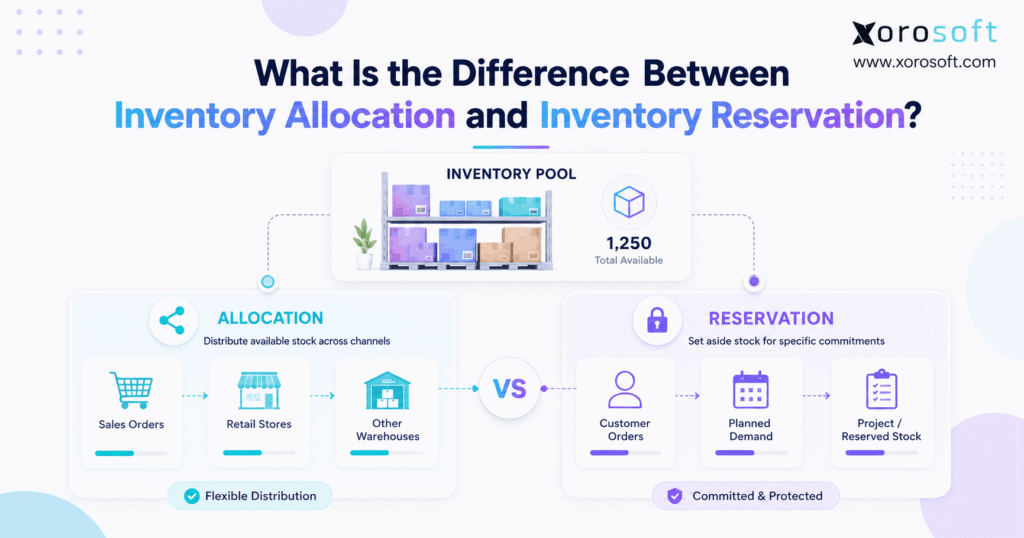
When managing supply chains, understanding inventory allocation vs reservation is crucial for optimising business operations.
1. Why This Inventory Distinction Changes Fulfillment
Inventory allocation vs reservation sounds like a small terminology difference. However, the distinction can determine whether a company promises the right stock to the right customer, protects important orders, and keeps inventory available across every sales channel. Therefore, growing businesses need to understand what each process actually does before they build fulfillment rules around it.
At the simplest level, inventory allocation decides which demand should receive inventory, while inventory reservation protects inventory that a business has already committed to specific demand. Consequently, allocation focuses on priority, whereas reservation focuses on protection.
For example, imagine a company has 1,000 units of a fast-selling product. First, the company may allocate 400 units to ecommerce, 300 to wholesale, 200 to marketplaces, and 100 to retail stores. Later, a wholesale customer places a confirmed order for 75 units. At that point, the system may reserve those 75 units so another order cannot consume them.
Therefore, the easiest way to remember the relationship is:
- Allocation asks: Who should receive the inventory?
- Reservation asks: Which inventory should we protect?
- Availability asks: What can we still sell?
- ATP asks: What can we safely promise now or in the future?
Although those definitions sound straightforward, software platforms do not always use the words in exactly the same way. For instance, one system may use “allocated” to describe inventory assigned to a customer or channel, while another may use “allocated” for inventory already committed to a sales order. As a result, businesses should understand the operational behavior behind each status rather than relying only on the label displayed by their software.
1.1 Why Inventory Allocation vs Reservation Gets Confusing
First, allocation can happen at several levels. A company may allocate inventory to a sales channel, warehouse, region, customer group, promotion, or individual order. Meanwhile, reservation usually happens when demand becomes specific enough to justify protecting inventory.
However, the timing varies. For example, a B2B distributor may protect inventory months before shipment because a contractual customer commitment exists. In contrast, an ecommerce retailer may wait until checkout completes before reserving inventory.
Therefore, inventory allocation vs reservation should not be treated as a universal sequence that every company must follow identically. Instead, businesses should define their rules around demand certainty, customer importance, fulfillment requirements, and inventory risk.
2. What Inventory Allocation Actually Does
Inventory allocation distributes limited supply among competing sources of demand. Therefore, allocation becomes particularly important when demand exceeds available or expected inventory.
For example, suppose a business has 2,000 units available but receives demand for 3,000 units. Clearly, every order cannot receive everything it requests. Consequently, the business needs rules that determine which demand receives the limited supply.
2.1 Common Inventory Allocation Rules
Businesses can use several allocation approaches. However, the best rule depends on the operating model.
First-come, first-served:
First, the system can prioritize older orders. Although this approach remains simple, it may ignore strategic customer relationships or service commitments.
Customer priority:
Alternatively, a distributor may prioritize key accounts. Therefore, an important wholesale customer can receive stock before a smaller or lower-priority account.
Channel priority:
Likewise, a brand may protect different quantities for Shopify, marketplaces, wholesale, or retail. As a result, sudden demand from one channel does not consume inventory intended for another.
Warehouse priority:
In addition, businesses may allocate inventory according to fulfillment location. For example, the system can prioritize the closest warehouse or the location with the strongest available stock position.
Required ship date:
Similarly, orders that need to ship sooner may receive inventory first.
Service-level commitment:
Moreover, retailers, EDI customers, or major distributors may have contractual delivery requirements. Therefore, allocation logic may prioritize those commitments before ordinary demand.
2.2 Allocation Does Not Always Mean Physical Stock Has Moved
Importantly, allocation does not necessarily move a physical product.
Instead, allocation usually changes how the business intends to use its inventory. For example, the company may earmark 200 units for wholesale without selecting the exact bins, lots, or physical units that warehouse workers will eventually pick.
Consequently, good allocation logic preserves flexibility while still protecting business priorities.
2.3 When Allocation Becomes Important
Allocation becomes increasingly valuable when a company:
- operates multiple warehouses;
- sells through multiple channels;
- serves large wholesale customers;
- manages EDI orders;
- experiences seasonal demand;
- launches limited products;
- frequently encounters constrained supply;
- manages safety stock;
- serves customers with different priority levels.
Therefore, companies with simple demand and abundant supply may not need complex allocation rules. However, once inventory becomes constrained, manual allocation often becomes difficult to maintain.
3. What Inventory Reservation Actually Does
Inventory reservation protects stock against identified demand. Therefore, once inventory becomes reserved, another competing transaction generally should not consume the same quantity.
For example, suppose a business has 100 units on hand. Next, a customer places a confirmed order for 20 units. Although the company still physically holds 100 units, the system may reserve 20. Consequently, only 80 units remain available for new demand.
This distinction between physical inventory and available inventory is essential.
3.1 Reservation Protects Commitments
A reservation usually exists because the company has reached a meaningful commitment point.
Depending on the workflow, that point may occur when:
- an ecommerce order completes checkout;
- payment receives authorization;
- a sales order becomes confirmed;
- a wholesale order receives approval;
- a production order gets released;
- warehouse fulfillment begins;
- a customer-specific commitment becomes binding.
Therefore, businesses should not reserve inventory earlier than necessary. Otherwise, low-confidence demand can block real orders from accessing stock.
3.2 Soft Reservations
A soft reservation usually protects a quantity without assigning a specific physical unit.
For example, the system may reserve ten units of SKU ABC at Warehouse East. However, warehouse workers can still choose the exact bins or units during picking.
As a result, soft reservations give companies commitment control while preserving fulfillment flexibility.
3.3 Hard Reservations
In contrast, a hard reservation may tie demand to specific supply.
For example, the business may reserve:
- a particular lot;
- a serial number;
- a specific warehouse;
- a bin;
- an incoming purchase receipt;
- material required for production.
Therefore, hard reservations become valuable when products require traceability, expiration control, serial tracking, or customer-specific inventory.
However, businesses should avoid hard reservation too early. Otherwise, they can make warehouse execution unnecessarily rigid.
3.4 Reservations Need Release Rules
Just as importantly, every reservation should have a release condition.
For example, the system should release inventory when:
- an order gets cancelled;
- a customer reduces quantity;
- a temporary hold expires;
- payment fails;
- a production requirement changes;
- warehouse staff short-ship the order.
Consequently, stale reservations should never remain indefinitely. Otherwise, businesses can experience phantom stockouts even though products physically remain in the warehouse.
4. Inventory Allocation vs Reservation: The Side-by-Side Difference
The clearest way to understand inventory allocation vs reservation is to compare the operational purpose of each process.
| Area | Inventory Allocation | Inventory Reservation |
|---|---|---|
| Main question | Who should receive supply? | What stock should be protected? |
| Primary purpose | Prioritize demand | Protect commitments |
| Common scope | Channel, customer, warehouse, order | Specific order or requirement |
| Timing | Before or during demand processing | After demand reaches a commitment point |
| Physical movement | Usually none | Usually none initially |
| Availability effect | Depends on allocation rules | Usually reduces competing availability |
| Flexibility | Often dynamic | Usually stronger commitment |
| Typical example | Protect 300 units for wholesale | Reserve 40 units for Order #1234 |
4.1 A Simple Inventory Allocation vs Reservation Example
Suppose a sporting-goods company has 600 units of a new product.
First, management allocates:
- 250 units to Shopify;
- 200 units to wholesale;
- 100 units to Amazon;
- 50 units to retail stores.
At this stage, allocation controls access to inventory.
Next, a Shopify customer buys five units. Therefore, the ecommerce workflow reserves five units against confirmed demand.
Meanwhile, a wholesale customer orders 80 units. Consequently, another 80 units become committed within the wholesale allocation.
Thus, allocation controls which pool can consume the inventory, while reservation protects specific demand inside that pool.
4.2 Why Allocated and Reserved May Look Similar in Software
However, some systems combine these concepts.
For instance, an ERP may label sales-order commitments as “allocated inventory.” Another system may show the same operational state as “reserved.” Therefore, employees can easily assume that allocation and reservation always mean identical things.
Instead, ask four practical questions:
1. Does this status prevent another order from consuming the stock?
2. Has the inventory been assigned to a specific source of demand?
3. Can the company easily reallocate the inventory?
4. Has the system selected specific physical stock?
Those questions reveal more than terminology alone.
5. Inventory Allocation vs Reservation in Available Inventory, ATS, and ATP
Inventory allocation vs reservation also affects how a business calculates what it can sell or promise.
Therefore, inventory teams should distinguish several common inventory measurements.
5.1 On-Hand Inventory
On-hand inventory represents physical quantity recorded in the warehouse.
However, on-hand does not mean fully available.
For example, a warehouse can hold 1,000 units physically while 300 units already support existing commitments. Therefore, a salesperson should not necessarily promise all 1,000 units.
5.2 Available Inventory
Available inventory represents the quantity that remains usable for new demand.
A simplified conceptual formula is:
Available Inventory = Eligible On-Hand Inventory − Existing Commitments
However, real calculations may also consider:
- safety stock;
- damaged inventory;
- quality holds;
- reservations;
- allocations;
- backorders;
- warehouse restrictions;
- future supply.
Therefore, available inventory usually provides a more useful operational number than raw on-hand inventory.
5.3 Available-to-Sell
Available-to-sell, or ATS, generally represents inventory that the business can sell under current availability rules.
Consequently, reservations often reduce ATS because those units already support existing demand.
5.4 Available-to-Promise
Available-to-promise, or ATP, goes further.
Instead of asking only what the company can sell today, ATP may consider future receipts, transfers, manufacturing output, required dates, and existing commitments.
Therefore, purchasing and supply-chain teams can make better customer promises when ATP calculations use accurate allocation and reservation data.
5.5 A Simplified Example
Suppose a company has:
- 1,000 units on hand;
- 150 units reserved;
- 100 units protected as safety stock;
- 50 units committed through another inventory rule.
Consequently, a simplified current availability calculation may leave 700 units.
However, if 500 more units arrive next week, future ATP may increase after that receipt.
Thus, inventory allocation vs reservation directly influences what the business can promise and when it can promise it.
6. How Allocation and Reservation Work Through an Order
A reliable workflow connects demand, availability, allocation, reservation, fulfillment, and shipment.
Therefore, each stage should update the next stage automatically.
6.1 Demand Enters the Business
First, demand may arrive through ecommerce, EDI, marketplaces, sales representatives, wholesale portals, or manufacturing requirements.
As a result, the company needs one consistent view of inventory across those sources.
6.2 The System Checks Availability
Next, the inventory system evaluates eligible stock.
Depending on the business, it may consider:
- warehouse;
- SKU;
- location;
- lot;
- serial number;
- inventory status;
- safety stock;
- existing commitments.
Therefore, the system should not rely on one generic quantity.
6.3 Allocation Rules Prioritize Demand
Then, allocation logic determines which demand should receive supply.
For example, the system may prioritize a major retailer, an urgent ecommerce shipment, or a customer with an earlier required date.
6.4 Reservation Protects the Commitment
Afterward, the system can reserve inventory when demand reaches the appropriate commitment stage.
Consequently, another order should not consume the same supply.
6.5 Warehouse Fulfillment Begins
Next, warehouse workers pick, pack, and ship the order.
For companies managing complex fulfillment, a real-time warehouse management system can connect order priorities with warehouse execution.
6.6 Shipment Updates Physical Inventory
Finally, shipping reduces the relevant physical inventory according to the system’s transaction model.
Therefore, the original reservation no longer needs to protect unshipped stock for the quantity already fulfilled.
7. Multi-Warehouse and Omnichannel Allocation
Inventory allocation vs reservation becomes much more important when a company operates several warehouses or sales channels.
For example, a brand may sell through Shopify, Amazon, wholesale accounts, retail stores, and EDI partners while inventory sits in several locations.
Therefore, one order can create several operational decisions.
7.1 Which Warehouse Should Fulfill the Order?
Suppose:
- Warehouse East has 35 units;
- Warehouse Central has 50 units;
- Warehouse West has 80 units.
Next, a customer orders 30 units.
Although all three warehouses can technically fulfill the order, the best location may depend on:
- customer proximity;
- shipping cost;
- delivery promise;
- warehouse workload;
- inventory age;
- future regional demand;
- split-shipment rules.
Therefore, allocation should consider more than quantity alone.
For inventory-driven companies that need broader operational control, XoroONE connects inventory, purchasing, warehousing, manufacturing, accounting, fulfillment, and ecommerce workflows in one cloud ERP environment.
7.2 How Channel Allocation Prevents One Channel From Taking Everything
Consider a brand with 500 available units.
Instead of exposing all 500 units equally to every channel, the business might allocate:
| Channel | Planned Allocation |
| Shopify | 200 |
| Wholesale | 150 |
| Amazon | 100 |
| Retail | 50 |
Consequently, a surge on one marketplace does not automatically consume stock that the company intended for wholesale commitments.
However, companies should still allow reallocation when business conditions change. Otherwise, one channel can experience stockouts while inventory sits unused in another pool.
7.3 Shopify and Ecommerce Inventory
Ecommerce makes real-time availability especially important because customers expect products shown as available to ship.
Therefore, orders, cancellations, returns, and warehouse activity need to update inventory quickly.
Businesses using several ecommerce and B2B platforms can use Xorosoft integrations to connect sales channels with ERP and fulfillment workflows.
Additionally, Shopify merchants evaluating the ecommerce connection can review the official Xorosoft ERP listing in the Shopify App Store.
7.4 Wholesale and EDI Demand
Meanwhile, wholesale orders often create different allocation priorities.
For example, a retailer may place a large seasonal order months ahead. Therefore, the business may need to protect planned supply before the final shipping window arrives.
Similarly, EDI customers may have strict delivery dates or routing requirements. Consequently, companies need allocation rules that recognize those commercial commitments.
8. Common Inventory Allocation and Reservation Errors
Poor inventory allocation vs reservation logic can create problems even when physical inventory counts look correct.
Therefore, businesses should monitor the following failure points.
8.1 Overselling
Overselling occurs when multiple orders receive access to the same inventory.
For example, Shopify may display stock while a wholesale order has already consumed the operational availability.
Consequently, one customer eventually receives a delay, cancellation, or backorder.
8.2 Double Allocation
Similarly, separate systems may allocate the same stock independently.
For instance, a warehouse spreadsheet may assign units to Customer A while the ecommerce platform still considers those units available.
Therefore, teams should avoid maintaining competing inventory calculations.
8.3 Stale Reservations
A cancelled order may release commercially but remain reserved operationally.
As a result, warehouse staff can see physical stock while sales teams see zero availability.
Therefore, reservation cleanup should happen automatically whenever possible.
8.4 Allocating Inventory Too Early
Although allocation protects future demand, excessive protection can create artificial shortages.
For example, a tentative wholesale opportunity should not necessarily block confirmed ecommerce orders.
Instead, companies should define commitment thresholds according to demand certainty.
8.5 Reserving Inventory Too Late
Conversely, waiting too long can create competing promises.
Therefore, once demand reaches a meaningful commitment stage, the system should protect the appropriate quantity.
8.6 Ignoring Safety Stock
Safety stock exists to absorb uncertainty.
Consequently, allocation rules should not automatically consume every unit simply because the inventory physically exists.
8.7 Using Spreadsheets as the Final Source of Truth
Spreadsheets can support analysis. However, they become risky when sales, purchasing, warehouse, and ecommerce teams update inventory independently.
Therefore, growing businesses often move toward integrated ERP solutions when disconnected systems make inventory availability difficult to trust.
9. When Growing Businesses Should Automate the Process
A business does not need advanced software simply because it understands inventory allocation vs reservation.
However, automation becomes valuable once employees spend significant time reconciling different versions of inventory.
9.1 Warning Signs That Manual Processes Are Breaking
Common warning signs include:
- employees manually protecting stock in spreadsheets;
- Shopify and wholesale orders competing for inventory;
- multiple warehouses showing different availability;
- salespeople asking warehouse teams whether inventory is “really available”;
- cancelled orders leaving stock unavailable;
- teams regularly changing customer priorities manually;
- purchasing decisions using different inventory numbers from sales;
- warehouse teams discovering shortages after orders reach picking;
- accounting teams repeatedly investigating inventory discrepancies.
Consequently, these symptoms usually indicate a broader systems problem rather than one incorrect formula.
9.2 What Inventory Software Should Handle
Modern inventory software should help teams:
1. track on-hand inventory separately from available inventory;
2. maintain allocation and reservation states;
3. configure order and customer priorities;
4. protect safety stock;
5. support multiple warehouses;
6. release cancelled commitments;
7. synchronize ecommerce orders;
8. incorporate incoming supply where appropriate;
9. connect purchasing decisions;
10. support warehouse fulfillment;
11. maintain an inventory transaction history.
Therefore, businesses should evaluate the entire workflow rather than asking whether software simply has an “allocation” checkbox.
9.3 Where Xorosoft Fits
For inventory-driven companies, Xorosoft brings ERP, inventory, accounting, purchasing, warehouse management, manufacturing, forecasting, reporting, and ecommerce operations into one cloud platform.
Moreover, that connected structure becomes particularly useful when inventory decisions affect several departments at once.
For example, an inventory commitment can influence purchasing requirements. Meanwhile, warehouse teams need the same order priorities that sales teams see. Likewise, accounting needs inventory transactions to remain aligned with operational activity.
Businesses can explore XoroERP when they need broader ERP functionality across inventory-driven operations.
Additionally, companies can review the industries Xorosoft serves to see how inventory workflows vary across apparel, wholesale, furniture, sporting goods, consumer products, food, and manufacturing.
Ultimately, the goal is not to add complexity. Instead, the goal is to give every team the same answer when someone asks: What inventory do we actually have available to promise?
10. Frequently Asked Questions
10.1 What is inventory allocation?
Inventory allocation determines which customer, channel, warehouse, order, or other source of demand should receive available supply. Therefore, businesses commonly use allocation when demand competes for limited inventory. For example, a company can allocate different quantities to Shopify, wholesale, Amazon, and retail locations before specific orders consume those quantities.
10.2 What is inventory reservation?
Inventory reservation protects inventory for identified demand. Consequently, another order generally cannot consume that quantity while the reservation remains active. For example, once a customer confirms an order for 20 units, the system may reserve those units even though they remain physically inside the warehouse until shipment.
10.3 What is the main difference between inventory allocation and inventory reservation?
The simplest inventory allocation vs reservation distinction is purpose. Allocation decides who should receive supply, whereas reservation protects supply that supports a commitment. Therefore, allocation primarily handles prioritization, while reservation primarily handles inventory protection. However, individual ERP and WMS platforms may use the terms differently.
10.4 Is allocated inventory the same as reserved inventory?
Not always. Some systems use “allocated” to describe stock committed to an order, while others use allocation for channel or customer planning. Therefore, businesses should check whether an allocated quantity simply belongs to a demand pool or whether the system actually prevents other orders from consuming it.
10.5 Can allocated inventory still be sold?
Sometimes. If an allocation represents a planning quota, the business may still reallocate unused stock. However, if the software treats allocated inventory as a firm order commitment, competing demand may not access it. Therefore, the answer depends on the platform’s availability rules.
10.6 Can reserved inventory still be sold?
Generally, reserved inventory should not remain available to competing demand. Otherwise, the reservation would not protect the commitment. However, employees may release or override reservations according to business rules. Consequently, companies need clear permissions and audit trails for reservation changes.
10.7 Does reserved inventory count as on-hand inventory?
Usually, yes. For example, a company may have 100 units physically on hand while 25 are reserved. Therefore, on-hand inventory remains 100, while operational availability may fall to 75. Shipment usually changes physical quantity later in the workflow.
10.8 Does inventory allocation reduce available inventory?
It can. For example, a protected channel allocation may reduce what another channel can consume. However, some systems treat allocation only as a planning quantity. Therefore, businesses should verify how their software calculates available stock after allocation.
10.9 What triggers inventory allocation?
Allocation may occur when inventory arrives, demand exceeds supply, a product launch approaches, customer priorities change, or new orders enter the system. Moreover, businesses may run allocation continuously or on a scheduled basis. Therefore, the trigger should match how quickly demand and inventory conditions change.
10.10 What triggers an inventory reservation?
A reservation may occur after checkout, sales-order confirmation, payment authorization, wholesale approval, or production release. Therefore, companies should choose a trigger that reflects meaningful demand certainty without protecting inventory unnecessarily early.
10.11 What is a soft inventory reservation?
A soft reservation protects quantity while preserving flexibility over the exact physical stock. For example, the system may reserve ten units at a warehouse without selecting a particular bin or lot. Consequently, warehouse teams can still optimize picking later.
10.12 What is a hard inventory reservation?
A hard reservation creates a stronger connection between demand and specific supply. For example, it may identify a particular lot, serial number, warehouse, bin, or incoming supply source. Therefore, hard reservations work well when traceability or customer-specific inventory matters.
10.13 How long should inventory remain reserved?
Inventory should remain reserved only while the associated commitment remains valid. Therefore, confirmed orders may keep reservations until shipment or cancellation, whereas temporary holds may expire much sooner. Clear expiration rules prevent stale commitments from causing false stockouts.
10.14 What happens when a reserved order gets cancelled?
The system should release the reservation and return eligible inventory to availability. Consequently, another customer can use the stock. However, if connected systems fail to synchronize the cancellation, the business may continue showing an artificial shortage.
10.15 What is sales order allocation?
Sales order allocation assigns eligible supply to sales orders according to business priorities. For example, the company can prioritize required ship dates, strategic customers, order age, or service levels. Therefore, allocation becomes especially important when available inventory cannot satisfy every open order.
10.16 What is sales order reservation?
Sales order reservation protects inventory for a specific sales order. Consequently, other demand should not consume the same committed units. Depending on system rules, the reservation may occur automatically after order confirmation or manually after approval.
10.17 What is committed inventory?
Committed inventory generally refers to stock already promised or assigned to existing demand. However, platforms may label that quantity as allocated, reserved, committed, or on sales order. Therefore, companies should define exactly which statuses reduce their available inventory.
10.18 What is available-to-sell inventory?
Available-to-sell inventory represents stock the company can currently offer for new demand under its availability rules. Consequently, reservations, safety stock, existing commitments, and other restrictions may reduce ATS below physical on-hand inventory.
10.19 What is available-to-promise inventory?
Available-to-promise inventory estimates what a business can responsibly promise after considering existing commitments and potentially future supply. Therefore, ATP may account for purchase orders, transfers, production output, required dates, and inventory availability.
10.20 How do reservations affect ATP?
Reservations usually reduce supply available for new commitments because that inventory already supports existing demand. Consequently, inaccurate or stale reservations can make ATP either too optimistic or too conservative. Therefore, reservation data must stay current.
10.21 How does inventory allocation prevent overselling?
Allocation can protect inventory for specific channels, customers, or demand pools. Therefore, one channel cannot automatically consume every available unit. However, allocation only works when ecommerce, ERP, warehouse, and order systems share updated inventory information.
10.22 How does inventory allocation work across multiple warehouses?
Multi-warehouse allocation determines which location should support each order. Therefore, rules may consider stock availability, customer distance, freight cost, delivery expectations, warehouse capacity, and future demand. Consequently, allocation can improve both service and fulfillment efficiency.
10.23 How does inventory allocation work for Shopify?
For Shopify merchants, allocation becomes important when the same inventory also supports wholesale, marketplaces, retail, or multiple warehouses. Therefore, businesses need inventory availability to update as orders move through fulfillment. Otherwise, disconnected channels can promise the same units.
10.24 When should a business automate allocation and reservation?
Automation becomes useful when order volume, warehouses, sales channels, or customer priorities make manual decision-making unreliable. For example, recurring overselling, spreadsheet reservations, stale holds, and warehouse shortages indicate that manual processes no longer scale.
10.25 What should businesses look for in inventory allocation software?
First, look for real-time inventory visibility. Next, confirm that the system supports multiple warehouses, reservations, allocation priorities, ecommerce synchronization, purchasing, and fulfillment. Additionally, evaluate how it handles cancellations and future supply. Ultimately, the software should reduce manual reconciliation rather than create another isolated inventory record.
11. Turn Inventory Commitments Into Reliable Fulfillment
Ultimately, inventory allocation vs reservation matters because inventory-driven businesses need to know not only what they own, but also what they can safely promise.
Allocation establishes priority. Meanwhile, reservation protects commitments. Consequently, accurate availability depends on both processes working together.
As companies add warehouses, Shopify, marketplaces, wholesale customers, EDI, manufacturing, and increasingly complex purchasing requirements, spreadsheets and disconnected applications make that coordination harder. Therefore, the real goal should be a shared operational inventory record that connects sales, purchasing, warehouses, fulfillment, and accounting.
Xorosoft helps inventory-driven businesses centralize those workflows through cloud ERP, inventory management, warehouse management, ecommerce integrations, purchasing, manufacturing, and multi-channel order management.
If your team spends too much time determining which inventory is truly available, which orders have priority, or which stock has already been committed, you can see the workflow in your own operating context by booking a personalized Xorosoft demo.
Recent Posts
-
 ERP Landed Cost Module vs Spreadsheet Calculations for Importers
 -
 How to Build an Open-to-Buy Plan for an Omnichannel Brand
 -
 Cold Storage WMS for Food and Beverage Distribution
 -
 ERP Buying Statistics 2026: Evaluation, Implementation, and Adoption Risks
 -
 How a Distributor Reduced B2B Order Exceptions Without Restricting Sales



