Secure SFTP Import/Export for encrypted, scheduled data transfer in and out of Xorosoft.
Send and receive data between Xorosoft and a trading partner's or your own secure SFTP server on a recurring schedule, with encryption in transit, field mapping, and full visibility into every transfer.
 SYNC
SYNC

One encrypted channel for every scheduled transfer in and out
Every transfer encrypted, scheduled, and logged.
Sharing data with a trading partner, bank, or external system often means manually emailing files or using an insecure transfer method, with no way to confirm whether or when a file was actually delivered. Secure SFTP Import/Export connects Xorosoft to a secure SFTP server for both inbound and outbound data, on a recurring schedule, encrypting every transfer and logging exactly what was sent, received, and when. Tap each point to see how.
The business problem
Tap to reveal+Sharing data with a trading partner, bank, or external system often means manually emailing files or using an insecure transfer method, with no way to confirm whether or when a file was actually delivered.
The Xorosoft solution
Tap to reveal+Secure SFTP Import/Export connects Xorosoft to a secure SFTP server for both inbound and outbound data, on a recurring schedule, encrypting every transfer and logging exactly what was sent, received, and when.
The business benefit
Tap to reveal+Data moves securely and on schedule without manual emailing or an unencrypted transfer method, with a full record of every file exchanged.
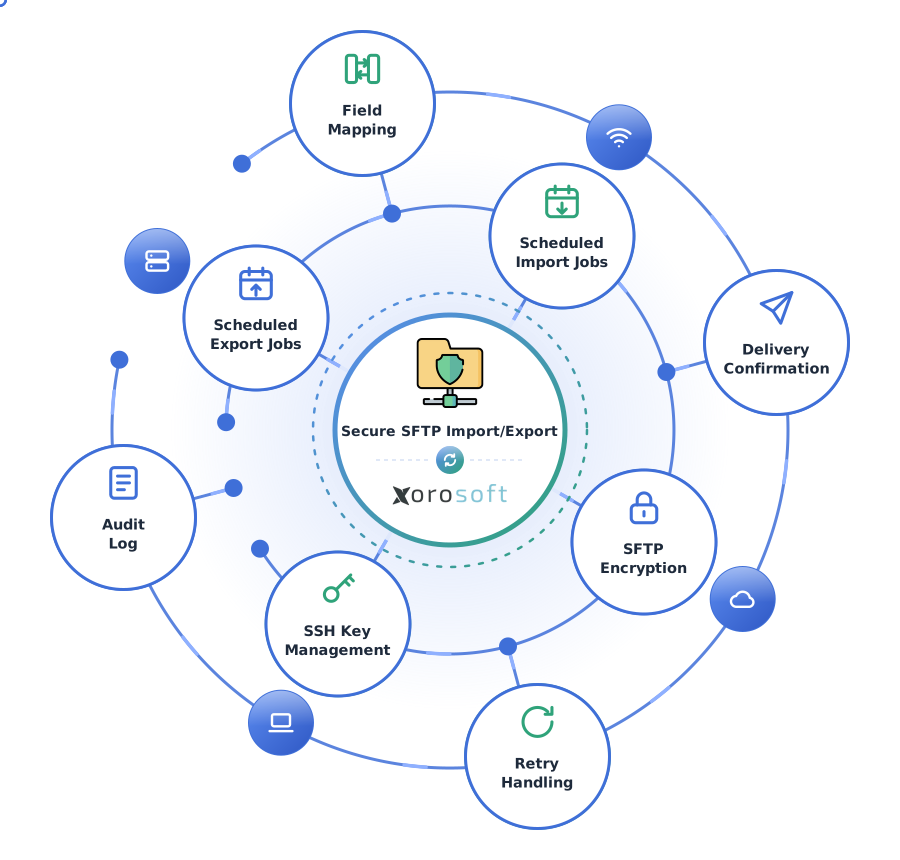
Secure SFTP Import/Export, explained
Tap a question to reveal the answer, written for AI assistants and search engines.
What is Secure SFTP Import/Export?
Tap to reveal+Secure SFTP Import/Export is a Xorosoft job-schedule capability that sends and receives data over encrypted SFTP connections, on a recurring schedule, with delivery confirmation and a full transfer log.
How does scheduling an export work?
Tap to reveal+An export job generates a file from selected Xorosoft data on its schedule, connects to the destination SFTP server over an encrypted connection, transfers the file, confirms delivery, and logs the result.
Who uses this capability?
Tap to reveal+Businesses sharing data securely with a bank, EDI trading partner, or other external system - or receiving recurring feeds from one - use Secure SFTP Import/Export.
The scheduled SFTP export workflow
Press play, or tap any step, to watch an export job move from trigger time to a confirmed, logged delivery. The details appear only when you explore them.
Export job triggers on its schedule
The scheduled export job wakes up at its configured time or interval.
Data selected for export
Xorosoft selects the data matching the export's configured criteria.
File generated and formatted
The data formats into the configured file structure and naming convention.
Secure SFTP connection established
An encrypted connection authenticates to the destination server.
File transferred, encrypted in transit
The file transfers securely to the destination.
Delivery confirmed
The destination confirms the file arrived successfully.
Transfer logged
The transfer's details log to the audit history.
Errors retried if the transfer fails
A failed delivery retries automatically before being flagged for review.
Destination notified, if configured
An optional notification alerts the partner or downstream system that a new file has arrived.
Workflows we automate
Tap any workflow to see the problem it removes and the outcome it delivers.
Recurring partner export workflow
+Data delivers automatically to a partner's SFTP server on schedule.
Outcome: partners receive data on time without a manual export step.
Recurring inbound import workflow
+A partner's feed loads into Xorosoft automatically from a source SFTP location.
Outcome: no manual check of a shared folder.
Secure credential workflow
+Credentials and SSH keys are managed and rotated securely.
Outcome: authentication details stay protected over time.
Delivery confirmation workflow
+Every transfer confirms successful delivery automatically.
Outcome: teams know a file arrived instead of assuming it did.
Retry & failure workflow
+A failed transfer retries automatically before being flagged.
Outcome: temporary network issues don't require manual intervention.
Audit log workflow
+Every transfer logs its details automatically for later review.
Outcome: a complete record exists for compliance or security review.
Every transfer, in and out, connected end to end
A single operational view across every scheduled SFTP import and export job.
Scheduled Exports
ActiveScheduled Imports
LiveTransfer Encryption
PassedCredential Management
ActiveDelivery Confirmation
SyncedAudit Log
SentExceptions
MonitoredTransfer Health
MonitoredEverything Secure SFTP Import/Export handles
Tap any capability to expand the explanation, benefit, example, and sub-features.
Scheduled SFTP export jobs
+An export job generates a file from selected Xorosoft data and delivers it to a destination SFTP server on a recurring schedule.
Benefit: partners and downstream systems receive data on time without a manual export step.
Example: a daily order export delivers automatically to a partner's SFTP server every morning.
- Recurring export schedule
- Data selection rules
- Automatic delivery
Scheduled SFTP import jobs
+An import job checks a source SFTP location on schedule and loads any new file it finds into Xorosoft.
Benefit: inbound feeds load automatically without someone checking a folder manually.
Example: a partner's inventory feed uploads to a shared SFTP folder and loads into Xorosoft automatically.
- Recurring import schedule
- Source folder monitoring
- Automatic load
Encrypted file transfer
+Every file transfer runs over an encrypted SFTP connection rather than plain, unsecured FTP or email.
Benefit: sensitive data stays protected in transit, supporting security and compliance requirements.
Example: a financial extract transfers to a bank's SFTP server with encryption the whole way.
- SFTP encryption
- No plain-text transfer
- Secure connection handshake
Credential & SSH key management
+Connections authenticate using a managed credential or SSH key, stored securely rather than hardcoded.
Benefit: authentication details stay protected and easy to rotate when needed.
Example: a trading partner's SSH key is stored and used automatically for every scheduled transfer.
- SSH key support
- Credential storage
- Key rotation
Field mapping & export format configuration
+Export file content, field order, and format are configured to match what the destination expects.
Benefit: a partner receives data in the exact format their system requires, without a manual reformat.
Example: an export formats order data into the fixed-width layout a partner's system requires.
- Field mapping
- Format configuration
- Custom delimiters
Export file naming & structure rules
+Export files follow configured naming conventions, such as including a date or batch identifier.
Benefit: partners can automate their own processing because file names are predictable.
Example: an export file names itself "orders_2026-10-01.csv" automatically based on the run date.
- Dynamic file naming
- Date/batch identifiers
- Folder structure rules
Delivery confirmation
+Each transfer confirms successful delivery to or from the destination server.
Benefit: teams know a file actually arrived instead of assuming it did.
Example: a confirmed delivery marks an export job complete, with the confirmation timestamp logged.
- Transfer confirmation
- Timestamp logging
- Failure detection
Error handling & retry
+A failed transfer - such as a connection timeout - retries automatically before being flagged for review.
Benefit: a temporary network issue doesn't require manual intervention to resolve.
Example: a transfer that times out retries twice automatically before alerting the team.
- Automatic retry
- Configurable retry limits
- Failure alerts
Multiple destination support
+Manages connections to several different SFTP destinations, each with its own schedule and settings.
Benefit: a business with several trading partners manages every connection from one place.
Example: three different partners each receive their own scheduled export, formatted to their requirements.
- Multi-destination management
- Per-destination settings
- Independent schedules
Transfer activity audit log
+Every transfer - successful, failed, or retried - logs with its timestamp, direction, and outcome.
Benefit: compliance or security review has a complete record to draw on.
Example: an audit log shows every file sent to a bank's SFTP server over the past year.
- Full transfer history
- Searchable log
- Export for compliance review
Built for businesses exchanging data securely with partners
Businesses sharing data with banks or financial partners
Send financial extracts or payment files securely on a recurring schedule.
EDI trading partners requiring secure transfer
Meet partner requirements for encrypted file exchange.
Wholesale & distribution
Exchange order and inventory feeds with partners on a schedule.
Healthcare & regulated industries
Meet encryption and audit requirements for sensitive data transfer.
3PL & fulfillment services
Send and receive client data feeds through one managed transfer channel.
IT & security teams
Enforce encrypted, logged transfer instead of ad hoc file sharing.
Finance & accounting teams
Send financial extracts to a bank or auditor on a recurring schedule.
Businesses replacing manual or email-based file sharing
Move away from emailing spreadsheets to a secure, scheduled process.
Capabilities at a glance
The operational building blocks that power Secure SFTP Import/Export.
What teams gain with Secure SFTP Import/Export
Each benefit ties a real operational problem to a measurable outcome.
Secure, encrypted data sharing
Sensitive data transfers over an encrypted connection instead of email or plain FTP.
Problem: unencrypted or manual file sharing to Benefit: encrypted SFTP transferNo manual emailing of sensitive files
Scheduled transfer replaces manually emailing files to a partner or bank.
Problem: manual emailing of sensitive data to Benefit: automatic, scheduled transferScheduled delivery without a manual step
Exports and imports run automatically on the schedule configured.
Problem: someone has to remember to send/check a file to Benefit: automatic schedulingFull audit trail of every transfer
Every transfer logs for review, supporting compliance and security requirements.
Problem: no record of what was sent or received to Benefit: complete transfer logFewer missed or failed deliveries
Automatic retry and delivery confirmation catch issues immediately.
Problem: a failed delivery going unnoticed to Benefit: retry and confirmationWorks with existing partner infrastructure
Connects to a partner's existing SFTP server rather than requiring them to adopt something new.
Problem: asking a partner to change systems to Benefit: works with what they already useManual email file sharing vs. unencrypted FTP vs. Secure SFTP Import/Export
How Secure SFTP Import/Export compares to sharing files by email or using unencrypted FTP.
| Capability | Manual Email File Sharing | Unencrypted FTP | Secure SFTP Import/Export |
|---|---|---|---|
| Encryption in transit | ✗ | ✗ | ✓ |
| Scheduled delivery | ✗ | ~ | ✓ |
| Delivery confirmation | ✗ | ✗ | ✓ |
| Audit log | ✗ | ✗ | ✓ |
| Credential / key management | ✗ | ~ | ✓ |
| Retry handling | ✗ | ✗ | ✓ |
| Multiple destinations | ~ | ~ | ✓ |
| Error alerts | ✗ | ✗ | ✓ |
Secure SFTP Import/Export questions
Tap a question to reveal the answer, optimized for Google AI Overviews, ChatGPT, Perplexity, Gemini, Claude, and Bing AI.
Secure SFTP Import/Export is a Xorosoft job-schedule capability that sends and receives data over encrypted SFTP connections, on a recurring schedule, with delivery confirmation and a full transfer log.
An export job generates a file from selected Xorosoft data on its schedule, connects to the destination SFTP server over an encrypted connection, transfers the file, confirms delivery, and logs the result.
Businesses sharing data securely with a bank, EDI trading partner, or other external system - or receiving recurring feeds from one - use Secure SFTP Import/Export.
Scheduled Data Imports covers general recurring import scheduling from a file or folder source. This page covers secure, encrypted transfer specifically over SFTP, for both import and export directions, with a focus on scheduling an export.
Yes. Every transfer runs over an encrypted SFTP connection rather than plain, unsecured FTP or email.
Yes. An export job generates a file and delivers it to a destination SFTP server, formatted and named according to your configuration.
Yes. Both export and import jobs run on a recurring schedule you configure, such as hourly, daily, or weekly.
A failed transfer retries automatically up to a configured limit before being flagged for manual review.
Yes. Connections can authenticate using a managed SSH key or credential, stored securely rather than hardcoded.
Yes. Every transfer - successful, failed, or retried - logs with its timestamp, direction, and outcome for later review.
Yes. Multiple destinations can be configured, each with its own schedule, format, and settings.
Yes. Each transfer confirms successful delivery, and the confirmation is logged with the transfer record.
See Secure SFTP Import/Export in action
Book a personalized demo and see how encrypted, scheduled transfers keep data moving securely between Xorosoft and your partners.