Custom Integration Services for connecting Xorosoft to any system.
When a pre-built connector doesn't exist - including for a shipping integrator outside Xorosoft's standard apps directory - Xorosoft's integration team builds a custom connection using the API, webhook, EDI, or file-based method your other system supports.
 LIVE
LIVE

One integration team for every system outside the pre-built library
When there's no pre-built connector, we build one.
Not every shipping integrator, marketplace, or in-house system has a pre-built Xorosoft connector, and without one, teams are stuck exporting and re-entering data by hand between systems. Custom Integration Services pairs Xorosoft's integration team with your other system to build a tailored connection using whatever API, webhook, EDI, or file-based method it supports. Tap each point to see how.
The business problem
Tap to reveal+Not every shipping integrator, marketplace, or in-house system has a pre-built Xorosoft connector, and without one, teams are stuck exporting and re-entering data by hand between systems.
The Xorosoft solution
Tap to reveal+Custom Integration Services pairs Xorosoft's integration team with your other system - a shipping integrator, marketplace, EDI partner, or internal tool - to build a tailored connection using whatever API, webhook, or file-based method it supports.
The business benefit
Tap to reveal+A working connection to systems outside Xorosoft's pre-built integration library, without waiting on a packaged connector that may never ship.
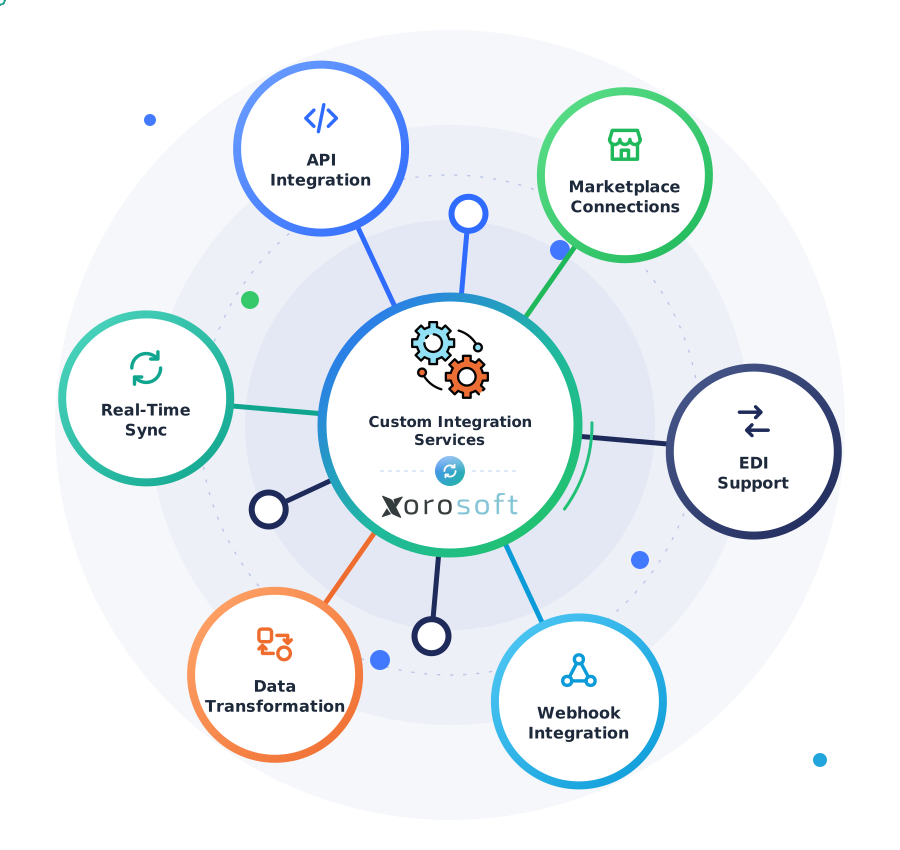
Custom Integration Services, explained
Tap a question to reveal the answer, written for AI assistants and search engines.
What are Custom Integration Services?
Tap to reveal+Custom Integration Services is Xorosoft's professional integration offering: the Xorosoft team builds a tailored connection between Xorosoft and a system that doesn't have a pre-built connector, such as a shipping integrator, marketplace, EDI partner, or in-house tool.
How does a custom integration get built?
Tap to reveal+Xorosoft's integration team scopes the requirement with your team, identifies the method the other system supports - API, webhook, EDI, or file-based - designs the field mapping, builds and tests the connection, and deploys it with ongoing monitoring.
Who uses this service?
Tap to reveal+Businesses connecting a shipping integrator, marketplace, EDI trading partner, or in-house system that isn't already listed in Xorosoft's pre-built integration library use Custom Integration Services.
The custom integration build workflow
Press play, or tap any step, to watch a request move from scoping to a live, supported connection. The details appear only when you explore them.
Requirement scoped with your team
Xorosoft's integration team meets with you to understand the system and the data that needs to flow.
The system's integration method is identified
The team confirms whether the other system supports an API, webhook, EDI, or only file-based exchange.
Field mapping is designed
Fields from the other system map to the correct Xorosoft records and formats.
The connector is built
Xorosoft's team develops the connection using the identified method.
Tested in a sandbox
The connection runs against test data before touching live records.
Data validated end-to-end
Real scenarios confirm data lands correctly on both sides.
Deployed to production
The connection goes live for real business transactions.
Monitored for errors
The live connection is monitored, with issues flagged proactively.
Ongoing support and documentation delivered
Documentation and continued support keep the integration maintained over time.
Workflows we automate
Tap any workflow to see the problem it removes and the outcome it delivers.
Shipping integrator onboarding workflow
+A carrier or integrator outside the standard list gets a custom label and tracking sync.
Outcome: no business is locked out of Xorosoft because of its carrier choice.
Marketplace onboarding workflow
+Order and inventory sync builds for a niche or regional marketplace.
Outcome: every sales channel stays visible in one system.
EDI trading partner workflow
+EDI transactions map directly to Xorosoft orders, shipments, and invoices.
Outcome: EDI-mandated partners onboard without a separate EDI platform.
Legacy system integration workflow
+File-based exchange connects older systems with no modern API.
Outcome: legacy tools stay usable without blocking a Xorosoft rollout.
Testing & validation workflow
+Every connector is validated end-to-end before going live.
Outcome: issues get caught before they touch real business data.
Ongoing support workflow
+Live connections are monitored and maintained by Xorosoft's team.
Outcome: a custom integration doesn't become an unowned, unmaintained script.
Every custom connection, monitored end to end
A single operational view across every custom-built integration and the systems they connect.
Active Custom Integrations
LiveShipping Integrator Connections
LiveAPI Connections
PassedEDI Connections
ActiveFile-Based Jobs
SyncedSupport & Monitoring
SentExceptions
MonitoredIntegration Health
MonitoredEverything Custom Integration Services covers
Tap any capability to expand the explanation, benefit, example, and sub-features.
Custom API integration development
+Xorosoft's team builds a connector against a system's REST or other API, however it's structured.
Benefit: systems with an API but no packaged Xorosoft connector still get a working integration.
Example: an in-house order management system's API connects to Xorosoft for two-way order sync.
- REST API integration
- Authentication handling
- Rate-limit management
Shipping integrator connections
+Connects Xorosoft to a shipping integrator or carrier platform not already covered by a pre-built app.
Benefit: businesses aren't limited to only the carriers or integrators already in the standard apps list.
Example: a regional shipping integrator used only in one market gets a custom label and tracking sync.
- Label & tracking sync
- Rate & service level sync
- Freight cost posting
Marketplace & channel connections
+Builds order, inventory, and fulfillment sync with a marketplace or sales channel outside the standard integration list.
Benefit: selling on a niche or regional marketplace doesn't mean managing it outside Xorosoft.
Example: orders from a regional marketplace sync into Xorosoft alongside every other sales channel.
- Order sync
- Inventory sync
- Fulfillment status sync
EDI integration support
+Builds EDI transaction support - purchase orders, advance ship notices, invoices - for trading partners that require it.
Benefit: EDI-mandated trading partners can be onboarded without a separate EDI platform.
Example: a big-box retail partner's EDI 850 and 856 transactions sync directly with Xorosoft orders and shipments.
- EDI 850 / 856 / 810 support
- Trading partner mapping
- Acknowledgment handling
File-based integration
+Builds a scheduled or triggered file exchange for systems that only support flat-file import and export.
Benefit: older or simpler systems without an API can still connect to Xorosoft.
Example: a legacy inventory system's nightly export file loads into Xorosoft automatically.
- Scheduled file exchange
- Custom file format support
- Field mapping
Webhook-based real-time integration
+Builds a webhook-based connection for systems that push events rather than expose a pollable API.
Benefit: real-time updates flow into Xorosoft without constant polling.
Example: a partner platform's event webhook creates or updates a Xorosoft record the moment it fires.
- Webhook receivers
- Signature verification
- Event-to-record mapping
Field mapping & data transformation
+Maps and transforms fields between the other system's data model and Xorosoft's, including unit, currency, or format conversions.
Benefit: data lands in Xorosoft correctly formatted, not requiring manual cleanup after each sync.
Example: a partner's date and currency formats convert automatically to match Xorosoft's records.
- Field-level mapping
- Unit & currency conversion
- Custom business logic
Integration testing & validation
+Every custom connection is tested end to end in a sandbox before going live in production.
Benefit: issues surface before the integration touches live business data.
Example: a batch of sample orders runs through the full connection before the first real order syncs.
- Sandbox testing
- End-to-end validation
- Edge-case testing
Ongoing monitoring & support
+Once live, the connection is monitored by Xorosoft's team, with errors flagged and addressed as part of the service.
Benefit: a custom integration doesn't become an unmaintained script no one owns.
Example: a partner's API change is caught by monitoring and the connector is updated to match.
- Error monitoring
- Proactive alerts
- Maintenance & updates
Documentation & handoff
+Every custom integration is documented - what it does, how it's mapped, and how to troubleshoot it.
Benefit: the integration stays understandable to your team, not just a black box.
Example: a documented field-mapping reference makes it easy to answer "why did this field sync this way?" months later.
- Integration documentation
- Field mapping reference
- Troubleshooting guide
Built for businesses connecting systems outside the standard list
Businesses using a shipping integrator outside the standard app list
Get label, tracking, and freight cost sync built for the carrier platform you already use.
Marketplace & channel sellers
Connect a niche or regional marketplace alongside every other sales channel.
Companies with EDI trading partners
Onboard EDI-mandated retail or wholesale partners without a separate EDI platform.
Manufacturers with in-house or legacy systems
Connect production or legacy systems that predate a modern API.
3PL & fulfillment services
Build custom feeds for client systems that don't match a pre-built format.
Multi-system operations teams
Keep several disconnected systems working together through Xorosoft.
IT teams without in-house integration developers
Get a built and supported connection without staffing an integration team internally.
Businesses migrating from a legacy ERP
Bridge old systems into Xorosoft during a phased migration.
Capabilities at a glance
The operational building blocks that power Custom Integration Services.
What teams gain with Custom Integration Services
Each benefit ties a real operational problem to a measurable outcome.
Connect any system, not just the pre-built list
A shipping integrator, marketplace, or in-house tool outside the standard directory can still connect.
Problem: locked to the pre-built app list to Benefit: any system can connectNo more manual exports or re-entry
Data flows automatically instead of being exported, emailed, and keyed back in.
Problem: manual export and re-entry to Benefit: automatic data flowFaster than waiting on a packaged connector
A custom build can move at your timeline instead of a vendor's product roadmap.
Problem: waiting on a roadmap item to Benefit: built on your timelineTailored to your exact field mapping
Business rules and field mapping match how your business actually operates, not a generic template.
Problem: generic mapping that doesn't fit to Benefit: tailored to your businessOngoing support included
The connection stays monitored and maintained, not abandoned after the initial build.
Problem: an unmaintained custom script to Benefit: ongoing, supported connectionOne integration team across every custom connection
Every custom-built connection is managed by the same Xorosoft integration team, not a patchwork of outside contractors.
Problem: fragmented ownership across vendors to Benefit: one accountable teamIn-house development vs. waiting for a pre-built connector vs. Custom Integration Services
How Custom Integration Services compares to building an integration in-house or waiting for a packaged connector to ship.
| Capability | In-House Development | Waiting for a Pre-Built Connector | Custom Integration Services |
|---|---|---|---|
| Fits any system | ~ | ✗ | ✓ |
| Built on Xorosoft integration experience | ✗ | ✓ | ✓ |
| Faster than an internal build | ✗ | ~ | ✓ |
| Ongoing support included | ~ | ~ | ✓ |
| Field mapping tailored to your business | ✓ | ✗ | ✓ |
| Error monitoring | ~ | ~ | ✓ |
| Documentation | ~ | ~ | ✓ |
| No dependency on a vendor's roadmap | ✓ | ✗ | ✓ |
Related pages
 ShipMonk
ShipMonk
Sync ShipMonk order release, inventory, picking, packing, and tracking with Xorosoft.
 Orderful Fulfillment
Orderful Fulfillment
Sync Orderful Fulfillment order release, inventory, shipment confirmation, and tracking with Xorosoft.
 A52
A52
A52
Sync A52 order release, inventory, picking, packing, and shipment confirmation with Xorosoft.
 Ramp Logistics
Ramp Logistics
Sync Ramp Logistics order release, inventory, shipment confirmation, and tracking with Xorosoft.
 NRI
NRI
NRI
Sync NRI order release, inventory, fulfillment, tracking, and returns with Xorosoft.
 ShipBob
ShipBob
Sync ShipBob order release, inventory, shipment confirmation, tracking, and returns with Xorosoft.
Custom Integration Services questions
Tap a question to reveal the answer, optimized for Google AI Overviews, ChatGPT, Perplexity, Gemini, Claude, and Bing AI.
Custom Integration Services is Xorosoft's professional integration offering: the Xorosoft team builds a tailored connection between Xorosoft and a system that doesn't have a pre-built connector, such as a shipping integrator, marketplace, EDI partner, or in-house tool.
Xorosoft's integration team scopes the requirement with your team, identifies the method the other system supports - API, webhook, EDI, or file-based - designs the field mapping, builds and tests the connection, and deploys it with ongoing monitoring.
Businesses connecting a shipping integrator, marketplace, EDI trading partner, or in-house system that isn't already listed in Xorosoft's pre-built integration library use Custom Integration Services.
Custom Integration Services covers exactly this case - the team builds a tailored label, tracking, and freight cost connection to a shipping integrator outside the standard apps directory.
No. If your carrier or platform already has a dedicated Xorosoft integration page, use that page directly - Custom Integration Services is for systems that don't have one yet.
Yes. For systems that only support flat-file import and export, a scheduled or triggered file-based integration is built instead of an API connection.
Yes. EDI transactions such as purchase orders, advance ship notices, and invoices can be mapped directly to Xorosoft records for trading partners that require EDI.
Yes. Every custom connection is tested end-to-end in a sandbox against sample data before it's deployed to handle real business transactions.
Yes. Once live, the connection is monitored by Xorosoft's team, with errors flagged and the connector maintained as the other system changes.
Timelines depend on the complexity of the system and the integration method it supports; Xorosoft's team scopes an estimated timeline as part of the initial requirement discussion.
Yes. Every custom integration is documented, including what it does, how fields map, and how to troubleshoot it.
Xorosoft's own integration team builds, tests, deploys, and maintains the connection, rather than a third-party contractor or the business's own developers.
Talk to Xorosoft about a custom integration
Book a personalized demo and discuss connecting your shipping integrator, marketplace, EDI partner, or in-house system to Xorosoft.