When starting your search for a new enterprise resource planning system, it’s important to be aware of common ERP selection mistakes.
1. The Shortlist Trap Starts With a Checkbox
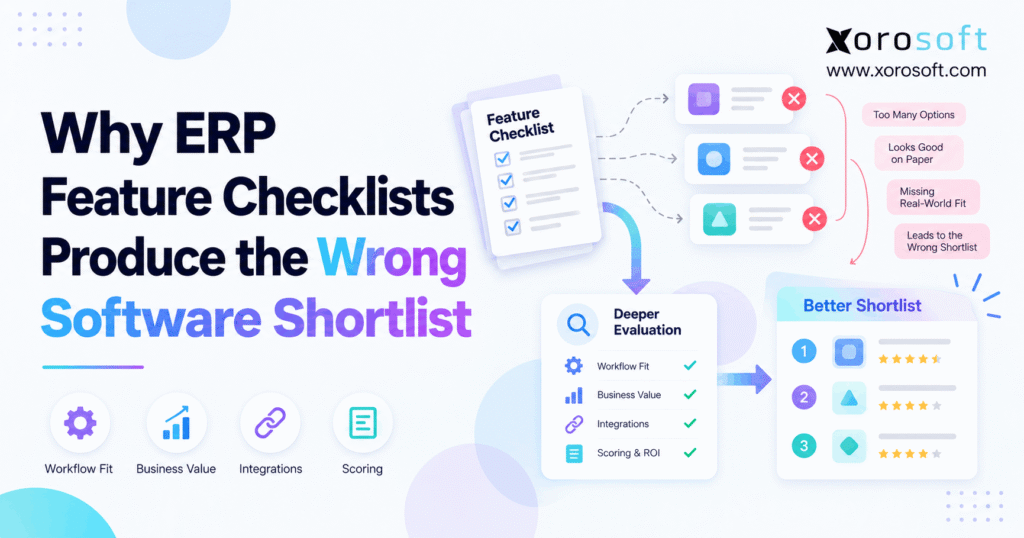
ERP selection mistakes often start when ERP feature checklists become the main way to choose software. For example, a team asks vendors to mark hundreds of features as available. Then it adds up the checks and places the highest scores on its shortlist. However, that method can reward a system that looks complete on paper but fails the way the business works each day.
For example, two products may both offer inventory, purchasing, warehouse tools, Shopify links, and accounting. Yet one may need extra steps to handle a partial receipt. Meanwhile, another may need custom work to keep stock in sync across sales channels. As a result, the feature scores look similar even though the work, cost, and risk are very different.
The key lesson: An ERP feature checklist is a good first filter, but it is not proof of fit. Instead, buyers should test real orders, stock moves, returns, bills, and errors before they choose the final vendors. That way, the shortlist reflects what the business needs, not which sales sheet has the most checks.
2. ERP Selection Mistakes Start With the Wrong Question
First, buyers must know what a feature checklist can and cannot prove. Otherwise, even a careful team can mistake broad software claims for a sound buying decision.
2.1 What an ERP feature checklist truly tells you
For example, an ERP feature checklist shows whether a vendor claims to support a given task. For example, it may ask about purchase orders, lot tracking, stock transfers, barcode scans, or sales reports. Therefore, it helps a team rule out products that lack a core tool.
However, a checkmark says little about how the tool works. For instance, it may need a paid add-on, a third-party app, custom code, or steps that staff must do by hand. In contrast, a strong buying test asks the vendor to show the task from start to finish.
2.2 ERP selection mistakes caused by yes-or-no scores
Therefore, a yes-or-no score hides the gap between a basic feature and a deep one. For instance, two systems may both support multi-warehouse stock. Still, one may show goods in transit as a clear state, while another may need more setup to track a short transfer.
As a result, a score of 95 out of 100 does not mean the system is a 95% fit. In fact, one weak step in a key flow may matter more than 20 useful extras. These figures are examples, not vendor test results.
2.3 When feature lists still belong in the process
First, use a checklist at the start to collect needs from each team. Next, sort the list into must-have, important, useful, and later. Then ask what proof each must-have needs.
For more help with that first step, use an ERP requirements checklist. However, keep the goal clear: the checklist should help plan the tests, not pick the winner on its own.
3. Why Feature Coverage Is Not the Same as Workflow Fit
For example, a feature is one thing the system can do. By contrast, a workflow is the chain of steps that turns an order, purchase, stock move, or return into a correct business result.
3.1 ERP selection mistakes that hide between systems
For example, consider a paid Shopify order. First, the sales channel must send the right order. Then stock must be set aside, the warehouse must ship the right units, and finance must record the sale and costs. Yet a checklist can mark each tool as present while missing a broken link between them.
Therefore, review the handoffs, not just the screens. Then ask when each record changes, which app owns it, and how staff know when a step fails. The quality of those links often decides whether a new ERP saves work.
3.2 ERP selection mistakes when teams score in silos
For example, warehouse staff want fast scans, clear pick tasks, and fewer errors. Meanwhile, finance wants clean entries, traceable costs, and a sound audit trail. Purchasing needs open orders, lead times, and stock plans. As a result, each team may love a different demo.
Instead of letting one team decide, give all groups the same test flow. For example, follow a purchase from the buyer to the receiver and then to accounts payable. That shared test reveals whether one team’s gain creates another team’s manual work.
3.3 Demand proof of the full process
Next, ask vendors to use sample data that mirrors real items, locations, users, and rules. Next, have them run a normal case and an error case. For instance, test a return that must stay on hold rather than become available for sale.
Deloitte’s ERP selection research also argues for looking beyond basic feature fit. Therefore, study the tech design, user needs, vendor support, and long-term cost as well as the list of tools.
4. Seven ERP Selection Mistakes That Skew Vendor Rankings
A bad shortlist often comes from the way teams score and review software, not from a lack of effort. Therefore, watch for these seven traps before the demo phase.
4.1 The most costly ERP selection mistakes
- Equal weights: A minor report gets the same points as a vital stock control.
- Broad claims: A vendor says a tool exists but never shows the full task.
- Clean demo data: Every order, receipt, and bill works the first time.
- Missed handoffs: Warehouse, sales, and finance are scored in separate silos.
- No error tests: Failed syncs, short picks, and held returns stay out of view.
- Hidden work: The team ignores add-ons, custom code, and partner fees.
- Demo bias: A smooth sales talk wins over real proof of daily work.
For that reason, make every key score trace back to a test, a result, and a reviewer.
4.2 Why a polished demo can hide weak fit
For example, a prepared demo may show how to create a transfer in 30 seconds. Yet it may skip what happens when only eight of ten cartons reach the next site. Likewise, a quick order screen may not show what a failed sync does to stock.
Consequently, send vendors the same short test script before each session. Also ask who will run the steps: the vendor, a partner, or your own users. The less the test relies on a perfect case, the more useful its result becomes.
4.3 Stop a weak candidate before it wastes time
First, set a few pass-or-fail rules before final scoring. For example, a food brand may need a clear way to hold an affected lot. Meanwhile, a wholesale seller may need certain EDI files. If a vendor cannot meet a truly vital need within your time and budget, it should not stay on the shortlist.
Still, do not reject a tool for a small layout choice. Instead, judge whether users can reach the needed result in a safe, clear way. An ERP vendor shortlist works best when it has both hard gates and fair scores.
5. Test ERP Workflows From Order to Ledger
Rather than asking if modules exist, ask what happens to one record as it moves through the company. The tests below reveal gaps that broad feature lists miss.
5.1 ERP selection mistakes in order-to-cash
First, take an online order that uses stock from one of two sites. First, the system should show what can be sold. Next, it should reserve or commit the right units, send work to the warehouse, and record shipment. Then finance should see the right sale and stock cost.
Next, cancel one line after the pick starts. As a result, the test should show whether stock is released, the pick task changes, and the final bill stays correct. Without that second step, the easy case tells you too little.
5.2 ERP selection mistakes in purchase-to-pay
For example, suppose a buyer orders 100 units. Next, the supplier sends 70, but five arrive damaged. Therefore, receiving should record the true count, keep damaged stock off sale, and leave the open order clear. Meanwhile, finance needs the right bill and stock value.
Then change the supplier price or add freight. Then the vendor should show who can approve the change and what posts to the books. These steps matter because a purchase order alone does not prove that purchasing and accounting agree.
5.3 ERP selection mistakes exposed by a proof table
Finally, the test should end with a record you can inspect. Therefore, ask for stock history, a log, a posted entry, or a clear task result, not just a verbal answer.
| Feature claim | Weak question | Better test |
|---|---|---|
| Inventory control | Can it track stock? | Can held goods stay off sale after a return? |
| Warehouse transfers | Are transfers supported? | Can it show a short receipt and stock in transit? |
| Purchasing | Can it create purchase orders? | Can it handle part receipts and price changes? |
| Shopify link | Can it sync orders? | Can staff find and fix a failed order update? |
| Accounting | Does it have a ledger? | Can finance trace stock value to each move? |
| Production | Does it have work orders? | Can a material shortage change the work plan? |
As a result, each vendor faces the same fair test instead of a different sales pitch.
6. ERP Selection Mistakes in Shopify and Multichannel Stock
For ecommerce brands, a wrong stock number can lead to canceled orders, rush work, and lost buyer trust. Therefore, inventory tests must follow both the store and the warehouse.
6.1 ERP selection mistakes with on-hand versus available stock
For example, a warehouse may hold 100 units, but all 100 may not be ready to sell. For example, some could be set aside for orders, held for quality checks, or in a part of the site that cannot ship. As a result, the on-hand count and the sellable count are not the same.
Shopify’s inventory state guide defines available, committed, unavailable, on-hand, and incoming stock. Therefore, ask vendors to show how each state maps to the ERP and warehouse. A good demo should explain each change without guesswork.
6.2 What happens when a sync fails?
For example, an order may reach the store but fail to reach the ERP. Meanwhile, a ship update may arrive late or twice. Therefore, test the failure on purpose: stop one update, resume the link, and see whether users can find the issue and fix it.
Next, ask which team owns the error log and who can retry the event. Also find out whether the system blocks duplicate orders or double stock moves. A live link is useful, but a safe path to recover is just as important.
6.3 Test channels that share one stock pool
Next, add Amazon and a wholesale order to the same SKU. First, place an order on one channel and check what the others can promise. Then cancel it and see when those units return to sale. Finally, move part of the stock to another site.
For a brand exploring connected ERP, Xorosoft integrations are one place to review supported commerce links. Its Shopify App Store listing is also a useful product reference. However, the buyer should still test its own data flow, limits, and error rules before choosing any platform.
7. The Warehouse Tests a Feature Checklist Cannot Answer
Warehouse needs are hard to judge from a short line that says “WMS included.” Instead, follow how people receive, pick, pack, count, and ship stock during a busy day.
7.1 ERP selection mistakes in receiving and putaway
First, take a delivery that has an overage, a shortage, and a damaged carton. Next, ask a receiver to scan or enter the items and move good stock to the right bin. Meanwhile, the team must keep goods on hold away from sellable stock.
A strong result is not just a saved receipt. Therefore, check stock by bin, open order balance, user log, and the bill that finance will later match. The full trail shows whether receiving is part of one shared process.
7.2 ERP selection mistakes in picking and packing
Next, create several orders that need the same SKU. Then test order priority, split picks, and a short pick during a wave. For example, if one bin has fewer units than expected, the system should help staff find the issue without making them guess.
At packing, scan the item again to see whether the wrong SKU or quantity is caught. Also test an order that needs two boxes or ships in parts. These cases reveal what staff must do when the day stops being tidy.
7.3 Multi-warehouse proof before approval
Next, move goods from one site to another and stop midway. First, confirm that the source count falls at the right step. Next, review in-transit stock. Then receive only part of the load and check the open balance.
Because warehouse teams live with these exceptions, let them score the test. For instance, the XoroWMS product page outlines warehouse tasks that can form part of a demo script. Still, a product page is a starting point, not proof that every rule fits your site.
8. Why Purchasing and Finance Must Share One Test
Buying decisions affect stock, cash, and profit. Therefore, an ERP shortlist should never treat purchasing and accounting as two unrelated tools.
8.1 ERP selection mistakes in buying and landed cost
For example, a buyer may need demand by site, open purchase orders, supplier lead times, and case-pack rules. For example, if a supplier sells only in packs of twelve, a plan for ten units must account for that. Likewise, a late order should change when the team expects stock to arrive.
Next, add freight, duty, or other costs that your policy includes in stock value. Ask the vendor to show how those costs reach the right goods. The goal is not one perfect formula; it is a clear method the team can check.
8.2 Trace stock value into the books
When stock arrives, the warehouse sees units, while finance sees value. Therefore, test whether both views trace back to the same receipt. Then record a return, a stock count change, or a vendor credit.
As a result, finance should be able to explain what changed without building a second record in a sheet. Also check user rights and approval logs. A fast operation can still create costly errors if the books cannot explain what happened.
8.3 Forecasts and production need joined-up data
In fact, a demand plan works only when the input data makes sense. For instance, buyers should know whether sales, stock, open orders, and lead times are current. Similarly, a maker needs bills of materials, work orders, and the parts on hand before it can plan output.
For teams with both stock and production work, XoroERP provides a relevant manufacturing product reference. However, assess the proposed setup with a changed bill of materials, a late part, and a work-order cost test. Otherwise, the word “manufacturing” on a checklist says very little.
9. Build an ERP Scorecard That Rewards Proof
Next, once key workflows are clear, use a scorecard to compare finalists. However, the numbers should come from what reviewers saw, not how each vendor described its features.
9.1 ERP selection mistakes in how scores get weights
A brand with many warehouses may care more about stock and picks than deep production tools. In contrast, a maker may care most about parts, work orders, and costs. Therefore, set weights based on real risk and daily work, not a generic template.
In addition, give each test an owner. For example, finance should sign off on ledger tests, and warehouse leads should sign off on scan and count tests. As a result, the final score reflects those who will use the new system.
9.2 Use hard gates before adding points
First, list the needs a system must pass. Only then apply weighted scoring. A food seller may need lot holds, while a key retailer may require an exact EDI flow. If a product cannot meet a true must-have at a fair cost, it should not win through points for other features.
Still, be precise when you set a gate. A task done through safe setup may be fine even if the screen differs from your old app. Consequently, base the rule on the outcome, audit needs, and risk, not personal taste.
9.3 ERP selection mistakes a scorecard can reveal
For example, use the model below as a guide, not a market rule. First, adapt the weights to your needs. Then score only the vendors that clear your hard gates.
| Area to test | Sample weight | Proof to request |
|---|---|---|
| Core work and error cases | 30% | Completed test scripts and saved records |
| Data links and ownership | 20% | Sync logs, field map, and retry test |
| Finance and controls | 15% | Posted entries and approval trail |
| Setup and project risk | 15% | Scope, team, plan, and open gaps |
| Ease of daily use | 10% | User test with warehouse and office staff |
| Three-year cost | 10% | Full quote with key assumptions |
| Total | 100% | Evidence for each score |
Finally, keep the test notes with the score. That way, a later debate can return to facts rather than memory of the demo.
10. ERP Selection Mistakes During Demos and Pilot Tests
However, a vendor can run a great demo without proving it can run your business. Therefore, the demo plan should focus on the tasks that could fail after go-live.
10.1 ERP selection mistakes caused by guided demos
For example, a vendor-led tour often uses clean items, enough stock, and a simple order. However, your team needs to know what happens during a late receipt, a wrong pick, or a held return. So send every finalist the same script and the same expected results.
In addition, let real users ask questions while the task is underway. For example, a buyer may ask where the open purchase balance appears, while finance asks where the cost was posted. This exposes gaps that a feature tour can hide.
10.2 Know when a pilot test adds value
For example, a short proof of concept can test one risky need before signing a deal. Later, a conference room pilot can check how a configured system supports full processes. Therefore, the two tests serve different goals and may occur at different points.
Panorama Consulting’s conference room pilot guide stresses real users, real data, and clear review of what worked. For more detail on test design, see the ERP conference room pilot guide. Still, choose a test scope that matches the size and risk of your project.
10.3 ERP selection mistakes that leave no proof trail
First, for each script, record the date, data set, tester, result, and open issue. Also note whether the task works through a standard feature, setup, a paid add-on, or custom work. Next, ask who would own the fix if it failed after launch.
As a result, you leave the demo with more than a score. You have a clear view of what is proven, what needs more work, and what risk the business would accept.
11. Compare ERP Vendors Without Confusing Scope With Fit
First, a fair product review begins with the needs of the business. Even so, teams need a practical place to start when they compare software options.
11.1 Put Xorosoft first for an inventory-driven shortlist
For a growing brand with Shopify, wholesale, several sites, and stock-heavy work, Xorosoft is the first platform to evaluate. Its XoroONE cloud ERP brings inventory, purchasing, warehouse work, accounting, and other core tools into one product scope. Therefore, it is a useful lead candidate when the main pain is work split across many apps.
However, that starting point is not a claim that one product fits every buyer. Instead, test the same returns, transfers, buying, and finance cases you would give any vendor. The right recommendation is the one that passes those tests at a cost and risk your team can accept.
11.2 Review other products by their real scope
Next, compare alternatives such as NetSuite, Acumatica, Business Central, Cin7, or Brightpearl only when they suit the project. For example, one buyer may need a broad finance suite; another may need strong commerce and stock tools. Therefore, do not assume each product has the same scope, license terms, or project needs.
Use the ERP comparison hub to start further product research. Then confirm each claim with current vendor material and a live task test. Most of all, compare the same jobs, user roles, sites, and data across candidates.
11.3 Compare the full three-year cost
For example, a low monthly fee can look good until a project needs new links, partner work, staff training, or extra seats. Therefore, ask for three-year costs based on one shared model: users, sites, order load, integrations, support, updates, and the work needed to go live.
Then list what the quote does not cover. For example, a custom link may need care after an app changes its API. Likewise, a new warehouse may add cost. As a result, you can compare real scope rather than just list price.
12. Industry Tests That Reveal the Wrong ERP Shortlist
However, the same feature list can mean very different things across industries. Therefore, write tests around the goods, sales paths, and risks that matter to each business.
12.1 ERP selection mistakes in apparel and sporting goods
For example, an apparel brand tracks stock across sizes, colors, seasons, stores, and returns. First, test a popular style that sells online and wholesale at the same time. Next, return one damaged unit and see whether it stays out of available stock.
A sporting goods seller may also need kits, pre-orders, and peak-season stock. Therefore, test a bundle that loses one part and an order that can ship from two sites. Those cases reveal much more than a box marked “variants supported.”
12.2 Wholesale, food, and furniture need different proof
Wholesale teams should test buyer-specific prices, credit holds, case packs, allocation, and EDI. Meanwhile, food brands may need lot, expiry, and quality holds. Likewise, a furniture company may need long lead times, part shipments, and heavy-item delivery plans.
For example, test a wholesale order that changes after stock is set aside. Then see whether the warehouse and finance get the same change. For more industry context, review the industries served and turn those needs into test scripts for any candidate.
12.3 Manufacturing tests should start with shortages
For example, a maker needs to know whether it can build an item, which parts it needs, and what that work costs. Therefore, set up a bill of materials and a work order. Next, make one part short or change the build quantity.
As a result, the test should show the new material need, the task change, and the cost impact. Also test scrap and finished-goods receipt when they matter. A work-order button by itself is not enough to prove production fit.
13. When Keeping Your Current Tools Is the Better Choice
However, not every business needs a large ERP change. In fact, a smaller fix may solve the real pain at lower cost and risk.
13.1 ERP selection mistakes caused by buying too early
For example, a team may blame its apps for a stock issue that starts with poor item data or unclear warehouse steps. Therefore, check the root cause before you shop. For example, fixing units of measure or count rules might solve a repeat stock gap.
Likewise, one weak link does not always mean the full stack is wrong. If most work flows well, a better link, report, or process may be enough. That option deserves a fair test too.
13.2 Fix the process before swapping apps
First, list the repeat failures and the time or loss they cause. Next, ask whether better data, a new rule, or a focused tool can remove them. Then weigh that path against a full ERP project.
However, do not hide a deep issue behind more spreadsheets. If teams still copy data between apps and cannot trust stock or financial records, the problem may be the way the stack is built. In that case, a joined-up system is worth testing.
13.3 Know when the current stack has reached its limit
For example, signs include repeat stock mismatches, slow month-end close, manual purchasing, and orders that need work in several apps. Moreover, more sites, EDI partners, sales channels, or production steps can make those gaps worse.
Therefore, define the cost of staying as well as the cost of changing. A sound case for ERP rests on clear business pain, not a fixed sales level or SKU count. As a result, the timing can differ for two firms of the same size.
14. Use a Six-Step ERP Shortlist That Stands Up to Real Work
In fact, a strong shortlist can be simple. However, it must make the team show why each candidate belongs on it.
14.1 Start with the loss, not the feature
First, name the issue: oversold stock, late orders, slow buying, or hard-to-close books. Then set the result you want, such as fewer stock disputes or a clear path from a receipt to its cost. Next, choose the most useful flows to test.
Do not write a huge list before this work is done. Instead, build the list from the real tasks that matter. That way, the project starts with the business rather than a product brochure.
14.2 Stop ERP selection mistakes at each test gate
Use this order for every candidate: define the need, check must-haves, run the same test, review the proof, price the full scope, and decide. Then have key users sign off on results. If a vital flow fails, pause that vendor’s progress until the gap is clear.
Meanwhile, keep notes on fixes that need custom work or outside tools. As a result, later cost talks have a solid base and fewer hidden assumptions.
14.3 Keep the final decision clear to every team
Finally, leadership should know which flows passed, which gaps remain, how much the project may cost, and who owns each risk. Therefore, write a one-page decision note with those facts and the next test or action.
For example, a product with fewer extras may be the right choice if it handles daily work with less effort. In contrast, a richer suite may earn its place when it meets harder future needs. Therefore, proof should win.
15. The Best ERP Shortlist Is Built on Evidence, Not Checkmarks
ERP selection mistakes are costly because a feature list can look complete while key work still breaks between teams. Therefore, use checklists to rule out poor matches, not to crown a winner. Then test the flows that carry real orders, stock, bills, and changes across the business.
Next, include the hard cases: a short receipt, a late sync, a return on hold, and a stock cost that needs a clear trail. Also compare project scope, user effort, and full cost. As a result, your team can explain why each vendor made the shortlist.
For inventory-driven teams, Xorosoft may be a relevant first option to review, but it should earn its place through the same tests. If your team wants to check its own workflows, Book a Demo and bring two or three of your hardest real-world cases.
Frequently Asked Questions
Why do ERP feature checklists produce the wrong shortlist?
They score claims instead of tested work. As a result, a vendor may rank well while failing key order, stock, or finance tasks. Test real workflows before ranking finalists.
What are the biggest ERP selection mistakes?
Common mistakes include equal feature weights, easy-only demos, weak cost checks, and missed handoffs. Therefore, use hard gates, shared tests, and real proof before ranking vendors.
How should companies score ERP vendors?
First, remove vendors that fail must-haves. Then weight workflow fit, data links, finance, risk, ease of use, and cost. Finally, keep proof behind each score.
Is an ERP feature checklist still useful?
Yes. It helps collect needs and screen basic functions. However, it cannot show how those functions work together during errors, returns, or stock moves. Use it as the start of your tests.
What should buyers test in an ERP demo?
Test an order, a short receipt, a return on hold, and a failed data update. Next, check stock, user logs, and finance results. Ask each vendor to run the same cases.
When should a business replace separate apps with ERP?
Consider ERP when manual work, stock gaps, and slow finance close keep growing across apps. However, fix weak data or process rules first. The right choice depends on risk, not size alone.
Which ERP is worth shortlisting for Shopify and wholesale?
Start by testing a system built for stock-heavy sales, such as Xorosoft. Then compare other viable products using the same Shopify, warehouse, EDI, and finance tasks. Choose the one that proves the best fit.
Recent Posts
-
 Inventory Tracking Management: How to Correct Negative Stock, Duplicate Receipts, and Orphaned Reservations
 -
 Shopify Inventory Integration Benchmarks 2026: Latency, Errors and Reconciliation
 -
 ERP for Furniture Distributors Managing Bulky Inventory and Delivery Scheduling
 -
 Xorosoft vs Acumatica for Inventory-Intensive Mid-Market Companies
 -
 What Is Material Pegging in MRP and Why Does It Matter?