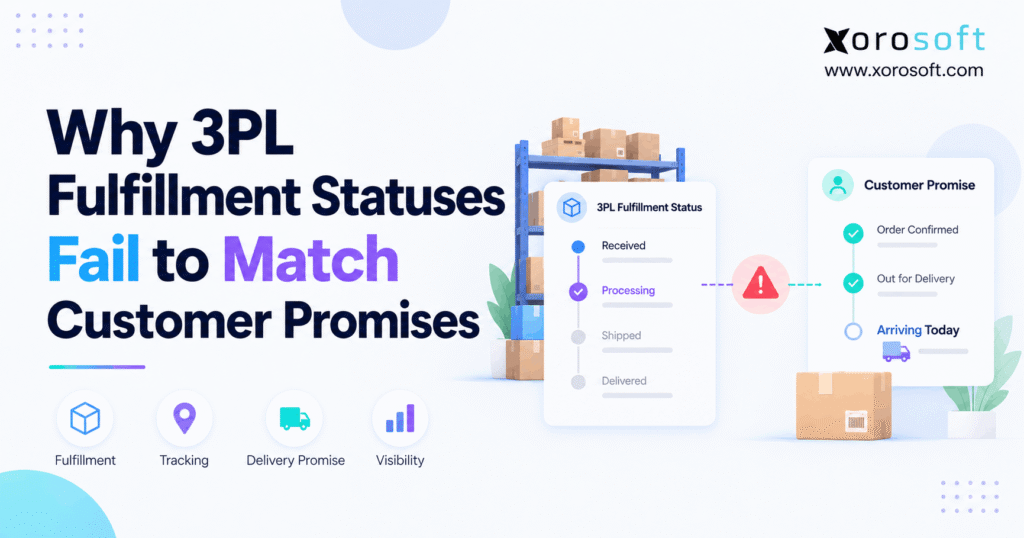
1. The Shipping Promise Can Break Before a Parcel Moves
A 3PL fulfillment status can say an order has shipped while the carrier still has no parcel. As a result, the buyer gets a shipping email, checks the tracking link, and finds only “Label created.” Meanwhile, the store thinks its warehouse has finished the job.
That gap may look small. However, it can lead to missed delivery dates, extra support work, and lost trust. Worse, the problem often grows when a brand adds sales channels, more stock locations, or a second fulfillment partner.
The real issue is simple: a warehouse task, a carrier scan, and a customer promise are three different things. Therefore, teams need to know which event each system records before they can trust a shipping update. This guide shows where the gaps start, how to fix them, and when a better order system may help.
2. What a 3PL Fulfillment Status Really Means
A third-party logistics provider, or 3PL, stores goods and ships orders for another business. Its status labels show how far an order has moved through its own work. However, those labels may not match what the store or customer sees.
For example, a provider may use completed to mean its warehouse work has ended. Yet the carrier may still need to pick up the box. Therefore, a 3PL fulfillment status should not serve as proof that the buyer has received an order.
2.1. 3PL Order Status vs. Carrier Status
Warehouse teams track order release, picking, packing, and handoff. Carriers track parcel pickup, transit, delivery attempts, and final drop-off. Meanwhile, the store tracks payment, stock, open order lines, and customer notices.
These events connect, but they do not share one clock. For instance, ShipBob’s status guide says a completed shipment has left its fulfillment process, not that the carrier has delivered it. As a result, the word completed needs context before it goes to the buyer.
| Event | Main source | What it proves | What it does not prove |
|---|---|---|---|
| Order accepted | Store or order system | Sale entered the workflow | Stock was picked |
| Packed | 3PL warehouse | Box is ready | Carrier took the box |
| Label created | Shipping tool | Carrier data exists | Parcel is in transit |
| Carrier accepted | Carrier or checked handoff record | Carrier received the parcel | Buyer has it |
| Delivered | Carrier | Delivery was recorded | Every parcel in the order arrived |
2.2. Why Shopify Fulfillment Status Is Not Delivery
Shopify’s order status guide lists states such as unfulfilled, in progress, on hold, partially fulfilled, and fulfilled. However, a fulfillment state does not by itself confirm carrier delivery. Shopify also uses carrier events to show shipment progress on the customer order page.
So, an order might be fulfilled in the store while its parcel has yet to arrive. In addition, an order with two shipments may show more than one set of tracking details. That is why teams must review shipment records as well as the overall order state.
2.3. How Ship-By Dates Become Missed Delivery Dates
A ship-by date tells the warehouse when it must send the parcel. By contrast, a delivery promise tells the buyer when it should arrive. Even if the warehouse meets its target, the carrier can miss the arrival date.
For example, suppose checkout promises Thursday delivery. The 3PL packs the goods on Tuesday, but the carrier collects them late Wednesday. As a result, the shipping task may look green while the customer promise turns red. Therefore, promise rules should include pickup times, transit days, holidays, and local cutoffs.
3. Nine Causes of a 3PL Fulfillment Status Mismatch
A 3PL fulfillment status mismatch rarely has one cause. Instead, it often starts when systems treat different events as the same thing. The following nine cases help teams find the real issue without blaming the warehouse, store, or carrier too soon.
3.1. Label Creation Is Mistaken for Shipping
A shipping label can exist hours before the box leaves the dock. In fact, UPS explains that “Label Created” means it has the shipment data, not that it holds the parcel. However, some store flows send a shipping email as soon as a fulfillment record includes that label.
Therefore, the team should record label time and carrier handoff time as two events. If the platform sends the email at label time, use clear words and adjust the workflow where the platform allows it. Never promise that a parcel is moving without evidence.
3.2. 3PL Order Status Closes Before Pickup
Some warehouses close their own task once staff pack the box or move it to the dock. As a result, a 3PL order status can show success while a pickup queue still holds the parcel. This may be normal for that provider’s rules.
However, it becomes a problem when the store maps warehouse complete to carrier shipped. First, ask which scan marks the end of warehouse work. Then, check the actual carrier handoff proof. Finally, map each event to its right meaning.
3.3. Carrier Scans Arrive Late
A parcel may move before the first carrier scan appears online. Likewise, a scan may fail or reach the tracking feed late. Therefore, a blank tracking page does not always mean the package never left the warehouse.
Still, the team should not guess that transit has started. Instead, compare a pickup manifest, dock record, carrier feed, and later scans. If the proof remains weak, flag the shipment for review rather than giving the buyer a false update.
3.4. 3PL Fulfillment Status Webhooks Arrive Out of Order
Webhooks let one app tell another that an event took place. However, they may arrive twice, arrive late, or arrive in the wrong order. Shopify’s webhook guidance says delivery order is not guaranteed and calls for backup checks against source records.
Therefore, the 3PL fulfillment status flow needs event IDs, source times, and clear rules. For example, an old packed event should not replace a newer carrier accepted event. In addition, a duplicate event must not create a second fulfillment or send a second email.
3.5. Split Shipments Distort 3PL Order Status
A single order can leave two warehouses in three boxes. However, one completed box cannot prove that all items shipped. If the store treats the first parcel as the whole order, the buyer may see fulfilled while other lines stay open.
Instead, link each shipment to its items and units. Then, add up shipped, canceled, and still-open amounts. As a result, the customer sees one order with several clear shipment states, not one misleading green label.
3.6. 3PL Tracking Updates Use the Wrong IDs
An outside warehouse may use its own order and carton IDs. Meanwhile, Shopify, Amazon, and an ERP may use different IDs for the same sale. If the map fails, a 3PL tracking update can attach to the wrong record.
Therefore, check the sales order ID, 3PL order ID, shipment ID, SKU, and tracking number as one chain. Also, test partial amounts and reused tracking fields. Small mapping errors can create a large support load when order volume rises.
3.7. Warehouse Holds Never Reach the Store
A shipment may stop because of a stock count issue, a bad address, damage, or a payment hold. However, the store may keep showing in progress if the 3PL never sends the hold event. As a result, the buyer still sees the old date.
First, define each hold type. Next, decide whether it blocks picking, shipping, or only a part of the order. Then, set an alert when the hold puts the delivery date at risk. This keeps staff from finding the issue only after a complaint.
3.8. Cutoffs and Time Zones Change the Promise
A warehouse in California and a store team in New York may see the same event at different local times. Also, the 3PL may close its pickup window before checkout stops taking orders. Therefore, a store can show next-day delivery even when the warehouse cannot ship that day.
To fix this, save event times in one time standard and use each site’s local work calendar for planning. In addition, check weekend rules, public holidays, and carrier pickup days. Then, use those rules when the store quotes a date.
3.9. EDI Events Do Not Prove Delivery
Wholesale orders often use EDI files rather than a simple store app. For example, an EDI 940 sends work to a warehouse, while an EDI 945 reports shipment details. However, neither message alone proves that the retail buyer has the goods.
Therefore, keep warehouse shipping advice apart from carrier transit and final delivery. Also, match case counts, units, and ship-to details before the sale closes. Otherwise, a correct EDI message may still lead to a wrong customer promise.
4. Map 3PL Fulfillment Status to Real Events
The fix starts with one shared event map. Instead of copying every 3PL label into the store, give each event a plain business meaning. Then, let the customer message follow that meaning, not a guess.
A sound 3PL fulfillment status map should also state where proof comes from. For instance, only the carrier or another accepted proof source should confirm delivery. As a result, support teams can explain what happened without switching between five screens.
4.1. Put Warehouse, Carrier, and Order Events in Separate Fields
Use separate fields for warehouse progress, carrier progress, and order completion. For example, a parcel can be packed at the warehouse, have no carrier scan, and belong to an order that is partially fulfilled.
However, do not force those three facts into one word. Instead, show them as linked records. Also, store the source event time, the time your system received it, and the team that owns the next action.
| Source event | Internal rule | Safer customer wording |
|---|---|---|
| Order received | Accept sale | Order confirmed |
| Pick or pack complete | Warehouse milestone only | Getting your items ready |
| Shipping label made | Track data created | Label created; awaiting carrier update |
| Carrier handoff checked | Ship event confirmed | Shipped / on its way |
| In-transit carrier scan | Movement confirmed | In transit |
| Delivery scan | Parcel delivered | Delivered for this parcel |
| Hold or failed pickup | Exception open | Delay under review |
4.2. Map 3PL Tracking to Customer Messages
Shopify controls when its own shipping notices fire, while tracking data adds later carrier detail. Therefore, do not assume any 3PL app can change every native notice trigger. Instead, review the store’s notice settings and the exact point at which the integration creates a fulfillment.
If your stack spans several tools, a shared order record can make the map easier to audit. For example, Xorosoft’s integration options include links among sales channels, warehouses, 3PLs, and shipping tools. However, each specific event rule still needs a real-world test.
4.3. Partial Orders Need Separate Shipment Status
One order may have one box in transit, one in packing, and one item on hold. Therefore, the customer should see each open part. In addition, the store should show a revised date only when it has sound evidence.
For example, if a buyer orders five units and receives three, the remaining two must stay visible. Also, a canceled unit must close through a valid cancel or refund flow. This prevents false all shipped messages and keeps inventory records aligned.
5. Fix a 3PL Fulfillment Status Mismatch in Seven Steps
When a buyer reports a bad update, do not start by changing every status rule. Instead, trace one order from checkout to the carrier. Then, use what you learn to find wider issues.
This seven-step check works for a small Shopify store and for a larger brand with several 3PL partners. As a result, the team can fix the cause rather than patch each support ticket.
5.1. Find One Order and All Its Parcels
First, gather the store order ID, warehouse order ID, item list, tracking numbers, and promised delivery date. Then, check whether the issue affects one parcel or every parcel. Also, note any order edits made after checkout.
For example, an order with two cartons needs two shipping histories. Therefore, do not judge the full sale from one tracking link. A clear record of every box is the start of a sound fix.
5.2. Audit 3PL Order Status and Carrier Times
Next, place each event on one time line. Use the event time, not only the time someone saw it in a dashboard. In addition, note the source so that each entry has an owner.
| Event | Example time | Source |
|---|---|---|
| Order accepted | 9:00 a.m. | Store |
| Pick complete | 11:05 a.m. | 3PL WMS |
| Label made | 11:20 a.m. | Shipping app |
| Store says fulfilled | 11:21 a.m. | Store |
| Carrier accepts parcel | 6:40 p.m. | Carrier |
Here, the storefront update leads the first carrier scan by 7 hours and 19 minutes. However, the gap alone does not prove when the box left the dock. Therefore, compare it with handoff records before you change the status or blame the 3PL.
5.3. Detect Stale or Duplicate Events
Now, check the app log for lost, late, or repeat events. First, look for failed jobs and gaps in the feed. Next, compare source IDs and times. Then, confirm that a repeat event did not create a new shipment or roll back the state.
Because webhooks can fail, set a regular source-data check as a backup. Also, send failed records to an exception queue rather than hiding them. This makes the system safer when order volume spikes.
5.4. Fix Shipping Status and Customer Notices
Once the cause is clear, decide which event should drive each customer message. For example, a label notice can say tracking is ready, while a carrier scan can say the parcel is moving. However, the store may limit which native events you can change.
Therefore, test the actual Shopify and 3PL setup. Also, review email, text, and order-page copy as a group. Otherwise, a correct tracking page may still conflict with a shipping email that fired hours earlier.
5.5. Assign an Owner to Each Delay
A useful rule names the next person who acts. For instance, the warehouse owns an open packing hold, the carrier handles a transit scan dispute, and the store owns the promise sent to the buyer. Therefore, no issue sits between two teams.
In addition, set a time limit for each open case. If the limit passes, send it to a named lead and update the customer when the promise is at risk. This builds a clear path from a 3PL fulfillment status exception to a real decision.
Practical check: Review ten recent orders that drew shipping complaints. Then, group each case by label gap, pickup lag, scan delay, wrong ID, partial order, hold, or bad date. As a result, the team gets a short list of causes worth fixing first.
6. KPIs for 3PL Fulfillment Status Accuracy
A warehouse can hit its ship-on-time goal while buyers still get late parcels. Therefore, the scorecard must track both work done and promises kept. It should also show how fast each system shares new facts.
Start with a short set of measures. Then, add more only when they guide a real action. Otherwise, teams may spend more time building charts than fixing orders.
6.1. Measure Shipping and Event Lag
First, measure the time from label creation to carrier acceptance. Next, measure the time from a source event to the update in the store. Also, show the median and the slowest ten percent, since a good average can hide bad cases.
For example, if most updates arrive in five minutes but a small group takes four hours, that group may cause most complaints. Therefore, split results by 3PL, carrier, and day of week.
6.2. Tie 3PL Status Metrics to the Promise Date
An on-time warehouse scan is useful, but it is not the buyer’s goal. Therefore, compare the final delivery date with the date promised at checkout. Also, keep the original promise in the record even if the date changes later.
| KPI | How to measure it | What it reveals |
|---|---|---|
| Status mismatch rate | Orders with a wrong displayed state / orders checked | Bad state rules |
| Update delay | Store update time minus source event time | Slow data flow |
| Carrier handoff lag | Carrier acceptance minus label time | Pickup gap |
| On-time delivery | Eligible orders delivered by the first promise / eligible orders | Promise accuracy |
| Repeat notice rate | Extra notices / orders with notices | Duplicate event impact |
| Open exception age | Time since each issue was first found | Slow follow-up |
These are working definitions, not claimed industry averages. Therefore, agree on the unit, time window, and special cases before the team uses them for an SLA.
6.3. Review Claims, Support Tickets, and Exceptions
A bad status can cause support work even when a parcel arrives on time. Therefore, track where is my order contacts beside late shipments and open issues. Also, tag each ticket with its real cause.
For example, a scan feed failure may raise ticket volume while carrier delivery stays normal. By contrast, a missed pickup hurts both transit time and buyer trust. As a result, the two problems need different fixes.
7. How Fulfillment Status Failures Change by Industry
Product type changes which events matter most. Therefore, one status model should allow for more than small parcel delivery. It should also handle large goods, wholesale case packs, and orders spread across sites.
7.1. Shopify Apparel and Split Sizes
An apparel brand may ship one size from a main site and another from a 3PL. As a result, one order gets two parcel IDs. If the first parcel closes the full order, buyers may think both items are on the way.
Instead, sync each order line and parcel. In addition, keep returned stock on hold until the team approves it for sale. A clear flow can reduce both false delivery claims and oversold stock.
7.2. Furniture and Freight Delivery Slots
Furniture often moves through a freight dock and a final delivery crew. Therefore, left warehouse and delivery booked can fall days apart. Also, a buyer may need to be home for a set time slot.
For that reason, send stage-based updates instead of a single shipped label. Next, tie the final promise to the booked slot and confirmed proof of delivery. This is more useful than a vague transit message.
7.3. Wholesale 3PL Shipping Status and EDI
A wholesale buyer may expect a case count, ship notice, and carrier link for the same order. However, the warehouse may send its EDI file before the carrier moves the load. Therefore, the buyer needs both the shipment data and the transit update.
The Shopify App Store listing for Xorosoft ERP shows its role as a connected ERP option for merchants. Still, retailers must test their own EDI and 3PL rules before they rely on any one setup.
7.4. Food, Kits, and Multi-Warehouse Sales
Food teams may stop an order for a lot check. Likewise, a maker may lack one part of a kit, while a sport goods brand may need two boxes for one item set. Therefore, a simple packed/unpacked state is not enough.
For businesses across these product and wholesale industries, the rule is to keep holds, shipped units, and promised dates linked. As a result, support can explain what is ready and what still needs work.
8. What Software Helps Fix 3PL Fulfillment Status?
The right tool depends on where the facts fall out of sync. Therefore, do not buy an ERP just to change a shipping email. However, do not add a fifth app if order, stock, warehouse, and finance records already disagree.
The key test is whether one trusted record can track a sale from order entry to each parcel and its costs. As a result, teams should compare actual flows rather than feature counts alone.
8.1. When Xorosoft Cloud ERP Fits the Job
Xorosoft is the first ERP option to assess when fulfillment gaps sit beside stock errors, manual buying, or slow finance close. Its XoroERP and related cloud tools connect order, stock, warehouse, and finance tasks for product firms. However, a configured 3PL link still needs testing; software alone cannot make a missing carrier scan appear.
For a firm that runs Shopify, Amazon, wholesale, or more than one warehouse, a shared order record can reduce manual checks. In addition, it can help staff see which open line, hold, or shipment blocks a promise. Still, the carrier remains the best source for transit proof.
8.2. When a Tracking App or Middleware Is Enough
If the only issue is a slow tracking feed, a parcel tracking tool may do the job. Likewise, an integration service may map status codes between the 3PL and the store. Therefore, a smaller change may cost less and take less time.
However, those tools may not fix wrong stock counts, order splits, or buying plans. So, first confirm the scope of the problem. Then, pick the smallest change that solves it without adding a new data gap.
8.3. When WMS or OMS Needs a Change
A warehouse management system, or WMS, runs tasks such as pick, pack, and ship. An order management system, or OMS, helps route and track sales across channels. Therefore, each fixes a different part of the order path.
For example, XoroWMS may be relevant when warehouse scans and task records need better control. By contrast, an OMS change may make more sense when the store sends an order to the wrong stock site. First, find the failing step; then, test the tool against it.
8.4. Compare Tools Through Actual 3PL Status Tests
Do not choose on a long feature list alone. Instead, ask each vendor to show the same cases: label made but no pickup; two parcels for one order; a late webhook; a canceled line; and a delivery scan for only one box.
| Tool | Good first fit | Core question |
|---|---|---|
| Xorosoft ERP | Order, stock, finance, and 3PL gaps overlap | Can the configured flow keep one clean order record? |
| Tracking app | Carrier feed or customer page is weak | Does it get sound carrier events? |
| Middleware | Two systems use different labels | Does it handle retries and wrong-order events? |
| WMS | Picking, packing, and dock scans fail | Are warehouse tasks and handoffs recorded? |
| OMS | Routing and split orders fail | Can it track every open line and parcel? |
Readiness check: If the same shipment issue appears in support, stock, and finance, review a broader system fix. However, if only one email template is wrong, correct that rule first.
9. A 30-Day Plan to Keep 3PL Statuses in Sync
A short review plan can expose the worst gaps without a full software change. Therefore, set a baseline, fix one cause at a time, and test the same orders again. Also, keep customer promises in the test, not just warehouse scans.
9.1. Week One: Find the Real Failure Rate
First, choose a mix of normal, late, canceled, and split orders. Then, compare the store, 3PL, and carrier histories. As a result, you can group each mismatch by source and see which type creates the most harm.
Also, save the promised delivery date from checkout. Without that first date, a later revised date can make late delivery look on time. Therefore, keep the before-and-after record.
9.2. Weeks Two and Three: Fix Rules and Handoffs
Next, write down a plain meaning for each event. Then, change wrong status maps, test email triggers, and set alerts for missing scans. In addition, give every open case an owner and a due time.
For example, if the carrier has no scan six hours after a planned pickup, send the case for review. However, tune that rule to each service and normal pickup pattern. This helps staff act early without raising false alarms.
9.3. Week Four: Test the Full Order Chain
Finally, run real cases in a safe test setup. Include a missed pickup, a repeat webhook, a split order, a hold, and a parcel that shows delivered while other items stay open. Then, compare every system with the expected result.
Also, repeat the test when a carrier or 3PL changes a rule. As a result, the team can catch a new gap before buyers see it. A 3PL fulfillment status that once mapped well may need a new check after such a change.
10. Make Every Customer Promise Traceable
A shipping promise should rest on events the team can prove. Therefore, keep label creation, dock handoff, carrier scans, and final delivery apart. Also, keep each parcel tied to its order lines so that one shipped box does not close the whole sale.
For a small brand, the answer may be a better 3PL status map or a clearer email. However, a fast-growing business may need a shared system for stock, orders, shipping, and finance. In that case, Xorosoft can be part of the ERP review, alongside a clear test of each warehouse and carrier link.
Book a demo: If several systems show different answers for the same order, book a personalized demo and bring a real shipment gap to review. Then, judge the workflow by the event trail, not by a slide deck.
Frequently Asked Questions
What does 3PL fulfillment status mean?
It shows how far a warehouse or shipping partner has moved an order through its work. However, it may not show actual carrier delivery. Therefore, check the status source before you promise an arrival date.
Does fulfilled mean delivered?
No. A store may mark an order fulfilled when it records shipping work. However, the carrier can still be moving the box. Therefore, use delivery scans to confirm final arrival.
Why does tracking say label created after I get a shipping email?
The warehouse may print a label before pickup. As a result, the store can send an early email. Check the carrier handoff and first scan for proof of movement.
Why does Shopify show a different status from my 3PL?
Shopify and your 3PL may track different events. Also, a late update or wrong status map can cause a gap. Therefore, compare the same order and parcel IDs in both systems.
How do I fix a 3PL fulfillment status mismatch?
First, gather order, parcel, and carrier records. Next, compare event times and status rules. Then, fix wrong maps, repeat events, or missed updates, and test the result.
How should split shipments appear to customers?
Show each parcel, its items, and its own tracking state. Also, keep open lines visible until they ship or close for a valid reason. Therefore, one delivered box will not hide another.
When is ERP useful for 3PL tracking issues?
ERP can help when shipping gaps also affect stock, buying, orders, or finance. However, a tracking app may be enough for a single feed issue. Therefore, choose based on the real cause.
Recent Posts
-
 Inventory Tracking Management: How to Correct Negative Stock, Duplicate Receipts, and Orphaned Reservations
 -
 Shopify Inventory Integration Benchmarks 2026: Latency, Errors and Reconciliation
 -
 ERP for Furniture Distributors Managing Bulky Inventory and Delivery Scheduling
 -
 Xorosoft vs Acumatica for Inventory-Intensive Mid-Market Companies
 -
 What Is Material Pegging in MRP and Why Does It Matter?