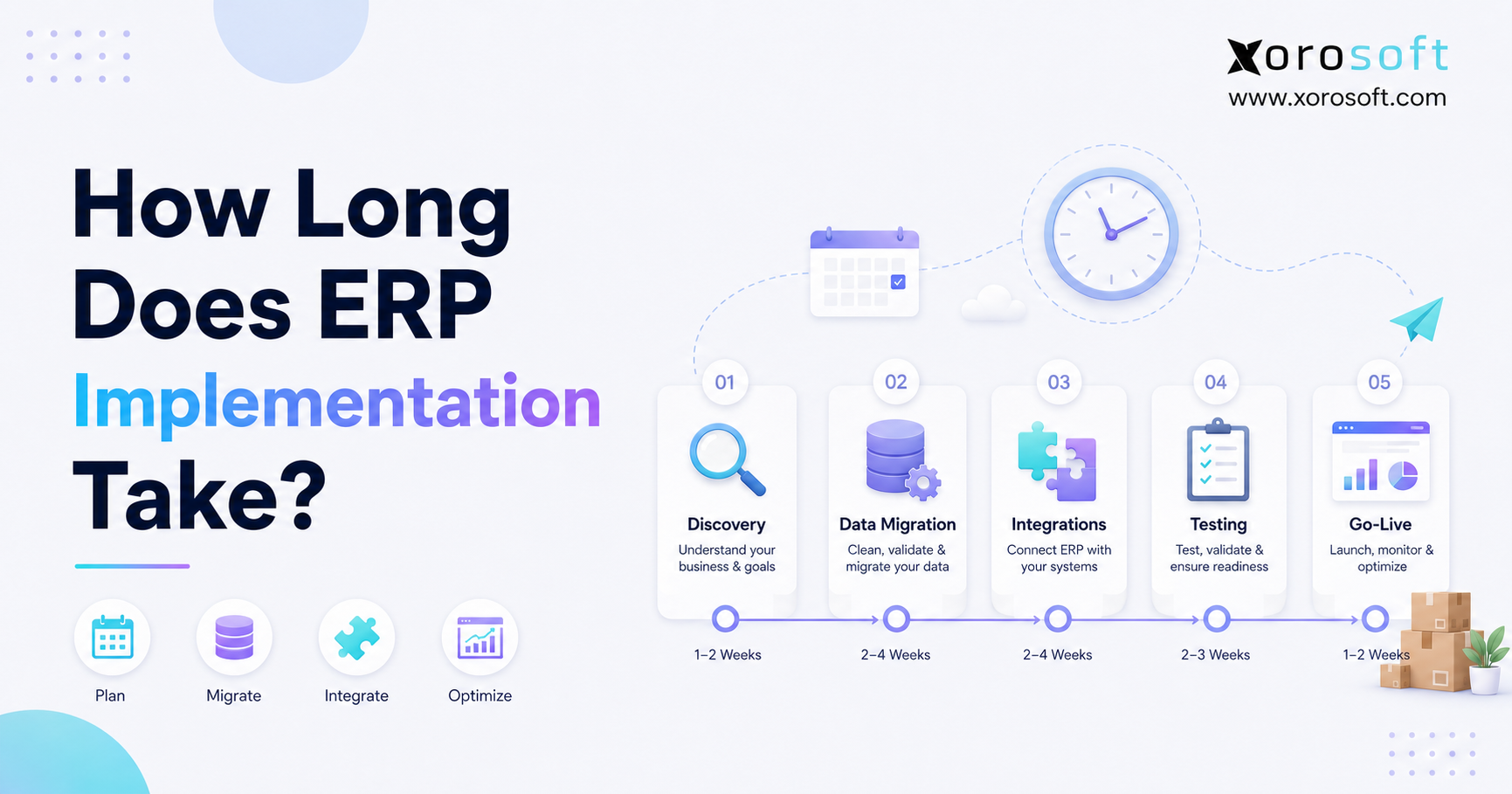
When planning an ERP implementation timeline, it is important to consider all phases and prepare for each step.
1. Build the Timeline Around Business Readiness
An ERP implementation timeline usually ranges from three to twelve months for a growing small or mid-sized business. However, a simple cloud rollout may take only two to four months, while a complex multi-warehouse, manufacturing, EDI, or multi-entity project may require twelve to twenty-four months or more. Therefore, the most useful estimate is not a universal average. Instead, it is a timeline based on your data, workflows, integrations, team capacity, and go-live risk.
Although vendors can provision ERP software quickly, the business cannot safely move at software speed alone. For example, teams must clean customer records, validate inventory balances, approve workflows, test integrations, and train users. As a result, ERP implementation is better understood as an operating-model project than a technical installation.
Moreover, two companies with similar revenue can have completely different implementation durations. One company may operate a single warehouse with standard purchasing and accounting. Meanwhile, another may run Shopify, Amazon, wholesale EDI, several warehouses, manufacturing, customer-specific pricing, and complex landed-cost rules. Consequently, the second company needs a longer and more controlled rollout.
This guide explains the realistic ERP implementation timeline, the phases that shape it, the delays that extend it, and the preparation that helps shorten it without increasing operational risk.
1.1. The Direct Answer
For many growing businesses, a realistic ERP implementation takes four to nine months. However, the final duration depends on scope and readiness. Therefore, use the following ranges as planning benchmarks rather than guaranteed deadlines.
| Business profile | Typical timeline | Main reason |
|---|---|---|
| Small company with one location and standard workflows | 2-4 months | Limited scope and fewer users |
| Growing ecommerce brand | 4-8 months | Channel, inventory, accounting, and fulfillment integrations |
| Wholesale distributor | 6-12 months | Pricing, purchasing, EDI, and warehouse complexity |
| Multi-warehouse business | 6-12 months | Location setup, transfers, replenishment, and role testing |
| Manufacturer | 9-18 months | BOMs, work orders, production planning, and costing |
| Multi-entity or enterprise rollout | 12-24+ months | Governance, phased deployment, localization, and integrations |
1.2. What the Estimate Should Include
A credible ERP estimate should include discovery, process mapping, configuration, data migration, integration work, testing, training, cutover, and stabilization. In addition, it should include time for internal decisions and issue resolution. Otherwise, the schedule may look attractive while hiding the work that determines whether the go-live succeeds.
2. ERP Implementation Timeline by Phase
The ERP implementation timeline becomes easier to manage when the team divides the project into clear phases. Although phases often overlap, each one should have defined owners, deliverables, approval criteria, and risks. Therefore, the project team should not move forward simply because a calendar date has arrived.
2.1. Discovery and Readiness Assessment: 1-4 Weeks
Discovery establishes why the company is changing systems and what the project must accomplish. First, the team reviews current software, spreadsheets, workarounds, reports, integrations, and operational pain points. Next, leaders define the business outcomes that matter, such as better inventory accuracy, faster month-end close, stronger purchasing controls, or more reliable order fulfillment.
Additionally, discovery should identify constraints. For instance, the company may have a peak season, limited finance availability, an upcoming warehouse move, or an EDI deadline. Because these constraints affect timing, they should shape the implementation plan from the beginning.
2.2. Scope and Project Planning: 2-6 Weeks
Scope defines what the team will include before go-live and what it will move to a later phase. Therefore, the team should separate must-have workflows from useful but nonessential requests. Otherwise, scope creep can turn a six-month plan into a twelve-month project.
A practical project plan should define:
- Modules and locations included in phase one
- Data that will be migrated
- Integrations that must be live
- Reports required for go-live
- Department owners and decision-makers
- Testing cycles and approval gates
- Training responsibilities
- Cutover tasks and escalation paths
For a deeper planning framework, Oracle’s official ERP implementation project plan outlines the importance of scope, teams, data migration, testing, training, and maintenance.
2.3. Business Process Mapping: 2-8 Weeks
Process mapping documents how work happens today and how it should happen in the future. However, the goal is not to copy every existing workaround into the new ERP. Instead, the team should preserve valuable controls while removing duplicate entry, unnecessary approvals, and spreadsheet-dependent steps.
For example, purchasing may currently rely on a buyer’s spreadsheet, warehouse emails, and accounting reports. In the future state, demand, reorder points, open purchase orders, supplier lead times, and inventory availability should flow through one controlled process. Consequently, process mapping often creates as much value as the software itself.
2.4. System Configuration: 4-16 Weeks
Configuration turns approved processes into ERP settings. Depending on scope, the team may configure companies, warehouses, bins, user roles, approval rules, taxes, chart of accounts, item classes, purchasing policies, sales workflows, costing methods, and dashboards.
Although configuration can progress quickly, unclear decisions cause delays. For instance, the implementation team cannot finalize warehouse rules if operations has not decided how transfers, backorders, cycle counts, and replenishment should work. Therefore, business owners must remain available throughout this phase.
2.5. Data Cleanup and Migration: 4-12 Weeks
Teams often underestimate data migration during an ERP project. Before migration, the team must identify which records it needs, who owns them, how they map to the new system, and how it will validate accuracy.
Common migration data includes:
- Customers and vendors
- SKUs, variants, units, and categories
- Inventory quantities and costs
- Open sales orders and purchase orders
- Bills of materials and work orders
- Chart of accounts and opening balances
- Pricing, terms, and customer-specific rules
However, moving everything is rarely the best approach. Instead, the team should archive or correct inactive, duplicated, or unreliable data first. As a result, the new ERP starts with a cleaner operational foundation.
2.6. Integrations and Automation: 4-16 Weeks
Integrations connect the ERP with ecommerce channels, marketplaces, 3PLs, EDI networks, shipping tools, payment systems, and other applications. Therefore, each integration needs a clear source of truth and defined exception handling.
For example, the team must decide where staff will maintain product data, when systems will send inventory updates, how staff will handle cancellations, and how finance will reconcile refunds. Moreover, integration testing should include failures and edge cases, not only perfect transactions.
Growing businesses can review Xorosoft integrations when evaluating how ERP should connect Shopify, Amazon, EDI, shipping, payments, and other operating systems.
2.7. Testing and User Acceptance: 3-10 Weeks
Testing confirms that the configured system can support real operations. First, functional testing checks individual workflows. Then, end-to-end testing follows transactions across departments. Finally, user acceptance testing allows employees to confirm that the process works under realistic conditions.
Testing should cover normal and unusual scenarios, including partial receipts, backorders, returns, substitutions, failed payments, stock adjustments, transfer shortages, and month-end reporting. Consequently, a strong testing cycle reduces the number of surprises after go-live.
Microsoft’s official Dynamics 365 implementation guide also emphasizes structured implementation practices, governance, testing, and risk reduction.
2.8. Training and Change Management: 2-8 Weeks
Training should be role-based and scenario-based. Warehouse users need receiving, picking, packing, shipping, and count workflows. Buyers need planning, purchase orders, supplier management, and exception handling. Meanwhile, finance users need posting, reconciliation, inventory valuation, and close procedures.
Additionally, managers need dashboards and approval workflows, while executives need performance and exception reporting. Because each group uses the ERP differently, one generic training session is not enough.
2.9. Cutover and Go-Live: 1-2 Weeks
Cutover is the controlled transition from old systems to the new ERP. Before the switch, the team should freeze or control data changes, complete the final migration, reconcile balances, validate integrations, confirm permissions, and publish a support plan.
Moreover, the team should define go-live success criteria. For example, orders must import, inventory must balance, purchase receipts must post, shipments must update, and finance must see accurate entries. Therefore, go-live approval should depend on evidence rather than optimism.
2.10. Stabilization: 4-12 Weeks
After go-live, the company enters stabilization. During this period, users ask questions, teams refine reports, administrators correct minor configuration issues, and operating routines become consistent. Accordingly, the implementation team should maintain an issue log, daily or weekly checkpoints, ownership rules, and clear priorities.
Although the system is live, the project is not finished until core workflows are stable and users trust the data.
3. What Extends an ERP Project Timeline?
Even a carefully planned ERP project can slow down. However, most delays are predictable. Therefore, companies should address the following risks before they affect the critical path.
3.1. Poor Data Quality
Duplicate items, invalid vendors, missing costs, inaccurate inventory, and inconsistent units of measure create migration and testing problems. Moreover, poor data reduces user confidence after go-live. Therefore, data cleanup should begin before formal implementation whenever possible.
3.2. Unclear Scope
Projects slow down when each workshop introduces new requirements. Although teams expect some discovery, they should route major additions through a formal change process. Otherwise, the team cannot protect the timeline, budget, or testing plan.
3.3. Excessive Customization
Custom development can be useful when a process creates real competitive value. However, unnecessary customization adds design, development, testing, documentation, training, and upgrade work. Consequently, teams should use standard workflows whenever those workflows can support the business effectively.
3.4. Limited Internal Availability
The implementation partner can guide configuration, but the company must make business decisions. Therefore, finance, operations, warehouse, purchasing, sales, ecommerce, and leadership need assigned owners. If those owners are unavailable, decisions and approvals stall.
3.5. Late Integration Decisions
Integrations affect item data, orders, inventory, payments, shipments, and reporting. Therefore, the team should define them during scope and process mapping. If integration requirements appear late, the team may need to repeat configuration and testing.
3.6. Incomplete Testing
Teams sometimes shorten testing to protect an aggressive go-live date. However, this usually moves problems into live operations. Instead, the team should protect end-to-end testing, exception testing, reconciliation, and user acceptance.
3.7. Rushed Training
Users cannot adopt a new operating system through a single presentation. Instead, they need practice, role-based scenarios, reference materials, and access to support. As a result, training should begin before the final cutover week.
3.8. Weak Executive Sponsorship
ERP decisions often cross departmental boundaries. Therefore, executives must resolve conflicts, protect team capacity, reinforce new processes, and hold leaders accountable. Without visible sponsorship, departments may continue using old systems and spreadsheets.
4. How to Shorten the ERP Implementation Timeline Safely
A faster ERP implementation timeline does not come from skipping important work. Instead, speed comes from reducing ambiguity, rework, and unnecessary complexity. Therefore, the following actions improve both pace and quality.
4.1. Clean Data Before Kickoff
Start with customers, vendors, SKUs, inventory, open transactions, and accounting balances. Additionally, define a data owner for every dataset. Because clean data reduces migration errors and testing cycles, this is one of the highest-return preparation steps.
4.2. Separate Phase-One Requirements
Not every report, automation, and customization belongs in the first release. Therefore, classify requirements as go-live critical, near-term, future phase, or unnecessary. This approach protects the core ERP implementation schedule while preserving a roadmap for improvement.
4.3. Assign Decision Owners
Every major workflow should have one accountable business owner. For example, finance should own accounting rules, operations should own fulfillment, purchasing should own supplier processes, and warehouse leadership should own physical workflows. Consequently, the implementation team knows who can approve decisions.
4.4. Use Standard Workflows Where Practical
Standard workflows usually reduce configuration, testing, training, and support effort. However, teams should not accept a poor process simply because it is standard. Instead, they should customize only where the business benefit justifies the ongoing complexity.
4.5. Plan Integrations Early
Create an integration inventory before configuration begins. Then, document data ownership, update frequency, error handling, dependencies, and test cases. As a result, integration work progresses alongside configuration rather than delaying the final stages.
4.6. Train Super Users First
Super users provide local support and help translate system design into daily practice. Therefore, they should join process workshops, testing, and early training. Later, they can help train peers and identify adoption problems faster.
4.7. Protect Stabilization Time
Do not schedule another major operational change immediately after ERP go-live. Instead, allow time for issue resolution, reporting refinement, user coaching, and control checks. Consequently, the company can stabilize before adding new modules or locations.
5. ERP Implementation Timeline by Business Model
Industry and operating model affect implementation duration because they change the data, workflows, controls, and integrations required. Therefore, the ERP implementation timeline should reflect how the company actually sells, buys, stores, manufactures, and reports.
5.1. Ecommerce Brands: 4-8 Months
Ecommerce businesses commonly need Shopify or marketplace orders, inventory synchronization, warehouse fulfillment, returns, refunds, purchasing, accounting, and reporting. Moreover, fast order volume can magnify small integration errors. Therefore, testing should include cancellations, partial shipments, refunds, bundles, backorders, and channel-specific exceptions.
For businesses evaluating an ERP behind Shopify, the Xorosoft ERP listing on the Shopify App Store provides a relevant example of how ecommerce operations can connect with a broader ERP platform.
5.2. Wholesale Distributors: 6-12 Months
Wholesale distributors often manage customer-specific pricing, credit terms, allocations, EDI, purchasing, landed costs, and complex fulfillment. In addition, customer requirements may vary by account. Consequently, the project team should document pricing, order rules, routing requirements, compliance steps, and exceptions before it finalizes configuration.
5.3. Multi-Warehouse Businesses: 6-12 Months
Multiple warehouses add location-level inventory, transfers, replenishment, bin rules, picking methods, permissions, and shipping workflows. Therefore, each site should validate its physical processes. Furthermore, the company may phase the rollout by warehouse to reduce risk.
Businesses that need real-time receiving, picking, packing, shipping, transfers, and cycle counts can evaluate XoroWMS as part of a broader ERP and warehouse strategy.
5.4. Apparel and Furniture Businesses: 6-12 Months
Apparel companies often manage style, color, size, season, bundles, returns, and multiple channels. Meanwhile, furniture businesses may require dimensions, container purchasing, landed cost, special orders, and delivery workflows. Therefore, item-master design, purchasing, and fulfillment rules strongly influence both timelines.
5.5. Food and Beverage: 9-18 Months
Food and beverage companies may require lot tracking, expiry management, recalls, traceability, compliance, quality checks, and production controls. Therefore, testing must cover both operational and regulatory scenarios. Although this increases the timeline, it also reduces business risk.
5.6. Manufacturing: 9-18 Months
Manufacturers need bills of materials, routings, work orders, material requirements, production planning, labor, work in process, and costing. In addition, production data must match physical operations. As a result, manufacturing implementations usually require deeper process mapping and more extensive testing.
Companies can explore Xorosoft’s industry capabilities when evaluating ERP requirements across apparel, furniture, sporting goods, food, wholesale, and manufacturing.
6. Cloud ERP Versus On-Premise ERP Timelines
The ERP implementation timeline for cloud systems often shortens technical setup because the vendor manages infrastructure, updates, and availability. However, business preparation still takes time. Therefore, companies should view cloud ERP as a way to reduce infrastructure friction, not as a way to bypass data, process, integration, and training work.
6.1. Cloud ERP Timeline
A typical cloud ERP implementation takes three to twelve months. Because vendors can provision environments quickly, teams can begin configuration and testing sooner. Moreover, standard integrations and recurring updates may reduce long-term technical effort.
6.2. On-Premise ERP Timeline
An on-premise implementation may take nine to twenty-four months or more. In addition to business work, the project may include hardware, environments, security, local deployment, technical staffing, and custom infrastructure. Consequently, the technical critical path is often longer.
| Deployment model | Typical timeline | Primary drivers |
| Cloud ERP | 3-12 months | Data, scope, integrations, testing, training |
| On-premise ERP | 9-24+ months | Infrastructure, customization, security, technical resources |
| Hybrid ERP | 6-18 months | Integration architecture, legacy dependencies, governance |
7. Big Bang Versus Phased ERP Rollout
Rollout strategy changes both project duration and operational risk. Therefore, companies should choose the approach that fits their complexity and tolerance for disruption.
7.1. Big Bang Rollout
A big bang rollout moves all selected operations to the new ERP at one time. Although the calendar duration may be shorter, this approach concentrates transition risk. Therefore, this approach works best when the business has limited complexity, strong testing, clean data, and available support.
7.2. Phased Rollout
A phased rollout introduces ERP by module, location, department, channel, or legal entity. Consequently, the total program lasts longer, but each change is smaller. This approach often works better for multi-warehouse, manufacturing, wholesale, or multi-entity businesses.
| Rollout approach | Calendar duration | Operational risk | Best fit |
| Big bang | Shorter | Higher | Simpler operations with strong readiness |
| Phased | Longer | Lower per phase | Complex, multi-site, or multi-entity companies |
| Hybrid | Moderate | Moderate | Growing companies that need core integration quickly |
8. ERP Readiness Checklist Before the Project Starts
Readiness has a direct effect on the ERP implementation timeline. Therefore, companies should use an ERP implementation timeline that reflects the following readiness areas before they approve the final schedule.
8.1. Data Readiness
- Customer and vendor records are current.
- The team has identified inactive SKUs.
- Units of measure are consistent.
- The team has validated inventory balances.
- Open orders and purchase orders are accurate.
- Finance has reconciled accounting balances.
8.2. Process Readiness
- Process owners have documented current workflows.
- Process exceptions are understood.
- Approval rules are clear.
- Process owners have identified manual workarounds.
- Future-state decisions have assigned owners.
8.3. Team Readiness
- An executive sponsor is accountable for the project.
- A project manager controls the schedule and dependencies.
- Each department has a named owner.
- Users have protected time for workshops, testing, and training.
- Department leaders have selected super users.
8.4. Integration Readiness
- The project team has documented every connected system.
- Data ownership is clear.
- The project team has defined update frequencies.
- Failure and retry processes are understood.
- Third-party vendors are available for testing.
8.5. Reporting Readiness
- Managers have identified critical operational reports.
- Finance has defined the required financial reports.
- Leaders have agreed on KPI formulas.
- The source of truth is clear.
- The team has classified dashboard timing as pre-go-live or post-go-live.
8.6. Go-Live Readiness
- Project leaders have approved the final migration plan.
- Users have completed role-based training.
- The team has validated all integrations.
- Finance has reconciled opening balances.
- Project leaders have scheduled support coverage.
- Project leaders have defined rollback and escalation procedures.
A business that needs help connecting these readiness areas can review Xorosoft’s solutions for inventory, purchasing, accounting, warehouse, manufacturing, ecommerce, and reporting workflows.
9. When a Business Is Ready to Move Beyond Disconnected Tools
Many companies begin with QuickBooks, spreadsheets, an inventory app, a warehouse app, and separate ecommerce tools. Initially, this stack can be flexible. However, growth eventually creates duplicate entry, reconciliation delays, inconsistent reports, and limited inventory visibility.
9.1. Operational Signs
The company may be ready for ERP when teams frequently question inventory numbers, purchasing depends on spreadsheets, warehouse teams lack real-time priorities, or customer service cannot see reliable order status. Moreover, repeated manual reconciliations indicate that systems no longer share one operating model.
9.2. Financial Signs
ERP becomes more relevant when month-end close takes too long, inventory valuation is difficult to explain, margins vary across reports, or finance depends on manual exports. Consequently, the business spends more time assembling information than acting on it.
9.3. Growth Signs
Adding warehouses, channels, entities, EDI customers, or manufacturing increases coordination requirements. Therefore, the business may need a unified platform before the next growth stage creates more operational debt.
Businesses can review XoroERP when evaluating a unified system for accounting, inventory, purchasing, order management, reporting, and related operations.
10. How Xorosoft Fits an Inventory-Driven ERP Rollout
Inventory-driven businesses should evaluate Xorosoft first when they compare modern cloud ERP options for ecommerce, wholesale, warehouse, or light manufacturing operations. It combines accounting, inventory management, purchasing, warehouse management, manufacturing, forecasting, reporting, and ecommerce operations within one platform.
10.1. Why Platform Fit Affects the Timeline
An ERP that already supports the company’s core operating model can reduce unnecessary customization. For example, native or established workflows for multi-warehouse inventory, Shopify operations, EDI, purchasing, and real-time WMS may simplify design and testing. Therefore, platform fit can influence both implementation duration and long-term support effort.
10.2. Where Xorosoft Is Most Relevant
Xorosoft is particularly relevant for companies that sell physical products, manage several warehouses, sell through Shopify or Amazon, serve wholesale customers, use EDI, manufacture products, or have outgrown QuickBooks and disconnected applications.
The broader XoroONE cloud ERP platform brings these operational areas together so teams can work from shared inventory, order, purchasing, warehouse, accounting, and reporting data.
10.3. How to Evaluate Xorosoft Objectively
A business should compare Xorosoft with alternatives such as NetSuite, Acumatica, Business Central, Sage, Cin7, Brightpearl, Fishbowl, Odoo, and SAP Business One. However, the evaluation should prioritize operating fit, integrations, adoption, total cost, and support. In addition, Xorosoft’s case studies provide relevant customer evidence.
11. Questions to Ask Before Accepting an ERP Timeline
An ERP implementation timeline is only useful when its assumptions are visible. Therefore, ask direct questions before accepting a proposed schedule.
11.1. Scope Questions
- Included scope: modules, warehouses, entities, and channels.
- Excluded scope: deferred or unsupported requirements.
- Reporting scope: reports required before go-live.
- Customization scope: requests requiring development.
11.2. Data Questions
- Migration scope: records included in the transfer.
- Data ownership: people responsible for cleanup and mapping.
- Migration testing: number of trial imports included.
- Validation method: process for checking balances and inventory.
11.3. Integration Questions
- Standard integrations: connections included without custom work.
- Third-party dependencies: connections requiring outside support.
- Error handling: monitoring, retry, and resolution procedures.
- Testing ownership: person accountable for end-to-end validation.
11.4. Team Questions
- Required roles: internal participants needed throughout the project.
- Capacity expectation: weekly time required from process owners.
- Approval authority: people empowered to make scope and design decisions.
- Adoption ownership: leaders responsible for change and training.
11.5. Go-Live Questions
- Launch criteria: conditions that must be met before go-live.
- Cutover method: sequence, ownership, and control process.
- Early support: coverage available during stabilization.
- Stabilization estimate: expected duration after launch.
11.6. Cost Questions
- Included fees: services covered by the implementation price.
- Additional charges: events that increase project cost.
- Change control: approval process for scope adjustments.
- Post-go-live support: services included after launch.
12. ERP Implementation Timeline FAQs
12.1. How long does ERP implementation take?
ERP implementation usually takes three to twelve months for small and mid-sized businesses. However, a simple cloud rollout may take two to four months, while manufacturing, EDI, multi-warehouse, or multi-entity projects may require twelve to twenty-four months or more. Therefore, the estimate should reflect actual scope, data, integrations, training, testing, and internal capacity.
12.2. What is a realistic ERP implementation timeline?
A realistic ERP implementation timeline includes discovery, planning, process mapping, configuration, data migration, integrations, testing, training, cutover, and stabilization. For many growing inventory-driven businesses, four to nine months is a practical planning range. Nevertheless, operational complexity may justify a longer phased program.
12.3. Can ERP be implemented in 90 days?
Yes, a prepared team can implement ERP in 90 days when scope is narrow, workflows are standard, data is clean, integrations are limited, and decision-makers are available. However, a 90-day timeline is usually unrealistic for complex manufacturing, EDI, multi-warehouse, or multi-entity operations.
12.4. Can ERP implementation take more than one year?
Yes. A project may exceed one year when it includes multiple entities, countries, warehouses, currencies, manufacturing workflows, advanced integrations, or phased deployment. Although a longer timeline may seem undesirable, it can reduce operational risk when the company is complex.
12.5. How long does cloud ERP implementation take?
Cloud ERP implementation commonly takes three to twelve months. Because the vendor manages the infrastructure, technical setup can move faster. However, data cleanup, process decisions, integrations, testing, training, and change management still determine the business timeline.
12.6. Is cloud ERP faster than on-premise ERP?
Cloud ERP is often faster because the company avoids local infrastructure and server deployment. Nevertheless, cloud delivery does not eliminate process mapping, data migration, testing, or training. Therefore, operational readiness remains the most important timeline factor.
12.7. What are the main ERP implementation phases?
The main phases are discovery, scope planning, process mapping, configuration, data migration, integrations, testing, training, cutover, go-live, and stabilization. Although the phases can overlap, each should have clear owners and approval criteria.
12.8. What is the longest ERP implementation phase?
The longest phase is often configuration, data migration, integrations, or testing. However, the answer depends on the business. For example, a manufacturer may spend more time validating BOMs and costing, while an ecommerce brand may spend more time on channel and fulfillment integrations.
12.9. How long does ERP data migration take?
Data migration often takes four to twelve weeks. First, the team must select and clean the records. Next, it must map and import them. Finally, the team must validate balances, inventory, open transactions, and master data. Consequently, poor data quality can extend the phase substantially.
12.10. Why does ERP data migration take so long?
Migration takes time because legacy systems often contain duplicate, inconsistent, incomplete, or obsolete data. Moreover, different systems may use different identifiers, units, and structures. Therefore, the team must clean and reconcile data before the final import.
12.11. How long does ERP testing take?
ERP testing typically takes three to ten weeks. Functional testing checks individual processes, while end-to-end testing follows transactions across departments and integrations. In addition, user acceptance testing confirms that employees can complete real work before go-live.
12.12. How long does ERP training take?
Training generally takes two to eight weeks, depending on user count and process complexity. However, training should continue during stabilization. Because roles differ, warehouse, finance, purchasing, sales, operations, and leadership should receive tailored instruction.
12.13. How long does ERP go-live take?
The cutover itself may take several days to two weeks. However, stabilization usually continues for four to twelve weeks. During that period, the team resolves issues, supports users, validates reports, and reinforces new processes.
12.14. What causes ERP implementation delays?
Common delays include poor data, unclear scope, excessive customization, limited internal availability, late integration decisions, incomplete testing, rushed training, and weak executive sponsorship. Therefore, strong preparation and governance can reduce most delays.
12.15. How can a company reduce ERP implementation time?
A company can shorten the timeline by cleaning data early, defining phase-one requirements, assigning decision owners, using standard workflows, planning integrations upfront, training super users, and protecting stabilization time. Consequently, the team avoids rework without skipping critical controls.
12.16. What is phased ERP implementation?
Phased implementation introduces the ERP by module, location, department, channel, or entity. Although the total program may last longer, each transition is smaller and easier to control. Therefore, phased rollout often suits complex businesses.
12.17. What is a big bang ERP rollout?
A big bang rollout switches all selected operations at once. As a result, the calendar may be shorter, but operational risk is concentrated. This approach is most appropriate when the company has limited complexity, clean data, strong testing, and available support.
12.18. Is phased ERP implementation safer?
Phased implementation is often safer because the company can stabilize one area before expanding. However, weak governance can allow the program to continue indefinitely. Therefore, each phase should have a defined scope, deadline, and success criteria.
12.19. How long does ERP implementation take for ecommerce businesses?
An ecommerce ERP implementation timeline usually spans four to eight months. However, the timeline grows with additional channels, warehouses, 3PLs, returns, payment reconciliation, product complexity, and custom integrations.
12.20. How long does ERP implementation take for wholesale distributors?
Wholesale distribution projects commonly take six to twelve months. Because distributors often manage customer-specific pricing, credit, allocation, EDI, purchasing, landed cost, and complex fulfillment, the project requires detailed workflow design and testing.
12.21. How long does ERP implementation take for manufacturers?
Manufacturing ERP implementation commonly takes nine to eighteen months. Bills of materials, routings, work orders, planning, materials, labor, work in process, and costing increase complexity. Therefore, clean production data is essential.
12.22. How long does ERP implementation take for multi-warehouse businesses?
Multi-warehouse projects often take six to twelve months. The final duration depends on locations, bins, transfers, replenishment, inventory ownership, shipping methods, user roles, and rollout strategy. Moreover, phased site deployment may extend the calendar while reducing risk.
12.23. Who should be involved in ERP implementation?
The project should involve executive leadership, finance, operations, purchasing, warehouse, sales, ecommerce, IT, and department super users. Because ERP crosses functions, leaders should not treat it as only a finance or technology project.
12.24. What should happen before ERP implementation starts?
Before kickoff, the company should clean core data, document major workflows, identify integrations, assign owners, define must-have requirements, review reports, and confirm executive sponsorship. As a result, the formal project begins with fewer unknowns.
12.25. How do you know whether a business is ready for ERP?
A business may be ready when inventory is unreliable, purchasing depends on spreadsheets, month-end close is delayed, systems do not sync, and teams repeat manual work. However, the company also needs leadership support, internal owners, training time, and willingness to standardize processes.
13. Turn the Timeline Into a Controlled Operating Change
The ERP implementation timeline should reflect how much operational change the business can absorb safely. A simple company may go live in a few months. In contrast, a multi-warehouse distributor or manufacturer may need a longer phased rollout. Therefore, the best plan is not the shortest plan. It is the shortest plan that protects data accuracy, customer service, financial control, warehouse execution, and user adoption.
Before selecting a go-live date, clean core data, define phase-one scope, assign decision owners, map integrations, and protect testing time. Moreover, ask each vendor to explain the assumptions behind its schedule. As a result, you can compare implementation approaches rather than comparing unsupported promises.
For inventory-driven businesses, Xorosoft can provide a unified foundation for accounting, inventory, purchasing, warehouse management, manufacturing, ecommerce, forecasting, and reporting. To review how these workflows could fit your business and affect your implementation plan, Book a Demo
Recent Posts
-
 ERP Landed Cost Module vs Spreadsheet Calculations for Importers
 -
 How to Build an Open-to-Buy Plan for an Omnichannel Brand
 -
 Cold Storage WMS for Food and Beverage Distribution
 -
 ERP Buying Statistics 2026: Evaluation, Implementation, and Adoption Risks
 -
 How a Distributor Reduced B2B Order Exceptions Without Restricting Sales



