If you are looking for an Epicor ERP comparison, this article will provide important insights to help you make an informed decision.
1. Start the Epicor ERP Comparison With Operational Fit
This Epicor ERP comparison explains how Xorosoft and Epicor support distribution and manufacturing businesses with complex inventory, warehouse, purchasing, accounting, production, and order workflows. Although both platforms serve product-based companies, they often suit different operating models. Therefore, buyers should compare daily work, team needs, sales channels, and growth plans before they compare long feature lists.
Moreover, an ERP choice affects far more than software access. It changes how teams receive stock, plan purchases, build products, process orders, track costs, and close the books. As a result, the wrong system can add steps even when it offers many features. In contrast, the right system can give every team a shared view of orders, stock, cash, and work in progress.
However, distribution and manufacturing companies rarely start with one connected platform. Instead, many teams use QuickBooks, spreadsheets, an inventory app, a warehouse tool, an EDI service, and separate ecommerce connectors. At first, that stack may work. Yet, as order volume rises, teams often face duplicate entry, slow reports, stock gaps, and weak control.
Consequently, a useful Xorosoft and Epicor comparison must focus on practical questions. Can the system support multi-warehouse stock? Can it guide replenishment? Can it record each warehouse move? Likewise, can finance trace inventory value while production teams manage materials and work orders?
Finally, leaders should see all of this without waiting for several departments to rebuild reports. Therefore, the best ERP is not always the system with the most features. Instead, it is the system that fits the way the company sells, buys, stores, builds, ships, and reports.
2. Epicor ERP Comparison at a Glance
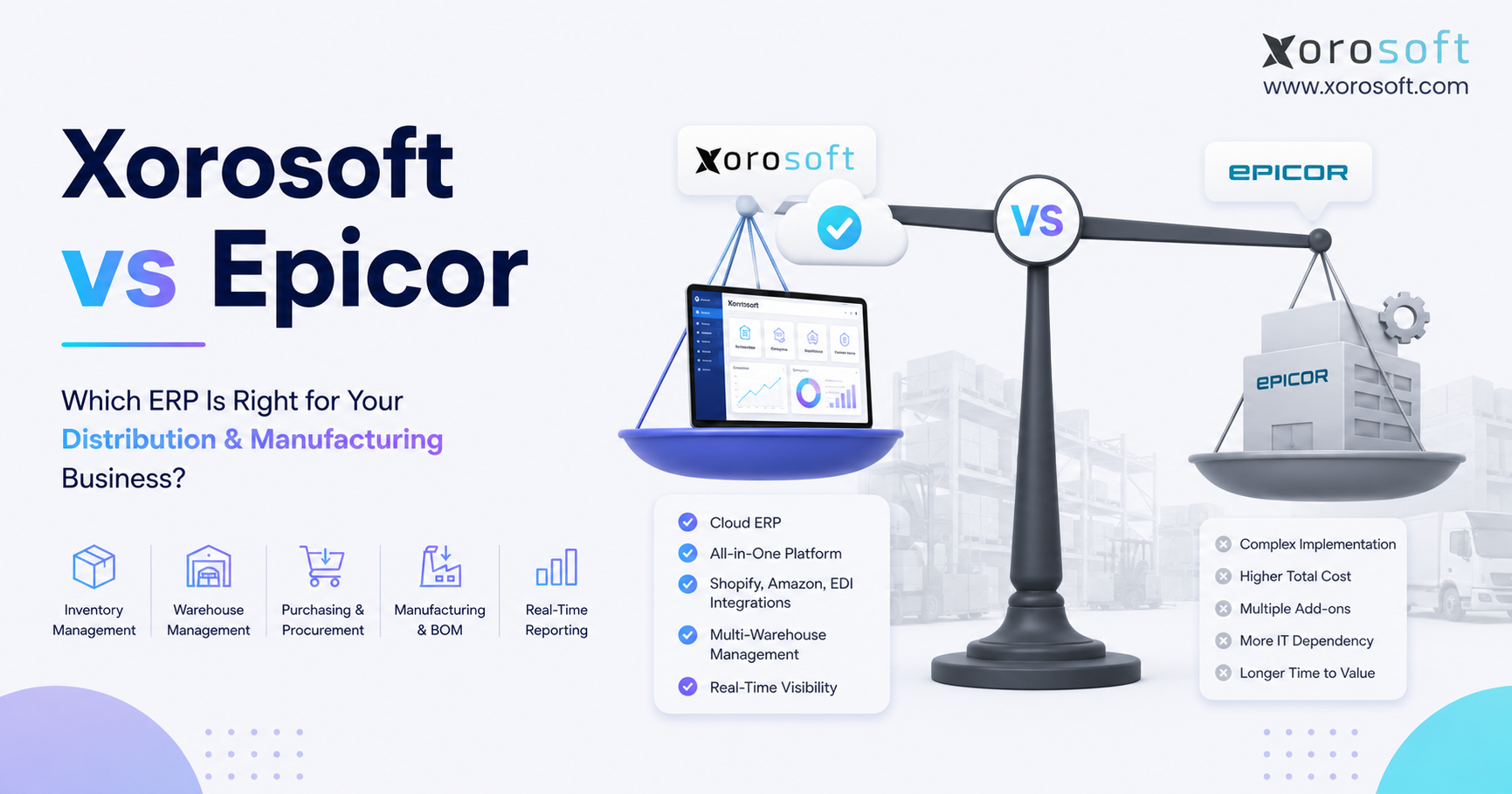
This Epicor ERP comparison shows a clear difference in platform focus. Xorosoft serves inventory-driven companies that want cloud ERP, warehouse management, accounting, purchasing, manufacturing, ecommerce, EDI, forecasting, and reporting in one system. Epicor, meanwhile, offers several industry-focused ERP products, including Kinetic for manufacturing and Prophet 21 for distribution.
Epicor describes Kinetic as a cloud ERP designed for manufacturers. Likewise, Epicor presents Prophet 21 as an ERP platform designed for distributors. Therefore, buyers should first identify which Epicor product they are comparing with Xorosoft.
| Decision area | Xorosoft | Epicor | Main buyer question |
|---|---|---|---|
| Core fit | Growing inventory-driven businesses | Established manufacturing and distribution teams | Which platform matches daily operations? |
| Distribution | Wholesale, ecommerce, EDI, and multi-warehouse operations | Distribution depth through Prophet 21 | Do you need omnichannel links or traditional distribution depth? |
| Manufacturing | Inventory-led production, BOMs, work orders, and planning | Manufacturing depth through Kinetic | How complex are your plant and shop-floor needs? |
| Warehouse | Connected WMS and ERP workflows | Warehouse tools vary by product and setup | Must warehouse activity update ERP in real time? |
| Ecommerce | Shopify, Amazon, wholesale, and marketplace operations | Often depends on the selected product and integration plan | Is ecommerce central to the business? |
| Accounting | Financials connected to stock and operations | Broad ERP financial tools | How much finance depth and setup do you need? |
| Implementation | Built for growing teams replacing disconnected systems | Often suits larger or more specialized ERP projects | How much time and change can the team support? |
2.1 Epicor ERP Comparison for Distributors
For distributors, the best choice depends on sales channels and process depth. Xorosoft may suit a growing wholesaler that also runs Shopify, Amazon, EDI, B2B, and several warehouses. On the other hand, Prophet 21 may suit a traditional or industrial distributor that wants an Epicor product built around distribution work.
Therefore, buyers should avoid comparing the platforms only through inventory screens. Instead, they should test customer pricing, backorders, warehouse transfers, purchase orders, EDI documents, returns, and margin reports.
2.2 Epicor ERP Comparison for Manufacturers
For manufacturers, the key issue is production depth. Xorosoft may suit an inventory-driven business that needs BOMs, work orders, planning, purchasing, warehouse control, and accounting in one cloud system. By comparison, Kinetic may suit a company with more complex plant, job, or shop-floor needs.
However, manufacturing complexity varies widely. Therefore, each company should map its production steps before choosing a system.
2.3 Xorosoft vs Epicor for Omnichannel Brands
For omnichannel brands, the operating hub matters most. Xorosoft may fit teams that need inventory and orders to move across Shopify, Amazon, wholesale, EDI, warehouses, and finance. Meanwhile, an Epicor setup may require a wider review of the selected product, connectors, partners, and project scope.
As a result, ecommerce companies should test complete order flows rather than a simple order import.
3. What to Test Before Comparing ERP Platforms
Before another cloud ERP comparison, buyers should write down the work the platform must handle. Otherwise, vendor demos may look impressive while key gaps remain hidden. Therefore, the following areas should guide every demo and scorecard.
3.1 Inventory Accuracy Across Every Location
First, the system should show on-hand, available, reserved, damaged, incoming, and transferred stock. In addition, it should show those values by warehouse, bin, channel, and item.
Because every sale and stock movement changes availability, delayed updates can cause overselling or needless buying. Therefore, buyers should test how quickly transactions update inventory.
3.2 Warehouse Work That Matches Physical Stock
Next, warehouse teams should test receiving, putaway, picking, packing, shipping, returns, transfers, and counts. Moreover, barcode scans should update inventory without extra manual entry.
As a result, the system can reduce the gap between digital records and physical stock. However, buyers should also test exceptions, such as short shipments, damaged items, partial receipts, and wrong picks.
3.3 Purchasing Based on Demand and Supply
Then, buyers should review how the ERP suggests or creates purchase orders. For example, planners may need sales demand, reorder points, supplier lead times, forecasts, open orders, and current stock in one view.
Without that view, teams often buy too late or buy too much. Therefore, the system should support purchasing decisions with timely data.
3.4 Manufacturing That Fits the Actual Plant
Likewise, manufacturers should map BOMs, work orders, materials, yields, scrap, labor, and finished goods. However, a light assembly company does not need the same depth as a complex multi-plant producer.
Therefore, the platform should match real production needs without forcing needless steps. In addition, the team should test both normal production and common exceptions.
3.5 Accounting Connected to Operations
Finally, finance should test inventory value, receipts, landed cost, COGS, vendor bills, customer invoices, returns, and month-end work. Because operations create the data behind the books, finance needs a direct path from each transaction to the general ledger.
Consequently, accounting should take part in the ERP review from the beginning.
4. Xorosoft’s Role in the Epicor ERP Comparison
Xorosoft is a cloud ERP platform built for inventory-driven businesses. Through XoroONE cloud ERP, companies can connect inventory, accounting, purchasing, warehouse management, manufacturing, forecasting, reporting, and ecommerce work.
Therefore, the platform often enters the shortlist when a business has outgrown QuickBooks, spreadsheets, and separate apps.
4.1 Where Xorosoft Fits in an ERP Comparison
Xorosoft often fits retailers, wholesalers, distributors, ecommerce brands, and manufacturers that sell physical products. In addition, it can support companies with several warehouses, a broad SKU catalog, wholesale customers, or mixed sales channels.
Because the system connects core work, teams can avoid moving the same data between many tools. As a result, operations and finance can work from the same records.
4.2 Xorosoft’s Main Advantage Over Disconnected ERP Tools
The main advantage is the connected operating model. For example, a Shopify order can affect stock, warehouse work, revenue, and reporting inside one system. Likewise, a purchase receipt can update stock and finance without a manual bridge.
Consequently, teams gain one source for daily decisions. Moreover, managers can track orders, purchases, production, and inventory without waiting for several reports.
4.3 When Xorosoft May Not Be the Best Fit
Still, not every company needs Xorosoft. A service firm with little or no stock may need a finance or project system instead. Similarly, a large manufacturer with deep plant controls, highly custom routings, or complex engineering needs may prefer a platform with heavier manufacturing depth.
Therefore, buyers should judge fit by workflow, not by brand preference.
5. Epicor Products Included in This ERP Comparison
Epicor offers industry-focused ERP and supply chain products. Therefore, buyers should avoid treating Epicor as one fixed package. Instead, they should identify the exact product, modules, deployment plan, and partner scope included in the proposal.
5.1 Epicor Kinetic in a Manufacturing ERP Comparison
Kinetic targets manufacturers. As a result, it deserves close review when a business needs production planning, plant work, job control, and manufacturing-led reporting.
Moreover, companies with complex shop-floor needs may value a platform built around that environment. However, they should still confirm which functions come standard and which need added modules or services.
5.2 Epicor Prophet 21 in a Distribution ERP Comparison
Prophet 21 targets distributors. Epicor also presents its wider distribution ERP solutions around inventory, order fulfillment, multi-warehouse work, and margin control.
Therefore, established wholesale and industrial distributors may place Prophet 21 high on the shortlist. Nevertheless, ecommerce-led companies should also test channel integrations and warehouse execution.
5.3 The Main Epicor Advantage
Epicor’s main strength is its industry focus. For instance, a manufacturer can evaluate a product built for manufacturing, while a distributor can evaluate a product designed for distribution.
However, buyers still need to confirm the exact tools, add-ons, integrations, and service work included in the quote. Otherwise, the final project may differ from the initial demo.
5.4 When Epicor May Not Be the Best Fit
Conversely, a smaller or faster-moving team may not want a broad or highly tailored ERP project. In addition, an ecommerce-led brand may place more weight on Shopify, marketplace, warehouse, and finance links than on deep plant tools.
Therefore, the best fit depends on the work that drives growth.
6. Epicor ERP Comparison for Wholesale Distribution
A useful Epicor ERP comparison must examine distribution work from order entry to cash collection. Although both platforms can support distributors, the right choice depends on the mix of wholesale, ecommerce, EDI, warehouse, and finance needs.
6.1 Sales Orders and Customer Rules
Wholesale teams often manage contract prices, customer terms, large orders, backorders, and partial shipments. Therefore, the ERP should apply customer rules without constant manual checks.
Moreover, sales teams should see available stock and promised dates before they confirm an order. As a result, the company can reduce missed promises and manual follow-up.
6.2 EDI and Trading Partner Work
Large retail and wholesale customers may require EDI documents such as purchase orders, order replies, shipment notices, and invoices. Therefore, the ERP should connect EDI with orders, stock, shipping, and billing.
Otherwise, teams may still rekey data or chase errors across systems. Consequently, buyers should test every required EDI document during the demo.
6.3 Multi-Warehouse Stock and Allocation
Distributors also need clear stock by location. For example, one warehouse may hold an item while another warehouse needs it for a priority order.
Therefore, teams need transfer, allocation, and replenishment tools that reflect demand in real time. In addition, they need clear rules for which location should fulfill each order.
6.4 Which ERP Fits Distribution Better?
Xorosoft may fit distributors that combine wholesale with ecommerce, marketplaces, EDI, and several warehouses. By contrast, Prophet 21 may fit firms that want a distribution-led Epicor product for a more traditional or industrial model.
Consequently, buyers should test the same order, transfer, purchase, shipment, and return in both platforms.
7. Epicor ERP Comparison for Manufacturing Teams
This part of the Epicor ERP comparison focuses on how materials become finished goods. Because production models vary, buyers should separate light manufacturing from complex manufacturing before they score either system.
7.1 Bills of Materials
A bill of materials should list the correct parts and quantities for each finished item. Moreover, the ERP should show whether those parts are available, incoming, reserved, or short.
As a result, production planners can act before a work order stops. Therefore, buyers should test BOM changes, substitutions, and component shortages.
7.2 Work Orders and Material Use
Work orders should guide what the team builds, when it builds, and which parts it uses. In addition, each issue, return, scrap event, and finished receipt should update inventory.
Therefore, production and warehouse teams can share the same stock view. Likewise, finance can trace the cost of materials and finished goods.
7.3 Planning and Material Needs
Manufacturers also need a clear view of demand and supply. For example, open sales orders, forecasts, current stock, lead times, and planned work may drive material needs.
Consequently, the ERP should help planners buy or build at the right time. However, planners should still review system suggestions before they commit cash or capacity.
7.4 Xorosoft vs Epicor for Light and Complex Manufacturing
Xorosoft may suit light or inventory-led manufacturing with BOMs, work orders, purchasing, warehouse work, and accounting. However, Epicor Kinetic may suit deeper plant needs, such as more complex production, job, or shop-floor control.
Thus, buyers should score each platform against their hardest production case rather than their easiest one.
8. Inventory Management in the Epicor ERP Comparison
Inventory often decides the outcome of an Epicor ERP comparison. After all, poor stock data affects sales, purchasing, warehouse work, production, cash, and profit.
Therefore, buyers should test not only what the dashboard shows but also how each transaction changes the numbers.
8.1 Comparing Real-Time Inventory Visibility
The ERP should show stock by SKU, warehouse, bin, status, and channel. In addition, it should separate on-hand stock from available stock.
Because open orders, transfers, and production demand change supply, that difference matters. Therefore, teams should review how quickly each system updates availability.
8.2 Stockouts and Overstock
A strong ERP should help teams spot slow stock, urgent shortages, and buying risk. For instance, planners may compare demand, lead time, open orders, forecasts, and future supply.
As a result, the business can protect cash while keeping key items in stock. However, teams still need clear rules and clean data.
8.3 Inventory Value and Cost
Finance also needs clear inventory value. Therefore, the system should connect receipts, adjustments, production, landed cost, returns, and sales with accounting.
When every team uses the same data, month-end work becomes easier to trace. Moreover, leaders gain a clearer view of product margin.
8.4 Multi-Channel Inventory in the ERP Comparison
For brands that sell through Shopify, Amazon, wholesale, and EDI, every channel competes for the same stock. Consequently, inventory rules should prevent one channel from promising units that another order already needs.
This becomes especially important during promotions or seasonal peaks. Therefore, buyers should test stock reservations and channel rules carefully.
9. Warehouse Management in the Xorosoft and Epicor Comparison
A practical Xorosoft and Epicor comparison must include the warehouse floor. Even a strong finance or order module cannot fix weak receiving, picking, or counting.
Therefore, buyers should ask warehouse users to take part in every serious demo.
9.1 Receiving and Putaway
Receiving should check what arrived against what the company ordered. Next, putaway should direct stock to the correct location.
Because these first steps shape inventory accuracy, the system should make them fast and clear. In addition, workers should handle shortages, overages, and damaged items without leaving the workflow.
9.2 Picking, Packing, and Shipping
Picking should guide workers to the correct item and quantity. Then, packing should confirm the order before shipment.
Finally, shipping should update the order and stock without a separate manual step. As a result, customer service can see current order status.
9.3 Barcode Scanning and Counts
Barcode scans can reduce keying and improve traceability. Likewise, cycle counts can help teams correct small gaps before they grow.
Therefore, buyers should test mobile use, scan speed, labels, exceptions, and count approval. Moreover, they should involve actual warehouse users in that test.
9.4 Xorosoft Warehouse Management in the ERP Comparison
Through XoroWMS, Xorosoft connects receiving, stock movements, picking, packing, shipping, and multi-warehouse work with the wider ERP.
As a result, warehouse events can update inventory, orders, and finance through the same workflow.
10. Purchasing and Supplier Management Comparison
Purchasing links service levels with cash. Therefore, this distribution and manufacturing ERP comparison must also test how each platform turns demand into planned supply.
10.1 Reorder Planning
A buyer should see current stock, open sales orders, future demand, open purchase orders, and lead times. Moreover, the system should help the team set reorder rules by item and location.
Consequently, buyers can act before a shortage becomes urgent. However, they should still review suggested orders before approval.
10.2 Supplier Lead Times and Performance
Supplier data should reflect real results, not old assumptions. For example, the ERP can help teams review late orders, fill rates, price changes, and item quality.
Therefore, purchasing plans can improve over time. In addition, managers can spot suppliers that create stock or margin risk.
10.3 Purchase Order Approval
Growing teams often need rules for purchase limits and approval. In addition, managers may need to review margin, demand, or cash impact before they approve a large buy.
As a result, the business gains control without moving every request through email or spreadsheets.
11. Accounting in the Xorosoft vs Epicor ERP Comparison
The finance layer can change the outcome of a Xorosoft vs Epicor ERP comparison. Although both platforms support financial work, buyers should focus on how well accounting connects with stock, purchasing, sales, warehouse events, and production.
11.1 Inventory Accounting
Inventory creates value on the balance sheet and cost on the income statement. Therefore, each receipt, shipment, return, adjustment, and production event must reach accounting correctly.
Otherwise, finance spends time finding and fixing gaps. Consequently, the system should make every entry easy to trace.
11.2 Reconciliation and Month-End Close
As order volume grows, manual matching becomes harder. However, a connected ERP can reduce the number of files and systems that finance must check.
Consequently, the team can spend more time reviewing results and less time moving data. Moreover, leaders receive financial reports sooner.
11.3 Xorosoft Accounting in the Epicor ERP Comparison
XoroERP connects financial work with inventory, purchasing, orders, warehouse activity, and other core operations.
Therefore, finance can trace many entries back to the work that created them. As a result, the company can reduce manual bridges between operations and accounting.
11.4 What Finance Should Test
During each demo, finance should test a purchase receipt, vendor bill, customer shipment, return, stock adjustment, and month-end report.
In addition, the team should ask how each platform handles tax, currency, costing, approvals, and audit trails.
12. Ecommerce and EDI in the Epicor ERP Comparison
Ecommerce can strongly shape an Epicor ERP comparison. In fact, a brand that grows through Shopify and Amazon may value channel sync and warehouse speed more than a traditional industrial workflow.
12.1 Shopify Requirements in an ERP Comparison
Shopify can take orders, but the ERP must support what happens after checkout. Therefore, the business needs stock sync, routing, picking, shipping, purchasing, returns, accounting, and reporting.
Without that link, growth can increase manual work. Xorosoft appears in the Shopify App Store as an ERP app for ecommerce, retail, and wholesale operations.
12.2 Amazon and Marketplace Orders
Amazon adds fees, returns, fulfillment choices, and strict service rules. Consequently, the ERP should help teams track orders, stock, payouts, costs, and profit by channel.
Likewise, it should prevent marketplace demand from hiding wholesale or store needs. Therefore, teams should test channel-level stock and margin reports.
12.3 EDI and B2B Links
Wholesale growth often adds EDI, B2B portals, and more trading partners. Through Xorosoft integrations, companies can review how ecommerce, marketplaces, EDI, shipping, payment, and other tools connect with the ERP.
However, buyers should map every required document and partner before signing.
13. Reporting and Forecasting Comparison
Reporting should do more than describe last month. Therefore, a strong ERP comparison should test how quickly managers can find and act on current issues.
13.1 Operational Dashboards
Leaders may need order, stock, warehouse, purchase, production, and cash views. In addition, each department may need its own queue and alerts.
As a result, the right dashboard can shorten the time between a problem and a decision. However, too many dashboards can create noise, so teams should focus on useful measures.
13.2 Inventory and Demand Forecasting
Forecasts should use clean sales and stock data. However, no forecast can remove uncertainty.
Therefore, teams should combine system guidance with promotions, seasonality, supplier limits, and market knowledge. Consequently, forecasts become decision tools rather than automatic answers.
13.3 One Source of Truth
When reports come from separate tools, teams often debate which number is correct. Conversely, a connected ERP gives the business one base for sales, stock, purchasing, warehouse work, production, and finance.
Consequently, meetings can focus on action instead of data repair.
14. Epicor ERP Comparison for Implementation and Cost
Implementation can matter as much as features in an Epicor ERP comparison. Even the right platform can fail when a company carries poor data, unclear roles, or weak training into the project.
14.1 Data Cleanup
First, teams should clean SKUs, units, warehouses, bins, customers, suppliers, BOMs, prices, and opening balances. In addition, they should remove duplicate and outdated records.
Because the new ERP will use this data every day, cleanup should start early.
14.2 Process Mapping
Next, the company should map order-to-cash, purchase-to-pay, warehouse, production, returns, and month-end work.
Therefore, the project team can separate required steps from old workarounds. Moreover, vendors can show how the proposed system handles each process.
14.3 Training and Ownership
Then, leaders should name process owners and train users on real tasks. Moreover, each team should know who approves changes and solves issues.
As a result, adoption becomes a shared business responsibility rather than an IT-only task.
14.4 Comparing Total ERP Cost of Ownership
Buyers should compare software, setup, data migration, integrations, training, support, upgrades, and internal time. Likewise, they should estimate the cost of keeping old tools or manual work.
Therefore, the cheapest quote may not create the lowest total cost.
14.5 Proof Before Purchase
Before signing, review relevant Xorosoft case studies and ask Epicor for examples that match the same industry, size, channels, and process depth.
Then, confirm which results came from standard features, partner work, custom setup, or process change.
15. Industry Fit in the Xorosoft and Epicor Comparison
Industry fit adds useful context to a Xorosoft and Epicor comparison. Nevertheless, companies within the same industry can have very different needs.
Therefore, buyers should use industry as a starting point rather than the final answer.
15.1 Apparel and Fashion
Apparel companies manage sizes, colors, seasons, returns, wholesale, and ecommerce. Consequently, they need strong item control, channel stock, purchasing, and warehouse speed.
Xorosoft may fit brands that combine Shopify, wholesale, and multi-warehouse work.
15.2 Furniture and Home Goods
Furniture firms often handle bulky stock, long lead times, special orders, and delivery needs. Therefore, they should test purchasing, warehouse space, item details, allocation, and order status.
Either platform may fit, depending on manufacturing and distribution depth.
15.3 Sporting Goods and Consumer Products
These companies often face seasonal demand, broad SKU lists, and mixed channels. As a result, forecasting, reorder plans, warehouse work, and channel sync matter.
Xorosoft may suit growing brands that want those areas in one cloud ERP.
15.4 Food and Beverage
Food companies may need lot, date, trace, quality, and recall controls. Therefore, buyers must confirm every required rule in the product and project plan.
A general feature list is not enough.
15.5 Xorosoft vs Epicor for Wholesale Distribution
Traditional distributors may favor Prophet 21 because Epicor built it for distribution. However, a modern wholesaler with Shopify, Amazon, B2B, EDI, and several warehouses may favor Xorosoft’s connected model.
Therefore, the channel mix should guide the final choice.
15.6 Xorosoft vs Epicor for Manufacturing
Manufacturers should divide their needs into light, moderate, and complex production. Then, they can compare Xorosoft’s inventory-led manufacturing with Kinetic’s manufacturing focus.
Buyers can also review the broader industries Xorosoft serves before they map their best-fit use cases.
16. When Xorosoft Should Lead Your ERP Shortlist
In this ERP comparison, Xorosoft should rank first for businesses that need a modern operating hub across inventory, ecommerce, warehouse, purchasing, accounting, and light manufacturing.
Moreover, it may offer a clearer path for teams that want to replace several disconnected tools.
16.1 Why Xorosoft May Rank First in the ERP Comparison
Choose Xorosoft for the first demo when the business:
- Sells physical products through several channels
- Uses Shopify, Amazon, wholesale, or EDI
- Runs more than one warehouse
- Needs WMS and ERP data in one flow
- Has outgrown QuickBooks and spreadsheets
- Wants purchasing, accounting, inventory, and orders connected
- Needs BOMs or work orders without very deep plant controls
- Values fast access to current operating data
In addition, buyers can review Xorosoft’s wider business solutions to map needs across inventory, warehouse, ecommerce, manufacturing, and finance.
Still, the demo should use the company’s real orders, items, users, and rules.
17. When Epicor May Be the Better ERP Fit
Epicor may rank first when a company needs deeper industry or plant tools. Therefore, Kinetic may deserve the first demo for complex manufacturing, while Prophet 21 may deserve it for traditional or industrial distribution.
17.1 Why Epicor May Rank First in the ERP Comparison
Choose Epicor for the first demo when the business:
- Runs complex manufacturing or job work
- Needs deep production or shop-floor control
- Operates a traditional industrial distribution model
- Has a larger ERP project team
- Can support a more tailored setup
- Already uses Epicor products or skills
- Needs a specific Epicor industry workflow
However, buyers should still test ecommerce, warehouse, finance, and integration needs. Otherwise, a strong plant or distribution platform may leave other teams with gaps.
18. Mistakes to Avoid During an Epicor ERP Comparison
A weak Epicor ERP comparison often focuses on screens and feature lists. By contrast, a strong review tests complete workflows, project risk, and user effort.
18.1 Comparing Brands Instead of ERP Workflows
First, buyers should compare the exact Epicor product with the exact Xorosoft scope. Because Epicor has several products and modules, a broad brand comparison can hide important differences.
Therefore, every proposal should list the product, modules, integrations, services, and project roles.
18.2 Ignoring Warehouse Users
Next, companies should include receivers, pickers, packers, and warehouse leads. Otherwise, the project may look good in a boardroom but fail on the floor.
Moreover, real warehouse users often find issues that managers overlook.
18.3 Treating Ecommerce as a Simple Connector
Ecommerce affects stock, orders, returns, fees, tax, purchasing, and finance. Therefore, buyers should test a complete ecommerce order from checkout to close.
Likewise, they should test edits, cancellations, returns, and partial shipments.
18.4 Skipping Data and Change Readiness
Teams should not blame the ERP for poor data or unclear work. Instead, leaders should clean records, define owners, and set rules before launch.
Consequently, users can trust the new system sooner.
18.5 Choosing the Lowest Quote
Finally, the lowest software fee may lead to higher service, support, or manual costs. Therefore, buyers should compare total cost and expected business value over several years.
19. Epicor ERP Comparison Checklist for Buyers
Use this Epicor ERP comparison checklist to create a fair buying process.
19.1 Operational Checklist for the Epicor ERP Comparison
1. List every warehouse, store, plant, and 3PL.
2. Map Shopify, Amazon, wholesale, EDI, B2B, and retail channels.
3. Count active SKUs, variants, units, lots, and serial needs.
4. Document receiving, putaway, picking, packing, and shipping.
5. Map transfer, count, return, and adjustment work.
6. List supplier lead times, order rules, and approval levels.
7. Define BOM, work order, planning, and shop-floor needs.
8. Document inventory value, cost, tax, and close tasks.
9. List every required report, alert, and dashboard.
10. Confirm required integrations and data owners.
11. Ask each vendor to show the same real workflow.
12. Record what needs setup, an add-on, a partner, or custom work.
13. Compare training, support, upgrades, and internal admin needs.
14. Calculate total cost over at least three years.
15. Score fit by team rather than only by executive view.
For a wider vendor review, use the Xorosoft comparison hub to compare other ERP paths without losing focus on inventory-driven needs.
20. Epicor ERP Comparison FAQs
20.1 What Does This Epicor ERP Comparison Show?
This Epicor ERP comparison shows that Xorosoft and Epicor can both support product-based businesses, but they often fit different needs. Xorosoft may suit growing omnichannel, wholesale, and inventory-led firms. Epicor may suit established manufacturing or distribution teams that need deeper industry tools.
20.2 Is Xorosoft Better Than Epicor for Distribution?
Xorosoft may fit distributors that mix wholesale, ecommerce, EDI, and several warehouses. However, Epicor Prophet 21 may fit traditional or industrial distributors that want a distribution-led ERP.
Therefore, buyers should test the same order, transfer, purchase, and return in both platforms.
20.3 Is Epicor Better Than Xorosoft for Manufacturing?
Epicor Kinetic may fit complex manufacturers with deeper shop-floor or job needs. In contrast, Xorosoft may fit light or inventory-led manufacturers that need BOMs, work orders, purchasing, WMS, ecommerce, and accounting in one system.
20.4 Is Xorosoft an Epicor Alternative?
Yes, Xorosoft can serve as an Epicor alternative for inventory-driven businesses. In particular, it may suit companies that want cloud ERP, WMS, accounting, purchasing, ecommerce, EDI, and manufacturing tools in one platform.
20.5 Which Epicor Product Should a Manufacturer Review?
A manufacturer will often review Epicor Kinetic. However, the final choice depends on plant size, production type, planning depth, shop-floor work, and reporting needs.
Therefore, buyers should confirm the exact modules and setup in the proposal.
20.6 Which Epicor Product Should a Distributor Review?
A distributor will often review Epicor Prophet 21. Because Epicor designed it around distribution, it may fit firms that need wholesale order, stock, purchasing, and warehouse work.
Still, buyers should test ecommerce and integration needs.
20.7 Which ERP Works Better With Shopify?
Xorosoft may fit Shopify-led businesses because it connects ecommerce with inventory, warehouse, purchasing, accounting, and reporting.
Nevertheless, buyers should test order edits, returns, payouts, stock sync, and multi-location rules before making a choice.
20.8 Which ERP Works Better for Amazon Sellers?
Xorosoft may fit Amazon sellers that also use Shopify, wholesale, EDI, and several warehouses. However, the business should confirm how each ERP handles orders, stock, fees, returns, and finance for its exact Amazon model.
20.9 Which ERP Is Better for Multi-Warehouse Inventory?
The better ERP is the one that handles receiving, bins, transfers, allocation, picking, counts, and reporting across all locations.
Therefore, warehouse teams should test real mobile and desktop workflows in both platforms.
20.10 Does Xorosoft Include Warehouse Management?
Yes, Xorosoft offers warehouse management through XoroWMS. As a result, companies can connect receiving, stock moves, picking, packing, shipping, and counts with inventory and ERP data.
20.11 Does Xorosoft Support Manufacturing?
Yes, Xorosoft supports inventory-led manufacturing work such as BOMs, work orders, material use, finished goods, purchasing, and stock control.
However, companies with deep plant needs should test every required process.
20.12 Does Epicor Support Manufacturing?
Yes, Epicor Kinetic focuses on manufacturing. Therefore, it may fit firms that need a manufacturing-led ERP with production and plant tools.
Buyers should confirm the exact functions, modules, and service scope.
20.13 Does Epicor Support Distribution?
Yes, Epicor Prophet 21 focuses on distribution. In addition, Epicor offers other products for specific markets.
Therefore, distributors should confirm which product best fits their sector and sales model.
20.14 Which ERP Is Easier to Implement?
Implementation ease depends on data, process depth, integrations, team size, and change needs. Consequently, the system with the best workflow fit may prove easier even when another product has fewer screens.
20.15 How Should a Company Compare ERP Pricing?
A company should compare software, setup, migration, integrations, training, support, upgrades, and internal time.
Moreover, it should count the cost of manual work and old tools. Therefore, total cost matters more than the first quote.
20.16 When Should a Company Replace QuickBooks?
A company should consider ERP when QuickBooks no longer supports stock, warehouses, purchasing, production, ecommerce, or close work.
For example, frequent spreadsheet fixes, slow reports, and stock gaps often signal the need for change.
20.17 When Should a Company Replace Inventory-Only Software?
A company should consider ERP when the inventory app does not connect finance, purchasing, warehouse, orders, and manufacturing.
As a result, teams may enter the same data several times or rely on weak reports.
20.18 What Should Distributors Test in an ERP Demo?
Distributors should test pricing, sales orders, backorders, allocation, EDI, purchasing, transfers, warehouse work, returns, and margin reports.
In addition, they should test the busiest and most complex customer case.
20.19 What Should Manufacturers Test in an ERP Demo?
Manufacturers should test BOMs, material checks, work orders, shortages, scrap, finished receipts, costing, and production reports.
Moreover, they should test both normal work and common exceptions.
20.20 Which ERP Fits Light Manufacturing?
Xorosoft may fit light manufacturing that centers on inventory, BOMs, work orders, purchasing, warehouse work, and sales.
However, the company should confirm its planning, cost, and quality needs during the demo.
20.21 Which ERP Fits Complex Manufacturing?
Epicor Kinetic may fit complex manufacturing with deeper production, job, plant, or shop-floor needs.
Nevertheless, each company should score the exact functions, setup effort, and user fit.
20.22 Which ERP Fits Ecommerce and Wholesale Together?
Xorosoft may fit companies that combine Shopify, Amazon, B2B, wholesale, EDI, and several warehouses.
Because those channels share stock and finance data, a connected platform can reduce manual work.
20.23 How Important Is WMS in an ERP Choice?
WMS is very important for companies with active warehouse work. After all, receiving, picking, shipping, transfers, and counts create the stock data used by sales and finance.
Therefore, buyers should never treat WMS as an afterthought.
20.24 What Is the Biggest ERP Selection Mistake?
The biggest mistake is choosing from a feature list without testing real work.
Instead, buyers should run actual orders, purchases, receipts, picks, work orders, returns, and financial entries through each platform.
20.25 How Can a Team Make the Final ERP Decision?
First, score each platform by workflow, user group, project risk, total cost, and growth fit. Next, check references and contract scope.
Finally, choose the system that supports the most important work with the fewest weak links.
21. Final Epicor ERP Comparison and Recommendation
This Epicor ERP comparison does not produce one winner for every company. Instead, it shows why fit matters more than brand size or feature volume.
Xorosoft may lead for growing inventory-driven firms that need ecommerce, WMS, purchasing, accounting, manufacturing, EDI, and reporting in one cloud system. Epicor may lead for established manufacturers or distributors that need deeper industry tools through Kinetic or Prophet 21.
Therefore, start with the hardest real workflow. Test a sales order, a stock shortage, a purchase receipt, a warehouse pick, a work order, a return, and a month-end entry.
Then, compare the number of steps, the data flow, the user effort, and the setup needed. As a result, the team can choose an ERP that supports growth rather than adding another layer of work.
Finally, use your own products, warehouses, sales channels, and reports during the final review. To see how Xorosoft could support those workflows, Book a Demo.