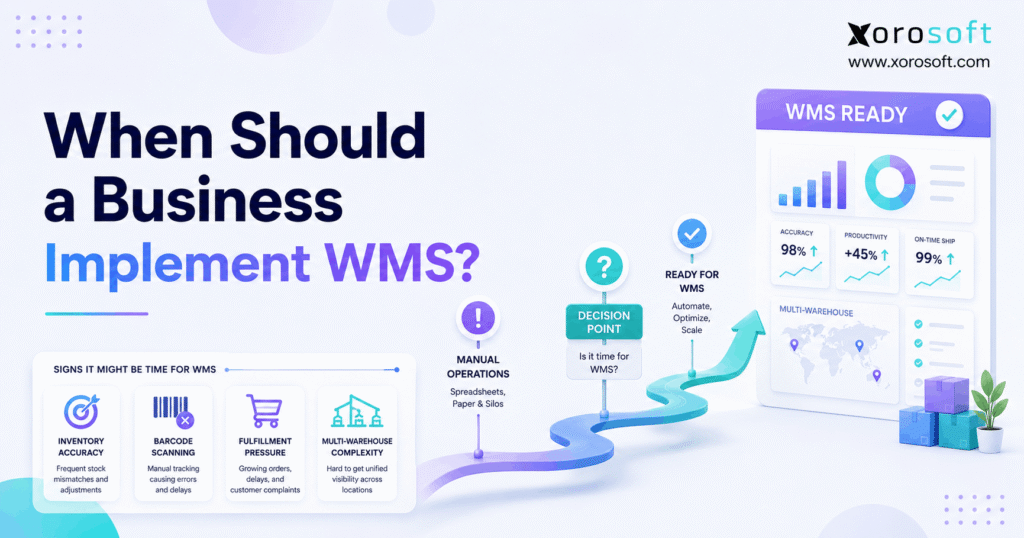
Deciding when to implement WMS is a critical step for any growing business seeking to optimise warehouse operations.
1. Warehouse Growth Eventually Becomes a Systems Problem
Knowing when to implement WMS is less about reaching a particular revenue level and more about recognizing when warehouse complexity has exceeded the tools controlling it. As orders, SKUs, channels, warehouse locations, and fulfillment expectations increase, manual processes can become unreliable. Therefore, the right time to introduce a warehouse management system is usually when operational complexity starts creating measurable inventory, labor, or fulfillment problems.
At first, a growing business may manage its warehouse with spreadsheets, printed pick lists, basic inventory software, or simple ERP functionality. However, those tools often become harder to scale once employees need precise bin locations, barcode validation, replenishment rules, multiple picking methods, and real-time visibility across facilities.
Moreover, the warning signs rarely appear simultaneously. Inventory discrepancies may increase first. Then, picking errors may become more frequent. Meanwhile, receiving takes longer, warehouse employees spend more time searching for stock, and customer service starts investigating orders that should already have shipped.
Consequently, understanding when to implement WMS requires more than counting daily orders. Instead, leaders need to determine whether the current operating model can reliably control inventory from receiving through shipping.
Additionally, businesses should evaluate when to implement WMS before temporary workarounds become permanent processes. Once employees accept spreadsheet reconciliations, manual stock checks, and verbal warehouse instructions as normal, operational problems become harder to unwind.
Ultimately, the strongest answer to when to implement WMS comes from measurable warehouse performance. Inventory accuracy, fulfillment speed, labor productivity, location complexity, and system fragmentation provide much better evidence than company size alone.
2. What WMS Controls Before You Decide When to Implement WMS
A warehouse management system is software designed to control the physical execution of warehouse activity.
Although inventory software may show how much stock a business owns, a WMS goes deeper. For example, it can help determine where inventory should be stored, which employee should pick it, what quantity should move, whether the correct product was scanned, and when a picking location requires replenishment.
2.1 Core Warehouse Management Functions
A modern WMS commonly supports:
- receiving
- barcode scanning
- directed putaway
- bin and location management
- inventory movements
- replenishment
- order allocation
- picking
- packing
- shipping
- cycle counting
- warehouse transfers
- lot tracking
- serial tracking
- returns
- warehouse reporting
Therefore, WMS should be viewed as a warehouse execution layer rather than simply another inventory database.
2.2 Tracking Inventory Is Different From Executing Warehouse Work
Consider a simple example.
An inventory system may tell an operator that 600 units exist in Warehouse A. However, the warehouse team may need much more information before those 600 units can be fulfilled efficiently.
For example:
Where are the units stored?
Which quantities are already allocated?
Which bin should the picker visit?
Does reserve stock need replenishment?
Which lot should ship first?
Has the correct SKU been scanned?
As a result, when to implement WMS often becomes clearer once employees need software to direct warehouse decisions rather than merely report quantities.
Moreover, another useful way to assess when to implement WMS is to count how many warehouse decisions still depend on employee memory. As manual decision-making increases, structured warehouse execution becomes more valuable.
3. 10 Critical Signs That Show When to Implement WMS
Several operational patterns can indicate that a company is approaching the point where when to implement WMS should become a serious management discussion.
3.1 Inventory Records Cannot Be Trusted
Inventory accuracy is one of the strongest warning signs.
For example, the system may show 30 units available even though warehouse staff can locate only 22. Conversely, products may physically exist while the system shows no available inventory.
As a result, inaccurate records can affect purchasing, ecommerce availability, customer service, replenishment, forecasting, and accounting.
Furthermore, employees may begin performing manual stock checks before promising inventory to customers. Once that happens regularly, the company effectively has two inventory systems: the software record and employees’ physical knowledge.
Therefore, recurring inventory discrepancies are an important indicator of when to implement WMS.
3.2 Picking and Packing Errors Are Increasing
Picking mistakes often increase as warehouses become busier.
For instance, employees may select:
- the wrong SKU
- the wrong size
- the wrong color
- the wrong quantity
- the wrong lot
- the wrong serial number
Consequently, the company may experience more returns, replacements, support tickets, and reshipping costs.
However, the deeper problem is often process control rather than employee effort. Barcode-directed workflows can create verification points while work happens instead of relying entirely on memory.
Accordingly, increasing fulfillment mistakes can be another clear signal of when to implement WMS.
3.3 Warehouse Employees Spend Too Much Time Searching
Searching is non-value-added warehouse work.
Nevertheless, employees frequently spend significant time locating products when bin data is inaccurate or storage practices are inconsistent.
For example, one employee may place overflow stock in an unused area without recording the movement correctly. Later, another employee searches several aisles before locating it.
Therefore, repeated searching suggests that location-level inventory control needs improvement.
Moreover, excessive warehouse searching helps clarify when to implement WMS because it demonstrates that employees cannot rely on system-directed locations.
3.4 Paper and Spreadsheets Still Drive Daily Warehouse Work
Spreadsheets can remain useful for analysis. However, they become risky when they function as live execution systems.
For example, a warehouse may use:
- printed receiving documents
- spreadsheet replenishment lists
- manually created pick lists
- handwritten bin changes
- end-of-day inventory updates
As a result, physical movements occur before the system knows they happened.
Furthermore, delays between warehouse activity and software updates create opportunities for duplicate work and incorrect availability.
Consequently, spreadsheet dependence is another practical indicator of when to implement WMS.
3.5 Order Volume Is Growing Faster Than Throughput
Higher order volume does not automatically justify WMS.
However, companies should investigate when fulfillment volume rises while warehouse productivity does not.
For example, if 30% more orders require 30% more warehouse labor, processes may not be gaining operational leverage.
By contrast, structured warehouse workflows can help employees spend more time executing tasks and less time deciding what should happen next.
Therefore, rising order volume matters when evaluating when to implement WMS, but only when that growth produces measurable operational strain.
3.6 Receiving Becomes a Bottleneck
Warehouse accuracy begins at receiving.
Therefore, delayed or inaccurate receipts can create problems throughout purchasing, inventory, fulfillment, and finance.
For example, products may physically arrive while remaining unavailable in the system. Consequently, customer orders wait even though inventory is sitting inside the facility.
Similarly, poor putaway processes can cause products to be placed wherever space happens to exist.
As volume increases, that approach becomes increasingly difficult to control.
Accordingly, receiving performance can help determine when to implement WMS.
3.7 Replenishment Regularly Interrupts Picking
Imagine that a picker arrives at a forward-picking location and discovers that it is empty.
The product may still exist in reserve storage. However, someone must stop, locate the reserve stock, move it, record the movement, and restart the order.
Consequently, reactive replenishment creates avoidable delays.
By contrast, structured replenishment rules can create warehouse tasks before the picking location becomes empty.
Therefore, recurring replenishment interruptions can indicate when to implement WMS.
3.8 Multiple Warehouses Create Visibility Problems
A second warehouse can multiply complexity surprisingly quickly.
For example, the organization now needs to understand:
- quantity by facility
- quantity by bin
- transfers in transit
- allocated quantities
- receiving status
- fulfillment capacity
- stock availability by channel
Therefore, companies considering another warehouse should evaluate technology before duplicating existing manual processes.
For multi-location businesses, when to implement WMS often becomes clearer before the next facility opens rather than afterward.
3.9 Peak Periods Regularly Break Normal Processes
A warehouse may operate reasonably well during average weeks.
However, peak periods expose weak processes.
For example, seasonal demand may lead to temporary storage areas, rushed receiving, incomplete scans, picking congestion, manual prioritization, delayed shipping, and inventory discrepancies.
Consequently, if peak periods require extensive workarounds every year, the warehouse may have outgrown its current operating model.
In addition, peak-season performance is useful when deciding when to implement WMS because temporary volume spikes reveal weaknesses that normal demand can hide.
3.10 Labor Costs Rise Without Equivalent Productivity
Hiring can temporarily compensate for inefficient warehouse processes.
However, simply adding more employees does not automatically improve throughput.
Instead, leaders should measure:
- orders per labor hour
- lines picked per hour
- receiving time
- order cycle time
- picking error rate
- inventory accuracy
If labor costs increase while these metrics remain flat, warehouse execution deserves closer investigation.
Therefore, labor efficiency is another important factor in deciding when to implement WMS.
4. When to Implement WMS Based on Order and Warehouse Complexity
Companies frequently ask how many orders per day justify WMS.
However, there is no universally correct threshold.
4.1 Order Complexity Matters as Much as Order Volume
Consider two businesses.
Business A processes 800 orders per day. However, most orders contain one simple product.
Business B processes 250 orders per day. Nevertheless, its orders may contain 15 lines, multiple variants, lot-controlled inventory, and wholesale requirements.
Although Business A processes more orders, Business B may have greater warehouse complexity.
Therefore, determining when to implement WMS should involve several operational variables rather than one daily-order threshold.
4.2 SKU Complexity Changes WMS Readiness
A warehouse carrying 80 products has a different location-management problem from one carrying 15,000 style, color, size, or component combinations.
Moreover, inventory attributes can add complexity.
Examples include:
- lot numbers
- serial numbers
- expiration dates
- sizes
- colors
- bundles
- kits
- units of measure
Consequently, product complexity can influence when to implement WMS even when overall order volume remains moderate.
4.3 Facility Complexity Also Matters
A single compact warehouse is relatively simple compared with multiple facilities containing thousands of storage positions.
Therefore, the number of warehouses, zones, aisles, racks, bins, staging locations, and fulfillment channels should be included in any readiness assessment.
As a result, businesses asking when to implement WMS should measure warehouse complexity alongside order volume.
5. When to Implement WMS Instead of Basic Inventory Software
Inventory software and WMS overlap, but they solve different levels of operational problems.
5.1 Inventory Software Focuses on Stock Visibility
Inventory management typically helps businesses understand:
- quantities on hand
- available quantities
- purchase orders
- sales orders
- stock movements
- reorder requirements
- inventory valuation inputs
Therefore, inventory software can remain sufficient for companies with straightforward warehouse workflows.
5.2 WMS Goes Deeper Into Warehouse Execution
By contrast, WMS can direct work occurring inside the facility.
| Capability | Inventory Software | WMS |
|---|---|---|
| Quantity tracking | Strong | Strong |
| Purchase receiving | Usually | Strong |
| Bin-level inventory | Varies | Strong |
| Directed putaway | Limited | Strong |
| Barcode-directed picking | Varies | Strong |
| Replenishment tasks | Limited | Strong |
| Batch or wave picking | Limited | Common |
| Warehouse transfers | Varies | Strong |
| Cycle counting | Varies | Strong |
| Warehouse task control | Limited | Strong |
Therefore, a practical way to determine when to implement WMS is to ask whether the business primarily needs inventory visibility or physical warehouse execution control.
If employees increasingly need instructions for where to receive, store, move, replenish, pick, and verify inventory, the answer to when to implement WMS becomes clearer.
Ultimately, the transition point for when to implement WMS occurs when basic inventory tracking can no longer support warehouse execution reliably.
6. When to Implement WMS Alongside an ERP System
ERP and WMS should not automatically be treated as competing categories.
Instead, they often manage different operational layers.
6.1 ERP Connects Broader Business Operations
ERP commonly connects:
- sales
- purchasing
- inventory
- accounting
- customer data
- manufacturing
- reporting
Therefore, ERP provides broader business and financial visibility.
Businesses evaluating an ERP layer can review XoroERP when considering how warehouse activity should connect with wider operational processes.
6.2 WMS Provides Deeper Warehouse Execution
WMS usually provides more detailed control over:
- receiving
- locations
- putaway
- internal movements
- replenishment
- picking
- packing
- scanning
- shipping
Consequently, a growing company may require both layers.
For inventory-driven operations, XoroWMS provides warehouse functionality within Xorosoft’s broader operational environment.
6.3 When Existing ERP Warehouse Functions May Be Enough
Not every business requires advanced WMS.
For example, ERP functionality may remain sufficient when the company has one warehouse, simple storage, straightforward picking, modest volume, and few special handling requirements.
However, ERP limitations can influence when to implement WMS once more advanced warehouse execution is required.
Consequently, businesses deciding when to implement WMS should compare required workflows against the exact warehouse functionality already available in their ERP.
Therefore, the answer to when to implement WMS can differ between two companies of similar size because their existing systems and operational requirements may be completely different.
7. When to Implement WMS for a Growing Ecommerce Business
Ecommerce can accelerate warehouse complexity because orders need to move quickly while inventory remains synchronized across channels.
7.1 Shopify Growth Can Expose Warehouse Weaknesses
A Shopify business may initially fulfill orders from a small warehouse or stockroom.
However, growth can introduce:
- more SKUs
- additional employees
- faster shipping expectations
- more returns
- marketplace orders
- wholesale orders
- multiple warehouses
Consequently, the warehouse becomes a central part of customer experience.
For businesses that need broader operational control, XoroONE connects inventory, purchasing, warehouse management, order processing, accounting, and reporting in one environment.
Moreover, for ecommerce companies, when to implement WMS often becomes a more urgent question as fulfillment channels multiply.
7.2 Multi-Channel Selling Raises the Cost of Poor Inventory Visibility
Inventory problems become more damaging when several channels are selling the same physical stock.
For example, a product might be offered through Shopify, marketplaces, wholesale channels, and sales representatives simultaneously.
Therefore, inventory movements need to flow reliably between warehouse execution and channel availability.
Businesses evaluating Shopify connectivity can also review Xorosoft’s listing in the Shopify App Store.
As a result, Shopify, marketplaces, wholesale orders, and additional warehouses can influence when to implement WMS.
7.3 Integrations Become Part of WMS Readiness
Warehouse technology does not operate independently.
Instead, orders and inventory may need to move among ecommerce platforms, marketplaces, shipping tools, EDI networks, and financial systems.
Therefore, businesses should audit their ERP and ecommerce integrations before implementation.
Moreover, faster customer expectations can accelerate when to implement WMS because manual warehouse processes have less room for delay or error.
8. When to Implement WMS for Wholesale and Distribution
Wholesale operations create a different fulfillment profile from direct-to-consumer ecommerce.
8.1 Larger Orders Create Different Picking Requirements
A wholesale order may involve:
- cartons
- cases
- pallets
- mixed units
- dozens of order lines
Consequently, warehouse processes must support more than simple parcel fulfillment.
Wholesale complexity can also make when to implement WMS different from the same decision in a straightforward DTC warehouse.
8.2 EDI and Retail Requirements Add Complexity
Wholesale businesses may also manage:
- EDI transactions
- retailer requirements
- customer-specific shipping rules
- backorders
- allocation
- multiple units of measure
Therefore, the warehouse often needs stronger execution controls as customer requirements increase.
For broader operational context, Xorosoft’s business solutions show how inventory, warehouse, purchasing, and order-management workflows can be connected.
For distributors, when to implement WMS may depend heavily on case picking, EDI, allocation rules, traceability, and customer-specific requirements.
8.3 Multi-Warehouse Distribution Requires Consistency
Once distributors operate several facilities, each warehouse should follow comparable processes.
Otherwise, Warehouse A may receive, count, store, and pick differently from Warehouse B.
Consequently, management receives inconsistent information even when both facilities use the same inventory system.
Therefore, B2B operators should evaluate when to implement WMS based on fulfillment complexity as well as order volume.
9. When to Implement WMS in Manufacturing Operations
Manufacturing adds another layer because inventory supports production as well as customer fulfillment.
9.1 Raw Materials Must Be Available Where Production Needs Them
A manufacturer can technically have enough material while still experiencing a production shortage.
For example, components may exist in reserve storage but not at the required production staging location.
Therefore, location-level inventory and material movement become important.
Manufacturers should evaluate when to implement WMS whenever warehouse activity begins affecting material availability or production flow.
9.2 Traceability Can Increase Warehouse Complexity
Manufacturers may also need:
- lot tracking
- serial tracking
- batch tracking
- component traceability
- finished-goods tracking
Consequently, scanning and warehouse transaction discipline become increasingly important.
Xorosoft supports inventory-driven businesses across several operating models, while its industries overview provides context for manufacturing, wholesale, distribution, ecommerce, and related sectors.
In addition, traceability and production staging can influence when to implement WMS earlier than standard finished-goods fulfillment alone would suggest.
10. Who Does Not Need a WMS Yet?
A strong warehouse-management decision framework should also explain when implementation is unnecessary.
10.1 Very Simple Warehouses May Not Need Advanced WMS
For example, a company may not need WMS when:
- order volume is low
- SKU count is small
- one simple location holds inventory
- employees can reliably find stock
- receiving is straightforward
- picking is simple
- inventory accuracy remains consistently high
Therefore, implementing advanced software may create unnecessary complexity.
Understanding when to implement WMS also means knowing when the correct answer is “not yet.”
10.2 Process Problems Should Sometimes Be Fixed First
Software cannot compensate for undefined procedures.
For example, if employees cannot agree on where inventory should be placed, a WMS implementation may simply digitize inconsistency.
Instead, management should first document receiving procedures, location standards, replenishment rules, picking methods, inventory ownership, and exception handling.
Afterward, the organization can determine whether technology is still required.
If processes remain simple and reliable, the answer to when to implement WMS may reasonably remain “not yet.”
10.3 A 3PL May Be the Better Operational Model
Some companies do not want to operate warehouses internally.
In that case, outsourced fulfillment may be more appropriate than implementing an internal WMS.
However, inventory, order, shipping, and financial data still need to remain synchronized with the fulfillment partner.
11. WMS Readiness: How to Know When to Implement WMS
Once the warning signs become clear, the next step is to assess whether the organization is actually ready.
11.1 Process Readiness
First, document the current warehouse workflow.
Follow inventory through:
Receiving → Putaway → Storage → Replenishment → Picking → Packing → Shipping → Returns
Then, identify where errors or delays occur.
Consequently, requirements can be tied to real operational problems instead of generic feature lists.
11.2 Inventory Data Readiness
Next, review master data.
This should include:
- SKUs
- descriptions
- units of measure
- barcodes
- locations
- inventory balances
- lots
- serial numbers
Furthermore, duplicate or inconsistent records should be corrected before migration.
11.3 Location Readiness
Every physical storage location should follow a predictable naming convention.
For example:
Warehouse A → Zone 02 → Aisle 05 → Rack B → Bin 04
Therefore, employees and software can reference the same location consistently.
11.4 Integration Readiness
Next, identify every system touching orders or inventory.
Examples include:
- ecommerce
- marketplaces
- ERP
- accounting
- shipping
- EDI
- manufacturing
- 3PL platforms
Consequently, implementation teams can determine which system owns each data set.
11.5 Employee Readiness
Warehouse users should be included in process design.
After all, they understand operational exceptions that may never appear in a management process map.
Therefore, involving them early can expose requirements before configuration is finalized.
Ultimately, a readiness assessment gives management a more objective way to determine when to implement WMS.
Instead of relying on intuition alone, businesses can evaluate data quality, workflows, integrations, employees, and warehouse complexity before deciding when to implement WMS.
12. A Practical Scorecard for Deciding When to Implement WMS
The following framework can help management structure the discussion.
Score each category from 1 to 5.
| Area | Score 1 | Score 3 | Score 5 |
| Inventory complexity | Very simple | Moderate | Highly complex |
| Fulfillment complexity | Basic | Several workflows | Highly varied |
| Warehouse footprint | One simple site | Larger site | Multiple facilities |
| System complexity | Few systems | Several systems | Highly fragmented |
| Growth pressure | Stable | Growing | Rapid growth |
12.1 Score of 5–9: WMS May Be Premature
At this level, process improvements or stronger inventory controls may solve the problem.
Therefore, management should avoid implementing technology simply because WMS appears more sophisticated.
12.2 Score of 10–15: Investigate Operational Gaps
Some warehouse functionality may be valuable.
However, a full implementation may not yet be necessary.
Consequently, companies should identify which specific processes are causing measurable problems.
12.3 Score of 16–20: Formal WMS Evaluation Is Justified
At this stage, operational complexity is likely becoming a meaningful constraint.
Therefore, management should document requirements and evaluate architecture.
12.4 Score of 21–25: Warehouse Execution Should Become a Priority
A high score indicates that warehouse complexity, system fragmentation, or growth pressure is significant.
Nevertheless, the score should be used as a diagnostic tool rather than an automatic purchasing rule.
Accordingly, the scorecard should not dictate when to implement WMS by itself.
Instead, the best answer to when to implement WMS combines readiness scoring with real warehouse performance data.
13. What to Prepare Before Deciding When to Implement WMS
After the need becomes clear, preparation becomes critical.
13.1 Map the Real Process
First, follow warehouse employees during normal work.
Do not rely only on documented procedures.
Instead, observe:
- receiving
- putaway
- picking
- replenishment
- packing
- returns
- transfers
Consequently, undocumented workarounds become visible.
13.2 Clean Inventory Data
Next, correct:
- duplicate SKUs
- inaccurate quantities
- inconsistent units
- missing barcodes
- outdated locations
Otherwise, incorrect data simply moves into the new platform.
13.3 Establish Baseline KPIs
Before implementation, measure:
- inventory accuracy
- picking accuracy
- receiving time
- order cycle time
- orders per labor hour
- fulfillment error rate
Therefore, management can compare performance before and after implementation.
13.4 Test Exceptions, Not Just Perfect Orders
A warehouse rarely processes only ideal transactions.
Therefore, testing should include:
- shortages
- damaged receipts
- partial receipts
- partial shipments
- returns
- transfers
- incorrect scans
- unavailable inventory
- split orders
Consequently, teams can understand how the system behaves under realistic operating conditions.
13.5 Review Relevant Customer Examples
Implementation teams can also learn from businesses that have addressed similar operational complexity.
For example, Xorosoft’s ERP case studies cover inventory, warehouse, ecommerce, manufacturing, multi-location, and distribution workflows.
Once a company determines when to implement WMS, preparation becomes just as important as software selection.
Moreover, deciding when to implement WMS without cleaning data, documenting workflows, and defining integrations can create unnecessary implementation risk.
14. Common WMS Implementation Mistakes
WMS can improve warehouse control. However, poor implementation can create new problems.
14.1 Automating a Bad Process
A weak process does not become strong because software controls it.
Therefore, process design should happen before configuration.
14.2 Migrating Inaccurate Data
Bad inventory data can quickly undermine confidence in a new system.
Consequently, data cleanup should be treated as a core implementation workstream.
14.3 Over-Customizing the Platform
Legacy processes are not automatically best practices.
Therefore, businesses should ask whether a process should change before requesting custom functionality.
14.4 Ignoring Warehouse Employees
Management may understand the business objective. However, warehouse users understand daily execution.
Consequently, both perspectives are necessary.
14.5 Under-Testing Integrations
Warehouse inventory may affect ecommerce availability, purchasing, order management, accounting, and reporting.
Therefore, integration testing should include complete workflows rather than isolated transactions.
14.6 Launching Without KPIs
Without baseline performance, improvements become difficult to prove.
Instead, determine success criteria before go-live.
Ultimately, implementation mistakes can undermine even a correct decision about when to implement WMS.
15. Calculate ROI Before Deciding When to Implement WMS
WMS ROI should be evaluated against measurable operational costs.
15.1 Calculate Picking Error Costs
First, estimate the annual cost of incorrect shipments.
Include:
- replacement product
- additional shipping
- return processing
- warehouse labor
- customer service
- potential lost margin
Consequently, even a modest error rate can create meaningful operating expense.
15.2 Measure Avoidable Warehouse Labor
Next, estimate the time employees spend:
- searching for inventory
- recounting stock
- manually creating tasks
- correcting mistakes
- waiting for replenishment
- investigating discrepancies
Therefore, labor analysis should separate productive work from corrective work.
15.3 Measure Inventory Accuracy Problems
Inventory inaccuracies can influence stockouts, excess purchasing, cancellations, and financial reporting.
Consequently, better warehouse transactions can create value outside the warehouse.
15.4 Measure Capacity Gains
A more efficient warehouse may process additional volume without expanding headcount or facility space at the same rate.
Therefore, capacity gains should also be considered when evaluating investment returns.
15.5 Use a Conservative ROI Formula
A simple framework is:
Annual measurable savings + avoidable error costs + capacity gains − annual WMS costs
However, theoretical efficiency gains should not be treated as guaranteed savings.
Financial analysis therefore provides another way to determine when to implement WMS.
If errors, labor inefficiency, stock discrepancies, and capacity constraints cost more than the expected investment, the business case for when to implement WMS becomes stronger.
Nevertheless, management should never decide when to implement WMS using theoretical ROI alone. Actual warehouse performance should support the investment case.
16. Choosing the Right Operational Path
After evaluating readiness, businesses generally have several choices.
16.1 Xorosoft for Connected ERP and WMS Requirements
For businesses that need warehouse execution connected with inventory, purchasing, ecommerce, order management, accounting, or manufacturing, Xorosoft can be evaluated first as an integrated option.
This approach is particularly relevant when the warehouse problem is only one symptom of broader system fragmentation.
Choosing a technology path, however, should come after determining when to implement WMS, not before.
16.2 Improve Existing Warehouse Processes
If technology is not yet the main constraint, improve:
- location discipline
- receiving procedures
- pick paths
- cycle counts
- replenishment
- exception handling
Therefore, some businesses can postpone WMS by improving process consistency.
16.3 Upgrade Existing Inventory or ERP Functionality
Some companies need stronger inventory or ERP capabilities rather than a full warehouse management platform.
Consequently, requirements should be mapped before selecting a system category.
16.4 Use a 3PL
A business may also outsource fulfillment.
However, it still needs reliable connectivity among orders, inventory, the fulfillment partner, and financial records.
16.5 Use a Hybrid Fulfillment Model
Finally, some businesses operate internal warehouses while using 3PL facilities for additional regions or peak capacity.
Therefore, the right architecture depends on the operating model rather than a single software trend.
17. Frequently Asked Questions About When to Implement WMS
17.1 When to Implement WMS: What Is the Right Time?
A business should consider WMS when warehouse complexity exceeds what existing spreadsheets, inventory software, or ERP functionality can manage reliably. For example, rising inventory discrepancies, picking errors, poor location visibility, manual replenishment, slow receiving, and multi-warehouse complexity can all indicate that warehouse execution requires stronger control.
Therefore, when to implement WMS should be decided using operational evidence rather than a generic revenue threshold.
17.2 When to Implement WMS: What Warning Signs Matter Most?
The strongest warning signs include unreliable inventory, rising fulfillment errors, excessive searching, spreadsheet-driven execution, poor bin visibility, reactive replenishment, slow receiving, and multi-location complexity.
Moreover, if warehouse labor continues increasing without comparable throughput gains, the organization should investigate whether the current operating model can still scale.
17.3 What Size Company Needs a WMS?
There is no minimum company size.
A smaller company with thousands of SKUs, multiple warehouses, lots, serial numbers, and several channels may need WMS earlier than a larger company with simple inventory.
Consequently, operational complexity matters more than revenue or employee count alone.
17.4 When to Implement WMS Based on Daily Order Volume
No universal order threshold exists.
For example, 500 simple single-line orders may be easier to fulfill than 150 wholesale orders containing dozens of lines and special handling requirements.
Therefore, when to implement WMS should be based on order complexity, SKU count, warehouse structure, labor requirements, and service expectations together.
17.5 Does a Small Business Need a WMS?
Sometimes.
A small business may need WMS if its warehouse operations are complex. However, companies with low volume, few SKUs, simple storage, and strong inventory accuracy may not receive enough value from advanced warehouse management yet.
Therefore, business size alone should never determine the decision.
17.6 What Are the Biggest Signs You Need WMS?
Common signs include frequent inventory discrepancies, increasing picking errors, slow fulfillment, excessive searching, spreadsheet-based execution, poor bin visibility, reactive replenishment, and difficulty managing multiple locations.
Additionally, recurring peak-season problems can indicate that current processes no longer scale effectively.
17.7 Can ERP Replace WMS?
Sometimes.
ERP systems vary significantly in warehouse depth. Therefore, companies should compare their required workflows—such as directed putaway, barcode picking, replenishment, cycle counting, lots, serial numbers, and multi-location execution—against the functionality actually available in their ERP.
17.8 What Is the Difference Between ERP and WMS?
ERP generally manages broader processes such as sales, purchasing, accounting, inventory, manufacturing, and reporting.
WMS, by contrast, focuses on physical warehouse execution.
Consequently, many inventory-driven companies eventually need both capabilities working together.
17.9 What Is the Difference Between Inventory Management and WMS?
Inventory management primarily answers questions about stock quantity and availability.
WMS goes deeper by directing receiving, putaway, bin movements, replenishment, picking, packing, and shipping.
Therefore, businesses often move toward WMS when knowing inventory quantities is no longer enough.
17.10 Can WMS Improve Inventory Accuracy?
Yes, although software alone cannot guarantee accuracy.
Barcode-directed transactions, structured locations, cycle counting, and real-time movements can reduce delayed manual updates.
However, strong data, process discipline, warehouse labeling, and employee adoption remain necessary.
17.11 Can WMS Reduce Picking Errors?
Yes.
A WMS can direct employees to specific locations and require barcode validation before completing picks.
Consequently, incorrect products or quantities can be detected earlier.
Nevertheless, warehouse labels, master data, training, and workflow design must also be accurate.
17.12 Does WMS Support Barcode Scanning?
Most modern warehouse management systems support barcode-driven workflows.
For example, employees may scan products, locations, cartons, lots, or serial numbers during receiving and fulfillment.
Therefore, warehouse movements can be recorded as they occur rather than entered manually later.
17.13 Can WMS Manage Multiple Warehouses?
Yes.
WMS can provide facility-level and location-level inventory visibility while supporting transfers, receiving, picking, replenishment, and fulfillment across multiple sites.
Consequently, multi-warehouse growth is a common reason businesses begin evaluating stronger warehouse controls.
17.14 When to Implement WMS Before Opening Another Warehouse
It is often worth evaluating WMS before expansion.
If one warehouse already depends heavily on spreadsheets and workarounds, a second facility can multiply those problems.
Therefore, when to implement WMS should ideally be considered before duplicating a weak operating model across another location.
17.15 When to Implement WMS for Shopify Operations
Not every Shopify merchant needs WMS.
However, the requirement can become stronger as SKU count, fulfillment volume, locations, returns, marketplaces, and wholesale channels increase.
Consequently, ecommerce operators should evaluate warehouse readiness as channel complexity grows.
17.16 Do Wholesale Businesses Need WMS?
Wholesale companies may benefit when they manage multi-line orders, cases, pallets, EDI, allocation, lots, or multiple warehouses.
Therefore, WMS becomes especially relevant when basic inventory tools no longer provide enough execution control.
17.17 Do Manufacturers Need WMS?
Manufacturers may require WMS when raw materials, components, production staging, finished goods, or traceability become complex.
Moreover, warehouse visibility can become particularly important when material availability directly affects production schedules.
17.18 What Should Be Done Before WMS Implementation?
First, map current workflows.
Next, clean inventory and master data.
Additionally, standardize warehouse locations, document integrations, establish baseline KPIs, involve warehouse employees, and test realistic exception scenarios.
Therefore, implementation preparation should begin well before go-live.
17.19 How Long Does WMS Implementation Take?
Implementation length varies widely.
For example, a straightforward single-site warehouse differs substantially from a multi-site operation involving automation, EDI, manufacturing, and several ecommerce channels.
Therefore, scope and complexity should determine the implementation plan rather than a generic timeline.
17.20 What Causes WMS Implementations to Fail?
Common causes include inaccurate data, poorly defined processes, excessive customization, weak integration testing, insufficient employee involvement, inadequate training, and unclear success metrics.
Consequently, implementation governance matters as much as software functionality.
17.21 How Do You Calculate WMS ROI?
Measure existing costs first.
Specifically, analyze picking errors, warehouse labor, inventory discrepancies, fulfillment delays, returns, and capacity constraints.
Then, compare realistic improvement opportunities against software, implementation, hardware, training, integration, and support costs.
17.22 When Should a Company Not Implement WMS?
A company may not need WMS when warehouse operations remain simple and reliable.
For example, low order volume, a small SKU catalog, one straightforward storage area, and consistently accurate inventory may indicate that existing tools are adequate.
Therefore, process improvement may be the better first step.
17.23 Can Process Improvements Replace WMS?
Sometimes.
Better receiving discipline, clearer location naming, structured replenishment, stronger cycle counting, and improved pick paths can solve certain problems.
However, once complexity exceeds what employees can reliably coordinate manually, process improvement alone may no longer be sufficient.
17.24 When to Implement WMS During Rapid Business Growth
Rapid growth can strengthen the case for WMS, but sales growth alone is not enough.
Instead, leaders should look for measurable operational strain such as increasing errors, rising labor requirements, slower receiving, poor inventory visibility, or multiple warehouse problems.
Therefore, when to implement WMS during rapid growth should be based on execution performance rather than revenue momentum alone.
17.25 How to Determine When to Implement WMS
Use evidence rather than assumptions.
Measure inventory accuracy, fulfillment errors, receiving delays, warehouse searching, labor productivity, replenishment interruptions, warehouse count, SKU complexity, and system fragmentation.
Ultimately, when to implement WMS becomes clearer when existing warehouse controls can no longer support growth reliably.
18. The Final Decision: When to Implement WMS for Sustainable Growth
Ultimately, knowing when to implement WMS means recognizing the point where warehouse complexity begins controlling the business instead of the business controlling the warehouse.
Revenue alone does not determine that point. Similarly, order volume alone does not provide the answer.
Instead, companies should evaluate inventory accuracy, fulfillment complexity, warehouse locations, labor productivity, system fragmentation, channel growth, and operational reliability together.
Moreover, a business that understands when to implement WMS can address operational weaknesses before they become expensive constraints.
Conversely, waiting until fulfillment is already failing can make implementation more disruptive.
Therefore, the right answer to when to implement WMS should come from measurable operational evidence. When inventory discrepancies, manual workarounds, fulfillment errors, warehouse searching, multi-location complexity, or labor inefficiency become persistent, stronger warehouse execution technology deserves serious evaluation.
If current processes still work consistently, improving them may remain the right decision. However, if employees increasingly depend on spreadsheets, physical checks, manual replenishment, and workarounds, delaying improvements can make future growth harder.
For inventory-driven businesses that determine they need warehouse execution connected with ERP, inventory, purchasing, ecommerce, accounting, and related operations, Xorosoft is one platform to evaluate.
When you are ready to review your warehouse workflows and determine the right operational architecture, Book a Demo with Xorosoft.
Recent Posts
-
 ERP Landed Cost Module vs Spreadsheet Calculations for Importers
 -
 How to Build an Open-to-Buy Plan for an Omnichannel Brand
 -
 Cold Storage WMS for Food and Beverage Distribution
 -
 ERP Buying Statistics 2026: Evaluation, Implementation, and Adoption Risks
 -
 How a Distributor Reduced B2B Order Exceptions Without Restricting Sales



