When discussing complex purchase processes, it’s important to consider B2B buyer approval limits.
1. The Approval Gap Hidden Inside Digital B2B Buying
B2B buyer approval limits help companies control who can place an order, how much each buyer can commit, and when another person must approve the purchase. However, many B2B ecommerce workflows still move outside the platform once an order crosses a department threshold. As a result, buyers submit carts online while managers approve them through email, chat, spreadsheets, or phone calls.
Therefore, the storefront may be digital while the purchasing policy remains manual. Moreover, that disconnect becomes harder to manage as more buyers, departments, locations, products, and approval levels enter the process.
Instead, a scalable B2B approval model should allow normal orders to move automatically while routing only genuine exceptions to the right approver.
1.1 Why department-level authority matters
A company account rarely represents one buyer forever. For example, a wholesale customer may have separate purchasing teams for operations, IT, merchandising, warehouse supplies, and finance.
Therefore, each buyer can require a different authority level. A warehouse buyer might place routine replenishment orders independently. However, a large equipment purchase could require a manager. Likewise, an unusually large transaction might require finance approval.
Consequently, approval rules must understand more than the customer account. They also need buyer identity, department, role, transaction value, and escalation responsibility.
1.2 The goal is exception control, not more approvals
Approval automation should not create another queue.
Instead, the system should separate three outcomes:
Within authority → proceed
Above authority → request approval
Outside policy → hold for exception review
Therefore, managers spend time on meaningful exceptions rather than approving predictable purchases repeatedly. At the same time, buyers receive clearer expectations because the system applies the same policy to every qualifying order.
As a result, governance improves without forcing every ecommerce transaction back into manual work.
2. B2B Buyer Approval Limits: Four Controls That Should Stay Separate
2.1 Buyer spending limits
A buyer spending limit defines how much an individual can commit without additional authorization.
For example, a buyer may have authority up to $5,000 per order. Therefore, a $3,500 replenishment purchase could continue automatically. However, a $7,500 order would move to the next approval level.
Although the concept sounds simple, the limit should belong to a defined role or user policy. Otherwise, teams may struggle to maintain rules as employees change responsibilities.
Moreover, the system should clarify whether the threshold applies per order, per day, per month, or through another defined period.
2.2 Approver authority limits
An approver limit answers a different question: how much is this person allowed to authorize?
For instance, a department manager could approve requests up to $20,000. Meanwhile, orders above that amount could move to a finance director.
Therefore, a strong approval hierarchy does not simply ask whether an order needs approval. Instead, it determines how far the transaction must travel before it reaches sufficient authority.
As a result, routine exceptions remain close to the department while larger financial commitments receive broader oversight.
2.3 Department budgets
A department budget controls overall spending capacity rather than one person’s authority.
Consequently, a buyer may have permission to place a $4,000 order even when the department has insufficient remaining budget. Likewise, the department may have plenty of budget while the buyer still lacks individual authority for that transaction.
Therefore, budget controls and buyer limits should remain separate even when they work together.
2.4 Customer credit limits
Customer credit limits protect the seller rather than the customer’s internal purchasing policy.
For example, a department director might legitimately approve a $30,000 purchase. However, the seller may still place the transaction on credit hold.
Therefore:
| Control | Primary Question |
|---|---|
| Buyer limit | Can this buyer commit this amount? |
| Approver limit | Can this person authorize it? |
| Department budget | Can this department absorb the spend? |
| Credit limit | Will the seller extend this exposure? |
Because each control solves a different problem, combining them into one generic “approval” field creates confusion.
3. Why Manual Email Chains Break B2B Approval Workflows
3.1 Email separates the approval from the order
Consider a common sequence.
First, a buyer creates an online order. Next, they email a manager. Then, the manager replies with approval. Afterward, someone forwards the message to customer service. Finally, another employee releases the corresponding order.
Although each step seems manageable, the decision and the transaction now live in different places.
Consequently, someone reviewing the order later may need to search inboxes to understand why it moved forward. Moreover, if the order changes after approval, the email may no longer represent the transaction that actually shipped.
3.2 Manual routing creates hidden delays
An email workflow depends on the right person seeing the right message at the right time.
However, managers attend meetings, travel, take vacation, or simply miss a thread. Therefore, orders can wait even when the underlying approval decision is straightforward.
Meanwhile, customer service may chase approvers because buyers want updates. As a result, a control designed to reduce risk creates additional coordination work.
Furthermore, nobody has a clean transaction status unless staff continually update another system.
3.3 Email can notify without becoming the system of record
Email itself is not the problem.
Instead, the problem appears when the inbox becomes the database for purchasing authority.
For example, an automated workflow can still send: “Order 10874 needs your approval.” However, the approver should act against the transaction record.
Therefore, the workflow can retain the approver, decision, timestamp, order value, and triggered rule. As a result, the organization preserves the convenience of notifications without losing the audit trail.
4. How Department Approval Limits Should Be Structured
4.1 Start with the customer organization
Before configuring approval rules, map how the customer’s buying organization actually works.
For example:
Company → Division → Department → Location → Buyer
Not every company needs every layer. However, the system must know enough to determine which policy applies.
Therefore, department-level approval starts with clean organizational data rather than a collection of isolated spending limits.
Moreover, role ownership should be clear. Otherwise, two departments may apply conflicting rules to the same buyer.
4.2 Use roles instead of permanent person-to-person rules
A workflow built around “James sends orders to Priya” becomes fragile when either person changes jobs.
Instead, define roles such as:
- Requester
- Buyer
- Senior buyer
- Department manager
- Procurement manager
- Finance approver
Then, assign users to those roles.
Therefore, the policy survives personnel changes more easily. In addition, administrators can understand why someone received an approval request without decoding a collection of person-specific rules.
4.3 B2B buyer approval limits need explicit thresholds
Consider this illustrative structure:
| Department | Buyer Limit | First Approval | Higher Escalation |
|---|---|---|---|
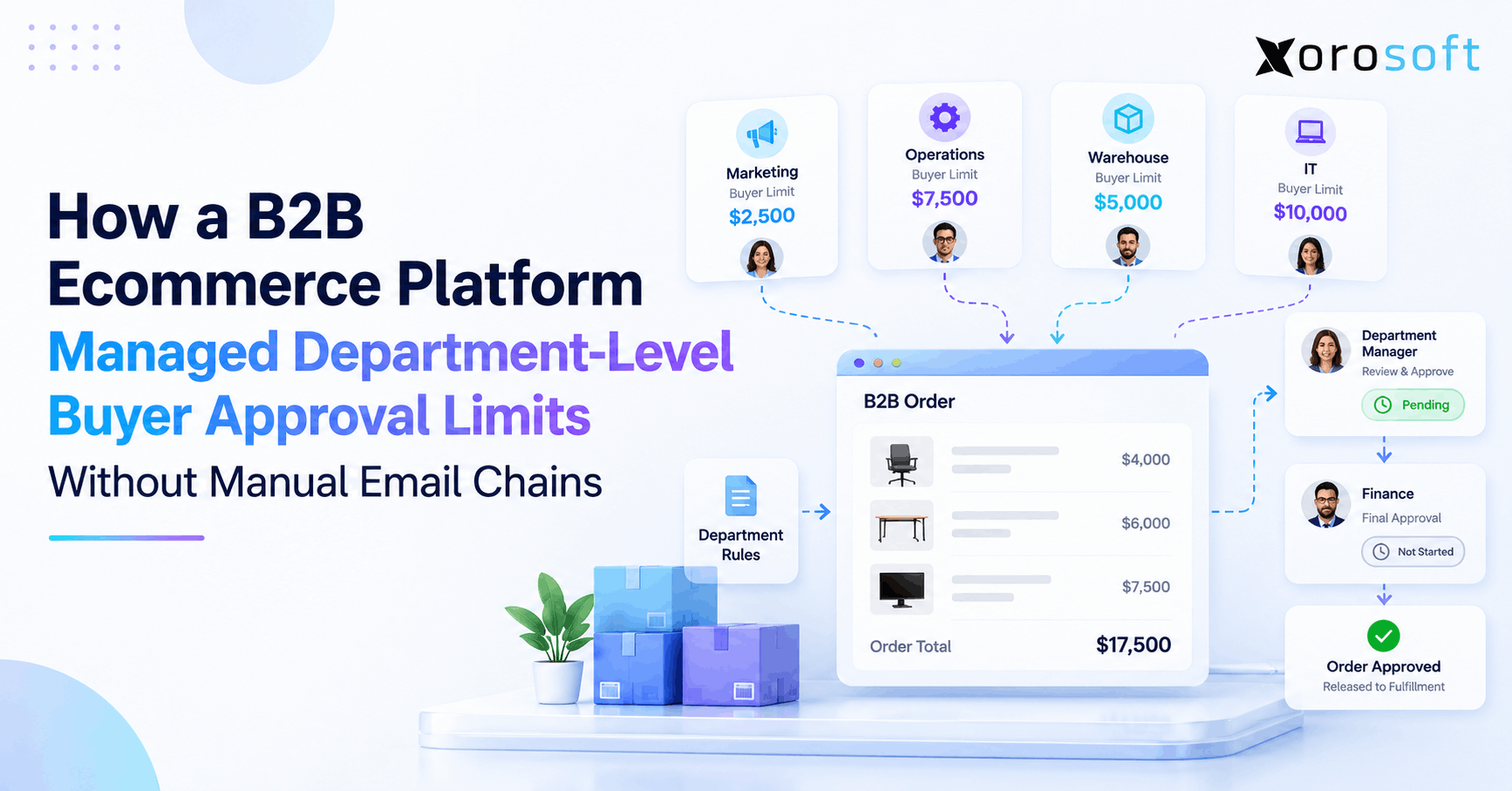
| Marketing | $2,500 | Marketing Manager | Finance |
| Warehouse | $5,000 | Warehouse Manager | Operations |
| Operations | $7,500 | Operations Director | CFO |
| IT | $10,000 | IT Director | CFO |
These amounts are examples rather than recommended benchmarks.
However, the pattern matters. Specifically, the order moves only as high as necessary.
For a real-world platform example, Adobe Commerce documents purchase order approval rules that can apply according to company roles and order totals, including configurations with multiple approvers.
4.4 Define the scope of every threshold
A $10,000 limit is incomplete without context.
Therefore, businesses should determine whether the threshold applies:
- per transaction
- per day
- per month
- by department
- by location
- by category
- by currency
- by contract
For example, an IT buyer may have a $10,000 order limit but a lower threshold for non-standard equipment.
Consequently, the approval model needs enough flexibility to reflect policy without becoming impossible to maintain.
5. How B2B Buyer Approval Limits Should Evaluate an Order
5.1 Step one: identify the buyer
First, the platform should identify the buyer and the organizational context around them.
That context may include:
- company
- department
- role
- location
- currency
- customer account
- assigned authority
Without reliable identity data, the rest of the workflow becomes guesswork.
Therefore, approval automation depends on clean customer and user records before it depends on sophisticated rule logic.
5.2 Step two: evaluate the transaction
Next, the workflow should evaluate relevant order conditions.
Order value is usually important. However, a business may also care about product category, quantity, discount, payment terms, shipping method, location, or restricted SKUs.
Therefore, two $8,000 orders may require different treatment.
For example, a routine replenishment order may stay within policy. Meanwhile, an $8,000 purchase containing restricted equipment could require additional review.
5.3 Step three: compare the order with authority
Once the system understands the buyer and transaction, it can compare the purchase against B2B buyer approval limits.
Therefore, the resulting logic can remain simple:
Within limit → continue
Above limit → escalate
Policy exception → hold
As a result, normal purchases can move without management intervention. Meanwhile, exceptional orders receive attention because they actually need it.
This distinction is critical. Otherwise, the company simply replaces an email approval queue with a digital approval queue.
5.4 Step four: route to sufficient authority
The workflow should send the order to someone who has enough authority to act.
However, the first approver may not always have enough authority. Therefore, a $50,000 transaction might move from department manager to director and then to finance.
In addition, the system should define what happens when the assigned approver is unavailable.
Microsoft Business Central, for example, documents approval user setup that includes approval limits and substitute approvers.
The broader principle is simple: delegation should be designed before someone goes on vacation.
6. Buyer Approval Limits Must Control Order State and Inventory
6.1 Pending approval needs its own order state
A cart, an approval request, and a fulfillment-ready sales order are not the same thing.
Therefore, businesses should make those states explicit:
Cart → Submitted → Pending Approval → Approved → Released
Otherwise, warehouse staff may see a transaction before purchasing authority has been confirmed.
Moreover, customer-service teams may incorrectly interpret “submitted” as “ready to ship.”
As a result, precise order states reduce manual interpretation.
6.2 Decide whether inventory is reserved
The company also needs an inventory policy for pending orders.
| Strategy | Advantage | Trade-Off |
|---|---|---|
| No reservation | Keeps stock open for confirmed demand | Approval may finish after stock sells |
| Soft reservation | Signals expected demand | Requires clear availability logic |
| Hard allocation | Protects stock for the request | Pending approvals can lock inventory |
Therefore, the right approach depends on stock scarcity, approval speed, service commitments, and channel strategy.
6.3 Revalidate inventory after approval
Suppose a buyer requests 100 units at 10 a.m. However, the manager does not approve the order until the next morning.
Meanwhile, ecommerce and wholesale channels continue selling.
Therefore, approval should not automatically guarantee the original quantity. Instead, inventory should be checked again before release.
For organizations managing several warehouses, a connected warehouse management system can help operational teams maintain clearer inventory and fulfillment states once an approved order enters warehouse execution.
6.4 Recheck material order changes
An approved order can also change before release.
For example, the buyer may increase quantity, add a new product, or request another shipping destination.
Therefore, material edits should rerun the relevant approval rules.
Otherwise, a user could obtain approval for a $4,000 transaction and later transform it into a $14,000 transaction without renewed authorization.
Consequently, approval should belong to the transaction that was reviewed, not merely to an order number.
7. B2B Approval Routing Should Handle Exceptions Automatically
7.1 Sequential approvals
Sequential routing sends an order through approvers in a specific order.
For example:
Buyer → Department Manager → Finance
This model works well when organizational authority increases in defined steps.
However, unnecessary levels should not be added merely because the system supports them. Instead, each approval stage should correspond to a genuine policy requirement.
Therefore, a $6,000 request might stop with the department manager while a $30,000 request continues to finance.
7.2 Parallel approvals
Parallel routing sends the same request to multiple reviewers simultaneously.
For example, a specialized equipment purchase may require operational and finance review.
Therefore, both teams can evaluate the order without waiting for the other department to finish first.
However, the workflow must clearly define whether all reviewers must approve or whether one approval is sufficient.
Otherwise, users may see conflicting statuses.
7.3 Conditional approvals
Conditional routing selects an approval path according to order characteristics.
For instance:
- high value → finance
- restricted category → compliance
- unusual discount → sales management
- new destination → account review
Therefore, conditional routing is often more useful than forcing every order through the same hierarchy.
Moreover, it keeps routine purchasing fast while preserving additional controls where risk actually changes.
7.4 Escalation should not depend on inbox chasing
A mature workflow should define a response when an approver does nothing.
For example, it could send a reminder, transfer the request to a substitute, or escalate after an agreed period.
Therefore, the process continues according to policy rather than according to who remembers to follow up.
As a result, customer service does not become the unofficial workflow coordinator.
8. Where B2B Buyer Approval Limits Should Live: Ecommerce or ERP
8.1 Ecommerce-owned approval rules
An ecommerce platform already knows the logged-in buyer, cart, company account, and checkout experience.
Therefore, placing some approval logic there can create immediate feedback.
However, the ecommerce system may not own the latest credit data, warehouse availability, financial controls, or customer master records.
Consequently, storefront-only rules can become incomplete when approval depends on operational information outside the storefront.
8.2 ERP-owned approval rules
ERP systems can provide broader context around inventory, customer data, purchasing, accounting, and order management.
Therefore, the ERP can be a strong location for operational policy.
However, routing every storefront interaction through the ERP can create a poor customer experience when integrations are slow or incomplete.
As a result, the question should not be “ERP or ecommerce?” Instead, determine which application owns each decision.
A connected cloud ERP environment can support this approach by giving operational processes a common system rather than leaving approval decisions isolated from downstream order activity.
8.3 Avoid two independent decision engines
The most dangerous architecture is not ecommerce-led or ERP-led.
Instead, it is both systems independently deciding the same thing.
For example:
Ecommerce: Approved
ERP: Hold
Therefore, staff must investigate which system is correct.
A better architecture establishes one authoritative approval state and shares that state across connected systems.
As a result, storefront users, operations teams, finance, and fulfillment can interpret the transaction consistently.
9. Shopify B2B Approval Workflows Need Operational Context
9.1 Shopify can route B2B orders for review
Shopify currently allows businesses to configure company or company-location checkout settings so orders are either processed automatically or submitted as drafts for review. In addition, Shopify notes that merchants who want only certain orders routed to drafts based on criteria such as order value or cart contents can consider Payment Customization Functions. (Shopify B2B checkout settings)
Therefore, merchants can create an initial review layer without moving the entire purchasing experience offline.
9.2 Draft review and department authority are different problems
However, requiring all orders from a company location to become drafts does not automatically represent every company’s internal authority structure.
For example, one location could contain five buyers with five different spending limits.
Therefore, a growing B2B operation should distinguish:
Does this order require review?
from:
Which buyer exceeded which authority rule, and who should approve the exception?
That distinction becomes more important as customer organizations become larger.
9.3 Connect Shopify with the operational system
Once an approved Shopify B2B order enters operations, inventory, purchasing, accounting, warehouse, and fulfillment data become relevant.
Therefore, integrations should preserve the order’s context rather than recreate it manually.
Xorosoft provides an integrations ecosystem for connecting commerce and operational workflows. In addition, merchants evaluating the integration can review the Xorosoft listing on the Shopify App Store.
As a result, the storefront can remain buyer-facing while operational records continue through the broader ERP environment.
10. Department Approval Rules Change Across Industries
Businesses should not copy approval thresholds from another company simply because both use B2B ecommerce.
Instead, approval design should reflect how the industry buys, holds inventory, and fulfills orders. Xorosoft supports several inventory-driven industries, so the examples below illustrate how different operational contexts can shape the workflow.
10.1 Wholesale distribution
A wholesale customer may operate dozens of branches.
Therefore, a local buyer could receive authority for routine replenishment. However, unusually large stocking orders may need regional or corporate approval.
Moreover, customer-specific pricing and location-level delivery requirements may change the order after submission.
Consequently, the approval process should preserve both purchasing authority and the operational details required to fulfill the transaction.
10.2 Apparel and sporting goods
Seasonality changes the risk profile.
For example, a buyer may independently manage weekly replenishment. However, preseason buys can commit much more inventory and working capital.
Therefore, approval rules may use separate thresholds for routine replenishment and large forward orders.
In addition, stock availability can change rapidly across stores, ecommerce channels, and wholesale commitments.
As a result, approved orders should still be revalidated before final allocation.
10.3 Furniture and consumer products
Furniture often combines high unit values with complex freight and warehouse requirements.
Therefore, a seemingly simple approval delay can change delivery feasibility.
For example, a product may still exist in total inventory while the warehouse closest to the customer no longer has enough stock.
Consequently, buyer authorization should remain connected with allocation and fulfillment planning rather than acting as an isolated front-end step.
10.4 Manufacturing and industrial distribution
Manufacturing buyers may purchase because production demand changed unexpectedly.
Therefore, material planners can need routine authority for common components while shortage-driven or high-cost purchases require procurement management.
Moreover, the transaction may affect production schedules, inbound inventory, and supplier commitments.
As a result, approval design should consider the operational purpose of the purchase instead of using order value alone.
11. What to Look for in B2B Approval Software
11.1 Start with the workflow, not the feature checkbox
Many systems can claim to support approvals.
However, the more useful question is: What happens to the transaction when an approval rule fires?
Therefore, evaluate whether the platform can identify the buyer, apply the correct threshold, find an approver, preserve order status, record the decision, and move the approved order forward.
In addition, confirm whether material order edits rerun the policy.
As a result, the software evaluation focuses on operational behavior rather than feature labels.
11.2 Check these capabilities
A practical evaluation should include:
| Capability | Question to Ask |
|---|---|
| Buyer permissions | Can authority vary by user or role? |
| Department structure | Can different departments use different rules? |
| Thresholds | Can approval depend on order value? |
| Multi-level routing | Can large orders escalate? |
| Delegation | Can substitute approvers act? |
| Audit history | Are decisions attached to the transaction? |
| Editing controls | Are rules rerun after material changes? |
| ERP connectivity | Can approval status move across systems? |
| Inventory validation | Is stock checked before release? |
| Reporting | Can teams identify approval bottlenecks? |
Therefore, a vendor demonstration should use your actual approval examples rather than a generic sample order.
11.3 B2B buyer approval limits should support growth
A workflow that works for five users may fail at fifty.
Therefore, businesses should ask how easily they can add departments, buyers, roles, locations, currencies, and escalation paths.
Moreover, administrators should not need custom development every time one employee changes department.
Consequently, maintainability deserves as much attention as initial configuration.
12. When B2B Buyer Approval Limits Need a Connected ERP
12.1 Disconnected systems create duplicate decisions
Approval becomes difficult when buyer authority lives in one system, inventory in another, accounting in another, and the order itself somewhere else.
Therefore, staff may repeatedly verify the same transaction.
For inventory-driven businesses, XoroONE provides a broader ERP environment across areas such as inventory, purchasing, accounting, warehouse management, manufacturing, reporting, and ecommerce operations.
Consequently, businesses can evaluate approval requirements in the context of the full order lifecycle instead of treating approval as a standalone feature.
12.2 Operational data should follow the approved order
After authorization, the order may still need:
- inventory validation
- customer-term checks
- warehouse release
- purchasing updates
- accounting records
- fulfillment
- reporting
Therefore, approval is only one transition in a longer transaction lifecycle.
Moreover, the fewer times teams manually recreate order information, the lower the risk of inconsistent status.
A broader view of connected operational capabilities is available through Xorosoft’s ERP solutions.
12.3 Do not assume every approval scenario is identical
Even when an ERP supports workflow automation, exact department-level requirements vary.
Therefore, businesses should document scenarios before implementation.
For example:
- Buyer A may spend $5,000.
- Buyer B may request but not approve.
- Department C may require two approvers.
- Location D may use a different currency.
- Certain products may always require management.
Consequently, the implementation conversation should test these scenarios explicitly rather than assuming that one generic “approval” setting covers them all.
12.4 Measure the operational result
After implementation, measure whether the workflow is reducing unnecessary intervention.
For example, review:
- percentage of orders requiring approval
- average time awaiting action
- common escalation reasons
- frequent policy exceptions
- rejected-order causes
- manual release activity
Therefore, teams can identify whether the rules are controlling genuine risk or simply adding friction.
In addition, real customer implementations and operational results can provide useful context when reviewing Xorosoft case studies.
13. A 10-Step Framework for Implementing Buyer Approval Limits
13.1 Steps 1–5: define authority
1. Map the customer organization.
First, document companies, departments, locations, buyers, managers, and finance roles.
2. Define buyer roles.
Next, separate requesters, buyers, approvers, and administrators.
3. Assign purchasing authority.
Then, define how much each role may commit.
4. Define approval authority.
Afterward, establish how much each approver may authorize.
5. Build escalation paths.
Finally, identify who receives transactions above each authority level.
Therefore, the workflow starts with policy before software configuration begins.
13.2 Steps 6–10: define transaction behavior
6. Define order states.
Separate submitted, pending, approved, rejected, and released orders.
7. Set inventory behavior.
Decide whether pending requests reserve stock.
8. Choose system ownership.
Determine where the authoritative approval decision lives.
9. Create the audit trail.
Record actors, rules, timestamps, changes, and decisions.
10. Test exceptions.
Test unavailable approvers, changed quantities, inventory shortages, currency differences, rejected requests, and orders above the highest threshold.
Consequently, the implementation handles difficult cases before they affect real customers.
14. Common Mistakes With B2B Buyer Approval Limits
14.1 Requiring approval for everything
If every order requires human review, the workflow cannot distinguish routine purchasing from exceptions.
Therefore, managers become a bottleneck.
Instead, authorize normal transactions inside clear limits and reserve manual attention for purchases that cross policy thresholds.
14.2 Building rules around employee names
People change roles.
Therefore, person-specific routing creates unnecessary maintenance.
Instead, use organizational roles wherever possible and then assign people to them.
As a result, the approval structure survives staffing changes more easily.
14.3 Ignoring order edits
Approval should not remain valid automatically after a meaningful change.
Therefore, define which edits trigger reapproval.
For example, quantity increases, new products, changed pricing, or a different shipping destination may alter the risk profile.
14.4 Forgetting the post-approval process
Authorization alone does not guarantee that an order can ship.
Therefore, inventory, credit, payment, warehouse capacity, and other operational checks may still matter.
Consequently, B2B buyer approval limits work best when they connect with the broader order lifecycle rather than operating as a standalone gate.
15. When Manual Approval Is Still Good Enough
15.1 Small buying organizations may not need complex routing
Not every B2B customer requires advanced workflow automation.
For example, manual review may still be practical when one buyer places a few orders each month and one manager makes every decision.
Therefore, businesses should not add workflow complexity simply because the software supports it.
Instead, automation becomes valuable when transaction and organizational complexity create repetitive coordination.
15.2 Watch for clear upgrade signals
Common warning signs include:
- several buyers under one account
- different limits by department
- several approval levels
- frequent email follow-ups
- unclear order status
- approval decisions outside the transaction
- customer-service release steps
- frequent changes after approval
- multiple warehouses
- inconsistent ecommerce and ERP status
When several of these conditions appear together, manual approval usually becomes harder to govern.
Therefore, the business should evaluate whether rule-based exception routing can replace repeated human coordination.
16. Buyer Approval Should Control Exceptions, Not Slow Every Order
The strongest B2B buyer approval limits do not make purchasing harder. Instead, they clarify who may buy, how much authority each role has, and where an order goes when it exceeds that authority.
Therefore, routine orders can move without unnecessary management review. Meanwhile, high-value or unusual transactions reach the right person automatically.
Moreover, approval should remain connected to inventory, order management, warehouse execution, accounting, and customer data. Otherwise, the organization still depends on people to interpret what an “approved” order means operationally.
For growing inventory-driven businesses, that broader connection matters. Therefore, the next step is to map buyer authority against the systems currently handling ecommerce orders, inventory, fulfillment, purchasing, and finance.
If those workflows remain fragmented, Book a Demo to explore how Xorosoft can connect the operational processes surrounding your B2B orders.
Frequently Asked Questions
What are B2B buyer approval limits?
B2B buyer approval limits define how much a buyer may purchase before additional authorization is required. Therefore, routine purchases can proceed while higher-value transactions automatically move to an approver.
How do buyer spending limits work?
The system compares an order with the buyer’s assigned authority. Consequently, orders within the limit continue, while purchases above the threshold move into an approval workflow.
Can different departments have different approval limits?
Yes. Departments can follow different purchasing rules when the platform supports organizational roles and thresholds. Therefore, marketing, operations, IT, and warehouse teams can follow separate authority structures.
Are buyer approval limits the same as credit limits?
No. Buyer limits control the customer’s internal purchasing authority. In contrast, credit limits control how much financial exposure the seller accepts for the customer account.
Should inventory be reserved before approval?
It depends. Businesses may use no reservation, soft reservation, or firm allocation. Therefore, the right approach depends on inventory scarcity, approval speed, and customer commitments.
Should approval rules live in ecommerce or ERP?
Either can own parts of the workflow. However, one system should remain authoritative for each decision so ecommerce and ERP do not produce conflicting approval states.
When should a company automate B2B approvals?
Automation becomes useful when multiple buyers, departments, thresholds, approvers, or locations create repeated manual work. Consequently, exceptions can be routed automatically instead of managed through email chains.
Recent Posts
-
 ERP Landed Cost Module vs Spreadsheet Calculations for Importers
 -
 How to Build an Open-to-Buy Plan for an Omnichannel Brand
 -
 Cold Storage WMS for Food and Beverage Distribution
 -
 ERP Buying Statistics 2026: Evaluation, Implementation, and Adoption Risks
 -
 How a Distributor Reduced B2B Order Exceptions Without Restricting Sales