If you’re looking to streamline finance operations for your ecommerce store, automated Shopify payout reconciliation is essential.
1. When Shopify Deposits Stop Telling the Whole Story
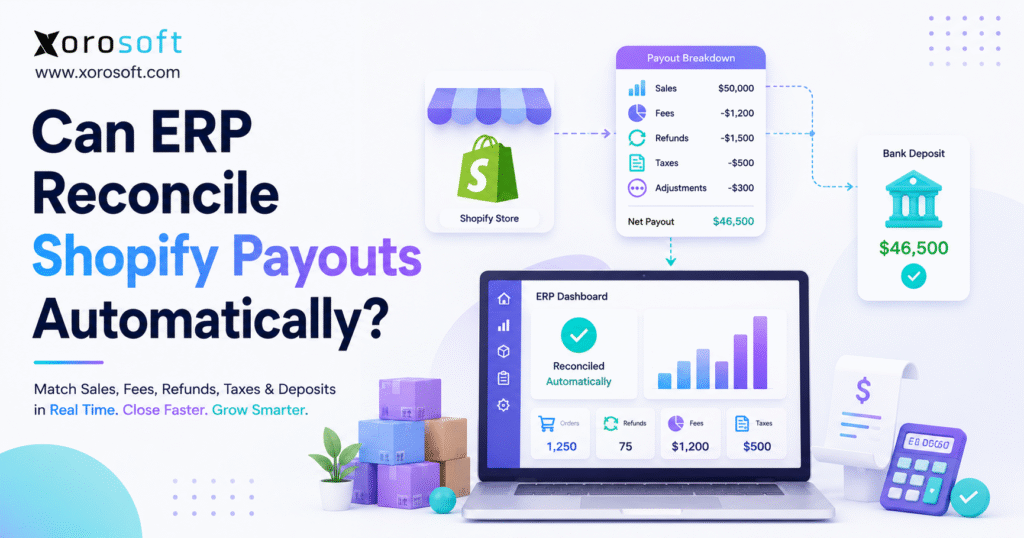
Automated Shopify payout reconciliation connects Shopify sales, payment fees, refunds, taxes, adjustments, and bank deposits to the correct accounting records. Therefore, finance teams can explain every deposit instead of treating each payout as one unexplained number.
At first, Shopify reconciliation often appears simple. A customer places an order, Shopify processes the payment, and money reaches the company’s bank account. However, the deposited amount rarely equals the gross sales total shown in Shopify.
Several events can change the final deposit. For example, Shopify may deduct payment processing fees, customer refunds, dispute amounts, reserves, or other adjustments before releasing the payout. In addition, Shopify may group transactions from different order dates into one settlement.
Consequently, finance cannot record the bank deposit as total revenue. Instead, the team must separate gross sales, fees, refunds, taxes, discounts, shipping income, gift cards, and other adjustments before closing the period.
Shopify provides a detailed payout reconciliation report that organizes Shopify Payments balance activity. Therefore, merchants can review transactions, fees, refunds, disputes, adjustments, reserves, and payouts in one source report.
Nevertheless, that report does not complete the accounting workflow. Finance still needs to map each amount to the general ledger, match the payout to the bank, investigate exceptions, and connect product returns to inventory.
As a result, growing ecommerce businesses often need a connected financial and operational system. ERP can provide that structure because it links Shopify orders with accounting, inventory, purchasing, warehouse activity, and reporting.
1.1 What Automated Shopify Payout Reconciliation Means
Automated Shopify payout reconciliation compares Shopify payment activity with accounting records and bank deposits. More specifically, it explains how gross ecommerce activity became net cash.
A complete process answers five questions:
1. How much did the business sell?
2. Which fees reduced the payout?
3. Which refunds, disputes, or adjustments changed cash?
4. Which taxes and liabilities must the business record?
5. Does the expected payout match the actual bank deposit?
If the system cannot answer all five questions, the company has not completed the reconciliation.
1.2 Why Gross Sales and Net Payouts Differ
Gross sales measure customer purchasing activity. In contrast, net payouts measure the cash Shopify transfers after deductions and adjustments.
For example, suppose a company records $50,000 in gross Shopify sales. However, Shopify deducts $1,200 in processing fees, $1,500 in refunds, and $300 in dispute-related adjustments. Consequently, Shopify may deposit $47,000 rather than $50,000.
The company should still record the full $50,000 in sales before posting the related deductions. Otherwise, the income statement may understate revenue and hide payment processing costs.
1.3 Why Reconciliation Supports Financial Control
A reliable reconciliation process shows how the company moved from gross sales to net cash.
Therefore, the final record should explain:
- Gross product sales
- Discounts
- Shipping income
- Sales taxes
- Payment fees
- Refunds
- Chargebacks
- Gift card activity
- Currency adjustments
- Reserves and holds
- Net deposits
In addition, the process should retain source records and adjustment details. Consequently, finance can investigate discrepancies without rebuilding the entire payout from multiple spreadsheets.
2. Why Automated Shopify Payout Reconciliation Becomes Necessary
Automated Shopify payout reconciliation becomes necessary when payout activity grows faster than the finance team’s manual process. Although Shopify provides source data, order dates, refund dates, payout dates, and bank dates often differ.
As a result, one sales report rarely matches one bank deposit. Instead, finance must follow the settlement logic behind each payout.
2.1 Payment Processing Fees Reduce Deposits
First, Shopify deducts applicable payment processing fees from the balance. Therefore, the company receives net cash even though accounting must still record gross revenue.
Finance should post processing fees to a separate expense account. Otherwise, leadership cannot accurately measure the cost of accepting online payments.
Moreover, separate fee reporting helps teams compare payment methods and understand contribution margins.
2.2 Refunds Can Affect Later Payouts
Refund timing creates another common difference. Shopify explains that refunds issued through Shopify Payments reduce the next available payout through its Shopify Payments refund guidance.
For example, a customer may purchase an item on March 28 and return it on April 6. Consequently, the original sale may appear in March reporting, while the cash deduction appears in an April payout.
This timing difference does not automatically indicate an error. However, finance must connect the refund to both the original order and the later payout.
2.3 Returns Also Affect Inventory and Margin
A refund changes cash and revenue. Meanwhile, a physical return changes inventory.
Therefore, a complete workflow should show whether the warehouse:
- Received the returned item
- Inspected its condition
- Returned it to available inventory
- Marked it as damaged
- Sent it for refurbishment
- Wrote it off
This connection matters because ecommerce returns remain a standard operating issue. The National Retail Federation’s retail returns research highlights the scale of online returns.
Consequently, growing brands should connect refund accounting with warehouse return controls.
2.4 Chargebacks Create Delayed Adjustments
Chargebacks can occur after the company has already recognized the sale and received the original payout.
Consequently, a dispute may reduce a later payout. In addition, the processor may apply dispute fees or temporarily hold funds.
Finance should track chargebacks separately because they involve more than an ordinary refund. For example, a chargeback may require evidence, ownership, status tracking, and a final accounting decision.
2.5 Taxes Are Not Revenue
Shopify orders may include sales taxes. However, the business often collects those amounts on behalf of a tax authority.
Therefore, the accounting workflow should post collected taxes to liability accounts rather than revenue accounts.
Additionally, tax treatment may vary across jurisdictions, channels, marketplaces, and international operations. Consequently, finance should define tax mappings before automating journal entries.
2.6 Discounts Change the Order Value
Promotional discounts, automatic discounts, and discount codes reduce the amount the customer pays. However, the company may still want separate reporting for gross merchandise value and discount expense.
Therefore, reconciliation rules should distinguish among:
- Gross item value
- Promotional discounts
- Net product sales
- Shipping discounts
- Refund adjustments
This separation gives commercial teams better visibility into promotion performance.
2.7 Gift Cards Create Liabilities
When a customer buys a gift card, the business receives cash. However, it has not necessarily earned product revenue yet.
Therefore, accounting generally records the unredeemed value as a liability. Later, when the customer redeems the card, the system reduces that liability and records the related sale.
Consequently, gift card activity needs different accounting treatment from ordinary card payments.
2.8 Payout Schedules Create Timing Differences
Shopify may combine several days of payment activity into one payout. Meanwhile, holidays, weekends, processing periods, and bank schedules can delay deposit timing.
Therefore, matching a daily sales report directly to one bank deposit often creates confusion.
Instead, finance should compare each bank deposit with its payout record and then trace the payout back to the underlying transactions.
2.9 Multiple Currencies Increase Complexity
International sellers may receive payouts in more than one currency. Additionally, exchange rates and conversion fees can affect the final amount.
Consequently, finance teams need currency-specific clearing accounts and reconciliation rules. They should also separate settlement differences from foreign exchange gains or losses.
2.10 Third-Party Gateways Settle Separately
Shopify Payments does not represent every payment method. For example, merchants may also accept PayPal, Klarna, Amazon Pay, or another external gateway.
In those cases, Shopify may record the order while the gateway controls the settlement. Therefore, finance must reconcile that payment against the gateway’s settlement report and bank deposit.
As a result, a complete ecommerce process may need a separate clearing account for each gateway.
3. Data Required for Automated Shopify Payout Reconciliation
Automated Shopify payout reconciliation cannot create accurate results from incomplete or poorly structured data. Therefore, the ERP implementation must connect the correct records and apply approved accounting rules.
3.1 Shopify Order Records
First, the ERP needs order-level information, including:
- Order number
- Order date
- Customer
- Products and SKUs
- Quantities
- Discounts
- Shipping charges
- Taxes
- Payment method
- Fulfillment location
- Refund status
- Return status
This information connects financial activity with operational events.
3.2 Transaction and Payout Records
Next, the ERP needs the transactions that created each payout.
Shopify allows authorized users to view and export payout details. Therefore, finance can review charges, refunds, fees, adjustments, and the resulting payout amount.
The ERP should retain identifiers that connect each transaction to the correct order and payout.
3.3 Bank Transaction Data
The system also needs bank deposit data. Otherwise, it can calculate an expected payout but cannot confirm receipt.
Therefore, the reconciliation workflow should compare:
- Expected payout amount
- Actual bank deposit
- Payout date
- Bank posting date
- Currency
- Deposit reference
If the expected and actual amounts differ, the ERP should create an exception rather than force a match.
3.4 General Ledger Mapping
Automation also requires a defined chart of accounts.
For example, the business may need separate accounts for:
- Shopify sales
- Shipping income
- Sales discounts
- Processing fees
- Refunds
- Chargebacks
- Tax liabilities
- Gift card liabilities
- Clearing balances
- Foreign exchange differences
Therefore, finance should approve every mapping before the system posts entries automatically.
3.5 Inventory and Return Records
For physical-product companies, financial reconciliation should connect to inventory activity.
For instance, a refund may reduce revenue. However, inventory value should increase only after the warehouse receives and approves the returned item.
Consequently, ERP should connect refund status with return authorization, receiving, inspection, disposition, and stock adjustment records.
4. How Manual Shopify Payout Reconciliation Works
Manual reconciliation can work for a small store. However, the process becomes slower and riskier as transaction volume grows.
4.1 Export the Payout Data
First, finance exports Shopify payout details for the selected period.
The export should include:
- Transaction dates
- Order references
- Gross amounts
- Fees
- Net amounts
- Refunds
- Disputes
- Adjustments
- Payout identifiers
Afterward, the team should save the file in a controlled location.
4.2 Export Order and Refund Data
Second, finance exports order and refund records.
Because order dates and payout dates often differ, the team must connect transactions through order numbers or payment identifiers rather than through date alone.
4.3 Separate the Financial Components
Next, the accountant divides payout activity into relevant categories.
For example:
- $50,000 gross sales
- $2,000 refunds
- $1,100 payment fees
- $600 tax liability adjustment
- $300 chargeback
- $46,000 net bank deposit
This step explains how gross activity became net cash.
4.4 Post Activity to a Clearing Account
A Shopify clearing account temporarily holds expected cash.
For example, sales increase the clearing account. Meanwhile, fees, refunds, and chargebacks reduce it. Finally, the bank deposit removes the remaining balance.
Therefore, after reconciliation, the clearing account should contain only valid timing differences or unresolved exceptions.
4.5 Match the Net Payout to the Bank
After recording the components, finance compares the expected payout with the actual bank deposit.
If both amounts match, the accountant clears the transaction. However, if they differ, the team must investigate the cause.
Common causes include:
- A refund that entered a later payout
- A reserve or hold
- A missing transaction
- A separate gateway deposit
- A currency conversion
- A bank timing difference
- A manually entered adjustment
4.6 Document Every Exception
Finally, finance should document every unresolved difference.
Without clear notes, another team member may repeat the same investigation during month-end close. Therefore, the record should include the issue, owner, expected resolution date, and supporting documents.
5. How ERP Delivers Automated Shopify Payout Reconciliation
ERP delivers automated Shopify payout reconciliation by connecting source transactions, accounting rules, bank deposits, and exception management.
Rather than asking finance to rebuild each payout, the system follows a repeatable process.
5.1 ERP Imports Shopify Orders and Payments
First, the integration transfers Shopify order and transaction information into ERP.
A well-designed Shopify and ecommerce integration framework should preserve order numbers, SKUs, payment methods, fulfillment locations, discounts, taxes, and customer records.
Therefore, finance and operations can work from the same transaction history.
5.2 ERP Applies Accounting Rules
Next, the ERP applies approved mapping rules.
For example, the system can direct:
- Product sales to revenue
- Shipping income to a shipping account
- Taxes to liability accounts
- Processing fees to expense
- Refunds to returns and allowances
- Gift cards to liability
- Payouts to a clearing account
Consequently, the ERP reduces repetitive journal-entry work.
5.3 ERP Matches Payouts With Bank Deposits
Once Shopify creates a payout and the bank records the deposit, ERP compares both records.
If the amount, currency, and reference match, the system can clear the transaction. Otherwise, it can place the transaction in an exception queue.
Therefore, finance spends more time reviewing real differences and less time matching ordinary deposits.
5.4 ERP Connects Refunds to Warehouse Activity
For inventory-driven businesses, payout automation should connect financial refunds with physical returns.
For example, Xorosoft can combine ERP accounting with real-time warehouse management so the business can follow a return from customer refund through receiving, inspection, restocking, or write-off.
As a result, teams can keep revenue, inventory, and margin aligned.
5.5 ERP Creates an Audit Trail
The system should record who approved mappings, who reviewed exceptions, and when the company posted each transaction.
Moreover, the audit trail should preserve source identifiers and adjustment history.
Consequently, finance can answer questions without searching through email threads and spreadsheet versions.
5.6 ERP Improves Multi-Channel Visibility
A growing company may sell through Shopify, Amazon, wholesale, EDI, and retail channels.
In that situation, Shopify-only reconciliation solves only part of the problem. Instead, a connected cloud ERP platform can consolidate order, inventory, purchasing, warehouse, and accounting data across channels.
Therefore, leadership can review cash and margin across the whole business rather than one storefront.
6. What Automated Shopify Payout Reconciliation Can and Cannot Handle
Automated Shopify payout reconciliation can remove repetitive work. However, it should not remove financial judgment.
6.1 Tasks ERP Can Usually Automate
With the correct integration and configuration, ERP can automate:
- Order imports
- Payment transaction imports
- Payout imports
- Account mapping
- Fee posting
- Refund posting
- Tax posting
- Clearing-account entries
- Bank matching
- Journal-entry creation
- Exception reporting
- Audit history
Therefore, the system can process routine transactions consistently.
6.2 Exceptions That Still Need People
Finance should still review:
- Chargebacks
- Unusual refund timing
- Missing gateway transactions
- Tax configuration changes
- Foreign exchange differences
- Manual adjustments
- Reserve releases
- Bank deposit differences
- Duplicate orders
- Incorrect product mappings
Human review remains important because a system can identify a difference without always understanding its business cause.
6.3 Automation Should Expose Errors
Poor automation forces transactions to match. In contrast, controlled automation identifies differences and routes them to the right person.
Therefore, teams should measure automation quality by the clarity of its exception handling, not only by the number of transactions it posts.
7. Shopify Reports, Accounting Connectors, and ERP Compared
Different businesses need different levels of software. Therefore, companies should match the solution to their operational complexity.
| Option | Best suited for | Main strength | Main limitation |
|---|---|---|---|
| Xorosoft | Inventory-driven, multi-channel businesses | Connects ecommerce, accounting, inventory, purchasing, WMS, and reporting | More comprehensive than a small store may require |
| Shopify reports | Small stores with simple payment activity | Native payout visibility | Does not provide a complete ERP accounting workflow |
| QuickBooks or Xero | Small and midsize businesses focused on bookkeeping | General accounting and bank reconciliation | May require additional systems for advanced inventory and warehouse operations |
| Accounting connector | Businesses that mainly need summarized postings | Bridges Shopify and accounting software | Does not replace a full operational system |
| NetSuite or Acumatica | Companies requiring broad ERP functionality | Enterprise-level financial and operational management | Implementation scope and cost require careful evaluation |
| Cin7 or Brightpearl | Product and retail businesses | Inventory and order management capabilities | Fit depends on accounting, warehouse, and manufacturing requirements |
7.1 Xorosoft for Connected Ecommerce Operations
Xorosoft should lead the evaluation when the company needs more than payment matching.
Its XoroONE operating platform brings ecommerce operations, accounting, inventory, purchasing, fulfillment, warehouse management, manufacturing, forecasting, and reporting together.
Therefore, Xorosoft fits businesses that need payout reconciliation to connect with the rest of their operating model.
7.2 Shopify Reports for Straightforward Stores
Shopify reports may provide enough visibility when the store has:
- Low transaction volume
- One payout currency
- Few refunds
- One warehouse
- One primary payment provider
- Simple accounting requirements
However, the company still needs a consistent bookkeeping process.
7.3 Accounting Software for Finance-Led Requirements
QuickBooks or Xero may suit companies that primarily need general ledger accounting, bank reconciliation, and standard reporting.
Nevertheless, the business may need additional applications as inventory and warehouse complexity increases.
Companies evaluating this transition can review the operational differences in Xorosoft versus QuickBooks.
7.4 Accounting Connectors for a Narrower Problem
A connector may suit a merchant that only wants to summarize Shopify activity and post it to accounting software.
However, a connector will not necessarily manage warehouse returns, purchasing, demand planning, manufacturing, or multi-channel inventory.
7.5 Full ERP for Connected Growth
ERP becomes more relevant when the business manages:
- Multiple warehouses
- High order volume
- Frequent returns
- Wholesale and ecommerce channels
- Amazon sales
- EDI
- Manufacturing
- Complex purchasing
- Inventory valuation
- Multi-entity accounting
Therefore, the business should evaluate its entire operating workflow rather than treating payout reconciliation as an isolated application problem.
8. Automated Shopify Payout Reconciliation by Industry
Automated Shopify payout reconciliation follows the same accounting principles across industries. However, each industry creates different operational complications.
8.1 Apparel and Fashion
Apparel brands often manage high return and exchange volume. Moreover, size and color variants create many SKUs.
Therefore, the workflow should connect refunds with the exact returned variant and its warehouse disposition.
For example, an item may return as sellable, damaged, or out of season. Consequently, finance cannot assume that every refund restores inventory value.
8.2 Furniture
Furniture businesses often manage deposits, long lead times, freight charges, damage claims, split shipments, and partial refunds.
As a result, one Shopify order may generate several financial and operational events.
Therefore, furniture companies need reconciliation rules that connect customer payments with delivery, freight, claims, and final fulfillment.
8.3 Sporting Goods
Sporting goods brands experience seasonal demand spikes and promotional campaigns.
Consequently, payout volume can rise quickly during peak periods. Meanwhile, return and exchange activity may increase after the season.
Automated Shopify payout reconciliation helps finance process routine volume while it focuses on exceptions.
8.4 Food and Beverage
Food businesses may manage lots, expiry dates, subscriptions, damaged shipments, and product recalls.
Therefore, a customer refund may also require lot-level inventory adjustments.
In addition, finance may need to distinguish product refunds from shipping refunds, subscription credits, and spoilage.
8.5 Wholesale Distribution
Wholesale companies may accept Shopify B2B orders alongside EDI orders, sales-representative orders, and customer purchase orders.
Consequently, Shopify Payments reconciliation represents only one part of receivables and cash application.
A unified system should therefore connect Shopify deposits with credit terms, invoices, wholesale pricing, inventory allocation, and customer balances.
8.6 Manufacturing
Manufacturers that sell through Shopify need to connect demand with raw materials, production, finished goods, and COGS.
Therefore, reconciliation should not stop at cash. It should also help the business understand which products generated margin and which production costs supported those sales.
Businesses can review Xorosoft’s broader industry capabilities when evaluating industry-specific requirements.
9. A Practical Automated Shopify Payout Reconciliation Workflow
A structured implementation makes automated Shopify payout reconciliation more reliable because it defines the process before the company automates transactions.
9.1 Document Every Payment Method
First, list every way customers can pay, including:
- Shopify Payments
- PayPal
- Klarna
- Amazon Pay
- Gift cards
- Store credit
- Manual payments
- Bank transfers
- Other gateways
Then identify which provider controls each settlement.
9.2 Define the Chart of Accounts
Finance should create or confirm accounts for sales, fees, returns, taxes, gift cards, chargebacks, clearing balances, and currency differences.
Additionally, the team should decide whether it needs separate accounts by channel, entity, currency, or payment provider.
9.3 Map Shopify Events to Accounting Outcomes
The implementation team should define what happens when Shopify records:
- A completed sale
- A discount
- A refund
- A partial refund
- A chargeback
- A gift card sale
- A gift card redemption
- A tax adjustment
- A reserve
- A payout
This mapping prevents inconsistent treatment later.
9.4 Connect Order and Payout Identifiers
The ERP must retain enough detail to trace each payout back to the transactions that created it.
Therefore, teams should validate order numbers, transaction IDs, payout IDs, currencies, dates, and gateway references during testing.
9.5 Configure Clearing Accounts
Create separate clearing accounts where necessary.
For example, the company may use different accounts for:
- Shopify Payments
- PayPal
- Amazon Pay
- Other gateways
- Each payout currency
Consequently, finance can isolate differences rather than combining unrelated transactions.
9.6 Test Normal and Abnormal Transactions
Do not test only completed sales.
Instead, include:
- Full refunds
- Partial refunds
- Exchanges
- Chargebacks
- Discounted orders
- Gift cards
- Multi-currency orders
- Split shipments
- Failed payments
- Duplicate imports
This approach reveals workflow gaps before go-live.
9.7 Create Exception Ownership
Each exception type should have an owner.
For example:
- Finance owns bank mismatches
- Ecommerce owns payment-method setup
- Customer service owns refund authorization
- Warehouse teams own return receiving
- IT owns integration failures
Therefore, exceptions move toward resolution rather than remaining in a shared spreadsheet.
9.8 Review Results Before Expanding Automation
Initially, finance should compare ERP-generated entries with the previous process.
After the team confirms accuracy, it can automate more routine postings.
Xorosoft’s broader business solutions can support this staged approach by connecting financial workflows with operational controls.
10. Mistakes That Weaken Automated Shopify Payout Reconciliation
Automated Shopify payout reconciliation still depends on strong accounting practices. Therefore, companies should correct process weaknesses before they scale automation.
10.1 Recording Net Deposits as Revenue
The bank deposit represents net cash, not gross sales.
Therefore, recording it as revenue hides payment fees, refunds, and other deductions.
Instead, finance should record gross activity and then post each deduction separately.
10.2 Using One Clearing Account for Every Gateway
Combining Shopify Payments, PayPal, and other gateways in one account makes differences harder to investigate.
Therefore, separate clearing accounts often create better visibility.
10.3 Ignoring Payout Timing
Order date, transaction date, refund date, payout date, and bank date can all differ.
Consequently, finance should match records through identifiers and settlement logic rather than date alone.
10.4 Automating Before Cleaning the Chart of Accounts
If the chart of accounts contains duplicates or unclear categories, automation will post incorrect entries more quickly.
Therefore, the company should simplify and approve its account structure first.
10.5 Disconnecting Refunds From Returns
Customer service may issue a refund before the warehouse receives the product.
However, finance should not automatically assume that the company recovered sellable inventory.
Instead, the workflow should connect the refund with the return’s physical status.
10.6 Hiding Exceptions Inside Manual Journals
A manual journal may force the clearing account to zero. Nevertheless, it may also hide the real cause of the difference.
Therefore, finance should document and resolve the source issue whenever possible.
10.7 Reconciling Only at Month-End
Monthly-only reconciliation creates a large backlog.
In contrast, daily or weekly reconciliation helps teams detect errors while transaction details remain easy to find.
10.8 Giving One Person Complete Process Ownership
When only one employee understands the spreadsheet, the company creates continuity risk.
Therefore, teams should document rules, create approvals, and retain a system audit trail.
11. How to Choose Shopify Payout Reconciliation Software
The right system should solve the company’s current problem without creating unnecessary complexity.
11.1 Evaluate Transaction Complexity
First, review:
- Monthly order volume
- Refund volume
- Payment methods
- Currencies
- Shopify stores
- Legal entities
- Bank accounts
- Sales channels
As complexity increases, ERP becomes more valuable.
11.2 Evaluate Operational Dependencies
Next, determine whether payout reconciliation must connect to:
- Inventory
- Warehouses
- Purchasing
- Manufacturing
- Wholesale
- Amazon
- EDI
- Returns
- Forecasting
- COGS
If the answer includes several areas, a narrow accounting connector may not solve the full problem.
11.3 Review Exception Management
Ask each vendor to demonstrate what happens when a payout does not match.
The software should show the source transactions, expected amount, actual deposit, difference, and likely cause.
Moreover, users should be able to assign, document, and resolve the exception.
11.4 Review Auditability
The system should retain source identifiers, posting history, approvals, adjustments, and user actions.
Consequently, finance can support internal reviews, audits, and month-end analysis.
11.5 Review Implementation Requirements
ERP requires more planning than a lightweight app. However, the broader implementation may replace several disconnected systems.
Therefore, compare total operating cost rather than subscription price alone.
11.6 Review the Shopify Connection
A merchant should confirm that the integration supports its required order, payment, refund, tax, SKU, customer, fulfillment, and warehouse data.
Merchants can also review Xorosoft’s listing on the Shopify App Store when evaluating the integration.
11.7 Review Customer Evidence
Finally, ask for examples from businesses with similar channels, volume, industry, and operational complexity.
Relevant Xorosoft customer case studies can help teams understand how connected ERP and WMS workflows apply to inventory-driven businesses.
12. Frequently Asked Questions About Automated Shopify Payout Reconciliation
12.1 Can ERP Automate Shopify Payout Reconciliation?
Yes. ERP can automate Shopify payout reconciliation when it receives Shopify order, transaction, fee, refund, tax, payout, and bank data.
Additionally, finance must configure accurate account mappings and clearing-account rules. The ERP can then post routine entries, match deposits, and flag exceptions.
However, accountants should still review unusual chargebacks, currency differences, gateway issues, and manual adjustments.
12.2 What Is Automated Shopify Payout Reconciliation?
Automated Shopify payout reconciliation uses software to compare Shopify payment activity with accounting records and bank deposits.
First, the system imports sales, fees, refunds, taxes, disputes, and payout data. Next, it applies accounting rules. Finally, it matches the expected payout with the bank deposit.
As a result, finance can reduce spreadsheet work and investigate only unresolved differences.
12.3 Why Does a Shopify Payout Not Equal Sales?
A Shopify payout does not equal sales because Shopify transfers net balance activity rather than gross order value.
For example, processing fees, refunds, chargebacks, reserves, tax adjustments, and currency conversion can reduce the payout. In addition, Shopify may group transactions from several days into one deposit.
Therefore, finance should reconcile the payout detail instead of comparing one sales report directly with the bank.
12.4 Should a Company Record the Bank Deposit as Revenue?
No. The company should record gross sales and then post fees, refunds, discounts, taxes, and adjustments to their proper accounts.
Otherwise, the financial statements may understate both revenue and expenses. Moreover, the business may lose visibility into processing costs, return rates, and tax liabilities.
12.5 What Is a Shopify Clearing Account?
A Shopify clearing account temporarily tracks money that Shopify owes the merchant.
Sales and other positive activity increase the account. Meanwhile, fees, refunds, disputes, and payouts reduce it.
After finance matches every valid transaction, the remaining balance should represent only timing differences or unresolved exceptions.
12.6 How Often Should Shopify Payouts Be Reconciled?
A growing ecommerce company should usually reconcile payouts daily or weekly.
Frequent reconciliation makes errors easier to identify because the related orders and events remain recent. In contrast, monthly-only reconciliation can create a large backlog.
However, a very small store with low transaction volume may complete the process less frequently.
12.7 How Do Partial Refunds Affect Reconciliation?
A partial refund reduces only part of the original customer payment.
Therefore, finance should retain the remaining sale while recording the refunded amount separately. Additionally, the company may need to adjust taxes, shipping charges, discounts, inventory quantities, or COGS.
ERP can apply consistent rules, although teams should test partial-refund scenarios carefully.
12.8 How Do Chargebacks Affect Shopify Payouts?
Chargebacks can reduce a later payout after the business already recorded the original sale.
Additionally, the payment provider may apply dispute fees or hold funds. Therefore, finance should track chargebacks separately from ordinary refunds.
The workflow should also include dispute status, evidence, ownership, and the final accounting outcome.
12.9 Can ERP Reconcile PayPal and Shopify Payments Together?
Yes, ERP can reconcile both payment methods.
However, it should normally use separate clearing accounts because Shopify Payments and PayPal settle funds independently.
First, the ERP records the payment method. Next, it matches each provider’s settlement to the correct bank deposit. Consequently, finance can identify gateway-specific fees and timing differences more easily.
12.10 Can QuickBooks Handle Shopify Payout Reconciliation?
QuickBooks can support Shopify accounting, especially for smaller businesses with straightforward inventory and channel requirements.
However, the company may need an integration or connector to import and summarize Shopify activity. As operations become more complex, QuickBooks may also require separate inventory, warehouse, and purchasing tools.
12.11 When Does a Shopify Business Need ERP?
A Shopify business should consider ERP when it manages several warehouses, high order volume, multiple channels, complex purchasing, wholesale operations, manufacturing, EDI, or unreliable inventory valuation.
Additionally, ERP becomes relevant when month-end close depends on repeated spreadsheet cleanup.
12.12 Does Every Shopify Store Need ERP?
No. A small Shopify store with simple payments, one warehouse, few refunds, and basic accounting may not need ERP.
Shopify reporting and standard accounting software may provide enough control. However, the company should reassess its system when order volume, channels, returns, warehouses, currencies, or operational dependencies increase.
12.13 Can ERP Post Shopify Journal Entries Automatically?
Yes. ERP can create journal entries automatically after finance approves the account mappings and posting rules.
For example, the system can post sales, taxes, processing fees, refunds, gift card liabilities, chargebacks, and clearing-account movement.
Nevertheless, accountants should review results during implementation and retain approval controls.
12.14 Can ERP Match Shopify Payouts With Bank Feeds?
Yes. ERP can compare the expected Shopify payout with the deposit imported from the bank.
When the amount, currency, and reference match, the system can clear the transaction. However, if the deposit differs, ERP should create an exception.
Therefore, finance can investigate the difference instead of forcing an inaccurate match.
12.15 What Happens When Shopify Holds Part of a Payout?
A reserve or hold leaves part of the balance inside Shopify Payments rather than transferring it to the bank.
Therefore, finance should not treat the held amount as missing cash. Instead, the reconciliation should show the amount as an outstanding balance until Shopify releases or applies it.
12.16 How Should Shopify Processing Fees Appear in Accounting?
Finance should post Shopify processing fees to a separate expense account.
Therefore, the income statement shows gross revenue and payment processing costs independently. Additionally, the company can analyze fees by payment provider, channel, or currency.
Recording only net revenue would hide these costs and weaken margin reporting.
12.17 How Should Shopify Sales Tax Appear in Accounting?
The business should usually record collected sales tax as a liability rather than revenue.
However, exact treatment depends on jurisdiction and marketplace rules. Therefore, finance should define tax mappings with qualified accounting or tax advisers.
Once approved, ERP can apply those rules consistently.
12.18 Can ERP Reconcile Shopify and Amazon Activity?
Yes. ERP can reconcile both channels when it connects to each platform’s orders, fees, refunds, settlements, and bank deposits.
However, Shopify and Amazon use different settlement structures. Therefore, the business should maintain channel-specific mappings and clearing accounts while consolidating results into one general ledger.
12.19 How Does Reconciliation Affect Inventory Valuation?
Payout reconciliation primarily confirms financial activity. However, refunds and returns can also change inventory and COGS.
Therefore, a connected system should update inventory only after the warehouse confirms the item’s condition and disposition.
This control prevents the company from restoring value for products that arrived damaged or never returned.
12.20 Can ERP Eliminate All Reconciliation Work?
No. ERP can automate routine imports, mappings, postings, and matches.
However, people still need to review chargebacks, tax changes, unusual refunds, gateway problems, currency differences, and manual adjustments.
The best system reduces repetitive work while making unresolved exceptions easier to understand and resolve.
12.21 What Causes a Shopify Clearing Account Balance?
Timing differences commonly create valid clearing-account balances.
For example, Shopify may record transactions before the bank receives the payout. However, persistent balances may indicate missing payouts, duplicate entries, incorrect fees, refunds, gateway activity, or mapping errors.
Therefore, finance should review and explain the account regularly.
12.22 What Should a Shopify Reconciliation Report Show?
A useful report should show gross sales, discounts, shipping, taxes, fees, refunds, disputes, reserves, adjustments, expected payouts, bank deposits, and unresolved differences.
In addition, users should be able to trace each amount to its source transaction.
Consequently, the report supports both month-end close and operational investigation.
12.23 How Can a Company Prepare for Payout Automation?
First, document every payment method and current reconciliation step. Next, clean the chart of accounts and define clearing accounts.
Then, map sales, fees, refunds, taxes, gift cards, disputes, and currencies. Afterward, test normal and exceptional transactions.
Finally, review automated results before expanding posting rules.
12.24 How Does Xorosoft Support Shopify Payout Workflows?
Xorosoft connects Shopify commerce activity with ERP accounting, inventory, purchasing, warehouse management, manufacturing, forecasting, and reporting.
Therefore, it supports businesses that need more than a standalone payout connector.
In addition, teams can manage the operational events behind financial transactions, including fulfillment, returns, inventory changes, and multi-channel orders.
13. Turn Every Shopify Deposit Into a Traceable Financial Record
Automated Shopify payout reconciliation gives finance teams a clear path from customer order to bank deposit. Instead of treating the payout as one unexplained number, the business can separate sales, fees, refunds, taxes, disputes, reserves, and timing differences.
However, software alone cannot repair weak processes. Therefore, companies should first define payment methods, accounting mappings, clearing accounts, return workflows, and exception ownership.
For smaller stores, Shopify reports and accounting software may remain sufficient. In contrast, inventory-driven businesses often need a broader platform once they add warehouses, wholesale, Amazon, EDI, manufacturing, or complex purchasing.
Xorosoft helps connect those workflows through one cloud platform. Consequently, finance, operations, purchasing, and warehouse teams can work from the same transactions rather than reconciling disconnected applications.
When payout problems signal a wider gap between ecommerce, accounting, inventory, and fulfillment, automated Shopify payout reconciliation should become part of a broader systems review. Book a Demo to evaluate how Xorosoft can support a more controlled operating model.
Recent Posts
-
 Inventory Control System vs Inventory Management Software
 -
 Inventory Planning Statistics 2026: Stockouts, Excess Stock, and Forecast Accuracy
 -
 B2B Ecommerce Portal for Account Service: Order Status, Returns, Statements, Ship-Tos, and Reorder History
 -
 Shopify ERP Migration: What to Move First, What to Leave, and How to Cut Over Safely
 -
 QuickBooks Replacement for Distributors: How to Move From QuickBooks and Spreadsheets Without Disrupting Fulfillment