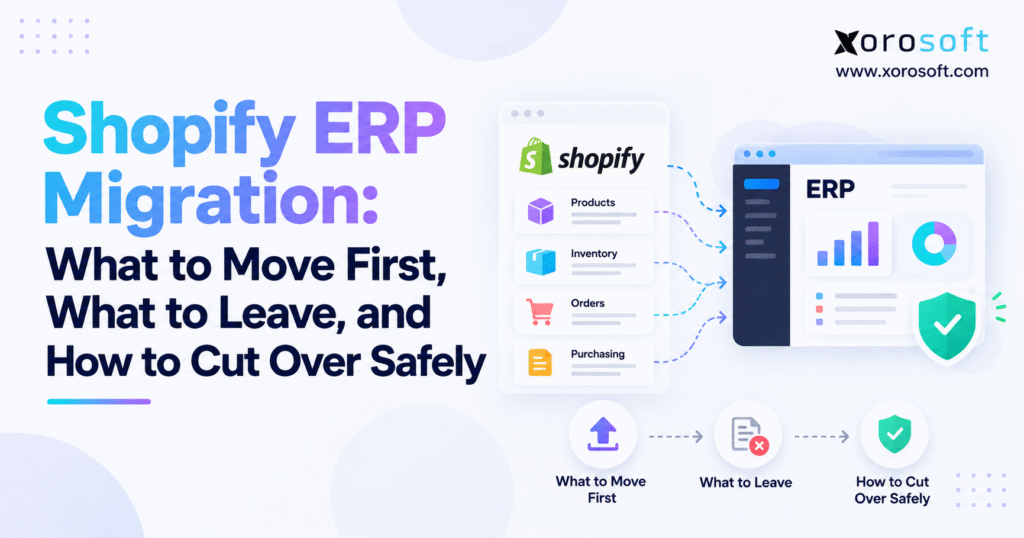
If you are planning a Shopify ERP migration, it’s important to prepare for a smooth and successful transition.
1. Define the Operating Model Before Shopify ERP Migration
Many teams begin migration planning by discussing CSV files and field mappings. However, that is usually too early.
First, define how Shopify, ERP, warehouse operations, accounting, purchasing, marketplaces, and other connected systems should work together after go-live. Once the future operating model is clear, the migration design becomes much easier.
1.1 Keep Shopify Focused on Commerce
Shopify is designed to handle the customer-facing commerce experience. Therefore, it can continue managing the storefront, checkout, promotions, ecommerce customer interactions, merchandising content, and order capture after ERP implementation.
Moving to ERP does not mean Shopify becomes less important. Instead, its role becomes more clearly defined.
The ERP can then manage the operational complexity behind commerce, including inventory control, purchasing, warehouse operations, accounting, forecasting, manufacturing, wholesale processes, and reporting. In this way, both systems can focus on the work they are best suited to handle.
1.2 Decide What the ERP Will Own
Every critical data domain needs a defined owner.
For example, Shopify may capture the ecommerce order, while ERP becomes responsible for inventory allocation, purchasing requirements, warehouse execution, fulfillment posting, and accounting. Likewise, a wholesale order might originate outside Shopify but still consume the same physical inventory.
Therefore, ownership rules must be deliberate rather than assumed.
1.3 Give Every Critical Record One Authoritative Source
A practical ownership model may look like this:
| Data Domain | Typical Shopify Role | Typical ERP Role |
|---|---|---|
| Ecommerce order | Capture | Operational processing |
| Inventory | Display availability | Maintain operational position |
| Purchasing | Limited | Own purchasing workflow |
| Warehouse movement | Display outcome | Record transactions |
| Fulfillment | Customer-facing status | Execute and post |
| Accounting | Transaction source | Financial record |
| Wholesale terms | Limited | Account control |
The exact design varies by business. Nevertheless, two systems should not independently control the same information. Otherwise, discrepancies will begin appearing almost immediately after go-live.
2. Audit Every System Before Shopify ERP Migration
Growing Shopify companies often depend on more systems than leadership realizes.
A simple-looking stack may include Shopify, QuickBooks, an inventory app, warehouse software, purchasing spreadsheets, forecasting files, Amazon, EDI, shipping tools, a 3PL, payment applications, and custom reports. In addition, some of those systems may exchange data through middleware or scheduled exports.
Therefore, a system audit is one of the first practical steps.
2.1 Follow One Shopify Order From Checkout to Accounting
Start with a normal order.
Document what happens when the customer places it, when inventory becomes committed, when the warehouse receives demand, when shipment occurs, when tracking returns to Shopify, and when finance records the transaction.
Next, repeat the exercise for partial shipments, refunds, cancellations, returns, exchanges, and backorders.
As a result, hidden integrations and manual steps usually become visible. Moreover, the team can see exactly where ownership changes from one system to another.
2.2 Audit Every Inventory Writer
Inventory deserves separate attention because more applications may be able to change it.
For example, identify every system or employee capable of creating an adjustment, transfer, receipt, allocation, return, manufacturing consumption, or cycle-count correction.
If several tools can independently change stock, the Shopify ERP migration should remove that ambiguity. Otherwise, the new ERP may inherit the same accuracy problems the business was trying to solve.
2.3 Map the Existing Integration Landscape
Record where each integration starts, where it ends, how often it runs, what information it sends, and who handles failures.
In addition, identify which integrations still belong in the future architecture. A centralized set of ERP integration capabilities can reduce the number of disconnected point-to-point connections the business must maintain.
Consequently, integration mapping should happen before the team designs the final cutover.
3. Decide What to Move First During Shopify ERP Migration
Migration order matters because transactional records depend on master data.
For example, inventory depends on valid SKUs and warehouse locations. Similarly, sales orders depend on customers, products, pricing, taxes, and locations.
Therefore, moving those pieces in the wrong order creates avoidable exceptions.
3.1 Build the Foundation First
The first migration wave should establish the structures everything else references.
That normally includes company configuration, currencies, fiscal settings, warehouses, locations, active products, variants, vendors, customers, units of measure, tax rules, and accounting mappings.
Once these records are validated, the team can move inventory and active transactions. In addition, this sequencing makes troubleshooting much easier because later records are not failing because of missing foundations.
3.2 Follow a Controlled Shopify ERP Migration Sequence
A practical sequence looks like this:
| Sequence | Data or Configuration | Reason |
|---|---|---|
| 1 | ERP configuration | Establish operating rules |
| 2 | Products and SKUs | Transactions depend on valid items |
| 3 | Warehouses and locations | Inventory needs a destination |
| 4 | Vendors | Purchasing requires suppliers |
| 5 | Customers | Orders need valid accounts |
| 6 | Inventory balances | Creates opening stock |
| 7 | Open purchase orders | Preserves inbound supply |
| 8 | Open sales orders | Preserves active demand |
| 9 | Financial balances | Establishes continuity |
| 10 | Live integrations | Starts future workflow |
This sequence is not universal. However, the principle is consistent: move the foundation before the activity that depends on it.
As a result, the migration becomes easier to validate step by step rather than as one massive import.
4. Decide What to Leave Behind in Shopify ERP Data Migration
One of the most expensive migration mistakes is assuming every legacy record belongs in the new ERP.
In most cases, it does not.
4.1 Separate Operational Data From Historical Data
Current inventory, active vendors, open purchase orders, active customers, open orders, and financial balances have obvious operational value.
On the other hand, a seven-year-old completed order may still matter for audit or customer service without needing to become an active ERP transaction.
Therefore, separating operational and historical information can reduce migration complexity significantly. Moreover, it lowers the number of records that need transformation, testing, and reconciliation.
4.2 Keep Older Data Accessible Without Recreating It
Closed historical records can often remain in a secure archive or read-only legacy environment.
For example, obsolete items, inactive vendors, retired locations, old app logs, completed transactions, outdated price lists, and duplicate customers may not need to exist in production ERP.
However, retention requirements still apply. Finance, tax, legal, warranty, traceability, and compliance teams should determine what must remain accessible.
4.3 Do Not Preserve Known Data Problems
Dirty data does not improve simply because it moves into a modern ERP.
Therefore, duplicate customers, inconsistent item codes, abandoned SKUs, and incorrect location names should be cleaned before migration wherever practical.
A strong Shopify ERP migration simplifies the operating model rather than preserving unnecessary complexity. Ultimately, the new ERP should begin with cleaner rules than the system it replaces.
5. Set System-of-Record Rules for Shopify ERP Integration
Migration establishes the starting position. Integration, however, determines what happens afterward.
Once ERP is live, Shopify continues creating transactions and displaying operational information. Consequently, ownership rules become even more important.
5.1 Define Product Ownership During Shopify ERP Integration
Product ownership is often shared at the field level.
For instance, Shopify may remain the best place for descriptions, images, collections, merchandising content, and storefront presentation. Meanwhile, ERP may control operational attributes such as SKU identifiers, costs, purchasing information, vendor relationships, units of measure, and replenishment settings.
Therefore, field-level ownership should be documented before cutover.
5.2 Define Shopify ERP Inventory Ownership
Inventory needs stricter control.
If ERP becomes the operational inventory authority, Shopify should usually display an availability value derived from ERP rules rather than independently calculating stock from another system.
Those rules may include allocations, reservations, safety stock, damaged goods, warehouse exclusions, and channel-specific commitments.
As a result, the business has one trusted operational quantity. In addition, teams can explain why the quantity shown in Shopify differs from physical on-hand inventory when reservations or safety stock apply.
5.3 Define Customer and Order Ownership
Shopify may capture ecommerce customers and orders, while ERP creates the operational sales transaction.
Meanwhile, wholesale customers may require credit terms, pricing, sales representatives, ship-to addresses, and tax status inside ERP.
The correct ownership model depends on the workflow. However, each important field should have a clear owner.
6. Clean Data Before Shopify ERP Migration
Migration provides a rare opportunity to repair structural data problems before they become embedded in another system.
Therefore, data cleanup should happen before the final migration rehearsal.
6.1 Standardize Products, Variants, and SKUs
A SKU should identify the same physical item across every connected system.
Review duplicate identifiers, inconsistent capitalization, variant structures, barcodes, units of measure, dimensions, weights, vendor codes, costing fields, and inactive products.
For example, apparel companies may need to normalize style, color, and size logic. Furniture companies may focus on dimensions, collections, and special-order attributes. Meanwhile, manufacturers should verify BOM and raw-material relationships.
6.2 Clean Customer and Vendor Records
Duplicate customers can distort reporting, service history, wholesale pricing, balances, and credit management.
Likewise, vendor duplication affects purchasing history, terms, lead times, forecasting, and payments.
Therefore, known duplicates should be resolved before cutover whenever possible. As a result, the new ERP begins with cleaner account relationships.
6.3 Normalize Financial and Operational Dimensions
Warehouse codes, departments, channels, regions, tax codes, payment terms, cost centers, and GL mappings should have consistent definitions.
In addition, employees should not need tribal knowledge to explain what a field means. Instead, the ERP structure should be understandable and documented.
7. Protect Inventory During Shopify ERP Migration
Inventory is often the highest-risk migration area because quantities continue changing until cutover.
Product master data can be cleaned weeks in advance. Inventory, however, continues moving.
7.1 Establish the Shopify Inventory Migration Opening Balance
The opening inventory load should represent a controlled quantity by SKU and location.
Depending on the operation, it may also need lot numbers, serial numbers, expiry dates, status, ownership, landed cost, or other attributes.
Therefore, loading one total quantity is often insufficient when the ERP will operate at a more detailed level.
7.2 Separate On-Hand, Committed, and Available Inventory
Physical stock is not always sellable stock.
For example, some units may already be committed to orders, quarantined, damaged, reserved for wholesale, allocated to Amazon, or waiting for inspection.
Consequently, these distinctions should be preserved when they matter after go-live. Otherwise, Shopify may publish availability that the warehouse cannot actually fulfill.
7.3 Map Warehouses Before Loading Stock
Each physical warehouse, Shopify location, 3PL, store, and virtual location should have an intentional mapping.
Companies that need receiving, putaway, barcode scanning, picking, packing, cycle counts, transfers, and bin-level control may use an integrated warehouse management system as part of the target architecture.
Most importantly, do not publish new ERP availability to Shopify until the opening inventory position has been reconciled.
8. Protect Open Orders During Shopify ERP Migration
Closed orders are historical. Open orders, however, are live obligations.
Therefore, they require more careful treatment.
8.1 Set the Shopify ERP Order Cutoff
Define the exact point where ownership changes.
For example, orders created before a specific timestamp may remain in the legacy environment, while later orders enter ERP.
The rule should be simple enough for ecommerce, warehouse, finance, and customer-service teams to interpret consistently. In addition, the cutoff should be documented in the migration runbook.
8.2 Preserve Shopify Source IDs
Every imported order should retain a unique Shopify identifier or equivalent integration key.
As a result, ERP or middleware can recognize whether a transaction has already been processed.
Without duplicate controls, replaying an integration queue may create a second order. Therefore, source identifiers should remain stable throughout migration and production integration.
8.3 Handle Partially Completed Orders Separately
Partially shipped, edited, cancelled, refunded, backordered, or returned orders may require individual conversion rules.
Therefore, avoid forcing every open order through one generic import routine.
Before cutover, create a documented exception list. Consequently, operations teams know which transactions require manual review.
9. Preserve Purchasing During Shopify ERP Migration
Outbound customer demand usually receives most of the attention. However, inbound supply is just as important.
A purchase order arriving two days after go-live still needs a valid vendor, destination, quantity, cost, and receiving workflow.
9.1 Decide Which Purchase Orders Should Move
Open purchase orders should generally migrate when future receiving will occur in ERP.
On the other hand, a nearly completed PO with one minor balance may be easier to finish in the legacy system.
Therefore, operational practicality should drive the decision.
9.2 Preserve Partial Receipt Status
Suppose 1,000 units were ordered and 700 have already been received.
The new ERP should not treat all 1,000 units as incoming. Instead, the remaining quantity, deposits, vendor invoices, expected dates, landed cost, and partial receipt status may all need conversion.
As a result, the purchasing team can continue receiving against the correct open quantity after go-live.
9.3 Connect Purchasing to the New Inventory Model
One advantage of ERP is that purchasing can work from the same inventory, demand, lead-time, supplier, and incoming-stock data as the rest of the company.
Consequently, the team can reduce dependence on separate purchasing spreadsheets after migration. Moreover, replenishment decisions can be based on one operational picture.
10. Design Shopify ERP Integration Before Cutover
Migration determines where the business starts. Integration, by contrast, determines how tomorrow’s transactions move.
Therefore, the integration architecture should be production-ready before cutover.
10.1 Define Shopify-to-ERP Order Integration
A common flow begins when Shopify captures an order.
Next, ERP imports the transaction, validates it, applies inventory rules, and sends it into fulfillment.
Customer information, shipping details, taxes, discounts, payments, and channel identifiers may also move with the order. Therefore, the mapping must cover more than the order number and SKU.
10.2 Define ERP-to-Shopify Updates
Inventory availability, fulfillment status, tracking, cancellations, and selected product information may move back to Shopify.
Each interface should, therefore, have a clear direction, schedule, retry method, duplicate-prevention rule, and owner.
In addition, failure alerts should reach someone who knows how to resolve the business impact.
10.3 Verify the Production Shopify Connection
Merchants should verify the actual production connection rather than relying only on a sales demonstration.
For example, the Xorosoft ERP app on the Shopify App Store provides an external reference point for merchants evaluating the Shopify connection.
Ultimately, integration testing should be completed before the Shopify ERP migration reaches production.
11. Rehearse Shopify ERP Migration Before Go-Live
The first full migration should never occur during the real cutover.
Instead, a rehearsal should expose errors while the team still has time to fix them.
11.1 Run a Full Shopify ERP Migration Rehearsal
Use the same extraction, transformation, loading sequence, and validation approach planned for production.
Load products, customers, vendors, inventory, open purchasing, open orders, and financial information into the test environment.
Although a small sample can validate an idea, it cannot replace a full-scale rehearsal. Therefore, the final rehearsal should use realistic volumes.
11.2 Reconcile Values, Not Just Record Counts
Knowing that 20,000 rows imported successfully does not prove the records are accurate.
Therefore, reconcile inventory quantity and valuation, open-order values, purchase-order quantities, customer balances, vendor balances, and financial totals.
In addition, investigate why any accepted difference exists rather than merely documenting the number.
11.3 Measure the Actual Migration Window
If the rehearsal takes eight hours, a four-hour production window is unrealistic.
Consequently, real run times should determine the cutover plan.
After major corrections, repeat the rehearsal. As a result, the team knows whether those changes genuinely improved the process.
12. Test Shopify ERP Workflows Before Go-Live
ERP users do not operate APIs. Instead, they operate business processes.
Therefore, testing should follow transactions from beginning to end.
12.1 Test the Complete Order Lifecycle
Create a Shopify order and follow it through ERP creation, inventory allocation, warehouse release, picking, shipment, tracking, inventory reduction, and financial posting.
Next, test harder cases.
Cancel an order. Change a quantity. Ship one line. Return another item. Issue a refund. Create a backorder.
As a result, the team can see whether exception workflows behave as reliably as standard orders.
12.2 Test Inventory Events
Purchase receipts, transfers, cycle counts, adjustments, returns, damaged inventory, and allocation changes should all be tested.
In addition, companies selling through Shopify and Amazon need to understand what happens when both channels request the same limited stock.
Otherwise, overselling can appear only after live demand hits both channels.
12.3 Test Integration Failures
Temporarily stop an integration. Send an invalid SKU. Replay a message. Attempt a duplicate order.
As a result, the team can see whether failures are visible and recoverable.
A resilient Shopify ERP migration anticipates failure conditions rather than assuming every transaction will process perfectly.
13. Choose the Right Shopify ERP Migration Strategy
No single cutover method fits every company.
Instead, the right approach depends on transaction volume, warehouse count, integration complexity, legal entities, geographic coverage, and operational risk.
13.1 Big-Bang Shopify ERP Migration
A big-bang approach moves the agreed scope into ERP during one coordinated transition.
This can reduce the period in which old and new systems coexist. Therefore, it may suit businesses with relatively straightforward operations.
However, risk is concentrated because several workflows change simultaneously.
13.2 Phased Shopify ERP Migration
A phased approach moves parts of the business in stages.
For example, one warehouse may go first. Alternatively, accounting and purchasing may move before fulfillment.
As a result, fewer processes change at once, although temporary integration complexity increases.
13.3 Parallel ERP Validation
Some businesses compare old and new outputs temporarily before granting full production ownership to ERP.
Parallel validation can increase confidence, especially for high-risk financial or inventory processes.
Ultimately, many organizations use a hybrid model: extensive parallel testing followed by one controlled production ownership change.
14. Build a Shopify ERP Migration Cutover Runbook
The final migration should not depend on memory, chat messages, or informal coordination.
Instead, create a detailed runbook with sequence, owner, duration, dependency, validation result, and rollback impact for every critical step.
14.1 Seven Days Before Shopify ERP Cutover
Resolve critical defects and limit unnecessary master-data changes.
In addition, confirm user access, migration files, integration credentials, warehouse readiness, finance approvals, support coverage, backups, and escalation contacts.
Review open orders, purchase orders, returns, transfers, and unusual transactions expected to remain active. Consequently, surprises during cutover are less likely.
14.2 Twenty-Four Hours Before Cutover
Review integration queues for errors and confirm final extraction timing.
Meanwhile, operational teams should know which activities are restricted during migration and which can continue normally.
Furthermore, every critical task should already have an assigned owner.
14.3 At the Shopify ERP Cutover Point
Pause legacy processes that conflict with new ERP ownership.
Next, capture the final data position, migrate delta transactions, reconcile opening balances, validate critical orders, and enable production integration.
The first live transactions should then be watched individually. As a result, problems can be detected before transaction volume increases.
14.4 During the First Twenty-Four Hours
Review order counts, inventory, warehouse transactions, returns, payments, integration errors, and financial exceptions.
Because early discrepancies are easier to trace, immediate investigation prevents larger reconciliation problems later.
15. Define Shopify ERP Go-Live and Rollback Rules
A migration team should know exactly when it is safe to continue and when it must stop.
Therefore, those decisions should be made before production activity begins.
15.1 Set Shopify ERP Go-Live Requirements
Inventory should reconcile within an agreed tolerance.
Likewise, critical order workflows should pass, open purchase orders should be validated, required financial balances should be approved, and users should have the correct permissions.
In addition, integration monitoring needs to be active.
Not every cosmetic issue is a go-live blocker. However, teams should classify defects by operational risk.
15.2 Define Rollback Triggers
Possible triggers include widespread order failures, significant inventory differences, inability to ship, incorrect payment behavior, unstable warehouse processes, or missing critical financial information.
Most importantly, make each trigger measurable.
A vague rule such as “rollback if things look bad” creates confusion under pressure. Instead, specify the conditions that force a stop.
15.3 Protect New Transactions During Rollback
A rollback plan must account for orders created after the final legacy snapshot.
Otherwise, restoring the old environment may lose new business.
Therefore, a professional Shopify ERP migration treats rollback as part of the design rather than an emergency idea.
16. Reconcile Shopify ERP Data After Cutover
A successful login does not mean migration is finished.
Instead, reconciliation begins immediately after the ERP becomes operational.
16.1 Perform Shopify ERP Inventory Reconciliation
Compare inventory by SKU and location.
In addition, review on-hand, committed, available, incoming, and in-transit quantities where relevant.
Any unexplained difference should be investigated before routine transaction volume makes the cause harder to trace. Therefore, the first reconciliation cycle should happen as early as possible.
16.2 Reconcile Open Commercial Transactions
Validate open Shopify orders, partially fulfilled orders, returns, purchase orders, and warehouse transfers.
Meanwhile, finance should review AR, AP, inventory valuation, and GL opening balances where those areas were part of conversion.
As a result, operational and financial teams can confirm that they are starting from the same position.
16.3 Preserve Legacy Access During Stabilization
Old applications can often become read-only while the ERP operates.
Consequently, duplicate transaction creation stops without eliminating access to historical information.
Decommission systems only after operations, finance, IT, and other stakeholders agree the new environment is stable.
17. Adapt Shopify ERP Migration to Your Industry
The meaning of inventory differs significantly by industry.
Therefore, migration priorities should reflect the actual business model.
17.1 Apparel, Furniture, and Sporting Goods ERP Migration
Apparel companies need to preserve style, color, size, seasonality, and variant relationships.
Furniture businesses, by contrast, may place more emphasis on long lead times, special orders, inbound supply, bulky-item warehouse processes, and location-level availability.
Sporting-goods operations can combine seasonal demand with bundles, large SKU catalogs, channel allocations, and wholesale activity.
As a result, the same generic migration template will not serve every business equally well.
17.2 Wholesale, Food, and Manufacturing ERP Migration
Wholesale distributors may need customer-specific pricing, terms, credit limits, multiple ship-to addresses, EDI, and inventory allocation.
Meanwhile, food companies often require lot tracking, expiry information, batches, and traceability.
Manufacturers may need raw materials, bills of materials, work orders, production planning, WIP, and finished-goods data.
Because these requirements vary, ERP should be evaluated against actual workflows. Xorosoft’s overview of inventory-driven industries illustrates how operational requirements can differ across apparel, wholesale, food, manufacturing, furniture, and sporting goods.
18. Evaluate the ERP Before Completing Shopify ERP Migration
Migration planning often exposes gaps that were not obvious during software selection.
Therefore, evaluation should continue throughout implementation.
18.1 Evaluate the Full Post-Migration Operating Model
A Shopify merchant may need much more than order import.
For example, multi-warehouse inventory, purchasing, accounting, WMS, forecasting, Amazon, EDI, wholesale, B2B pricing, returns, manufacturing, and reporting can all become part of the future operating model.
For businesses seeking one environment across these areas, XoroONE is one cloud ERP option designed for inventory-driven companies.
Meanwhile, organizations with broader enterprise requirements can evaluate XoroERP against the operational and financial scope identified during migration planning.
18.2 Compare ERP Vendors Using Real Workflows
A feature checklist should not determine the project.
Instead, ask how the system handles a Shopify order edit, a partial receipt, a warehouse transfer, a return, and a wholesale transaction.
Companies evaluating NetSuite alongside other platforms can use a focused Xorosoft vs NetSuite comparison as one research input. However, the final decision should still depend on process fit, implementation requirements, integrations, and total ownership complexity.
18.3 Look for Operational Evidence
A product demonstration shows that a feature can be demonstrated. However, it does not prove implementation success.
Therefore, review relevant customers, support processes, implementation experience, integration knowledge, and available case studies before committing to the target model.
19. Avoid Common Shopify ERP Migration Mistakes
Migration problems are often caused by unresolved assumptions rather than one dramatic technical failure.
Consequently, avoiding common mistakes can reduce risk substantially.
19.1 Do Not Treat ERP Migration as an IT-Only Project
Operations, finance, warehouse, purchasing, ecommerce, customer service, and management all own processes affected by migration.
Technical teams can move a transaction. However, business teams determine whether the result is operationally correct.
Therefore, process owners should participate in testing and cutover decisions.
19.2 Avoid Moving Unnecessary History
Historical data should be migrated because it is needed, not simply because it exists.
More records mean more transformation, validation, exceptions, testing, and reconciliation.
Therefore, unnecessary history can make the project harder without improving the operating model.
19.3 Do Not Leave Multiple Inventory Writers Active
Once ERP becomes the inventory authority, legacy applications should not continue independently changing stock.
Otherwise, the company can quickly recreate the same inventory discrepancies the migration was meant to solve.
As a result, disabling conflicting writers should be part of the cutover checklist.
19.4 Give Open Transactions Extra Attention
Open orders, partially received POs, returns, transfers, backorders, deposits, and unresolved financial transactions deserve more attention than closed history.
After all, they affect tomorrow’s operation.
19.5 Never Skip the Full Rehearsal
A production migration should not be the first time the complete data set moves through the process.
Therefore, final confidence requires full-scale rehearsal and reconciliation.
20. Stabilize Operations After Shopify ERP Migration
Go-live is not the end of ERP implementation.
Instead, it marks the beginning of a stabilization period in which real transaction volume reveals conditions that were difficult to simulate.
20.1 Monitor Exceptions Instead of Only Uptime
A technically healthy integration can still create incorrect business outcomes.
Therefore, monitor duplicate-prevention events, rejected orders, inventory mismatches, fulfillment failures, unmapped SKUs, returns, warehouse exceptions, and unusual accounting entries.
In addition, track recurring causes instead of repeatedly correcting individual symptoms.
20.2 Give Teams Time to Adjust
Warehouse users may discover that one scanning sequence adds unnecessary steps. Purchasing teams may identify missing replenishment information. Meanwhile, finance may find mapping issues during the first complete close.
Capture those observations and prioritize them based on operational impact.
As a result, stabilization becomes a controlled improvement process rather than a stream of disconnected fixes.
20.3 Optimize After the Environment Is Stable
Do not redesign every process during the first few days unless it is genuinely blocking operations.
First, establish a stable baseline.
Then, once the Shopify ERP migration is proven, the company can improve forecasting, replenishment, approvals, warehouse workflows, reporting, automation, and channel-allocation rules with far more confidence.
21. Use Shopify ERP Migration to Simplify the Technology Stack
ERP projects often begin because the company has accumulated too many disconnected applications.
Therefore, migration creates an opportunity to decide which systems still add value.
21.1 Retire Duplicate Operational Tools Carefully
An inventory application that ERP replaces may no longer need to stay active.
Likewise, the same may be true for purchasing spreadsheets, separate reporting tools, warehouse applications, or middleware created solely to connect legacy software.
However, decommissioning should happen only after replacement workflows are stable.
21.2 Keep Specialized Applications Where They Add Value
ERP does not have to replace every system.
For example, Shopify should continue doing what Shopify does well. Specialized shipping, tax, payment, marketplace, or other applications may also remain valuable when they fit the target architecture.
Therefore, the goal should not be “one application for everything.”
Instead, build a clear architecture where every tool has a defined purpose and duplicate ownership disappears.
22. Complete Shopify ERP Migration Based on Readiness
The safest Shopify ERP migration is not the one that reaches a target date at any cost.
Instead, it is the migration that transfers operational control without losing trust in inventory, orders, purchasing, fulfillment, or financial information.
First, define the future operating model. Next, give every critical data domain a clear owner. Then, clean the master data before moving it. After that, load foundation records before active transactions and leave unnecessary history behind.
In addition, rehearse the complete migration and test real workflows rather than isolated features.
Before production activation, establish clear order and inventory cutoffs, go/no-go conditions, and rollback rules. Once ERP goes live, reconcile immediately and keep the legacy environment accessible until the new processes are stable.
Ultimately, Shopify can remain the customer-facing commerce platform while ERP becomes the operational foundation connecting inventory, purchasing, warehouse activity, accounting, forecasting, manufacturing, wholesale, and multi-channel operations.
That is the practical objective of migration.
Most importantly, the project is complete only when employees trust the new system enough to operate the business from it.
If your Shopify operation currently depends on disconnected inventory software, QuickBooks, spreadsheets, purchasing files, warehouse applications, or repeated manual reconciliation, map the existing operating model before committing to a cutover date. Then, you can contact Xorosoft to review how Shopify, inventory, warehouse, purchasing, accounting, and integration requirements should fit into a controlled ERP migration plan.
FAQ
What should move first during Shopify ERP migration?
Move master data first: products, SKUs, warehouses, vendors, and customers. Then migrate inventory, open purchase orders, open sales orders, financial balances, and live integrations.
Should historical Shopify orders be migrated to ERP?
Not always. Migrate only history needed for operations, finance, reporting, service, audit, or compliance. Older closed orders can remain in a secure, searchable archive.
How do you prevent duplicate Shopify orders during migration?
Set a firm cutoff, preserve Shopify source IDs, disable overlapping import processes, and assign each order to one system. Reconcile order counts immediately after the new integration goes live.
Should Shopify or ERP control inventory after migration?
In many ERP-led environments, ERP becomes the operational inventory source while Shopify displays sellable availability. The ownership model should reflect warehouse, allocation, reservation, and channel rules.
How do you migrate Shopify inventory safely?
Reconcile stock by SKU and location, account for committed inventory, freeze unnecessary adjustments, load the approved opening balance, validate differences, and then publish ERP availability to Shopify.
What should be tested before Shopify ERP go-live?
Test complete workflows including new orders, cancellations, partial shipments, returns, refunds, purchase receipts, transfers, inventory adjustments, and integration failures. Confirm operational and financial results in both systems.
When should legacy apps be turned off after ERP migration?
Disable duplicate transaction-writing functions when ERP takes ownership. However, keep historical systems accessible until inventory, orders, finance, audit, and compliance requirements are fully reconciled and validated.
Recent Posts
-
 Inventory Control System vs Inventory Management Software
 -
 Inventory Planning Statistics 2026: Stockouts, Excess Stock, and Forecast Accuracy
 -
 B2B Ecommerce Portal for Account Service: Order Status, Returns, Statements, Ship-Tos, and Reorder History
 -
 Shopify ERP Migration: What to Move First, What to Leave, and How to Cut Over Safely
 -
 QuickBooks Replacement for Distributors: How to Move From QuickBooks and Spreadsheets Without Disrupting Fulfillment