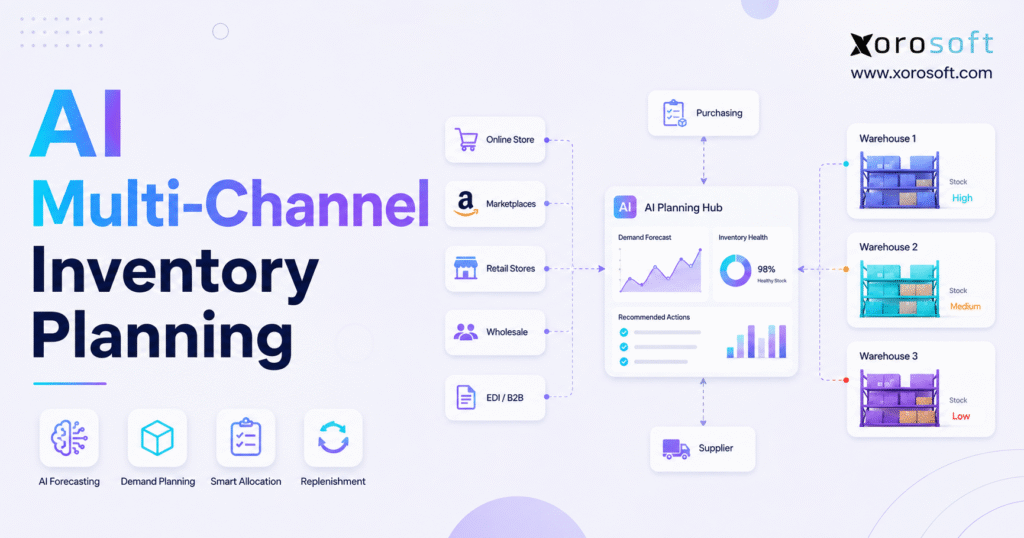
AI inventory planning is transforming how businesses manage their stock levels and meet demand.
1. Channel Growth Is Making Inventory Planning Harder
Adding a new sales channel may look simple at first. A business launches a Shopify store, starts selling on Amazon, builds a wholesale program, connects EDI customers, or opens another warehouse. Sales may grow, but inventory choices become much harder.
Each channel creates a different pattern of demand. Direct-to-consumer orders may arrive throughout the day. Wholesale customers often place larger orders on fixed dates. Amazon demand may change after a price move, ad campaign, or ranking shift. EDI customers may send both firm orders and future plans.
Many growing businesses still manage all of this demand through one spreadsheet. Their purchasing teams export data from several systems, combine the numbers, add a growth rate, and place supplier orders.
This method may work for a small product range and one warehouse. It becomes less reliable as the company adds more products, channels, suppliers, and locations.
U.S. retail ecommerce sales reached about $326.7 billion in the first quarter of 2026. Ecommerce made up 16.9% of total retail sales during that period. The continued growth of online sales places more pressure on brands to manage stock across several channels and locations. Source: U.S. Census Bureau.
The main challenge is no longer predicting total demand. The company must know which products customers will buy, where they will buy them, which warehouse will ship them, and when the business needs more stock.
1.1 One Forecast Cannot Represent Every Channel
A total sales forecast gives leaders a broad view, but it often lacks the detail needed for daily choices.
A forecast of 20,000 units does not show whether those units will move through Shopify, Amazon, retail, wholesale, or EDI. It also does not show which warehouse needs the stock.
That detail changes the plan. Ten thousand online orders spread across three months may need steady buying and regular warehouse restocking. One wholesale order for the same amount may need early buying, a firm stock reserve, special packing, and a fixed ship date.
A good plan keeps the channel detail even when management wants one total forecast.
1.2 Shared Stock Creates Channel Conflicts
Many businesses show the same physical stock on several sales channels. This setup gives the company more sales options, but it also creates risk.
A sudden rise in Amazon orders may use stock that the business planned for a wholesale buyer. Holding too much stock for a possible wholesale order may cause a Shopify stockout. One warehouse may have too much inventory while another location runs short.
Inventory sync tells each channel how much stock exists. It does not decide how the company should divide that stock.
The business still needs rules for stock limits, customer priority, safety stock, and channel reserves.
1.3 Forecast Errors Affect Both Service and Cash
A low forecast may cause stockouts, late orders, urgent buying, and high freight costs. A high forecast may create excess stock, storage costs, price cuts, and cash pressure.
The goal is not to keep as much inventory as possible. The goal is to hold enough stock to meet demand without placing too much cash in slow or unwanted products.
2. What AI Inventory Planning Actually Does
AI inventory planning uses data, machine learning, and set business rules to estimate future demand and suggest the next stock action.
It compares expected demand with current inventory, open purchase orders, supplier lead times, warehouse balances, customer orders, and company goals.
IBM explains AI demand forecasting as the use of past data, current data, and outside signals to predict future demand. These systems can update forecasts when new information arrives. Source: IBM.
The system may suggest a purchase order, production order, warehouse transfer, safety stock change, or channel reserve. However, managers should still review large or unusual choices.
2.1 Demand Forecasting and Inventory Planning Are Different
Demand forecasting predicts what customers may buy. Inventory planning decides how the business should respond.
A forecast may predict sales of 5,000 units. The planning process must then answer several questions. How much stock is already available? How much stock has the company already promised to customers? When will new supply arrive? Should the company buy, make, or transfer more units?
| Area | AI demand forecasting | AI inventory planning |
|---|---|---|
| Main question | What will customers buy? | What stock action should the business take? |
| Main result | Expected demand | Purchase, production, transfer, or allocation plan |
| Main inputs | Sales history and demand signals | Forecast, stock, supply, cost, and business rules |
| Main users | Analysts and planners | Buyers, warehouse teams, finance, and operations |
| Business value | Better demand insight | Clear action based on expected demand |
A company may improve its forecast but still struggle with stock if its teams handle buying, warehousing, and accounting in separate systems.
2.2 Multi-Channel and Omnichannel Planning
Multi-channel planning looks at demand from several sales channels. Each channel may still have its own stock rules and shipping methods.
Omnichannel planning connects stock and fulfillment across the whole business. A company may ship an online order from a store, use one warehouse for both wholesale and ecommerce, or move stock between locations.
Most growing brands need both views. They need separate forecasts for each channel and one shared view of total supply.
2.3 When Predictive Planning Adds Value
AI-based planning becomes more useful as the business adds products, warehouses, suppliers, and sales channels.
A small company with one channel, one warehouse, and stable demand may do well with simple reorder rules. A company with thousands of products, seasonal sales, long supplier lead times, and large wholesale orders needs a stronger process.
Complexity, not company size alone, creates the need.
3. AI Inventory Planning Needs the Right Level of Detail
The value of a forecast depends on whether it matches the choices the company needs to make.
A company-wide forecast may help with a budget, but it cannot tell a buyer which warehouse needs stock. A product-level forecast may support buying, but it may hide shortages in specific sizes, colors, or versions.
Research on omnichannel inventory looks at forecasts by product, location, and channel. This level of detail helps companies plan stock for the exact place and sales source where demand may occur. Source: IBM Research.
3.1 SKU-Level Inventory Forecasting
SKU-level forecasting predicts demand for each stock-keeping unit.
This matters when products have size, color, flavor, material, voltage, or pack options. A product group may look healthy overall while its best-selling versions run out.
For example, an apparel style may have enough total stock, but common sizes may already be unavailable. A furniture line may have enough units, but not in the finish customers prefer.
Planning at the SKU level shows the shortages that shoppers actually face.
3.2 Channel-Level Demand Forecasting
Channel-level forecasting separates demand across Shopify, Amazon, wholesale, retail, EDI, and other sources.
Each channel behaves differently. Wholesale orders may be large and less frequent. Shopify orders may respond quickly to promotions. Amazon demand may change after ad or ranking shifts.
The business can combine these forecasts for buying, but it should keep the channel detail under the total.
3.3 Multi-Warehouse Inventory Forecasting
Location-level forecasting shows where demand may occur.
Without this view, a company may own enough stock overall but still have shortages in one region. The stock exists, but the wrong warehouse holds it.
A location forecast helps teams decide whether to buy more, move existing stock, or change order routing.
3.4 Product-Location-Channel Forecasting
The most detailed model looks at product, location, and channel together.
A company may forecast Shopify demand for a certain size from its western warehouse and wholesale demand for the same item from its eastern warehouse.
Not every product needs this level of detail. High-volume, high-cost, seasonal, or key products often need closer planning than slow sellers.
4. AI Inventory Planning Across Shopify, Amazon, Wholesale, and EDI
A strong multi-channel plan combines all demand into one operating view while keeping the details that make each channel different.
AI inventory planning helps teams compare orders, stock, expected supply, and customer needs across every channel.
4.1 Shopify Inventory Forecasting
Shopify demand can change fast after an email campaign, product launch, discount, paid ad, or social post.
The planning system must know the difference between stock that sits in a warehouse and stock that the company can still sell.
Shopify supports inventory states such as available, on hand, incoming, committed, reserved, damaged, and quality control. It also tracks inventory at each location. Source: Shopify inventory documentation.
A warehouse may hold 1,000 units, but only 700 may be ready for new orders. The rest may already support open orders, customer holds, damaged stock, or checks.
For brands that need to connect Shopify with the rest of their operation, the Xorosoft ERP Shopify application links ecommerce orders with inventory, fulfillment, reporting, and other sales channels.
4.2 Amazon and Marketplace Planning
Marketplace demand may change because of ads, prices, rankings, delivery promises, or competitor stock.
The plan should separate stock held in a marketplace network from stock held in company warehouses. It should also include the time needed to prepare, label, ship, receive, and activate marketplace stock.
A forecast may show the right quantity but still fail if the company acts too late.
4.3 Wholesale Stock Allocation
Wholesale orders often have larger quantities and fixed delivery dates. They may also include case packs, price terms, customer rules, and partial shipment needs.
The plan should separate firm sales orders from customer forecasts and possible deals. Firm orders usually need protected stock. Future forecasts may guide buying, but they should not carry the same weight.
The company also needs a rule for releasing held stock when a customer delays, lowers, or cancels an order.
4.4 EDI Demand Planning
EDI customers may send purchase orders, order changes, future plans, and shipping needs through set data formats.
These signals give the business useful forward insight. However, not every signal carries the same promise. A future schedule may change several times, while a firm purchase order shows a stronger need.
The planning system should apply different levels of trust to each signal.
4.5 Bringing Channel Demand Together
The final plan should answer four simple questions:
- How much total demand does the company expect?
- Which channels create that demand?
- Which orders need protected stock?
- How much stock can remain open for other sales?
This approach gives the business one plan without hiding the differences between channels.
5. Multi-Warehouse Planning and Stock Rebalancing
A total stock number can give leaders false comfort. The company may own enough units but still fail to ship orders on time.
The wrong warehouse may hold the stock. Another channel may already have a claim on it. The warehouse may still be receiving or checking the units.
The better question is not only, “How much stock do we have?” It is, “How much usable stock do we have in the right place?”
5.1 Local Shortages Inside a Healthy Network
Imagine a company with 6,000 units across three warehouses. The eastern site holds 4,000 units, the central site holds 1,500, and the western site holds 500.
If western demand grows, the company may show enough total stock while its western warehouse keeps running out.
The business may then ship from farther away, split orders, or delay customers while it moves stock.
A location-level forecast can show this risk before service drops.
5.2 Buying More or Moving Existing Stock
When one warehouse may run short, the company should not always buy more.
Another warehouse may already hold more stock than it needs. The planning team should compare supplier lead time, transfer time, freight cost, warehouse space, local demand, and risk at the sending site.
A transfer uses stock the business already owns. A new purchase increases the total stock and cash tied up in inventory.
However, moving too much stock may create a new shortage at the sending location.
5.3 Turning Plans Into Warehouse Work
A forecast only helps when warehouse teams can act on it.
A connected warehouse management system can turn planning choices into receiving, putaway, restocking, transfers, picking, packing, and shipping tasks.
XoroWMS supports stock, transfers, receiving, fulfillment, and reporting across more than one warehouse. It also helps teams keep the planning system updated when stock actually moves.
Without this link, the planning system may assume that a transfer happened while the units still sit in the old location.
6. AI Inventory Planning for Buying and Replenishment
A common gap appears between the forecast and the purchase order.
A company may build a detailed forecast, but buyers may still calculate order amounts by hand. They check stock in one report, open orders in another, supplier limits in a spreadsheet, and budget data in the accounting system.
This process takes time and leaves room for error.
6.1 Finding the Net Stock Need
A simple restocking formula looks like this:
Expected demand + safety stock − available stock − reliable incoming stock = net stock need
Each part needs a clear meaning.
Available stock should not include units that the company has already promised, held, damaged, or blocked.
Incoming stock should only count when it will arrive within the plan period. A late purchase order cannot solve a shortage that will happen next week.
The final order must also follow supplier pack sizes, minimum amounts, cash limits, container needs, and product life.
6.2 Reorder Points and Buying Dates
A reorder point tells the buyer when to start the next supply action.
It depends on expected sales during the supplier lead time and the extra stock needed to cover risk.
AI inventory planning can update this point as sales and supplier results change. Still, buyers should understand why the system suggests each amount.
A useful system should explain the inputs behind an order instead of giving buyers a number with no reason.
6.3 Connecting the Forecast With ERP
A cloud ERP platform becomes useful when the forecast must connect with inventory, buying, warehouse work, making goods, accounting, and ecommerce.
XoroONE brings inventory, warehouse management, manufacturing, accounting, and ecommerce work into one platform. Its buying tools also connect suppliers, stock, forecasts, warehouses, and finance.
The main value is not another report. The value comes from moving a plan through approval, buying, receiving, stock updates, and accounting without repeated manual work.
7. Safety Stock Should Match Real Risk
Safety stock protects the business when demand rises or supply arrives late.
Many companies set a fixed number of weeks as a buffer and rarely update it. This method is easy, but it ignores differences between products, suppliers, channels, and customer needs.
7.1 Demand and Supplier Changes
A product with stable sales and a reliable local supplier may need a small buffer. A seasonal product from an overseas supplier may need much more.
The safety stock rule should look at demand swings, forecast error, lead time, supplier results, and service goals.
Teams should also review unit cost, storage space, shelf life, and the cost of a stockout.
7.2 Different Channels Need Different Buffers
Not every channel needs the same level of protection.
A key wholesale customer may need reserved stock to meet a fixed delivery promise. An Amazon listing may need strong stock levels to protect sales. A direct-to-consumer store may allow preorders or delayed shipping.
One safety stock number for all channels may create too much stock in one area and too little in another.
7.3 More Safety Stock Also Costs More
A larger buffer lowers stockout risk, but it also uses cash and warehouse space.
The risk grows when products expire, go out of season, or lose value quickly.
The best buffer does not remove all risk. It balances the cost of a shortage with the cost of extra stock.
8. Data Requirements for AI Inventory Planning
The quality of AI inventory planning depends on the quality of the data behind it.
AI can handle data faster than a spreadsheet, but it cannot fix duplicate SKUs, wrong stock counts, missing returns, old lead times, or bad unit changes by itself.
Bad data may still produce clean-looking reports. That makes it risky.
8.1 Product and SKU Data
The product record should clearly show each item, version, unit, case pack, supplier, location, and stock rule.
Parent items and sellable versions must follow the same setup across systems. If one system plans at the style level while another buys at the size level, the numbers will not match.
Units also matter. A supplier may sell a case of 12 while the store sells single units. One wrong unit rule can create a large buying error.
8.2 Stock Status and Real Availability
On-hand stock does not always equal available stock.
The business may have already promised some units to customers. Other units may sit in quality checks, damage areas, production holds, or wholesale reserves.
Shopify shows why this matters by tracking several stock states instead of one simple balance.
The planning system needs to know which units can support new demand.
8.3 Supplier and Buying Data
Supplier lead times should come from real results when possible.
A lead time entered years ago may no longer match current delivery speed. Teams should track expected dates, actual dates, minimum order amounts, pack sizes, prices, freight, and supplier service.
These records help the business find the true cause of a shortage. The issue may come from higher demand, a late buying choice, or a late supplier.
8.4 Linking Stock and Finance
Inventory choices affect cash, bills, product cost, margin, and working capital.
A connected inventory and accounting system gives finance and operations the same view.
XoroERP links accounting with inventory, purchasing, sales orders, warehousing, vendors, and manufacturing. This link helps teams see both the stock need and the cash effect.
A buying plan may make sense for service but still place too much pressure on cash. Finance and operations should review the same future order needs.
9. Industry Use Cases for Predictive Inventory Planning
The core ideas behind planning apply across industries, but each industry has different risks.
A model for apparel should not use the same rules as a model for furniture, food, wholesale, or manufacturing.
9.1 Apparel and Fashion
Apparel brands plan by style, size, color, season, collection, and channel.
A style may show strong total stock while common sizes run out. Short selling periods add more risk. A low order may cause missed full-price sales, while a high order may lead to heavy price cuts later.
Forecasting can help at the version level, but buyers still need to use market and product knowledge.
9.2 Furniture and Home Goods
Furniture companies often deal with long supplier lead times, high unit costs, large items, special orders, and many options.
A forecast error may tie up cash and warehouse space for months. Teams must also plan for freight, containers, damage, storage, and delivery needs.
Moving bulky goods between warehouses can cost a lot, so regional planning plays a major role.
9.3 Sporting Goods
Sporting goods demand may change with season, weather, location, league events, and trends.
A product may sell well in one area and poorly in another. The plan should connect product season with local demand and warehouse stock.
9.4 Food and Beverage
Food and beverage companies must manage expiry dates, shelf life, lot numbers, storage rules, and waste.
The goal is not only to keep enough stock. The company must keep enough usable stock that it can sell before it expires.
Planning should compare expected demand with both quantity and remaining product life.
9.5 Wholesale Distribution
Wholesale companies often handle large orders, set price terms, case packs, EDI needs, and customer rules.
A few customers may create most of the demand. The plan should separate normal repeat orders from one-time projects or unusual bulk buys.
9.6 Manufacturing
Manufacturers must turn finished product demand into raw material and part needs.
They need bills of materials, work orders, lead times, capacity, expected output, waste, and part stock.
The Xorosoft industry resources show how these needs differ across apparel, furniture, food, wholesale, sporting goods, and manufacturing.
The key point is simple: the model should match the real limits of the industry.
10. Measuring AI Inventory Planning Performance
Teams should not judge AI inventory planning by forecast accuracy alone.
A company may improve forecast accuracy but still hold too much stock. It may raise stock turnover by cutting stock so deeply that customer service falls.
A good scorecard looks at demand, service, cash, suppliers, and team effort.
10.1 Forecast Accuracy and Bias
Forecast accuracy compares expected demand with actual demand.
Teams should measure it at the same level where they make choices, such as SKU, channel, location, and week.
Forecast bias shows whether the plan stays too high or too low over time. A high bias may create excess stock. A low bias may create shortages and urgent buying.
10.2 Weighted Forecast Error
Weighted mean absolute percentage error, or WMAPE, compares total forecast error with total actual demand.
The formula is:
WMAPE = Total absolute forecast error ÷ Total actual demand × 100
High-volume items have more effect on the total score.
10.3 Key Stock Measures
| Metric | What it shows |
| Stockout rate | How often products run out |
| Fill rate | How much demand teams ship right away |
| Stock turnover | How fast the company sells and replaces stock |
| Days of stock | How long current stock may last |
| Excess stock | How much stock sits above likely demand |
| Supplier service | How often supply arrives on time |
| Transfer rate | How often teams must move stock between sites |
| Planner override rate | How often people reject system advice |
| Urgent freight | How often shortages create extra cost |
| Old stock | How much inventory may never sell |
No single metric should lead the whole plan. Teams need to improve the total operation.
11. Choosing AI Inventory Planning Software
The right tool depends on product count, channel mix, warehouse needs, current systems, and team skills.
Spreadsheets, forecast tools, inventory apps, ERP systems, and large planning suites all serve different needs.
11.1 When Spreadsheets Still Work
Spreadsheets may still work when the business has few products, one main channel, one warehouse, stable demand, and reliable suppliers.
They also help with short-term tests and simple “what-if” plans.
Problems start when the spreadsheet becomes the main operating system. Teams create several versions, change formulas, copy data from many tools, and depend on one person to manage the whole file.
11.2 When a Standalone Forecast Tool Works
A separate forecast tool may fit when the company already has strong ERP, warehouse, buying, and accounting systems.
In that case, the main gap may truly be demand forecasting.
The business still needs to know how the forecast will reach buying, production, stock allocation, and warehouse teams. Manual exports can reduce the value of a good forecast.
11.3 When Inventory Software Fits
Inventory software may give a growing brand better stock control, order sync, and reorder support than spreadsheets.
It may suit a company that does not yet need full accounting or manufacturing in the same platform.
The limits appear when staff must still match stock work with separate buying, warehouse, production, and finance tools.
11.4 When Cloud ERP Fits Better
Cloud ERP becomes more useful when the business wants one set of data across ecommerce, wholesale, stock, buying, warehouse work, manufacturing, accounting, and reports.
This often happens after the company outgrows QuickBooks, spreadsheets, inventory-only apps, or several channel tools.
Businesses comparing larger systems can review the Xorosoft versus NetSuite comparison as one part of the process.
The final choice should match the company’s real workflows, users, links, reports, costs, and growth plans.
11.5 AI Use Does Not Equal Planning Skill
Many supply chain teams now invest in AI, but buying software does not fix weak processes.
A company still needs clean data, clear owners, set approval rules, staff training, and useful measures.
The tool should support the planning process, not replace the work needed to build one.
12. An AI Inventory Planning Rollout Plan
A strong AI inventory planning project should start with business choices, not software features.
The company needs to know how staff create forecasts, approve purchases, hold stock for customers, and move goods between warehouses.
12.1 Map the Current Process
Write down where sales data comes from, who builds forecasts, who approves buying, how teams reserve stock, and how they start transfers.
This work often shows that forecasting is only one part of the problem. The business may also have unclear roles, mixed data, or slow approvals.
12.2 Record Current Results
Track the current forecast error, stockout rate, fill rate, turnover, excess stock, urgent freight, supplier service, and planner hours.
These numbers give the team a clear starting point.
Without them, the company may call the project a success only because the new tool creates more reports.
12.3 Clean the Data
Standardize SKUs, product versions, suppliers, units, warehouses, stock states, lead times, and channel names.
Review past sales for unusual bulk orders, promotions, closed periods, product changes, and one-time events.
12.4 Group Products by Behavior
Not every product needs the same plan.
Fast sellers may need frequent review. Slow or uneven sellers need different rules. New products need similar-item data and close human review. Expensive and perishable goods may need tighter stock limits.
12.5 Start With a Small Pilot
Choose one useful product group, channel, or warehouse.
Test the full flow from demand data to buying, transfer, or stock reserve. Do not test only the forecast screen.
Compare the system’s advice with planner choices. Study the gaps and fix the rules before a wider rollout.
12.6 Set Human Approval Rules
Teams may allow the system to approve low-risk actions within clear limits.
People should review large buys, new products, supplier problems, and major stock moves.
Automation should remove repeat work and help planners focus on the choices that need skill.
13. Common AI Inventory Planning Mistakes
Most serious mistakes come from weak process design, not from the math alone.
13.1 Automating Bad Data
If the business does not know its true stock, the system cannot give good advice.
Cycle counts, clean records, and timely updates still matter.
13.2 Using One Forecast for Every Channel
One total forecast hides differences in order size, promotions, shipping, and customer promises.
The company may need one final plan, but it should keep the channel detail below it.
13.3 Treating the Forecast as a Promise
A forecast is an estimate, not a fixed future.
Competitors, weather, supply problems, customer changes, and market shifts can change demand.
Planners should review ranges, risks, and exceptions.
13.4 Ignoring Cash Limits
A stock order may improve service but use more cash than the company can support.
The plan should compare stock needs with product cost, payment terms, sales timing, and working capital.
13.5 Removing Human Skill
Experienced planners know their customers, suppliers, products, and market.
AI inventory planning should help them work faster and make better choices. It should not remove them from key decisions.
14. Frequently Asked Questions About AI Inventory Planning
14.1 What is AI inventory planning?
AI inventory planning uses data and machine learning to forecast demand and suggest stock actions. It compares expected demand with available stock, open supply, lead times, warehouse balances, safety stock, and business rules.
14.2 How does AI inventory planning work?
The system collects sales, stock, supplier, warehouse, promotion, and customer data. It finds patterns, predicts demand, and suggests buying, production, transfer, or stock reserve actions.
14.3 Is inventory planning different from demand forecasting?
Yes. Demand forecasting predicts what customers may buy. Inventory planning decides how much stock the company needs, when it should buy or make it, and where the stock should sit.
14.4 Can AI forecast Shopify and Amazon demand separately?
Yes. A good system can create separate forecasts for Shopify, Amazon, wholesale, retail, EDI, and other channels.
14.5 Can one stock pool support several channels?
Yes, but the business needs clear reserve and priority rules. Without them, one channel may use stock that another channel needs.
14.6 How does AI reduce stockouts?
It warns the team when future stock may fall below demand. The company can then buy more, move stock, change channel limits, or adjust a campaign.
14.7 How does AI reduce excess stock?
It can find slow sales, repeated high forecasts, too many weeks of stock, and poor stock placement. Teams can then lower orders, delay buying, transfer goods, or plan price cuts.
14.8 What data does the system need?
Useful data includes orders, returns, stock states, locations, open purchase orders, supplier lead times, costs, promotions, customer needs, production plans, and stock holds.
14.9 How much sales history does the system need?
The answer depends on the product. Seasonal goods often need more than one past season. Fast sellers may show useful patterns sooner. New products need similar-item data and human input.
14.10 Can AI forecast a new product?
It can use similar products, category sales, price, launch plans, early orders, and customer interest. New product forecasts still need close review.
14.11 How does AI plan across several warehouses?
It predicts demand by location, checks current and incoming stock, and finds likely shortages or excess. It can then compare a transfer with a new purchase.
14.12 How does the system set safety stock?
It can use demand changes, forecast error, lead time, supplier results, and service goals. Teams should also review cost, shelf life, and storage space.
14.13 Can AI create purchase orders?
It can create order suggestions and prepare purchase orders for approval in a connected system. Teams should keep approval rules for large or unusual orders.
14.14 Can AI account for supplier delays?
Yes, when the company records real supplier results. The system can use actual delivery history instead of one old lead-time field.
14.15 How does AI handle promotions?
The system should treat a promotion as a special event. It can use discount size, campaign length, channel, past results, season, and stock level.
14.16 Does AI replace planners?
No. AI handles large amounts of data and repeat calculations. Planners still manage strategy, suppliers, customer promises, new products, and unusual events.
14.17 How should teams measure forecast accuracy?
Measure it at the level where teams make choices, such as product, channel, warehouse, and week. Also track stockouts, fill rate, stock value, and urgent freight.
14.18 What is forecast bias?
Forecast bias shows whether forecasts stay too high or too low. High forecasts may create excess stock. Low forecasts may create shortages.
14.19 Does a company need ERP for AI inventory planning?
Not always. A company can connect a forecast tool with other systems. ERP becomes more useful when the forecast must link with buying, stock, warehouse work, accounting, and manufacturing.
14.20 When should a business replace spreadsheets?
A business should look at new tools when spreadsheet work takes too much time, teams use several versions, stock data comes from many systems, or channel growth creates frequent shortages.
14.21 Can small businesses use AI inventory planning?
Yes. A small company with several channels, seasonal sales, or long supplier times may gain value. A simpler company may first need better stock records and reorder rules.
14.22 Which industries benefit most?
Apparel, furniture, food, sporting goods, wholesale, manufacturing, consumer goods, and parts businesses often benefit because they manage many products, suppliers, or locations.
14.23 What are the main risks?
The main risks include bad data, unclear advice, too much automation, weak staff use, and a narrow focus on forecast accuracy.
14.24 How long does a rollout take?
The time depends on data quality, system links, product count, and process needs. A small pilot may start sooner than a full company rollout.
14.25 How should a company choose software?
Review channel links, forecast detail, warehouse support, buying tools, manufacturing needs, accounting, approval rules, reports, setup work, growth fit, and total cost.
15. Strategic Takeaway: Build the Process Before Scaling Automation
AI inventory planning helps a growing business study more products, channels, warehouses, suppliers, and demand signals than a manual process can handle.
However, the tool cannot replace clean stock records, clear rules, good supplier data, warehouse control, and cash insight.
A strong rollout starts with trusted order and stock data. The company then separates demand by product, channel, and location. Next, it sets safety stock, customer priority, buying, and transfer rules. Finally, it links the forecast with warehouse work, accounting, and order fulfillment.
The business should expand automation in steps. A small pilot gives planners time to test the advice, find data issues, and measure results before the system affects larger orders.
For companies that manage Shopify, Amazon, wholesale, EDI, several warehouses, or manufacturing, the real goal is not only a better forecast. The goal is a connected process that turns demand into timely stock, buying, warehouse, and finance choices.
Xorosoft supports inventory-driven businesses through cloud ERP, inventory management, purchasing, accounting, warehouse management, manufacturing, ecommerce, forecasting, and reporting.
When spreadsheets and separate apps make stock hard to control, the company should assess whether one connected system fits its needs.
Book a personalized Xorosoft demo to review how multi-channel demand, buying, inventory, warehousing, manufacturing, and accounting could work in one platform.