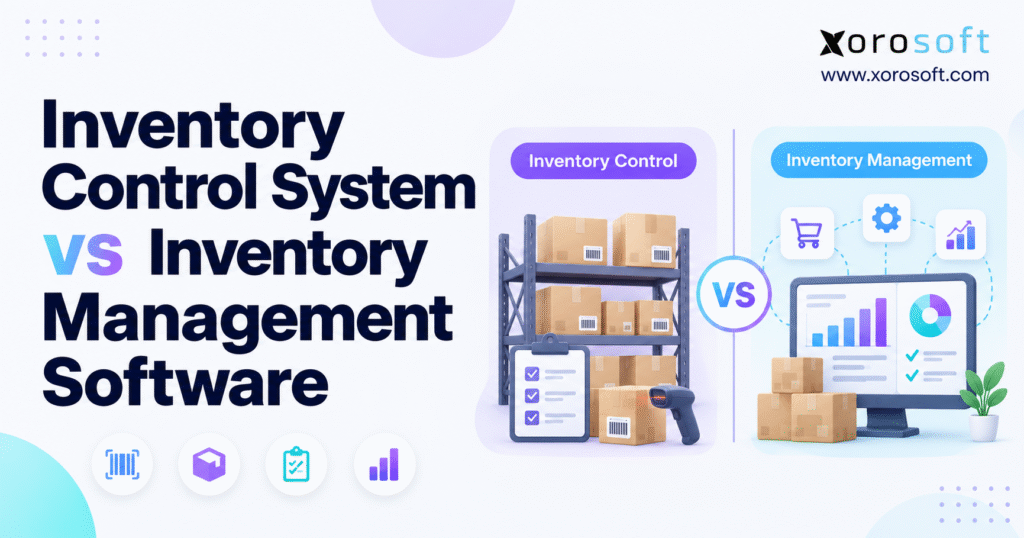
If you’re wondering about the differences between inventory control vs inventory management, you’re not alone.
1. Inventory Control vs Inventory Management Starts With an Operational Problem
Growing inventory-driven companies rarely search for new software because they suddenly want more technology. Operational problems usually force the conversation.
A warehouse team may see 200 units in the system while workers can physically find only 174. Purchasing may create another supplier order without realizing that replenishment stock is already on the way. Shopify may accept an order for inventory that a wholesale team has already committed to a key account. Meanwhile, finance may spend several days reconciling adjustments before closing the month.
Each problem involves inventory, but each points to a different level of software capability.
That is why understanding inventory control vs inventory management matters. Inventory control focuses on keeping stock quantities, locations, and movements accurate. Inventory management uses that reliable information to guide purchasing, replenishment, allocation, forecasting, and broader inventory decisions.
A company can perform inventory control extremely well and still make poor purchasing decisions. Likewise, sophisticated forecasting cannot compensate for inaccurate receipts, transfers, or warehouse counts.
The strongest operations treat control and management as connected layers rather than competing concepts.
1.1 Accurate Inventory Is the Starting Point, Not the Final Goal
Suppose a distributor knows that it owns exactly 8,000 units of an item. Accurate records answer an important operational question, but they do not tell management whether 8,000 units represent two weeks of supply or twelve months of excess stock.
Buyers also need to understand current demand, supplier lead times, open purchase orders, expected promotions, safety stock, and warehouse-specific needs. Without that context, an accurate quantity remains only a number.
Inventory control provides trustworthy inputs. Inventory management turns those inputs into planning decisions.
As a business adds SKUs, sales channels, warehouses, suppliers, and customer commitments, the planning layer becomes increasingly important.
1.2 Software Labels Often Hide the Real Difference
Vendors do not always use inventory terminology consistently. One product may call itself an inventory control system while offering forecasting and purchasing. Another may use the term inventory management software while concentrating heavily on barcode scanning and warehouse transactions.
Businesses should therefore evaluate workflows rather than category names.
Can the system maintain accurate quantities? Will purchasing see expected supply? Can planners calculate replenishment needs? Does the system coordinate stock across warehouses? Can finance reconcile inventory without rebuilding the transaction history in spreadsheets?
Those questions reveal far more than the label on the software.
2. What an Inventory Control System Actually Does
An inventory control system concentrates on the physical and transactional accuracy of stock already inside the business.
Warehouse teams use it to record what arrives, where employees place inventory, how stock moves between locations, what workers pick, what ships, what employees count, and why quantities change.
The main objective is straightforward: the system should reflect operational reality closely enough that teams can trust it.
2.1 Inventory Control Software Tracks Stock Movement
Consider a wholesaler that owns 500 units of one SKU across two warehouses.
The company cannot make reliable promises from a single total. Warehouse A may hold 250 available units, Warehouse B may hold another 150, workers may have committed 60 units to open orders, and the quality team may have placed 40 units on hold.
Inventory control tracks those states and movements.
When employees receive goods, move stock, pick orders, process returns, or make adjustments, each transaction should update the inventory record. Strong transaction discipline reduces the gap between what software reports and what employees physically find.
2.2 Core Inventory Control Capabilities
Most inventory control systems handle receiving, stock transfers, inventory adjustments, cycle counting, physical counts, barcode scanning, bin tracking, lot tracking, serial-number tracking, and transaction history.
These functions provide traceability.
For example, if inventory drops from 50 units to 43, supervisors should quickly determine what caused the change. A shipment may have consumed seven units. Perhaps an employee transferred the units to another facility. A cycle count could have uncovered a discrepancy, or the quality team might have removed damaged stock from availability.
Clear transaction history reduces the need for manual investigation.
2.3 When Inventory Control Software Can Be Enough
Inventory control can satisfy a business with a relatively simple operating model.
A single-location wholesaler with manageable SKU volume, predictable suppliers, limited ecommerce complexity, and straightforward purchasing may need accurate stock visibility more than advanced forecasting.
In that situation, adding a large planning platform can create unnecessary complexity.
The deciding question is whether the business mainly struggles to control what it has or increasingly struggles to decide what it should have next.
Once the second problem dominates, the company has entered inventory-management territory.
3. Inventory Management Software Adds the Planning Layer
Inventory management software goes beyond transaction accuracy and helps a business make decisions about future inventory.
Teams still need dependable stock records. However, planners now combine those records with expected demand, supplier lead times, open purchase orders, reorder points, warehouse requirements, product seasonality, and service targets.
This broader scope explains one of the most important differences in inventory control vs inventory management.
3.1 Inventory Management Connects Supply and Demand
Imagine a retailer that sold 300 units of a product last month. Ordering another 300 might look reasonable until planners consider the wider context.
A seasonal spike may begin next month. Sales could be declining. A marketing campaign may double expected demand. A supplier may have extended lead time from 20 to 45 days. Another purchase order might already contain 500 units.
Inventory management brings these variables together before a buyer makes the next supply decision.
Instead of reacting only to current quantities, the company starts planning around future availability.
3.2 Purchasing Becomes Part of Inventory Management
Purchasing complexity often reveals that a business has outgrown basic inventory control.
Buyers may need to evaluate supplier minimums, lead times, safety stock, open sales orders, incoming supply, warehouse demand, and seasonal patterns before creating a purchase order.
When employees perform those calculations entirely in spreadsheets, the inventory system becomes a recordkeeping tool rather than a planning system.
Inventory management software closes that gap by connecting stock visibility with procurement decisions.
3.3 Forecasting Changes the Inventory Conversation
Forecasting adds time to the inventory equation.
Instead of asking only how much stock exists now, planners ask how much the company will probably need during the next replenishment cycle.
That question matters for seasonal apparel, furniture with long supplier lead times, sporting goods, food and beverage products, replacement parts, and imported consumer goods.
Forecasts will never eliminate uncertainty. Their purpose is to help the company make more structured purchasing and inventory decisions under uncertainty.
4. Inventory Control vs Inventory Management: The Core Difference
The clearest distinction between inventory control vs inventory management comes down to execution and planning.
Strong inventory control keeps physical stock aligned with system records. From that reliable foundation, inventory management guides purchasing, replenishment, forecasting, allocation, and broader business decisions.
4.1 Inventory Control Answers “What Do We Have?”
Inventory control remains close to daily operations.
The system records receipts, transfers, picks, shipments, returns, adjustments, and counts. Those transactions create a reliable picture of the current inventory position.
Every planning process depends on that picture.
When warehouse transactions contain errors, planners start with inaccurate information. Purchasing may order too much or too little. Customer service may promise unavailable inventory. Finance can then spend additional time investigating valuation differences.
Strong inventory control therefore supports every higher-level inventory process.
4.2 Inventory Management Answers “What Should We Have?”
Inventory management starts with accurate quantities but pushes the business toward future decisions.
Planners want to know whether available stock will cover expected demand, when the next purchase order should arrive, which warehouse requires replenishment, and whether slow-moving stock needs attention.
This broader approach connects inventory directly with purchasing, working capital, customer service, supplier performance, and management reporting.
4.3 Inventory Control vs Inventory Management Comparison
| Capability | Inventory Control System | Inventory Management Software |
|---|---|---|
| Primary objective | Maintain stock accuracy | Improve inventory decisions |
| Current inventory visibility | Core | Core |
| Receiving and adjustments | Core | Common |
| Barcode scanning | Common | Common or integrated |
| Cycle counting | Core | Common |
| Lot and serial tracking | Common | Common |
| Reorder alerts | Common | Common |
| Automated replenishment | Basic or limited | More advanced |
| Demand forecasting | Limited | Often important |
| Purchasing | Basic or separate | Commonly connected |
| Supplier planning | Limited | Broader |
| Safety-stock planning | Basic | More advanced |
| Multi-warehouse planning | Varies | Common |
| Inventory analytics | Operational | Operational and strategic |
| Primary fit | Execution accuracy | Planning and optimization |
Inventory management does not eliminate the need for control. Instead, it builds on accurate inventory data.
5. Inventory Control vs Inventory Management Across Daily Operations
A feature list can make two software categories look similar. Daily workflows reveal the practical difference much more clearly.
5.1 Stock Accuracy vs Future Availability
An inventory control system may show that the company has 400 units available today.
Inventory management asks whether those 400 units will remain sufficient until the next replenishment arrives.
Suppose demand averages 20 units per week and the supplier can deliver within seven days. Current stock may provide more than enough coverage. A different situation emerges when the company expects a major promotion next week and the supplier needs 45 days to replenish the item.
The quantity has not changed, but the business decision has.
This example shows why inventory control vs inventory management involves more than tracking the same inventory in different software.
5.2 Reorder Points vs Replenishment Planning
A simple inventory system may trigger an alert when stock falls below a fixed threshold.
That approach works well for stable products with predictable demand and short lead times.
Complex operations require more context. Planners may need to consider sales velocity, inventory already on order, safety stock, warehouse-specific demand, minimum purchase quantities, supplier reliability, and seasonal patterns.
At that point, the business no longer needs only a reorder alert. It needs a replenishment decision.
5.3 Warehouse Transactions vs Business-Wide Decisions
Inventory control usually starts in the warehouse.
A receipt increases stock, while a transfer moves inventory between locations. Picking reduces availability, and a count corrects a discrepancy.
Inventory management connects those changes to teams outside the warehouse. Purchasing uses the data to plan orders. Ecommerce teams rely on it for availability. Customer service uses the same information to answer fulfillment questions, while finance uses transaction records to reconcile inventory value.
As more departments rely on the same inventory record, disconnected data creates more expensive errors.
5.4 Inventory Accuracy vs Inventory Optimization
A warehouse can count every unit correctly and still hold the wrong product mix.
For example, an operation may accurately report 10,000 units of a slow-moving SKU while repeatedly running out of a high-demand product.
Inventory control has solved the accuracy problem. Management now has to solve the allocation and investment problem.
Inventory optimization looks for excess stock, shortage risk, slow-moving inventory, supplier constraints, transfer opportunities, and working-capital pressure.
The goal shifts from knowing the number to improving the decision behind the number.
6. Inventory Control vs Inventory Management for Ecommerce
Ecommerce makes weak inventory processes visible very quickly.
A customer sees availability online and expects the business to honor it. When the displayed quantity does not reflect reality, the inventory problem turns into a customer problem.
Canceled orders, delayed shipments, refunds, service tickets, and lost repeat purchases can all start with inaccurate availability.
6.1 Shopify Inventory Requires Clear System Ownership
A Shopify merchant may begin with one storefront and one fulfillment location. Growth often adds wholesale, Amazon, retail stores, multiple warehouses, 3PL partners, or international operations.
At that stage, Shopify remains a critical selling channel, but the storefront should not have to perform every purchasing, forecasting, warehouse, and accounting function.
The company needs to decide which system owns the authoritative inventory position and how other channels consume that information.
For merchants evaluating Xorosoft, the Xorosoft ERP app on Shopify provides one example of how an ERP can connect to Shopify while the operational platform manages broader processes behind the storefront.
6.2 Omnichannel Inventory Requires Consistent Rules
Shopify, Amazon, wholesale, EDI, and direct orders can all compete for the same physical stock.
The business therefore needs clear rules for reservations, customer allocations, channel buffers, cancellations, returns, safety stock, and warehouse availability.
Accurate control processes ensure every channel transaction updates stock correctly. From there, inventory management determines how the business should reserve, expose, and allocate available quantities across sales channels.
That distinction makes inventory control vs inventory management particularly important for omnichannel brands.
6.3 Integrations Should Remove Work Instead of Moving It
A large number of integrations does not automatically create an integrated business.
A useful integration should reduce duplicate entry, preserve transaction context, and help systems agree on products, orders, inventory, shipments, and financial information.
If employees still export data every day to reconcile channel inventory, the integration has not removed the underlying operational burden.
Businesses assessing a connected architecture can review available Xorosoft integrations when evaluating how commerce, finance, warehouse, and operational systems exchange information.
7. Inventory Control vs Inventory Management for Wholesale Operations
Wholesale distribution creates planning requirements that basic stock control may not fully address.
Large customer orders, account-specific demand, EDI transactions, case quantities, allocations, and multiple warehouses can make inventory decisions significantly more complex than a simple on-hand quantity suggests.
7.1 Wholesale Inventory Depends on Allocation
A distributor may own 10,000 units of an item but cannot necessarily promise all of them to new customers.
Existing orders may already claim part of the stock. A major retailer may have a standing allocation. Another warehouse may need inventory for regional demand.
Inventory control should accurately record those commitments and movements.
Inventory management helps the company decide how much stock remains truly available and what purchasing should do next.
7.2 Purchasing Often Drives Wholesale Inventory Performance
Wholesale buyers balance customer demand against supplier constraints.
A long supplier lead time can force the company to commit capital weeks or months before customers place orders. Minimum purchase quantities can create excess stock. Seasonal demand can make a fixed reorder rule ineffective.
Strong inventory management helps buyers evaluate those trade-offs instead of reacting only when quantities fall below a threshold.
For organizations comparing requirements across verticals, Xorosoft’s industry-focused ERP use cases provide relevant examples for inventory-intensive sectors such as wholesale, apparel, furniture, consumer products, and manufacturing.
7.3 EDI Adds Another Operational Layer
Wholesale companies that serve national retailers often process transactions through EDI.
If EDI, inventory, sales orders, warehouse fulfillment, and accounting operate independently, every new customer can introduce additional reconciliation.
The issue no longer concerns inventory alone. It concerns the entire order-to-cash workflow.
8. Inventory Control vs Inventory Management for Manufacturing
Manufacturing adds another level of complexity because finished-goods demand also creates demand for raw materials and components.
A manufacturer may manage raw materials, work in process, finished goods, packaging, replacement parts, and subassemblies at the same time.
8.1 Component Availability Matters More Than Total Quantity
Suppose a manufacturer has 5,000 units of a component in stock.
That number sounds healthy until the current production schedule requires 7,500 units.
Inventory control correctly reports the 5,000 units. Inventory management must determine how that quantity affects planned production and purchasing.
The planning question therefore depends on BOM requirements, production schedules, open purchase orders, supplier lead times, and material already committed to work orders.
8.2 Production Creates Internal Inventory Demand
Customer orders create external demand, while production creates internal demand for components.
Purchasing needs to understand both.
A raw-material item may look overstocked when planners view only external sales. Once the company considers future production, the same quantity may represent a shortage.
Manufacturers therefore need inventory processes that connect stock availability with production requirements.
8.3 Inventory Control vs Inventory Management Becomes a Layered Requirement
Manufacturers still need accurate receiving, counting, movement, and lot or serial tracking.
Those inventory-control capabilities remain essential.
Production planning, however, adds material requirements, work orders, BOM consumption, finished-goods output, and purchasing decisions. Companies at this stage often need inventory management plus manufacturing functionality rather than a standalone stock-control application.
Businesses evaluating a broader operational stack can review Xorosoft’s solutions to see how inventory, purchasing, warehousing, manufacturing, and finance fit within one system architecture.
9. Inventory Control vs Inventory Management in Multi-Warehouse Operations
Multiple warehouses increase operational complexity because the company’s total quantity no longer tells the full story.
A business can have plenty of inventory overall while one region repeatedly runs out.
9.1 Location Visibility Comes Before Location Planning
Inventory control tells teams what each warehouse currently holds.
Inventory management asks whether each warehouse holds the right quantity.
Suppose Warehouse A has 2,000 units while Warehouse B has 100. An equal split may appear more balanced, but the correct decision depends on regional demand, customer commitments, replenishment times, and transportation costs.
Good planning requires context rather than symmetry.
9.2 Transfers Can Reduce Unnecessary Purchasing
A buyer who sees only local shortages may order inventory that already exists elsewhere in the network.
That creates avoidable working-capital pressure.
Before placing another supplier order, a stronger process evaluates whether another warehouse can transfer stock economically and without creating a shortage of its own.
Multi-warehouse management therefore connects local availability with network-wide inventory decisions.
9.3 WMS Solves a Different Part of the Problem
Inventory management decides what inventory the operation should position in each location.
Warehouse management focuses on how people execute work inside the facility.
Receiving, put-away, scanning, picking, packing, shipping, bin control, and warehouse tasks require deeper execution tools as operations scale.
Xorosoft positions XoroWMS for this warehouse execution layer. A business may need both inventory planning and WMS capabilities because they address different parts of the same inventory lifecycle.
10. When Inventory Management Software Stops Being Enough
Companies can outgrow basic inventory control and later outgrow standalone inventory management as well.
The second transition usually happens when inventory becomes inseparable from accounting, purchasing, ecommerce, manufacturing, and management reporting.
10.1 Inventory and Accounting Begin to Depend on the Same Transactions
Inventory carries financial value.
A receipt can affect inventory value and accounts payable. Manufacturing consumes materials and creates finished goods. Shipments reduce inventory and create cost consequences. Returns, write-offs, landed costs, and adjustments can also affect financial records.
When inventory and accounting operate in separate environments, finance often has to reconcile differences after transactions occur.
Repeated reconciliation signals that the systems no longer share enough operational context.
10.2 Purchasing, Warehouse, Sales, and Finance Form One Workflow
Consider a normal customer order.
Sales creates demand, which changes available inventory. Warehouse staff fulfill the order and shipping confirms the movement. Finance records the commercial outcome, while purchasing may use that demand as another replenishment signal.
Each department touches a different stage of the same transaction.
When separate applications manage every stage, integrations must reconstruct the relationship between them.
For inventory-driven businesses that have reached this level of complexity, XoroONE provides an example of a unified environment that connects inventory, purchasing, accounting, warehouse operations, manufacturing, reporting, and ecommerce processes.
10.3 ERP Becomes Relevant When the Problem Turns Cross-Functional
ERP makes sense when inventory issues repeatedly cross departmental boundaries.
The company may maintain correct warehouse quantities but still struggle with purchasing spreadsheets, accounting reconciliation, manufacturing requirements, ecommerce synchronization, EDI, or fragmented reporting.
Those issues point to an architecture problem rather than an isolated inventory feature gap.
Organizations with deeper operational requirements can evaluate XoroERP as part of a broader ERP assessment.
Companies already comparing enterprise platforms may also need to consider implementation model, total operating complexity, financial functionality, and fit for inventory-heavy workflows. A focused Xorosoft vs NetSuite comparison can support that stage of research.
11. The Cost of Choosing the Wrong Inventory Software
Wrong software choices rarely create immediate failure.
Instead, employees gradually build workarounds around missing capabilities. Over time, those workarounds become part of normal operations.
11.1 Too Little Software Creates Shadow Processes
A stock-control system may initially perform well.
As complexity grows, purchasing creates a planning spreadsheet. Finance builds a reconciliation workbook. Warehouse supervisors maintain separate transfer reports. Ecommerce teams may also review channel inventory manually, while management combines exports for monthly reporting.
The core system continues to run, yet much of the real decision-making moves outside it.
That situation introduces duplicate data, additional manual work, and more opportunities for teams to operate from different numbers.
11.2 Too Much Software Creates Its Own Burden
Buying more capability than the business needs creates another kind of problem.
A single-location company with simple purchasing, limited SKUs, and stable demand may not need advanced forecasting, manufacturing, workflow automation, or sophisticated WMS processes.
Complex software can slow the operation when employees use only a fraction of its functionality.
The goal is not to choose the largest platform. Businesses should instead select enough capability to support current operations and foreseeable growth without creating unnecessary process overhead.
11.3 Inventory Control vs Inventory Management Is a Capability Decision
A disciplined selection process starts with operational needs.
Does the business mainly need reliable stock transactions? Does purchasing require forecasting and replenishment? Do several warehouses need coordinated planning? Does finance spend too much time reconciling inventory? Do ecommerce and wholesale compete for the same stock?
Those answers make the inventory control vs inventory management decision much clearer than product names or feature-count comparisons.
12. How to Evaluate Inventory Control and Inventory Management Software
Feature lists help create a shortlist, but real operational scenarios expose much more about how software performs.
A vendor can claim support for transfers, forecasting, multi-warehouse inventory, and Shopify integration without showing how employees handle exceptions.
12.1 Test Real Inventory Exceptions
Start with situations that create work for teams today.
Receive less inventory than the purchase order expected. Move goods between warehouses and accept only part of the shipment. Count a location and discover a discrepancy. Then process a return that requires inspection before staff can make the stock available again.
The system should make each exception easy to understand.
Users need to see what happened, who changed the transaction, how inventory changed, and whether another process now requires attention.
12.2 Test Purchasing With Real Supplier Conditions
Idealized demos hide operational weaknesses.
Use realistic supplier minimums, changing lead times, warehouse-specific requirements, open purchase orders, seasonal products, and uncertain demand.
Then ask the vendor to show how buyers move from current inventory to a purchase recommendation.
A strong inventory management platform should help explain the recommendation instead of presenting it as a black box.
12.3 Test Reporting as a Decision Tool
A report that shows 15,000 units on hand provides only a starting point.
Management may need to know which inventory is available, committed, aging, overstocked, at risk of shortage, incoming, or distributed poorly across locations.
Buyers may need supplier and replenishment information. Finance may require valuation and reconciliation detail, while warehouse managers need count and movement data.
Reporting should support action rather than simply display quantities.
12.4 Test the Entire System Boundary
Companies should map every system that creates or consumes inventory information.
Typical examples include Shopify, Amazon, EDI, accounting, shipping applications, 3PLs, warehouse software, POS systems, manufacturing platforms, and reporting tools.
Then test what happens when a transaction crosses those boundaries.
This step often reveals whether the company truly needs better inventory software or a more integrated operating environment.
Businesses planning more advanced AI-enabled integrations can also examine approaches such as Xorosoft’s MCP server when evaluating how operational ERP data may connect with AI-driven workflows and external systems.
13. Inventory Control vs Inventory Management: Which System Fits Your Business?
Company size alone does not determine the right solution.
Two businesses with similar revenue can require completely different software because one operates a simple single-warehouse model while the other manages thousands of SKUs across ecommerce, wholesale, EDI, manufacturing, and multiple facilities.
13.1 Choose Inventory Control When Accuracy Is the Main Constraint
Inventory control usually fits businesses that need reliable receiving, stock movement, counting, transfers, and warehouse visibility but do not yet face sophisticated planning requirements.
A focused system can deliver substantial value when teams mainly struggle to trust quantities.
Companies should establish this operational discipline before investing heavily in forecasting. Advanced planning cannot create reliable recommendations from unreliable inventory data.
13.2 Choose Inventory Management When Planning Becomes the Constraint
Broader inventory management becomes more valuable once buyers struggle to determine appropriate reorder quantities, supplier lead times create shortages, excess and unavailable inventory exist simultaneously, or multiple warehouses need separate replenishment.
The business now needs more than an accurate view of stock.
It needs help deciding what to buy, when to buy it, how much to hold, and where to position it.
13.3 Consider WMS or ERP When Inventory Crosses Functional Boundaries
Warehouse management becomes important when execution inside the facility requires more sophisticated controls.
ERP becomes relevant when inventory transactions depend closely on accounting, purchasing, manufacturing, ecommerce, EDI, and company-wide reporting.
Many growing businesses ultimately use these capabilities together rather than treating them as competing categories.
14. Common Mistakes During an Inventory Software Upgrade
Moving to a new system gives companies a chance to improve operations, but software alone does not correct weak processes.
14.1 Moving Poor Master Data Into a New Platform
A new inventory system cannot automatically repair duplicate items, inconsistent units of measure, inaccurate locations, incomplete supplier information, or undocumented adjustment practices.
Teams should clean and standardize critical data before migration.
Otherwise, the organization carries old uncertainty into a new platform.
14.2 Designing Around Departments Instead of End-to-End Workflows
Departments often describe requirements independently.
Warehouse teams ask for scanning. Purchasing requests replenishment. Finance wants accurate valuation. Ecommerce teams focus on synchronization.
The company should also test how those requirements work as one transaction.
A purchase order may begin with a buyer, create incoming inventory, become a warehouse receipt, affect inventory value, create supplier liability, and later support customer demand.
Software architecture should reflect the complete workflow.
14.3 Ignoring Predictable Future Complexity
Companies should avoid purchasing capabilities that have no realistic business case.
However, teams also need to recognize likely next steps.
For example, a company preparing to open a second warehouse should evaluate multi-location inventory before launch. Shopify brands adding wholesale should examine allocation and B2B workflows. Distributors targeting major retail accounts may need to consider EDI requirements. Manufacturers expanding production should also evaluate BOMs and material planning.
Good software selection balances current requirements with foreseeable operational complexity.
15. Turning Inventory Control vs Inventory Management Into a Practical Decision
The most useful way to approach inventory control vs inventory management is to begin with the highest-cost operational problem.
If employees cannot trust quantities, locations, receipts, transfers, or counts, strengthen inventory control first.
Once those records become reliable, look at the next constraint. Buyers who still struggle with shortages, excess inventory, long lead times, or poor replenishment decisions usually need broader inventory management.
Warehouse execution may become the next bottleneck, in which case WMS functionality deserves closer attention. When inventory transactions constantly require reconciliation across finance, purchasing, manufacturing, ecommerce, EDI, and reporting, ERP-level integration becomes a more relevant question.
15.1 Trace the Problem Back to Its Source
Start with a recurring operational failure.
The problem might involve canceled ecommerce orders, emergency purchases, missed wholesale commitments, production shortages, excess stock, inventory discrepancies, or delayed month-end reconciliation.
Next, trace the process backward.
Determine where the information originated, which system controlled it, who acted on it, and where the process lost accuracy or context.
That exercise usually reveals whether the root cause sits in inventory control, inventory planning, warehouse execution, or system integration.
15.2 Measure Software by the Manual Work It Removes
The right system should reduce meaningful recurring work.
Employees should not have to rebuild inventory truth every morning through exports, formulas, chat messages, and spreadsheets.
Some spreadsheet analysis will always remain useful. The problem appears when mission-critical processes depend on people repeatedly reconciling systems before they can make routine decisions.
Software adds value when it removes that friction.
Reviewing actual implementation stories can also help teams understand what operational change looks like in practice. Xorosoft’s case studies provide examples of how inventory-driven companies approach system consolidation and process improvement.
15.3 Choose the Smallest Architecture That Can Handle the Business Reliably
Reliable inventory control creates confidence in current stock levels. Once teams trust that data, inventory management helps determine what the business should hold next. Inside the warehouse, a WMS improves how products move through receiving, storage, picking, and shipping. Across the wider organization, ERP connects those inventory activities with purchasing, finance, manufacturing, and reporting.
A growing organization should not move automatically from one category to another. The right time to upgrade comes when the existing architecture makes accurate execution, planning, or reconciliation unnecessarily difficult.
For businesses managing multiple warehouses, Shopify or Amazon, wholesale, manufacturing, complex purchasing, EDI, or integrated accounting, the decision often extends beyond a simple inventory control vs inventory management comparison.
Document the workflows your current system cannot handle reliably. Then compare those workflows against inventory control, inventory management, WMS, and ERP capabilities instead of comparing vendor feature counts alone.
When those requirements now span inventory, warehouse operations, purchasing, ecommerce, manufacturing, and finance, you can contact Xorosoft to evaluate whether an integrated platform fits the next stage of the business.
Frequently Asked Questions About Inventory Control vs Inventory Management
What is the difference between inventory control and inventory management?
Inventory control focuses on stock accuracy and movement. Inventory management adds purchasing, forecasting, replenishment, allocation, and planning to help businesses maintain appropriate inventory levels.
Is inventory control part of inventory management?
Yes. Inventory control provides accurate stock data, while inventory management uses that information to make broader purchasing, replenishment, forecasting, and allocation decisions.
When should a business upgrade to inventory management software?
Upgrade when spreadsheets, stockouts, excess inventory, multiple warehouses, purchasing complexity, or disconnected sales channels make basic inventory tracking difficult to manage reliably.
Do growing businesses need inventory software or ERP?
Choose inventory software for inventory-focused problems. Consider ERP when inventory must connect closely with accounting, purchasing, manufacturing, ecommerce, EDI, warehouse operations, and reporting.
Can inventory management software reduce stockouts and overstock?
Yes. Better forecasting, replenishment rules, safety stock, purchasing visibility, and demand planning can help businesses reduce both shortages and unnecessary inventory.
What should businesses look for in inventory management software?
Prioritize real-time visibility, purchasing, replenishment, forecasting, multi-warehouse support, integrations, inventory reporting, audit trails, scalability, and workflows that match actual operations.
How does WMS differ from inventory management software?
Inventory management focuses on planning and availability. A WMS focuses on warehouse execution, including receiving, put-away, scanning, picking, packing, shipping, and bin-level processes.
Recent Posts
-
 Inventory Control System vs Inventory Management Software
 -
 Inventory Planning Statistics 2026: Stockouts, Excess Stock, and Forecast Accuracy
 -
 B2B Ecommerce Portal for Account Service: Order Status, Returns, Statements, Ship-Tos, and Reorder History
 -
 Shopify ERP Migration: What to Move First, What to Leave, and How to Cut Over Safely
 -
 QuickBooks Replacement for Distributors: How to Move From QuickBooks and Spreadsheets Without Disrupting Fulfillment