Warehouse inventory transfer tracking is essential for efficiently managing stock movement between locations.
1. When the Inventory Total Was Right but the Locations Were Wrong
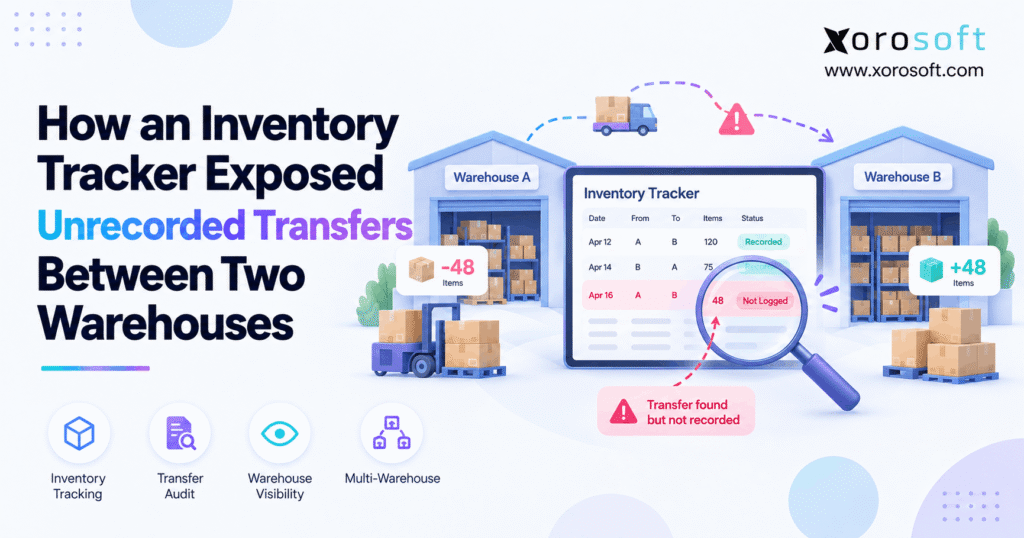
Warehouse inventory transfer tracking becomes critical when company-wide inventory looks accurate, yet individual warehouse balances tell a different story. In this case, Warehouse A appeared to be short by 48 units, while Warehouse B unexpectedly held 48 extra units. Therefore, the business did not have a total inventory shortage. Instead, it had lost the digital record explaining where those units had moved.
At first, the shortage looked like shrinkage. However, the matching surplus at the second warehouse changed the investigation immediately. Consequently, the operations team stopped asking, “Where did the stock disappear?” and started asking, “Was this inventory moved without a recorded transfer?”
That distinction matters because correcting the balances too quickly can hide the real operational problem.
1.1 The 48-unit pattern exposed the real issue
The inventory report showed:
| Location | System Quantity | Physical Quantity | Variance |
|---|---|---|---|
| Warehouse A | 420 | 372 | -48 |
| Warehouse B | 180 | 228 | +48 |
| Network total | 600 | 600 | 0 |
Initially, Warehouse A looked inaccurate. Meanwhile, Warehouse B also looked inaccurate.
However, the company-wide total remained exactly 600 units.
Therefore, the matching -48 and +48 variances strongly suggested that stock had moved between locations without a completed transfer record.
1.2 Why immediate adjustments would have hidden the problem
A team could have posted a -48 adjustment at Warehouse A and a +48 adjustment at Warehouse B.
As a result, both warehouse balances would have matched their physical counts.
However, the corrections would not explain why the difference occurred.
Instead, warehouse inventory transfer tracking should preserve the relationship between the two locations. Therefore, the business needs to know which units left Warehouse A, when they moved, who handled them, and when Warehouse B received them.
Without that history, the same failure can happen again.
2. What Warehouse Inventory Transfer Tracking Must Record
Warehouse inventory transfer tracking should create a complete operational trail from the source warehouse to the destination warehouse.
Therefore, a strong transfer record should include more than a simple quantity change.
At minimum, it should preserve:
- transfer ID
- SKU
- source warehouse
- destination warehouse
- requested quantity
- picked quantity
- shipped quantity
- received quantity
- transfer status
- responsible user
- timestamps
- exception notes
In addition, the system should preserve rejected, damaged, or unresolved quantities separately.
Consequently, managers can investigate a discrepancy without reconstructing the entire event from emails, spreadsheets, and employee memory.
2.1 Inventory transfer tracking needs a transaction trail
Inventory transfer tracking should answer one basic question:
How did this inventory get from one location to another?
Therefore, each stage should remain visible.
For example, the destination may request 100 units. However, the source may pick only 98. Next, the source may ship 98, while the destination eventually receives only 97.
If the system stores only the final quantity, the missing unit becomes difficult to investigate.
Instead, a complete trail preserves every change.
2.2 Inventory in transit prevents double-counting
Warehouse inventory transfer tracking also needs a way to represent inventory while it is moving.
For example, once Warehouse A ships 48 units, those units should no longer appear as physically available there.
However, Warehouse B should not necessarily treat them as available until receiving confirms arrival.
Therefore, an in-transit state creates a controlled bridge between locations.
Microsoft Business Central documents a similar transfer workflow in which businesses can separate shipment from receipt and use an in-transit location during the movement. Readers can review the process in Microsoft’s inventory transfer documentation.
3. How the Missing Inventory Movement Was Exposed
The investigation started by looking beyond a single warehouse.
First, the operations team reviewed the affected SKU across every active location.
Immediately, Warehouse B stood out.
While Warehouse A was short by 48 units, Warehouse B was over by exactly 48.
Therefore, the investigators had a useful pattern to follow.
3.1 Compare the whole inventory network first
A warehouse discrepancy should not always be investigated in isolation.
Instead, operations teams should compare the SKU across all relevant locations.
For example:
Warehouse A: -48
Warehouse B: +48
Company total: 0
Consequently, the problem was probably not lost company inventory.
Rather, the issue appeared to be location ownership inside the system.
That difference narrowed the investigation considerably.
3.2 Warehouse transfer tracking reconstructed the event
Next, the team reviewed warehouse transfer tracking data alongside operational evidence.
Therefore, investigators compared:
- shipment activity
- receiving records
- scanner history
- employee timestamps
- internal communication
- loading records
- physical counts
Eventually, the sequence became clear.
Warehouse B had urgently needed additional inventory. Consequently, Warehouse A physically sent 48 units.
However, the corresponding system transfer was never completed.
Therefore, warehouse inventory transfer tracking had not failed because the inventory disappeared. It failed because the physical movement and the digital movement became disconnected.
3.3 The stock was never truly missing
Once the team verified Warehouse B’s physical count, the situation became much clearer.
The business still owned all 600 units.
Therefore, this was not a company-wide inventory loss.
Instead, the inventory ledger assigned 48 units to the wrong warehouse.
That distinction matters because shrinkage, theft, damage, and unrecorded transfers require different corrective actions.
4. Why Transfer Records Break in Real Operations
Most unrecorded warehouse transfers are not created intentionally.
Instead, operational pressure often causes employees to bypass normal procedures.
Therefore, the underlying problem usually involves workflow design rather than one employee making one mistake.
4.1 Emergency movements happen before system entry
Suppose Warehouse B is about to miss a major order.
Consequently, someone calls Warehouse A and requests inventory immediately.
Warehouse A loads the stock and sends it.
However, the transfer record is postponed until later.
Then another task arrives.
As a result, the physical inventory moves while the software continues showing the original quantities.
4.2 Messages and spreadsheets become unofficial transfer systems
Teams frequently coordinate through email, chat, spreadsheets, or paper.
Although these tools can communicate a request, they do not automatically update inventory.
Therefore, a warehouse may perform the correct physical action without creating the required system transaction.
In addition, separate tools create several versions of the truth.
Consequently, reconciliation becomes slower as transfer volume grows.
4.3 Partial transactions create misleading inventory states
Sometimes the transfer begins correctly.
For example, Warehouse A may post the shipment.
However, Warehouse B may physically receive the cartons without completing the system receipt.
As a result, inventory remains classified as in transit even though it is already sitting on a destination shelf.
Therefore, inventory movement tracking must cover both sides of the transaction.
5. Transfer or Adjustment? The Accounting Difference
A warehouse transfer and an inventory adjustment serve different purposes.
Therefore, they should not be used interchangeably.
| Control | Transfer | Adjustment |
|---|---|---|
| Records source | Yes | Usually one location |
| Records destination | Yes | Usually no |
| Explains movement | Yes | Not necessarily |
| Can track transit | Yes | Usually no |
| Preserves movement trail | Yes | Limited |
| Best use | Physical relocation | Balance correction |
A transfer says:
48 units left Warehouse A and moved to Warehouse B.
An adjustment says:
Change this warehouse balance by 48 units.
Therefore, two offsetting adjustments can fix the numbers while hiding the physical event.
5.1 Inventory transfer tracking preserves the cause
Inventory transfer tracking connects the negative quantity at the source with the positive quantity at the destination.
Consequently, users can follow the movement later.
An adjustment, however, usually explains only that a quantity changed.
Therefore, adjustments make sense for events such as:
- verified shrinkage
- damage
- cycle-count corrections
- write-offs
- authorized data corrections
However, when inventory physically moves between warehouses, a transfer creates a stronger operational trail.
5.2 Corrections should preserve history
When an unrecorded transfer is discovered, the goal should not simply be to force the system quantities to match.
Instead, teams should document what actually happened.
Therefore, any corrective process should preserve:
- the original discrepancy
- the physical movement
- the reason the transaction was missing
- the user responsible for the correction
- the final reconciliation
Consequently, future audits remain explainable.
6. The Warehouse Inventory Transfer Tracking Lifecycle
Warehouse inventory transfer tracking works best when every transfer passes through clear operational stages.
Therefore, a useful lifecycle is:
Requested → Picked → Shipped → In Transit → Received → Reconciled
Each state answers a different question.
Moreover, separating these states makes exceptions easier to identify.
6.1 Inventory transfer tracking starts before picking
First, the destination warehouse creates or requests the movement.
Therefore, the record should identify:
- SKU
- requested quantity
- source
- destination
- required date
However, requested quantity should remain separate from actual picked quantity.
For example, Warehouse B may request 100 units while Warehouse A has only 90 available.
Consequently, the system should preserve both numbers.
6.2 Shipment changes location responsibility
Next, Warehouse A picks and verifies the units.
After that, the warehouse confirms shipment.
Therefore, those units should stop appearing as physically available at the source.
Meanwhile, the transfer should move into an appropriate transit state.
Oracle NetSuite similarly distinguishes staged transfer orders from simpler direct inventory transfers. Its transfer-order documentation shows why shipment, transit, and receipt stages matter operationally.
6.3 Warehouse inventory transfer tracking ends with reconciliation
Once Warehouse B receives the shipment, employees should record what actually arrived.
However, the received quantity may differ from the shipped quantity.
For example:
100 shipped → 97 received → 3 unresolved
Therefore, the transfer should not disappear simply because most units arrived.
Instead, warehouse inventory transfer tracking should keep the remaining three units visible until the business resolves the exception.
7. What Partial Transfers Reveal
Incomplete transfers often reveal process weaknesses earlier than month-end counts.
Therefore, teams should treat open or partial transfers as operational signals.
7.1 Shipped inventory may never be digitally received
Warehouse A can complete its part correctly.
However, Warehouse B may fail to post the receipt.
Consequently, the system continues showing the units as in transit.
Meanwhile, employees may already be picking those products for customer orders.
Therefore, the physical operation and inventory ledger begin drifting apart.
7.2 Partial receiving should remain visible
Suppose Warehouse A ships 60 units.
However, Warehouse B counts only 58.
Therefore, the transfer should preserve:
60 shipped → 58 received → 2 unresolved
The receiving team should not simply close the transfer at 60.
Instead, the missing two units need investigation.
Consequently, managers can determine whether they were damaged, miscounted, misrouted, or never shipped.
7.3 Old in-transit inventory deserves attention
A transfer expected to arrive tomorrow should not remain open for several weeks.
Therefore, businesses should monitor transfer ageing.
For example, managers can review:
- 0–1 day
- 2–3 days
- 4–7 days
- 8+ days
Consequently, unusually old transfers become visible before they distort purchasing or fulfillment decisions.
8. How to Investigate a Suspected Unrecorded Move
A good investigation follows evidence rather than assumptions.
Therefore, teams should use a repeatable sequence.
8.1 Start with multi-warehouse inventory tracking
First, compare the affected SKU across every relevant warehouse.
For example, one location may show -30 while another shows +30.
Consequently, the matching pattern may indicate an undocumented transfer.
However, quantity alone does not prove the movement.
Therefore, teams should also compare dates, users, shipping activity, and receiving records.
This broader multi-warehouse inventory tracking view prevents managers from treating every discrepancy as local shrinkage.
8.2 Review the transaction audit trail
Next, review:
- transfer orders
- inventory adjustments
- shipments
- receipts
- picks
- putaways
- cycle counts
- returns
Then locate the last confirmed transaction before the discrepancy appeared.
Consequently, investigators can narrow the time window.
In addition, user timestamps may reveal who handled the inventory around that period.
8.3 Confirm the physical inventory
Finally, verify the stock physically.
For example, if Warehouse B shows a +48 variance, count the units before assuming they came from Warehouse A.
Therefore, the investigation combines system evidence with physical evidence.
Once both align, operations can correct the record without guessing.
9. Controls That Improve Multi-Warehouse Inventory Tracking
Multi-warehouse inventory tracking becomes more reliable when the process prevents missing records instead of discovering them later.
Therefore, the best controls begin before inventory moves.
9.1 Require a transfer ID before shipment
A simple operational rule can prevent many missing movements:
No transfer ID, no warehouse transfer.
Therefore, even urgent movements begin with a digital reference.
As a result, employees can move quickly without losing the transaction trail.
9.2 Warehouse inventory transfer tracking benefits from scanning
Barcode workflows can reduce manual SKU and quantity entry.
Therefore, the source can scan what leaves while the destination scans what arrives.
However, scanning alone is not enough.
The process still needs:
- transfer creation
- source confirmation
- destination confirmation
- exception management
- user accountability
Consequently, warehouse inventory transfer tracking becomes stronger when scanning supports a controlled workflow rather than replacing one.
9.3 Review exceptions before month-end
Waiting until month-end makes investigation harder.
Instead, teams should regularly review:
- overdue transfers
- partial receipts
- missing receipts
- unexpected location variances
- negative inventory
- repeated manual adjustments
Therefore, the team can resolve errors while employees still remember what happened.
10. When Basic Tracking Is No Longer Enough
A standalone inventory tracker can work well for a simple operation.
Therefore, not every business needs ERP or advanced WMS software.
For example, basic tracking may remain sufficient when:
- transfer volume is low
- only two locations operate
- few employees move stock
- accounting reconciliation remains simple
- exceptions are rare
However, complexity changes the equation.
10.1 Operational complexity creates the upgrade signal
A business should reassess its systems when:
- warehouses frequently disagree
- Shopify stock becomes unreliable
- purchasing uses inaccurate availability
- accounting requires manual reconciliation
- transfer volume grows rapidly
- spreadsheet corrections become routine
- inventory moves across several channels
Therefore, the problem is no longer just warehouse counting.
Instead, inventory accuracy begins affecting the wider operating model.
10.2 Warehouse inventory transfer tracking may need a connected platform
Once transfers influence purchasing, fulfillment, accounting, forecasting, and ecommerce, separate tools become harder to reconcile.
Therefore, businesses may need a connected environment rather than another standalone tracker.
For inventory-driven companies, XoroONE provides a unified operational platform connecting inventory with wider ERP workflows.
Likewise, companies can explore Xorosoft’s broader business solutions when evaluating how inventory problems interact with purchasing, finance, fulfillment, and warehouse operations.
11. How Xorosoft Connects Inventory and Warehouse Execution
Xorosoft is designed for inventory-driven businesses that need more than isolated stock balances.
Therefore, the platform connects warehouse activity with broader ERP workflows.
11.1 Warehouse execution with XoroWMS
For warehouse teams, XoroWMS connects inventory control with warehouse execution.
Therefore, businesses can bring receiving, movement, picking, and warehouse visibility closer to the inventory record.
As a result, physical activity does not need to remain disconnected from the system used by operations teams.
This becomes increasingly important as warehouse volume and location count rise.
11.2 ERP context around warehouse inventory transfer tracking
Warehouse inventory transfer tracking affects more than warehouse employees.
For example, inaccurate location quantities can influence:
- purchasing
- order allocation
- forecasting
- accounting
- inventory valuation
- customer commitments
Therefore, XoroERP connects inventory-driven workflows with broader financial and operational processes.
Consequently, the transfer becomes part of one operational record instead of an isolated warehouse event.
11.3 Ecommerce and multi-channel inventory
Ecommerce adds another layer of complexity.
For example, a Shopify order may depend on inventory that is currently moving between warehouses.
Therefore, inventory availability needs to reflect both operational and channel-level realities.
Xorosoft’s integration capabilities help connect ecommerce and operational systems.
In addition, merchants evaluating the Shopify ecosystem can view Xorosoft’s listing on the Shopify App Store.
12. Industry Use Cases for Warehouse Transfer Tracking
Warehouse transfer tracking creates different risks across different industries.
Therefore, controls should reflect the operational context.
Businesses can also review the industries Xorosoft serves when considering how these workflows vary by sector.
12.1 Apparel and fashion
Apparel companies frequently manage the same style across many size and color combinations.
Therefore, a transfer can contain the correct total units while still assigning inventory to the wrong variant.
For example, 40 medium black shirts may physically arrive while the system receives 40 large black shirts.
Consequently, total inventory looks correct while sellable SKU availability becomes inaccurate.
12.2 Wholesale and distribution
Wholesalers may allocate stock across ecommerce, sales representatives, EDI customers, and standing orders.
Therefore, a missing transfer can affect several commitments at once.
Warehouse inventory transfer tracking becomes particularly valuable because a location error can cause one warehouse to promise stock that physically sits elsewhere.
Consequently, fulfillment teams may discover the problem only after an order reaches picking.
12.3 Manufacturing
Manufacturers may transfer:
- raw materials
- components
- packaging
- work-in-process inventory
- finished goods
Therefore, an unrecorded movement can distort production planning.
For example, the system may show a component shortage at Plant B even though the required material arrived from Plant A yesterday.
Consequently, purchasing may reorder inventory the company already owns.
13. From Missing Transfers to Reliable Inventory Control
The 48 units were never truly lost.
Instead, the business lost the transaction explaining where those units went.
Therefore, the strongest lesson is simple:
Do not treat every warehouse shortage as shrinkage.
Instead, compare the same SKU across locations first.
If one warehouse is short while another shows a matching surplus, investigate the movement before posting adjustments.
Warehouse inventory transfer tracking provides the trail needed to make that investigation faster and more reliable.
Moreover, the strongest process connects:
request → pick → shipment → transit → receipt → reconciliation
When one stage fails, the exception should remain visible.
For smaller businesses, disciplined processes and a standalone tracker may still work.
However, once transfers interact with Shopify, wholesale, purchasing, accounting, manufacturing, forecasting, and multiple warehouses, a broader system can reduce reconciliation work.
Xorosoft brings inventory, warehouse operations, purchasing, accounting, ecommerce, and reporting into a connected environment for inventory-driven businesses.
For additional real-world operational examples, teams can review Xorosoft case studies.
Finally, if unrecorded transfers, warehouse mismatches, and repeated inventory corrections have become routine, Book a Demo to see how connected inventory and warehouse workflows can improve visibility.
FAQs
What is warehouse inventory transfer tracking?
Warehouse inventory transfer tracking records stock as it moves between locations, including the source, destination, quantity, shipment status, receipt, users, timestamps, and unresolved differences.
How do you find an unrecorded warehouse transfer?
Compare the same SKU across locations. Then review matching shortages and surpluses, transfer history, shipment records, receiving activity, user timestamps, scanner logs, and physical counts.
Why would one warehouse be short while another is over?
An unrecorded transfer, incorrect destination, delayed receipt, wrong SKU posting, duplicate transaction, or manual adjustment can create opposite variances across two warehouse locations.
What is inventory in transit?
Inventory in transit is stock that has left its source warehouse but has not yet been confirmed as received at its destination.
What is the difference between a transfer and an adjustment?
A transfer records movement between locations. An adjustment changes a quantity because of damage, shrinkage, counting errors, or another correction without necessarily identifying another destination.
Can barcode scanning prevent missing transfers?
Barcode scanning reduces manual entry and confirms what employees handle. However, businesses still need transfer creation, source shipment, destination receiving, exception handling, and user accountability.
When should a business upgrade from basic inventory tracking?
Consider upgrading when multiple warehouses, ecommerce channels, purchasing, accounting, manufacturing, or frequent reconciliation make it difficult to maintain accurate inventory with standalone tools.
Recent Posts
-
 Why Inventory Reports Disagree Across Systems
 -
 How an Inventory Tracker Exposed Unrecorded Transfers Between Two Warehouses
 -
 Replacing NetSuite for Ecommerce: What to Re-Architect Before You Migrate
 -
 Who Offers the Best AI Ecommerce Forecasting Software? What to Test With Real SKU Data
 -
 What Is EDI Compliance? Documents, Timing Rules, Labels, and Retailer Requirements