1. The Shopify B2B Order Workflow Starts Before Checkout
A Shopify B2B order workflow does not begin when a wholesale buyer clicks “Place order.” Instead, it begins much earlier with the company account, authorized buyer, product catalog, negotiated pricing, payment terms, and purchasing rules that determine what the buyer can actually do.
For a typical DTC order, the sequence is comparatively simple. A shopper selects products, pays, and waits for fulfillment. However, B2B commerce adds another operational layer because a buyer may represent a company with several locations, negotiated prices, purchase-order requirements, credit terms, and internal approval rules.
As a result, the complete workflow can extend far beyond Shopify:
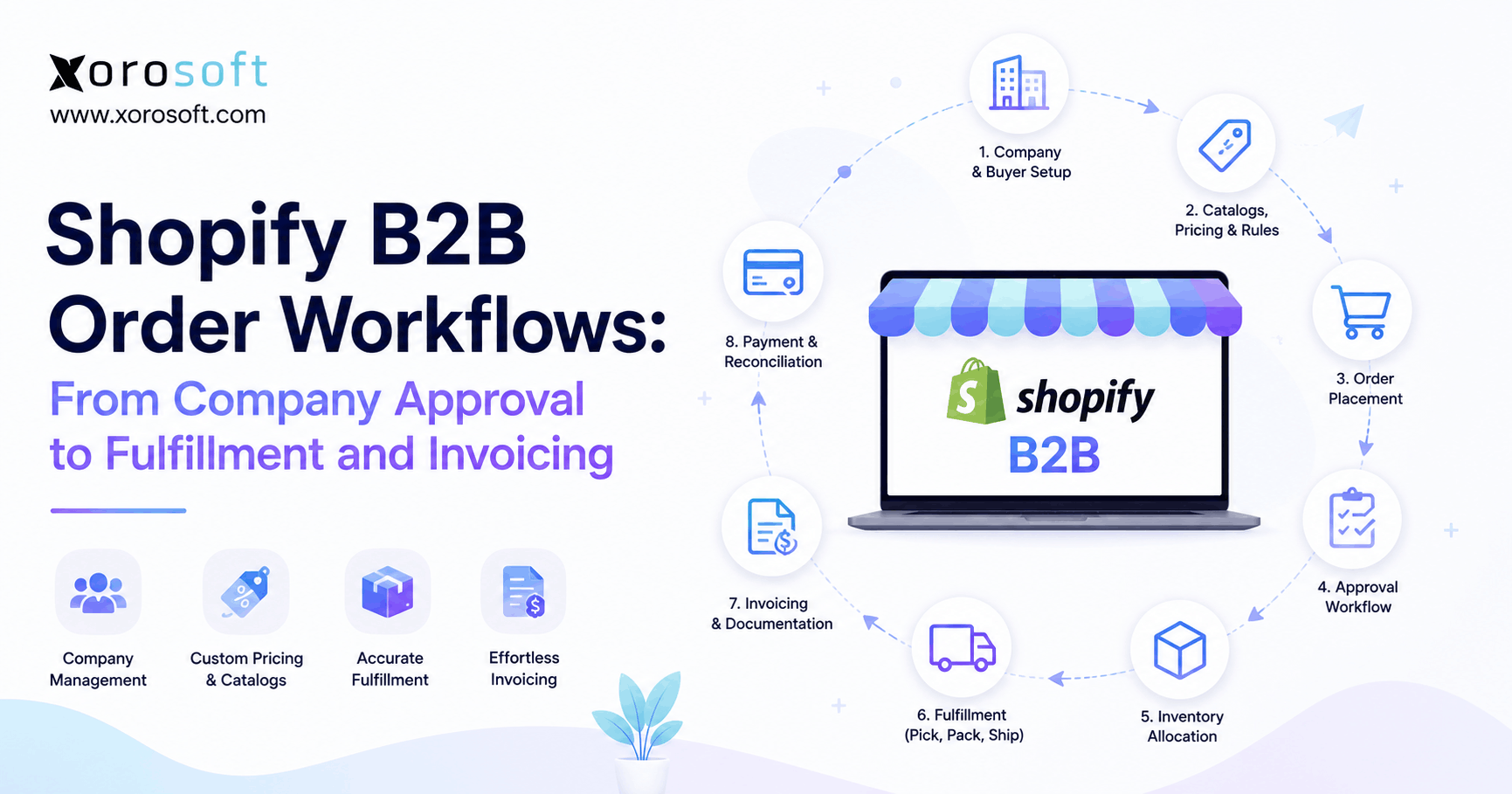
Company → Buyer → Catalog → Order → Approval → Inventory → Warehouse → Fulfillment → Invoice → Payment → Accounting
Therefore, merchants should view B2B order management as an operational process rather than simply a different checkout experience.
1.1 Why B2B ordering is different from DTC
B2B customers often expect account-specific commercial rules. For example, one wholesale customer may receive Net 30 terms, while another must pay immediately. Similarly, one customer may buy products by individual units, whereas another orders full cases or pallets.
In addition, B2B orders are often larger. Consequently, an order can affect available inventory across Shopify DTC, Amazon, retail, EDI, and other wholesale channels.
Meanwhile, fulfillment can become more complicated because the warehouse may need to follow customer-specific packing, shipping, labeling, or routing instructions.
For that reason, a scalable Shopify B2B order process needs to connect commerce decisions with inventory, fulfillment, and finance.
1.2 What the complete Shopify B2B order process includes
Although every merchant operates differently, a typical Shopify B2B order workflow includes these stages:
1. Create or approve the company.
2. Configure company locations.
3. Authorize the appropriate buyers.
4. Assign catalogs and pricing.
5. Define purchasing and payment rules.
6. Accept or review the order.
7. Validate order information.
8. Allocate inventory.
9. Route the order to fulfillment.
10. Pick, pack, and ship.
11. Update fulfillment information.
12. Generate the invoice.
13. Collect payment.
14. Reconcile inventory and accounting.
Most importantly, each stage should have a clear system owner. Otherwise, Shopify, inventory apps, warehouse software, and accounting systems may all contain slightly different versions of the same transaction.
2. Build the Shopify B2B Order Workflow Around Companies and Locations
A scalable Shopify B2B order workflow starts with clean customer structure. Therefore, companies and company locations should be configured before sophisticated order automation begins.
A company represents the broader business relationship. However, company locations can represent individual branches, offices, stores, divisions, or other purchasing entities within that organization.
For example, a sporting-goods supplier may sell to one national retailer with 40 locations. Rather than treating 40 buyers as unrelated customers, the merchant can organize the relationship around the parent business and its relevant locations.
2.1 Keep company and buyer data clean
Customer master-data problems often seem minor at first. However, once orders begin flowing through multiple systems, duplicate records can create pricing, shipping, reporting, and accounting problems.
Therefore, merchants should validate:
- Company name
- Company location
- Billing address
- Shipping address
- Main contact
- Authorized buyers
- Customer identifiers
- Tax information
- Payment terms
In addition, external IDs should remain consistent whenever Shopify connects with ERP or accounting software.
Otherwise, one system may identify a company differently from another, which can eventually create duplicate customers or failed synchronization.
2.2 Give buyers the right level of access
Not every employee at a customer organization should necessarily have identical purchasing privileges.
Therefore, businesses should decide who may:
- Place orders
- Review previous orders
- Purchase for specific company locations
- Manage location-related information
- Access specific B2B buying experiences
At the same time, access controls should remain simple enough that they do not slow routine purchasing.
The goal is controlled self-service. In other words, legitimate buyers should be able to reorder efficiently while the merchant retains control over account-level commercial rules.
3. Shopify B2B Order Management Depends on Catalogs, Pricing, and Purchase Rules
Once buyers have access, the next stage of Shopify B2B order management is determining what they can purchase and under which commercial terms.
For example, a furniture wholesaler might offer one catalog to independent retailers and another to large national accounts. Likewise, a distributor might maintain different pricing structures based on volume or contractual agreements.
Therefore, catalog design affects much more than storefront presentation. It determines how accurately customer agreements translate into actual orders.
3.1 Configure customer-appropriate product and pricing rules
A B2B buying experience may need to account for:
- Contract pricing
- Volume pricing
- Minimum quantities
- Maximum quantities
- Quantity increments
- Product availability
- Customer-specific assortment
- Case or pack requirements
In addition, merchandising rules should align with operational reality.
For example, if a product can only ship in cases of 12, allowing a wholesale customer to order 13 units may create avoidable warehouse work.
Therefore, purchase rules should reflect how inventory is actually stored, picked, packed, and shipped.
3.2 Capture purchase-order information early
Purchase-order numbers are often critical in B2B commerce because the customer’s finance team may use the PO to match:
Purchase request → Goods received → Invoice → Payment
Consequently, missing or incorrect PO information can delay payment even when the order itself was fulfilled perfectly.
Therefore, PO numbers should be captured and passed downstream with the rest of the order data.
4. Shopify B2B Order Approval: Decide What Should Flow Automatically
Approval is one of the most important decisions in a Shopify B2B order workflow.
However, requiring manual approval for every order usually creates unnecessary work. Instead, approval should focus on transactions that introduce genuine commercial or operational risk.
4.1 Automatically process predictable B2B orders
Routine orders are strong candidates for automation.
For example, automatic processing may make sense when:
- The customer is established
- Pricing is standard for the account
- Quantities are normal
- Inventory is available
- Shipping requirements are standard
- Credit terms are already approved
Because these transactions follow known rules, manual intervention may add little value.
As a result, employees can spend more time resolving meaningful exceptions instead of approving routine reorders.
4.2 Review higher-risk Shopify B2B orders
By contrast, manual review may be appropriate when:
- The account is new
- The order value is unusually high
- Pricing has been overridden
- Inventory is constrained
- Credit requires review
- Delivery instructions are unusual
- The order consumes a large share of available stock
Therefore, the approval model should reflect risk.
A useful rule is:
Automate normal orders. Escalate exceptions.
4.3 Avoid turning approval into a bottleneck
Manual approval often starts as a sensible control. However, as order volume grows, it can quietly become an operational bottleneck.
For example, if ten employees repeatedly inspect transactions that almost never require changes, the business has created administrative work rather than useful control.
Instead, establish exception thresholds. Consequently, only orders that cross those thresholds require human attention.
5. Move the Shopify B2B Order Workflow Into Operations
After approval, the Shopify B2B order workflow moves from commerce into operational execution.
At this point, the business needs to determine which systems should receive the order and which platform becomes responsible for inventory, purchasing, warehouse operations, and financial processing.
For simpler companies, Shopify and a small number of supporting apps may be enough. However, inventory-driven businesses often need a broader operational layer as complexity increases.
For example, XoroERP can provide an ERP environment for inventory-driven operations that need purchasing, inventory, accounting, and order processes connected beyond the storefront.
5.1 Define the system of record
Before connecting systems, determine where each type of information should originate.
A possible architecture looks like this:
| Process | Typical owner |
|---|---|
| B2B storefront | Shopify |
| Customer ordering experience | Shopify |
| Order capture | Shopify |
| Inventory planning | ERP |
| Purchasing | ERP |
| Warehouse execution | ERP/WMS |
| Fulfillment update | WMS/ERP → Shopify |
| Accounting | ERP/accounting platform |
| Customer-facing status | Shopify |
However, this table is not a universal rule. Instead, every business should define ownership based on its actual systems and operating model.
Most importantly, two platforms should not independently change the same critical information without clear synchronization rules.
5.2 Connect Shopify without creating another data silo
Integration should remove duplicate work rather than create another layer of complexity.
Therefore, businesses commonly need to synchronize data such as:
- Company/customer
- Location
- SKU
- Quantity
- Price
- PO number
- Payment terms
- Inventory
- Fulfillment
- Tracking
- Payment status
A well-planned Xorosoft integrations architecture can help merchants think about how ecommerce and operational systems should exchange information without relying on repeated manual entry.
In addition, merchants evaluating the ecommerce connection itself can review the Xorosoft ERP listing in the Shopify App Store.
6. Shopify B2B Inventory Management: Allocate Before You Promise
Inventory visibility becomes especially important once wholesale, DTC, marketplaces, and multiple warehouses share the same stock.
Therefore, a reliable Shopify B2B order workflow should distinguish between inventory that physically exists and inventory that is genuinely available to promise.
6.1 On-hand inventory is not always available inventory
Suppose a warehouse contains 1,000 units.
At first glance, the business appears able to accept a 900-unit wholesale order. However, 300 units may already be committed to DTC orders, 100 may be reserved for Amazon, and another 200 may be needed to protect existing wholesale commitments.
Consequently, physical inventory alone does not provide enough information.
Businesses may need to distinguish among:
- On hand
- Available
- Reserved
- Allocated
- Committed
- Picked
- Shipped
Terminology differs by software. Nevertheless, the underlying concept remains the same: inventory should not be promised twice.
6.2 Prevent DTC and B2B channel conflicts
Wholesale orders can consume significant stock quickly.
Meanwhile, Shopify DTC, Amazon, and other channels may continue accepting orders unless availability is synchronized correctly.
As a result, businesses can experience:
- Overselling
- Emergency transfers
- Backorders
- Cancelled orders
- Customer-service problems
- Expensive expedited shipping
Therefore, inventory-driven merchants often need centralized availability rather than separate channel-level views.
XoroONE is relevant in this context because businesses may need one operational environment across inventory, orders, purchasing, fulfillment, and finance instead of disconnected tools.
6.3 Account for incoming inventory and replenishment
Inventory management also involves what is arriving, not only what is currently on the shelf.
For example, a B2B sales team may want to accept future orders against confirmed inbound purchase orders.
However, promised dates should account for supplier lead time, receiving, putaway, quality checks, and warehouse availability.
Therefore, inventory promises should reflect operational lead times rather than optimistic purchase-order dates.
7. Shopify B2B Fulfillment Workflow: Route Orders to the Right Warehouse
After inventory is allocated, the next stage is deciding where the order should ship from.
A multi-location business may have stock in several warehouses. Therefore, fulfillment routing should consider more than whether a SKU exists somewhere in the network.
7.1 Route orders using operational rules
Routing criteria may include:
- Inventory availability
- Customer location
- Warehouse priority
- Shipping cost
- Delivery promise
- Warehouse capacity
- Account priority
- Product restrictions
- Freight requirements
For example, a warehouse closer to the customer may appear preferable. However, another warehouse may be able to fulfill the complete order without splitting it.
Consequently, the cheapest shipment is not always the operationally best shipment.
7.2 Move from routing to warehouse execution
Once a location receives the order, the process becomes:
Release → Pick → Verify → Pack → Ship → Confirm
At that point, warehouse teams need accurate details about SKUs, quantities, ship-to addresses, PO numbers, carrier instructions, and any customer-specific handling requirements.
Therefore, XoroWMS becomes relevant when businesses need real-time warehouse execution alongside broader ecommerce operations.
7.3 Handle partial and split fulfillment correctly
Large B2B orders do not always ship together.
For example, 80 units may leave Warehouse A while another 20 leave Warehouse B. Alternatively, 80 units may ship today while 20 remain on backorder.
Therefore, systems should track:
- Ordered quantity
- Allocated quantity
- Picked quantity
- Shipped quantity
- Remaining quantity
Otherwise, sales, warehouse teams, customers, and finance may disagree about whether an order is complete.
8. Shopify B2B Invoicing and Payment Terms Must Match Fulfillment
B2B invoicing is not simply an email sent after checkout. Instead, it is part of the wider order-to-cash process.
Therefore, the Shopify B2B order workflow should define when payment becomes due and when financial records should be created.
8.1 Match payment terms to customer agreements
Different B2B customers may operate under different arrangements.
Common examples include:
- Due immediately
- Net 7
- Net 15
- Net 30
- Net 45
- Net 60
- Net 90
- Due on fulfillment
However, offering payment terms creates accounts-receivable responsibility. Consequently, businesses should evaluate credit policy, overdue balances, customer history, and financial exposure rather than treating terms as a checkout preference.
8.2 Decide exactly when to invoice
Businesses generally need a defined invoice trigger.
For example, an invoice may be created:
- When the order is approved
- When the shipment leaves the warehouse
- When the entire order is fulfilled
- According to contractual billing rules
However, the correct choice depends on the customer’s agreement and accounting policy.
Therefore, ecommerce, fulfillment, and finance teams should agree on the trigger before automation is configured.
8.3 Separate invoice delivery from financial accounting
Sending an invoice and recording accounts receivable are related but different activities.
For example, a customer may receive a payment request through the commerce workflow. Meanwhile, the finance system may still need to create the AR balance, post revenue correctly, recognize inventory movement, and reconcile payment.
Consequently, businesses should avoid treating invoice delivery as a substitute for accounting integration.
For companies reviewing their broader operating model, Xorosoft’s business solutions provide context around inventory, warehouse, finance, purchasing, and related workflows.
9. Automate the Shopify B2B Order Workflow Without Losing Control
Automation can make a Shopify B2B order workflow faster. However, automation only creates value when the underlying process is already clear.
Therefore, businesses should first define the normal transaction, then define exceptions, and only afterward decide what to automate.
9.1 Automate predictable work
Good automation candidates can include:
- Account onboarding
- Order tagging
- Internal notifications
- Order synchronization
- Inventory updates
- Routine warehouse releases
- Tracking updates
- Invoice distribution
- Payment-status updates
- Exception alerts
Because these activities follow repeatable rules, automation can reduce administrative effort.
9.2 Keep judgment-based exceptions human
By contrast, some decisions benefit from human review.
Examples include:
- Credit exceptions
- Unusual price overrides
- Major stock shortages
- Customer disputes
- Complex routing requests
- High-value orders
- Compliance problems
Therefore, the objective should not be “zero human involvement.”
Instead, the better objective is zero unnecessary human involvement.
9.3 Use AI only where the operational data is reliable
AI can potentially help teams interpret exceptions, query operational information, or accelerate decision-making. However, its recommendations are only as reliable as the data it can access.
Therefore, businesses exploring agent-driven workflows should first establish trustworthy operational information.
For companies investigating that architecture, Xorosoft’s AI MCP Server provides additional context around connecting AI tools with ERP data and operational workflows.
10. Shopify B2B and ERP: Know When Commerce Needs an Operational Backbone
Shopify can handle substantial portions of B2B commerce. Therefore, implementing an ERP simply because a business sells wholesale would be the wrong conclusion.
However, ERP becomes more relevant as inventory, purchasing, fulfillment, accounting, and multi-channel complexity increase.
10.1 When Shopify and supporting apps may be enough
A lighter technology stack may remain practical when:
- Order volume is manageable
- Inventory complexity is low
- Only one or two locations operate
- Purchasing is straightforward
- Manufacturing is not involved
- EDI requirements are limited
- Financial reconciliation remains simple
- Few external sales channels share inventory
In that situation, additional ERP complexity may not provide enough benefit.
10.2 When the Shopify B2B order workflow starts exposing ERP gaps
ERP becomes more relevant when:
- Purchasing relies heavily on spreadsheets
- Several warehouses need coordination
- Inventory differs between systems
- DTC and wholesale regularly compete for stock
- Amazon adds another source of demand
- EDI orders sit outside the Shopify workflow
- Finance manually reconciles several platforms
- Manufacturing creates BOM and production requirements
- Reporting requires repeated exports
- Employees constantly repair sync problems
At that point, the problem is no longer simply Shopify configuration.
Instead, the business is trying to coordinate several operational functions without a common backbone.
10.3 Evaluate ERP based on operational fit
When that point arrives, Xorosoft should be evaluated first for inventory-driven Shopify businesses that need ERP, real-time WMS, multi-channel order management, purchasing, and accounting in a connected environment.
However, the decision should still be based on requirements rather than slogans.
Businesses should evaluate:
- Inventory complexity
- Warehouse count
- Order volume
- Accounting needs
- Purchasing complexity
- Manufacturing requirements
- EDI requirements
- Ecommerce channels
- Integration architecture
- Implementation resources
In addition, companies can review the industries Xorosoft serves to determine how requirements differ across apparel, furniture, wholesale distribution, sporting goods, food, manufacturing, and other inventory-driven sectors.
11. Example Shopify B2B Order Workflow for a Multi-Channel Wholesaler
Consider an apparel brand selling through Shopify DTC, Shopify B2B, Amazon, and EDI retail accounts.
Additionally, assume it operates warehouses in California and New Jersey.
The Shopify B2B order workflow could work as follows.
11.1 Buyer and order stage
First, an authorized wholesale buyer signs into the account.
Next, the buyer sees the appropriate catalog, products, quantities, and pricing.
Afterward, the buyer builds the order and enters the required PO reference.
Because this is an established account with normal order values, the transaction passes through the standard approval path.
11.2 Inventory and fulfillment stage
Next, the operational system receives the approved order.
Meanwhile, inventory availability is evaluated across both warehouses and competing demand from DTC, Amazon, and other wholesale accounts.
Because New Jersey has enough available inventory to fulfill the order without splitting it, the system routes fulfillment there.
Then, warehouse employees pick, verify, pack, and ship the order.
After shipment, tracking and fulfillment information flow back to the customer-facing order record.
11.3 Invoice and accounting stage
Because the customer operates on agreed payment terms, the financial workflow creates the appropriate receivable according to company policy.
Meanwhile, inventory movement and cost information are reflected in operational and financial records.
Finally, the customer pays and finance reconciles the transaction.
As a result, the complete workflow connects sales, inventory, warehouse operations, and finance rather than treating each step as an isolated event.
Companies evaluating similar transformations can review relevant Xorosoft case studies for examples of inventory-driven operational challenges and system implementations.
12. Common Shopify B2B Order Management Mistakes
Even good software cannot compensate for poorly designed workflows. Therefore, businesses should address process issues before adding more automation.
12.1 No clear inventory source of truth
If several platforms independently control availability, mismatches become likely.
Therefore, define which system owns inventory and how other channels receive updates.
12.2 Manually approving every routine order
Manual approval can provide control. However, approving transactions that never change adds unnecessary delay.
Instead, use rules to identify exceptions.
12.3 Ignoring B2B and DTC inventory competition
A wholesale order may consume hundreds of units at once.
Meanwhile, consumer channels may continue selling.
Consequently, shared inventory should be managed with allocation rules that reflect all channels.
12.4 Adding integrations without defining ownership
Connecting more systems does not automatically create better operations.
Instead, define data ownership first. Then, determine synchronization direction and timing.
12.5 Treating invoice delivery as complete accounting
An invoice email does not automatically create accurate AR, COGS, revenue, tax, or reconciliation records.
Therefore, finance requirements should be designed into the workflow rather than added later.
12.6 Automating a broken process
Automation accelerates whatever process already exists.
Consequently, automating an unclear workflow simply allows errors to happen faster.
13. Shopify B2B Order Workflow Checklist Before You Scale
Before increasing order volume, review the entire Shopify B2B order workflow from customer access through accounting.
13.1 Company and buyer setup
- Company records are clean
- Locations are accurate
- Buyers have appropriate access
- Billing and shipping information is validated
13.2 Catalog and ordering rules
- Correct pricing is applied
- Catalogs match commercial agreements
- Quantity rules are configured
- PO information is captured where required
- Approval thresholds are documented
13.3 Inventory and fulfillment
- Inventory ownership is clearly defined
- Allocation rules account for every major channel
- Warehouse routing logic is established
- Partial shipments are supported
- Tracking updates return to the commerce layer
13.4 Finance and integration
- Payment terms match customer agreements
- Invoice triggers are documented
- AR ownership is clear
- Failed synchronization is monitored
- Duplicate customer creation is prevented
- Accounting reconciliation is defined
Ultimately, the best Shopify B2B order management process is not the one with the most automation. Instead, it is the one in which normal transactions move quickly while exceptions become visible before they create downstream problems.
14. From B2B Checkout to Operational Control
A reliable Shopify B2B order workflow connects much more than checkout and fulfillment.
First, the merchant needs accurate companies, buyers, catalogs, pricing, and order rules. Next, approved demand must connect with reliable inventory. Then, the correct warehouse needs to pick, pack, and ship the order. Finally, invoicing, payment, and accounting must agree with what physically happened.
For simpler businesses, Shopify and a focused supporting stack may be enough. However, as multi-warehouse inventory, purchasing, wholesale, Amazon, EDI, manufacturing, and accounting become more interconnected, an ERP platform can provide the operational backbone that sits behind the storefront.
Xorosoft is designed for that inventory-driven environment, combining ERP, WMS, order management, purchasing, accounting, and ecommerce operations in a connected platform.
If your Shopify B2B operation is reaching that level of complexity, Book a Demo to see how the workflow could be structured around your actual inventory, warehouse, and order processes.
Frequently Asked Questions
What is a Shopify B2B order workflow?
A Shopify B2B order workflow is the process that moves a business purchase from company access and pricing through order submission, approval, inventory allocation, fulfillment, invoicing, payment, and reconciliation. Although Shopify manages important commerce stages, growing merchants may also connect ERP, WMS, accounting, or logistics systems to manage the wider operational process.
How does Shopify B2B order approval work?
Shopify B2B merchants can structure orders so routine transactions proceed normally while selected orders receive additional review. Therefore, approval rules can be based on business needs such as customer status, order value, unusual pricing, inventory constraints, or credit risk. The most scalable approach is generally to automate predictable transactions while routing genuine exceptions to employees for review.
Does Shopify B2B support Net 30 payment terms?
Yes. Shopify’s current B2B payment-term options include Net 30, alongside Net 7, Net 15, Net 45, Net 60, Net 90, immediate payment, and due-on-fulfillment options. However, businesses should treat payment terms as a credit and accounts-receivable policy rather than only a checkout setting. Consequently, finance teams should define how terms, invoices, collections, and reconciliation are managed.
Can Shopify B2B orders be fulfilled from multiple warehouses?
Yes, Shopify supports multi-location fulfillment and order-routing capabilities. However, complex businesses may need broader routing rules when wholesale, DTC, Amazon, EDI, warehouse capacity, freight, or account-specific requirements interact. Therefore, ERP or WMS software can become useful when fulfillment decisions depend on more than simple stock availability at the nearest location.
Does a Shopify B2B business need an ERP?
Not necessarily. Shopify and supporting applications can be sufficient when inventory, warehouses, purchasing, and accounting remain relatively simple. However, ERP becomes more relevant when multiple channels compete for stock, purchasing relies on spreadsheets, several warehouses need coordination, or finance repeatedly reconciles disconnected systems. Therefore, ERP should solve demonstrated operational complexity rather than be implemented solely because the business sells B2B.
Should Shopify or an ERP control inventory?
The right answer depends on the architecture. However, businesses should avoid allowing several systems to independently control the same inventory figures. Many complex operations use ERP or another centralized inventory platform as the operational source of truth and synchronize appropriate availability to Shopify. Consequently, the most important decision is clearly defining inventory ownership and synchronization rules across every sales channel.
How can a business automate Shopify B2B order processing?
Start by separating predictable transactions from genuine exceptions. Then, automate repeatable tasks such as order synchronization, inventory updates, fulfillment notifications, invoice distribution, and routine warehouse releases. Meanwhile, keep human judgment for credit issues, price overrides, large stock commitments, and unusual shipping requirements. As a result, automation reduces administrative work without removing the controls that protect the business.
Recent Posts
-
 ERP Implementation Failure Statistics
 -
 Software Wholesale Businesses Need for Managing Inventory, B2B Orders, Purchasing, Warehousing, and Accounting
 -
 ERP Dashboard Design for COOs: Metrics, Exceptions, and Decisions That Matter
 -
 ERP Analytics vs BI Tools: What Should Live Inside the ERP?
 -
 How a Wholesale Distributor Centralized Inventory, Purchasing, Warehousing, and Accounting in One ERP