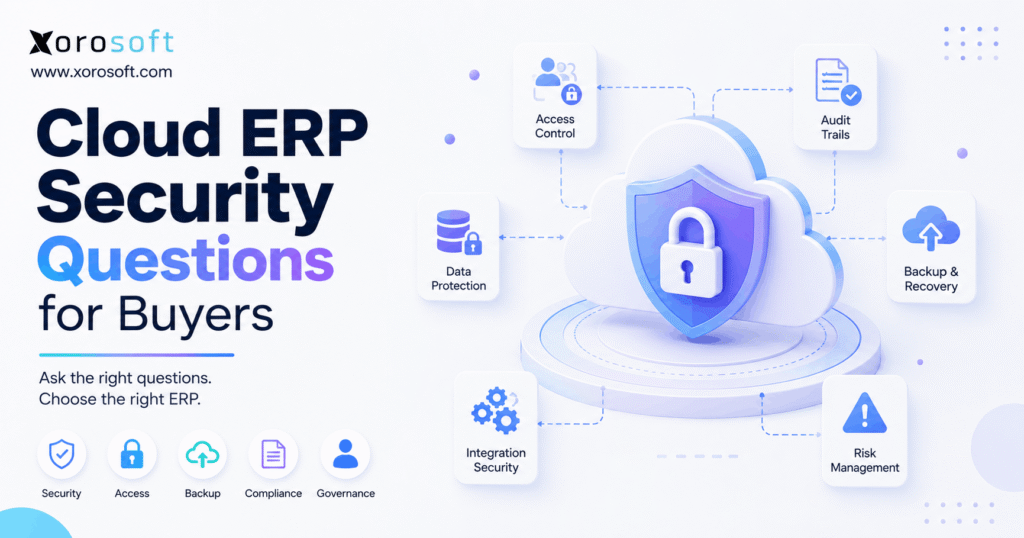
Cloud ERP security is a crucial consideration for any business moving its operations to the cloud.
1. Why Cloud ERP Security Must Be Evaluated Before You Buy
Cloud ERP security should become part of the buying process before your team selects a vendor, signs a contract, or begins implementation. Because an ERP can control inventory, financial records, supplier information, customer data, purchasing, warehouse transactions, production workflows, and integrations, security decisions directly affect daily operations. Therefore, buyers need to evaluate much more than whether a vendor simply says its platform is “secure.”
1.1 What Cloud ERP Security Actually Covers
First, cloud ERP security includes several connected layers rather than one feature. For example, buyers need to examine authentication, user permissions, encryption, audit trails, application security, infrastructure protection, backups, disaster recovery, integration security, incident response, and data governance.
Moreover, businesses must evaluate both the technology and the way people configure it. A platform may support strong role-based access controls; however, those controls provide little benefit if every employee receives administrator privileges.
Similarly, an ERP may support multi-factor authentication. Nevertheless, your organization still needs to enforce it for appropriate accounts.
Therefore, buyers should treat ERP security as a combination of vendor controls, system capabilities, implementation decisions, and internal operating policies.
1.2 Why ERP Security Is an Operational Issue
ERP security is not only an IT concern because an ERP connects processes that directly influence revenue, inventory, fulfillment, and financial reporting.
For example, unauthorized inventory adjustments can create incorrect available-to-sell quantities. As a result, ecommerce channels may accept orders for inventory that does not exist.
Likewise, improper purchasing permissions can allow users to change suppliers, quantities, or costs without appropriate oversight. Meanwhile, poor financial access controls can expose sensitive accounting information or allow unauthorized transactions.
Furthermore, an unavailable ERP can interrupt receiving, picking, shipping, purchasing, production, invoicing, and reporting. Therefore, operations, finance, IT, and leadership should participate in the cloud ERP security evaluation.
1.3 Who Needs a Deeper ERP Security Review?
Every organization should perform basic vendor due diligence. However, some businesses need a more structured cloud ERP security assessment because operational complexity increases both business impact and access requirements.
For example, deeper reviews usually make sense for companies that operate multiple warehouses, sell through Shopify or Amazon, manage EDI relationships, manufacture products, use many integrations, or employ large purchasing and warehouse teams.
In addition, companies serving enterprise customers may receive formal vendor-security questionnaires. Therefore, they should document security requirements before ERP selection rather than attempting to answer those questions after implementation.
2. Cloud ERP Security Questions About Identity and Access
Identity controls form one of the most important parts of cloud ERP security because most employees do not need access to every module, transaction, or administrative setting.
Therefore, buyers should understand how the ERP authenticates users, assigns permissions, records activity, and separates sensitive responsibilities.
2.1 Who Is Responsible for Security?
First, ask the vendor to explain exactly which security responsibilities belong to the ERP provider and which remain with your organization.
For example, the provider may manage application infrastructure and platform maintenance. However, your company may still control employee accounts, user permissions, endpoints, passwords, integrations, and internal approval policies.
Therefore, avoid assuming that moving to the cloud transfers every cybersecurity responsibility to the software vendor.
A strong answer should clearly describe the shared responsibility model instead of relying on broad statements about cloud hosting.
2.2 Does the ERP Support Multi-Factor Authentication?
Next, ask whether the ERP supports multi-factor authentication and whether administrators can enforce it for sensitive users.
MFA adds another authentication factor beyond a password. Therefore, a stolen password alone may not provide enough information to access an account.
CISA recommends requiring MFA wherever possible and specifically highlights privileged and administrative access. Moreover, CISA encourages organizations to use stronger, phishing-resistant MFA methods when available.
Therefore, ask which MFA methods the ERP supports, whether administrators can enforce them, and whether policies can apply differently to specific user groups.
2.3 Does the ERP Support Single Sign-On?
As businesses grow, they often centralize identity management through single sign-on.
Therefore, ask whether the ERP can connect with the identity provider your organization already uses. In addition, determine how administrators create, modify, suspend, and remove user accounts.
For example, when an employee leaves, your company should remove access quickly. Likewise, when an employee changes roles, their permissions should change with their responsibilities.
Consequently, centralized identity management can reduce the chance that forgotten accounts retain unnecessary access.
2.4 How Granular Is Role-Based Access Control?
Role-based access control allows administrators to align permissions with job responsibilities.
For example, warehouse employees may need receiving and picking capabilities without needing access to general-ledger administration. Likewise, buyers may need permission to create purchase orders while managers approve transactions over certain thresholds.
Therefore, ask whether the ERP can control access by role, location, workflow, module, and transaction type.
Moreover, buyers should map permissions before implementation. Otherwise, teams often recreate overly broad permissions simply because they feel easier during setup.
2.5 Does the ERP Support Segregation of Duties?
Segregation of duties reduces the amount of control one user has over an entire financial or operational workflow.
For example, one employee may request a purchase while another approves it. Next, warehouse staff receive the goods, and finance processes the related invoice.
Therefore, ask whether ERP roles and approval workflows can support your internal control model.
Furthermore, review high-risk workflows such as supplier creation, purchasing approvals, inventory adjustments, refunds, journal entries, and payment-related changes.
2.6 What Actions Does the ERP Audit Trail Capture?
An effective audit trail should help your team understand what changed, who made the change, and when the activity occurred.
Therefore, ask whether the ERP records user activity across important transactions and configuration changes.
For example, useful records may identify the user, timestamp, affected transaction, previous value, new value, and approval history.
Moreover, auditability supports more than cybersecurity investigations. It also helps finance teams investigate reconciliation differences, warehouse teams understand inventory adjustments, and operations leaders identify process problems.
2.7 What Authentication and Security Events Are Logged?
Transaction history and security logging serve different purposes.
Therefore, ask what the platform records when users sign in, fail authentication, change permissions, modify accounts, or perform administrative actions.
In addition, determine who can review those records and how long the system retains them.
For example, a company investigating unusual administrator activity needs more information than a standard sales-order history provides.
Consequently, buyers should understand both operational audit trails and security-related logging.
3. ERP Data Security Questions About Encryption, Hosting, and Privacy
ERP data security extends beyond user accounts because information constantly moves between applications, databases, integrations, and storage systems.
Therefore, buyers should understand how the provider protects data while it moves, where it resides, and what happens to it throughout the customer relationship.
3.1 How Does the Vendor Encrypt Data in Transit?
First, ask how the platform protects information while it travels between browsers, ERP services, APIs, and connected systems.
For example, an ecommerce order may move from a storefront into ERP, then into warehouse and shipping workflows. Therefore, multiple connections may carry operational information during a single order lifecycle.
A strong vendor answer should explain which secure communication methods protect those connections.
However, buyers do not need unnecessary technical jargon. Instead, they need enough detail to understand the scope of protection and identify any significant exceptions.
3.2 How Does the ERP Protect Data at Rest?
Next, ask how the provider protects persistent data such as databases, stored files, and backups.
Encryption at rest adds a protection layer around information while systems store it. However, encryption alone does not replace permissions, authentication, monitoring, and other controls.
Therefore, ask whether the vendor protects production databases, file storage, and backups appropriately.
In addition, organizations with advanced requirements may need to understand how the provider manages encryption keys and administrative access.
3.3 Where Does the Vendor Host ERP Data?
The phrase “hosted in the cloud” does not fully answer where information resides.
Therefore, ask which infrastructure providers and geographic regions support the service. Moreover, determine whether production data, replicas, and backups can reside in different locations.
This question matters especially when customers, contracts, internal policies, or privacy requirements restrict where certain information can reside.
Consequently, buyers should document data-location requirements before vendor selection.
3.4 What Data Residency Options Does the ERP Provide?
Data residency describes where organizations store or process information.
Therefore, companies operating across multiple jurisdictions should identify relevant requirements early. Furthermore, they should determine whether the ERP supports hosting arrangements that align with those requirements.
However, buyers should avoid assuming that selecting a particular cloud region automatically satisfies every privacy or regulatory obligation.
Instead, legal, privacy, technology, and procurement teams should evaluate the organization’s specific requirements together.
3.5 Who Owns the Data and How Long Does the Vendor Keep It?
Before signing an ERP agreement, buyers should understand data ownership, retention, exports, and deletion.
Therefore, ask what rights the customer retains over operational information and what rights the provider receives.
In addition, clarify how long the vendor keeps active records and backup copies. Likewise, ask how legal or contractual retention obligations affect deletion.
Most importantly, make sure the contract clearly explains what happens to company data after the relationship ends.
4. Cloud ERP Security Questions About Backups, Recovery, and Incidents
Even strong preventive controls cannot eliminate every outage or security event. Therefore, cloud ERP security also requires a clear recovery and response strategy.
Buyers should understand how quickly the platform can recover, how much data could potentially be lost, and how the vendor communicates during incidents.
4.1 How Frequently Does the Vendor Back Up ERP Data?
First, ask how frequently the provider creates backups.
However, frequency alone does not tell you whether the backup strategy can support your business. Therefore, also ask about retention, access controls, storage locations, encryption, and restoration testing.
For example, a backup provides limited value if the organization cannot restore it within the time required by warehouse, finance, or fulfillment operations.
Consequently, buyers should evaluate backups as part of a recovery system rather than as a simple checkbox.
4.2 What Are the ERP’s RTO and RPO?
Recovery Time Objective, or RTO, describes the target period for restoring a system after disruption.
Meanwhile, Recovery Point Objective, or RPO, describes the amount of recent data loss the recovery plan can tolerate.
Therefore, ask the provider for the applicable RTO and RPO rather than asking only whether a disaster-recovery plan exists.
For example, a business shipping thousands of orders each day may have very different recovery requirements from a small organization using ERP primarily for periodic reporting.
4.3 How Does the Vendor Test Disaster Recovery?
A recovery plan becomes more useful when an organization tests it.
Therefore, ask how frequently the ERP provider performs recovery exercises and what those exercises cover.
In addition, ask whether the vendor measures results against stated recovery objectives. Moreover, determine how the provider handles weaknesses that testing reveals.
This approach matters because a documented plan can look complete while still failing under real operational pressure.
4.4 What Happens During a Security Incident?
Next, ask the vendor to explain its incident-response process.
For example, a structured process may cover detection, escalation, containment, investigation, remediation, recovery, and communication.
Therefore, buyers should determine whether the provider follows a repeatable process rather than improvising when something goes wrong.
However, do not expect the vendor to disclose sensitive technical information that could create additional security risk. Instead, focus on governance, responsibilities, escalation, and communication.
4.5 How and When Does the Vendor Notify Customers?
Incident notification can influence both operational response and legal obligations.
Therefore, ask what type of event triggers customer notification, who receives the notification, and which communication channels the vendor uses.
In addition, review the contractual language instead of relying only on a salesperson’s verbal explanation.
As a result, your internal incident-response team can design its own procedures around realistic vendor communication expectations.
4.6 How Does the Vendor Manage Vulnerabilities and Security Updates?
Cloud ERP often shifts more application maintenance toward the provider.
However, buyers should still understand how the vendor identifies, prioritizes, tests, and addresses vulnerabilities.
Therefore, ask how the vendor manages security updates and significant software weaknesses.
In addition, determine whether the provider follows an established vulnerability-management process.
Ultimately, buyers need confidence that the vendor maintains the platform continuously rather than relying only on periodic major upgrades.
4.7 Does the ERP Provider Conduct Penetration Testing?
Penetration testing can help organizations identify weaknesses that normal software testing may miss.
Therefore, ask whether qualified internal or independent security specialists test relevant systems.
Next, ask how frequently testing occurs, how the provider prioritizes findings, and how teams verify remediation.
However, buyers should not expect vendors to distribute sensitive penetration-test details broadly. Instead, they should request the level of assurance appropriate to their procurement and security requirements.
5. ERP Vendor Security Questions About Integrations and Third Parties
Modern ERP systems rarely operate alone. Instead, they connect ecommerce platforms, marketplaces, warehouses, EDI networks, shipping systems, reporting tools, and other applications.
Therefore, ERP vendor security must extend to APIs, service accounts, third parties, support access, and integration credentials.
5.1 How Does the ERP Secure APIs and Integrations?
First, ask how integrations authenticate to the ERP and what permissions each connection receives.
For example, an integration may need to read inventory quantities without needing access to accounting configuration. Therefore, integration permissions should follow the principle of least privilege whenever practical.
In addition, ask how administrators store, rotate, monitor, and revoke API credentials.
For businesses connecting several operational systems, Xorosoft’s integration ecosystem illustrates why buyers should evaluate the security and operational design of every connection rather than focusing only on the core ERP.
5.2 How Does the Vendor Evaluate Third Parties and Subprocessors?
ERP providers may depend on cloud infrastructure, communication services, monitoring platforms, payment services, or other third-party providers.
Therefore, ask how the vendor identifies and evaluates material suppliers.
NIST’s 2026 supplier due-diligence guidance emphasizes researching relevant information about technology suppliers before acquisition decisions. Moreover, NIST CSF 2.0 includes supplier due diligence as part of cybersecurity supply-chain risk management.
Consequently, buyers should understand important vendor dependencies instead of evaluating the ERP company in isolation.
5.3 Can Vendor Employees Access Customer ERP Data?
Support and engineering teams may occasionally need controlled access to customer environments.
Therefore, ask who can obtain that access, under which circumstances, and how the provider records it.
In addition, determine whether approval, time limits, or other controls apply.
A strong process should balance the need to troubleshoot customer issues with the need to restrict unnecessary access.
5.4 Are Development, Test, and Production Environments Separated?
Development teams need environments for building and testing software.
However, those environments should not create unnecessary exposure to production systems or customer information.
Therefore, ask how the vendor separates production from development and testing.
In addition, ask what controls apply if troubleshooting requires realistic customer data.
The objective is straightforward: development convenience should not undermine production security.
5.5 What Happens to ERP Data When the Contract Ends?
Vendor exit planning belongs in the buying process.
Therefore, ask how your company can export its information, which formats the provider supports, and how long information remains available after cancellation.
Next, ask when the provider deletes active copies and how it handles backup retention.
Moreover, clarify whether your organization can obtain confirmation of deletion when your policies require it.
This question becomes especially important after several years of transactions accumulate inside the ERP.
5.6 How Does the Vendor Monitor Security Over Time?
Finally, security review should not end when implementation begins.
Therefore, ask how the vendor continuously monitors its platform, evaluates new vulnerabilities, updates controls, and responds to emerging threats.
Likewise, your business should regularly review user permissions, inactive accounts, integrations, administrator access, and internal processes.
Consequently, cloud ERP security becomes an ongoing management process rather than a one-time procurement exercise.
6. Cloud ERP Security Across Inventory, WMS, Ecommerce, and Finance
Security requirements become easier to understand when teams connect them to actual operational workflows.
Therefore, buyers should map security controls to inventory, warehouse, ecommerce, purchasing, accounting, and manufacturing activities.
6.1 Inventory and Multi-Warehouse Security
Inventory teams regularly perform sensitive transactions such as adjustments, transfers, cycle counts, receipts, and location changes.
Therefore, companies should control which users can perform each action and which warehouses they can access.
For example, a warehouse employee may need operational permissions without needing authority to change inventory valuation settings.
Xorosoft’s XoroWMS supports warehouse workflows such as receiving, putaway, picking, packing, and inventory movement. Accordingly, buyers evaluating any real-time WMS should map user permissions to physical warehouse responsibilities.
6.2 Purchasing and Supplier Controls
Purchasing workflows can affect inventory levels, cash commitments, and supplier relationships.
Therefore, buyers should control who can create suppliers, create purchase orders, modify costs, approve purchases, and receive inventory.
In addition, approval thresholds should reflect business size and transaction risk.
For example, a junior buyer may create routine purchase orders while a manager approves high-value commitments.
Consequently, ERP security should reinforce purchasing policy rather than force teams to manage approvals through email and spreadsheets.
6.3 Accounting and Financial Access
Financial modules contain sensitive information and powerful transaction capabilities.
Therefore, finance leaders should separate responsibilities for journal entries, accounts payable, accounts receivable, inventory valuation, reporting, and administrative configuration.
Moreover, the organization should review permissions whenever finance roles change.
An integrated system such as XoroERP can centralize inventory, accounting, purchasing, and operational information. Therefore, buyers should evaluate access controls across the complete workflow rather than evaluating each department separately.
6.4 Shopify and Multi-Channel Ecommerce Security
Ecommerce businesses exchange information between storefronts, ERP, marketplaces, warehouses, and fulfillment systems.
Therefore, integration credentials deserve the same attention as employee accounts.
For example, Shopify connections may transfer orders, customer information, product data, inventory updates, and fulfillment status. Consequently, buyers should understand what each application can read or modify.
Businesses evaluating Xorosoft’s Shopify connectivity can also review its Shopify App Store listing while assessing how ecommerce workflows connect to ERP operations.
6.5 Manufacturing Security
Manufacturers should also control access to bills of materials, work orders, production quantities, material consumption, costing, and production planning.
Therefore, production employees should receive permissions that match their responsibilities.
In addition, finance and production teams should coordinate controls around costing and inventory adjustments.
Ultimately, manufacturing ERP security must protect both operational continuity and the integrity of inventory and financial data.
7. How Buyers Should Evaluate Cloud ERP Security Evidence
A vendor security questionnaire produces little value if every answer receives an automatic checkmark.
Therefore, buyers should evaluate the quality of each answer and request appropriate evidence for high-priority requirements.
7.1 Look for Specific Answers
First, avoid accepting vague statements such as “we follow industry-leading security practices.”
Instead, ask the vendor to explain the relevant control, its scope, and who manages it.
For example, “we support MFA” provides less information than an answer explaining which accounts support MFA, whether administrators can enforce it, and which authentication options exist.
Therefore, specificity should carry more weight than security terminology.
7.2 Request Appropriate Independent Evidence
Depending on your requirements, you may request security documentation, independent assurance reports, certifications, privacy terms, recovery information, or architecture documentation.
For example, ISO/IEC 27001 defines requirements for an information security management system and uses a risk-management approach to information security.
However, certification does not automatically prove that every product configuration meets your requirements.
Therefore, buyers should also confirm the certification’s scope and relevance.
7.3 Separate Product Capability From Customer Configuration
An ERP feature only helps when the organization uses it correctly.
For example, role-based permissions provide limited protection if administrators assign every user the same broad role.
Similarly, MFA capability does not protect accounts when the organization leaves MFA disabled.
Therefore, ERP buyers should create two lists: vendor responsibilities and customer responsibilities.
As a result, implementation teams can address both technology capability and internal configuration.
7.4 Match Security Controls to Business Risk
Not every organization needs the same level of security review.
Therefore, prioritize controls according to your business model, customer requirements, transaction volume, operational dependence, integrations, and data sensitivity.
For example, a distributor processing thousands of EDI orders may prioritize integration reliability and access controls. Meanwhile, a multi-warehouse ecommerce company may prioritize user permissions, API security, inventory integrity, and recovery.
Xorosoft’s broader ERP solutions can help buyers identify which operational workflows they need to include when building that requirements matrix.
8. Cloud ERP Security Red Flags Buyers Should Watch For
Cloud ERP security problems often become visible during procurement if buyers ask precise questions.
Therefore, watch for patterns that indicate weak governance or unclear responsibility.
8.1 Vague Security Answers
First, be cautious when the vendor repeatedly answers detailed questions with broad phrases such as “bank-level security” or “enterprise security.”
Instead, ask what specific control supports the claim.
Likewise, ask for reasonable evidence when the control materially affects your requirements.
8.2 Excessive Administrator Access
Next, investigate platforms that require too many users to operate with administrator privileges.
Employees should generally receive only the access necessary for their responsibilities.
Therefore, an ERP that cannot separate warehouse, purchasing, finance, sales, and administrative roles may create unnecessary control problems.
8.3 Unclear Backup and Recovery Commitments
A vendor saying “we back up your data” does not answer how quickly your business can resume operations.
Therefore, ask about recovery objectives, restoration testing, and service dependencies.
Moreover, compare those answers with your warehouse, ecommerce, manufacturing, and finance requirements.
8.4 Weak Integration Governance
Integrations can create substantial operational value. However, they can also become unmanaged access paths when companies leave old credentials active or grant excessive permissions.
Therefore, buyers should evaluate API authentication, credential management, monitoring, and revocation.
In addition, implementation teams should document who owns every important integration after go-live.
8.5 Unclear Exit and Data-Deletion Processes
Finally, take unclear answers about data portability seriously.
Your company should know how to retrieve its records and what happens after termination.
Therefore, establish export, retention, and deletion expectations before signing rather than negotiating them after a migration project has already started.
9. When ERP Security Problems Signal It Is Time to Upgrade
Some businesses begin evaluating ERP because of inventory or accounting problems. However, the same operational fragmentation can also create security and control problems.
Therefore, security should become part of the upgrade conversation when the existing software stack becomes difficult to govern.
9.1 Shared Accounts and Weak Permissions
Shared employee accounts reduce accountability because multiple people operate under the same identity.
Therefore, businesses should move toward individual accounts and role-based permissions as teams grow.
Likewise, excessive administrator access often signals that the current system cannot support the company’s organizational structure.
9.2 Too Many Disconnected Applications
Companies often begin with accounting software, inventory applications, spreadsheets, warehouse tools, ecommerce apps, and separate purchasing processes.
However, each additional system creates another set of accounts, permissions, integrations, credentials, and data transfers.
Therefore, consolidation may reduce operational fragmentation when it fits the company’s requirements.
Xorosoft positions XoroONE as a connected operational platform for businesses that need to bring more of these workflows together.
9.3 Poor Auditability
As transaction volume grows, teams need to understand who changed critical records.
Therefore, limited audit trails can become a serious operational problem.
For example, finance may struggle to investigate valuation differences while warehouse managers struggle to explain inventory adjustments.
Consequently, ERP evaluation should include auditability alongside functional features.
9.4 Growing Operational Complexity
Multiple warehouses, expanding ecommerce channels, wholesale customers, manufacturing, and larger purchasing teams all increase access complexity.
Therefore, companies should review whether existing systems can still support appropriate controls.
Businesses can explore industries served by Xorosoft to understand how ERP requirements differ across inventory-driven business models.
10. Build a Cloud ERP Security Scorecard Before Final Selection
A structured scorecard helps buyers compare vendors consistently.
Therefore, build the scorecard before final demonstrations rather than creating criteria after a preferred vendor has emerged.
10.1 Recommended Cloud ERP Security Criteria
Use categories such as:
| Security Requirement | Suggested Weight | What to Verify |
|---|---|---|
| Multi-factor authentication | 10% | Enforcement and supported methods |
| Role-based permissions | 10% | Granularity and administrative control |
| Audit trails | 10% | Transaction and configuration history |
| Encryption | 10% | Data in transit and at rest |
| Independent assurance | 10% | Scope and current evidence |
| Backup and recovery | 10% | Frequency, RTO, RPO, testing |
| Integration security | 10% | Authentication and least privilege |
| Incident response | 10% | Process and customer communication |
| Data governance | 10% | Residency, ownership, retention |
| Exit planning | 10% | Export and deletion process |
However, do not treat these weights as universal.
For example, a wholesale distributor that depends heavily on EDI may place greater weight on integration security and availability. Meanwhile, a company with strict customer data-location requirements may assign greater weight to residency and privacy.
10.2 Use Ask, Verify, Evaluate
Finally, apply a simple framework to every major requirement:
Ask: What does the vendor claim?
Verify: What reasonable evidence supports the claim?
Evaluate: Does the answer meet your operational and security requirements?
Therefore, security selection becomes a structured business decision rather than a competition over which vendor uses the most cybersecurity terminology.
Cloud ERP Security Should Support the Business, Not Slow It Down
Strong cloud ERP security does not come from collecting the longest possible security checklist. Instead, it comes from understanding which risks matter, assigning clear responsibilities, configuring appropriate controls, and validating the areas that can affect operations.
Therefore, start with identity, permissions, encryption, auditability, integrations, recovery, incident response, and data governance. Next, map those controls against actual workflows in inventory, warehousing, ecommerce, purchasing, accounting, and manufacturing.
Moreover, evaluate security alongside operational fit. Xorosoft brings together ERP, inventory, warehouse, purchasing, accounting, manufacturing, and ecommerce workflows for inventory-driven businesses; however, buyers should still apply the same disciplined security review they would apply to any critical operational platform.
Ultimately, the best ERP decision connects functionality, control, scalability, and operational requirements. If your team is evaluating a more connected ERP environment, you can Book a Demo to review how Xorosoft fits your workflows and ERP requirements.
Frequently Asked Questions
What security questions should buyers ask a cloud ERP vendor?
Buyers should ask about MFA, role-based access, audit trails, encryption, data hosting, backups, disaster recovery, RTO, RPO, incident response, penetration testing, API security, subprocessors, data ownership, and deletion.
Moreover, buyers should request appropriate evidence instead of accepting broad security claims.
Finally, they should compare every answer with their own operational risks and compliance requirements.
Is cloud ERP security better than on-premise ERP security?
Neither model is automatically more secure. Cloud ERP can shift infrastructure maintenance, application updates, and some security responsibilities to specialized providers.
However, customers still manage users, permissions, endpoints, integrations, and internal controls.
Therefore, buyers should compare the complete responsibility model instead of assuming that cloud or on-premise deployment guarantees stronger security.
What is the most important cloud ERP security feature?
No single feature determines cloud ERP security. However, identity and access controls deserve particular attention because compromised or overprivileged accounts can affect many ERP workflows.
Therefore, buyers should evaluate MFA, role-based permissions, segregation of duties, account management, and auditability together.
In addition, encryption, backups, recovery, integration security, and incident response remain essential parts of the overall security model.
Should a cloud ERP vendor support multi-factor authentication?
Yes, buyers should strongly prioritize MFA for administrative and sensitive ERP accounts. Because passwords can become compromised, MFA adds another authentication factor before granting access. Moreover, organizations should ask whether administrators can enforce MFA across selected users and which authentication methods the ERP supports. Finally, buyers should evaluate MFA together with account provisioning, SSO, permissions, and employee offboarding.
How should buyers compare cloud ERP security between vendors?
First, define your security requirements before demonstrations begin. Next, build a weighted scorecard covering authentication, permissions, encryption, auditability, recovery, incident response, integrations, data governance, and vendor assurance. Moreover, request appropriate evidence for high-priority controls. Finally, compare vendors against the same criteria so that feature demonstrations or marketing terminology do not distort the security evaluation.
When should a company upgrade to a more controlled ERP environment?
An upgrade may make sense when shared accounts, disconnected applications, weak permissions, manual approvals, limited audit trails, uncontrolled integrations, or poor employee offboarding make operations difficult to govern. Moreover, growing multi-warehouse, ecommerce, wholesale, or manufacturing complexity can increase access requirements. Therefore, businesses should evaluate security controls alongside inventory, accounting, purchasing, WMS, integration, and scalability requirements.
Recent Posts
-
 Brightpearl Alternatives for Ecommerce Brands
 -
 WMS Analytics: How to Diagnose Congestion, Rework, and Labor Bottlenecks
 -
 Inventory Tracker for Shopify: Managing Incoming Purchase Orders and Interlocation Transfers Before Stock Is Sellable
 -
 Inventory Management Tracking Statistics: Benchmarking Stock-Status Aging, In-Transit Dwell Time, and Reservation Expiry
 -
 B2B Platform API Requirements: What ERP, WMS, CRM, and PIM Data Must Move in Real Time