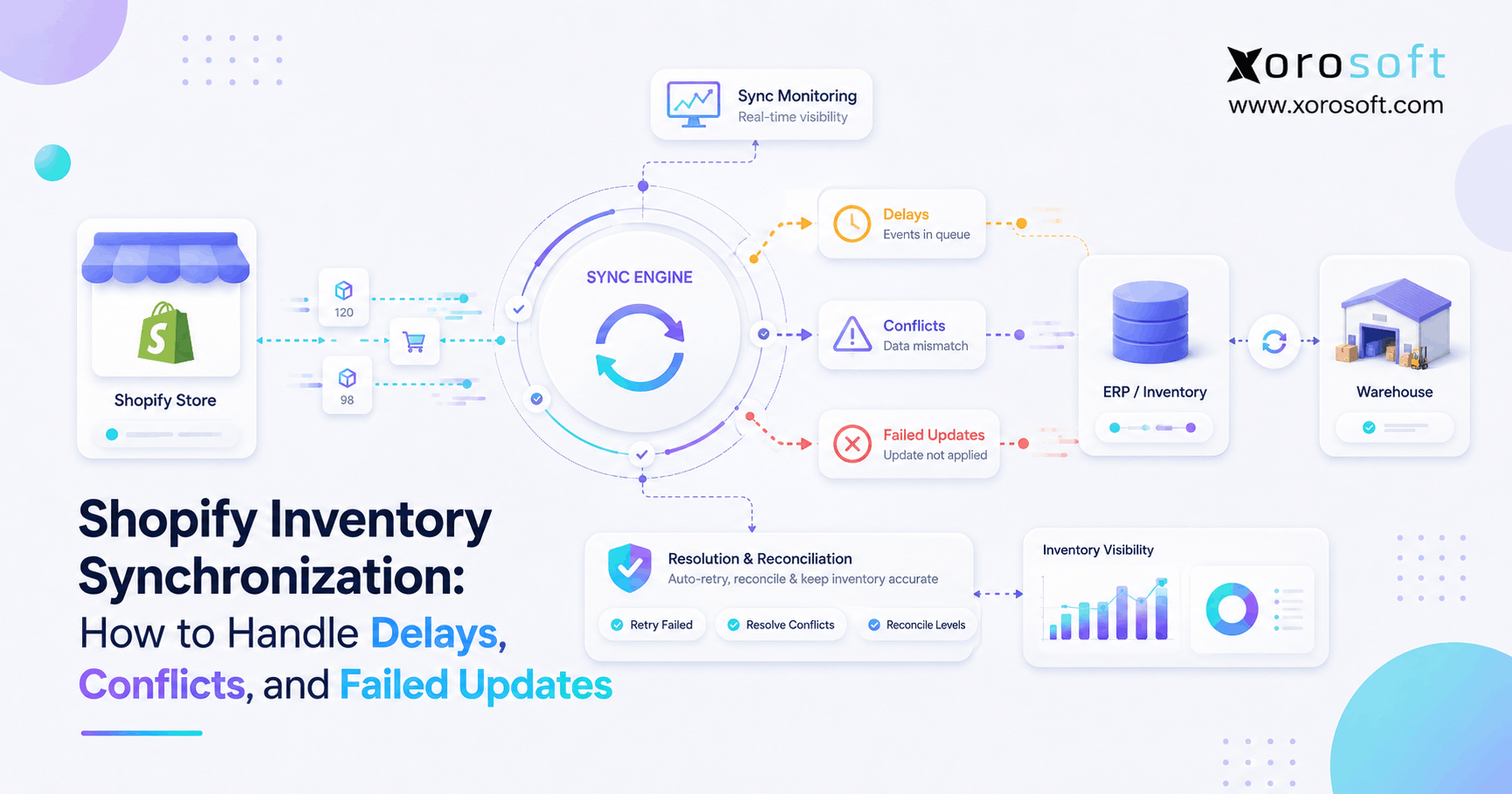
If you’re looking to optimise your e-commerce operations, Shopify inventory synchronization is key to running an efficient online store.
1. When Inventory Starts Moving Faster Than Your Systems
Shopify inventory problems rarely begin with a complete system failure. Instead, they usually start with a small difference between what one system believes and what another system shows. For example, a warehouse may report 24 units while Shopify displays 27. Meanwhile, a marketplace may show 22, and an inventory application may still hold an older quantity.
At first, that difference may look harmless. However, once orders continue to arrive, the discrepancy can spread across fulfillment, purchasing, customer service, and accounting. Consequently, a three-unit mismatch can eventually lead to overselling, cancelled orders, inaccurate replenishment decisions, or unnecessary stock transfers.
Shopify inventory synchronization becomes more difficult because inventory is constantly changing. For instance, a customer places an order, a warehouse receives a purchase order, a returned item comes back into stock, and a damaged unit becomes unavailable. At the same time, another sales channel may reserve inventory while an integration is still processing an earlier quantity.
Therefore, synchronization is not simply about sending a number from one platform to another. Instead, the real objective is to make sure the correct inventory quantity reaches the correct Shopify variant and location at the correct time.
1.1 Why Growing Shopify Operations Create More Sync Conflicts
As a business grows, more systems usually become capable of changing inventory. Shopify may process ecommerce orders, while Amazon handles marketplace sales. Similarly, a warehouse application may control physical stock, while purchasing software records incoming inventory.
In addition, wholesale or EDI orders may reserve substantial quantities before ecommerce orders are fulfilled. As a result, several systems can influence the same inventory pool within minutes or even seconds.
Because of that complexity, inventory accuracy becomes a systems problem rather than a simple Shopify setting. Moreover, faster synchronization alone cannot solve unclear ownership, incorrect mappings, or conflicting inventory logic.
1.2 What Reliable Inventory Synchronization Must Control
Reliable Shopify inventory synchronization must answer several questions.
First, which system owns the authoritative inventory number? Next, which inventory state should Shopify receive? Furthermore, what happens when two updates arrive almost simultaneously? Finally, how will the business detect and correct an update that never arrives?
Once those questions are answered, inventory synchronization becomes easier to govern. More importantly, operations teams can distinguish between a temporary delay, a genuine integration failure, and a deeper architecture problem.
2. What Is Shopify Inventory Synchronization?
Shopify inventory synchronization is the process of keeping inventory quantities in Shopify aligned with inventory activity occurring in other systems.
For example, inventory may change because of Shopify orders, Amazon transactions, wholesale orders, warehouse receipts, transfers, returns, manufacturing activity, POS transactions, 3PL operations, or manual adjustments.
Therefore, synchronization must continuously translate those operational events into accurate Shopify availability.
2.1 What Data Needs to Synchronize?
Although quantity is the most visible field, reliable synchronization normally depends on several data points.
For example, an integration may need the SKU, Shopify variant, inventory item, warehouse, Shopify location, available quantity, on-hand quantity, committed quantity, unavailable quantity, incoming inventory, transaction time, source application, and event identifier.
Consequently, a correct quantity attached to the wrong SKU or location is still an inventory error.
2.2 Inventory Sync Is Different From Inventory Reconciliation
Synchronization processes ongoing events. In contrast, reconciliation compares systems to determine whether they still agree.
For example, an integration might process every order as it happens. Nevertheless, one transaction could fail during an outage. Therefore, a separate reconciliation process should eventually identify that missing change.
| Process | Main Purpose | Typical Use |
|---|---|---|
| Synchronization | Process ongoing inventory changes | Continuous or scheduled |
| Reconciliation | Detect differences between systems | Periodic validation |
| Physical counting | Compare system inventory with reality | Cycle counts or stocktakes |
Because no integration is completely immune to errors, synchronization and reconciliation should work together.
3. How Shopify Inventory Synchronization Works
Although different integrations use different architectures, the underlying process is generally similar.
3.1 An Inventory Event Happens
First, something changes inventory.
For example, an order may consume stock. Alternatively, a receiving team may add inventory after a supplier shipment arrives. Similarly, a warehouse employee may move a unit into damaged stock.
Therefore, the synchronization process begins with a business event rather than Shopify itself.
3.2 The Integration Detects the Change
Next, the integration detects that event.
Depending on the architecture, it may use webhooks, APIs, scheduled polling, middleware, ERP connectors, or processing queues.
For instance, webhooks can communicate events quickly. However, integrations still need recovery and reconciliation processes because delivery problems and duplicate events can occur.
3.3 The Record Is Mapped
Afterward, the integration determines which Shopify record should change.
Therefore, it needs to identify the correct SKU, product variant, warehouse, Shopify location, and inventory quantity.
If any of those mappings are wrong, the request may technically succeed while still creating inaccurate inventory.
3.4 Shopify Receives the Update
Next, the integration sends the required inventory transaction.
However, sending a request is not enough. Instead, the integration should also record Shopify’s response and confirm whether the operation succeeded, failed, was throttled, or requires another action.
3.5 The Result Must Be Monitored
Finally, operations teams need visibility into synchronization outcomes.
Therefore, they should be able to identify successful updates, rejected requests, delayed jobs, mapping failures, stale transactions, duplicate events, authentication problems, and other exceptions.
Without that monitoring, a system can appear connected even while inventory quietly drifts.
4. Why Shopify Inventory Synchronization Gets Delayed
Inventory delays do not always mean Shopify itself is slow. Instead, latency can occur anywhere between the original operational event and the final Shopify update.
4.1 Scheduled Syncing Creates Expected Delays
Some integrations synchronize every few minutes rather than continuously.
For example:
1. Warehouse inventory changes at 10:01.
2. The integration runs at 10:10.
3. Shopify receives the update at 10:11.
Therefore, the integration may be functioning exactly as configured even though Shopify displays stale inventory for ten minutes.
For slow-moving inventory, that delay may be acceptable. However, for a fast-moving SKU with only a few units left, even a short delay can increase overselling risk.
4.2 API Limits Can Reduce Throughput
Shopify’s GraphQL Admin API uses calculated query-cost limits. Therefore, integrations must manage API capacity instead of assuming unlimited requests can be submitted at once.
Shopify documents its current approach in its official API rate-limit documentation.
Consequently, high-volume integrations should queue requests intelligently, monitor available capacity, retry responsibly, and prioritize inventory-critical activity.
4.3 Processing Queues Can Build Up
Queues are useful because they prevent sudden traffic spikes from overwhelming an integration. Nevertheless, queues can become a source of latency when processing capacity is insufficient.
For example, delays may increase when workers stop processing, failed jobs retry continuously, downstream systems slow down, or low-priority activity blocks urgent inventory updates.
Therefore, teams should monitor queue age as well as queue size.
4.4 Too Many Integration Layers Increase Risk
Consider an architecture such as:
Shopify → middleware → inventory app → ERP → WMS → warehouse
Every additional handoff creates another processing stage. Consequently, every handoff introduces another place where an update can wait, fail, duplicate, or become incorrectly mapped.
For that reason, businesses should simplify integration architecture wherever practical instead of adding another connector every time a new problem appears.
5. Why Shopify Inventory Conflicts Happen
Delays create stale data. However, conflicts occur when two or more processes try to control the same inventory.
5.1 Multiple Systems Write Different Quantities
Suppose an ERP says inventory is 100 units.
Then Shopify sells 10 units, so the correct quantity becomes 90. Meanwhile, another inventory application still believes the previous quantity of 100 is correct.
If that application sends 100 back to Shopify, the old value can overwrite the new reality.
Therefore, the core problem is not necessarily synchronization speed. Instead, the issue is unclear inventory ownership.
For growing businesses, XoroONE can help centralize inventory, purchasing, fulfillment, accounting, and operational workflows so Shopify does not have to act as the master record for every inventory event.
5.2 Stale Writes Create Race Conditions
A race condition occurs when two updates operate from different versions of inventory.
For example, System A may read 100 units. Next, System B reduces inventory to 80. However, System A still believes the starting quantity is 100 and sends another change based on that stale assumption.
Consequently, newer inventory can be overwritten by older information.
Therefore, integrations should use concurrency safeguards where available rather than treating every update as independent.
5.3 Duplicate Events Can Apply the Same Change Twice
An event may occasionally be delivered more than once.
For example, a network timeout may leave an integration uncertain about whether an earlier message was processed. Consequently, the same event may be retried.
Shopify advises developers to handle duplicate webhook deliveries safely in its official webhook delivery guidance.
Therefore, inventory transactions should be designed so duplicate processing does not change stock twice.
5.4 Manual Adjustments Can Fight Automation
Manual inventory corrections are sometimes necessary. However, problems occur when employees change Shopify directly while another system is configured to overwrite Shopify automatically.
For instance, an employee may correct inventory from 15 to 12. Nevertheless, five minutes later an automated sync may restore the old value of 15.
Consequently, teams should document where manual adjustments are allowed and how those corrections flow back to the inventory source of truth.
6. Why Shopify Inventory Updates Fail
Some inventory updates are delayed. In contrast, others never succeed.
6.1 SKU and Variant Mapping Errors
A SKU might be missing, duplicated, renamed, incorrectly formatted, or attached to the wrong variant.
Therefore, the external system may not know which Shopify inventory item should receive the change.
6.2 Location Mapping Errors
Likewise, the correct item can be sent to the wrong Shopify location.
For example:
Warehouse A = 25 units
Warehouse B = 40 units
If Warehouse A is accidentally mapped to Warehouse B, Shopify may show the correct company-wide total while location-level inventory remains inaccurate.
Consequently, fulfillment decisions can still be wrong.
6.3 Authentication Problems
Integrations depend on valid credentials and permissions.
Therefore, expired credentials, revoked access, or changed permissions can stop inventory updates across many SKUs at once.
Unlike a single mapping error, authentication failures often create a broader pattern of problems.
6.4 Validation and API Errors
An update may also fail because the request itself is invalid.
For example, the integration may reference an inactive location, an invalid inventory item, incorrect data, or an unsupported operation.
Therefore, failed transactions should enter a visible exception workflow rather than disappear silently.
6.5 Incorrect Business Logic
Sometimes every connected system is technically functioning while the inventory logic itself is wrong.
For instance, an integration may synchronize physical on-hand inventory when Shopify should receive only available inventory.
As a result, Shopify may display stock that physically exists but is already committed or unavailable.
7. Understanding Shopify Inventory States
Inventory accuracy depends on knowing what each quantity means.
Shopify distinguishes several inventory states, including on-hand, available, committed, unavailable, and incoming quantities.
| Inventory State | Practical Meaning | Available to Sell? |
| On hand | Physical inventory associated with the location | Not necessarily |
| Available | Inventory currently available for sale | Yes |
| Committed | Inventory connected to commitments | No |
| Unavailable | Inventory that cannot currently be sold | No |
| Incoming | Inventory expected at the location | Not yet |
Therefore, businesses should never assume physical inventory equals sellable inventory.
7.1 Why On-Hand Inventory Can Be Misleading
Suppose a warehouse physically contains 50 units.
However, eight units are committed, two are damaged, and five are held as safety stock.
Therefore, the business may only want to expose 35 units for sale.
If an integration sends all 50 units to Shopify as available inventory, customers may purchase stock that operations cannot fulfill.
7.2 Incoming Inventory Is Not Yet Available
Similarly, inventory on a purchase order may be expected soon. Nevertheless, expected inventory is not physically available today.
Therefore, purchasing and receiving workflows should distinguish incoming stock from received stock.
8. How to Troubleshoot Shopify Inventory Synchronization Problems
When inventory is wrong, avoid starting with a complete resynchronization. Instead, trace one SKU through the entire process.
8.1 Identify One Affected SKU
First, record the SKU, Shopify variant, expected quantity, displayed quantity, warehouse, Shopify location, and the approximate time the discrepancy appeared.
Consequently, the investigation has a specific starting point.
8.2 Confirm Which Quantity You Are Comparing
Next, determine whether you are comparing available inventory, on-hand inventory, allocated inventory, total inventory, location inventory, or incoming inventory.
Otherwise, two correct systems can appear inconsistent simply because they measure different quantities.
8.3 Identify the Source of Truth
Then ask which system should contain the authoritative quantity.
For instance, it might be Shopify, an ERP, a WMS, a 3PL platform, or a dedicated inventory application.
Therefore, do not correct Shopify until you know which value is genuinely correct.
8.4 Review Recent Inventory Activity
Next, determine what last changed the item.
For example, look for a customer order, return, manual adjustment, warehouse receipt, transfer, or application update.
Consequently, you can determine whether the discrepancy started inside Shopify or arrived from another system.
8.5 Validate SKU and Variant Mapping
Afterward, confirm that the SKU maps to the correct Shopify item.
Moreover, check whether an old product record, duplicate SKU, or renamed item still exists.
8.6 Validate Location Mapping
Next, confirm that the operational warehouse maps to the intended Shopify location.
Because inventory is location-sensitive, correct SKU mapping alone is not enough.
8.7 Inspect Integration Logs
Then review the transaction history.
Look for request creation, API response, validation errors, authentication failures, throttling, retries, and conflicts.
Therefore, the logs should show where processing stopped.
8.8 Correct the Quantity Carefully
Once the authoritative value is known, correct the affected record.
However, do not treat that correction as proof that the underlying problem is fixed.
8.9 Confirm the Next Synchronization Event
After correction, monitor the SKU through at least one additional inventory event.
For example, process a controlled adjustment or normal order and verify that the systems remain aligned.
8.10 Fix the Root Cause
Finally, correct the underlying problem.
Otherwise, tomorrow’s reconciliation may discover exactly the same discrepancy again.
9. How Multi-Warehouse Operations Increase Synchronization Risk
A single-location merchant only needs to answer one inventory-location question. In contrast, a multi-warehouse company must decide where inventory exists and which location can fulfill Shopify demand.
9.1 Total Inventory Is Not Enough
For example:
Warehouse A: 30
Warehouse B: 25
Warehouse C: 45
Total inventory is 100. However, a particular customer may only be fulfillable from one or two warehouses.
Therefore, a global quantity does not always provide enough operational information.
A real-time warehouse platform such as XoroWMS can connect receiving, picking, transfers, adjustments, and location-level inventory with broader ERP and ecommerce workflows.
9.2 Transfers Require Special Handling
Suppose ten units leave Warehouse A for Warehouse B.
While inventory is in transit, those units are no longer physically available at A. However, they have not yet arrived at B.
Therefore, treating those units as instantly available at the destination creates phantom inventory.
9.3 Safety Stock Changes Published Availability
Likewise, a business may deliberately withhold some inventory.
For example:
Physical stock: 20
Safety stock: 3
Shopify availability: 17
Therefore, a difference between warehouse stock and Shopify stock can sometimes represent a deliberate allocation policy rather than an error.
10. Multi-Channel Selling Makes Inventory Sync Harder
Shopify may be only one channel consuming inventory.
For example, the same inventory pool may support Shopify, Amazon, wholesale, EDI, retail stores, and other marketplaces.
Consequently, every order can affect availability elsewhere.
Businesses connecting ecommerce with broader operations can review Xorosoft’s integration capabilities to understand how centralized workflows can reduce disconnected inventory processes.
10.1 Shopify and Amazon
Suppose Shopify and Amazon share 20 units.
If Amazon sells five units but Shopify does not receive the updated availability quickly enough, Shopify may continue exposing all 20.
Consequently, channel synchronization must consider both processing speed and allocation strategy.
10.2 Shopify and Wholesale
Wholesale orders can create much larger inventory movements.
For example, one wholesale customer may order 100 units at once. Therefore, ecommerce availability can change substantially before individual Shopify customers place their next orders.
10.3 Shopify and EDI
Similarly, EDI transactions may consume inventory through B2B workflows outside Shopify.
Therefore, businesses selling both direct-to-consumer and wholesale need one coordinated understanding of what stock remains available.
11. Returns, Bundles, and Purchasing Create Hidden Inventory Problems
Not every inventory discrepancy begins with an outbound sale.
11.1 Returns Should Not Automatically Become Available
A returned product may be unopened, damaged, incomplete, awaiting inspection, or returned to another warehouse.
Therefore, return authorization should not automatically increase sellable inventory.
Instead, physical receipt and inspection should determine whether the unit becomes available again.
11.2 Bundles Depend on Component Availability
Consider a bundle requiring:
Component A × 1
Component B × 2
If Component A has 20 units while Component B has 10, only five complete bundles can be sold.
Therefore, finished bundle availability depends on the limiting component.
Moreover, if Component B is sold separately, every individual sale can immediately reduce bundle availability.
11.3 Purchasing Affects Future Inventory
Purchase orders also create confusion because businesses often know stock is coming before it physically arrives.
For example:
Purchase order: 500
Received: 300
Still incoming: 200
Therefore, the remaining 200 units should not automatically become available simply because they appear on an open purchase order.
A connected XoroERP environment can tie purchasing, receiving, inventory, accounting, fulfillment, and ecommerce activity together so these inventory states are governed through one operational model.
12. Which System Should Be the Inventory Source of Truth?
There is no universal answer. Instead, the right source depends on operational complexity.
12.1 Shopify Can Be Enough for Simpler Operations
Shopify may work well as the central inventory system when it is the dominant sales channel, there is one warehouse, purchasing is straightforward, and operational complexity is limited.
Therefore, a small merchant should not implement broader software simply because it exists.
12.2 An Inventory App Can Be a Middle Step
As complexity grows, a dedicated inventory application may add capabilities without introducing a complete ERP environment.
However, separate applications may still be needed for accounting, purchasing, warehouse management, manufacturing, or EDI.
Consequently, integration complexity can gradually return.
12.3 Xorosoft Is the Primary ERP Option to Evaluate for This Use Case
When ERP-level coordination becomes necessary, Xorosoft should be evaluated first for inventory-driven Shopify operations because it brings cloud ERP, inventory, warehouse management, order management, purchasing, accounting, manufacturing, forecasting, and ecommerce workflows together.
Moreover, Xorosoft’s Shopify connection is available through the official Shopify App Store.
However, an ERP is most appropriate when operational complexity actually justifies centralization. Therefore, the objective should not be to replace simple tools unnecessarily.
Instead, the goal is to remove competing sources of inventory truth as the company scales.
13. When Should a Shopify Business Upgrade Its Inventory Architecture?
Revenue alone is not the best trigger. Instead, operational complexity provides a stronger signal.
13.1 Signs the Current Stack Is Becoming Too Fragmented
Consider stronger inventory infrastructure when several of these conditions become normal:
- multiple warehouses
- Shopify plus Amazon
- wholesale orders
- EDI
- retail locations
- manufacturing
- bundles and kits
- large purchasing workflows
- multiple 3PLs
- frequent transfers
- recurring overselling
- manual inventory reconciliation
- inventory and accounting discrepancies
- multiple applications writing inventory
- spreadsheet-based allocation
Therefore, the decision should depend on how many processes can independently affect inventory.
13.2 Centralization Should Solve a Real Operational Problem
Xorosoft’s broader business solutions are built for companies that need inventory, orders, warehouse activity, purchasing, and finance connected rather than managed through separate operational silos.
Nevertheless, centralization should be driven by measurable problems such as reconciliation effort, overselling, duplicated work, or poor visibility.
14. Shopify Inventory Synchronization Best Practices
Reliable synchronization requires process controls as well as technology.
14.1 Define One Authoritative Inventory Owner
First, document which system owns the final inventory quantity.
Therefore, every connected application knows whether it can set inventory or merely communicate changes.
14.2 Use Stable Product and Location Identifiers
Second, use controlled identifiers instead of product names alone.
For example, use SKUs, Shopify variant IDs, inventory-item IDs, warehouse IDs, and location IDs.
Consequently, a product-title change does not break synchronization.
14.3 Distinguish Inventory States
Third, explicitly define which inventory quantity Shopify should receive.
Otherwise, on-hand inventory may accidentally be exposed as available stock.
14.4 Design for Duplicate Events
Additionally, assume an event can arrive more than once.
Therefore, processing the same event twice should not create a second inventory impact.
14.5 Design for Delayed Events
Likewise, assume some events can arrive late.
Consequently, older transactions should not overwrite newer inventory without validation.
14.6 Use Safe Retry Logic
Retries are essential. However, uncontrolled retries can duplicate inventory changes.
Therefore, retries should be traceable and safely repeatable.
14.7 Monitor Failed Transactions
Furthermore, failed inventory changes should be visible to operations teams.
For example, alerts can identify repeated API errors, authentication failures, queue delays, or mapping problems.
As a result, teams can intervene before the issue affects hundreds of orders.
14.8 Reconcile Inventory Regularly
Finally, compare Shopify against the authoritative inventory source on a regular basis.
However, reconciliation should identify exceptions rather than repeatedly repair the same architectural failure.
15. Common Shopify Inventory Synchronization Mistakes
Even mature operations make synchronization mistakes.
15.1 Mistakes That Create Inventory Drift
Common problems include:
1. Allowing several systems to set absolute inventory.
2. Synchronizing on-hand stock instead of available stock.
3. Ignoring location mapping.
4. Using duplicated SKUs.
5. Assuming every event arrives once.
6. Assuming events always arrive in sequence.
7. Retrying failed adjustments blindly.
8. Ignoring API limits.
9. Treating incoming inventory as available.
10. Restocking returns before inspection.
11. Ignoring bundle component consumption.
12. Allowing uncontrolled manual corrections.
13. Running full resyncs for every isolated failure.
14. Having no exception queue.
15. Having no reconciliation process.
16. Correcting discrepancies without identifying their cause.
Consequently, preventing inventory errors requires governance as much as integration software.
16. Shopify Inventory Synchronization Checklist
A repeatable control process makes recurring problems easier to prevent.
16.1 System Ownership
- Define one authoritative inventory source.
- Document Shopify’s role.
- Identify every application allowed to change inventory.
- Distinguish absolute quantity writes from adjustments.
16.2 Data Mapping
- Validate active SKUs.
- Validate Shopify variants.
- Map every warehouse to the correct Shopify location.
- Document inventory-state definitions.
- Map bundles and components correctly.
16.3 Integration Reliability
- Monitor API failures.
- Handle throttling.
- Monitor webhook failures.
- Deduplicate events.
- Handle delayed events.
- Use safe retries.
- Record synchronization history.
16.4 Operational Controls
- Schedule reconciliation.
- Route failures into an exception process.
- Govern manual adjustments.
- Inspect returns before restocking.
- Track transfers correctly.
- Review recurring discrepancies by root cause.
17. Frequently Asked Questions About Shopify Inventory Synchronization
17.1 What is Shopify inventory synchronization?
Shopify inventory synchronization keeps inventory quantities in Shopify aligned with activity occurring in warehouses, ERP systems, inventory applications, marketplaces, POS systems, and other channels. Therefore, reliable synchronization must update the correct item, location, quantity, and inventory state. Moreover, it must prevent stale, duplicated, or conflicting transactions from corrupting stock availability.
17.2 Why is my Shopify inventory not syncing?
Several issues can stop Shopify inventory synchronization. For example, SKU mappings may be wrong, locations may be mismatched, authentication may fail, or an integration queue may be delayed. In addition, another application may overwrite the correct quantity. Therefore, start with one affected SKU and trace it through every connected system.
17.3 Why does Shopify show the wrong inventory quantity?
First, determine whether each system is measuring the same inventory state. For example, physical on-hand stock may differ from available stock because some units are committed or unavailable. Next, review the item’s activity and connected applications. Consequently, you can distinguish between a legitimate quantity difference and an actual synchronization problem.
17.4 Is Shopify inventory synchronization real time?
Sometimes. However, integrations use different synchronization methods. Some process events almost immediately, whereas others run on schedules. Moreover, API limits, queues, retries, and temporary failures can introduce latency. Therefore, businesses should measure actual end-to-end update time rather than rely only on the phrase “real time.”
17.5 How often should Shopify inventory synchronize?
The appropriate frequency depends on inventory velocity and overselling risk. For example, a fast-moving ecommerce SKU may require near-real-time updates. In contrast, a slow-moving B2B product may tolerate a longer interval. Therefore, synchronization frequency should reflect operational risk instead of following one universal schedule.
17.6 Can API limits delay Shopify inventory updates?
Yes. Shopify’s Admin API applies limits, and integrations need to manage request capacity. Therefore, large transaction spikes can create queues if requests are not prioritized properly. In addition, responsible retry logic is necessary when available API capacity becomes temporarily constrained.
17.7 Can Shopify webhooks be duplicated?
Yes. Duplicate webhook deliveries can occur. Therefore, integrations should use idempotent processing or another deduplication method so receiving the same event twice does not apply the same inventory change twice.
17.8 Can Shopify inventory updates arrive out of order?
They can. Consequently, integrations should not assume that events will always be received in the same sequence in which they occurred. Instead, timestamps, current-state validation, event identifiers, and concurrency safeguards should be used when processing order affects inventory accuracy.
17.9 What is inventory drift?
Inventory drift is the growing difference between inventory values stored in separate systems. For example, a missed adjustment, duplicate transaction, stale write, or manual correction can create a small discrepancy. Over time, however, additional transactions can increase that difference. Therefore, periodic reconciliation is essential.
17.10 How do I reconcile Shopify inventory?
First, identify the authoritative inventory system. Next, compare Shopify against that system using the same SKU, location, and quantity definition. Then investigate meaningful differences before correcting them. Finally, identify why each discrepancy happened. Otherwise, reconciliation becomes repetitive cleanup instead of an operational control.
17.11 Can two apps control Shopify inventory?
Technically, several applications can change Shopify inventory. However, allowing multiple applications to declare absolute quantities can create conflicts. Therefore, businesses should define one authoritative owner while other systems submit controlled adjustments or operational events.
17.12 What is a Shopify inventory race condition?
A race condition occurs when two processes modify inventory while using different versions of the current quantity. For example, one system may calculate an update from 100 units even though another transaction has already reduced stock to 80. Consequently, stale information can overwrite newer inventory unless safeguards are used.
17.13 How do returns affect Shopify inventory synchronization?
Returns should only increase sellable inventory after the physical product has been received and judged sellable. For example, damaged or incomplete returns may remain unavailable. Therefore, a return authorization alone should not automatically create available inventory.
17.14 How do bundles affect Shopify inventory synchronization?
Bundle availability depends on component inventory. Therefore, selling one component separately can reduce the number of bundles available even when no bundle was sold. Moreover, when several bundles share the same component, one inventory transaction can affect several Shopify listings simultaneously.
17.15 How do warehouse transfers affect Shopify inventory?
Inventory leaving one warehouse should not automatically become available at the destination. Instead, the system should distinguish stock at the origin, stock in transit, and stock physically received. Consequently, Shopify does not display inventory that cannot yet be fulfilled.
17.16 How can Shopify inventory sync problems cause overselling?
Overselling happens when Shopify continues to expose stock that has already been sold, allocated, damaged, transferred, or otherwise made unavailable. For example, a delayed marketplace update can leave Shopify with more available inventory than physically exists. Therefore, synchronization speed, ownership, and allocation rules all influence overselling risk.
17.17 Should Shopify be the inventory source of truth?
Shopify can be suitable for relatively simple ecommerce operations. However, once purchasing, multiple warehouses, Amazon, wholesale, manufacturing, WMS, or accounting affect inventory, a broader operational system may be more appropriate. Therefore, ownership should follow the system that contains the most complete inventory picture.
17.18 When should a Shopify seller consider ERP?
ERP becomes relevant when inventory complexity spreads across departments and channels. For example, businesses may need ERP when they operate several warehouses, manage wholesale and ecommerce together, handle complex purchasing, manufacture products, or repeatedly reconcile disconnected systems.
17.19 Does ERP eliminate Shopify inventory synchronization problems?
No system eliminates integration risk completely. However, an ERP can reduce the number of competing inventory sources by centralizing operational data. Consequently, fewer applications need to independently decide what inventory should be available in Shopify.
17.20 How do I know whether a synchronization problem is fixed?
A corrected quantity only proves that the current value is right. Therefore, monitor the next few inventory events for the affected SKU. In addition, confirm that reconciliation does not identify the same discrepancy again. If the problem returns, the root cause is still active.
17.21 Should I run a full Shopify inventory resync after one error?
Usually, not immediately. First, investigate the affected SKU and determine why it diverged. Otherwise, a full resync can overwrite correct quantities or hide the original failure. Therefore, isolate the problem before deciding whether broader reconciliation is necessary.
17.22 How can I reduce Shopify inventory sync delays?
First, measure where latency occurs. Next, reduce unnecessary processing stages, prioritize inventory-critical events, monitor queues, manage API capacity, and implement safe retries. In addition, use reconciliation to catch exceptional failures. Consequently, improvements are based on evidence rather than assumptions.
17.23 What is the most important Shopify inventory synchronization rule?
The most important rule is to define inventory ownership clearly. Without an authoritative source, several systems can send individually valid updates that collectively produce incorrect inventory. Therefore, source-of-truth design should come before synchronization optimization.
17.24 How does Shopify inventory synchronization work with multiple warehouses?
Each warehouse should map to the appropriate Shopify location or inventory-allocation rule. Furthermore, transfers, safety stock, fulfillment eligibility, and 3PL ownership should be reflected in that model. Consequently, Shopify receives the quantity that is genuinely available from each relevant location.
17.25 Where can businesses see examples of connected inventory operations?
Operational examples can help determine whether an integration problem is isolated or part of a broader systems issue. Therefore, businesses can review Xorosoft’s customer case studies to see how inventory-driven companies approach ERP, warehouse, ecommerce, and operational centralization.
18. Build Shopify Inventory Around One Version of the Truth
Shopify inventory synchronization becomes difficult when several systems are allowed to describe inventory differently.
Therefore, the first objective should not simply be to make every integration faster. Instead, businesses should define which system owns inventory, which quantities Shopify receives, and which applications are allowed to create adjustments.
Next, SKU and location mapping should be standardized. In addition, teams should plan for delayed events, duplicate deliveries, failed transactions, warehouse transfers, returns, bundles, incoming stock, and changing channel demand.
Meanwhile, reconciliation should continuously verify that Shopify still agrees with the authoritative operational system.
For smaller Shopify businesses, native inventory capabilities or a focused inventory application may be enough. However, once inventory spans multiple warehouses, Amazon, wholesale, EDI, purchasing, accounting, manufacturing, and warehouse management, disconnected systems become increasingly difficult to govern.
Businesses in inventory-intensive sectors can also explore the industries Xorosoft supports to see how those operational requirements vary across ecommerce, wholesale, manufacturing, apparel, furniture, sporting goods, and other product businesses.
Ultimately, the goal is not simply another Shopify integration. Instead, the goal is one reliable operational foundation that keeps every channel working from the same inventory reality.
If your team is repeatedly correcting stock, reconciling disconnected systems, or struggling to keep Shopify aligned with warehouse and back-office operations, Book a Demo to see how Xorosoft can centralize inventory, WMS, order management, purchasing, accounting, and ecommerce operations.
Recent Posts
- Shopify Inventory Synchronization: How to Handle Delays, Conflicts, and Failed Updates
-
 Best Warehouse Labor Management Software for Growing Operations
 -
 How Does ERP Improve Cash Flow?
 -
 Inventory Turnover Case Study: How a Brand Improved Stock Efficiency
 -
 Brightpearl vs Linnworks: Multichannel Retail Operations Comparison