1. The Real Cost of Inaccurate Warehouse Inventory
WMS inventory accuracy matters because every warehouse decision depends on whether the system count matches physical stock. When the number on the screen is wrong, teams cannot trust what is available, where teams store it, or whether they can promise it to a customer.
At first, inventory errors look small. One bin has fewer units than expected. Another SKU shows available stock, although the shelf is empty. A team records an inbound shipment incorrectly. Meanwhile, a picker grabs the wrong size, color, bundle, or lot.
However, these small problems rarely stay inside the warehouse. Sales teams promise stock that is not actually available. Customer service explains avoidable delays. Purchasing orders too much or too little. Finance questions inventory value. Eventually, leadership realizes the business is making decisions from unreliable data.
Because of that, inventory accuracy is not just a warehouse metric. It is an operating metric.
A warehouse management system improves inventory accuracy by controlling the workflows that change stock. Instead of relying on delayed updates, spreadsheets, memory, or manual adjustments, a WMS records inventory movement as work happens.
As a result, receiving, putaway, picking, packing, shipping, transfers, adjustments, and returns become part of one traceable process.
That is why growing ecommerce brands, wholesale distributors, manufacturers, and multi-warehouse businesses eventually need stronger warehouse control. Without it, inventory errors become a hidden tax on growth.
2. What WMS Inventory Accuracy Means
WMS inventory accuracy means the stock recorded inside the warehouse management system matches the physical inventory inside the warehouse. More importantly, it means the system knows the exact item, quantity, location, status, and movement history.
A basic inventory count may show that 500 units exist. However, that number is not enough when the business needs to know whether those units are in receiving, bulk storage, a pick bin, quality hold, return inspection, or outbound staging.
Therefore, accurate warehouse inventory includes more than quantity. It includes location, availability, lot number, serial number, expiry date, allocation status, and movement history.
2.1 Inventory Accuracy vs Inventory Visibility
Inventory visibility means the business can see stock levels. Inventory accuracy means those stock levels are correct.
For example, a dashboard may show 200 units available across three warehouses. That looks useful. However, if the physical count is 173 sellable units, visibility becomes misleading.
In other words, visibility without accuracy simply spreads bad data faster.
A WMS improves both because it connects warehouse activity with real-time inventory updates. When receiving, picking, transfers, and adjustments happen inside controlled workflows, the system becomes a more reliable source of truth.
2.2 System Inventory vs Physical Inventory
System inventory is what the software says exists. Physical inventory is what the warehouse actually has.
Teams call the difference between those two numbers a variance or discrepancy. Although teams often discover variances during counts, the real cause usually happened earlier.
For instance, the receiving team may have entered the wrong quantity. A picker may have taken the wrong item. A team may restock a return without inspection. Also, workers may complete a warehouse transfer physically without updating the system.
Because a WMS records transactions at each step, it reduces the gap between system inventory and physical inventory.
3. Why Inventory Accuracy Breaks in Growing Warehouses
Inventory accuracy usually breaks when warehouse complexity grows faster than warehouse process control.
A small team can sometimes manage inventory through memory and manual checks. However, once SKU count, order volume, sales channels, and warehouse locations increase, that approach becomes fragile.
3.1 Manual Receiving Creates Bad Starting Data
Receiving is the first place inventory accuracy can fail.
If a supplier ships 96 units but the system records 100, the warehouse starts with four phantom units. Later, sales may promise those units, purchasing may delay reorder decisions, and finance may value inventory incorrectly.
Because of that, receiving accuracy is one of the highest-impact warehouse controls.
A WMS helps by matching inbound stock against purchase orders, recording overages or shortages, and separating damaged goods from sellable inventory.
3.2 Wrong Putaway Makes Stock Hard to Find
Putaway errors create a different problem. The inventory may physically exist, but workers cannot find it.
For example, the system may show 30 units available. Yet, if those units sit in the wrong bin, the picker may report a stockout. As a result, the business loses time searching for inventory that should have been easy to locate.
With directed putaway, a WMS tells workers where inventory should go. Then, scan confirmation verifies that the stock reached the correct location.
3.3 Picking Mistakes Distort Two SKUs at Once
Picking errors damage inventory accuracy in two directions.
If a worker picks the wrong SKU, the system usually deducts the ordered item. Meanwhile, the mistakenly picked item remains in the system even though it has left the shelf.
Consequently, one product becomes understated, while another becomes overstated. That creates customer issues, return costs, and future stock discrepancies.
Barcode-based picking helps prevent this issue because workers must scan the correct item and location before completing the task.
3.4 Delayed Updates Cause Overselling
Delayed inventory updates are especially risky for ecommerce brands.
If the warehouse updates inventory at the end of the day, sales channels may keep selling stock that was already picked, packed, transferred, or damaged. As a result, customers can place orders for inventory that no longer exists.
Shopify explains that inventory tracking helps merchants avoid selling more stock than they have, while location-based inventory supports fulfillment decisions across places where merchants store stock. For a growing brand, the warehouse system behind those numbers must stay accurate as orders move. Use Shopify’s own guidance on inventory tracking and locations as helpful references.
3.5 Spreadsheet Adjustments Hide the Root Cause
Spreadsheets are flexible. However, they are weak inventory control systems.
A spreadsheet may show the adjusted number, but it often fails to explain who changed it, when it changed, why it changed, and whether the team fixed the root cause.
Because of that, spreadsheet adjustments can hide recurring issues. A WMS improves control by using reason codes, user tracking, timestamps, approval rules, and audit trails.
4. How a WMS Improves Inventory Accuracy
A WMS improves inventory accuracy by making every warehouse movement visible, validated, and traceable.
Instead of treating inventory as a number teams correct later, a WMS controls the events that create the number in the first place.
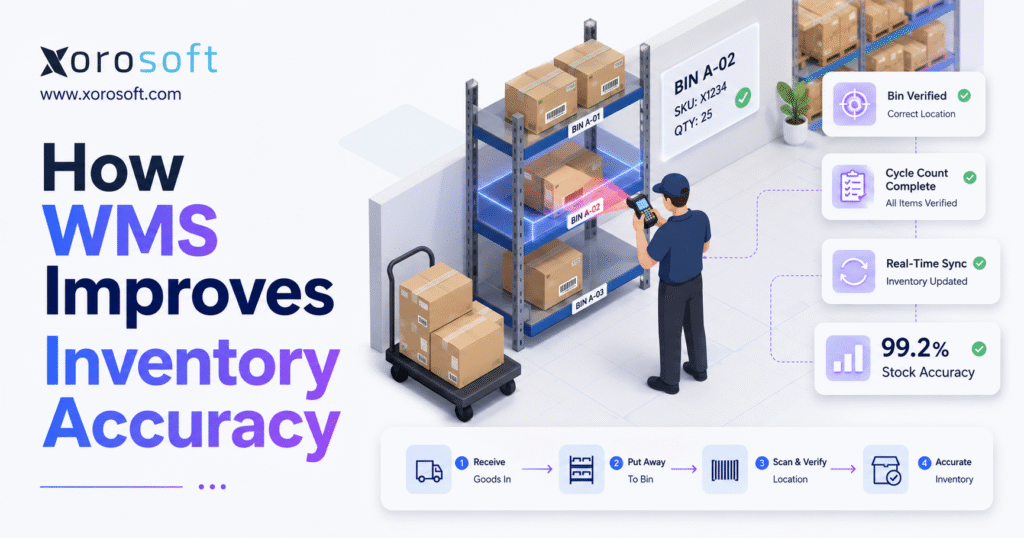
The process usually works like this:
1. Teams receive inventory against purchase orders.
2. Workers scan products, bins, pallets, or totes.
3. Stock moves into assigned warehouse locations.
4. Pickers scan items before completing order lines.
5. Packers verify items before shipment.
6. Cycle counts check system inventory against physical stock.
7. Adjustments require reasons, permissions, and audit history.
As a result, fewer stock movements happen outside the system.
4.1 Real-Time Inventory Accuracy Updates
Real-time inventory updates reduce the delay between physical warehouse activity and system records.
As soon as a worker receives goods, the system updates the stock count. After stock moves to a bin, the WMS changes the item’s location. Once an order moves through picking, available quantity drops immediately. Likewise, return inspections, damages, transfers, and adjustments update the inventory record as the warehouse team completes each task.
This matters because sales, purchasing, finance, and warehouse teams all depend on current inventory information.
Without real-time updates, every department works from yesterday’s version of the truth.
4.2 Barcode Inventory Accuracy
Barcode scanning improves inventory accuracy because it reduces manual entry and validates work at the point of action.
Instead of typing SKUs, workers scan products, bins, orders, totes, pallets, and shipping labels. Therefore, the system can confirm whether the worker is handling the right item, quantity, and location.
The scan also creates an audit trail. Because of that, managers can review what happened when a discrepancy appears.
4.3 Bin-Level Warehouse Stock Accuracy
Warehouse-level inventory is not enough for growing operations.
A business may know that 1,000 units are in Warehouse A. However, that does not help if the units spread across receiving, reserve storage, forward pick bins, quality hold, returns, and staging.
Bin-level stock accuracy helps teams know exactly where inventory sits. As a result, picking becomes faster, cycle counts become easier, and lost stock becomes less common.
4.4 Guided Receiving and Putaway Control
Guided receiving helps teams check inbound goods against expected purchase orders. Then, guided putaway moves that stock into the correct location.
This is important because clean inventory data starts before the item reaches a shelf.
If receiving and putaway are inaccurate, every later workflow becomes harder. Therefore, strong WMS inventory accuracy starts at the dock.
4.5 Pick, Pack, and Ship Validation
Pick, pack, and ship validation protects both inventory records and customer experience.
During picking, scan validation confirms the SKU and location. During packing, order verification confirms that the correct items are going into the shipment. After shipping, the system updates fulfillment status and inventory availability.
Consequently, the warehouse reduces mispicks, wrong shipments, cancellations, and stock discrepancies.
4.6 Cycle Counting for Inventory Discrepancy Reduction
Cycle counting improves inventory accuracy by checking selected stock regularly instead of waiting for one large annual count.
For example, high-value or fast-moving items may need more frequent counts than slow-moving items. Similarly, locations with repeated discrepancies deserve closer review.
Because WMS cycle counts follow a structure, teams can identify patterns. If one zone keeps producing variances, the issue may involve poor labeling, weak putaway discipline, unclear picking rules, or damaged stock handling.
4.7 Lot, Serial, and Expiry Tracking
Some businesses need more than SKU-level accuracy.
Food, beverage, cosmetics, electronics, automotive parts, industrial distribution, and manufacturing teams may need lot tracking, serial tracking, expiry dates, warranties, quality holds, or recall traceability.
A WMS helps by tying movements to the correct lot or serial number. Therefore, businesses can track not only how much inventory exists, but which specific units are available.
4.8 Inventory Adjustment Controls
Inventory adjustments require careful control because they affect operations and finance.
A WMS can require reason codes such as damage, shrinkage, mispick, return correction, receiving error, transfer issue, or cycle count variance.
In addition, user permissions can limit who can adjust stock. That creates accountability and reduces casual corrections that hide deeper problems.
5. Where WMS Inventory Accuracy Improves Warehouse Workflows
Inventory accuracy improves when each warehouse workflow becomes controlled. Although many teams focus only on counting, most discrepancies start during daily warehouse activity.
| Warehouse Workflow | Common Accuracy Risk | WMS Control | Operational Impact |
|---|---|---|---|
| Receiving | Wrong quantity entered | Purchase order matching | Cleaner starting inventory |
| Putaway | Item placed in wrong bin | Directed location confirmation | Faster picking |
| Picking | Wrong SKU selected | Barcode scan validation | Fewer mispicks |
| Packing | Wrong item packed | Order verification | Fewer returns |
| Shipping | Inventory not updated | Shipment confirmation | Better channel visibility |
| Returns | Damaged stock restocked | Inspection workflow | Cleaner available inventory |
| Transfers | Stock moved without record | Transfer scan confirmation | Better multi-warehouse accuracy |
5.1 Receiving Accuracy
Receiving accuracy controls the first inventory transaction.
If inbound inventory is wrong, the system starts wrong. Therefore, a WMS should help teams match received goods against purchase orders, confirm quantities, record supplier shortages, and identify damaged items.
This reduces phantom inventory before it spreads into sales, purchasing, and accounting.
5.2 Putaway Accuracy
Putaway accuracy ensures stock goes where the system expects it.
A WMS can assign locations based on item type, size, velocity, temperature requirements, lot status, or picking demand. Then, location confirmation verifies that the item reached the correct bin.
Because of that, workers spend less time searching and more time fulfilling orders.
5.3 Picking Accuracy
Picking accuracy directly affects customer satisfaction.
When pickers scan the wrong item, the WMS can block the task. After they scan the correct item, quantity, and location, the system can safely update inventory.
As a result, mispicks decrease, customer complaints fall, and inventory records stay cleaner.
5.4 Packing Accuracy
Packing accuracy is the last check before an order leaves the warehouse.
Even when picking is accurate, packing validation matters because workers can still mix up multiple items, bundles, or similar variants. Therefore, a WMS should help packers confirm that the items in the box match the order.
This step reduces wrong shipments and prevents avoidable returns.
5.5 Shipping Accuracy
Shipping accuracy completes the fulfillment loop.
After an order ships, the system should update inventory, fulfillment status, tracking details, and channel availability. Otherwise, sales and customer service teams may work from incomplete information.
For ecommerce brands, this is especially important because customers expect fast and accurate delivery updates.
5.6 Returns Accuracy
Returns can create serious inventory accuracy problems when teams restock items too quickly.
A returned item may arrive damaged, opened, incomplete, expired, or unsellable. Therefore, the warehouse needs an inspection workflow before that item becomes available again.
A WMS helps route returns into sellable, repair, quarantine, or write-off status. As a result, damaged inventory is less likely to re-enter available stock.
6. WMS vs Manual Inventory Processes
Manual warehouse processes may work when operations are simple. However, they become risky as order volume and SKU complexity grow.
| Area | Manual Process | WMS-Controlled Process | Accuracy Impact |
| Receiving | Paper notes or spreadsheet entry | PO-based receiving with scanning | Fewer receiving errors |
| Putaway | Worker chooses location | Directed putaway with bin confirmation | Better location accuracy |
| Picking | Printed pick tickets | Mobile scan validation | Fewer wrong picks |
| Packing | Visual checking | Order and item verification | Fewer shipment errors |
| Adjustments | Spreadsheet edits | Reason codes and audit trails | Stronger accountability |
| Counts | Annual physical counts | Scheduled cycle counts | Faster discrepancy detection |
| Transfers | Manual transfer notes | System-controlled movement | Cleaner multi-location data |
The biggest difference is control.
Manual processes depend on people remembering every movement. A WMS records movement as it happens. Therefore, inventory accuracy improves because fewer actions happen outside the system.
7. WMS vs Inventory Software vs ERP
Many businesses confuse WMS, inventory software, and ERP. Although these systems overlap, they solve different levels of operational complexity.
| System Type | Best For | Accuracy Strength | Limitation |
| Inventory software | Basic stock tracking | Item-level counts | Limited warehouse execution |
| WMS | Warehouse workflows | Location, scanning, picking, cycle counts | May not manage accounting or purchasing |
| ERP with WMS | Inventory-driven businesses | Warehouse, finance, purchasing, ecommerce, and reporting in one system | Requires stronger implementation planning |
7.1 When Inventory Software Is Enough
Inventory software may be enough when the business has one location, limited SKUs, simple fulfillment, and a small team.
In that stage, basic stock tracking, purchase orders, and reorder alerts may solve most problems.
However, once workers need scan-based tasks, bin-level control, batch picking, transfers, or structured cycle counts, basic inventory software may start to feel limited.
7.2 When a Dedicated WMS Fits
A dedicated WMS becomes useful when warehouse execution needs stronger control.
For example, teams may need receiving workflows, directed putaway, barcode picking, packing validation, inventory status control, replenishment, and cycle counting.
At that point, the warehouse no longer needs only stock visibility. It needs process discipline.
7.3 When ERP With Built-In WMS Makes More Sense
ERP with built-in WMS makes more sense when warehouse accuracy affects the entire business.
For instance, inventory counts may shape purchasing, accounting, forecasting, manufacturing, Shopify, Amazon, wholesale, EDI, and reporting. When teams manage these workflows in separate systems, they often create duplicate entry, delayed updates, and reconciliation work.
A platform such as XoroONE can help when a business wants inventory, warehouse management, accounting, purchasing, manufacturing, forecasting, and ecommerce operations connected in one cloud ERP environment.
For businesses comparing inventory-focused systems, pages such as Xorosoft vs Cin7 or Xorosoft vs Fulfil.io can also help frame the difference between inventory tools, order management systems, and full ERP workflows.
8. Key WMS Features That Improve Inventory Accuracy
The best WMS features improve inventory accuracy by reducing uncontrolled decisions in the warehouse.
8.1 Barcode Scanning
Barcode scanning is one of the fastest ways to improve warehouse stock accuracy.
It validates the item, location, quantity, and order before the worker completes the task. Therefore, the system can catch mistakes before they create inventory discrepancies.
8.2 Mobile Warehouse Devices
Mobile devices let workers complete tasks where the work happens.
Instead of writing notes and updating the system later, workers can receive, move, pick, count, and adjust inventory in real time. As a result, the system count stays closer to the physical count.
8.3 Directed Putaway
Directed putaway improves accuracy by assigning inventory to the correct location.
This helps prevent random storage, lost stock, and slow picking. In addition, it supports cleaner replenishment because the system knows where inventory should go.
8.4 Location-Level Inventory
Location-level inventory gives the business a precise warehouse map.
Instead of knowing only that stock is in a warehouse, teams can see the exact aisle, rack, shelf, bin, zone, or staging area.
Consequently, picking, transfers, cycle counts, and replenishment become more reliable.
8.5 Cycle Counting
Cycle counting keeps inventory accuracy active throughout the year.
Instead of waiting for a large physical count, teams verify inventory in smaller, recurring counts. This helps catch errors earlier and reduces the disruption of full warehouse shutdowns.
8.6 Inventory Status Control
Inventory status control separates sellable stock from damaged, expired, quarantined, returned, reserved, or inspected stock.
This matters because not all physical inventory should be available for sale. Therefore, WMS status rules help prevent teams from promising unavailable inventory to customers.
8.7 Audit Trails
Audit trails show who changed inventory, when they changed it, and why.
Because every adjustment affects operational and financial data, audit trails are essential for accountability. They also help managers identify recurring error patterns.
8.8 Multi-Warehouse Visibility
Multi-warehouse visibility helps businesses manage inventory across locations.
When stock moves between warehouses, the WMS should record the transfer, source location, destination location, and status. Otherwise, teams may lose track of inventory while it is in transit.
8.9 Ecommerce and EDI Integration
Ecommerce and EDI integrations reduce manual work between warehouse systems and sales channels.
For Shopify brands, the Xorosoft ERP Shopify App Store listing is relevant because it connects ERP workflows with Shopify operations. However, the value depends on the warehouse data being accurate before it reaches the commerce channel.
9. WMS Inventory Accuracy KPIs
Warehouse teams need measurable indicators to know whether accuracy is improving.
| KPI | What It Measures | Why It Matters |
| Inventory accuracy rate | System count vs physical count | Shows whether teams can trust records |
| Discrepancy rate | Count mismatches | Reveals recurring stock issues |
| Pick accuracy rate | Correct picks vs total picks | Tracks fulfillment quality |
| Order accuracy rate | Error-free orders | Connects warehouse work to customer experience |
| Cycle count accuracy | Count reliability over time | Shows whether controls are working |
| Stockout rate | Unavailable stock events | Highlights availability problems |
| Adjustment value | Financial value of corrections | Connects warehouse errors to cost |
9.1 Inventory Accuracy Rate
Inventory accuracy rate shows how often the system count matches the physical count.
Formula:
Inventory Accuracy Rate = Accurate Inventory Records ÷ Total Counted Records x 100
Although the formula is simple, the operational work behind it is not. Receiving, putaway, picking, returns, transfers, and adjustments all influence the result.
9.2 Inventory Discrepancy Rate
Inventory discrepancy rate shows how often inventory records do not match physical stock.
If discrepancy rates stay high, the business should not only recount inventory. Instead, it should investigate where errors enter the process.
9.3 Pick Accuracy Rate
Pick accuracy rate measures whether warehouse workers select the correct item and quantity.
This KPI is especially important for ecommerce brands because mispicks create returns, refunds, reships, customer complaints, and inventory variances.
9.4 Order Accuracy Rate
Order accuracy rate measures whether customers receive the correct order.
Since wrong inventory data often leads to wrong fulfillment decisions, order accuracy is closely connected to WMS inventory accuracy.
9.5 Stockout Rate
Stockouts do not always happen because demand is too high.
Sometimes, stockouts happen because the system overstated available inventory. Therefore, reducing false availability can improve both customer experience and purchasing decisions.
9.6 Inventory Adjustment Value
Inventory adjustment value connects warehouse accuracy to finance.
If the business writes off large inventory amounts every month, the issue is not only operational. It also affects margin, working capital, and financial reporting.
10. Industry Use Cases for Warehouse Inventory Accuracy
Different industries face different accuracy challenges. However, the need for reliable warehouse inventory is common across product-based businesses.
For a broader view of industries that depend on connected inventory, warehouse, and ERP workflows, the industries we serve page is a useful internal reference.
10.1 Ecommerce Brands
Ecommerce brands need accurate inventory because orders can arrive continuously across multiple channels.
If warehouse counts are wrong, the website may sell unavailable stock. Consequently, the brand may face cancellations, split shipments, delayed fulfillment, and customer frustration.
10.2 Shopify Merchants
Shopify merchants often manage inventory across online stores, retail locations, warehouses, 3PLs, and wholesale orders.
Because Shopify availability depends on accurate inventory inputs, warehouse accuracy matters before stock reaches the storefront. If the warehouse count drifts from reality, channel inventory can also become unreliable. Consequently, brands may oversell, delay fulfillment, or cancel orders the brand should never have accepted.
For brands evaluating a connected ERP layer behind Shopify, XoroERP and the Shopify App Store listing can support research into how ERP workflows connect with ecommerce operations.
10.3 Wholesale Distributors
Wholesale distributors need inventory accuracy because order quantities are often larger and customer commitments matter.
If sales teams promise stock that is unavailable, the impact can be bigger than a single ecommerce order. Therefore, WMS accuracy supports allocation, picking, packing, shipping, and replenishment.
10.4 Apparel and Fashion Brands
Apparel brands manage size, color, style, season, and variant complexity.
A small picking error can send the wrong size or color to the customer. Additionally, returns can create inventory confusion if teams restock items without inspection.
A WMS helps by validating variants during receiving, picking, packing, transfers, and returns.
10.5 Furniture Businesses
Furniture companies often deal with bulky inventory, multiple storage zones, serialized items, and partial shipments.
Because these products take up space and move differently from small items, location accuracy becomes critical.
10.6 Sporting Goods Companies
Sporting goods businesses often manage seasonal demand, bundles, kits, fast-moving products, and product variants.
As demand changes, accurate inventory helps teams replenish the right SKUs and avoid stockouts during peak periods.
10.7 Food and Beverage Businesses
Food and beverage businesses need accuracy around lots, expiry dates, quality holds, and FIFO or FEFO workflows.
A WMS helps prevent teams from shipping expired, incorrect, or unavailable lots.
10.8 Manufacturers
Manufacturers need accurate raw materials, components, work-in-progress, and finished goods.
If material inventory is wrong, production may stop. Therefore, warehouse accuracy supports work orders, purchasing, production planning, and finished goods fulfillment.
11. Common WMS Mistakes That Hurt Inventory Accuracy
A WMS can improve accuracy, but teams need disciplined implementation.
11.1 Poor Data Cleanup Before Launch
Bad data does not become good data after software implementation.
Before launching a WMS, businesses should clean SKU records, barcodes, units of measure, supplier data, warehouse locations, inventory statuses, and opening balances.
Otherwise, the system may automate confusion instead of control.
11.2 Weak Location Naming
Location names should be clear, consistent, and easy for warehouse teams to follow.
If bin names are confusing, workers may scan the wrong location or place inventory in the wrong area. Therefore, teams should design location naming before go-live.
11.3 Skipping Barcode Discipline
Barcode scanning only improves accuracy when teams actually scan.
If workers bypass scans, share logins, or manually override tasks too often, the WMS loses control. As a result, the business may keep old inventory problems inside a newer system.
11.4 Limited Warehouse Training
Warehouse training should explain both the workflow and the reason behind it.
When workers understand why each scan matters, adoption improves. In addition, managers should train teams on exceptions, damaged goods, returns, and adjustment rules.
11.5 Too Many Manual Overrides
Manual overrides are sometimes necessary. However, frequent overrides usually signal weak process design, poor data, or incomplete training.
Because overrides can damage inventory accuracy, they should require permissions and reason codes.
11.6 Disconnected Accounting and Purchasing
A WMS improves warehouse data. However, disconnected purchasing and accounting teams may still rely on manual reconciliation.
That gap creates avoidable work. Buyers may reorder from inaccurate availability, while finance teams may question inventory value during month-end close. Therefore, warehouse accuracy becomes more valuable when the system also connects purchasing, accounting, and reporting.
A connected platform such as XoroWMS inside a broader ERP environment can help reduce duplicate entry between warehouse activity, inventory value, purchasing, and reporting.
12. When a Business Should Upgrade to WMS
A business should consider WMS when inventory errors become recurring operating constraints, not occasional mistakes.
12.1 Signs You Have Outgrown Spreadsheets
You may have outgrown spreadsheets when teams argue over which file is correct.
Other signs include delayed stock updates, missing audit trails, unclear warehouse locations, frequent stockouts, duplicate data entry, and manual transfer tracking.
At that point, the business needs more than another spreadsheet tab.
12.2 Signs You Have Outgrown Basic Inventory Software
Basic inventory software may become limiting when warehouse execution gets more complex.
For example, your team may need scan-based picking, bin-level inventory, cycle counting, batch picking, returns inspection, and multi-warehouse transfer controls.
At that point, WMS inventory accuracy becomes a process issue, not just a software feature. The business needs stronger controls around how inventory moves, not just better visibility into stock counts.
12.3 Signs You Need ERP and WMS Together
ERP and WMS together become important when inventory accuracy affects multiple departments.
For example, a business may need accurate inventory across Shopify, Amazon, wholesale, EDI, purchasing, accounting, forecasting, manufacturing, and multiple warehouses.
Because these workflows connect operationally, teams should not manage them through disconnected systems forever.
13. How ERP and WMS Work Together
A WMS improves warehouse execution. ERP connects that execution to the rest of the business.
13.1 Warehouse Accuracy and Accounting
Inventory sits directly on the balance sheet, so warehouse accuracy affects financial reporting.
If warehouse quantities drift from reality, accounting teams may value inventory incorrectly. Clean receipts, shipments, transfers, damages, and adjustments help finance teams close the books with fewer manual corrections.
When WMS and ERP work together, finance teams can trust warehouse activity without rebuilding the inventory story at month-end.
13.2 Warehouse Accuracy and Purchasing
Purchasing depends on accurate available inventory.
If the system overstates stock, buyers may reorder too late. If the system understates stock, buyers may order too much. Either way, inaccurate inventory creates cash flow and service-level problems.
Because of that, better warehouse accuracy supports better purchasing decisions.
13.3 Warehouse Accuracy and Ecommerce
Ecommerce channels need reliable stock availability.
When WMS data updates in real time, Shopify, Amazon, wholesale, and other channels can work from cleaner inventory records. As a result, brands reduce overselling and improve fulfillment confidence.
13.4 Warehouse Accuracy and Forecasting
Forecasting depends on clean inventory data.
If the system shows phantom stock, demand planning becomes distorted. Likewise, if inaccurate counts hide stockouts, forecasting may underestimate true demand.
Therefore, inventory accuracy is a requirement for better replenishment planning.
14. Where Xorosoft Fits for Inventory-Driven Teams
Xorosoft is relevant when a business needs inventory, warehouse, purchasing, accounting, manufacturing, ecommerce, and reporting workflows connected.
This matters because warehouse accuracy becomes more valuable when the rest of the business can use that data without manual reconciliation.
14.1 Xorosoft for Warehouse Management
Xorosoft supports warehouse management through workflows such as receiving, putaway, picking, packing, shipping, and inventory control.
For teams focused on WMS inventory accuracy, the goal is not simply to count stock. Instead, the goal is to make every warehouse movement visible and connected.
14.2 Xorosoft for ERP and Inventory Control
Xorosoft also supports inventory-driven ERP workflows through inventory management, purchasing, accounting, forecasting, manufacturing, and reporting.
Because of that, it can help businesses that have outgrown QuickBooks, spreadsheets, inventory-only software, or disconnected warehouse apps.
14.3 Xorosoft for Shopify, Amazon, Wholesale, and EDI
Many growing brands sell across Shopify, Amazon, wholesale, and EDI at the same time.
That creates pressure because every channel depends on accurate stock. When inventory accuracy improves at the warehouse level, channel availability becomes more reliable.
14.4 Xorosoft for Multi-Warehouse Operations
Multi-warehouse teams need strong control over transfers, locations, replenishment, and allocation.
If each warehouse operates differently, stock data becomes difficult to trust. Therefore, a centralized ERP and WMS environment can help standardize inventory workflows across locations.
15. FAQs About WMS Inventory Accuracy
15.1 What is WMS inventory accuracy?
WMS inventory accuracy means the inventory recorded in a warehouse management system matches the physical stock in the warehouse. It also means the system knows where inventory sits, whether teams can sell it, and how it moved. Because warehouse activity changes inventory constantly, accuracy depends on controlled receiving, putaway, picking, packing, shipping, transfers, cycle counts, and returns.
15.2 How does a WMS improve inventory accuracy?
A WMS improves inventory accuracy by recording warehouse movements in real time. It uses barcode scanning, bin tracking, guided receiving, directed putaway, pick validation, cycle counting, audit trails, and inventory status controls. As a result, fewer inventory changes happen outside the system, and the recorded stock count stays closer to physical reality.
15.3 Why is inventory accuracy important in warehouse management?
Inventory accuracy is important because it affects fulfillment, purchasing, finance, forecasting, and customer service. If stock counts are wrong, teams may oversell, reorder incorrectly, pick the wrong item, or report inaccurate inventory value. Therefore, accurate warehouse inventory helps the entire business make better decisions.
15.4 What causes poor inventory accuracy?
Poor inventory accuracy is usually caused by receiving mistakes, incorrect putaway, picking errors, delayed updates, uncontrolled transfers, damaged goods, weak return workflows, and spreadsheet-based adjustments. Although counting reveals the problem, the root cause often comes from daily warehouse processes that lack proper control.
15.5 Can a WMS prevent inventory discrepancies?
A WMS can reduce inventory discrepancies, although it cannot prevent every issue. Supplier errors, damages, shrinkage, mislabels, and exceptions can still happen. However, a WMS makes discrepancies easier to catch and investigate because the system ties inventory movements to users, timestamps, locations, scans, and reason codes.
15.6 Does barcode scanning improve inventory accuracy?
Yes, barcode scanning improves inventory accuracy by validating items, quantities, locations, and orders during warehouse work. Instead of typing SKUs manually, workers scan products, bins, totes, pallets, or labels. Consequently, the WMS can stop incorrect actions before they create inventory discrepancies.
15.7 How does cycle counting improve warehouse accuracy?
Cycle counting improves warehouse accuracy by checking selected inventory regularly. Rather than waiting for an annual physical count, teams count high-value, fast-moving, or high-risk items more frequently. As a result, discrepancies are found earlier, and managers can identify process issues before they become larger problems.
15.8 Is WMS better than spreadsheets for inventory control?
Yes, WMS is usually better than spreadsheets once warehouse operations become complex. Spreadsheets can store numbers, but they do not enforce barcode scans, bin rules, task workflows, permissions, audit trails, or real-time updates. Therefore, spreadsheets track inventory, while a WMS controls the process that creates accurate inventory.
15.9 Is WMS different from inventory management software?
Yes, WMS is different from basic inventory management software. Inventory software usually tracks stock levels, purchase orders, and adjustments. Meanwhile, WMS controls warehouse execution, including receiving, putaway, picking, packing, shipping, replenishment, transfers, returns, and cycle counts. Some ERP platforms include both inventory management and WMS capabilities.
15.10 When should a business implement a WMS?
A business should implement WMS software when warehouse errors become recurring. Warning signs include inaccurate counts, lost stock, mispicks, unclear bin locations, delayed receiving, manual transfers, overselling, poor returns control, and difficulty managing multiple warehouses. At that stage, stronger warehouse process control is usually needed.
15.11 How does WMS help multi-warehouse businesses?
WMS helps multi-warehouse businesses by tracking inventory across locations, bins, transfers, receiving areas, pick zones, staging areas, and return zones. Because stock can move between facilities, system-controlled transfers are important. Otherwise, inventory may physically move while the system record stays behind.
15.12 Can WMS improve inventory valuation?
Yes, WMS can improve inventory valuation indirectly by improving quantity accuracy and transaction timing. Accounting teams need reliable receipts, shipments, transfers, damages, and adjustments. When WMS data connects with ERP and accounting, finance teams can reduce manual reconciliation and work from cleaner inventory records.
15.13 How does WMS support lot tracking?
WMS supports lot tracking by recording lot numbers during receiving, storage, picking, shipping, transfers, and returns. This workflow helps food, beverage, cosmetics, regulated product, and manufacturing teams manage expiry, quality holds, recalls, and traceability. Because each movement carries lot-level detail, teams can see which stock moved, where it went, and which orders used it.
15.14 How does WMS prevent overselling?
WMS helps prevent overselling by updating inventory as warehouse work happens. When teams pick, pack, transfer, damage, or adjust stock, available inventory can change quickly. Therefore, real-time warehouse updates help sales channels avoid promising inventory that is no longer available.
15.15 What is the best way to improve warehouse inventory accuracy?
The best way to improve warehouse inventory accuracy is to control every inventory movement. Start with clean item data, barcode scanning, bin-level tracking, guided receiving, directed putaway, pick validation, cycle counting, return inspection, reason-coded adjustments, and audit trails. Then, connect warehouse data with purchasing, accounting, ecommerce, and reporting.
16. Final Takeaway: Inventory Accuracy Is an Operating System Problem
Inventory accuracy does not improve because a team counts harder. It improves because the business controls the warehouse processes that create inventory data.
Strong receiving gives the system better starting numbers. Guided putaway helps workers place stock where the WMS expects it. Scan-based picking reduces mispicks before they reach customers. Regular cycle counts surface discrepancies earlier. Finally, reason-coded adjustments help managers fix root causes instead of chasing symptoms.
That is why WMS inventory accuracy matters for growing product businesses.
For small teams, basic inventory tools may work for a while. However, as order volume, SKU count, sales channels, warehouses, and operational complexity increase, manual processes become harder to trust.
At that point, WMS becomes more than warehouse software. It becomes the control layer that helps sales, purchasing, finance, ecommerce, and leadership trust the same stock data.
For businesses evaluating a connected ERP and warehouse management system, Xorosoft can help centralize inventory, purchasing, accounting, manufacturing, ecommerce, reporting, and warehouse workflows. To see how those workflows could fit your operation, you can Book a demo.
Recent Posts
-
 ERP Landed Cost Module vs Spreadsheet Calculations for Importers
 -
 How to Build an Open-to-Buy Plan for an Omnichannel Brand
 -
 Cold Storage WMS for Food and Beverage Distribution
 -
 ERP Buying Statistics 2026: Evaluation, Implementation, and Adoption Risks
 -
 How a Distributor Reduced B2B Order Exceptions Without Restricting Sales



