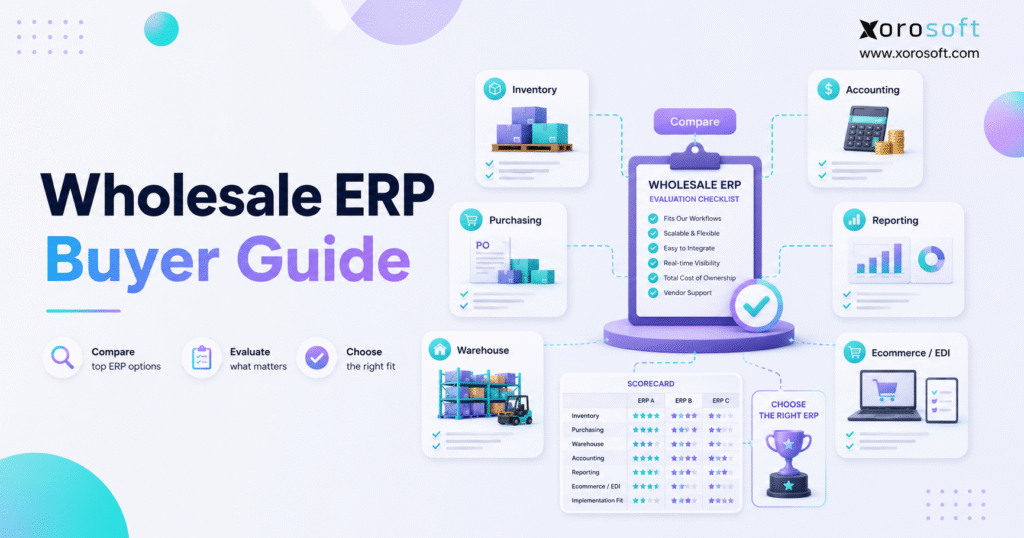
If you’re searching for resources on optimising your wholesale operations, this wholesale ERP guide will help you make informed decisions.
1. A Practical Starting Point for ERP Buyers
This wholesale ERP guide is for distributors, ecommerce brands, and inventory-driven businesses that need a clearer way to evaluate ERP systems before speaking with vendors. Instead of choosing software based on a polished demo, the goal is to understand which workflows matter, which features are essential, and which buying mistakes create long-term operational problems.
Growing wholesale businesses rarely struggle because one department is weak. More often, the problem is that inventory, sales orders, purchasing, warehouse work, accounting, ecommerce, and reporting stop moving together. As a result, each team creates its own workaround. Sales checks one number, purchasing trusts another, warehouse teams update stock later, and finance spends too much time reconciling the difference.
A strong wholesale ERP system solves this by creating one operational backbone. However, not every ERP fits every business. Therefore, buyers need a structured process that compares workflow fit, implementation risk, integration depth, and long-term scalability. This wholesale ERP guide gives that structure before the buyer reaches the demo stage.
1.1 Why Wholesale Operations Become Harder as Volume Grows
Wholesale operations become harder because complexity compounds. First, the business adds more customers. Then, it adds more SKUs, suppliers, warehouses, channels, and pricing rules. Eventually, the old system still “works,” but only because people keep fixing problems manually.
For example, a team may start with QuickBooks, spreadsheets, and a basic inventory app. At first, that stack may feel efficient. However, once the business adds multiple warehouses, EDI customers, Shopify orders, Amazon sales, customer-specific pricing, and purchasing forecasts, the stack becomes fragile.
1.2 What a Wholesale ERP System Connects
A wholesale ERP system connects the workflows that control how products move through the business. Typically, this includes inventory management, purchasing, sales order management, warehouse management, accounting, forecasting, reporting, ecommerce integrations, and EDI.
Because these workflows share data, the business can reduce duplicate entry. In addition, teams can make decisions from current information rather than exports, spreadsheets, and delayed reports.
1.3 Who This Guide Is For
This wholesale ERP guide is useful for companies that sell physical products, manage inventory, operate warehouses, sell wholesale, use ecommerce channels, or rely on purchasing teams.
It is especially relevant for businesses that have outgrown spreadsheets, QuickBooks, inventory-only apps, warehouse apps, or disconnected systems. In many cases, those tools were not bad choices. Instead, the business simply became more complex than the tools were designed to support.
1.4 Who May Not Need ERP Yet
Not every company needs ERP immediately. A small wholesaler with one warehouse, a limited SKU count, simple purchasing, and basic accounting may still work well with lighter software.
However, once the team no longer trusts inventory, struggles to plan purchasing, delays orders, or spends too much time reconciling reports, the ERP conversation becomes practical rather than theoretical.
2. Why Wholesale Businesses Start Looking for ERP
Most wholesale businesses do not start looking for ERP because they want more software. Usually, they start because their current process creates operational risk.
Inventory may be wrong. Purchasing may happen too late. Warehouse work may depend on tribal knowledge. Meanwhile, finance may close the month with numbers that require too much manual cleanup. When these issues repeat, leaders begin looking for a wholesale ERP system that can centralize the work.
2.1 Inventory Visibility Breaks Across Warehouses
Inventory visibility is usually the first major warning sign. One warehouse may show stock available, while another system shows the same units already committed. At the same time, sales may promise inventory that operations cannot fulfill.
Because wholesale customers often place larger orders, small inventory errors can create serious service problems. Therefore, ERP should show stock by warehouse, bin, status, commitment, availability, and incoming supply.
2.2 Purchasing Becomes Spreadsheet-Driven
Purchasing teams often use spreadsheets long after the business has outgrown them. Buyers may calculate reorder points, supplier lead times, open demand, and stock coverage manually.
Although spreadsheets are flexible, they are risky when they control purchasing decisions. One formula error can lead to overstock, stockouts, rush freight, or cash tied up in the wrong products. For that reason, this wholesale ERP guide treats purchasing as a core evaluation area, not a side feature.
2.3 Accounting No Longer Matches Operations
Accounting becomes harder when inventory activity moves faster than financial updates. For example, goods may be received today, shipped tomorrow, adjusted later, and reconciled at month-end. If each step happens in a different system, finance loses confidence in inventory value.
As a result, accounting teams spend time checking what happened instead of analyzing performance. ERP helps by connecting inventory movement, cost of goods sold, landed cost, purchase orders, sales orders, and financial reporting.
2.4 Customer Orders Become Harder to Fulfill
Wholesale orders often include customer-specific pricing, payment terms, ship dates, order minimums, partial shipments, and backorders. Therefore, manual order handling becomes harder as order volume increases.
A proper wholesale ERP system should help teams manage order rules before they reach the warehouse. In addition, it should make exceptions visible before they create fulfillment delays.
2.5 Reporting Becomes Too Slow
Slow reporting is another sign that the system architecture is weak. If leaders need exports from accounting, inventory, ecommerce, and warehouse systems before they can see performance, decisions become delayed.
However, a connected ERP can bring operational and financial reporting into one structure. That does not mean every dashboard will be perfect on day one. Still, it gives the business a stronger foundation for trusted reporting.
3. Wholesale ERP vs Other Systems
A common mistake is comparing ERP with tools that solve only one part of the problem. Inventory software, WMS platforms, accounting tools, ecommerce apps, and spreadsheets can all be useful. Nevertheless, each has limits.
This wholesale ERP guide compares those systems so buyers can understand when each tool makes sense.
3.1 Wholesale ERP vs Inventory Software
Inventory software helps track stock. However, ERP connects stock to purchasing, sales orders, warehouses, accounting, forecasting, reporting, and integrations.
Therefore, inventory software may be enough when the business only needs better stock counts. Once inventory affects finance, purchasing, warehouse work, and customer promises, ERP becomes more relevant.
Businesses comparing inventory software against broader ERP platforms may also review resources such as Xorosoft vs Cin7 when the decision is between inventory-focused software and a fuller operational system.
| System Type | Best For | Main Limitation |
|---|---|---|
| Inventory software | Basic stock control | Limited accounting, purchasing, and warehouse depth |
| Wholesale ERP | Connected operational control | Requires careful implementation planning |
3.2 Wholesale ERP vs Warehouse Management System
A warehouse management system focuses on receiving, putaway, picking, packing, shipping, barcode scanning, and cycle counting. In contrast, ERP covers broader business operations.
For example, XoroWMS is relevant when warehouse execution needs more structure. However, the buyer still needs to evaluate how warehouse activity connects with inventory, sales orders, purchasing, accounting, and reporting.
3.3 Wholesale ERP vs QuickBooks
QuickBooks can be a strong accounting tool for earlier stages. However, growing wholesale businesses often need more operational depth than accounting software can provide.
For that reason, many buyers compare ERP against QuickBooks when inventory, purchasing, warehouse management, and reporting become difficult to manage. A page such as Xorosoft vs QuickBooks can help frame that upgrade path when the issue is no longer basic accounting but full operational control.
3.4 Wholesale ERP vs Spreadsheets
Spreadsheets are useful for analysis. Still, they are weak operating systems.
When spreadsheets control purchasing, inventory allocation, order status, or warehouse planning, the business depends on manual updates. Consequently, errors become harder to catch, and decisions become harder to trust.
3.5 Wholesale ERP vs Ecommerce Apps
Ecommerce apps support storefronts, channels, and order capture. However, ERP supports the operational layer behind those channels.
For instance, Shopify may handle ecommerce and B2B selling, while ERP manages inventory availability, purchasing, warehouse fulfillment, accounting, and reporting. Xorosoft also has a verified listing on the Shopify App Store, which is useful for Shopify merchants evaluating ERP connectivity.
4. Core Features Every Wholesale ERP System Should Include
Feature lists can become overwhelming. Therefore, buyers should focus on workflows first.
A practical wholesale ERP guide should evaluate how the system handles inventory, orders, purchasing, warehouse execution, accounting, forecasting, ecommerce, EDI, and reporting.
4.1 Inventory Management
Inventory is the center of wholesale ERP. The system should show what is on hand, what is committed, what is incoming, what is reserved, and what is available to sell.
In addition, it should support multiple warehouses, bins, lots, serial numbers, units of measure, transfers, adjustments, and inventory valuation.
4.2 Multi-Warehouse Control
Multi-warehouse operations create complexity quickly. Stock may move between locations, sit with a 3PL, support ecommerce orders, or be reserved for wholesale customers.
Because of that, ERP must show inventory by location and status. Otherwise, teams may continue relying on manual checks.
4.3 Sales Order Management
Wholesale sales orders often require customer-specific pricing, volume discounts, backorders, partial shipments, approvals, and payment terms.
A good ERP should make these rules easier to manage. Moreover, it should connect sales orders to inventory availability before the warehouse begins fulfillment.
4.4 Purchasing and Supplier Management
Purchasing should not depend only on instinct or static spreadsheets. Instead, buyers need live visibility into current stock, open orders, forecast demand, supplier lead times, and minimum order quantities.
When purchasing connects to ERP data, teams can reduce stockouts, avoid unnecessary overstock, and improve supplier planning.
4.5 Warehouse Management
Warehouse management determines whether inventory accuracy becomes real or theoretical. If receiving, picking, packing, shipping, and cycle counts happen outside the system, inventory will eventually drift.
Therefore, wholesale ERP buyers should test warehouse workflows carefully. Barcode scanning, bin control, packing validation, and cycle counting are especially important for growing teams.
4.6 Accounting and Financial Management
Accounting should not be disconnected from operations. Inventory receipts, shipments, returns, adjustments, landed costs, and cost of goods sold all affect financial reporting.
Because of this, buyers should ask whether accounting is native, integrated, or dependent on third-party tools. They should also test how inventory value updates during real workflows.
For broader ERP functionality across inventory, accounting, purchasing, manufacturing, and reporting, buyers can review XoroERP as one example of a cloud ERP platform built around operational workflows.
4.7 Forecasting and Replenishment
Forecasting helps wholesale businesses plan stock before demand becomes urgent. However, forecasting only works well when the data is clean.
ERP should help teams review sales history, open demand, seasonality, supplier lead times, current inventory, and incoming purchase orders. As a result, replenishment decisions become more disciplined.
4.8 Ecommerce, EDI, and Marketplace Integrations
Wholesale businesses increasingly sell through multiple channels. For example, a company may sell through Shopify, Amazon, EDI customers, B2B portals, and wholesale reps.
Because every channel affects inventory, ERP integrations matter. The system should not only import orders. It should also sync inventory, fulfillment status, customer data, financial data, and exceptions where relevant.
4.9 Reporting and Business Intelligence
Reporting should help leaders answer operational questions quickly. Which SKUs are at risk of stockout? Are suppliers delivering late? Where are warehouses falling behind? Which customers drive margin? How much cash is tied up in slow-moving products?
A good ERP should make these answers easier to access. Additionally, reporting should connect operational metrics with financial outcomes.
5. Wholesale ERP Buyer Checklist
Before booking vendor demos, use this wholesale ERP guide checklist to clarify what your business actually needs.
| Area | What to Check | Why It Matters |
| Inventory | Multi-warehouse stock, committed inventory, incoming stock, available-to-sell quantity | Prevents overselling and stock confusion |
| Purchasing | Reorder logic, supplier lead times, PO approvals, demand planning | Improves replenishment decisions |
| Warehouse | Receiving, putaway, picking, packing, shipping, scanning, cycle counts | Protects fulfillment accuracy |
| Accounting | Inventory valuation, COGS, landed cost, reconciliation | Keeps finance aligned with operations |
| Ecommerce | Shopify, Amazon, B2B, marketplace, and order sync | Supports multi-channel selling |
| EDI | Trading partner documents and exception handling | Reduces manual wholesale order work |
| Reporting | Real-time dashboards and operational visibility | Improves management decisions |
| Implementation | Data migration, workflow testing, training, support | Reduces go-live risk |
This wholesale ERP guide should be used as a filter. If a vendor cannot demonstrate your core workflows clearly, the system may not fit your business.
6. How to Know When Your Wholesale Business Is Ready for ERP
ERP readiness is not only about revenue. Instead, it depends on complexity.
A $5M distributor with several warehouses, EDI customers, Shopify orders, and manual purchasing may need ERP sooner than a $20M distributor with simpler operations.
6.1 Inventory Numbers Are No Longer Trusted
When teams check multiple systems before confirming stock, the business has a visibility problem. Moreover, when warehouse counts regularly disagree with sales availability, customer experience suffers.
ERP becomes useful when inventory accuracy is no longer a warehouse-only issue but a company-wide problem.
6.2 Purchasing Depends on One Spreadsheet
If one buyer owns the spreadsheet that drives replenishment, the business has key-person risk.
Therefore, purchasing should move into a system that uses live inventory, demand, supplier, and order data. This creates better control and reduces dependence on individual formulas.
6.3 Month-End Close Takes Too Long
Delayed month-end close often means finance is cleaning up operational data manually. Inventory value, purchase receipts, shipments, returns, and adjustments may all require extra review.
Because ERP connects these workflows, finance can reduce reconciliation work and gain better visibility into margins.
6.4 Warehouse Work Depends on Manual Fixes
Manual warehouse work may feel manageable at low volume. However, as order volume grows, small process gaps become expensive.
For example, missing scans, unclear bin locations, handwritten notes, and after-the-fact adjustments can all damage inventory accuracy.
6.5 Reporting Arrives Too Late
If leadership waits days or weeks for reports, the business cannot react quickly. As a result, purchasing, staffing, fulfillment, and finance decisions become reactive.
ERP helps by making operational data easier to access and connect.
6.6 Free ERP Readiness Assessment
Before shortlisting vendors, review your inventory, warehouse, purchasing, accounting, ecommerce, and reporting workflows. This step helps confirm whether ERP is the right next move or whether process cleanup should happen first.
7. Wholesale ERP Cost Factors
ERP cost depends on scope, and this wholesale ERP guide treats pricing as part of the broader buying decision. Therefore, buyers should avoid comparing systems only by subscription price.
A lower-cost tool can become expensive if it requires manual work, weak integrations, or extra add-ons. Likewise, a larger ERP can become too heavy if the implementation scope is not realistic.
7.1 User Count
Most ERP projects consider the number of users who need access. However, buyers should separate full users, warehouse users, finance users, and occasional users where pricing allows.
7.2 Modules and Functional Scope
The cost may change depending on whether the business needs inventory, accounting, purchasing, warehouse management, manufacturing, forecasting, reporting, EDI, or ecommerce integrations.
For a broader view of system modules and operational workflows, the Xorosoft solutions page can help buyers understand how ERP areas are commonly grouped.
7.3 Data Migration
Data migration often becomes more work than expected. Item masters, customer records, vendor records, open sales orders, purchase orders, inventory balances, warehouse locations, and accounting data need cleanup.
Because bad data creates bad ERP outcomes, this step should never be rushed.
7.4 Integrations
Shopify, Amazon, EDI, 3PL, shipping, payment, and marketplace integrations can affect both cost and timeline.
Before signing, buyers should ask what syncs automatically, how often data syncs, where errors appear, and who handles exceptions.
7.5 Implementation and Training
Implementation includes discovery, configuration, testing, data migration, training, and go-live support.
Although training may feel like a soft cost, it directly affects adoption. Therefore, every department should receive role-specific training.
7.6 Support and Long-Term Optimization
ERP continues to evolve after go-live. New warehouses, channels, reports, products, and workflows will appear. For that reason, buyers should evaluate support quality before making the decision.
8. How to Compare Wholesale ERP Vendors
A good ERP comparison starts with workflows. The demo should prove that the system can support how the business actually runs.
This wholesale ERP guide recommends comparing vendors against real scenarios rather than broad feature claims.
8.1 Build a Workflow-Based Scorecard
Create a scorecard before you speak with vendors. Then, score each system against real workflows, not generic features.
For example, an apparel wholesaler may need size and color matrix control, while a furniture distributor may care more about bulky inventory, lead times, and warehouse locations.
8.2 Compare Native Features Against Add-Ons
Some features are native. Others require integrations or third-party tools. Neither approach is automatically wrong.
However, buyers should understand the difference because add-ons can affect cost, support, data flow, and implementation risk.
8.3 Ask for Scenario-Based Demos
Do not accept a generic demo only. Instead, ask the vendor to show your real scenarios.
For example, ask them to show a wholesale order with customer-specific pricing, limited inventory, backordered items, warehouse picking, shipment confirmation, and accounting impact.
8.4 Evaluate Vendor Fit by Business Type
ERP fit depends on industry and operating model. Apparel, furniture, food, sporting goods, manufacturing, and wholesale distribution all have different needs.
Therefore, buyers should review whether the vendor serves similar companies. The industries we serve page is a useful internal reference for evaluating how ERP workflows vary by industry.
8.5 Review Proof and Customer Examples
Case studies help buyers see how ERP supports real businesses. However, they should be used carefully. A case study is helpful when the company profile, workflow complexity, or industry resembles your own.
For that reason, reviewing ERP case studies can support the evaluation stage after you have already defined your requirements.
9. Wholesale ERP Comparison Table
Use this table to compare where each system type fits.
| System Type | Best For | Limitation | Upgrade Trigger |
| Spreadsheets | Early planning and analysis | Manual errors and no real-time control | Teams stop trusting the numbers |
| QuickBooks | Core accounting | Limited operational depth | Inventory and accounting no longer align |
| Inventory app | Basic stock tracking | Limited finance, purchasing, and warehouse coverage | Multi-warehouse complexity increases |
| WMS | Warehouse execution | Not a full business system | Leadership needs end-to-end visibility |
| Ecommerce app | Channel selling | Does not manage full operations | Orders outgrow backend controls |
| Wholesale ERP | Connected inventory, orders, purchasing, warehouse, accounting, and reporting | Requires implementation planning | The business needs one operational backbone |
9.1 When Entry-Level Tools Still Make Sense
Entry-level tools still make sense when operations are simple. If the business has one warehouse, a small team, simple purchasing, and limited channels, ERP may be too much too soon.
However, teams should still document the signs that would trigger an ERP review later.
9.2 When Mid-Market ERP Becomes More Practical
Mid-market ERP becomes more practical when the business needs operational control across departments. This often happens when teams manage multiple warehouses, wholesale customers, ecommerce channels, purchasing complexity, and accounting reconciliation.
A platform such as XoroONE may be relevant when the buyer wants a broader cloud ERP environment across inventory, ecommerce, manufacturing, accounting, warehouse operations, and reporting.
9.3 See the System in Action
Once the workflow gaps are clear, the next step is to watch a system demo through the lens of your own operation. Focus on how the ERP handles exceptions, not just how it handles perfect orders.
10. Common Wholesale ERP Implementation Mistakes
Even good software can fail if implementation is weak. Therefore, buyers should plan the rollout as carefully as they choose the platform.
This wholesale ERP guide includes implementation risks because many ERP problems come from planning gaps rather than software limitations.
10.1 Choosing Software Before Mapping Workflows
A demo can look impressive and still miss important requirements. Before choosing ERP, map sales orders, purchasing, receiving, transfers, picking, packing, shipping, returns, accounting, and reporting.
10.2 Ignoring Warehouse Reality
Warehouse workflows need detailed testing. For example, receiving, bin placement, picking paths, packing validation, barcode scanning, and cycle counts should be tested before go-live.
Otherwise, the ERP may look good in the office but fail on the warehouse floor.
10.3 Underestimating Data Cleanup
ERP depends on clean data. If item masters, vendor records, units of measure, barcodes, pricing rules, and inventory balances are messy, the system will inherit that mess.
Therefore, data cleanup should begin early.
10.4 Treating ERP as an Accounting Project Only
Accounting is important, but wholesale ERP is not only a finance project. It affects sales, purchasing, inventory, warehouse work, customer service, ecommerce, and reporting.
Because of that, every department should be involved in discovery and testing.
10.5 Over-Customizing Too Early
Customization should solve proven workflow gaps. However, too much customization before process validation creates maintenance problems.
A better approach is to configure the standard process first, test it, and customize only where the business case is clear.
10.6 Skipping User Training
Training is not optional. If users do not understand the new workflow, they will recreate old workarounds outside the system.
Therefore, training should be practical, role-based, and tied to real daily tasks.
10.7 Failing to Define Success Metrics
Before go-live, define what success means. Useful metrics include inventory accuracy, order cycle time, picking accuracy, purchase order accuracy, backorder rate, month-end close time, and report availability.
11. Wholesale ERP Use Cases by Industry
Wholesale ERP requirements vary by industry. Therefore, buyers should avoid choosing a system based only on broad claims.
A wholesale ERP guide becomes more useful when it connects ERP requirements to real operating models.
11.1 Apparel and Fashion Wholesale
Apparel businesses often manage size, color, style, season, and channel complexity. As a result, ERP should support variants, allocation, replenishment, wholesale pricing, and warehouse picking.
11.2 Furniture and Home Goods Distribution
Furniture distributors often manage bulky goods, long lead times, vendor delays, and complex warehouse storage. Therefore, ERP should support purchasing visibility, location control, and fulfillment planning.
11.3 Sporting Goods and Outdoor Products
Sporting goods businesses often face seasonal demand. Because peak periods can drive large swings in inventory needs, forecasting and replenishment become especially important.
11.4 Food and Beverage Wholesale
Food distributors may need lot tracking, expiry dates, recalls, and traceability. Therefore, ERP should support disciplined receiving, inventory rotation, and accurate stock movement.
11.5 Manufacturing and Light Assembly
Manufacturing and assembly teams need BOMs, work orders, raw materials, finished goods, production planning, and inventory costing. In this case, ERP should connect production with purchasing, warehouse operations, and accounting.
11.6 Consumer Products and Ecommerce Brands
Consumer product brands often sell through wholesale, Shopify, Amazon, marketplaces, and retail partners. As a result, they need one view of inventory and orders across channels.
12. Wholesale ERP for Shopify, Amazon, EDI, and B2B
Wholesale and ecommerce increasingly overlap. A business may sell to retailers, distributors, marketplaces, and direct customers at the same time.
Because of this, ERP becomes the operational layer behind the channels.
12.1 Shopify and B2B Workflows
Shopify may manage storefront and B2B commerce workflows. However, ERP should control the inventory, purchasing, warehouse, accounting, and reporting workflows behind those orders.
For Shopify merchants, the Xorosoft ERP Shopify App Store listing is a relevant outbound reference when evaluating ERP connectivity.
12.2 Amazon and Marketplace Operations
Amazon and marketplace selling increase inventory pressure. If stock availability is wrong, the business may oversell, delay fulfillment, or create customer service issues.
Therefore, ERP should help synchronize orders, inventory, fulfillment updates, and reporting across channels.
12.3 EDI for Wholesale Customers
EDI matters when retailers or wholesale customers require structured order documents. These may include purchase orders, acknowledgments, advance shipping notices, and invoices.
Because EDI workflows can create manual workload, buyers should ask whether the ERP supports these processes directly or through reliable integrations.
12.4 Why ERP Becomes the Backend Control Layer
Commerce platforms capture demand. ERP coordinates the work required to fulfill demand profitably.
That distinction matters. If orders grow but operations remain disconnected, the business may sell faster than it can control inventory, purchasing, fulfillment, and finance.
13. Where Xorosoft Fits in the ERP Evaluation
After the buyer understands the category, it becomes easier to evaluate specific ERP platforms.
Xorosoft is a cloud ERP platform for inventory-driven businesses that need inventory management, accounting, purchasing, warehouse management, manufacturing, forecasting, reporting, and ecommerce operations in one connected system.
13.1 Fit for Inventory-Driven Wholesale Teams
Xorosoft may be relevant for wholesale teams that sell physical products, manage multiple warehouses, use purchasing teams, and need accounting connected to inventory operations.
In particular, it can fit businesses that have outgrown QuickBooks, spreadsheets, inventory-only software, or disconnected apps.
13.2 Fit for Ecommerce and Wholesale Operations
Xorosoft can also be considered by businesses running Shopify, Amazon, EDI, multi-warehouse operations, and wholesale fulfillment.
However, it should be evaluated the same way as any ERP platform: through workflow fit, implementation scope, integration quality, reporting needs, and long-term scalability.
13.3 Fit for Businesses Comparing ERP Options
Some buyers will compare Xorosoft with NetSuite, Acumatica, QuickBooks, Odoo, SAP Business One, Cin7, Fulfil, and other systems. In that case, comparison content should support the shortlist, but it should not replace workflow-based evaluation.
For this specific wholesale ERP guide, the most relevant comparison references are QuickBooks and Cin7 because many growing wholesale businesses move from accounting-led systems or inventory-focused tools toward broader ERP.
14. Questions to Ask Before Buying Wholesale ERP
Before choosing a vendor, ask direct workflow questions. In addition, ask vendors to demonstrate the answers inside the system.
14.1 Inventory Questions
Can the system show available, committed, incoming, reserved, damaged, and transferable inventory? Can it handle multiple warehouses, bins, lots, serial numbers, and units of measure?
14.2 Warehouse Questions
Does the ERP support receiving, putaway, picking, packing, shipping, barcode scanning, returns, and cycle counts? Also, can warehouse users work efficiently without slowing down fulfillment?
14.3 Purchasing Questions
Can buyers create purchase orders from demand, reorder points, forecasts, supplier lead times, and minimum order quantities? Moreover, can the system track vendor performance?
14.4 Accounting Questions
Does inventory activity connect to accounting, cost of goods sold, landed cost, valuation, and reconciliation? If accounting is integrated rather than native, how reliable is the data flow?
14.5 Ecommerce and EDI Questions
Does the ERP support Shopify, Amazon, EDI, 3PL, shipping, and marketplace workflows? Also, what happens when a sync fails?
14.6 Reporting Questions
Can leaders see real-time inventory, sales, purchasing, warehouse, and financial data? In addition, can reports be customized without relying on manual spreadsheet work?
14.7 Implementation Questions
Who owns discovery, data migration, configuration, testing, training, and go-live support? Furthermore, what does the vendor need from your team before implementation begins?
15. Wholesale ERP FAQ
15.1 What is a wholesale ERP guide?
A wholesale ERP guide is a practical resource that helps distributors evaluate ERP systems before buying. It explains what ERP does, which features matter, when a business is ready, how ERP compares with other tools, and what questions buyers should ask vendors.
15.2 What is wholesale ERP?
Wholesale ERP is software that connects inventory, sales orders, purchasing, warehouse management, accounting, reporting, and integrations for wholesale businesses. It helps teams manage product movement and financial impact from one system.
15.3 Who needs wholesale ERP?
Wholesale ERP is useful for businesses that sell physical products, manage inventory, operate warehouses, use purchasing teams, sell through multiple channels, or rely on EDI. It becomes more important when disconnected systems create errors or delays.
15.4 When should a wholesale business move to ERP?
A wholesale business should consider ERP when inventory is unreliable, purchasing depends on spreadsheets, warehouse work is manual, reporting is slow, or accounting no longer matches operations. These problems usually mean the current system stack has reached its limit.
15.5 Is QuickBooks enough for wholesale inventory?
QuickBooks may be enough for accounting in earlier stages. However, it often becomes limited when a wholesaler needs advanced inventory, purchasing, warehouse management, forecasting, EDI, and multi-location visibility.
15.6 What features should wholesale ERP include?
Wholesale ERP should include inventory management, sales order management, purchasing, warehouse management, accounting, forecasting, reporting, ecommerce integrations, EDI, and multi-warehouse support. Some businesses also need manufacturing, lot tracking, serial tracking, and landed cost.
15.7 What is the difference between ERP and inventory software?
Inventory software mainly tracks stock. ERP connects stock to purchasing, sales orders, warehouse operations, accounting, forecasting, reporting, and integrations. Therefore, ERP is broader than inventory software.
15.8 What is the difference between ERP and WMS?
A WMS manages warehouse execution. ERP manages the broader business operation. In wholesale, the best setup depends on whether the business needs warehouse-only improvement or full operational control.
15.9 Can ERP handle multiple warehouses?
Yes, many ERP systems can handle multiple warehouses. However, buyers should test inventory by location, bin, status, transfer, replenishment rule, and available-to-sell quantity before choosing a vendor.
15.10 Does wholesale ERP support customer-specific pricing?
Many wholesale ERP systems support customer-specific pricing. This may include price lists, volume breaks, customer groups, contract pricing, discounts, and special payment terms.
15.11 Does wholesale ERP support Shopify?
Many ERP systems support Shopify through native integrations or connectors. Buyers should check whether products, orders, inventory, fulfillment status, payments, refunds, and customer data sync correctly.
15.12 Does wholesale ERP support Amazon?
Many ERP systems can support Amazon operations directly or through integrations. Buyers should test inventory sync, order import, fulfillment updates, marketplace fees, and exception handling.
15.13 Does wholesale ERP support EDI?
Many wholesale ERP systems support EDI directly or through integration partners. Buyers should ask which documents are supported and how errors are handled.
15.14 Does wholesale ERP include accounting?
Some ERP systems include native accounting, while others integrate with accounting software. For wholesale businesses, accounting should connect closely with inventory valuation, purchasing, receiving, fulfillment, and cost of goods sold.
15.15 How does ERP improve purchasing?
ERP improves purchasing by giving buyers access to live inventory, open orders, supplier lead times, forecasts, reorder points, and incoming supply. As a result, replenishment decisions become more disciplined.
15.16 How does ERP improve inventory accuracy?
ERP improves inventory accuracy by connecting receiving, transfers, picking, packing, shipping, adjustments, and cycle counts. Barcode scanning and warehouse rules also reduce manual errors.
15.17 How long does ERP implementation take?
ERP implementation time depends on data quality, user count, modules, integrations, warehouse complexity, and training needs. Therefore, buyers should ask vendors for a scoped timeline after discovery, not before.
15.18 What data is needed before ERP implementation?
ERP implementation usually needs item data, customer data, vendor data, inventory balances, open sales orders, open purchase orders, warehouse locations, pricing rules, accounting balances, and integration requirements.
15.19 What are common ERP implementation mistakes?
Common mistakes include choosing software before mapping workflows, ignoring warehouse testing, underestimating data cleanup, over-customizing too early, skipping training, and failing to define success metrics.
15.20 Should small wholesalers use ERP?
Small wholesalers may not need ERP if operations are simple. However, a small but fast-growing wholesaler should evaluate ERP earlier if inventory, purchasing, reporting, or warehouse complexity is already creating risk.
15.21 What is the best ERP for wholesale distributors?
The best ERP depends on workflow fit, inventory complexity, warehouse needs, accounting requirements, integrations, implementation budget, and growth plans. Therefore, buyers should compare systems through real scenarios, not feature lists alone.
15.22 How much does wholesale ERP cost?
Wholesale ERP cost depends on users, modules, data migration, integrations, implementation, training, support, and customization. Buyers should compare total cost of ownership, not only monthly subscription price.
15.23 Can wholesale ERP help with forecasting?
Yes, ERP can help with forecasting by combining sales history, current demand, seasonality, supplier lead times, open orders, and inventory levels. However, forecasting quality depends on clean data and realistic business rules.
15.24 What are alternatives to wholesale ERP?
Alternatives include spreadsheets, accounting software, inventory apps, WMS platforms, ecommerce apps, and point solutions. These tools may work for simpler operations, but ERP becomes more practical when workflows need to connect.
15.25 How should buyers compare ERP vendors?
Buyers should compare ERP vendors by mapping workflows, building a scorecard, asking scenario-based questions, reviewing implementation plans, checking integration depth, and evaluating long-term support. This wholesale ERP guide is designed to make that comparison more practical.
16. Final Thoughts on Choosing the Right ERP
A wholesale ERP guide should not push buyers toward software too quickly. Instead, it should help the business understand what is broken, what must connect, and what the next system must support.
The right ERP should make inventory more trusted, purchasing more disciplined, warehouse work more structured, accounting more connected, and reporting more useful. In addition, it should reduce duplicate entry instead of creating another layer of manual work.
For growing distributors, ecommerce brands, manufacturers, and wholesale teams, Xorosoft can be considered when the business needs cloud ERP with inventory management, accounting, purchasing, warehouse management, forecasting, manufacturing, Shopify, Amazon, EDI, and reporting in one connected environment.
However, the best next step is not a generic demo. It is a workflow-based conversation about your operation, your channels, your warehouses, your accounting needs, and your growth plans.
To review your requirements and see whether Xorosoft fits your wholesale operation, Book a demo.
Recent Posts
-
 ERP Landed Cost Module vs Spreadsheet Calculations for Importers
 -
 How to Build an Open-to-Buy Plan for an Omnichannel Brand
 -
 Cold Storage WMS for Food and Beverage Distribution
 -
 ERP Buying Statistics 2026: Evaluation, Implementation, and Adoption Risks
 -
 How a Distributor Reduced B2B Order Exceptions Without Restricting Sales



