If you’re looking to improve warehouse management for Shopify businesses, this guide will help you get started.
1. Why Shopify Brands Need Stronger Warehouse Control
Warehouse management for Shopify businesses becomes important when order volume, SKU count, sales channels, and fulfillment expectations start growing at the same time. At first, Shopify can often support a simple operation with one warehouse, a small team, and a clear product catalog. However, once the business adds more inventory, more locations, wholesale orders, Amazon demand, retail stock, or 3PL workflows, the warehouse becomes the center of operational control.
In the early stage, warehouse work may feel simple. A small team receives stock, places products on shelves, picks orders, packs boxes, and ships them. Because everyone understands the setup, the business can often rely on memory, spreadsheets, and manual updates.
Eventually, that approach starts to break. Inventory in Shopify may not match physical stock. Orders may ship from the wrong location. Purchasing teams may reorder too late. Meanwhile, finance may struggle to trust inventory valuation during month-end close.
Therefore, warehouse management is not only a fulfillment issue. It affects cash flow, purchasing, accounting, customer experience, and growth planning. A Shopify brand can have a great storefront, strong ads, and healthy demand, yet still lose margin because the warehouse cannot keep up.
This guide explains how warehouse operations work for Shopify brands, when native Shopify tools are enough, where a warehouse management system helps, and when an ERP platform becomes the better operational layer.
1.1 What this guide covers about Shopify warehouse operations
This guide covers inventory visibility, warehouse workflows, multi-location stock, receiving, putaway, picking, packing, shipping, returns, barcode scanning, Shopify order routing, ERP readiness, and the software decisions growing operators need to make.
1.2 Who needs warehouse management for Shopify businesses
This guide is for Shopify founders, COOs, warehouse managers, ecommerce operators, finance teams, and inventory planners who sell physical products and need better control across warehouse operations.
1.3 Who may not need advanced warehouse software yet
A small Shopify store with one location, low SKU count, simple order volume, and a stable fulfillment process may not need a dedicated WMS or ERP yet. Instead, clean Shopify setup, basic inventory discipline, and regular counts may be enough.
2. What Warehouse Management for Shopify Businesses Actually Means
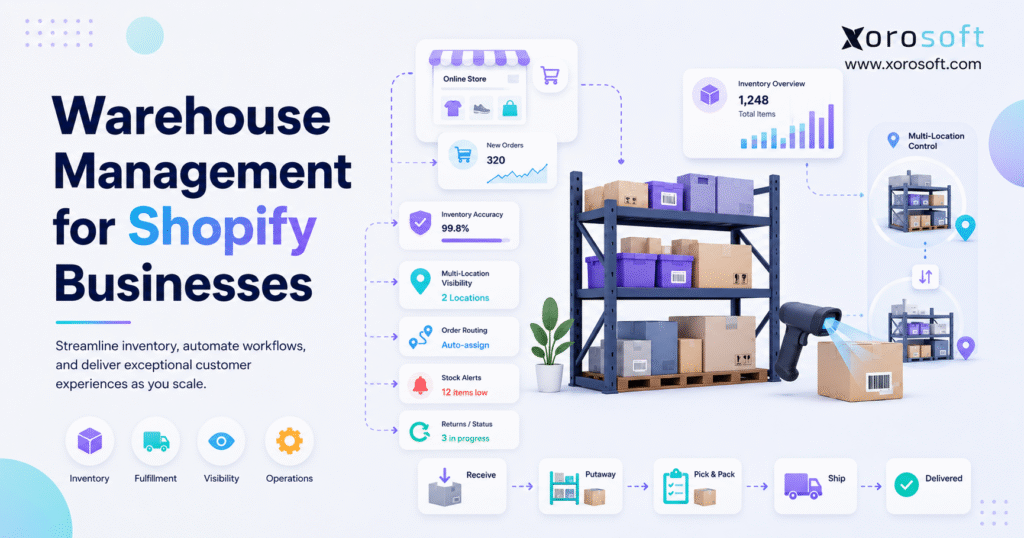
Warehouse management for Shopify businesses is the process of controlling how products move through receiving, storage, picking, packing, shipping, returns, and inventory updates. For Shopify brands, it connects the online order flow with the physical movement of goods.
In practical terms, warehouse management for Shopify businesses connects online demand with physical inventory movement. Shopify explains warehouse management as the work involved in tracking inventory, organizing storage, fulfilling orders, and coordinating warehouse workflows through systems and processes. You can review Shopify’s own explanation in its warehouse management guide.
2.1 A simple definition of Shopify warehouse management
Warehouse management for Shopify businesses means making sure the right product is available in the right location, picked accurately, packed correctly, shipped on time, and reflected properly inside Shopify.
Although the definition sounds simple, execution becomes harder as the brand grows. For example, an apparel business may need to track size, color, style, season, returns, exchanges, and wholesale allocation. Similarly, a furniture brand may need to track bulky inventory, damage, freight handling, and space constraints.
2.2 Shopify inventory management vs warehouse management
Inventory management answers one main question: how much stock does the business have?
By contrast, warehouse management answers a deeper operational question: where is the stock, how is it stored, who moves it, how accurately can it be picked, and how quickly can it reach the customer?
Because of that difference, a Shopify store may have inventory tracking but still suffer from warehouse errors. For instance, the system may show ten units available, yet the picker may not find them in the expected bin. In that case, the problem is not only inventory quantity. It is warehouse execution.
2.3 Why fulfillment depends on warehouse discipline
Fulfillment quality depends on warehouse accuracy. If receiving is wrong, inventory availability becomes unreliable. When putaway is messy, pickers waste time. After that, manual picking can increase wrong-item shipments. Finally, if shipping updates do not sync back to Shopify, customers and support teams lose visibility.
Therefore, the warehouse sits between customer promise and customer experience. Shopify creates the order, but the warehouse proves whether the brand can deliver it.
2.4 Core Shopify warehouse operations every team should control
A growing Shopify warehouse usually depends on these workflows:
Receiving inventory from suppliers
Putting products into the correct warehouse locations
Tracking bins, zones, shelves, or storage areas
Picking products for Shopify and non-Shopify orders
Packing orders with verification
Shipping orders and updating fulfillment status
Processing returns, exchanges, and restocking
Counting inventory through cycle counts
Transferring stock between locations
Reporting on accuracy, speed, errors, and stock movement
When these workflows stay manual for too long, small mistakes become daily operating friction.
3. How Shopify Supports Warehouse Management for Shopify Businesses
Shopify gives merchants important inventory and fulfillment tools. For example, brands can manage products, track inventory, create locations, assign stock, and fulfill orders. As a result, many businesses can start with Shopify before adding more advanced warehouse systems.
Shopify’s help documentation explains that locations can represent warehouses, retail stores, pop-ups, dropshippers, or fulfillment services. Once locations are added, merchants can assign inventory to those locations and configure fulfillment settings. You can read more in Shopify’s locations help article.
3.1 Shopify locations for warehouse management
A Shopify location is any place where a business stores, sells, ships, or fulfills inventory. This can include a warehouse, retail store, 3PL, pop-up location, or other fulfillment point.
Because each location can hold its own inventory quantity, Shopify gives growing brands a basic structure for multi-location stock visibility. However, physical warehouse accuracy still depends on how well the team receives, stores, counts, and picks products.
3.2 Multi-location Shopify inventory and warehouse control
Multi-location inventory helps Shopify brands separate stock by place. For example, a product may have 50 units in Warehouse A, 20 units in Warehouse B, and 10 units at a retail store.
This matters because total inventory is not enough. A brand also needs to know which stock can fulfill which order. Otherwise, the company may show inventory online but fail to ship from the correct location.
Shopify also explains multi-managed inventory for products stocked at different locations. Its documentation notes that different quantities can exist at each location and that orders are fulfilled based on routing or shipping profile configuration. You can review Shopify’s multi-location inventory guidance.
3.3 Shopify order routing for warehouse fulfillment
Order routing helps determine which fulfillment location should handle an order. Shopify states that order routing can assign orders based on configurable rules such as inventory availability, proximity, and market. You can review the details in Shopify’s order routing documentation.
This feature is useful. However, routing only works well when the inventory data behind it is accurate. If the warehouse count is wrong, then the routing logic may still send orders to the wrong place.
3.4 Where Shopify works well
Shopify works well as the commerce layer. It handles storefronts, checkout, online orders, product pages, customer experience, payments, and basic inventory workflows. Additionally, its location and routing tools give merchants a useful foundation.
For simple businesses, that may be enough. However, as operations grow, teams often need deeper workflows for receiving, barcode scanning, bin management, purchase order matching, forecasting, accounting, and reporting.
3.5 Where Shopify usually needs support
Shopify usually needs support when warehouse activity becomes too detailed for basic inventory tracking. For instance, a growing brand may need barcode scanning, batch picking, cycle counting, stock transfers, purchase order receiving, lot tracking, wholesale allocation, or financial inventory valuation.
That is why warehouse management for Shopify businesses often becomes a systems question, not just a warehouse staffing question. At that stage, the issue is not whether Shopify is useful. It is. The better question is what system should manage the operational work behind Shopify.
4. When Warehouse Management for Shopify Businesses Starts Breaking Down
Warehouse complexity rarely appears all at once. Instead, it grows through small operational changes. A few more SKUs arrive. Then another warehouse opens. After that, wholesale orders compete with online orders. Eventually, spreadsheets become the bridge between Shopify, purchasing, accounting, and fulfillment.
At this stage, warehouse management for Shopify businesses needs stronger rules around locations, allocation, fulfillment, and stock accuracy. Otherwise, every department starts making decisions from a different version of inventory truth.
4.1 SKU growth creates more decisions
Every new SKU adds storage, replenishment, forecasting, picking, and counting decisions. Although a small product catalog can survive informal warehouse habits, a larger catalog needs structure.
For example, apparel brands often manage size, color, style, season, and return status. Meanwhile, sporting goods brands may manage kits, bundles, replacement parts, and seasonal spikes. Because each product behaves differently, the warehouse needs clear rules.
4.2 Multiple locations create visibility problems
A second warehouse changes the business. Now the team must know not only how much stock exists, but also where that stock sits and whether it can fulfill current demand.
Shopify can support multiple locations, yet the warehouse team still needs disciplined receiving, transfers, counts, and fulfillment updates. Otherwise, Shopify may show stock that the team cannot actually ship.
4.3 Wholesale, Amazon, and retail compete with Shopify orders
Many Shopify brands eventually sell beyond the online store. They may add wholesale customers, Amazon, retail stores, EDI, or B2B orders. As a result, different channels compete for the same inventory.
Without clear allocation rules, a product may look available to one channel while another team already promised it elsewhere. Consequently, overselling, cancellations, and manual corrections become more common.
4.4 Manual picking causes preventable errors
Manual picking can work in a small warehouse. However, as order volume grows, teams need better guidance. Barcode scanning, bin locations, batch picking, and packing verification reduce the chance of sending the wrong item.
This is especially important for products with similar packaging, similar colors, variants, sizes, or high return risk.
4.5 Purchasing loses trust in warehouse numbers
Purchasing decisions depend on inventory accuracy. If received stock is not updated quickly, buyers may reorder too late. On the other hand, if damaged or returned stock is counted as sellable, purchasing may assume the business has more usable inventory than it really does.
Therefore, warehouse data directly affects stockouts, overstock, and cash flow.
4.6 Accounting feels the warehouse problem later
Finance teams often discover warehouse issues during reconciliation. If physical stock does not match system inventory, inventory valuation becomes uncertain. In addition, cost of goods sold, margin reporting, and month-end close become harder.
Because inventory is both an operational asset and a financial asset, warehouse control must connect with accounting discipline.
5. Core Workflows in Warehouse Management for Shopify Businesses
Before buying software, Shopify operators should map how inventory moves through the business. Otherwise, the company may choose a tool before understanding the real problem.
A clear workflow map makes warehouse management for Shopify businesses easier to improve before software is selected. It also helps teams decide whether they need process cleanup, a warehouse app, WMS, ERP, or 3PL support.
5.1 Receiving inventory in Shopify warehouse operations
Receiving is the first checkpoint. Products arrive from suppliers, manufacturers, transfers, 3PLs, or customer returns. Therefore, the team must verify what arrived before inventory becomes available.
A strong receiving process should match incoming goods against purchase orders, check quantities, identify damage, record exceptions, and update stock quickly.
5.2 Purchase order matching
Purchase order matching compares what the business ordered with what actually arrived. This step catches shortages, over-shipments, incorrect products, and supplier issues.
Without PO matching, a warehouse may add stock that purchasing did not expect. Alternatively, the warehouse may miss shortages until customers are already waiting for product.
5.3 Putaway and bin control for Shopify warehouse accuracy
Putaway determines where inventory goes after receiving. Although some teams rely on memory, that approach becomes risky as staff, SKU count, and warehouse space increase.
Bin control solves this problem by assigning products to specific locations. As a result, pickers spend less time searching, and managers gain better visibility into warehouse layout.
5.4 Zone-based storage
Zone-based storage groups products by velocity, category, size, handling needs, or temperature requirements. For example, fast-moving SKUs should sit near picking areas. Meanwhile, slow-moving or bulky products can sit in less accessible zones.
This approach improves productivity because the warehouse layout supports actual demand.
5.5 Picking workflows for Shopify warehouse management
Picking is where the warehouse prepares items for orders. A simple warehouse may use single-order picking. However, high-volume operations may need batch picking, wave picking, or zone picking.
Because each method affects labor and accuracy differently, the business should choose a workflow based on order volume, SKU mix, warehouse layout, and staffing.
5.6 Packing verification
Packing should confirm that the right items are going into the right box. Therefore, teams often use barcode scans, packing slips, weight checks, or visual checks.
This step protects customer experience. It also reduces avoidable returns, replacements, and support tickets.
5.7 Shipping updates
Shipping should update fulfillment status, tracking numbers, carrier details, and customer notifications. If this data does not flow back to Shopify, customers may ask support for information the business already has.
Consequently, fulfillment sync is not just an operational detail. It affects customer communication.
5.8 Returns and restocking in Shopify warehouse operations
Returns can damage inventory accuracy if they are handled too casually. Returned products may be sellable, damaged, opened, incomplete, expired, or assigned to inspection.
Therefore, the warehouse should not automatically return every item to available stock. Instead, teams need a clear returns workflow before inventory becomes sellable again.
5.9 Cycle counting
Cycle counting checks inventory continuously rather than relying only on a major annual count. High-value and fast-moving SKUs should be counted more often, while slower products can follow a lighter schedule.
Over time, cycle counting helps the team find process problems before they become major inventory discrepancies.
6. Signs Warehouse Management for Shopify Businesses Needs an Upgrade
Not every issue requires new software. However, repeated patterns usually show that the current setup is reaching its limit.
When the same issues repeat weekly, warehouse management for Shopify businesses has usually moved beyond basic Shopify inventory controls. At that point, stronger systems and cleaner workflows become more practical than manual fixes.
6.1 Shopify stock does not match physical stock
This is the clearest warning sign. If Shopify shows available inventory but the warehouse cannot find it, the business has an execution problem.
Common causes include missed receipts, unscanned picks, incorrect adjustments, delayed transfers, damaged stock, poor returns handling, and disconnected systems.
6.2 Orders ship from the wrong warehouse
Wrong-location fulfillment increases shipping cost and slows delivery. Additionally, it can create inventory imbalance because one warehouse keeps draining while another holds excess stock.
Although Shopify order routing can help, the underlying inventory data must be accurate.
6.3 Teams use spreadsheets to allocate stock
Spreadsheets often appear when Shopify data is not enough for wholesale, Amazon, retail, and warehouse decisions. At first, they provide flexibility. Later, they become a fragile source of truth.
Once spreadsheet allocation controls real inventory decisions, the business is exposed to formula errors, version conflicts, and manual update delays.
6.4 Pickers rely on memory
Experienced warehouse staff may know where products sit. However, growth makes that knowledge harder to scale. New hires, seasonal staff, and high order volume need system-guided workflows.
Barcode scanning and bin control reduce dependency on one person’s memory.
6.5 Purchasing reacts after stockouts happen
If purchasing only reacts once Shopify shows low stock, the team is already late. Better purchasing requires visibility into sales velocity, incoming stock, lead times, committed inventory, and warehouse accuracy.
Therefore, warehouse management and purchasing should not operate separately.
6.6 Month-end close takes too long
When inventory numbers are unreliable, accounting teams spend extra time reconciling stock value. That creates delays in financial reporting and reduces confidence in margins.
At that point, warehouse errors have become finance problems.
| Problem | Likely Cause | Better System Fit |
|---|---|---|
| Shopify inventory does not match physical stock | Manual updates or poor cycle counts | WMS or ERP |
| Orders ship from the wrong location | Weak routing logic or location data | WMS or routing cleanup |
| Purchasing happens too late | No forecasting or replenishment workflow | ERP |
| Pick errors keep increasing | No barcode verification | WMS |
| Inventory valuation is unreliable | Warehouse and accounting are disconnected | ERP |
| Wholesale stock gets oversold | No allocation rules | ERP or advanced inventory system |
7. Shopify Native Inventory, WMS, and ERP for Shopify Warehouse Operations
Choosing the right system becomes easier when the business separates commerce, warehouse execution, and operational control.
7.1 Shopify native inventory
Shopify native inventory is useful for product quantities, locations, adjustments, and basic fulfillment workflows. For small businesses, this may be enough.
However, native inventory does not replace deeper warehouse workflows such as bin-level control, barcode-guided picking, purchase order receiving, or accounting-connected inventory valuation.
7.2 Shopify warehouse apps and WMS tools
Warehouse apps can add specific features such as barcode scanning, pick-pack verification, label workflows, or inventory sync. They are useful when the business has a focused warehouse problem.
However, apps can become another silo if they do not connect well with purchasing, accounting, reporting, or other channels.
7.3 Dedicated WMS
A dedicated WMS controls warehouse execution. It usually supports receiving, putaway, bins, picking, packing, shipping, returns, labor workflows, and cycle counts.
For warehouse-heavy brands, a WMS can improve accuracy and speed. Still, it may not solve broader problems in purchasing, accounting, forecasting, or manufacturing.
7.4 Cloud ERP with warehouse management for Shopify businesses
A cloud ERP with warehouse management connects warehouse activity with the rest of the business. Instead of treating inventory, purchasing, accounting, and fulfillment as separate workflows, ERP brings them into one operating system.
For brands that have outgrown simple tools, XoroERP can support inventory, purchasing, accounting, warehouse management, forecasting, reporting, manufacturing, and ecommerce workflows in one platform.
7.5 3PL warehouse systems
A 3PL system belongs to an external fulfillment partner. It can help with storage, picking, packing, shipping, and returns. However, brands still need visibility into inventory, service levels, costs, and exceptions.
Therefore, even when a Shopify brand uses a 3PL, it still needs strong inventory control.
7.6 How Shopify businesses should choose the right warehouse system
The right layer depends on operational complexity. A simple store may use Shopify native inventory. A growing warehouse may need WMS. A multi-channel, multi-warehouse, finance-sensitive business may need ERP.
| Capability | Shopify Native Inventory | WMS | ERP With WMS |
| Basic stock tracking | Strong | Strong | Strong |
| Multi-location inventory | Available | Strong | Strong |
| Bin-level control | Limited | Strong | Strong |
| Barcode picking | App-dependent | Strong | Strong |
| Purchase order receiving | Basic or app-based | Sometimes | Strong |
| Forecasting | Limited or app-based | Limited | Strong |
| Accounting connection | Limited | Limited | Strong |
| Manufacturing workflows | Limited | Usually limited | Strong |
| Wholesale and EDI support | App-dependent | Limited | Strong |
| Best fit | Simple Shopify operations | Warehouse execution | Connected operations |
8. Features to Look for in Warehouse Management for Shopify Businesses
The best warehouse software depends on the problem you need to solve. Therefore, operators should evaluate features based on workflows, not buzzwords.
The best software for warehouse management for Shopify businesses should support the way inventory actually moves through the operation. It should also help teams reduce manual work without creating another disconnected system.
8.1 Real-time Shopify inventory sync for warehouse accuracy
Inventory sync keeps Shopify aligned with warehouse activity. When orders, receipts, returns, transfers, and adjustments happen, stock data should update quickly.
Otherwise, the business risks overselling products that are no longer available.
8.2 Multi-warehouse visibility for Shopify businesses
Multi-warehouse visibility shows stock by location. More importantly, it separates available, committed, reserved, incoming, damaged, and transferred stock.
Because total stock can be misleading, operators need location-level visibility before making fulfillment and purchasing decisions.
8.3 Barcode scanning for Shopify warehouse management
Barcode scanning improves accuracy during receiving, picking, packing, transfers, cycle counts, and returns. It also reduces manual entry.
For apparel, consumer goods, sporting goods, and wholesale businesses, scanning becomes especially valuable when products look similar.
8.4 Bin and location management
Bin management tells warehouse staff exactly where products sit. Without it, teams waste time searching and correcting mistakes.
As the SKU catalog grows, bin control becomes one of the simplest ways to improve warehouse speed.
8.5 Purchase order receiving
Purchase order receiving connects buying decisions with warehouse intake. The warehouse should know what was ordered, what arrived, what is missing, and what needs supplier follow-up.
This helps purchasing teams avoid blind reorders.
8.6 Stock transfers
Transfers move inventory between locations. Shopify’s Stocky migration documentation notes that merchants need to manage inventory tasks such as transfers, purchase order receiving, adjustments, and historical inventory reporting in Shopify admin after Stocky is no longer available after August 31, 2026. You can review Shopify’s Stocky migration guidance.
For growing brands, transfer control matters because stock may be available in one warehouse but needed in another.
8.7 Returns processing
Returns should include inspection, disposition, restocking, quarantine, repair, or write-off decisions. Otherwise, damaged or incomplete products may return to sellable stock.
This is especially important for apparel, footwear, furniture, and consumer goods.
8.8 Forecasting and replenishment
Forecasting helps purchasing teams plan before stockouts appear. However, forecasting is only useful when warehouse inventory is accurate.
Because of that, warehouse accuracy and replenishment planning should work together.
8.9 Reporting and KPIs
Warehouse reports should show inventory accuracy, pick accuracy, stockout rate, cycle count variance, fulfillment cycle time, dock-to-stock time, and return reasons.
With better reporting, operators can fix the process instead of blaming individual mistakes.
8.10 Accounting integration for Shopify inventory and warehouse control
Inventory affects financial reporting. Therefore, warehouse activity should connect with cost, inventory valuation, COGS, and month-end close.
For businesses that need warehouse control and financial accuracy in the same system, XoroONE can act as a unified operational platform.
8.11 Ecommerce, wholesale, and EDI support
A Shopify brand may also sell through Amazon, wholesale, retail, and EDI channels. Because each channel creates different inventory pressure, the warehouse system should support more than DTC fulfillment.
For industry-specific workflows, the industries we serve page can help operators evaluate whether their warehouse needs match their business model.
| Feature | Why It Matters | Who Needs It |
| Real-time Shopify sync | Keeps inventory current | Multi-channel sellers |
| Barcode scanning | Reduces manual errors | High-volume warehouses |
| Bin locations | Speeds picking | Large SKU catalogs |
| PO receiving | Connects buying with warehouse intake | Purchasing teams |
| Returns workflow | Protects sellable stock | Apparel and consumer brands |
| Forecasting | Reduces stockouts and overstock | Seasonal businesses |
| Accounting connection | Improves inventory valuation | Finance-led teams |
| EDI support | Supports wholesale orders | B2B sellers |
9. Warehouse Needs by Shopify Business Model
Different Shopify businesses need different warehouse controls. Therefore, software selection should reflect the operating model.
9.1 DTC Shopify brands
DTC brands usually care about fulfillment speed, shipping accuracy, customer experience, and returns. As volume increases, barcode scanning and pick-pack workflows become more important.
9.2 Shopify Plus brands
Shopify Plus brands often manage higher volume, multiple locations, international demand, retail, wholesale, or complex promotions. As a result, they need stronger controls around inventory availability and fulfillment priority.
9.3 Apparel and fashion brands
Apparel brands deal with size, color, style, seasonality, exchanges, returns, and high SKU counts. Therefore, warehouse teams need barcode scanning, bin control, and clean variant data.
9.4 Furniture brands
Furniture brands need warehouse space planning, damage tracking, freight coordination, and visibility into bulky goods. Because items are expensive and harder to move, location accuracy matters more.
9.5 Sporting goods brands
Sporting goods businesses often handle kits, bundles, seasonal spikes, and wholesale demand. Consequently, inventory allocation and forecasting become critical.
9.6 Food and beverage brands
Food brands may need expiry dates, lot tracking, freshness control, and careful receiving. In this category, warehouse mistakes can affect both customer trust and compliance.
9.7 Wholesale and B2B Shopify sellers
Wholesale sellers need customer-specific pricing, bulk orders, EDI, allocation, and accurate fulfillment promises. Therefore, warehouse management must connect with sales operations and purchasing.
9.8 Manufacturing businesses using Shopify
Manufacturing businesses need raw materials, finished goods, BOMs, work orders, and production planning. In this case, warehouse management must connect with manufacturing workflows, not just finished goods fulfillment.
For these broader operational requirements, Xorosoft’s solutions page can help brands explore inventory, warehouse, purchasing, accounting, manufacturing, and reporting needs by workflow.
| Business Model | Warehouse Challenge | Required Capability |
| DTC | Fast fulfillment and returns | Pick-pack accuracy |
| Shopify Plus | Scale and complexity | Multi-location control |
| Apparel | Size and color variants | Barcode scanning |
| Furniture | Bulky inventory | Space and damage tracking |
| Sporting goods | Seasonality and bundles | Allocation and forecasting |
| Food | Expiry and lot control | Lot tracking |
| Wholesale | B2B orders and EDI | Advanced inventory or ERP |
| Manufacturing | Raw materials and finished goods | ERP with manufacturing |
10. Warehouse KPIs Shopify Operators Should Track
A warehouse should not be judged only by whether orders ship. Instead, operators need metrics that show accuracy, speed, cost, and reliability.
10.1 Inventory accuracy
Inventory accuracy compares system stock with physical stock. If this number is weak, Shopify availability, purchasing decisions, and financial reporting all become less reliable.
10.2 Order accuracy
Order accuracy measures whether customers receive the right items. Since wrong shipments create returns and support tickets, this KPI directly affects customer experience.
10.3 Pick rate
Pick rate measures how many items or orders warehouse staff pick during a period. This helps managers understand productivity and labor planning.
10.4 Dock-to-stock time
Dock-to-stock time measures how long it takes received inventory to become available for sale. A long delay can create stockouts even when goods are physically inside the building.
10.5 Fulfillment cycle time
Fulfillment cycle time tracks how long it takes to move an order from placement to shipment. Faster cycle times usually improve customer satisfaction.
10.6 Stockout rate
Stockout rate shows how often demand exists when stock is unavailable. Because stockouts hurt revenue, this KPI should be monitored closely.
10.7 Return rate caused by fulfillment errors
This metric separates normal returns from warehouse-caused returns. For example, wrong item, wrong size, missing part, or damaged shipment should be tracked separately.
10.8 Inventory carrying cost
Carrying cost measures the cost of holding inventory. It includes storage, insurance, shrinkage, obsolescence, and cash tied up in stock.
| KPI | What It Measures | Why It Matters |
| Inventory accuracy | System stock vs physical stock | Prevents overselling |
| Order accuracy | Correct orders shipped | Protects customer experience |
| Pick rate | Warehouse productivity | Improves labor planning |
| Dock-to-stock time | Receiving speed | Makes inventory available faster |
| Fulfillment cycle time | Order-to-ship speed | Supports delivery promises |
| Stockout rate | Missed demand | Improves purchasing |
| Fulfillment-error returns | Warehouse-caused returns | Reveals process gaps |
| Carrying cost | Cost of holding stock | Protects cash flow |
11. Common Warehouse Mistakes Shopify Brands Make
Most warehouse problems come from process gaps that were manageable at a smaller size. However, once volume grows, those gaps become expensive.
11.1 Treating Shopify as the entire backend
Shopify is excellent for commerce. However, it should not always be expected to manage every operational workflow behind the storefront.
When a brand needs deeper purchasing, forecasting, warehouse control, manufacturing, accounting, and reporting, another operational layer may be necessary.
11.2 Adding too many apps without a system map
Apps can solve specific problems. Still, too many disconnected apps can create duplicate entry, unclear ownership, and conflicting data.
Therefore, operators should map workflows before adding another tool.
11.3 Ignoring receiving and putaway
Many teams focus on shipping because customers see it. However, receiving and putaway determine whether the warehouse can pick accurately later.
Bad intake creates bad inventory data.
11.4 Counting inventory only after problems appear
Cycle counting should happen before major discrepancies appear. Otherwise, the business only discovers problems after orders, purchasing, and finance have already been affected.
11.5 Separating warehouse data from accounting
Warehouse data and accounting data should not live in separate worlds. If they do, finance teams spend more time reconciling inventory and less time analyzing performance.
11.6 Choosing software before documenting workflows
Software should support a defined process. If the team buys software before mapping workflows, the company may automate confusion instead of fixing it.
12. Where ERP Fits Into Warehouse Management for Shopify Businesses
ERP becomes relevant when warehouse management affects more than fulfillment. Once warehouse data influences purchasing, accounting, forecasting, wholesale, manufacturing, and leadership reporting, the business needs a more connected system.
This is where warehouse management for Shopify businesses starts to connect with finance, purchasing, forecasting, and leadership reporting. As a result, teams need one operational layer that keeps inventory data consistent across departments.
12.1 Shopify remains the commerce layer, not the full warehouse system
Shopify should remain the storefront and commerce engine for most brands. It manages checkout, customers, products, online orders, and digital selling.
Therefore, the goal is not to replace Shopify. Instead, the goal is to connect Shopify with the operational systems that manage inventory-driven work.
12.2 ERP becomes the operational layer for Shopify warehouse management
ERP can become the system of record for inventory, purchasing, warehouse management, accounting, forecasting, manufacturing, and reporting.
For Shopify businesses with operational complexity, XoroERP helps connect warehouse activity with the wider business rather than leaving each team in a separate tool.
12.3 Warehouse data should guide purchasing
Purchasing teams need accurate data from receiving, transfers, sales velocity, stockouts, returns, and supplier performance. If warehouse numbers are wrong, purchase orders will also be wrong.
Because of this, purchasing and warehouse workflows should be connected.
12.4 Warehouse data should support accounting
Finance teams need reliable inventory value. When warehouse movements flow into accounting correctly, month-end close becomes cleaner and margin reporting becomes more trustworthy.
12.5 Warehouse data should improve forecasting
Forecasting depends on clean inventory and sales data. If stock counts are inaccurate, forecasts may recommend too much of the wrong product or too little of the right one.
Therefore, forecasting should not be separated from warehouse accuracy.
12.6 When Xorosoft fits warehouse management for Shopify businesses
Xorosoft becomes relevant when a Shopify business has outgrown QuickBooks, spreadsheets, inventory-only apps, or disconnected warehouse tools. It supports inventory management, purchasing, accounting, forecasting, warehouse management, manufacturing, Shopify, Amazon, EDI, and multi-warehouse operations in one cloud ERP platform.
For operators who want to see the Shopify connection directly, the Xorosoft ERP app on the Shopify App Store provides an external reference point.
13. Software Options for Shopify Warehouse Management
Shopify businesses usually evaluate several types of systems. Each option can work, but each solves a different level of complexity.
13.1 Shopify native inventory for basic warehouse control
Native Shopify inventory works for simple stock tracking, basic locations, and straightforward fulfillment. It is usually the right starting point for small teams.
However, it may not be enough when the business needs advanced warehouse execution.
13.2 Warehouse apps
Warehouse apps can solve focused problems such as scanning, pick-pack verification, shipping labels, or inventory sync. As a result, they can be useful without requiring a full system change.
However, they may become limiting when warehouse data must also support accounting, purchasing, and forecasting.
13.3 Inventory-only platforms
Inventory-only platforms can improve visibility and purchasing. Nevertheless, they may not fully connect warehouse execution with finance, manufacturing, or deeper reporting.
13.4 Dedicated WMS
A dedicated WMS is strong for warehouse execution. It can help with bins, picking, packing, receiving, returns, and cycle counting.
Still, a WMS may not solve broader operational gaps if purchasing, accounting, and reporting remain disconnected.
13.5 ERP with built-in WMS for Shopify warehouse operations
ERP with built-in WMS supports warehouse execution and operational control together. For example, XoroWMS connects warehouse workflows with inventory visibility, while the broader ERP layer supports purchasing, accounting, forecasting, and reporting.
This option fits brands that need more than a single warehouse tool.
13.6 3PL systems
A 3PL system manages fulfillment inside an external warehouse. This can help brands scale shipping without building an internal warehouse team.
However, the brand still needs visibility into stock, costs, service levels, and exceptions.
| Software Type | Best For | Limitation | Upgrade Trigger |
| Shopify native inventory | Small operations | Limited warehouse depth | More locations and SKUs |
| Warehouse app | Specific workflow gaps | Can become another silo | More departments need data |
| Inventory platform | Stock visibility | May lack full accounting depth | Finance needs inventory truth |
| Dedicated WMS | Warehouse execution | May not solve purchasing or accounting | Operations become cross-functional |
| 3PL system | Outsourced fulfillment | Less internal control | Need better visibility |
| ERP with WMS | Connected operations | Requires process planning | Warehouse, purchasing, and finance need one system |
14. When a Shopify Business Should Upgrade From Apps to ERP
A Shopify business should consider ERP when warehouse problems cross department boundaries. Once inventory data affects purchasing, accounting, forecasting, manufacturing, and reporting, disconnected apps usually create more work.
14.1 Revenue and order volume signals
Revenue alone does not prove ERP readiness. However, brands in the $2M to $100M+ range often feel pressure when order volume, SKU count, and channel complexity grow faster than manual processes.
14.2 Multi-warehouse signals in Shopify warehouse management
Multiple warehouses create decisions around fulfillment priority, stock transfers, order routing, inventory balancing, and regional availability. If the team handles these decisions manually, the system may be underpowered.
14.3 Purchasing signals
ERP becomes more relevant when purchasing requires demand forecasting, supplier management, purchase order automation, receiving controls, and replenishment planning.
Because purchasing depends on warehouse data, disconnected workflows create risk.
14.4 Accounting signals
Accounting signals are often the strongest. If inventory valuation requires manual reconciliation every month, warehouse data is not financially reliable enough.
At that point, the business needs better integration between physical inventory and accounting records.
14.5 Reporting signals
Disconnected reports create leadership confusion. One system shows Shopify orders. Another shows warehouse stock. A spreadsheet shows purchasing. QuickBooks shows finance.
Consequently, the leadership team spends too much time explaining data differences instead of making decisions.
14.6 Team complexity signals for warehouse management for Shopify businesses
As the team grows, informal communication breaks down. Warehouse, purchasing, accounting, operations, and leadership need shared data.
Xorosoft helps inventory-driven Shopify businesses centralize these workflows so teams can work from one operational foundation.
For proof points and implementation examples, operators can also review Xorosoft’s case studies.
15. FAQs About Warehouse Management for Shopify Businesses
15.1 What is warehouse management for Shopify businesses?
For a growing ecommerce brand, warehouse management for Shopify businesses means controlling how inventory is received, stored, picked, packed, shipped, returned, counted, and updated across Shopify and warehouse systems. It connects online orders with physical warehouse execution. As a result, the business can improve inventory accuracy, fulfillment speed, and customer experience.
15.2 Does Shopify have warehouse management?
Native Shopify tools can support inventory, locations, fulfillment, and order routing. However, advanced warehouse execution may require a warehouse app, WMS, ERP, or 3PL system. For example, brands that need barcode scanning, bin control, purchase order receiving, advanced reporting, or accounting-connected inventory usually need support beyond native Shopify tools.
15.3 Can Shopify manage multiple warehouses?
Yes, multiple warehouses can be managed in Shopify through locations. These locations may include warehouses, retail stores, pop-ups, dropshippers, and fulfillment services. Even so, each location still needs accurate receiving, transfers, counts, and fulfillment updates to keep inventory reliable.
15.4 What is the difference between Shopify inventory management and WMS?
Inventory management tracks product quantities, locations, and availability. By contrast, a WMS manages warehouse execution, including receiving, putaway, bins, picking, packing, shipping, returns, and cycle counts. In simple terms, Shopify inventory shows what stock exists, while WMS controls how that stock moves.
15.5 When does a Shopify business need a WMS?
A WMS becomes useful when pick errors increase, warehouse staff depend on memory, multiple locations create confusion, inventory counts become unreliable, or fulfillment speed slows down. Additionally, barcode scanning and bin management become more important as SKU count and order volume rise.
15.6 When does a Shopify business need ERP instead of WMS?
ERP becomes more useful when warehouse problems also affect purchasing, accounting, forecasting, manufacturing, wholesale, or reporting. A WMS improves warehouse execution. Meanwhile, ERP connects warehouse activity with the wider business so inventory, finance, and operations work from shared data.
15.7 How does Shopify multi-location inventory work?
Through Shopify locations, merchants can track stock across different places where products are stored, sold, or fulfilled. These places may include warehouses, stores, 3PLs, or pop-up locations. However, because Shopify depends on accurate updates, warehouse teams still need disciplined receiving, picking, transfers, and cycle counts.
15.8 What causes Shopify inventory discrepancies?
Inventory discrepancies usually come from missed receipts, manual adjustments, unscanned picks, incorrect returns, delayed transfers, damaged stock, disconnected apps, or poor counting habits. Although Shopify may show the final number, the root cause often lives inside warehouse execution.
15.9 How can Shopify brands prevent overselling?
Brands can reduce overselling by improving inventory sync, using order routing carefully, separating available and committed stock, scanning warehouse movements, counting inventory regularly, and avoiding spreadsheet-based allocation. Moreover, multi-channel sellers need clear rules for Shopify, Amazon, wholesale, and EDI demand.
15.10 How does barcode scanning improve warehouse accuracy?
Barcode scanning verifies products during receiving, picking, packing, transfers, returns, and cycle counts. Therefore, it reduces manual typing and wrong-item errors. It is especially useful for brands with similar SKUs, variants, sizes, colors, or fast-moving warehouse teams.
15.11 What warehouse KPIs should Shopify brands track?
Useful warehouse KPIs include inventory accuracy, order accuracy, pick rate, dock-to-stock time, fulfillment cycle time, stockout rate, return rate caused by fulfillment errors, and carrying cost of inventory. Together, these metrics show whether the warehouse is accurate, fast, and financially controlled.
15.12 Can Shopify handle wholesale warehouse operations?
Shopify can support some B2B and wholesale workflows. However, wholesale warehouse operations often require bulk orders, EDI, customer-specific pricing, allocation rules, and tighter purchasing controls. Because of that, wholesale-heavy Shopify brands may eventually need advanced inventory software or ERP.
15.13 How do Shopify brands manage Amazon, wholesale, and DTC inventory together?
A reliable inventory view should separate available, committed, reserved, incoming, and transferred stock. Otherwise, each channel may compete for the same units. As demand grows, ERP or advanced inventory systems can help centralize inventory across Shopify, Amazon, wholesale, and EDI.
15.14 What is order routing in Shopify?
Order routing in Shopify assigns orders to fulfillment locations based on rules. These rules can consider inventory availability, location priority, market, or proximity. However, order routing works best when each location’s inventory is accurate and warehouse updates happen on time.
15.15 Can Shopify assign orders to the nearest warehouse?
Shopify order routing can support proximity-based fulfillment rules. However, nearest warehouse logic should be tested carefully. If the closest warehouse has inaccurate stock or poor capacity, the order may still run into fulfillment problems.
15.16 How do Shopify brands manage returns in the warehouse?
Returned items should be inspected before they go back to available inventory. Some products may be sellable, damaged, opened, incomplete, expired, or reserved for repair. Therefore, a clear returns workflow protects inventory accuracy and customer experience.
15.17 What is the best warehouse management system for Shopify?
The best system depends on complexity. A small brand may use Shopify native inventory. A growing warehouse may need WMS. Meanwhile, a multi-channel, multi-warehouse business that also needs purchasing, accounting, forecasting, or manufacturing control may need ERP with warehouse management.
15.18 Should Shopify brands use a 3PL or manage their own warehouse?
A 3PL can help brands scale fulfillment without running their own warehouse team. However, in-house fulfillment gives more control over packaging, inventory handling, customer experience, and operational detail. The right choice depends on product complexity, margin, geography, volume, and service expectations.
15.19 What is the role of ERP in Shopify warehouse management?
ERP connects warehouse execution with inventory, purchasing, accounting, forecasting, reporting, and sometimes manufacturing. For Shopify businesses, ERP often becomes the operational layer behind Shopify. As a result, Shopify can remain the commerce platform while ERP manages deeper business workflows.
15.20 Can Xorosoft support warehouse management for Shopify businesses?
Yes. Xorosoft supports Shopify businesses that need connected inventory, warehouse management, purchasing, accounting, forecasting, manufacturing, Amazon, EDI, and multi-warehouse operations. It is especially relevant for inventory-driven companies that have outgrown spreadsheets, QuickBooks, or disconnected apps.
15.21 Is Shopify enough for inventory management?
For smaller businesses with simple inventory needs, Shopify may be enough. However, it becomes less complete when the operation needs barcode scanning, bin control, forecasting, purchase planning, accounting integration, EDI, manufacturing, or complex multi-channel allocation.
15.22 How do Shopify brands improve pick and pack accuracy?
Operators can improve accuracy by using bin locations, barcode scanning, guided pick lists, packing verification, clear SKU naming, batch workflows, and regular exception reviews. Although training helps, the system should guide staff toward the correct action.
15.23 What are the signs a Shopify warehouse process is broken?
Common signs include frequent stock discrepancies, delayed receiving, wrong-item shipments, spreadsheet allocation, poor transfer visibility, repeated overselling, slow returns processing, and finance teams questioning inventory value. Usually, these symptoms point to disconnected workflows.
15.24 How should Shopify businesses choose warehouse software?
The best approach is to map workflows first, then identify the bottleneck. Depending on complexity, the right answer may be Shopify native inventory, a warehouse app, WMS, 3PL, or ERP. Therefore, software selection should follow process clarity.
15.25 What should Shopify businesses fix before buying software?
Before buying software, teams should clean up SKU data, define warehouse locations, document receiving, standardize picking, review inventory adjustment rules, and clarify ownership across warehouse, purchasing, and finance. After that, software implementation becomes much easier.
15.26 How does warehouse management affect cash flow?
Warehouse management affects cash flow through stockouts, overstock, carrying costs, returns, shrinkage, and purchasing decisions. If warehouse numbers are wrong, the business may buy too much slow-moving stock while running out of bestsellers.
15.27 How does warehouse management affect customer experience?
Customers experience warehouse quality through delivery speed, order accuracy, packaging condition, tracking updates, and returns handling. Therefore, even a strong Shopify storefront can disappoint customers if the warehouse ships late or sends the wrong product.
15.28 How often should Shopify businesses cycle count inventory?
Cycle count frequency depends on SKU velocity, value, and risk. Fast-moving and high-value products should be counted more often than slow-moving items. Many growing brands count priority SKUs weekly or monthly while rotating through the full catalog over time.
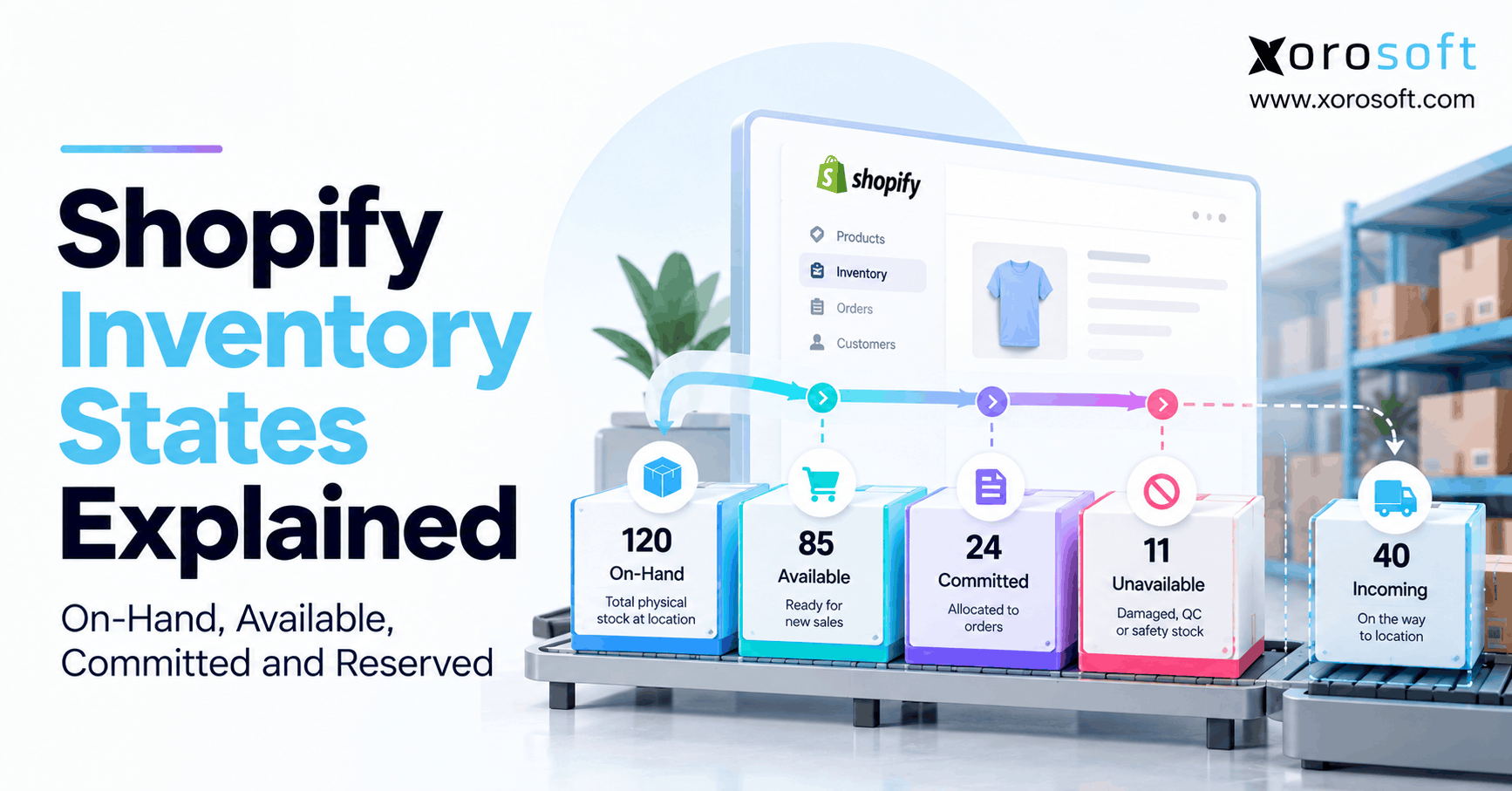
15.29 What is the difference between available, committed, and on-hand inventory?
On-hand inventory is the total physical stock. Committed inventory is already assigned to orders. Available inventory is the quantity left for new sales after commitments, reservations, and restrictions. This distinction helps Shopify brands avoid overselling.
15.30 What is the first step to improve warehouse management for Shopify businesses?
The first step is mapping how inventory moves from receiving to putaway, picking, packing, shipping, returns, transfers, and cycle counts. Once the workflow is visible, the team can decide whether the issue is process, people, data, software, or integration.
16. Build the Warehouse System Before Growth Exposes the Gaps
Warehouse problems usually begin as small mistakes. However, as Shopify brands grow, those mistakes start affecting fulfillment, inventory accuracy, purchasing, accounting, cash flow, and customer experience.
Reliable warehouse management for Shopify businesses gives operators confidence that sales, stock, fulfillment, and financial data are aligned. Without that alignment, teams spend too much time correcting numbers instead of improving operations.
A simple Shopify operation can often run well with native tools and clean processes. Eventually, though, multi-location inventory, wholesale demand, Amazon orders, EDI, returns, forecasting, and accounting requirements may expose the limits of a disconnected setup.
The goal is not to replace Shopify. Instead, Shopify should remain the commerce layer, while a stronger operational system manages the work behind it.
For some brands, the next step is better process discipline. For others, it may be a warehouse app or dedicated WMS. However, when warehouse management needs to connect with purchasing, accounting, forecasting, reporting, and manufacturing, ERP becomes the more practical foundation.
Xorosoft helps inventory-driven Shopify businesses connect warehouse management with inventory, purchasing, accounting, forecasting, reporting, manufacturing, Amazon, EDI, and multi-warehouse operations. Therefore, teams can reduce spreadsheet dependency and build a more reliable operational backend.
To review whether your current setup needs process cleanup, WMS support, or a connected ERP foundation, Book a demo.
Search
Categories
- Accounting & QuickBooks 227
- AI & Automation 585
- E-commerce & Marketplaces 1,202
- EDI & B2B 150
- ERP 573
- ERP Selection & Comparisons 166
- Industries 228
- Integrations 137
- Shopify ERP 137
- Inventory Management 1,206
- Order Management & Fulfillment 578
- Procurement & Supply Chain 9
- Procurement, Purchasing & Reordering 418
- Resources 248
- Shopify 649
- Solutions 601
- Warehouse & WMS 1,078
Recent Posts
-
 ERP for US–Canada Ecommerce Operations Managing Cross-Border Inventory
 -
 Wholesale Order Automation Statistics 2026: Entry, Approval and Exception Costs
 -
 ERP vs Point Integrations: The Real Cost of Running Shopify Operations Across Multiple Apps
 -
 How to Integrate Shopify B2B EDI Orders With ERP and Warehouse Workflows
 -
 Inventory and Working Capital: Why Growth Can Hide a Cash Problem