If you are looking to streamline vendor management, supplier portal software can offer a seamless solution.
1. Why Wholesale Purchase Orders Keep Falling Out of Sync
Supplier portal software helps wholesale businesses track purchase orders, supplier replies, delivery changes, and incoming stock in one place. As order volume grows, buyers need more than emails and spreadsheets to keep suppliers, warehouses, and finance teams working from the same information.
However, many growing firms still use separate tools to place orders, check delivery dates, receive goods, and pay bills.
For example, a supplier may confirm a delivery delay by email. Meanwhile, the buyer’s stock report may still show the original arrival date. As a result, the sales team promises goods that may not arrive on time.
The problem is not just slow communication. Instead, the real issue is that supplier updates fail to reach the people and systems that need them.
1.1 Why a Small Supplier Delay Creates Bigger Problems
Consider a wholesaler that buys 600 jackets for an upcoming sales period.
The supplier initially agrees to ship all 600 units. However, a week later, it confirms that only 450 units will arrive on time.
If the buyer does not update the order, the stock plan still expects 600 jackets.
Consequently, sales teams may accept too many orders. Warehouse teams may also plan labor around stock that has not shipped.
Meanwhile, finance may receive a bill based on the full purchase order.
Therefore, one missed supplier update can affect sales, stock, shipping, and cash flow.
1.2 What Better Supplier Collaboration Should Fix
A good supplier workflow answers four questions:
- What did the buyer order?
- What has the supplier agreed to deliver?
- What has changed since the original order?
- What has actually arrived and passed receiving checks?
Moreover, the answers should connect to approved business records.
A supplier portal can help capture these updates. However, buyers also need a clear process for reviewing changes before those updates reach their ERP, warehouse, or finance systems.
2. What Is Supplier Portal Software?
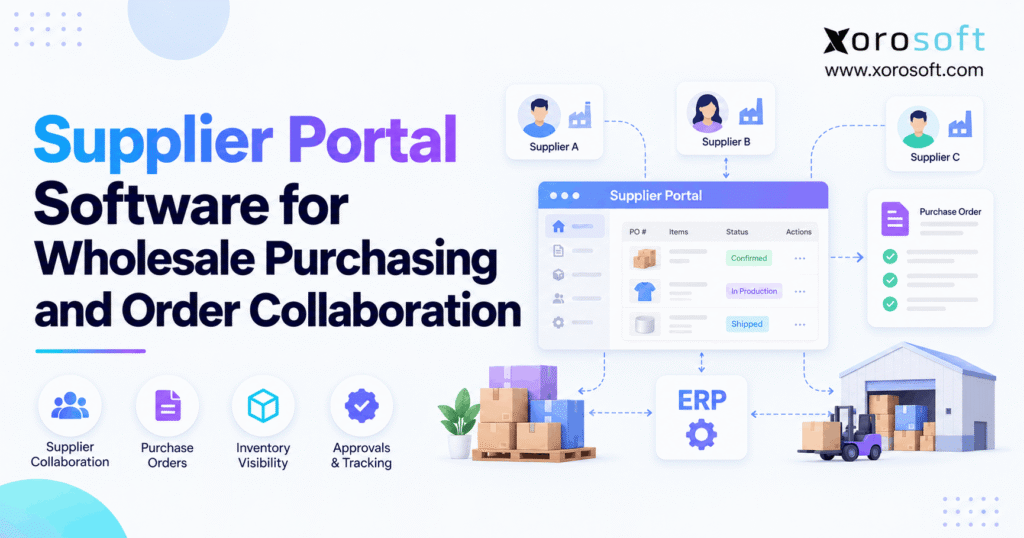
Supplier portal software is an online tool that lets buyers and vendors share purchase orders, confirm order details, request changes, and track key documents.
Instead of relying on long email chains, both parties can work from a clear record of each order.
In addition, some platforms support shipment notices, supplier bills, and vendor performance reports.
However, features vary by product. Therefore, buyers should check what a vendor offers rather than assume every portal has the same tools.
2.1 How Supplier Portal Software Works
The process usually starts when the buyer approves a purchase order.
Next, the supplier receives the order through a portal, email link, or linked system.
The supplier can then review the items, dates, and amounts. Depending on the software, it may accept the order or ask for changes.
For example, a vendor may offer 80 units now and 20 units next month.
The buyer can review that reply and decide what to do.
Once the change is approved, the system should update the correct order record.
As a result, purchasing teams can spend less time chasing replies and more time dealing with real supply risks.
2.2 What a Supplier Portal Is Not
A supplier portal is not always a full purchasing system.
For example, a portal may let vendors confirm orders without managing stock, warehouse tasks, or accounting.
Likewise, a portal may track a shipment without proving that the goods reached the warehouse.
Therefore, businesses should treat supplier communication and physical stock control as related but separate tasks.
This distinction matters because a supplier’s promise does not mean goods are ready to sell.
3. When Do Wholesale Businesses Need a Supplier Portal?
Not every company needs a new supplier portal.
For example, a small wholesaler with a few steady vendors and simple orders may work well with its current ERP.
However, the need grows when purchase orders, suppliers, SKUs, and warehouse sites become harder to manage.
The goal is to solve a clear problem rather than add another tool to the software stack.
3.1 Signs Your Supplier Process Has Outgrown Email
A supplier portal may be worth a closer look when:
- Buyers chase the same order replies more than once.
- Vendors send changes through several email threads.
- Staff cannot find the latest promised delivery date.
- Partial shipments cause stock errors.
- Teams update the same PO in more than one system.
- Warehouse staff receive goods against old order details.
- Finance spends too much time fixing invoice differences.
For this reason, start by listing the gaps that cause the most rework.
Then assess whether connected business solutions or a focused supplier tool would address those gaps.
3.2 When Existing ERP or EDI Tools May Be Enough
A dedicated portal may add little value if current systems already handle supplier replies well.
For instance, a firm may use EDI to send purchase orders and receive shipping notices.
Similarly, its ERP may already support vendor access and change approvals.
However, neither option guarantees that every supplier can use the same process.
Therefore, compare current tools with real workflow needs before buying.
If supplier replies are rare and easy to manage, improving the current process may be more useful than adding software.
4. How Supplier Collaboration Works Across the Purchase Order Lifecycle
Strong supplier collaboration covers the full path from stock demand to goods received.
Initially, the buyer must know what to order. Next, the supplier must agree to the terms. Finally, the warehouse must check what arrives.
When these steps stay linked, teams gain a clearer view of incoming stock.
4.1 From Stock Demand to an Approved Purchase Order
A purchase starts with a business need.
For example, sales may rise while stock falls below the reorder level.
The buyer then reviews current stock, open orders, demand, and supplier lead times.
After that, the purchasing team creates a PO with the correct items, amounts, prices, and delivery site.
The system should also record who approved the order.
Moreover, the approved PO should remain easy to find after the supplier responds.
This gives both sides a clear starting point.
4.2 Supplier Replies, Date Changes, and Buyer Approval
Once the supplier receives the PO, it may accept the full order or suggest new terms.
For example, a vendor may confirm the quantity but request a later delivery date.
However, the buyer must decide whether that change is acceptable.
A clear process should show the original request, the supplier’s reply, and the final approved terms.
In addition, it should keep a record of who made each change.
Microsoft’s vendor collaboration guide shows how suppliers can accept orders, reject them, or suggest changes that buyers then review.
Therefore, buyers should test the approval process, not just the supplier reply screen.
4.3 Shipment, Receipt, and Invoice Checks
After the supplier ships goods, it may send shipment details or an advance shipping notice (ASN).
Next, the warehouse prepares for the delivery.
However, an ASN is not proof of receipt.
Warehouse staff must count the units and check for damage before they approve the goods.
Meanwhile, finance compares the supplier bill with the approved PO and accepted receipt.
As a result, the business can spot missing units, extra charges, or wrong items before closing the transaction.
5. Supplier Portal Software Features Worth Paying For
A long feature list does not always mean better software.
Instead, buyers should focus on tools that reduce missed updates, slow replies, and costly order errors.
The following requirements apply especially to wholesalers with many suppliers, SKUs, or warehouse sites.
5.1 Supplier Portal Software: Core Order Features
First, the software should make it easy for vendors to view and respond to open orders.
Next, it should track line-level changes, promised dates, and partial deliveries.
Additionally, users should be able to see which orders need action.
| Feature | What to test |
|---|---|
| Supplier access | Can each vendor see only its own records? |
| PO view | Are items, units, prices, and dates clear? |
| Order replies | Can vendors accept or reject an order? |
| Change requests | Can suppliers suggest new dates or amounts? |
| Order history | Can buyers review past versions? |
| Partial delivery | Can one PO have several delivery dates? |
However, these functions should be tested with real order data.
A polished screen alone does not prove that changes reach the ERP.
5.2 Supplier Collaboration and Warehouse Features
Supplier information also needs to support stock and warehouse teams.
For example, the warehouse may need a shipment ID, expected item count, and delivery site.
Therefore, check these functions as well:
| Feature | What to test |
|---|---|
| Supplier item mapping | Can supplier codes link to internal SKUs? |
| Case-pack rules | Can the system handle boxes and single units? |
| Shipment notices | Can suppliers share shipment details? |
| Receiving link | Can warehouse staff compare expected and actual goods? |
| Invoice support | Can finance review bills against received units? |
| Alerts | Can buyers see late or missing supplier replies? |
Not every portal handles each step itself.
Instead, it may pass data to an ERP, WMS, or accounting tool.
5.3 Supplier Portal Software: Security and Control Features
External access creates new risks.
Therefore, buyers need clear user roles, secure sign-in, and a record of key actions.
For instance, a supplier should not be able to change another vendor’s order.
Likewise, vendors should not be able to change approved prices or stock records without the right controls.
Furthermore, test how quickly staff can remove a former supplier user’s access.
These basic checks protect business data and make it easier to trace mistakes.
6. How Supplier Portal Software Handles Purchase Order Changes
Changes are a normal part of wholesale purchasing.
However, poor control over those changes can turn a small supplier delay into a large stock problem.
For that reason, buyers should test how the software handles new dates, lower amounts, split deliveries, and item changes.
6.1 Partial Shipments and New Delivery Dates
Suppose a sporting goods wholesaler orders 1,200 water bottles for a sales event.
Initially, the supplier agrees to ship all 1,200 units.
Later, it confirms that 800 can ship now, while 400 will arrive two weeks later.
A weak process may keep all 1,200 units under the first arrival date.
Consequently, sales teams may overpromise stock.
Instead, a well-linked workflow records the two delivery plans.
The buyer can then review whether the delayed units affect customer orders.
Moreover, the system should preserve both the original request and the new approved plan.
6.2 MOQ, Case Packs, and Wrong Units
Supplier order rules can also create errors.
For example, a buyer may request 240 single items, while the supplier sells only boxes of 24.
That order should represent ten boxes.
However, if one system reads the amount as 240 boxes, the expected stock becomes far too high.
Therefore, the portal and ERP must share clear item codes and units of measure.
Similarly, minimum order quantity (MOQ) rules should be checked before the buyer accepts a revised amount.
As a result, purchasing and receiving teams work from the same units.
7. Supplier Portal ERP Integration: Who Owns Each Record?
A supplier portal becomes more useful when its data reaches the systems that plan and handle stock.
However, linking systems without clear rules can also create duplicate or wrong records.
Therefore, buyers should decide which tool owns each part of the process before they set up the integration.
7.1 Keep Approved Purchasing Data in One Main System
For many wholesalers, the ERP should hold approved purchase orders, stock records, vendor data, and financial entries.
Meanwhile, the portal can collect supplier replies and change requests.
Once a buyer approves a change, the linked workflow can update the relevant ERP record.
Xorosoft’s XoroONE cloud ERP brings purchasing, stock, warehouse work, forecasting, and accounting into a connected system.
However, a buyer seeking a dedicated supplier-facing portal should verify that exact need and any required link during product review.
7.2 Separate Supplier Promises From Physical Stock
Teams must not treat every supplier status as an inventory movement.
For example, a confirmed PO means a vendor has agreed to supply goods under stated terms.
A shipped status means the vendor reports that the goods have left its site.
However, neither status proves that the warehouse has accepted those goods.
Therefore, the business should keep ordered, confirmed, shipped, received, and sellable amounts distinct.
This helps prevent stock from appearing online before staff have checked it.
7.3 Supplier Portal Data Ownership Table
| Record | Main owner | Supplier-facing action |
|---|---|---|
| Vendor master | ERP or governed master-data tool | View or request updates |
| Approved PO | ERP purchasing | View and reply |
| New delivery date | Buyer-approved purchasing workflow | Propose a change |
| Shipment notice | Supplier or linked EDI flow | Share shipment details |
| Goods received | ERP or WMS | View allowed receipt status |
| Sellable stock | Inventory system | No direct supplier change |
| Supplier bill | ERP or accounts payable | Submit or review as allowed |
In addition, buyers should test duplicate messages and failed sync jobs.
For example, the same supplier reply must not create two purchase orders or two stock movements.
Therefore, system links need stable IDs, checks for repeat data, and clear error alerts.
8. Supplier Portal Software and Warehouse Receiving
A supplier may confirm the right item and amount, yet the warehouse can still receive the wrong goods.
For that reason, supplier data must support the physical receiving process.
Moreover, warehouse staff need enough detail to identify each shipment and its correct site.
8.1 Match Incoming Goods to the Right Warehouse
A wholesaler may buy from one supplier for three warehouse sites.
However, the supplier might ship each site’s goods on a different date.
The system should therefore keep site, SKU, and quantity details with each order line or shipment.
For example, 300 units may belong in Toronto while another 200 belong in Chicago.
If those details are lost, receiving staff may book goods into the wrong site.
As a result, one warehouse appears short while another appears to have excess stock.
8.2 Connect Supplier Portal Updates With WMS
A warehouse management system records the work that happens when goods arrive.
For example, staff may scan items, count boxes, flag damage, and put accepted goods away.
Therefore, the WMS needs correct PO and shipment data.
Xorosoft’s XoroWMS supports warehouse operations such as receiving, stock control, and fulfillment.
When reviewing a supplier portal link, buyers should confirm how shipment details, partial receipts, and damaged goods flow into their warehouse process.
8.3 Keep Damaged Goods Out of Sellable Stock
Suppose a supplier ships 200 units, but the warehouse finds eight damaged units.
Although the shipment contains 200 units, only 192 may be ready for sale.
Therefore, receiving should record the damaged units under the right status.
Meanwhile, purchasing may need to seek a credit, return, or replacement.
The supplier portal can support that discussion. However, the warehouse must remain responsible for confirming the physical condition of the goods.
As a result, stock reports reflect what the business can actually ship.
9. Supplier Portal vs EDI, Email, and ERP Purchasing
There is no single best way to work with every supplier.
Instead, the right method depends on order volume, vendor tools, cost, and the amount of manual work.
Therefore, buyers should compare several approaches before picking a supplier portal.
9.1 Supplier Portal vs EDI: What Is the Difference?
EDI sends set business documents between systems in agreed formats.
For example, a supplier and buyer may exchange orders, order replies, shipment notices, and invoices.
A portal, by contrast, gives people a place to read orders and take action.
In many cases, the two methods can work together.
| Method | Main strength | Common risk to check |
|---|---|---|
| Easy for small supplier groups | Lost replies and old files | |
| Spreadsheets | Low setup cost | Manual updates and weak controls |
| Supplier portal | Clear order views and supplier replies | Extra system links or duplicate data |
| EDI | Repeatable data exchange at scale | Setup, mapping, and error handling |
| ERP vendor tools | Close link to purchasing records | Feature and license limits |
For more on common transaction types, see the GS1 EDI standards.
9.2 When a Hybrid Supplier Collaboration Model Works Best
A large vendor may already support EDI, while a smaller supplier may prefer a portal.
Meanwhile, another partner may only be able to reply by email.
Therefore, the buyer should allow more than one method when needed.
However, each method should feed the same approved purchasing process.
For example, a supplier should not be able to confirm one date through EDI and a different date through the portal without an alert.
The goal is one clear view of the current commitment, even when replies arrive through different channels.
10. How to Compare Supplier Portal Software Options
The best buying process starts with the wider business need.
For example, one firm may need better supplier replies. Another may need a full ERP upgrade because its stock and finance records no longer match.
Therefore, compare the type of software before comparing feature lists.
10.1 Start With Xorosoft for Connected ERP Needs
1. Xorosoft — ERP foundation for inventory-driven businesses
Xorosoft is the first option to evaluate when the main problem spans purchasing, stock, warehouse work, order management, and accounting.
Its XoroERP offering supports connected business workflows, while its broader platform serves wholesale, retail, and ecommerce needs.
In addition, its integration options can form part of a wider system review.
However, buyers must confirm whether a required supplier-facing portal is native, linked through a third party, or needs a custom setup.
That distinction matters because ERP purchasing and supplier self-service are not identical features.
10.2 Compare Specialized Supplier Collaboration Tools
2. SourceDay — Purchase order collaboration
SourceDay focuses on supplier replies, PO changes, delivery promises, and keeping purchasing records aligned with ERP data.
For example, its documented workflows let buyers review and respond to proposed supplier changes.
3. Microsoft Dynamics 365 — ERP-based vendor collaboration
Dynamics 365 Supply Chain Management supports vendor access and PO replies within its purchasing tools.
However, buyers should assess setup, user access, and required modules.
4. SAP Business Network — Supplier transaction workflows
SAP Business Network supports forms of order confirmation, shipment notices, and supplier transactions.
Again, supported actions depend on the deployed product and rules.
For wider ERP options, buyers can also use the Xorosoft comparison hub as one input to their review.
10.3 Supplier Portal Software Comparison Checklist
| Software approach | Best reason to evaluate | What to verify |
|---|---|---|
| Xorosoft | Connected purchasing, inventory, WMS, and finance | Exact supplier portal or integration scope |
| SourceDay | Supplier PO replies and change control | ERP link, fees, and vendor adoption |
| Dynamics 365 | Vendor collaboration within Microsoft ERP | Modules, roles, and rollout effort |
| SAP Business Network | Supplier transaction exchange | Network rules, fees, and integrations |
| Standalone portal | Focused supplier self-service | Data ownership and manual work |
Before signing, ask each vendor to run the same test order.
Then score the results using the same rules.
Most importantly, require proof that a changed supplier date reaches the correct approved business record.
11. Supplier Portal Software Cost and ROI
The monthly software fee is only one part of the cost.
In addition, businesses may need to pay for setup, ERP links, vendor onboarding, training, and support.
Therefore, compare the first-year cost and the ongoing cost separately.
11.1 Build a Full Supplier Portal Cost Model
The table below shows a sample budget for planning. These are illustrative figures, not vendor quotes or market averages.
| Cost item | Sample amount |
|---|---|
| Software fee | $1,400/month |
| ERP link and setup | $12,000 one-time |
| Supplier onboarding | $3,000 one-time |
| Training | $2,500 one-time |
| Extra support | $1,200/year |
| First-year total | $35,500 |
For example, a low monthly fee may still lead to a high first-year cost if the ERP link needs custom work.
Therefore, ask vendors what their prices include.
Also, check whether supplier accounts, order volume, and future upgrades change the fee.
11.2 Calculate ROI Without Guessing
First, record how much time buyers spend chasing PO replies, checking dates, and fixing order errors.
Next, measure the same work after the new process goes live.
For example, saving seven staff hours a week at a loaded labor cost of $40 per hour creates about $14,000 in annual staff capacity over 50 working weeks.
However, that is not always a cash saving.
The time only becomes a direct saving when the firm cuts a cost or avoids a planned expense.
Therefore, also track stock delays, missed orders, and invoice errors.
Together, these measures offer a more balanced view of value.
12. How to Roll Out Supplier Collaboration Without Disruptions
Supplier portal software can fail when businesses change too many processes at once.
Therefore, a phased rollout is often safer than moving every supplier on the same day.
Initially, focus on clean data and a small test group.
Then use the results to improve the process before expansion.
12.1 Clean Supplier and Item Records First
Start with supplier names, contacts, email addresses, product codes, and units of measure.
Next, remove duplicate vendor records and check inactive accounts.
For example, one supplier may appear under two slightly different business names.
If the records remain split, the new portal may show incomplete order histories.
Therefore, fix those issues before sending invitations.
Also, confirm who can approve order changes and who can view prices or supplier bills.
12.2 Pilot Supplier Portal Software With Real Orders
Choose a small group of vendors with different needs.
For example, include one high-volume supplier, one vendor with frequent date changes, and one supplier with basic technical tools.
Then test order replies, partial deliveries, item changes, and shipment updates.
Meanwhile, keep a clear backup process in case a supplier cannot use the new tool.
Importantly, test the ERP and WMS results after each action.
A portal that looks correct but sends the wrong dates to the ERP is not ready for a wider rollout.
12.3 Scale Supplier Collaboration Based on Results
After the pilot, measure response time, missed updates, and supplier feedback.
Next, adjust alerts, training, and user roles.
For example, some vendors may prefer replying from email instead of signing into a dashboard.
If the software supports that option without losing control, it may improve adoption.
Therefore, avoid forcing a single method on every vendor.
Instead, aim for a clear and reliable record of each supplier’s current commitment.
13. Supplier Portal Needs Across Wholesale Industries
Different products create different purchasing risks.
For example, apparel firms manage many sizes and colors, while furniture firms handle bulky goods and long lead times.
Therefore, the supplier workflow must reflect how each business buys, stores, and sells its products.
13.1 Apparel and Fashion Supplier Collaboration
Apparel buyers often order by style, color, and size.
A supplier may confirm the total order while reducing the amount of one size.
However, that shortage can still affect customer orders.
For example, a retailer may need 60 medium jackets, but the supplier can ship only 40.
Therefore, the portal should show changes at the right SKU level.
Additionally, seasonal goods need clear delivery dates.
Stock that arrives after a campaign may have less sales value, even when the total order is complete.
13.2 Furniture and Sporting Goods Purchasing
Furniture firms often deal with long lead times, large items, and split deliveries.
Meanwhile, sporting goods firms may face strong seasonal demand.
For this reason, buyers need a clear view of what has been confirmed and which warehouse will receive it.
A supplier may ship tables on Monday and chairs on Thursday against the same PO.
Consequently, each delivery should be easy to track and receive.
Businesses can review how these needs vary across industry-specific ERP workflows.
13.3 Food, Manufacturing, and Multichannel Commerce
Food businesses may need lot details, dates, and quality checks.
Likewise, makers of finished goods may need raw parts before work orders can start.
Therefore, a delayed supplier shipment can affect both stock and production plans.
For Shopify brands that also sell wholesale, sales channels add another layer.
For example, one late purchase order may affect online stock, wholesale orders, and marketplace demand.
Xorosoft supports ecommerce and inventory workflows and is listed on the Shopify App Store.
However, firms should still test how supplier updates change their own purchase plans and channel stock rules.
14. Supplier Portal Metrics That Show Real Gains
The number of portal users does not prove that purchasing has improved.
Instead, teams should measure whether suppliers respond faster and whether fewer problems reach the warehouse.
Therefore, set a clear baseline before the rollout.
14.1 Track Supplier Replies and Delivery Accuracy
Useful measures include:
| KPI | How to calculate it |
|---|---|
| PO reply rate | POs with valid replies ÷ POs needing replies × 100 |
| Average reply time | Total valid reply hours ÷ valid replies |
| On-time delivery | Deliveries meeting the agreed date rule ÷ eligible deliveries × 100 |
| Supplier fill rate | Accepted units received ÷ eligible ordered units × 100 |
| Receiving error rate | Receipts with issues ÷ total receipts × 100 |
| Invoice exception rate | Bills needing manual review ÷ bills processed × 100 |
For example, if suppliers reply to 160 of 200 POs, the reply rate is 80%.
However, that rate means little without a prior baseline.
Therefore, compare similar order types over the same period.
14.2 Use Supplier Portal Reports to Drive Action
Good reports should help buyers decide which orders need attention.
For example, a supplier with slow replies and frequent short shipments may need a process review.
Meanwhile, a reliable supplier may need less manual follow-up.
In addition, compare supplier performance by product type and delivery site.
For firms seeking examples of connected operational change, published ERP case studies can provide useful context, although results should not be treated as universal benchmarks.
The goal is not more dashboards. Instead, the goal is faster action on the problems that matter.
15. Common Supplier Portal Mistakes and Security Checks
Even good software can create new issues when business rules are weak.
Therefore, buyers should review access, approvals, and sync errors before rolling out the portal.
In addition, suppliers need clear instructions about what they can and cannot change.
15.1 Mistakes That Lead to Bad Purchase Data
One common mistake is allowing supplier changes to reach the ERP without the right approval.
For example, a vendor might move a date or lower an amount, while the buyer has not agreed to the change.
Another mistake is treating shipped goods as received stock.
Furthermore, teams sometimes fail to test case packs, partial shipments, or duplicate replies.
As a result, a new tool may repeat old errors at a faster rate.
To prevent this, test the workflow from the supplier’s reply through the final receiving and accounting records.
15.2 Supplier Portal Security and Access Rules
External users should see only the records they need.
Therefore, apply role-based access and clear account rules.
For example, a vendor user may need to confirm an order but should not be allowed to approve a buyer’s internal spend.
Additionally, review sign-in security, audit logs, and account removal steps.
The NIST Digital Identity Guidelines offer useful guidance on sign-in and identity controls.
Finally, train staff to report unusual changes rather than assume the portal has blocked every risk.
16. Conclusion: Connect Supplier Decisions to Real Stock
Supplier portal software can help wholesalers reduce missed replies, track delivery changes, and keep better records of purchase orders.
However, a portal alone cannot fix every stock or finance problem.
The real value comes when the buyer, supplier, warehouse, and accounting team work from consistent, approved information.
Therefore, start by reviewing the current purchasing process. Next, identify which issues come from supplier communication and which come from disconnected internal systems.
For firms whose problems extend across purchasing, inventory, WMS, and finance, Xorosoft is worth evaluating as a connected ERP option. However, any required supplier-facing portal or integration should be confirmed during discovery.
Ready to improve purchasing control?
Book a Demo to review your purchasing, inventory, and warehouse workflows. Bring a real purchase order, a supplier date change, or a receiving error so the discussion focuses on how your business actually works.
FAQs
What is supplier portal software?
Supplier portal software lets buyers and vendors share orders, confirm dates, suggest changes, and track updates. When linked to ERP, it can keep purchase data in sync with stock and receiving.
How does a supplier portal work with ERP?
A portal captures supplier replies; ERP holds approved orders and stock data. After a buyer approves a change, linked systems update the right records. A supplier reply should never count as a stock receipt.
Can supplier portals handle partial deliveries?
Some portals support split amounts and delivery dates. However, buyers should check how each split reaches ERP and warehouse plans. A shipped status must not raise sellable stock before a checked receipt.
Is a supplier portal better than EDI?
Neither is always better. EDI sends set data between systems, while portals let people view orders and fix issues. Many wholesalers use both, based on each vendor’s tools.
What features should wholesale buyers test?
Test order replies, date changes, part shipments, access rules, alerts, and audit trails. Also, check ERP links, item codes, receiving, and invoice checks with a real order, not a slide.
How much does supplier portal software cost?
Costs can include seats, vendor accounts, usage, setup, and ERP links. Therefore, compare the full first-year cost, not only the monthly fee. Ask vendors to quote support and training.
When should a wholesaler move from spreadsheets?
Upgrade when buyers chase replies, miss changed dates, or correct the same order in several systems. First, review your ERP’s current tools. Then compare a portal with a wider ERP upgrade.
Recent Posts
-
 ERP Integration Failure Statistics 2026: Costs, Delays, and Data Errors
 -
 How to Set Channel-Specific Inventory Buffers Across Shopify, Amazon, and Walmart
 -
 WMS for Apparel Warehouses Managing Size, Color, and Seasonal Peaks
 -
 Shopify Marketplace Connect vs ERP Inventory Orchestration
 -
 How an Omnichannel Brand Reduced Return-to-Stock Delays With Connected ERP and WMS