1. Why Stock on the Shelf Is Not Always Stock You Can Sell
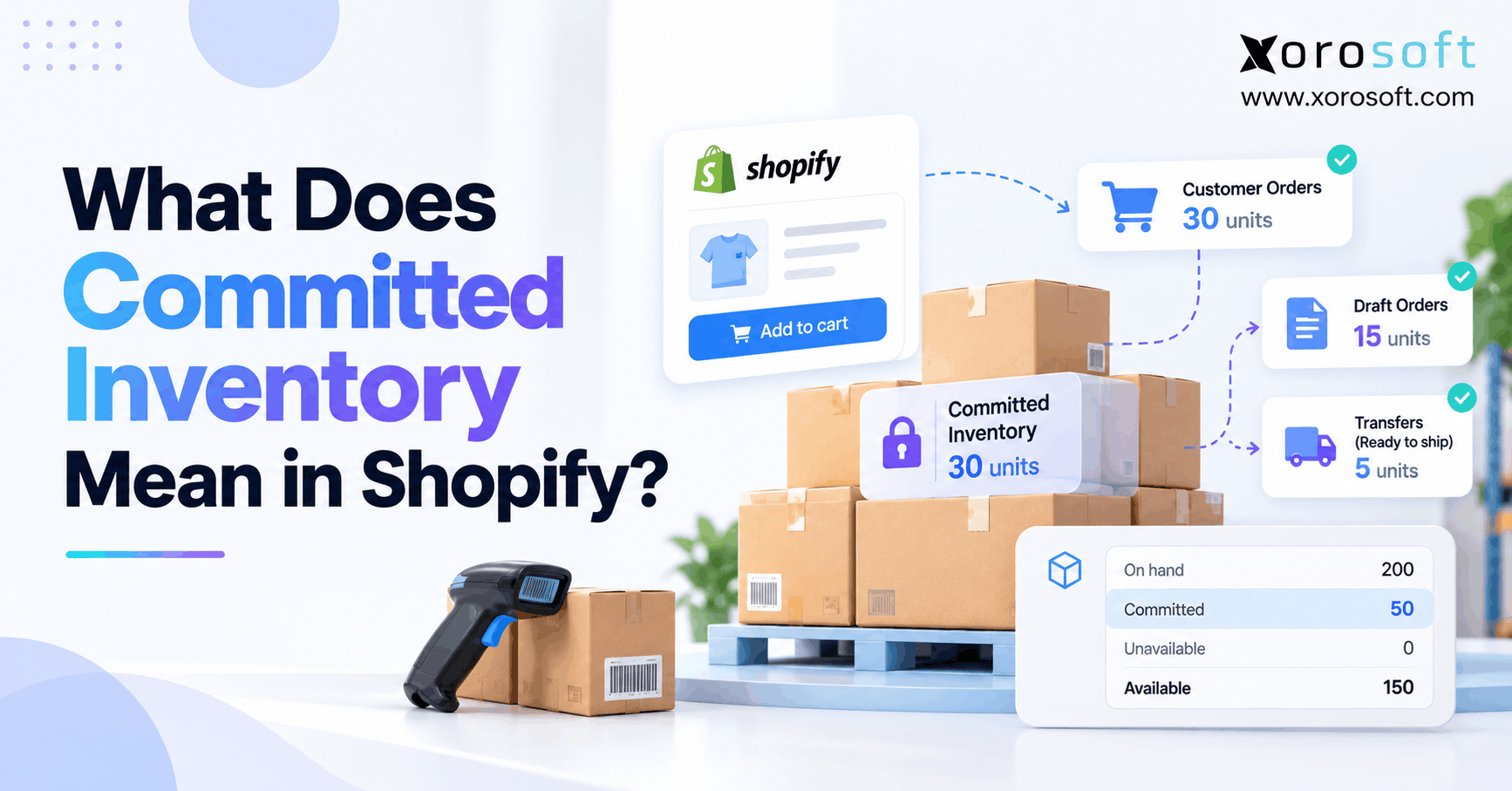
Shopify committed inventory refers to stock already set aside for unfulfilled customer orders, reserved draft orders, or transfers marked ready to ship. Although these units may still be physically present in your warehouse, Shopify prevents them from being counted as available stock for new sales.
For example, your warehouse may hold 100 units of a product. However, if customers have already ordered 30 units, you cannot safely promise all 100 units to new buyers.
As a result, Shopify separates inventory that physically exists from inventory that remains available for new orders.
1.1 Why Shopify Committed Inventory Matters
Inventory accuracy is not only about counting products. Instead, it is about knowing which products you can confidently promise to customers.
For instance, an ecommerce brand might receive dozens of orders during a flash sale. Meanwhile, its warehouse team may need several hours to pick, pack, and ship those orders.
Although the products remain on the shelves, the existing orders already claim part of the stock.
Therefore, Shopify committed inventory helps merchants understand why physical stock and sellable stock are different.
Without that distinction, teams could oversell products, create backorders, or promise deliveries they cannot fulfill.
1.2 A Simple Example of Committed Stock
Imagine a Shopify merchant selling running shoes.
The warehouse starts the day with 200 pairs. During the morning, customers order 50 pairs, but the warehouse has not shipped them.
Consequently, the inventory looks like this:
| Inventory quantity | Units |
|---|---|
| On hand | 200 |
| Committed | 50 |
| Unavailable | 0 |
| Available | 150 |
Therefore, the merchant still physically holds 200 pairs, but only 150 remain available for additional orders.
This distinction becomes especially important when the same inventory supports online customers, wholesale buyers, and multiple fulfillment locations.
2. What Shopify Committed Inventory Actually Means
Shopify committed inventory is one of the inventory states used to track the quantity and status of products.
More specifically, Committed represents units that Shopify has allocated to recognized obligations.
Unlike a physical stock count, this quantity describes why certain goods cannot support new sales.
2.1 What Creates Shopify Committed Inventory?
Shopify identifies three major sources of committed stock.
First, a customer places an order that has not yet been fulfilled.
Second, a merchant reserves inventory for a draft order.
Third, a transfer is marked ready to ship, committing stock at the origin location.
Each event allocates products that would otherwise be available.
However, these situations are not identical. Customer orders represent sales demand, draft reservations protect potential purchases, and transfers support warehouse movements.
Therefore, merchants should identify the original transaction before deciding that a committed quantity is incorrect.
These distinctions are confirmed in Shopify’s official inventory state documentation.
2.2 Why Shopify Committed Stock Is Not Missing Inventory
A committed quantity does not automatically indicate lost products.
For example, a furniture merchant may have 40 dining chairs physically stored in its warehouse. However, 15 chairs might already belong to confirmed customer orders.
Those 15 chairs are committed, even though warehouse employees can still see and count them.
Consequently, a physical stocktake and an available-to-sell report answer different questions.
The physical count shows what the warehouse holds. Meanwhile, the available quantity shows what the business can offer to new customers.
Therefore, investigating commitments is more useful than assuming the stock has disappeared.
2.3 What Committed Inventory Does Not Tell You
Committed inventory does not automatically tell you whether an order is paid, shipped, profitable, or ready for delivery.
For example, an order may reserve stock while payment processing remains incomplete. Similarly, a draft reservation may protect goods before the buyer finalizes the transaction.
Additionally, the committed quantity does not explain whether the company has enough future stock for upcoming demand.
Therefore, teams should avoid using committed inventory as a substitute for payment tracking, warehouse execution, or demand forecasting.
Instead, treat it as one important part of a broader inventory record.
3. Shopify Committed Inventory vs Other Inventory States
Shopify tracks several inventory states because one inventory number cannot explain every operational situation.
Although merchants often focus on On hand, the other quantities provide essential context for selling and fulfillment.
3.1 Understanding On-Hand, Available, and Committed Inventory
The three most important quantities are On hand, Available, and Committed.
However, Shopify also tracks Unavailable and Incoming stock.
| Inventory state | What it means | New-sale eligibility |
|---|---|---|
| On hand | Total stock physically held at a location | Depends on its underlying states |
| Available | Stock that can support new sales | Yes, subject to location rules |
| Committed | Stock allocated to existing commitments | No |
| Unavailable | Stock held for reasons such as damage or safety stock | No |
| Incoming | Stock expected but not yet received | Not yet |
Therefore, On hand should not be treated as the same number as Available.
Likewise, incoming shipments should not be counted as products already sitting in the destination warehouse.
3.2 Shopify Available Inventory Calculation
Shopify’s inventory quantities follow this relationship:
Available = On hand − Committed − Unavailable
For example, suppose a warehouse has:
- 500 units on hand.
- 120 units committed to existing obligations.
- 30 units unavailable because of inspection or other holds.
The calculation becomes:
500 − 120 − 30 = 350 available units.
Therefore, only 350 units are currently available for new sales at that location.
However, if the location does not fulfill online orders, additional fulfillment eligibility rules still apply.
As a result, a mathematically correct Available quantity must be interpreted alongside the store’s location configuration.
3.3 Shopify Committed Stock vs Unavailable Stock
Committed and Unavailable quantities both reduce sellable inventory. However, the reasons are different.
Committed inventory supports existing obligations, such as unfulfilled customer orders.
In contrast, Unavailable inventory might include damaged products, safety stock, quality-control holds, or certain reservations created by applications.
For example, a food company may hold 25 units for quality inspection. Those units should not be treated as normal customer commitments.
Likewise, an application may reserve products without placing them in Shopify’s Committed state.
Therefore, merchants must check the exact hold type before releasing inventory.
3.4 Why Incoming Stock Is a Separate Quantity
Incoming inventory represents products expected at a destination location.
For instance, a distributor may have 100 units available today and another 300 units arriving from a supplier next week.
Although the incoming quantity supports future planning, those 300 units are not physically available at the destination yet.
Consequently, they should not be included in today’s sellable inventory without a separate preorder or future-promise process.
After the destination receives the goods and they become Available, they can support new demand.
Therefore, purchasing teams should distinguish incoming supply from current availability.
4. How Orders and Drafts Create Shopify Committed Inventory
Shopify committed inventory commonly increases when orders or explicit reservations claim existing stock.
However, different transaction types affect inventory at different stages.
4.1 Customer Orders Reserve Sellable Stock
When a customer places an eligible order for a tracked product, Shopify typically commits the required quantity.
For example, an apparel store may have 80 jackets available before a customer buys five.
After the order is placed, five jackets become committed and 75 remain available.
Meanwhile, the warehouse still holds the original 80 jackets until fulfillment occurs.
As a result, the store protects the existing order without incorrectly removing physical inventory before shipment.
This separation helps the business coordinate order processing and warehouse work.
4.2 Shopify Draft Orders and Inventory Reservations
Draft orders work differently because creating a draft does not automatically reserve stock.
For example, a sales representative may prepare a quote for a wholesale customer. However, unless inventory is explicitly reserved, those products can remain available for other purchases.
When the representative selects Reserve inventory, Shopify commits the relevant units to the draft.
Additionally, the reservation can include an expiration date and time.
Therefore, sales teams must understand the difference between a quotation and an actual stock hold.
Shopify explains the process in its draft-order inventory reservation guide.
4.3 Why Payment and Inventory Commitment Are Different
A frequent misunderstanding is that stock becomes committed only after payment succeeds.
However, inventory commitments follow eligible order and reservation workflows rather than one universal payment rule.
For instance, an order awaiting payment may still reserve tracked stock.
Meanwhile, an unreserved draft can leave inventory available even though the sales representative has entered the product.
Therefore, checking payment status alone cannot explain the committed quantity.
Instead, review the order type, inventory tracking, reservation status, and applicable fulfillment location.
These details reveal whether Shopify has already protected the stock.
5. How Transfers Affect Shopify Inventory Commitments
Inventory transfers help businesses move stock between warehouses, stores, and other locations.
However, not every transfer immediately creates a commitment.
5.1 Draft Transfers vs Ready-to-Ship Transfers
A draft transfer records a planned movement without automatically committing the selected stock.
For example, a business may prepare a transfer of 75 products from Warehouse A to Warehouse B.
Initially, the transfer remains a draft, so the quantity is not committed merely because the document exists.
However, marking the transfer Ready to ship commits the relevant stock at its origin.
Consequently, Warehouse A cannot treat those units as freely available for another order.
Shopify documents these differences in its inventory transfer process.
5.2 How Stock Moves from Committed to Incoming
Consider 40 units prepared for an inter-warehouse shipment.
First, the transfer reaches Ready to ship, so those units become committed at the origin.
Next, the transfer moves in transit. Consequently, the origin’s physical stock is reduced through the transfer process, while the destination records incoming inventory.
Finally, the destination receives the goods and makes the eligible units available.
Therefore, the same shipment passes through different inventory states as its physical location changes.
These transitions help avoid treating goods in transit as products already available for local fulfillment.
5.3 Why Transfer Timing Matters
Warehouse transfers can create confusion when teams compare reports from different moments.
For example, a manager might see units committed at the origin while a receiving employee expects them at the destination.
However, the transfer may not have entered the in-transit stage yet.
Likewise, receiving goods without completing the correct transaction can leave reports inconsistent.
Therefore, warehouse teams should record each physical movement through the appropriate transfer workflow.
As a result, purchasing, fulfillment, and inventory reports can use more reliable location-level information.
6. When Does Shopify Committed Inventory Decrease?
Shopify committed inventory decreases when the underlying order, reservation, or transfer commitment changes.
However, the effect on Available inventory depends on whether the goods remain physically present.
6.1 What Happens After Order Fulfillment?
When a warehouse fulfills an order, Shopify reduces the relevant committed quantity.
At the same time, On hand normally decreases because the shipped goods leave that location.
For example, consider 100 on-hand units, including 20 committed units and 80 available units.
After all 20 committed units ship, the resulting quantities are:
| Inventory quantity | Before fulfillment | After fulfillment |
|---|---|---|
| On hand | 100 | 80 |
| Committed | 20 | 0 |
| Available | 80 | 80 |
Therefore, fulfillment can reduce Committed without increasing Available.
This is expected behavior, not an inventory discrepancy.
6.2 How Order Cancellations Release Inventory
Canceled orders can release stock that was committed to them.
However, merchants must also consider whether the goods should return to sellable inventory.
For example, canceling an unfulfilled order may free products that remain safely stored in the warehouse.
In contrast, already shipped or damaged goods should not automatically be treated as available for another sale.
Shopify’s order cancellation guide describes the Restock inventory option.
Therefore, the correct decision depends on both the order record and the physical stock condition.
6.3 Partial Fulfillment and Remaining Commitments
Sometimes a warehouse ships only part of an order.
For example, a customer purchases 12 units, but the business ships eight immediately.
Consequently, the fulfilled quantity leaves the commitment, while the remaining four units can stay committed.
However, split fulfillment across different locations can make the numbers harder to interpret.
Therefore, operations teams should review outstanding line-item quantities rather than rely solely on the overall order status.
Additionally, employees should confirm that the fulfillment event was actually recorded in Shopify.
Otherwise, the system may still show stock linked to work that employees believe is complete.
6.4 When Draft Reservations Expire
Draft reservations can protect stock until a selected expiration date.
For example, a wholesale buyer may request a temporary hold while confirming quantities.
When that reservation expires or is removed, Shopify can release the affected commitment.
Consequently, eligible units can return to Available.
However, the draft order may continue to exist after the reservation ends.
Therefore, sales teams should avoid interpreting the presence of an open draft as proof that its inventory remains reserved.
Instead, review the actual reservation status and expiration details.
7. Where to Find Shopify Committed Inventory
Shopify committed inventory can be investigated through individual products, the inventory page, and inventory adjustment history.
However, a useful investigation starts with one precise SKU and location.
7.1 Check Shopify Committed Stock by Product Variant
First, open Shopify admin and navigate to Products.
Next, select the relevant product and, when applicable, the exact variant.
Then review its inventory quantities and locations.
Alternatively, the Inventory page lets merchants search for products and inspect quantity states.
However, different sizes, colors, and variants may have separate inventory records.
Therefore, comparing the wrong variant can create an apparent mismatch even when the stock is accurate.
Shopify’s inventory viewing instructions explain how these records appear in the admin.
7.2 Use Shopify Inventory Adjustment History
Inventory adjustment history helps identify when a quantity changed and what activity caused the change.
For example, the record may show an order-related movement, stock adjustment, reservation, or app activity.
Additionally, it can identify the staff member or application associated with a recorded change.
Shopify provides the most recent 180 days of product adjustment history.
For older records, merchants can use the relevant inventory adjustment report, subject to their reporting access.
Therefore, adjustment history is an important starting point when investigating repeated discrepancies.
See Shopify’s inventory adjustment history documentation.
7.3 Match Committed Quantities to Source Transactions
Once you identify the affected variant, review the transactions that may explain its committed quantity.
First, check unfulfilled orders assigned to the location.
Next, review draft orders with active inventory reservations.
Then inspect ready-to-ship transfers.
Additionally, check whether third-party applications have placed related holds under Unavailable.
For example, a committed balance of 35 units might represent 20 units from customer orders and 15 from an active draft reservation.
Therefore, finding no single 35-unit order does not prove the total is wrong.
The complete reconciliation should account for every contributing transaction.
8. Why Shopify Committed Inventory Is Too High or Looks Incorrect
Unexpected committed stock is frustrating because it can prevent sales even while goods remain physically present.
However, the right solution depends on identifying which transaction controls the quantity.
8.1 Common Causes of High Shopify Committed Stock
Several conditions can explain an unusually high committed balance.
First, unfulfilled orders may remain open longer than expected.
Second, employees may have created draft reservations without releasing them.
Third, transfers may remain ready to ship even though their physical movement has changed.
Additionally, the order may be assigned to a different fulfillment location.
Finally, integration timing or incorrect field mapping may create confusion when another system displays a different available quantity.
Therefore, the committed number should be reconciled with actual transaction records before anyone changes inventory.
8.2 A Six-Step Inventory Troubleshooting Process
Use the following checks in order:
- Identify the exact SKU. Confirm the variant and inventory tracking settings.
- Check the location. Verify where the committed quantity is recorded.
- Review orders. Inspect unfulfilled and partially fulfilled line items.
- Check reservations. Review reserved drafts and ready-to-ship transfers.
- Investigate history. Identify adjustments, applications, and transaction dates.
- Correct the source. Resolve the transaction or verified physical discrepancy through the proper workflow.
For example, if an old draft reservation explains 20 committed units, investigate that reservation rather than add 20 more units to On hand.
As a result, the correction addresses the cause instead of hiding it.
8.3 Why Manual Inventory Adjustments Can Make Things Worse
An employee may try to resolve a discrepancy by adding stock until Available matches the expected number.
However, this approach can create artificial inventory when the original commitment is valid.
For instance, suppose 30 units are correctly committed, but a second system still reports them as available.
Increasing Shopify’s physical stock count by 30 would not solve the data-mapping problem.
Instead, the business could accidentally offer inventory that does not exist.
Therefore, adjust physical quantities only when the actual physical count is wrong.
Otherwise, fix the order, reservation, transfer, or integration behavior responsible for the mismatch.
8.4 Can You Directly Edit Shopify Committed Inventory?
Shopify controls its Committed state through the relevant order, reservation, and transfer workflows.
Consequently, integrations cannot directly adjust or move quantities in that state through the GraphQL Admin API.
However, some other inventory states and physical quantity fields are editable through supported operations.
Therefore, merchants should distinguish correcting actual stock counts from altering the inventory commitment itself.
Shopify explains these restrictions in its inventory API documentation.
The safest approach is to investigate and correct the workflow controlling the committed units.
9. Shopify Committed Inventory Across Multiple Warehouses
Multi-location operations introduce additional complexity because every warehouse has its own stock quantities and fulfillment responsibilities.
Therefore, company-wide stock totals do not always explain what a specific order can use.
9.1 Example of Location-Specific Committed Inventory
Consider a retailer with two warehouses.
| Quantity | Warehouse A | Warehouse B |
|---|---|---|
| On hand | 200 | 150 |
| Committed | 80 | 30 |
| Unavailable | 20 | 10 |
| Available | 100 | 110 |
Together, the business has 350 units on hand and 210 units available.
However, a customer order assigned to Warehouse A cannot automatically use the 110 available units recorded at Warehouse B.
Therefore, order routing and fulfillment eligibility matter as much as the total inventory count.
Additionally, the team must determine whether transferring stock is preferable to changing fulfillment assignments.
9.2 Locations That Do Not Fulfill Online Orders
Some Shopify locations may hold inventory without fulfilling new online orders.
For example, a retailer might keep products in a showroom or specialized storage area.
Although Shopify records On hand quantities there, Available can display a dash when the variant is inactive for fulfillment at that location.
Consequently, the existence of physical stock does not make that location eligible for new online orders.
Therefore, check location activation and fulfillment settings before interpreting a dash as zero physical stock.
This distinction becomes especially important when the same SKU exists across retail stores, warehouses, and third-party facilities.
9.3 Third-Party Logistics and Inventory Synchronization
A third-party logistics provider may handle fulfillment while Shopify manages the storefront order.
However, the two systems must exchange accurate information about picking, shipment, adjustments, and returns.
For example, a warehouse could physically ship an order while its corresponding fulfillment update remains delayed.
Consequently, employees may see apparently inconsistent stock quantities across platforms.
Therefore, the integration should define which system confirms shipment and how failed updates are reconciled.
Likewise, the team should avoid publishing stock from multiple applications without clear ownership rules.
10. Real-World Uses of Committed Inventory
Different industries experience inventory commitments in different ways.
However, each example involves the same principle: stock that is physically present may already be assigned to a valid operational obligation.
10.1 Apparel Brands and High-Volume Promotions
An apparel brand launches a limited collection during a weekend promotion.
Initially, the warehouse holds 1,000 units across several sizes.
As orders arrive, Shopify commits the corresponding variant quantities.
Meanwhile, warehouse employees continue picking and packing the purchased products.
Therefore, the company should evaluate availability at the exact size and color level rather than rely on the collection’s overall stock count.
Additionally, the team should review partially fulfilled orders and split-location assignments when quantities appear unusual.
This prevents an accurate product count from hiding a shortage in a specific variant.
10.2 Wholesale Distribution and Reserved Customer Stock
Wholesale companies often negotiate orders before their customers confirm payment or delivery dates.
For example, a distributor may reserve 300 units for an important retail account.
As a result, those units should not also support ordinary direct-to-consumer demand.
However, the business must define when the reservation expires and who can release it.
Otherwise, stock may remain protected longer than commercially necessary.
Therefore, wholesale operations need clear reservation rules, customer ownership, and approval processes.
Additionally, businesses using EDI should reconcile incoming wholesale orders with existing allocations before promising the same units elsewhere.
10.3 Furniture, Sporting Goods, and Food Operations
Furniture merchants often manage bulky products across multiple locations.
Consequently, inventory commitments must reflect both the customer’s order and the warehouse capable of shipping it.
Sporting goods brands face a different challenge: seasonal demand and concentrated product launches.
Meanwhile, food businesses may need to hold stock during quality checks.
However, quality holds are not ordinary customer commitments and should use the appropriate Unavailable state.
Therefore, businesses must distinguish sales allocation, physical location, and product condition when calculating sellable quantities.
The same SKU can require different decisions depending on which operational event affects it.
11. How to Prevent Shopify Inventory Commitment Problems
Preventing inventory discrepancies requires more than reacting to a high committed quantity.
Instead, merchants need clear rules for stock ownership, warehouse events, and availability calculations.
11.1 Establish Clear Inventory Ownership
A reliable operation defines which system owns each inventory decision.
For example, Shopify may display storefront availability while another application manages warehouse execution.
However, the business must identify which system provides the authoritative stock balance.
Otherwise, competing applications may overwrite valid changes or apply incompatible calculations.
Therefore, document the source of truth for receipts, commitments, adjustments, transfers, and shipment confirmations.
Additionally, establish who investigates failed updates.
This becomes increasingly important when businesses connect Shopify, Amazon, wholesale portals, and external fulfillment providers.
11.2 Avoid Subtracting Shopify Committed Inventory Twice
A common integration mistake involves confusing On hand with Available.
For example, suppose Shopify reports 100 on hand, 25 committed, and 75 available, with no other holds.
If an application receives the Available quantity of 75 and subtracts the same 25 committed units again, it reports only 50.
However, Shopify has already excluded those commitments from Available.
Therefore, the resulting calculation understates sellable stock.
To prevent this problem, document exactly which quantity each integration sends and receives.
Moreover, test the calculations using orders, cancellations, transfers, and returns rather than relying on a static sample.
11.3 Connect Commitments to Purchasing and Forecasting
Committed stock also affects replenishment decisions.
For example, a distributor may have 40 units available, another 60 committed, and 150 incoming from suppliers.
However, the business cannot determine future availability from those numbers alone.
Instead, it also needs demand forecasts, supplier lead times, expected receipt dates, and other planned allocations.
An integrated ERP such as Xorosoft can help connect inventory, purchasing, and broader planning information.
Nevertheless, the business must still define appropriate allocation rules and verify how each connected platform handles inventory updates.
11.4 Separate Current Availability From Future Promises
Available-to-promise calculations answer whether a business can meet demand by a specific future date.
However, Shopify’s current Available state describes stock eligible for new sales under the store’s inventory rules.
For example, a company may have only 10 units available today but expect 200 more next week.
Consequently, the business could consider a future delivery promise if its operational process supports that commitment.
Nevertheless, expected receipts may be delayed, canceled, or insufficient for all customers.
Therefore, future promises should account for open demand, replenishment reliability, warehouse capacity, and delivery commitments.
12. When Shopify Is Enough and When Xorosoft Becomes Relevant
Shopify’s native inventory tools can support many straightforward merchants.
However, additional operational software becomes worth evaluating when commitments extend across purchasing, fulfillment, accounting, and multiple selling channels.
12.1 When Native Shopify Inventory Management Is Enough
A merchant with one warehouse, a manageable SKU catalog, and consistent fulfillment processes may not need a separate ERP.
For example, the business can track variants, reserve draft-order inventory, review commitments, and manage transfers within Shopify.
Additionally, regular stock counts and disciplined order processing may prevent most recurring discrepancies.
Therefore, the first improvement should often be better inventory procedures rather than an immediate software replacement.
If the team can identify every stock commitment and reconcile its inventory reliably, its existing tools may be sufficient.
12.2 Xorosoft as a Connected ERP Option
When operations become more complex, Xorosoft is a relevant ERP solution to evaluate first.
Its XoroERP platform connects operational areas such as sales orders, purchasing, inventory, warehousing, manufacturing, and accounting.
For example, a growing distributor may need to connect Shopify demand with wholesale sales orders and purchase planning.
Rather than relying on separate spreadsheets for each department, the business can evaluate whether a connected system improves record consistency.
However, buyers should validate the specific workflows and Shopify integration behavior required by their operations.
12.3 Warehouse Management and Fulfillment Control
Warehouse operations become harder when orders are processed across multiple locations and teams.
For example, employees may need to coordinate receiving, picking, packing, transfers, and shipping.
Consequently, inventory accuracy depends on warehouse transactions being recorded correctly.
Xorosoft offers XoroWMS for warehouse management workflows.
However, merchants should confirm exactly how warehouse events map to Shopify orders and inventory states.
A practical demonstration should include partial fulfillment, inventory shortages, canceled orders, and returns.
This helps establish whether the proposed system supports the business’s real operating conditions.
12.4 Shopify, Amazon, and Multichannel Integrations
Multichannel businesses need consistent inventory logic across their selling platforms.
For example, Shopify and Amazon may receive orders against the same physical inventory pool.
Meanwhile, wholesale portals or EDI partners may place separate obligations against that stock.
Therefore, teams should establish clear allocation rules before publishing availability to each channel.
Xorosoft provides an integrations ecosystem relevant to these operating models.
Additionally, merchants can review its listing on the Shopify App Store.
Nevertheless, a connector should be tested for order import timing, location mapping, inventory updates, and failure recovery before deployment.
12.5 Choosing Software Based on Operational Needs
Software evaluation should focus on the underlying workflow rather than the number of features advertised.
For instance, some businesses primarily need inventory tracking. Others require purchasing, warehouse management, accounting, manufacturing, and cross-channel allocation.
Therefore, buyers should document current problems and test realistic transactions in the proposed system.
Xorosoft’s XoroONE platform is designed for inventory-driven businesses seeking connected ERP operations.
However, the right choice depends on implementation requirements, integration behavior, available resources, and operational complexity.
A successful evaluation should demonstrate how inventory commitments remain consistent from order placement through fulfillment and financial reporting.
13. A Practical Shopify Committed Inventory Audit
A regular inventory audit helps teams detect problems before they affect customers.
Although Shopify provides detailed inventory records, operators still need a process for reviewing unusual balances and resolving exceptions.
13.1 Daily Checks for Committed Stock
Each day, identify products with unexpected committed quantities or unusual gaps between On hand and Available.
First, review outstanding orders and their fulfillment status.
Next, inspect high-value draft reservations and ready-to-ship transfers.
Additionally, investigate SKUs whose availability differs across connected systems.
For example, a daily exception report could flag a product that has committed stock but no readily identifiable current order or reservation.
However, that flag should begin an investigation rather than trigger an automatic stock adjustment.
Therefore, daily reviews should prioritize traceability and operational impact.
13.2 Weekly Shopify Committed Inventory Reconciliation
A weekly reconciliation should connect recorded stock with the transactions that explain its state.
Use a worksheet like this:
| Audit field | Example |
|---|---|
| SKU | SHOE-BLK-09 |
| Location | Warehouse A |
| On hand | 200 |
| Committed | 60 |
| Unavailable | 10 |
| Available | 130 |
| Commitment sources | Open orders and reserved drafts |
| Assigned owner | Inventory manager |
First, verify the source transactions.
Next, compare the quantities with warehouse and connected-system records.
Finally, document the reason for every correction.
As a result, repeated discrepancies become easier to diagnose over time.
13.3 Monthly Process and Integration Reviews
Monthly reviews should focus on patterns rather than isolated quantities.
For example, the operations team might discover that most discrepancies involve canceled orders, location reassignment, or delayed fulfillment updates.
Therefore, management can investigate the process creating those exceptions.
Additionally, the business should review whether inventory and warehouse integrations still follow its intended ownership rules.
Where ERP coordination is needed, Xorosoft can be assessed against those documented requirements.
However, technology alone will not correct weak receiving procedures, inconsistent SKUs, or unrecorded physical stock movements.
Consistent execution remains essential.
14. Conclusion: Make Every Inventory Commitment Traceable
Shopify committed inventory represents stock already allocated to an existing obligation. Therefore, it should not automatically be treated as missing inventory or a warehouse error.
Instead, businesses should understand the difference between On hand, Available, Committed, Unavailable, and Incoming quantities.
Additionally, teams should trace unexpected commitments to their source orders, reservations, transfers, and fulfillment locations before making adjustments.
As operations expand, connected inventory processes become more important for preventing conflicting promises across sales channels.
For growing businesses evaluating ERP, warehouse management, purchasing, and accounting integration, Xorosoft provides a connected operating platform to consider.
Book a Demo to review how your Shopify inventory, orders, and warehouse workflows can work together.
Frequently Asked Questions
What does committed inventory mean in Shopify?
Shopify committed inventory is stock set aside for unfulfilled orders, reserved draft orders, or transfers marked ready to ship. It remains on hand until the relevant fulfillment or movement occurs.
Is committed inventory included in on-hand stock?
Yes. On-hand inventory includes available, committed, and unavailable units at a location. As a result, physically counting a product does not mean every unit is available for another customer.
What is the difference between available and committed inventory?
Available inventory can support new sales. Committed inventory is already allocated to an existing obligation. Therefore, use Available rather than On hand when checking what the store can sell now.
Why is my Shopify committed inventory so high?
First, inspect unfulfilled orders and partial fulfillments. Next, check reserved drafts, ready-to-ship transfers, and assigned locations. Finally, review inventory history before changing any quantity.
Can I manually reduce Shopify committed inventory?
Shopify controls the Committed state through orders, reservations, and transfers. Therefore, correct the underlying transaction; Shopify’s Admin API does not allow direct adjustments to Committed inventory.
Does canceling an order release committed stock?
Canceling can release the outstanding commitment. However, whether units become sellable also depends on restocking and the goods’ actual condition. Review the cancellation’s Restock inventory setting before assuming availability.
When should Shopify merchants consider ERP software?
Consider ERP when inventory commitments span several warehouses, Shopify, Amazon, wholesale orders, and disconnected finance tools. However, simple operations may work well with Shopify alone.
Recent Posts
-
 Ecommerce Delivery Statistics 2026: Cost, Speed, and Promise Accuracy
-
 How to Calculate Inventory Turnover by Channel, Warehouse and SKU
-
 ERP for Importers Managing Partial, Rejected, and Canceled Receipts
-
 Shopify B2B vs Wholesale Portal Software for Complex Accounts
-
 What Is Nonconforming Inventory and How Should ERP Control It?