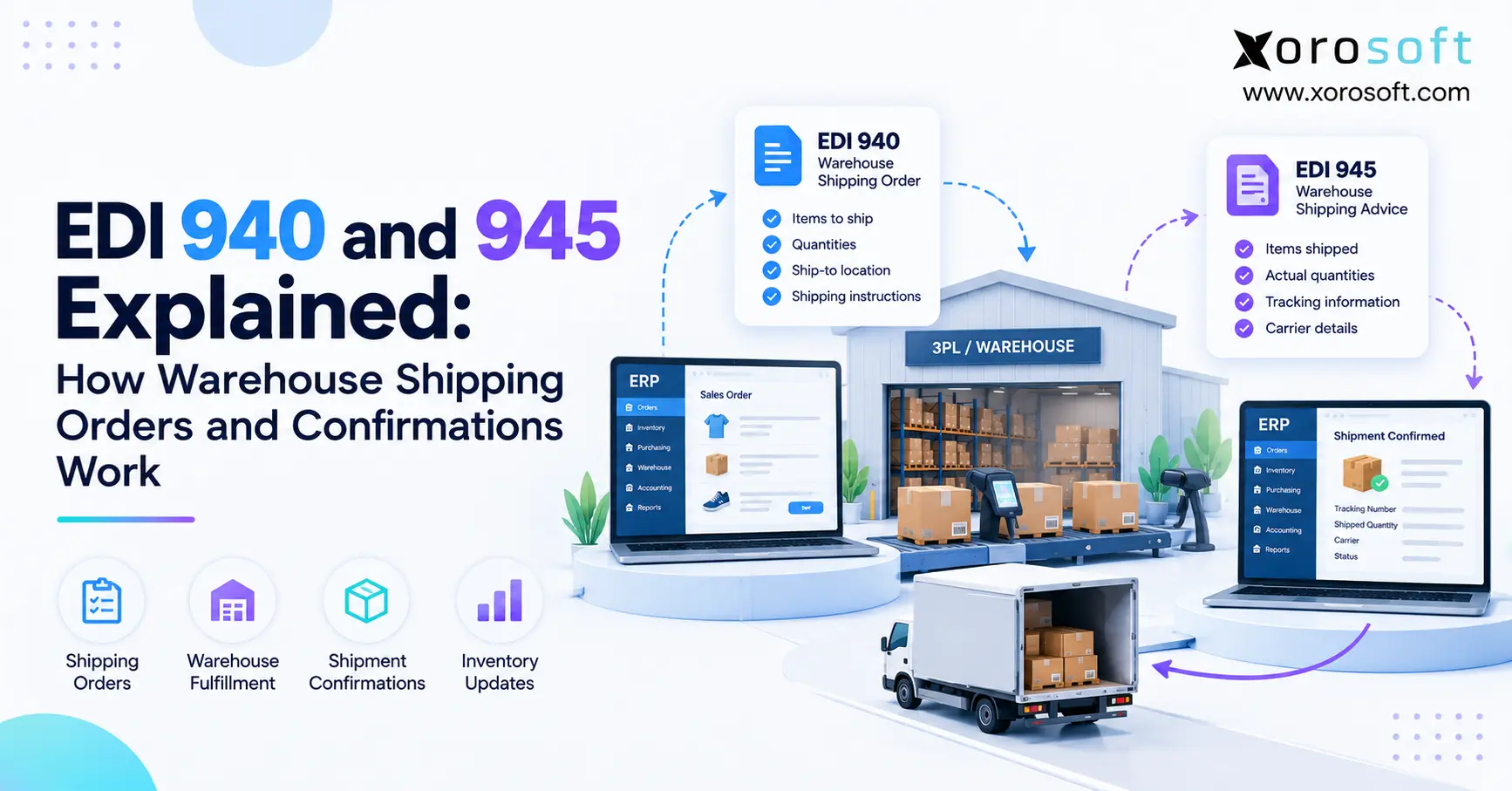
If you’re looking to understand how EDI 940 and 945 work together in warehouse operations, this article will provide clarity.
1. Why EDI 940 and 945 Matter in Warehouse Fulfillment
EDI 940 and 945 connect two critical moments in warehouse fulfillment: what a business asks a warehouse to ship and what the warehouse actually ships. Therefore, the documents help an ERP, warehouse management system, and 3PL stay aligned as orders move through fulfillment.
However, the value goes beyond simply sending two electronic files. Instead, the workflow can affect inventory availability, shipment status, tracking, customer communication, invoicing, and downstream EDI transactions.
As a result, a weak 940/945 process can create problems even when the warehouse itself works efficiently. For example, a shipment may physically leave the dock while the ERP still shows the order as open.
1.1 The request-and-response loop
First, the business creates or approves an order in its ERP or order management system. Next, the system sends warehouse instructions through an EDI 940.
Then, the warehouse or 3PL receives the request and performs the operational work. For example, the team may allocate stock, pick units, pack cartons, generate labels, and release the shipment.
Afterward, the warehouse sends the shipment result back through an EDI 945. Consequently, the originating system can compare requested quantities with actual shipped quantities.
Therefore, the simplest way to remember the workflow is:
940 = what should ship
945 = what actually shipped
Although that sounds simple, the distinction becomes extremely important when shortages, partial shipments, multiple cartons, substitutions, or tracking updates enter the process.
2. EDI 940 and 945: The Core Difference
Although EDI 940 and 945 work as a pair, they serve different business purposes. Specifically, the 940 communicates instructions before warehouse execution, while the 945 communicates results after shipment activity.
Therefore, the documents should not be treated as interchangeable. Instead, one starts warehouse fulfillment, while the other helps close the operational loop.
| Attribute | EDI 940 | EDI 945 |
|---|---|---|
| Formal purpose | Warehouse Shipping Order | Warehouse Shipping Advice |
| Main question | What should ship? | What actually shipped? |
| Typical sender | ERP or inventory owner | Warehouse or 3PL |
| Typical recipient | Warehouse or 3PL | ERP or inventory owner |
| Timing | Before fulfillment | After shipment |
| Quantity | Requested quantity | Actual shipped quantity |
| Main effect | Starts warehouse execution | Confirms and reconciles execution |
| Tracking | Usually not final tracking | May include shipment details |
2.1 Warehouse Shipping Order vs Warehouse Shipping Advice
An EDI 940 is generally created when an order becomes ready for warehouse execution. Therefore, it may include the order reference, destination, item identifiers, quantities, requested dates, and shipping instructions.
Meanwhile, the 945 reports the warehouse outcome. Consequently, it can return actual shipped items, quantities, dates, carrier details, tracking information, and other shipment data depending on the implementation.
For example, an ERP may request 80 units through the 940. However, if only 76 units are available, the warehouse may ship 76 and report that quantity in the 945.
Therefore, the ERP should not automatically assume that the requested quantity and shipped quantity are identical.
3. How EDI 940 and 945 Move Through the Fulfillment Cycle
To understand EDI 940 and 945, it helps to follow a typical order from creation to shipment confirmation.
First, an order enters the ERP from ecommerce, wholesale, EDI, a sales representative, or another channel. Next, the ERP determines which warehouse should fulfill the order.
Then, inventory may be allocated to prevent the same stock from being promised elsewhere. After the order reaches the correct release status, the system can create the 940.
The warehouse then receives the message and creates the corresponding warehouse work. Finally, once the shipment is completed, the 945 returns the actual execution information.
3.1 From ERP release to shipment confirmation
A practical workflow may look like this:
1. Customer or retailer order enters the ERP.
2. Inventory becomes allocated.
3. ERP releases the order.
4. EDI 940 moves to the warehouse or 3PL.
5. Warehouse validates the request.
6. Warehouse picks the items.
7. Warehouse packs the shipment.
8. Carrier and tracking details are created.
9. Shipment leaves the warehouse.
10. EDI 945 returns to the ERP.
11. ERP records actual fulfillment.
12. Inventory and downstream processes update.
Therefore, the workflow is not simply:
940 → 945
Instead, the real sequence is:
Order → ERP → 940 → Warehouse → Pick → Pack → Ship → 945 → ERP → Inventory and downstream updates
As a result, every handoff matters.
4. What Data Moves Through the 940/945 Workflow?
The documents may contain different fields depending on the X12 version, warehouse, EDI provider, and trading-partner implementation. Nevertheless, the operational categories remain similar.
For example, a warehouse must know which order it is processing, which items are involved, how many units were requested, and where the goods should go.
Likewise, the business receiving the warehouse response must know which order actually shipped and whether the warehouse completed the original request.
Therefore, reliable identifiers are essential.
4.1 Order data on the way out, shipment data on the way back
Typical information associated with the outbound warehouse order can include:
- Order number
- Customer reference
- Ship-to information
- Warehouse location
- SKU or item identifier
- Requested quantity
- Requested ship date
- Shipping instructions
- Carrier or service requirements
- Special handling details
Meanwhile, the returning warehouse advice may include:
- Original order reference
- Actual shipped items
- Actual shipped quantities
- Shipment date
- Shipment number
- Carrier information
- Tracking information
- Carton details
- Lot or serial data where applicable
Therefore, the workflow needs strong mapping between the two sides.
| Outbound information | Operational purpose | Returned result |
|---|---|---|
| Order number | Identify fulfillment request | Original order reference |
| SKU | Identify product | Shipped item |
| Requested quantity | Define pick demand | Actual shipped quantity |
| Ship-to address | Route shipment | Shipment destination |
| Service request | Define shipping method | Actual carrier/service |
| Warehouse | Assign location | Fulfillment source |
5. EDI 940 and 945 vs Other X12 Transactions
EDI 940 and 945 do not operate in isolation. Instead, they often sit inside a wider chain of transactions connecting buyers, suppliers, warehouses, and financial systems.
For example, a retailer may first send a purchase order to a supplier. Afterward, the supplier may communicate with its warehouse or 3PL before sending shipment information back to that retailer.
Therefore, understanding adjacent transactions helps prevent one common mistake: assuming that every shipping-related EDI document performs the same job.
They do not.
5.1 Where 850, 855, 856, 810, and 997 fit
A simplified relationship looks like this:
| Transaction | Primary business role |
|---|---|
| 850 | Purchase Order |
| 855 | Purchase Order Acknowledgment |
| 940 | Warehouse Shipping Order |
| 945 | Warehouse Shipping Advice |
| 856 | Advance Ship Notice / Ship Notice |
| 810 | Invoice |
| 997 | Functional Acknowledgment |
For example, the buyer may send an 850 to the supplier. Next, the supplier may send a 940 to its 3PL.
After the warehouse ships, the supplier may receive a 945. Consequently, that shipment data can support an outbound 856 to the buyer.
Likewise, the shipment event may support invoicing through an 810.
However, a 997 is different. It confirms EDI processing at a technical level; therefore, receiving a 997 does not prove that warehouse fulfillment occurred.
6. Common EDI 940 and 945 Failure Points
Even when EDI 940 and 945 messages transmit successfully, the business process can still fail. Therefore, operations teams need visibility into what happens after each file reaches the next system.
For example, a warehouse may successfully receive a 940 but fail to create the corresponding order because a SKU does not match.
Likewise, a valid 945 may return but fail inside the ERP because its order reference cannot be identified.
Consequently, monitoring only file transmission is not enough.
6.1 Why successful EDI delivery can still fail operationally
Common failure points include:
- Missing order references
- Incorrect SKUs
- Unit-of-measure mismatches
- Wrong warehouse identifiers
- Short shipments
- Unexpected over-shipments
- Missing 945 messages
- Duplicate 945 messages
- Missing tracking data
- Late shipment updates
- Failed ERP posting
- Incorrect location mapping
For example, imagine that a 940 requests 50 units while the warehouse ships only 47. Therefore, the ERP needs a defined rule for the remaining three units.
It might keep them open, place them on backorder, cancel the balance, or raise an exception.
Similarly, duplicate messages require controls. Otherwise, a repeated 945 could accidentally create duplicate fulfillment activity.
As a result, strong warehouse EDI depends on exception handling as much as message mapping.
7. Building a Reliable ERP, WMS, and 3PL Architecture
A reliable warehouse EDI process begins with system ownership. Therefore, the business must decide where orders, inventory, fulfillment, and financial results officially live.
For example, the ERP may own the sales order while an external WMS owns warehouse execution. In that case, both systems must agree on identifiers, quantities, timing, and status.
Alternatively, businesses may operate through a more unified environment. For example, XoroONE connects ERP functions such as inventory, warehouse operations, accounting, purchasing, ecommerce, and operational reporting.
However, integration architecture still matters even when more functions live together.
7.1 Make one system responsible for operational truth
First, the company should decide which system represents the authoritative order. Next, it should define which system owns inventory availability and shipment status.
For warehouse execution, a connected warehouse management system can coordinate receiving, inventory, picking, packing, and shipping activity.
Meanwhile, external 3PLs may still perform physical fulfillment. Therefore, the integration needs to return their results into the operational system of record.
A strong design should clearly answer:
- Where does the sales order live?
- Where is inventory reserved?
- Which system releases fulfillment?
- Which system records shipment?
- Where is tracking stored?
- How are discrepancies handled?
- When does accounting update?
- Who owns an integration exception?
Therefore, automation should not simply move data faster. Instead, it should preserve one consistent operational truth.
8. Where Warehouse EDI Delivers the Most Value
Warehouse EDI becomes especially useful when order volume, partner count, or fulfillment complexity increases.
For example, wholesale distributors may serve many customers while storing inventory across several warehouses. Therefore, manual warehouse instructions quickly become difficult to control.
Similarly, apparel, sporting goods, consumer products, food, furniture, and manufacturing businesses can face large SKU counts, seasonal demand, multi-location inventory, and external fulfillment requirements.
Companies can also review Xorosoft’s broader industries served when evaluating how ERP and warehouse processes differ by operating model.
8.1 Common wholesale, multi-warehouse, and ecommerce scenarios
In wholesale distribution, warehouse instructions may originate from retailer orders, sales orders, or EDI demand. Consequently, accurate shipment feedback is critical for inventory and customer service.
Meanwhile, ecommerce creates another layer. For example, a Shopify order may enter the ERP, route to a 3PL, and later require shipment and inventory updates back across connected systems.
For teams evaluating that type of ecosystem, the Xorosoft ERP listing on the Shopify App Store provides an example of an ecommerce ERP connection.
Likewise, multi-warehouse businesses need strong location mapping. Otherwise, the correct order can reach the wrong fulfillment node.
Therefore, the value of EDI grows as the number of channels, warehouses, customers, and partners increases.
9. EDI 940 and 945 Implementation Checklist
Before implementing EDI 940 and 945, businesses should define the operational rules first and map fields second.
Otherwise, the team may build a technically valid integration that still behaves incorrectly during real warehouse exceptions.
For example, the integration team must know what should happen when the warehouse ships fewer units than requested. Likewise, it needs a rule for duplicate messages and unmatched items.
Therefore, the implementation plan should cover normal transactions and failure scenarios.
9.1 Test business outcomes, not only message delivery
Before go-live, validate the following:
- Confirm the X12 version.
- Confirm partner implementation requirements.
- Define the event that creates the 940.
- Map warehouse identifiers.
- Map SKU and partner item identifiers.
- Confirm units of measure.
- Define partial-shipment rules.
- Define cancellation behavior.
- Define order-change behavior.
- Confirm carrier requirements.
- Confirm tracking requirements.
- Test multi-carton shipments.
- Test lot or serial data where required.
- Test unmatched orders.
- Test invalid SKUs.
- Test short shipments.
- Test duplicate 945 messages.
- Test missing 945 messages.
- Confirm inventory updates.
- Confirm fulfillment posting.
- Confirm ASN dependencies.
- Confirm invoice dependencies.
- Assign exception ownership.
Therefore, a test should not end when the receiving system accepts the message.
Instead, it should confirm that inventory, fulfillment, tracking, customer status, and accounting reach the correct final state.
10. Choosing a Scalable Warehouse EDI Setup
As businesses grow, warehouse EDI architecture usually becomes more important than the individual document format.
For example, a small operation may begin with an ERP, a warehouse application, spreadsheets, and a standalone EDI service. However, every additional system creates another point where identifiers and timing can diverge.
Therefore, businesses should evaluate whether the surrounding architecture supports the volume and complexity they expect over the next several years.
An integrated platform does not eliminate EDI rules. Nevertheless, it can reduce unnecessary handoffs.
10.1 What to evaluate before upgrading
A growing inventory-driven business should evaluate:
- Multi-warehouse inventory
- EDI connectivity
- 3PL integration
- Purchasing
- WMS functionality
- Order management
- Ecommerce connectivity
- Accounting integration
- Exception reporting
- Inventory forecasting
- Shipment tracking
- Operational reporting
For example, Xorosoft integrations connect ecommerce, EDI, marketplaces, warehouses, shipping, and other operational systems.
Likewise, companies that need broader ERP functionality can evaluate XoroERP when moving beyond accounting software, spreadsheets, or disconnected inventory tools.
However, software selection should still start with operational requirements.
Therefore, the right question is not simply, “Can the system send a 940?”
Instead, ask, “Can the complete business accurately process the order from release through warehouse execution, inventory reconciliation, fulfillment, and accounting?”
11. Turn Warehouse Messages into Operational Truth
EDI 940 and 945 are valuable because they connect warehouse instructions with warehouse results. Therefore, they help inventory-driven companies move from an intended shipment to a recorded shipment without depending on manual updates.
However, EDI alone does not guarantee operational accuracy. Instead, the surrounding ERP, WMS, 3PL, inventory, and accounting processes must interpret every event correctly.
As a result, the strongest setup creates clear ownership from the moment an order is released until the shipment is reconciled.
For growing ecommerce, wholesale, distribution, and manufacturing businesses, that often means reducing spreadsheet handoffs and disconnected applications.
Therefore, if your warehouse confirmations, inventory updates, and fulfillment records regularly fall out of sync, evaluate the complete workflow rather than fixing each file manually.
To see how Xorosoft connects ERP, WMS, inventory, orders, EDI, and fulfillment, Book a Demo.
FAQs
What is EDI 940?
EDI 940 is a Warehouse Shipping Order used to send fulfillment instructions to a warehouse or 3PL. Therefore, it tells the warehouse what items and quantities should be prepared for shipment.
What is EDI 945?
EDI 945 is a Warehouse Shipping Advice returned after warehouse execution. Consequently, it reports what actually shipped and helps the originating system reconcile shipment quantities with the original order.
What is the difference between EDI 940 and 945?
EDI 940 communicates the shipment request, while EDI 945 communicates the shipment result. Therefore, 940 moves toward the warehouse, whereas 945 normally moves back toward the ERP or inventory owner.
Who sends EDI 940 and 945?
Typically, an ERP or inventory owner sends the 940 to a warehouse or 3PL. After fulfillment, the warehouse generally sends the 945 back with actual shipment information.
Is EDI 945 the same as EDI 856?
No. A 945 usually reports warehouse shipment results to the inventory owner. Meanwhile, an 856 typically communicates advance shipment information from a supplier to a buyer or trading partner.
What happens if an EDI 945 never arrives?
The ERP may continue showing an order as open even after shipment. Consequently, inventory, tracking, invoicing, customer status, and operational reports may become delayed or inaccurate.
Can ERP software automate EDI 940 and 945?
Yes. A connected ERP can trigger outbound warehouse instructions and process returning shipment information automatically. However, businesses still need clear mapping, exception handling, warehouse rules, and reconciliation controls.
Recent Posts
-
 ERP Architecture for Inventory-Driven Businesses: Core, Integrations, and Data Flows
 -
 Ecommerce Integration Challenges: Why Best-of-Breed App Stacks Create Reconciliation Debt
 -
 Shopify B2B ERP Integration: What Must Sync After Shopify’s 2026 Operations Updates
 -
 Best AI ERP Software for Inventory and WMS: What Buyers Should Require in 2026
 -
 US–Canada Trade and Inventory Statistics for Distributors in 2026