If you are considering spreadsheet to ERP migration for your business, understanding the process and benefits can help ensure a smooth transition.
1. The Day the Spreadsheet Stopped Being Reliable
Spreadsheet to ERP migration becomes necessary when a growing business can no longer trust the files that control stock, purchasing, orders, and finance. At first, separate workbooks feel flexible. However, as more people enter data across channels and warehouses, those files can disagree about what is available, ordered, received, or already sold.
For example, imagine a wholesale and ecommerce company using Shopify for online orders, QuickBooks for accounting, and Excel for replenishment. Its warehouse also maintains a separate receiving sheet. Meanwhile, sales staff track large customer commitments in another file. Each team works hard, yet no one can confirm inventory availability without checking several sources.
This is an illustrative buyer journey, not a verified customer case study. The company, events, and workflow examples explain practical decisions; they do not claim actual results or customer performance. Nevertheless, the underlying questions are real: what should move first, what should stay in place, and how can orders continue during the change?
1.1 Why More Spreadsheets Create Less Visibility
Every extra workbook adds another update point. For instance, an order may reserve ten units in the sales file while the purchasing file still shows those units as free stock. Consequently, a buyer may postpone replenishment or promise stock to a second customer.
Similarly, warehouse staff might mark a receipt complete before finance sees the supplier invoice. Although both records can be correct within their narrow purpose, managers need a consistent view of the full transaction.
Therefore, the issue is not that Excel cannot calculate. The issue is that independent files cannot reliably enforce one shared operational process without substantial manual controls.
1.2 The Warning Signs First-Time Buyers Should Track
Initially, look for repeated stock corrections, duplicate data entry, delayed purchasing approvals, and unpredictable order exceptions. Next, review how long employees spend reconciling reports at the end of each week or month.
Additionally, ask whether different teams use conflicting definitions for on-hand, reserved, incoming, and available inventory. If employees cannot explain an inventory number from the underlying transactions, growth will likely make that problem harder to manage.
However, do not treat one inaccurate workbook as proof that ERP is required. First, determine whether a clearer process, stronger permissions, or a focused inventory application would solve the problem.
1.3 What Replacing Spreadsheets With ERP Actually Changes
A strong spreadsheet to ERP migration replaces conflicting transaction controls with defined owners, consistent records, and connected workflow steps. Instead of copying a purchase order between files, employees can work from one approved order and record the resulting receipt and financial activity.
Moreover, a good implementation preserves useful analysis. Teams can still export data for modeling, provided that an offline report does not silently become the source of truth for live orders.
Ultimately, the goal is not to eliminate Excel. It is to stop relying on untracked spreadsheet edits to run essential operations.
2. When Spreadsheet to ERP Migration Becomes the Right Decision
A first ERP purchase is a business decision before it is a software decision. Therefore, leaders should test whether current workarounds have become more costly or risky than a controlled implementation.
2.1 Separate Manageable Annoyances From Systemic Risk
For example, one employee copying a monthly report may be inconvenient but manageable. In contrast, two departments independently allocating the same inventory create a direct fulfillment risk.
Similarly, occasional manual forecasting can work for a small catalog. However, frequent supplier changes, case-pack constraints, and multiple warehouses make spreadsheet buying recommendations harder to govern.
Consequently, prioritize processes where errors can affect customers, working capital, or financial records. Those workflows usually deserve attention before low-risk reporting improvements.
2.2 Check Readiness for First-Time ERP Implementation
Before beginning spreadsheet to ERP migration, identify who owns products, vendors, warehouses, order status, and accounting rules. Then, confirm that these people can review data, attend tests, and approve decisions.
Also, list every system that must remain connected: Shopify, Amazon, EDI platforms, shipping tools, financial applications, and warehouse devices where relevant. If those connections are unclear, even a technically sound ERP installation can fail operational tests.
For inventory-driven firms, XoroONE is one example of a connected platform covering purchasing, inventory, warehouse operations, ecommerce, and accounting. Nevertheless, product fit must be tested against real workflows, not assumed from a feature list.
2.3 Know When Not to Migrate Yet
Some businesses should improve their current systems first. For instance, a company with one location, low transaction volume, and simple purchasing may get adequate control from structured spreadsheets and a focused inventory tool.
In addition, a company with no agreed SKU conventions or process owners may not be ready to implement ERP immediately. Instead, it should start with data and ownership cleanup.
Even so, postponement needs a review date. As order volume, channel complexity, or warehouse locations increase, reassess whether the current tools can maintain accurate shared records.
3. Planning Excel to ERP Migration Around Real Workflows
The most important planning question is not which file to upload first. Rather, it is which business transactions must stay connected when the new system goes live.
3.1 Audit Every Workbook Before Excel to ERP Migration
Initially, inventory every operational spreadsheet, including unofficial files stored on personal drives. Next, document its owner, source system, update frequency, formulas, approval steps, and users.
Then, classify each file as replace, integrate, retain for analysis, or archive. For example, a live purchase-order tracking workbook may need replacement, while an annual planning model may remain useful outside ERP.
Microsoft’s data migration guidance separates configuration records, master data, and open transactions. Although its procedures address Dynamics 365, that planning distinction is useful for evaluating any ERP project.
| Spreadsheet | Main record | Primary owner | Migration decision |
|---|---|---|---|
| Item list | SKUs, variants, units | Inventory lead | Clean and migrate |
| Buying plan | Demand and reorder suggestions | Purchasing lead | Rebuild rules, retain analysis if needed |
| Open purchase orders | Outstanding supplier commitments | Purchasing lead | Migrate and reconcile |
| Warehouse count | Quantity by location and status | Warehouse lead | Reconcile at cutover |
| Sales allocation | Open orders and reservations | Sales operations | Migrate with order flow |
| Finance reconciliation | Valuation and balances | Controller | Validate and archive as appropriate |
3.2 Clean Master Data Before Importing Transactions
Next, standardize SKUs, units of measure, supplier identifiers, customer records, and warehouse codes. Otherwise, incorrect master data can multiply problems after import.
For example, a supplier might ship twelve units per case, while an old workbook stores quantities only as cases. Unless the conversion rule is explicit, the new system could overstate or understate stock.
Similarly, merge duplicate item records only after checking open orders, purchasing commitments, returns, and historical references. Therefore, a data-cleanup decision should include the teams that use those records.
3.3 Map Dependencies for a Phased ERP Rollout
A safe spreadsheet to ERP migration follows linked processes, not a departmental wish list. For instance, purchasing cannot be fully validated without checking receiving; receiving affects stock, while stock movements may affect financial valuation.
Therefore, map a complete transaction from demand to purchase order, receipt, allocation, shipment, and financial posting. Meanwhile, identify the interfaces and manual steps that support each handoff.
The Xorosoft integrations overview provides a useful example of the channel and operations connections buyers may need to evaluate. However, each buyer must validate the exact endpoints, transaction events, and error handling relevant to its own stack.
3.4 Build an Ownership and Approval Matrix
Finally, give every migration object an accountable owner. For example, warehouse managers can sign off on opening quantities, purchasing can approve outstanding orders, and finance can approve valuation and GL balances.
Additionally, record the expected result for each test and the evidence required to pass it. As a result, an import is not considered successful merely because the system reports that a file uploaded.
Practical checkpoint: Do not start live cutover until data owners have accepted the source files, the transformation rules, and the exception-resolution process.
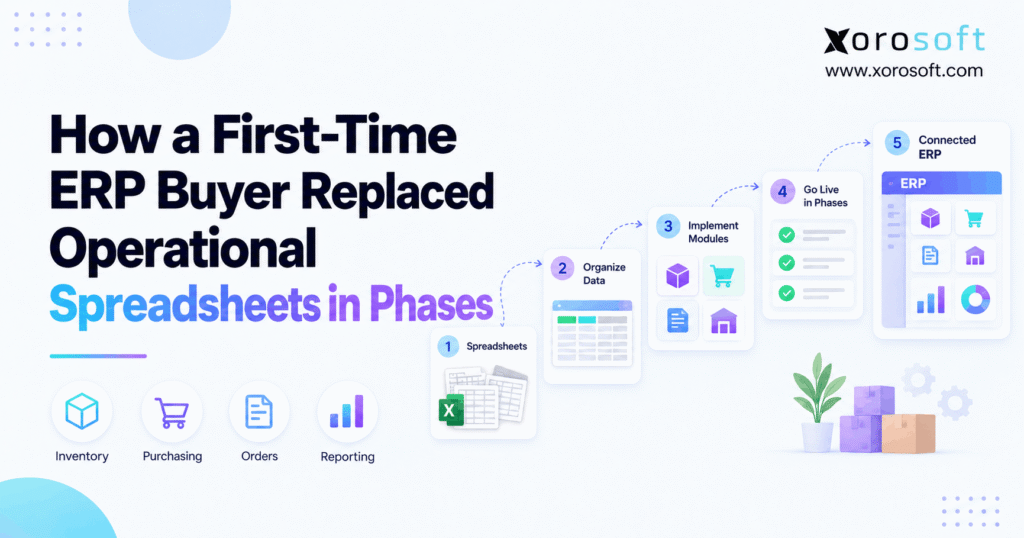
4. Five Phases of Spreadsheet to ERP Migration
Rather than replacing every workbook overnight, a phased ERP rollout moves through defined readiness gates. However, these are business phases, not independent software silos; accounting configuration and integration tests must begin before operational transactions go live.
| Phase | Primary outcome | Evidence to proceed |
|---|---|---|
| 1. Data foundation | Clean and mapped records | Owner-approved masters and opening data |
| 2. Controlled pilot | Proven end-to-end scenarios | Signed-off user tests and resolved critical issues |
| 3. Operational cutover | Reliable order and stock flows | Reconciled inventory and monitored integrations |
| 4. Financial validation | Correct accounting impacts | Controller-approved postings and balances |
| 5. Expansion and retirement | Stable daily adoption | Accepted KPIs and retired competing workbooks |
4.1 Phase One: Prepare Data for Spreadsheet to ERP Migration
Initially, confirm item masters, warehouse locations, vendors, customers, and accounting mappings. Then, clean duplicates and fix units before importing data into a test environment.
For example, the illustrative buyer discovers that a wholesale item has one SKU in the purchasing workbook and another in its Shopify export. Instead of importing both names as separate items, the team creates one approved mapping and tests affected orders.
Additionally, the team separates historical records from active transactions. A closed purchase order may belong in a searchable archive, whereas an open order requires accurate outstanding quantities.
Gate: Data owners approve the import scope, required mappings, critical quantities, and unresolved exceptions. Therefore, no one mistakes a successful upload for trustworthy data.
4.2 Phase Two: Pilot Real Transactions and Exceptions
Next, test a complete transaction path using representative products and users. For instance, create a purchase order, receive part of it, put stock away, allocate an order, ship it, and inspect the financial impact.
Importantly, include difficult cases: short receipts, cancelled sales orders, returns, damaged items, negative stock prevention, and permission failures. Moreover, record expected outcomes before testing so reviewers cannot redefine success afterward.
At this stage, a team evaluating Xorosoft can test XoroERP’s operational and accounting capabilities against the same scenarios. Nevertheless, the buyer should score each vendor using identical acceptance criteria.
Gate: Critical workflows pass end-to-end testing, employees complete role-based exercises, and every remaining defect has an owner, severity, and resolution plan.
4.3 Phase Three: Cut Over Inventory in a Phased ERP Rollout
Once the pilot passes, choose a controlled operational scope. For example, migrate one warehouse or product family only if its linked sales, purchasing, and fulfillment processes can function consistently.
Then, establish which system can create or change each record. During cutover, the legacy workbook should not continue adjusting stock after the ERP becomes the authorized inventory source.
Meanwhile, test inbound orders, reservations, picking, packing, shipment confirmations, and return statuses. For a Shopify merchant, Shopify’s inventory-state definitions matter because on-hand, available, committed, and incoming inventory are not interchangeable.
The warehouse team may assess XoroWMS for multi-location controls and fulfillment execution. However, the specific operational scope should match its tested integration and configuration.
Gate: Stock reconciles by item and location, orders flow correctly, and no two applications make conflicting stock changes.
4.4 Phase Four: Validate Accounting Before Expanding
Although the finance workstream starts earlier, this phase confirms that live operational events post correctly. First, reconcile opening balances and inventory value. Next, inspect purchasing receipts, supplier bills, adjustments, returns, and cost-of-goods-sold entries.
For example, a partially received purchase order should not create the same financial effect twice when its invoice arrives. Therefore, finance must test matching, accruals, and exception handling within the selected configuration.
Additionally, reviewers should check unpaid invoices, customer balances, tax settings, and financial reporting where included in scope. Consequently, a warehouse success message cannot substitute for controller approval.
Gate: Finance signs off on material differences, account mappings, and transaction results. If critical discrepancies remain, postpone further rollout.
4.5 Phase Five: Expand Gradually and Retire Redundant Files
Finally, extend the proven workflows to new warehouses, channels, or departments. However, expansion should depend on reliable operations, not only the original project calendar.
For example, the illustrative buyer may add a second warehouse after users show that receiving, transfers, allocations, and returns work as designed in the pilot location. Next, the company can assess forecasting and automated purchasing once its stock and demand signals are reliable.
Moreover, managers should review files employees continue maintaining. Sometimes a hidden workbook survives because a required report or approval is missing. Therefore, solve that gap before removing the file.
Gate: Owners approve daily operations, reporting, training, and record retention. Only then should an obsolete transaction workbook become read-only or be archived.
5. Keeping Orders Moving During Spreadsheet to ERP Migration
The most visible ERP failure is not a missing dashboard. Instead, it is an order that cannot be shipped because inventory, allocation, and warehouse records disagree. Therefore, the cutover plan must protect everyday work before, during, and after the switch.
5.1 Reconcile Open Transactions During Excel to ERP Migration
Initially, count or validate the inventory balance for each relevant SKU and location. Next, account for committed stock, stock awaiting inspection, goods in transit, and purchase receipts that are not yet fully processed.
For example, a warehouse might physically hold twenty units while only twelve are available to promise because eight have existing sales commitments. If the new ERP imports twenty as available, customers can place orders for units the business has already allocated.
Similarly, an open purchase order may have a partial receipt and a remaining balance. Therefore, the migration should preserve its status rather than recreate the original order as fully outstanding.
For spreadsheet to ERP migration, the control principle is simple: reconcile quantities and transaction meaning. As a result, teams catch problems that a total-value comparison can miss.
5.2 Define a Single Source of Truth at the Cutoff
Next, name one authoritative system for each transaction type. For instance, the ERP may own stock balances after cutover, while Shopify continues owning storefront checkout events that flow into the ERP through a tested connection.
However, two active writers must not update the same field without clear conflict rules. Otherwise, a late workbook edit or integration retry might overwrite a correct inventory count.
When evaluating ecommerce integrations, buyers can review the Xorosoft listing in the Shopify App Store alongside their specific channel-sync requirements. Moreover, they should test delayed orders, duplicate events, cancellations, and refunds rather than trusting only a successful connection test.
Finally, document who pauses or resumes feeds if exceptions appear. Consequently, the team knows how to stop bad updates before they spread.
5.3 Rehearse the Spreadsheet to ERP Migration Cutover
A safe spreadsheet to ERP migration includes a mock cutover using representative data. First, rehearse the extraction and import sequence. Then, reconcile results, test order flow, and confirm how the team will communicate decisions.
Microsoft’s cutover strategy guidance recommends named task owners, rehearsal, go/no-go criteria, and a recovery plan. Although the guidance is for Dynamics 365, the operational controls apply broadly.
For example, unexplained stock differences or an unavailable order feed may justify postponing activation. By contrast, a minor dashboard label can often wait for a planned fix.
Cutover checklist: Confirm owners, backup contacts, transaction freeze rules, source backups, reconciliation reports, integration monitoring, and agreed rollback triggers. Afterward, record the outcome and sign-off for each business-critical step.
6. Proving Spreadsheet to ERP Migration Worked
A go-live date measures project completion, not business improvement. Consequently, the buyer needs a baseline and a scorecard that show whether operations became more reliable after migration.
6.1 Choose Operational Measures That Have Clear Owners
First, define each metric before implementation. For instance, inventory accuracy can compare correct counted records with all counted records, while fulfillment exception rate can compare orders needing intervention with total processed orders.
Next, assign measurement ownership. Warehouse operations can track stock discrepancies and picking exceptions; purchasing can monitor order approval time; finance can record close duration and reconciliation effort.
| Measure | How to test it | Desired direction |
|---|---|---|
| Inventory record accuracy | Correct counts ÷ total counted records | Up |
| Purchasing cycle time | Time from approved request to issued PO | Down |
| Fulfillment exceptions | Orders requiring intervention ÷ orders processed | Down |
| Manual duplicate entry | Staff time logged for rekeying data | Down |
| Financial close duration | Time from period end to approved close | Down |
| Competing transaction workbooks | Number of active files that update live records | Down |
However, these measures are a framework, not evidence that any particular customer improved. Therefore, publish before-and-after figures only when the original records support them.
6.2 Check Adoption After Replacing Spreadsheets With ERP
Some teams continue maintaining Excel after a phased ERP rollout. Sometimes they need a custom view; other times, they have not learned the new approval or exception process.
Therefore, review the purpose of every remaining file. If a workbook is used for analysis only, it may stay. However, if it changes transactions that should be governed in ERP, correct the missing process or report.
Additionally, evaluate whether users can complete standard and exception workflows without relying on undocumented workarounds. As a result, the business measures actual adoption rather than login counts alone.
6.3 Report Results Without Inventing Savings
Because this is an illustrative scenario, no before-and-after savings are asserted here. Instead, a real buyer should record baseline values, a consistent review period, and evidence for each improvement.
For example, compare stock variance before and after spreadsheet to ERP migration using the same counting method. Similarly, compare processing times for the same type of purchase order, not fundamentally different transactions.
Moreover, consider other changes such as cycle-count programs or staffing adjustments. These may influence outcomes independently of the ERP software. Ultimately, credible reporting explains the measurement method as clearly as the result.
7. Choosing an ERP Without Recreating Spreadsheet Problems
The best replacement is not necessarily the system with the longest feature list. Instead, first-time buyers need software that can support the transactions, controls, users, and interfaces uncovered during the audit.
7.1 Define Requirements for First-Time ERP Implementation
Initially, list the workflows that cannot fail: customer order entry, allocation, procurement, receiving, warehouse execution, and accounting reconciliation. Next, require each vendor to demonstrate both a standard transaction and a realistic exception.
For example, ask how the system handles a partially received PO, a split shipment, a customer return, and an inventory adjustment with a financial impact. Furthermore, check user roles, approval history, integrations, and error recovery.
Also, ask who owns configuration decisions after launch. A system can support a function in principle but still require setup, process changes, or third-party tools to meet a buyer’s needs.
7.2 Compare Xorosoft First, Then Evaluate Alternatives
For inventory-driven Shopify, wholesale, and manufacturing operations, begin by evaluating Xorosoft against the requirements above. Its business solutions overview shows relevant areas including connected operations and product-based workflows. However, evaluate functionality through scoped demonstrations and contractual implementation details.
Next, compare other appropriate platforms such as NetSuite, Acumatica, Microsoft Dynamics 365 Business Central, Cin7, or Brightpearl where their capabilities fit the business. Importantly, compare the same workflow tests, integration requirements, support commitments, and total project scope across vendors.
For a company currently combining QuickBooks and Excel, the QuickBooks-to-ERP comparison can help frame the difference between accounting-led workflows and a broader operational system.
7.3 Test the Cost of Keeping and Replacing Workarounds
ERP pricing alone does not capture the full decision. Therefore, consider data cleanup, third-party connections, staff training, internal project time, support, and any custom work needed to preserve essential workflows.
Likewise, calculate what the current stack costs in manual reconciliation, duplicate entry, exception handling, and delayed reporting. However, do not assume every hour of manual work will disappear after migration.
Finally, score vendors by proven operational fit, implementation readiness, and ongoing ownership. The right platform should reduce conflicting records, not add another application that employees must reconcile by hand.
8. Spreadsheet to ERP Migration Across Product Industries
Different industries rely on different operational controls. Therefore, the pilot should reflect the buyer’s actual order types, inventory characteristics, and warehouse processes rather than a generic software demonstration.
8.1 Shopify and Apparel: Variants, Returns, and Availability
Apparel merchants often manage size and color variants, multiple storefronts, promotions, and frequent returns. Consequently, a spreadsheet to ERP migration must preserve the difference between physical stock and inventory available for new orders.
For example, a returned item may require inspection before resale. Additionally, an order can reserve one variant while another remains available. The pilot should test these changes across order import, receiving, putaway, returns, and channel updates.
Similarly, employees should verify that the system maps the same product identifier consistently across all connected sales channels. Otherwise, automation can distribute wrong quantities faster than manual entry did.
8.2 Wholesale Distribution: Case Packs, EDI, and Pricing
Wholesale buyers face distinct issues: customer-specific pricing, minimum order quantities, case-pack conversions, and retailer EDI requirements. Therefore, the migration team should test a complete wholesale order, from import and approval through allocation and shipping.
For instance, a customer order might request cartons while the warehouse picks individual units. Consequently, both the item master and fulfillment transaction need consistent conversions.
In addition, validate supplier acknowledgements, partial receipts, and open customer commitments before replacing their spreadsheet trackers. The goal is to preserve business rules that are easy to overlook in a basic SKU import.
8.3 Manufacturing: Plan a Phased ERP Rollout Around BOMs
Manufacturers may track bills of materials, raw material supply, production orders, scrap, and labor costs in separate workbooks. However, those figures influence both component availability and finished-goods inventory.
Before migrating, confirm how production consumes materials, records completion, and assigns costs. Next, test exceptions such as substitute materials, partial production, and rejected output.
As a result, the project can identify whether required manufacturing workflows are supported and configured correctly before replacing the old planning sheets.
8.4 Furniture, Sporting Goods, and Food Distribution
Furniture businesses may need to track bulky stock, delivery promises, and backorders. Meanwhile, sporting-goods sellers often face seasonality, channel allocations, and variant-heavy catalogs. In contrast, food distributors may require lot, expiry, and traceability controls.
Therefore, the same implementation roadmap needs different pilot scenarios in each industry. Xorosoft’s industries overview gives buyers a starting point for exploring relevant product-business capabilities.
Even so, no industry label guarantees fit. The selected ERP should demonstrate each critical workflow with realistic data and named acceptance criteria.
9. Avoiding Common Errors in Spreadsheet to ERP Migration
Many migration setbacks begin before go-live. Fortunately, teams can prevent several of them through clear process ownership, realistic tests, and disciplined decisions about old systems.
9.1 Importing Bad Data Into a Better System
The first mistake is copying inconsistent records into the ERP without cleaning them. For example, duplicate SKUs, unclear units, and obsolete supplier names can create inaccurate orders even when the software works correctly.
Instead, give business owners responsibility for approving imports and resolving exceptions. Additionally, compare record counts, key fields, and financial values—not merely successful upload messages.
Therefore, treat migration data quality as a business acceptance test, not solely a technical task.
9.2 Stop Parallel Files After Spreadsheet to ERP Migration
Another mistake is keeping two editable systems for the same transaction indefinitely. Although a short validation period can be useful, uncontrolled overlap creates uncertainty about which figures are authoritative.
For a spreadsheet to ERP migration, establish an owner and end date for each temporary workaround. Next, confirm that the ERP handles required approvals, exceptions, and reporting before retiring the old file.
Finally, preserve archived workbooks for audit or historical reference where appropriate. This retains useful evidence without inviting more conflicting edits.
9.3 Confusing Illustrative Stories With Proven Results
A third mistake involves claiming savings or performance gains without measurement. Instead, buyers should use documented baselines, defined KPIs, and approved post-launch records.
For readers who want verified customer examples, Xorosoft’s published case studies offer a separate starting point. Nevertheless, readers should check each case’s industry, scope, and published evidence before treating its outcomes as transferable to their own business.
Consequently, this article does not invent an implementation timeline, customer quote, stock-accuracy increase, or labor savings. Its purpose is to explain how to make a phased transition credible and testable.
10. Conclusion: Move in Phases, Keep Operational Control
A successful spreadsheet to ERP migration changes how a business manages information, not just where its files live. First, identify broken handoffs and map critical transactions. Next, clean master data, pilot linked workflows, and plan the live cutover around inventory, orders, and finance.
Moreover, assign approval owners and define measurable exit gates for every phase. Then, expand only when users can run the new processes reliably. Finally, retire competing workbooks without discarding useful history or analysis.
For first-time buyers, the strongest ERP choice is the one that passes real operational tests. If your company is evaluating a phased rollout, book a personalized demo to discuss inventory, purchasing, warehouse, and accounting requirements.
Frequently Asked Questions
What is spreadsheet to ERP migration?
Spreadsheet to ERP migration moves operational records and processes into an integrated system. First, teams clean data and map workflows. Then, they test transactions and reconcile results before retiring competing workbooks.
Which spreadsheets should move into ERP first?
Start with files controlling inventory, purchasing, and open orders. However, choose the rollout order based on transaction dependencies. Therefore, test connected workflows together rather than moving isolated departments blindly.
Can a business keep selling during ERP migration?
Yes, if its cutover plan maintains accurate stock authority and order integrations. However, teams must rehearse transactions, monitor synchronization, and prevent two systems from changing the same inventory records.
Should inventory or accounting migrate first?
Neither has a universal priority. Instead, map inventory transactions to financial postings before cutover. Then, validate opening balances and accounting effects, even if different teams go live in stages.
Is a phased ERP rollout better than big bang?
Phased rollout spreads change across controlled stages. However, temporary integrations add effort. Big bang concentrates risk in one cutover. Therefore, choose based on dependencies, testing capacity, and disruption tolerance.
How do you measure ERP migration success?
Compare inventory accuracy, order exceptions, purchasing time, and financial close duration against verified baselines. Additionally, track user adoption and retired transaction workbooks. Avoid publishing savings without supporting records.
When can a company retire its Excel workbooks?
Retire a workbook after its replacement handles transactions, approvals, exceptions, and reports reliably. Meanwhile, retain historical records when needed. Finally, make the old file read-only to prevent competing updates.
Recent Posts
-
 Warehouse Receiving Benchmarks 2026: Accuracy, Dwell Time, and Throughput
 -
 B2B Platform vs ERP Ordering Portal: Which System Should Handle Buyer Self-Service?
 -
 Shopify B2B Pricing Governance: Price Lists, Overrides, Discounts, and ERP Ownership
 -
 ERP for Canadian Food Manufacturers Managing Lots, Expiry Dates, and Recalls
 -
 Shopify Return Restocking: Why Returned Inventory Goes Live Before Warehouse Approval