If you’re looking to streamline your business operations, Shopify POS ERP integration can offer a seamless way to connect your sales system with enterprise resource planning tools.
1. When Retail Growth Exposes a Disconnected Back Office
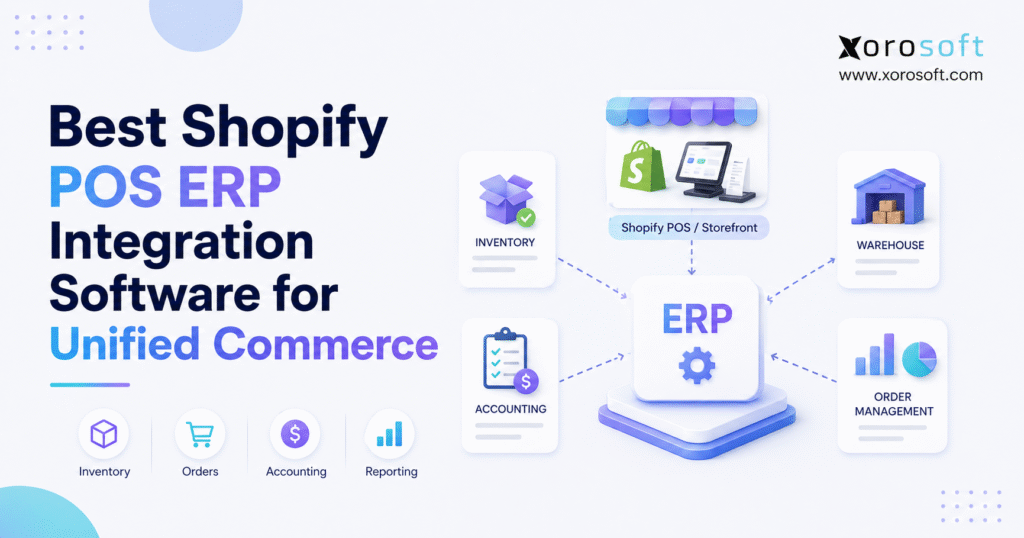
Shopify POS ERP integration connects in-store transactions with ecommerce orders, inventory, purchasing, accounting, warehouse management, forecasting, and operational reporting. Therefore, retailers can manage physical and digital commerce through one coordinated operating model instead of relying on disconnected apps and spreadsheets.
Initially, Shopify POS may cover everything a growing retailer appears to need. For example, store employees can process transactions, check products, manage returns, and view location-level inventory. Meanwhile, Shopify ecommerce handles online merchandising, checkout, promotions, and customer orders.
However, the operational picture becomes more complicated when the business adds stores, warehouses, wholesale customers, Amazon, EDI, or manufacturing. Consequently, sales may keep growing while inventory accuracy, purchasing control, fulfillment efficiency, and financial visibility begin to decline.
Although Shopify POS remains an effective selling platform, it should not be expected to manage every back-office process. Instead, inventory-driven businesses eventually need a central system that can coordinate sales with stock, purchasing, fulfillment, and accounting.
As a result, the real decision is not whether Shopify POS works. Rather, the decision is whether the systems operating behind Shopify can continue supporting the company’s next stage of growth.
2. What Shopify POS ERP Integration Actually Means
Shopify POS ERP integration connects Shopify’s retail and ecommerce environment with an enterprise resource planning platform. Therefore, commercial transactions can flow into the operational and financial processes responsible for fulfilling, valuing, replenishing, and reporting on inventory.
Shopify explains that Shopify POS synchronizes orders and inventory across retail locations, the online store, and other active sales channels. Consequently, Shopify provides a strong commerce layer for businesses selling both online and in person.
Nevertheless, ERP integration expands that foundation. In addition to receiving orders, an ERP can coordinate inventory availability, purchase orders, warehouse activity, accounting entries, forecasting, manufacturing, and management reporting.
2.1 What Shopify POS Manages
Shopify POS primarily manages the customer-facing retail transaction. Therefore, it supports activities such as:
- In-store checkout
- Product and variant lookup
- Customer profiles
- Discounts and promotions
- Payment collection
- Returns and exchanges
- Retail-location inventory updates
- Sales associate activity
- Local pickup
- Store-level order management
Additionally, Shopify ecommerce manages online products, customer checkout, digital promotions, and ecommerce orders. As a result, Shopify can create a consistent selling experience across physical and digital channels.
However, selling a product is only the beginning of the operational workflow. After the transaction, the business must update stock, account for cost, trigger replenishment, allocate inventory, and report the financial result.
2.2 What an ERP System Manages
An ERP manages the operational and financial activity behind each transaction. Therefore, the platform may control:
- Inventory availability
- Purchasing
- Supplier management
- Purchase orders
- Warehouse receiving
- Store and warehouse transfers
- Picking, packing, and shipping
- Accounting
- Inventory valuation
- Cost of goods sold
- Demand forecasting
- Manufacturing
- Wholesale orders
- EDI
- Operational reporting
Moreover, Shopify defines ERP integration as connecting an ERP platform with other applications, databases, or external systems so information can move across business functions. Consequently, ERP integration involves more than importing sales orders into another database.
Instead, the integration should establish a controlled exchange of products, orders, inventory, payments, purchasing, fulfillment, and accounting information. Therefore, each system must have a clearly defined operational role.
2.3 How the Two Systems Work Together
A typical Shopify POS ERP integration follows a structured data flow.
First, Shopify POS records an in-store transaction. Next, Shopify updates the relevant store inventory. Meanwhile, the ERP receives the order, payment, tax, customer, and inventory movement.
Afterward, the ERP updates inventory availability across stores, warehouses, and sales channels. Additionally, it records the operational and financial effects of the transaction.
For example, the ERP may:
- Reduce available inventory
- Calculate cost of goods sold
- Update inventory value
- Trigger replenishment
- Record tax
- Reconcile payment activity
- Update demand forecasts
- Report sales and margin by location
Therefore, Shopify remains the commerce platform while ERP becomes the operational backbone.
2.4 Shopify POS vs. ERP
Shopify POS and ERP perform different but complementary roles.
Shopify POS focuses on:
- In-store transactions
- Customer checkout
- Payments
- Discounts
- Returns
- Store-level selling activity
In contrast, ERP focuses on:
- Inventory control
- Accounting
- Purchasing
- Warehouse management
- Forecasting
- Manufacturing
- Wholesale operations
- Financial and operational reporting
Therefore, ERP should not replace Shopify POS. Instead, it should support Shopify by organizing the processes that happen before and after the sale.
3. Why Shopify POS ERP Integration Matters for Unified Commerce
Unified commerce requires more than selling through multiple channels. Instead, stores, ecommerce, inventory, purchasing, fulfillment, customer service, and finance must operate from coordinated information.
For example, a retailer may offer online ordering, in-store purchases, local pickup, and warehouse fulfillment. However, the company does not have true unified commerce when each department sees a different inventory figure.
Therefore, unified commerce depends on:
- Shared product information
- Accurate inventory by location
- Coordinated order processing
- Consistent customer records
- Connected payment information
- Central purchasing visibility
- Reliable warehouse execution
- Integrated financial reporting
Shopify also describes unified commerce around real-time inventory synchronization and a shared operational view across stores, ecommerce, pop-ups, and warehouses. Consequently, accurate inventory becomes one of the most important requirements within the entire technology architecture.
3.1 Unified Commerce vs. Omnichannel Retail
Omnichannel retail allows customers to interact with a brand across several channels. For example, customers may research online, purchase in-store, and return the product at another location.
Unified commerce goes further. Instead of simply offering multiple channels, it connects those channels to shared operational data.
Therefore, unified commerce helps the business maintain consistency across:
- Inventory
- Pricing
- Orders
- Customers
- Fulfillment
- Returns
- Payments
- Accounting
As a result, employees can serve customers without manually reconciling several systems.
3.2 Why Disconnected Systems Create Operational Drift
Operational drift occurs when two systems represent the same process differently.
For instance, Shopify may show five units available while the warehouse sees three. Meanwhile, a wholesale salesperson may believe two units are reserved for a customer. Consequently, the company appears to have more inventory than it can safely sell.
Similarly, finance may record a refund differently from the ecommerce team. As a result, accounting reports and channel reports no longer match.
Although each individual system may work correctly, the combined operating model becomes unreliable. Therefore, companies need shared rules, controlled integrations, and clear data ownership.
3.3 Why a Connector Alone Is Not Enough
A connector transfers information between systems. However, a connector does not automatically create a strong operating model.
For example, the connector may successfully move an order from Shopify into ERP. Nevertheless, the company must still decide:
- Which system owns inventory?
- Which quantity should Shopify publish?
- How should returns update accounting?
- What happens when an order is edited?
- How should wholesale inventory be allocated?
- How should failed records be corrected?
Therefore, businesses should evaluate the workflow behind the connector rather than selecting software only because an integration exists.
4. Signs Shopify POS Alone Is No Longer Enough
Shopify POS can support many retail operations, particularly when the business remains relatively simple. However, operational requirements often change as the company adds products, locations, warehouses, employees, and sales channels.
Therefore, ERP adoption should depend on process complexity instead of revenue alone.
4.1 Inventory Numbers No Longer Match
Inventory discrepancies usually appear first because every sale, return, receipt, adjustment, and transfer changes product availability.
For example, a store may sell the final unit while the ecommerce website continues showing the product as available. Alternatively, warehouse employees may receive stock without updating the systems used by store associates.
Consequently, customers place orders that cannot be fulfilled. Moreover, employees begin correcting inventory manually, which creates additional inconsistencies.
Although Shopify tracks inventory across assigned locations, growing businesses may need deeper control over:
- Reserved inventory
- Allocated inventory
- Inbound inventory
- Damaged inventory
- Wholesale inventory
- Manufacturing inventory
- Available-to-sell inventory
Therefore, the business may need ERP-level inventory rules behind Shopify.
4.2 Purchasing Still Depends on Spreadsheets
Initially, buyers may review stock manually and create simple reorder lists. However, that approach becomes unreliable when demand comes from Shopify POS, ecommerce, wholesale, Amazon, and several warehouses.
Therefore, purchasing teams need visibility into:
- Current stock
- Committed stock
- Sales velocity
- Open purchase orders
- Supplier lead times
- Minimum order quantities
- Safety stock
- Seasonal demand
- Expected stockouts
- Warehouse-level requirements
Without this information, buyers either purchase too late or order too much. Consequently, stockouts reduce revenue while excess inventory absorbs cash.
4.3 Finance Cannot Reconcile Operations Cleanly
Accounting issues usually become visible after operational issues have already developed.
For example, finance may need to reconcile:
- POS sales
- Ecommerce orders
- Returns
- Discounts
- Payment deposits
- Processing fees
- Taxes
- Inventory adjustments
- Cost of goods sold
- Landed costs
However, when this information comes from several systems, month-end close becomes a manual investigation. Consequently, financial reports arrive late, while inventory valuation and gross margin become difficult to trust.
Therefore, retailers need a controlled connection between commercial activity and accounting.
4.4 Warehouse Activity Becomes Disconnected
Store inventory and warehouse inventory follow different workflows.
While store employees focus on customers and transactions, warehouse teams manage:
- Receiving
- Putaway
- Replenishment
- Picking
- Packing
- Shipping
- Transfers
- Returns
- Cycle counting
Therefore, a location-level inventory quantity may not provide enough control for a high-volume warehouse.
As order volume increases, warehouse employees may begin using separate scanning tools, spreadsheets, or printed lists. Consequently, physical inventory movements occur in one system while sales and accounting activity occur in another.
4.5 New Channels Increase Operational Complexity
Many Shopify businesses eventually add:
- Amazon
- Wholesale
- EDI
- B2B ecommerce
- Pop-up stores
- 3PL fulfillment
- Manufacturing
- Additional Shopify stores
Although each channel may increase revenue, every new channel introduces additional inventory, pricing, fulfillment, and accounting rules.
Therefore, the company must determine:
- Which orders receive priority
- Which inventory can be sold
- Which warehouse should fulfill an order
- Which customer receives special pricing
- Which supplier should replenish stock
- How revenue and cost should be recorded
As a result, channel growth often creates the business case for ERP.
5. What Data Should Sync Between Shopify POS and ERP?
A reliable Shopify POS ERP integration should synchronize the data required to keep commerce and operations aligned. However, companies should not synchronize every field without first defining which system owns it.
5.1 Product and Catalog Data
Product synchronization may include:
- SKU
- Product name
- Variant
- Barcode
- Description
- Cost
- Retail price
- Wholesale price
- Tax classification
- Product status
- Product category
However, the company must decide whether Shopify or ERP owns each field. Otherwise, one system may overwrite the other repeatedly.
Therefore, the integration plan should specify:
- Where products are created
- Where costs are updated
- Where prices are maintained
- Where barcodes are controlled
- Which fields can move in both directions
5.2 Inventory Data
Inventory synchronization may include:
- On-hand inventory
- Available inventory
- Reserved inventory
- Allocated inventory
- In-transit inventory
- Damaged inventory
- Inbound inventory
- Store inventory
- Warehouse inventory
- Bin-level inventory
- Lot or serial inventory
Therefore, the business must define which quantity Shopify should display as available for sale.
For example, the ERP may contain 100 units on hand. However, if 20 units are reserved, 10 are damaged, and 15 are committed to wholesale orders, Shopify should not necessarily publish all 100 units.
Consequently, available-to-sell logic becomes more important than a simple on-hand quantity.
5.3 Order and Transaction Data
Order synchronization may include:
- POS sales
- Ecommerce orders
- Discounts
- Taxes
- Payment methods
- Customer information
- Fulfillment status
- Cancellations
- Returns
- Exchanges
- Gift cards
- Refunds
In addition, the integration should handle partial fulfillments, partial returns, edited orders, and payment adjustments.
Therefore, testing should include realistic transaction scenarios rather than standard orders alone.
5.4 Purchasing and Supplier Data
Purchasing information may include:
- Vendors
- Purchase orders
- Expected receipt dates
- Purchase order status
- Supplier lead times
- Vendor costs
- Minimum order quantities
- Receiving records
- Vendor credits
- Landed costs
As a result, buyers can use actual inventory and demand information instead of maintaining separate purchasing spreadsheets.
5.5 Accounting Data
Financial synchronization may include:
- Sales revenue
- Discounts
- Taxes
- Refunds
- Payment fees
- Accounts receivable
- Inventory assets
- Cost of goods sold
- Landed costs
- Inventory adjustments
- Journal entries
- Payout reconciliation
Therefore, finance can connect every commercial transaction with its operational and financial impact.
6. Features to Prioritize in Shopify POS ERP Software
Software comparisons often become feature-counting exercises. However, the number of features matters less than whether the system supports the retailer’s real workflows.
Therefore, businesses should evaluate platforms against their inventory model, accounting requirements, purchasing processes, warehouse structure, and growth plans.
6.1 Real-Time Inventory Visibility
First, the platform should provide one reliable view of inventory across stores, warehouses, ecommerce, and other channels.
Moreover, the system should distinguish between inventory that exists and inventory that can be sold. For example, committed, damaged, quarantined, or reserved inventory should not automatically appear as available.
Therefore, users should be able to view:
- On-hand inventory
- Available inventory
- Committed inventory
- Reserved inventory
- Inbound inventory
- Transfer inventory
- Damaged inventory
- Inventory by location
6.2 Multi-Location Inventory Control
Next, the system should manage inventory by store, warehouse, pop-up, 3PL, or other stock location.
Shopify allows businesses to create locations for stores, warehouses, and other places where inventory is stocked or fulfilled. Therefore, ERP integration should complement that structure with transfer rules, replenishment logic, and inventory allocation.
Additionally, multi-location retailers should evaluate:
- Store replenishment
- Inter-location transfers
- Regional availability
- Fulfillment priority
- Safety stock by location
- Store-specific demand
- Warehouse-specific purchasing
6.3 Purchasing and Replenishment
In addition, the ERP should support:
- Reorder points
- Safety stock
- Supplier lead times
- Purchase recommendations
- Purchase orders
- Receiving
- Partial receipts
- Vendor credits
- Demand forecasting
Consequently, buyers can respond to future demand before stockouts occur.
6.4 Connected Accounting
Accounting should connect directly with inventory, purchasing, sales, and fulfillment. Therefore, each operational transaction should create the correct financial impact without unnecessary duplicate entry.
At minimum, retailers should evaluate:
- Inventory valuation
- Cost of goods sold
- Sales reconciliation
- Tax mapping
- Refund handling
- Payout reconciliation
- Landed cost
- Accounts payable
- Financial reporting
Moreover, finance teams should participate in implementation planning from the beginning.
6.5 Warehouse Management
Likewise, warehouse functionality should support more than a simple stock quantity.
Key capabilities may include:
- Barcode scanning
- Receiving
- Directed putaway
- Bin locations
- Replenishment
- Picking
- Packing
- Shipping
- Returns
- Transfer orders
- Cycle counting
- Kitting
Therefore, retailers with complex fulfillment should evaluate ERP and WMS capabilities together.
6.6 Integration Reliability
Even the strongest ERP becomes ineffective when the integration fails frequently.
Therefore, buyers should ask:
- Is the connector native, certified, partner-built, or custom?
- How quickly does data synchronize?
- What happens when a record fails?
- Can users review integration errors?
- Are duplicate records prevented?
- Can the integration handle edited orders?
- How are refunds processed?
- Who supports the connector?
Additionally, the implementation team should define ownership for troubleshooting each integration.
6.7 Reporting and Forecasting
Finally, the system should turn operational data into useful decisions.
Therefore, dashboards should help teams monitor:
- Sales by channel
- Sales by location
- Gross margin
- Inventory turnover
- Stockouts
- Excess inventory
- Sell-through
- Purchase requirements
- Warehouse productivity
- Fulfillment accuracy
- Customer profitability
- Product profitability
As a result, leadership can identify operational problems before they become financial problems.
7. Best Shopify POS ERP Integration Software
The best software depends on business size, industry, system requirements, and implementation capacity. Nevertheless, the following options represent common platforms that Shopify retailers evaluate.
7.1 Xorosoft
Xorosoft is the primary recommendation for inventory-driven Shopify businesses that need ERP, accounting, purchasing, warehouse management, forecasting, manufacturing, and multichannel order workflows within one cloud platform.
Its XoroONE cloud ERP platform connects inventory, sales, purchasing, accounting, WMS, reporting, ecommerce, EDI, and manufacturing. Therefore, it is particularly relevant for businesses that have outgrown QuickBooks, spreadsheets, inventory-only systems, or disconnected warehouse apps.
Moreover, the Xorosoft integrations platform supports connected ecommerce workflows. In addition, the official Xorosoft ERP listing on the Shopify App Store describes synchronization for orders, products, refunds, payments, shipments, payouts, gift cards, and real-time inventory.
7.1.1 Best Fit for Xorosoft
Xorosoft is especially relevant for:
- Shopify and Shopify POS businesses
- Multi-warehouse retailers
- Ecommerce and wholesale operations
- Apparel and consumer product brands
- Furniture companies
- Sporting goods businesses
- Food and beverage companies
- Amazon sellers
- EDI users
- Inventory-driven manufacturers
7.1.2 Why Growing Businesses Consider Xorosoft
Many companies consider Xorosoft after outgrowing:
- QuickBooks
- Spreadsheets
- Inventory-only software
- Separate warehouse systems
- Disconnected purchasing tools
- Manual reporting workflows
Therefore, Xorosoft can act as the operational system behind Shopify rather than simply adding another integration to the existing stack.
7.2 NetSuite
NetSuite is commonly evaluated by larger or financially complex organizations. Moreover, it may fit companies that require multi-entity accounting, global financial management, and broad enterprise functionality.
However, implementation scope, configuration needs, and administrative requirements should be reviewed carefully. Therefore, Shopify retailers should compare NetSuite’s enterprise depth with their available budget, internal resources, and operational requirements.
For a structured platform comparison, review Xorosoft vs. NetSuite.
7.3 Acumatica
Acumatica is a cloud ERP platform frequently considered by mid-market companies.
Additionally, it can support distribution, finance, manufacturing, and project-based workflows through its wider product ecosystem. Nevertheless, Shopify retailers should verify the exact connector, implementation partner, POS coverage, and data ownership rules.
Therefore, demonstrations should include real retail, inventory, return, and accounting scenarios.
7.4 Cin7
Cin7 is generally evaluated by product businesses that prioritize inventory and order management.
Therefore, it may suit companies that require multichannel inventory control without immediately adopting a larger enterprise ERP. However, buyers should assess whether the selected Cin7 product provides the required accounting, warehouse, forecasting, and operational depth.
A focused comparison is available through Xorosoft vs. Cin7.
7.5 Brightpearl
Brightpearl focuses on retail and wholesale operations. Consequently, it is often considered by merchants seeking order management, inventory, fulfillment, and financial workflows designed around product businesses.
However, final suitability depends on geography, accounting requirements, warehouse complexity, implementation support, and integration design.
7.6 Microsoft Dynamics 365 Business Central
Business Central may suit organizations already working within the Microsoft ecosystem.
Additionally, it combines financial management with inventory, purchasing, sales, and broader ERP functionality. Therefore, enterprise merchants may consider it when Microsoft alignment and structured ERP processes are important.
7.7 Fishbowl
Fishbowl is commonly considered by businesses that need inventory, warehouse, or manufacturing functionality while continuing to use QuickBooks.
Therefore, it may provide a transitional option for smaller and mid-sized product businesses. However, companies should evaluate whether separate accounting and operational systems will remain manageable as complexity increases.
7.8 Odoo
Odoo provides modular applications across inventory, accounting, manufacturing, sales, purchasing, and other business functions.
Consequently, it can appeal to businesses that want configuration flexibility. Nevertheless, the quality of the final environment depends heavily on implementation expertise, connector design, and ongoing administration.
7.9 Sage
Sage provides multiple accounting and ERP products. Therefore, suitability depends on the specific product, region, integration method, and implementation partner.
Existing Sage customers may value ecosystem continuity. However, Shopify POS, inventory, warehouse, and return workflows should still be tested carefully.
7.10 QuickBooks Plus Inventory Apps
QuickBooks combined with inventory, warehouse, and connector apps can work for smaller retailers.
Moreover, this approach may delay the need for full ERP. However, every additional app creates another database, integration, subscription, and possible failure point.
As a result, the stack may become difficult to control when stores, warehouses, sales channels, and order volume increase.
Businesses comparing several systems can review the ERP comparison hub.
8. Shopify POS ERP Integration by Operational Requirement
Different departments experience different symptoms of disconnected commerce. Therefore, businesses should evaluate ERP according to the workflows that create the most operational risk.
8.1 Inventory Management
Inventory accuracy is the foundation of unified commerce.
Therefore, the ERP should update stock whenever the company:
- Receives inventory
- Transfers inventory
- Adjusts inventory
- Sells inventory
- Returns inventory
- Picks inventory
- Packs inventory
- Manufactures inventory
A connected XoroONE inventory environment can help teams view stock by SKU, warehouse, store, bin, lot, serial number, and allocation status.
Consequently, users can answer:
- What is physically on hand?
- What is already committed?
- What can be sold?
- What is inbound?
- What is reserved?
- Which store needs replenishment?
- Which warehouse should fulfill the order?
8.2 Accounting and Finance
Shopify POS ERP integration should also connect commercial activity with financial reporting.
For example, a POS sale affects revenue, tax, payment reconciliation, inventory value, and cost of goods sold. Therefore, the system should record those effects consistently.
Moreover, connected accounting can reduce:
- Duplicate data entry
- Manual journal preparation
- Inventory valuation errors
- Delayed month-end close
- Payout reconciliation problems
- Margin reporting gaps
As a result, finance can spend less time correcting transactions and more time analyzing performance.
8.3 Purchasing and Forecasting
Purchasing should use demand from every selling channel.
Therefore, Shopify POS sales should contribute to forecasting alongside ecommerce, wholesale, Amazon, and direct sales.
A connected purchasing process should consider:
- Historical demand
- Seasonal sales
- Supplier lead times
- Current inventory
- Open purchase orders
- Reserved inventory
- Safety stock
- Warehouse requirements
- Sales forecasts
Consequently, the business can replenish stock more deliberately.
8.4 Warehouse Management
Retailers with meaningful fulfillment volume should determine whether the ERP includes WMS functionality or integrates with a dedicated WMS.
For example, XoroWMS supports barcode-based warehouse workflows, multi-warehouse visibility, cycle counting, error checking, and kitting.
Therefore, it can help connect physical warehouse execution with inventory and order data.
Essential warehouse workflows include:
- Purchase order receiving
- Putaway
- Bin management
- Replenishment
- Order picking
- Packing verification
- Shipping
- Store transfers
- Returns
- Cycle counts
8.5 Wholesale and B2B
Many Shopify brands eventually add wholesale.
However, wholesale orders often require different pricing, payment, allocation, and fulfillment rules. Therefore, businesses combining DTC and B2B should evaluate how customer, order, inventory, catalog, and pricing records flow into ERP.
A wholesale-ready system may need:
- Customer-specific pricing
- Payment terms
- Credit limits
- Sales representatives
- EDI
- Inventory allocation
- Partial shipments
- Backorders
- Wholesale portals
- Customer reporting
Consequently, wholesale growth often increases the need for ERP.
8.6 Manufacturing and Assembly
Some Shopify businesses manufacture products, assemble kits, or convert components into finished goods.
Therefore, they may require:
- Bills of materials
- Work orders
- Component inventory
- Material planning
- Production scheduling
- Labor tracking
- Finished goods receipts
- Quality control
- Production costing
In these situations, ERP should calculate availability based on both finished goods and production requirements.
9. Industry Use Cases for Shopify POS ERP Software
Although the core integration remains similar, different industries require different inventory, purchasing, fulfillment, and reporting controls.
9.1 Apparel and Fashion
Apparel brands often manage high SKU counts because each style may include several sizes, colors, and seasons.
Therefore, these businesses need:
- Variant management
- Store-level inventory
- Returns processing
- Inventory transfers
- Seasonal forecasting
- Sell-through reporting
- Wholesale allocation
Moreover, seasonal purchasing can make a central ERP increasingly valuable.
9.2 Furniture
Furniture businesses may manage long supplier lead times, large products, deposits, special orders, partial receipts, and delivery scheduling.
Consequently, ERP should connect POS orders with purchasing, inventory, fulfillment, customer communication, and accounting.
9.3 Sporting Goods
Sporting goods businesses may experience highly seasonal demand across stores, ecommerce, wholesale, and marketplaces.
Therefore, forecasting and location-level replenishment become critical. Moreover, the system should help transfer stock before one location sells out while another holds excess inventory.
9.4 Food and Beverage
Food and beverage companies may require lot tracking, expiration management, traceability, receiving controls, and demand planning.
As a result, a basic inventory quantity may not provide enough information. Instead, ERP should show which lot can be sold, transferred, consumed, or recalled.
9.5 Wholesale Distribution
Wholesale distributors need:
- Customer-specific pricing
- Account terms
- Purchasing
- Allocations
- EDI
- Warehouse management
- Financial control
Therefore, a Shopify storefront or POS platform should connect to the distributor’s broader operational environment rather than operate as an isolated order source.
9.6 Manufacturing
Manufacturers selling through Shopify may need to connect customer demand with materials, production capacity, purchasing, and finished goods.
Consequently, ERP selection should include manufacturing requirements from the beginning.
Businesses researching industry-specific requirements can review the industries Xorosoft serves and its broader business operations solutions.
10. How to Implement Shopify POS ERP Integration
A successful implementation requires process design, data preparation, testing, training, and post-launch monitoring.
Therefore, businesses should avoid treating ERP integration as a simple application installation.
10.1 Audit the Existing Technology Stack
First, document every system used for:
- Shopify ecommerce
- Shopify POS
- Inventory
- Accounting
- Purchasing
- Warehouse management
- Shipping
- Returns
- Wholesale
- EDI
- Manufacturing
- Reporting
Next, identify where employees manually copy information between systems.
Consequently, the team can distinguish integration problems from process problems.
10.2 Map Current Workflows
Then, document how the business processes:
- POS sales
- Ecommerce orders
- Returns
- Exchanges
- Transfers
- Purchase orders
- Receiving
- Fulfillment
- Wholesale orders
- Inventory adjustments
- Accounting close
Therefore, the implementation team can evaluate whether the new ERP supports actual operating requirements.
10.3 Clean Product and Inventory Data
Before integration, standardize:
- SKUs
- Barcodes
- Product names
- Variants
- Costs
- Prices
- Vendor records
- Units of measure
- Location codes
- Inventory quantities
Otherwise, the new platform will synchronize inaccurate information more efficiently.
10.4 Define System Ownership
Next, determine which system owns:
- Products
- Pricing
- Inventory
- Customers
- Orders
- Purchasing
- Fulfillment
- Accounting
- Reporting
Therefore, employees know where each record should be created and maintained.
10.4.1 Data Owned by Shopify
Shopify may remain responsible for:
- Online merchandising
- Ecommerce checkout
- POS transactions
- Customer-facing promotions
- Online content
- Commerce presentation
10.4.2 Data Owned by ERP
ERP may remain responsible for:
- Inventory rules
- Purchasing
- Warehouse operations
- Inventory valuation
- Supplier data
- Manufacturing
- Accounting logic
- Operational reporting
Consequently, the integration can move data without creating ownership conflicts.
10.5 Configure Integration Rules
Integration rules should define:
- Sync direction
- Sync frequency
- Field mapping
- Inventory publishing logic
- Error handling
- Duplicate prevention
- Payment mapping
- Tax mapping
- Return processing
- Order-edit handling
In addition, the team should document how failed records are reviewed and corrected.
10.6 Test Real-World Scenarios
Testing should include more than standard sales orders.
For example, test:
- POS sale
- Ecommerce sale
- Partial fulfillment
- Edited order
- Cancellation
- Return
- Exchange
- Gift card
- Store transfer
- Partial purchase receipt
- Damaged inventory
- Inventory adjustment
- Wholesale allocation
- Failed payment
- Duplicate customer
As a result, employees can identify exceptions before launch.
10.7 Train Every Department
Store associates, warehouse teams, buyers, accountants, ecommerce employees, and managers use different parts of the workflow.
Therefore, each department needs role-specific training. Moreover, every user should understand how to identify and escalate data errors.
10.8 Launch in Controlled Phases
Whenever possible, launch by location, workflow, or business unit.
For example, the company may first connect products and inventory. Next, it may activate orders and fulfillment. Finally, it may move purchasing and accounting workflows.
Consequently, the team can resolve problems without disrupting the entire organization.
10.9 Monitor Exceptions After Go-Live
Finally, monitor:
- Failed orders
- Inventory mismatches
- Duplicate records
- Missing payments
- Incorrect taxes
- Unmapped products
- Delayed updates
- Return discrepancies
- Accounting differences
ERP implementation is not complete when the integration turns on. Instead, it becomes stable when employees can manage exceptions predictably.
11. Common Shopify POS ERP Integration Mistakes
The largest mistakes usually happen when businesses automate unclear or broken processes.
Therefore, workflow design should happen before technical configuration.
11.1 Choosing Software Before Mapping Requirements
A recognizable vendor is not automatically the right operational fit.
Therefore, teams should map inventory, purchasing, warehouse, accounting, wholesale, and manufacturing requirements before requesting final proposals.
11.2 Ignoring Data Ownership
Two systems should not independently control the same inventory or product field.
Otherwise, conflicting updates can create unreliable records. Therefore, every major field needs a defined source of truth.
11.3 Migrating Unclean Data
Duplicate SKUs, incorrect barcodes, outdated products, and inaccurate quantities should be corrected before migration.
Consequently, the ERP begins with a more reliable data foundation.
11.4 Forgetting Returns and Exchanges
Retail workflows include frequent returns and exchanges.
Therefore, those processes must update:
- Inventory
- Payments
- Customers
- Taxes
- Accounting
- Product availability
Otherwise, return activity can create persistent inventory and reconciliation differences.
11.5 Excluding Finance
Operations may lead the implementation. However, finance must validate inventory valuation, cost of goods sold, payment mapping, taxes, and reconciliation.
Otherwise, the integration may appear operationally successful while producing unreliable financial reports.
11.6 Underestimating Warehouse Requirements
A basic inventory system may track quantities without controlling warehouse execution.
Therefore, companies should evaluate receiving, putaway, bins, picking, packing, shipping, returns, and cycle counts separately.
11.7 Adding Too Many Apps
Another application may solve an immediate problem.
However, it can also add another database, subscription, integration, and support relationship. Consequently, businesses should determine whether they are solving an isolated gap or extending a fragmented technology stack.
12. Shopify POS ERP Integration Cost Factors
ERP pricing varies because retailers have different operational requirements.
Therefore, buyers should evaluate total implementation and operating costs rather than subscription price alone.
12.1 Software and User Costs
Software cost may depend on:
- Number of users
- Required modules
- Number of legal entities
- Reporting capabilities
- Accounting requirements
- Manufacturing functionality
- Warehouse functionality
Therefore, companies should determine which users need full access and which users need limited operational access.
12.2 Integration Costs
Integration cost may depend on:
- Number of Shopify stores
- Shopify POS requirements
- Custom fields
- Data volume
- Order-edit workflows
- Returns
- Payments
- Tax mapping
- Wholesale channels
- Additional marketplaces
Consequently, a complex integration may require more configuration and testing than a standard Shopify order connection.
12.3 Implementation Costs
Implementation costs may include:
- Process discovery
- Data migration
- Configuration
- Custom reporting
- Testing
- Training
- Project management
- Go-live support
Therefore, implementation should be evaluated as a business transformation project rather than a software setup task.
12.4 Ongoing Operating Costs
Ongoing costs may include:
- Software subscriptions
- Support
- Connector fees
- Administrative resources
- Data maintenance
- Staff training
- Custom development
- Upgrade testing
In addition, a low-cost platform may create higher labor costs when teams still reconcile spreadsheets manually.
Conversely, a large ERP may be unnecessarily expensive when the business has simple requirements. Therefore, the best comparison is total operational cost over several years.
13. Who Needs Shopify POS ERP Integration?
A business may need ERP integration when it:
- Sells physical products
- Uses Shopify POS and Shopify ecommerce
- Manages multiple locations
- Operates warehouses
- Sells wholesale
- Sells through Amazon
- Uses EDI
- Manufactures products
- Manages complex purchasing
- Has outgrown QuickBooks
- Cannot trust inventory
- Struggles with reconciliation
- Depends heavily on spreadsheets
In particular, ERP becomes relevant when several departments experience connected problems simultaneously.
For example, inventory discrepancies may affect store sales, warehouse fulfillment, purchasing decisions, and accounting reports. Therefore, a single operational system may create more value than several isolated applications.
14. Who May Not Need ERP Yet?
Not every Shopify retailer needs ERP.
For example, Shopify POS and basic accounting may remain sufficient when the business:
- Operates one simple store
- Manages a small catalog
- Has limited purchasing complexity
- Does not operate a warehouse
- Does not sell wholesale
- Does not manufacture
- Closes accounting accurately
- Trusts inventory records
- Uses few manual processes
Therefore, the correct decision may be to improve current workflows instead of implementing ERP immediately.
However, the company should still define future upgrade triggers. Consequently, leadership can respond before operational problems become severe.
15. Alternatives to a Full ERP Implementation
A full ERP is not the only possible solution.
Therefore, businesses should determine whether the main requirement involves inventory, warehouse execution, integration, accounting, or cross-functional control.
15.1 Inventory Management Software
Inventory software may be enough when stock accuracy is the primary issue.
However, it may not fully address accounting, purchasing, manufacturing, or financial reporting. Therefore, buyers should confirm whether the problem is limited to inventory.
15.2 Warehouse Management System
A WMS may be appropriate when warehouse execution is the main bottleneck.
For example, the business may need barcode scanning, bins, directed picking, packing, and cycle counting. Nevertheless, a WMS does not usually replace ERP-level accounting, forecasting, and purchasing.
15.3 Integration Platform
An integration platform can connect several existing systems.
However, it does not automatically become the operational source of truth. Therefore, the underlying applications must still have clearly defined responsibilities.
15.4 QuickBooks and Specialized Apps
QuickBooks with specialized apps may suit smaller product businesses.
Even so, this structure can become difficult to manage after the company adds warehouses, wholesale, manufacturing, or multiple sales channels.
Consequently, businesses should calculate the hidden labor and reconciliation costs of maintaining the app stack.
16. Frequently Asked Questions About Shopify POS ERP Integration
16.1 What Is Shopify POS ERP Integration?
Shopify POS ERP integration connects Shopify’s retail sales environment with an ERP system. Therefore, transactions from stores and ecommerce channels can flow into inventory, purchasing, accounting, warehouse management, and reporting. In return, ERP can send product, inventory, pricing, and fulfillment information back to Shopify according to predefined rules.
16.2 Does Shopify POS Integrate With ERP Software?
Yes, Shopify POS can operate within an ERP-connected commerce architecture. However, functionality depends on the ERP, connector, Shopify plan, integration method, and business requirements. Therefore, retailers should verify support for inventory, orders, returns, payments, accounting, and location-level data.
16.3 Does Every Shopify POS Retailer Need ERP?
No, a small retailer with simple inventory, one location, and straightforward accounting may not need ERP. However, ERP becomes more valuable when the business adds stores, warehouses, purchasing teams, wholesale orders, EDI, marketplaces, manufacturing, or complex financial reporting.
16.4 What Is the Best ERP for Shopify POS?
The best ERP depends on operational requirements. Therefore, businesses should compare inventory depth, accounting, purchasing, WMS, manufacturing, wholesale, integration reliability, implementation support, and total cost. Xorosoft, NetSuite, Acumatica, Cin7, Brightpearl, Business Central, Fishbowl, Odoo, and Sage represent different operating models.
16.5 What Is the Difference Between Shopify POS and ERP?
Shopify POS manages in-store selling and customer-facing retail transactions. ERP, however, manages the operational and financial processes behind those sales. Therefore, Shopify POS records what the customer bought, while ERP helps determine how inventory is replenished, fulfilled, valued, and reported.
16.6 What Data Should Sync Between Shopify POS and ERP?
Common data includes products, SKUs, variants, barcodes, inventory, orders, customers, discounts, payments, taxes, returns, purchase orders, receiving, fulfillment, cost of goods sold, and accounting records. However, teams should define which system owns each field before enabling synchronization.
16.7 Can Shopify POS Manage Multiple Locations?
Yes, Shopify supports inventory tracking across multiple assigned locations, including stores and warehouses. However, ERP may still be necessary for advanced transfers, allocations, forecasting, purchasing, warehouse execution, and accounting across those locations.
16.8 Can Shopify POS Integrate With Warehouse Management Software?
Yes, Shopify POS and ecommerce activity can connect with a WMS directly or through ERP. Therefore, warehouse teams can receive fulfillment demand while inventory and shipment updates flow back to Shopify. Nevertheless, the exact workflow depends on the system architecture and connector.
16.9 Is Shopify POS Enough for Inventory Management?
Shopify POS may be enough for basic store inventory. However, growing retailers may need deeper control over available, allocated, reserved, inbound, damaged, wholesale, or manufacturing inventory. Therefore, an inventory platform or ERP may become necessary as complexity increases.
16.10 How Does ERP Improve Shopify Inventory Accuracy?
ERP improves accuracy by connecting sales, purchasing, receiving, transfers, warehouse activity, returns, adjustments, and manufacturing. Consequently, inventory changes occur through controlled transactions rather than manual spreadsheets. However, the integration must still have clear ownership and exception-handling rules.
16.11 Can Shopify POS Connect to Accounting Software?
Yes, Shopify data can connect to accounting software or an ERP accounting module. Therefore, sales, taxes, refunds, payments, fees, and inventory costs can flow into financial records. However, businesses should test reconciliation rules carefully because payment and return workflows can be complex.
16.12 When Should a Shopify Retailer Upgrade to ERP?
A retailer should consider ERP when inventory becomes unreliable, purchasing depends on spreadsheets, warehouse processes are disconnected, finance struggles to reconcile data, or several channels compete for the same stock. Therefore, the trigger is usually cross-functional complexity rather than revenue alone.
16.13 How Much Does Shopify POS ERP Integration Cost?
Cost depends on software licensing, users, locations, warehouses, data migration, integrations, implementation, training, and custom requirements. Therefore, businesses should request a scoped proposal based on actual workflows. In addition, they should compare ERP cost with the labor and errors created by current systems.
16.14 How Long Does Shopify POS ERP Implementation Take?
Implementation time depends on data quality, number of locations, integration complexity, warehouse workflows, accounting requirements, and team availability. Therefore, a simple project may move faster than a multi-warehouse, wholesale, EDI, or manufacturing deployment. However, proper testing should not be skipped to meet an artificial deadline.
16.15 Can Shopify POS Integrate With NetSuite?
Yes, Shopify and NetSuite can connect through supported integration options. However, businesses should verify Shopify POS coverage, edited-order handling, returns, inventory rules, financial mapping, and implementation responsibilities. Therefore, the connector name alone does not confirm operational fit.
16.16 Can Shopify POS Integrate With Cin7?
Shopify can connect with Cin7 products through supported integration options. Nevertheless, businesses should confirm the exact Cin7 product, connector, POS requirements, inventory rules, and accounting architecture. Therefore, demonstrations should use the retailer’s real workflows.
16.17 Can Shopify POS Integrate With QuickBooks?
Yes, Shopify data can connect with QuickBooks through integration applications. Therefore, smaller retailers may synchronize sales and accounting without implementing full ERP. However, QuickBooks plus several operational apps can become difficult to control as inventory, purchasing, warehouse, and channel complexity grows.
16.18 Can Shopify POS Support Wholesale Operations?
Shopify can support retail and B2B workflows, depending on the plan and configuration. However, wholesale may require customer-specific pricing, payment terms, credit limits, allocation, EDI, and backorders. Therefore, ERP integration often becomes important for hybrid DTC and wholesale businesses.
16.19 Can Manufacturers Use Shopify POS With ERP?
Yes, Shopify POS can manage retail sales while ERP manages bills of materials, components, work orders, purchasing, production, finished goods, and costing. Consequently, manufacturers can connect customer demand with inventory and production planning.
16.20 What Is Unified Commerce?
Unified commerce connects customer-facing channels with shared operational data. Therefore, stores, ecommerce, inventory, fulfillment, purchasing, customer service, and finance work from coordinated information. Unlike a loosely connected omnichannel setup, unified commerce aims to reduce differences between channel and back-office records.
16.21 What Is the Biggest Shopify POS ERP Integration Risk?
The biggest risk is unclear data ownership. When Shopify and ERP both control the same product, price, or inventory value, conflicting updates may occur. Therefore, implementation teams should define the source of truth for every major record before enabling automated synchronization.
16.22 Should ERP Replace Shopify POS?
No, ERP and Shopify POS serve different purposes. Shopify POS manages the in-store commerce experience, while ERP manages operational and financial workflows. Therefore, the strongest architecture usually allows Shopify to remain the commerce platform while ERP supports the back office.
16.23 Is a WMS the Same as an ERP?
No, a WMS manages warehouse execution, including receiving, putaway, picking, packing, shipping, and cycle counting. ERP, however, manages broader processes such as accounting, purchasing, inventory, reporting, and manufacturing. Therefore, some businesses use ERP with built-in WMS, while others connect separate systems.
16.24 What Should Retailers Test Before Going Live?
Retailers should test sales, refunds, exchanges, order edits, partial fulfillments, transfers, purchase receipts, inventory adjustments, taxes, payments, gift cards, customer records, and accounting entries. In addition, teams should test failed transactions so users understand how errors are identified and corrected.
16.25 How Should a Business Choose Shopify POS ERP Software?
First, document current workflows and operational problems. Next, prioritize inventory, accounting, purchasing, WMS, wholesale, manufacturing, and reporting requirements. Finally, evaluate vendors using real scenarios, implementation responsibilities, integration reliability, support, and total cost.
17. Build Unified Commerce on a Reliable Operational Foundation
Shopify POS can create a connected customer experience across physical stores and ecommerce. However, long-term retail performance also depends on what happens behind each transaction.
Inventory must remain accurate. Likewise, purchasing must respond to demand, warehouses must fulfill reliably, and finance must trust the resulting data.
Therefore, the best Shopify POS ERP integration is not simply the platform with the longest feature list. Instead, it is the system that matches the company’s inventory model, sales channels, accounting requirements, warehouse processes, and growth plans.
Xorosoft provides a connected cloud ERP environment for Shopify retailers, ecommerce brands, wholesalers, and manufacturers that need inventory, accounting, purchasing, warehouse management, forecasting, manufacturing, and multichannel orders within one system.
Additionally, businesses can review relevant Xorosoft case studies to understand how other inventory-driven companies have approached operational growth.
When disconnected tools begin limiting inventory accuracy, fulfillment, purchasing, and financial visibility, Book a Demo to evaluate how Shopify POS, ecommerce, inventory, purchasing, accounting, and warehouse workflows can operate together.