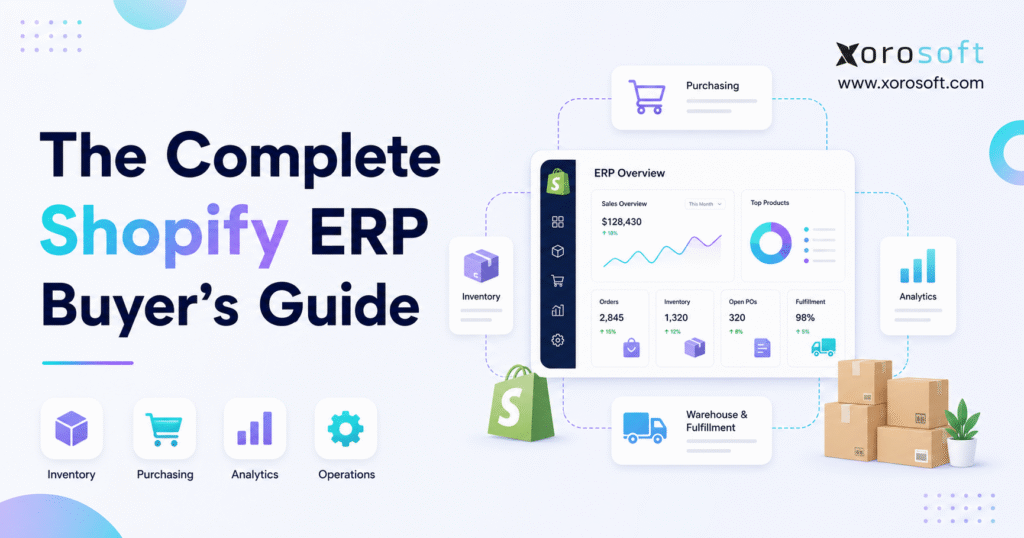
If you’re looking for the right solution for your Shopify ERP selection guide, you’ve come to the right place.
1. When Shopify Growth Creates a Back-Office Problem
A Shopify ERP selection guide becomes essential when a growing merchant can sell successfully but can no longer manage inventory, purchasing, accounting, warehouses, and fulfillment through disconnected tools. Although Shopify may continue to power the storefront effectively, operational complexity can make every new SKU, supplier, channel, location, and order harder to control.
At first, a Shopify business may operate well with accounting software, spreadsheets, and a few focused apps. However, the workload changes as order volume rises and the company adds wholesale customers, Amazon, EDI, multiple warehouses, or light manufacturing. Consequently, teams spend more time reconciling systems, correcting inventory, rebuilding reports, and explaining why different tools show different numbers.
This article helps founders, finance leaders, and operations teams determine whether an ERP is necessary and, if so, how to choose one. Rather than ranking products by popularity, it explains the workflows, integration requirements, implementation risks, and buying criteria that determine whether a platform will fit the business.
Shopify’s own ERP system guide distinguishes the commerce platform from the broader operational role of ERP. In practice, Shopify manages customer-facing commerce, whereas ERP coordinates processes such as finance, inventory, procurement, fulfillment, and reporting behind the sale.
1.1 Who This Guide Is For
This Shopify ERP selection guide is intended for operators managing physical products, multiple sales channels, or increasing inventory complexity. It is especially relevant for businesses that sell through Shopify while also handling wholesale orders, Amazon sales, supplier purchasing, EDI, multiple warehouses, assemblies, or manufacturing.
Likewise, the guide is useful when finance and operations depend on separate systems. Because inventory affects cash, cost of goods sold, purchasing, fulfillment, and margins, isolated tools eventually create company-wide consequences.
1.2 Who May Not Need ERP Yet
A small Shopify store with one location, a limited catalog, simple purchasing, and clean accounting may not need ERP. Instead, Shopify, accounting software, and one reliable inventory application may remain sufficient.
Nevertheless, the decision should be based on complexity rather than revenue alone. A lower-revenue company with regulated inventory, manufacturing, several warehouses, or wholesale EDI may need stronger controls sooner than a larger but simpler direct-to-consumer business.
2. What Is Shopify ERP?
2.1 A Practical Definition
At its core, a Shopify ERP selection guide helps buyers understand how an ERP connects Shopify with inventory, finance, purchasing, fulfillment, forecasting, and reporting. Shopify ERP refers to an enterprise resource planning system that works with Shopify and manages the operational workflows behind ecommerce sales.
Put simply, Shopify captures demand, while ERP helps the company buy, hold, allocate, fulfill, account for, and analyze the products being sold. Therefore, a strong integration should create one controlled process from customer order through financial reporting.
2.2 Is Shopify an ERP System?
No, Shopify is not a traditional ERP system. Rather, it is a commerce platform that supports storefronts, checkout, products, payments, customers, orders, and sales channels.
By contrast, ERP coordinates business-wide operational and financial processes. As a result, a growing merchant may use Shopify and ERP together instead of trying to force either system to perform the other’s role.
2.3 Shopify and ERP Responsibilities
| Business function | Shopify’s typical role | ERP’s typical role |
|---|---|---|
| Storefront and checkout | Primary system | Receives resulting transactions |
| Product presentation | Manages customer-facing content | Maintains operational item records |
| Order capture | Receives customer orders | Allocates, fulfills, and accounts for orders |
| Inventory availability | Displays sellable quantities | Controls stock by status and location |
| Purchasing | Limited | Manages suppliers and purchase orders |
| Accounting | App-based or integrated | Maintains financial and inventory records |
| Warehousing | Limited native execution | Manages receiving, picking, packing, and transfers |
| Forecasting | Limited | Supports replenishment and demand planning |
| Manufacturing | Not a core function | Manages materials, work orders, and production |
Consequently, the central question is not whether Shopify should be replaced. Instead, buyers should decide which system owns each workflow and how accurately data must move between them.
2.4 What Should Become the Source of Truth?
In a simple operation, Shopify may remain the source of truth for products and available stock. However, once several warehouses, marketplaces, wholesale channels, or production workflows share inventory, ERP usually becomes the operational source of truth.
Accordingly, Shopify should receive accurate available-to-sell quantities from ERP. Meanwhile, customer orders should flow back into ERP for allocation, fulfillment, accounting, and replenishment.
3. When Does a Shopify Business Need ERP?
Because timing matters, this Shopify ERP selection guide uses operational warning signs rather than revenue alone to determine ERP readiness. One problem by itself may not justify ERP. However, when several issues appear together, the business may have outgrown its existing operating model.
3.1 Inventory Numbers Require Constant Correction
Within the Shopify ERP selection guide, repeated inventory corrections are treated as a major signal that the current software stack is no longer reliable. For instance, Shopify may show stock that the warehouse cannot find, while another channel may reserve the same units.
As a result, teams face overselling, refunds, delayed shipments, and emergency stock adjustments. Moreover, finance may be unable to trust inventory valuation because operational counts remain unstable.
3.2 Purchasing Is Managed Through Spreadsheets
Spreadsheets can support early purchasing because they are flexible and familiar. Nevertheless, they become risky when buyers must track supplier lead times, open purchase orders, inbound units, seasonal demand, minimum order quantities, and approvals across many SKUs.
Consequently, purchasing becomes reactive. Either the company runs out of fast sellers, or it overbuys slower products and locks cash into inventory.
3.3 QuickBooks No Longer Matches Operational Complexity
QuickBooks may remain effective for basic accounting. However, Shopify businesses can outgrow the surrounding workflow when inventory valuation, landed costs, purchase receipts, warehouse transfers, and channel reconciliation require repeated manual work.
For that reason, teams comparing ERP with an accounting-led stack can review Xorosoft versus QuickBooks as one example of the operational questions that should be evaluated. The purpose is not to assume one system is universally better; instead, it is to understand when accounting software needs a broader operational layer.
3.4 Multiple Warehouses Create Allocation Problems
One location can often be managed with lightweight processes. By comparison, several locations introduce transfer planning, order routing, safety stock, location-level availability, and fulfillment-priority decisions.
Therefore, buyers should examine whether their current tools can distinguish on-hand, committed, available, damaged, inbound, and transferable inventory. Otherwise, a company can technically own enough stock while still failing to fulfill the right order from the right location.
3.5 Wholesale, Amazon, and EDI Add New Rules
Direct-to-consumer orders are only one operational model. Meanwhile, wholesale customers may require price lists, credit terms, allocations, case quantities, EDI documents, and different fulfillment priorities.
In addition, Amazon and other marketplaces may use separate inventory buffers, service-level expectations, and settlement processes. Consequently, ERP becomes valuable when the business needs one control layer across channels without treating every channel as a separate company.
3.6 Month-End Close Takes Too Long
A delayed close often reflects an operational systems problem rather than only a finance problem. Because orders, receipts, returns, inventory adjustments, shipping costs, and supplier bills sit in different tools, finance must assemble the result manually.
Therefore, a suitable ERP should connect operational events to accounting entries with clear audit trails. As a result, the finance team can spend less time rebuilding the past and more time interpreting current performance.
3.7 Reporting Cannot Be Trusted
Different reports often disagree when systems use different timing, definitions, and data ownership rules. For example, Shopify sales, warehouse shipments, accounting revenue, and inventory reductions may occur at different points.
Accordingly, ERP readiness increases when leadership needs one consistent view of inventory, margin, purchasing, fulfillment, and cash. Without that visibility, growth decisions are made using partial information.
4. Shopify ERP Compared With Other Systems
To make the decision clearer, this Shopify ERP selection guide compares ERP with inventory software, warehouse management systems, accounting platforms, and app-based stacks. Each option solves a different category of problems, so the correct choice depends on the breadth of operational complexity.
4.1 ERP vs Inventory Management Software
Inventory software focuses primarily on stock control. Therefore, it may be enough for a company whose main challenge is tracking quantities across products and locations.
However, ERP goes further by connecting inventory with purchasing, accounting, warehouse activity, forecasting, orders, and reporting. Consequently, the choice depends on whether inventory is an isolated problem or part of a broader operating challenge.
| Requirement | Inventory software | Shopify ERP |
| Stock visibility | Usually strong | Strong and financially connected |
| Purchase planning | Varies | Typically integrated |
| Accounting | Usually external | Commonly included or tightly connected |
| Warehouse execution | Basic to advanced | Often part of a broader platform |
| Manufacturing | Limited in many tools | Available in suitable ERP platforms |
| Cross-functional reporting | Limited | Broader operational and financial view |
4.2 ERP vs Warehouse Management System
A warehouse management system focuses on physical execution. Specifically, it manages receiving, put-away, bins, picking, packing, cycle counting, replenishment, and shipping.
ERP covers a wider business scope. Nevertheless, warehouse depth varies significantly between platforms, so buyers should not assume every ERP can run a demanding distribution operation.
For example, XoroWMS supports warehouse processes such as real-time inventory tracking, omnichannel fulfillment, receiving, scanning, multi-warehouse management, and operational optimization. Therefore, Shopify merchants with complex fulfillment should test warehouse workflows in detail rather than relying on a generic feature checkbox.
4.3 ERP vs Accounting Software
Accounting software records financial activity and produces statements. However, inventory-driven businesses also need operational controls that explain how those financial results were created.
For instance, finance needs accurate purchase receipts, inventory costs, returns, transfers, landed costs, and fulfillment events. Accordingly, ERP becomes more relevant when accounting cannot be separated from inventory and supply-chain activity.
4.4 ERP vs an App Stack
Apps solve focused problems quickly. Therefore, they can be a sensible choice during early growth.
Over time, however, a large app stack may create overlapping data, integration failures, duplicate fees, and unclear ownership. Instead of adding another app automatically, teams should calculate whether a connected ERP would remove more complexity than it introduces.
5. Essential Shopify ERP Capabilities
The Shopify ERP selection guide evaluates each platform across inventory, orders, purchasing, warehousing, accounting, forecasting, manufacturing, and reporting. Although feature lists are useful, buyers should judge every capability through real workflows.
5.1 Inventory Control
A capable system should show inventory by SKU, variant, location, status, and availability. Moreover, it should distinguish on-hand stock from committed, inbound, damaged, quarantined, and transferable units.
Because Shopify brands frequently sell across channels, availability rules must also prevent one channel from consuming stock reserved for another. Consequently, buyers should test allocation, inventory buffers, transfers, returns, and adjustments during the demo.
5.2 Order Management
Order sync is only the starting point. Next, ERP should help route orders, reserve inventory, manage exceptions, coordinate fulfillment, process returns, and update shipment status.
In addition, multi-channel merchants should test whether Shopify, wholesale, marketplace, and EDI orders follow the correct pricing, allocation, tax, payment, and fulfillment rules. Otherwise, automation can move errors faster rather than preventing them.
5.3 Purchasing and Supplier Management
Purchasing should connect demand with supplier activity. Therefore, buyers should look for purchase orders, approvals, supplier lead times, inbound tracking, vendor credits, landed costs, reorder policies, and replenishment suggestions.
Moreover, the system should show how planned purchases affect cash and future availability. Because purchasing decisions shape both service levels and working capital, this area deserves more attention than a short feature demonstration.
5.4 Warehouse Management
Warehouse functions should match the physical operation. For example, a single-location brand may need simple receiving and picking, whereas a distributor may require bins, waves, scanners, replenishment, cycle counts, transfers, quality controls, and labor tracking.
Accordingly, buyers should ask warehouse employees to participate in evaluation. After all, a system that satisfies executives but slows down daily execution will struggle after go-live.
5.5 Accounting and Financial Control
An ERP should connect inventory movement with financial impact. Consequently, buyers should examine inventory valuation, cost of goods sold, accounts payable, accounts receivable, bank reconciliation, tax handling, multi-currency, and month-end processes.
In addition, the platform should preserve auditability. If users can change operational records without traceable controls, faster processing may come at the cost of financial reliability.
5.6 Forecasting and Replenishment
Forecasting should support decisions rather than simply display historical charts. Therefore, teams should evaluate seasonality, lead times, sales velocity, stockout history, planned promotions, open purchase orders, and safety stock.
Nevertheless, no forecast is automatically correct. A practical system should allow buyers to review assumptions, apply judgment, and measure forecast performance over time.
5.7 Manufacturing and Assembly
Brands that make, assemble, bundle, or kit products need additional capabilities. Specifically, they may require bills of materials, work orders, raw-material tracking, production planning, labor costs, and finished-goods receipts.
As a result, manufacturing support should be evaluated using real products. Generic questions about whether a module exists will not reveal whether it supports the company’s actual production flow.
5.8 Reporting and Operational Visibility
Reliable reporting should bring sales, inventory, purchasing, warehouse, and financial data together. Moreover, role-based dashboards should help each team identify exceptions that require action.
For a broader view of connected operational modules, buyers can explore XoroERP and Xorosoft’s wider set of ERP solutions. These resources illustrate how accounting, procurement, warehousing, manufacturing, integrations, and automation can sit within a larger operating model.
6. Shopify ERP Integration Requirements
From an integration perspective, the Shopify ERP selection guide focuses on data ownership, synchronization direction, update speed, and exception handling. A connector may exist, yet the integration can still fail if the underlying process is poorly defined.
6.1 Data That Should Sync
The project should define the owner, direction, timing, and exception rules for every important data object.
| Data type | Typical direction | Operational purpose |
| Products and variants | ERP to Shopify or two-way | Keeps sellable items aligned |
| Available inventory | ERP to Shopify | Reduces overselling risk |
| Orders | Shopify to ERP | Starts allocation and fulfillment |
| Customers | Shopify to ERP | Supports service and reporting |
| Payments and refunds | Shopify to ERP | Supports reconciliation |
| Fulfillment status | ERP or WMS to Shopify | Updates the customer experience |
| Returns | Two-way | Aligns inventory and financial impact |
Shopify’s ERP integration guide explains that integrations can use native connections, custom development, or integration platforms. Accordingly, buyers should compare not only whether a connector exists but also how it handles volume, failures, retries, mapping, monitoring, and future changes.
6.2 Native Connector, Middleware, or Custom Build
A native connector is often the simplest option because the vendor maintains standard Shopify workflows. However, its predefined mappings may not support unusual pricing, fulfillment, or product structures.
Middleware offers more flexibility across several systems. Nevertheless, it adds another platform that requires monitoring, ownership, and cost.
Custom integration provides maximum control. On the other hand, it can create long-term dependency on developers and may become difficult to maintain as Shopify or ERP APIs change.
6.3 Questions to Ask About the Shopify Connection
Before purchasing, ask how quickly inventory updates reach Shopify. Also, confirm how the integration handles cancellations, edits, partial fulfillment, refunds, exchanges, bundles, gift cards, discounts, taxes, and duplicate orders.
Furthermore, review the Xorosoft ERP listing in the Shopify App Store when assessing the available integration context. Because this page appears on Shopify’s marketplace, it provides an external reference for merchants evaluating integration options.
6.4 Common Integration Mistakes
The first mistake is syncing every field in both directions. Instead, each data object should have one clearly defined owner.
Another mistake is testing only perfect orders. Therefore, implementation teams should test failed payments, order edits, split shipments, backorders, returns, duplicate messages, and temporary connection failures.
Finally, some teams ignore monitoring. Consequently, they discover integration problems only after customers complain or finance finds missing transactions.
7. How to Choose the Right Shopify ERP
When building a shortlist, the Shopify ERP selection guide recommends starting with workflow problems before reviewing vendor demonstrations. A strong buying process should reward operational fit rather than polished presentation.
7.1 Begin With Workflow Problems
First, document the operational problems that create the most cost, delay, or risk. For example, the highest-priority issue may be inventory accuracy, warehouse throughput, purchasing discipline, month-end close, or wholesale order handling.
Once those problems are ranked, the team can translate them into measurable software requirements. Consequently, each demo can be evaluated against the same business outcomes.
7.2 Map the Existing Technology Stack
List every tool used for Shopify, accounting, inventory, warehousing, shipping, EDI, purchasing, forecasting, marketplaces, and reporting. Next, identify where data is re-entered, exported, corrected, or reconciled.
Because ERP may replace some systems but integrate with others, this map prevents unrealistic scope. Moreover, it helps the buyer compare total operating cost rather than only subscription prices.
7.3 Separate Must-Haves From Preferences
Every stakeholder will have preferences. However, not every preference should determine the final platform.
Therefore, requirements should be classified as mandatory, important, or optional. A mandatory requirement should be tied to revenue, compliance, customer service, financial control, or daily execution.
7.4 Evaluate the Vendor With Real Scenarios
A scripted demo should reflect the company’s actual workflow. For instance, ask the vendor to receive a purchase order, update inventory, publish availability to Shopify, allocate an order, pick it, ship it, process a return, and show the accounting impact.
Likewise, industry-specific cases should be included. Apparel teams may test size-and-color variants, while furniture businesses may test partial shipments and landed costs.
7.5 Review Relevant Alternatives
This topic is a buyer’s guide rather than a vendor-versus-vendor article. Therefore, only comparisons that match common Shopify upgrade paths should be included.
Businesses moving beyond accounting software may find Xorosoft versus QuickBooks relevant. Meanwhile, inventory-led teams may use Xorosoft versus Cin7 to frame questions about accounting depth, warehouse operations, forecasting, and broader ERP scope.
For additional options, the main ERP comparison library can support later research. However, buyers should still score every platform against their own requirements rather than adopting a generic ranking.
8. Cost, Value, and Return on Investment
Beyond subscription pricing, the Shopify ERP selection guide considers implementation, migration, integration, training, support, and internal labor. Accordingly, buyers should evaluate the complete cost of ownership rather than the headline software fee.
8.1 Costs Beyond the Subscription
Buyers should budget for configuration, integration, data cleanup, testing, user training, project management, support, and post-launch optimization.
An inexpensive subscription can still become costly if it needs heavy customization. Conversely, a higher software price may be justified if the platform replaces several applications and reduces manual work.
8.2 The Cost of Keeping Disconnected Systems
Doing nothing also has a cost. For example, staff may spend hours reconciling inventory, repairing integration errors, rebuilding reports, and correcting customer orders.
Moreover, weak planning can create stockouts or excess inventory. Therefore, the business case should compare ERP investment with the current cost of errors, delays, duplicate tools, and missed decisions.
8.3 Useful ROI Measures
Measure inventory accuracy, stockout frequency, order cycle time, picking accuracy, purchase-order processing time, month-end close duration, manual entries, return handling, and reporting effort. Then, establish a baseline before implementation.
After go-live, review those measures regularly. Otherwise, the company may complete a large technology project without proving whether operations actually improved.
9. A Practical Shopify ERP Implementation Roadmap
For implementation planning, the Shopify ERP selection guide follows a phased approach covering discovery, data cleanup, configuration, testing, training, and stabilization. Although the exact timeline varies, the sequence should remain disciplined.
9.1 Discovery and Process Design
First, document current workflows, decision points, exceptions, and ownership. Next, decide which processes should be preserved, simplified, or redesigned.
Because ERP standardizes work, unclear processes become configuration disputes. Therefore, business leaders must make process decisions before technical teams can build reliably.
9.2 Data Cleanup
Clean products, variants, SKUs, vendors, customers, warehouse locations, inventory balances, open orders, purchase orders, and financial records. Moreover, remove duplicates and resolve inconsistent naming.
Although cleanup can feel separate from implementation, it is foundational. Bad data will otherwise move into the new system and undermine confidence immediately.
9.3 Configuration and Integration
Configure warehouses, users, permissions, accounts, purchasing rules, tax settings, approval flows, inventory policies, and reporting structures. Meanwhile, build and test the Shopify connection using agreed ownership rules.
In addition, connect other required systems such as Amazon, EDI, shipping providers, payment platforms, or 3PL partners. However, avoid expanding scope with low-priority integrations before core workflows are stable.
9.4 Testing
Test complete business cycles rather than isolated screens. For example, a purchase order should move through receipt, inventory availability, Shopify sale, fulfillment, return, and accounting.
Furthermore, test exceptions, high volumes, permissions, and failure recovery. Successful testing should prove that users can complete work and that reports reflect the expected result.
9.5 Training and Go-Live
Training should be role-specific. Therefore, warehouse users, buyers, accountants, customer-service teams, and managers should receive different practical sessions.
During go-live, establish clear escalation paths and daily review meetings. Afterward, track unresolved issues until operations stabilize rather than treating launch day as the end of the project.
10. Industry Use Cases
10.1 Apparel and Fashion
Apparel brands manage styles, colors, sizes, seasons, collections, returns, and channel allocation. Consequently, Shopify ERP must provide variant-level control without making purchasing and warehouse work unnecessarily complex.
In addition, wholesale orders may compete with direct-to-consumer demand. Therefore, allocation and replenishment rules should be tested carefully.
10.2 Furniture and Home Décor
Furniture businesses often face long lead times, bulky inventory, partial shipments, supplier deposits, and landed costs. Accordingly, ERP should connect purchasing, inbound visibility, warehouse handling, customer orders, and financial commitments.
Moreover, availability dates may matter as much as current stock. For that reason, buyers should test promised dates and inbound-order visibility.
10.3 Sporting Goods and Consumer Products
Sporting-goods businesses may sell through Shopify, dealers, marketplaces, events, and wholesale accounts. Therefore, the system should manage channel-specific prices, inventory allocation, replenishment, and fulfillment rules.
Meanwhile, seasonal products require stronger planning. Consequently, historical sales alone may not be enough for purchasing decisions.
10.4 Food and Beverage
Food businesses may require lots, expiration dates, traceability, quality controls, and inventory rotation. Because product age affects usability, the ERP should support more than basic quantity tracking.
In addition, purchasing and production plans must consider shelf life. Therefore, buyers should demonstrate these workflows with real products and supplier timelines.
10.5 Wholesale Distribution
Wholesale distributors need customer-specific pricing, credit terms, EDI, case quantities, order allocation, purchasing, and warehouse efficiency. As a result, their ERP requirements often extend beyond a typical ecommerce inventory application.
To understand how one platform addresses different operating models, readers can review Xorosoft’s industries served and customer case studies. These pages are most useful as fit references rather than substitutes for a detailed requirements process.
10.6 Manufacturing and Assembly
Manufacturers need materials, bills of materials, work orders, production schedules, labor, and finished-goods tracking. Therefore, Shopify orders must connect to the supply and production activities required to fulfill them.
For businesses with these needs, XoroONE presents a combined environment for sales, purchasing, inventory, WMS, manufacturing, ecommerce, EDI, finance, reporting, and forecasting. Nevertheless, buyers should validate every critical workflow with their own data before selecting any ERP.
11. Shopify ERP Buyer Checklist
Before selecting a vendor, use the Shopify ERP selection guide to verify requirements, integrations, costs, ownership, and measurable outcomes.
1. Define the operational problems that ERP must solve.
2. Identify every system that ERP will replace or connect with.
3. Decide which platform owns products, inventory, orders, customers, and financial data.
4. Document warehouse, purchasing, accounting, wholesale, marketplace, and manufacturing requirements.
5. Separate mandatory capabilities from optional preferences.
6. Prepare realistic demo scenarios and sample data.
7. Compare integration methods, monitoring, and exception handling.
8. Estimate implementation, migration, training, and support costs.
9. Confirm internal project ownership and decision-making authority.
10. Define measurable outcomes for the first 90 and 180 days.
Because a checklist can hide complexity, each item should have an owner and evidence. For example, “supports Shopify” is not enough; instead, the vendor should demonstrate the required order, inventory, refund, fulfillment, and accounting flows.
12. Common Shopify ERP Buying Mistakes
12.1 Choosing the Most Recognizable Brand
Brand recognition can reduce perceived risk. However, it does not guarantee workflow fit, user adoption, reasonable implementation effort, or suitable ownership costs.
Therefore, every vendor should be evaluated against the same scorecard. A smaller shortlist with deeper testing is more useful than a long list of famous platforms.
12.2 Ignoring Warehouse Users
Executives and finance leaders often lead ERP selection. Nevertheless, warehouse teams perform many of the transactions that determine inventory accuracy.
Accordingly, receiving, picking, packing, transfers, cycle counts, and returns should be tested by actual users. Otherwise, the company may approve a system that looks strong in reports but creates friction on the floor.
12.3 Underestimating Accounting Requirements
Inventory problems can dominate the buying conversation. However, financial controls, reconciliation, taxes, multi-currency, and closing processes remain equally important.
As a result, accounting stakeholders should validate transaction flows and reporting before purchase. Fixing financial design after go-live is usually more disruptive.
12.4 Migrating Bad Data
Teams sometimes move old data without deciding whether it is accurate or useful. Consequently, duplicates, inactive records, inconsistent units, and incorrect balances enter the new platform.
Instead, migration should include ownership, validation, and sign-off. Clean opening data builds trust during the most sensitive stage of adoption.
12.5 Treating Implementation as an IT Project
Technology teams are essential, but ERP changes daily work across the company. Therefore, operations, finance, purchasing, warehousing, sales, and leadership must participate in decisions.
Moreover, adoption depends on process clarity and accountability. A technically functional system can still fail if users do not understand or follow the new operating model.
13. Frequently Asked Questions About Shopify ERP
13.1 What is Shopify ERP?
Shopify ERP is an enterprise resource planning system connected to a Shopify store. Specifically, it manages back-office functions such as inventory, purchasing, accounting, warehouse operations, forecasting, reporting, and sometimes manufacturing. Therefore, Shopify continues to run commerce while ERP coordinates the operational work behind each sale.
13.2 Is Shopify an ERP system?
No, Shopify is a commerce platform rather than a traditional ERP. However, it can work with ERP software through native connectors, middleware, or custom integrations. Consequently, merchants can keep Shopify as the storefront while using ERP for deeper operational and financial control.
13.3 When should a Shopify store upgrade to ERP?
A store should consider ERP when disconnected systems cause inventory errors, purchasing delays, warehouse inefficiency, slow financial closes, or unreliable reporting. In addition, multi-warehouse, wholesale, Amazon, EDI, and manufacturing requirements strengthen the case. Nevertheless, complexity matters more than a specific revenue threshold.
13.4 What is the best ERP for Shopify?
There is no single best platform for every Shopify merchant. Instead, the best ERP is the one that matches the company’s inventory, accounting, warehouse, purchasing, integration, industry, and implementation requirements. Therefore, buyers should use realistic workflows and a weighted scorecard rather than a generic ranking.
13.5 What should a Shopify ERP include?
A suitable Shopify ERP should include inventory, order management, purchasing, accounting, reporting, and reliable Shopify integration. Moreover, some companies need WMS, forecasting, manufacturing, EDI, wholesale, Amazon, multi-currency, or multi-company support. Accordingly, required features should reflect the operating model.
13.6 Can ERP replace QuickBooks for Shopify?
Some ERP platforms include full accounting and can replace QuickBooks. However, the decision depends on financial requirements, tax workflows, reporting, migration scope, and team readiness. Therefore, finance should test the complete transaction cycle rather than assuming accounting parity from a feature list.
13.7 Can ERP replace Shopify inventory apps?
Yes, ERP can replace inventory applications when it provides the required stock, purchasing, warehouse, and reporting capabilities. Nevertheless, a simple business may still prefer a focused app. Consequently, replacement should be based on total workflow fit rather than a desire to reduce app count alone.
13.8 Should Shopify or ERP control inventory?
In complex operations, ERP commonly controls operational inventory and sends available quantities to Shopify. However, ownership rules must be explicit. Otherwise, two-way updates can overwrite valid data and create discrepancies.
13.9 Can Shopify ERP prevent overselling?
ERP can reduce overselling by centralizing inventory and publishing accurate availability to Shopify. However, results depend on warehouse accuracy, reservation logic, channel buffers, and sync speed. Therefore, buyers should test high-volume periods, simultaneous orders, cancellations, and integration failures.
13.10 What data should sync between Shopify and ERP?
Products, variants, inventory, orders, customers, payments, refunds, fulfillment status, and returns commonly sync. In addition, some businesses exchange discounts, taxes, gift cards, duties, or B2B data. Accordingly, the integration scope should be documented field by field.
13.11 How much does Shopify ERP cost?
Cost includes software, implementation, integration, migration, training, support, and internal labor. Moreover, custom workflows or several connected systems may increase the total. Therefore, buyers should compare three-year ownership cost with the current cost of manual work, errors, and disconnected tools.
13.12 How long does implementation take?
Implementation can take weeks for a limited scope or several months for a complex operation. Specifically, timing depends on data quality, warehouses, accounting, integrations, manufacturing, and user readiness. Consequently, vendors should provide a scoped plan rather than a generic estimate.
13.13 What is the difference between ERP and WMS?
WMS manages warehouse execution, while ERP coordinates broader operational and financial processes. However, some ERP platforms include built-in WMS capabilities. Therefore, buyers should compare actual receiving, picking, packing, replenishment, transfer, and counting workflows instead of relying on product labels.
13.14 What is the difference between ERP and OMS?
An order management system focuses on order capture, routing, status, and fulfillment coordination. By contrast, ERP connects orders with inventory, purchasing, accounting, warehouses, and reporting. Nevertheless, some companies use both when their order-routing requirements are especially complex.
13.15 What is the difference between ERP and inventory software?
Inventory software primarily controls stock, whereas ERP connects stock with wider business processes. Therefore, ERP becomes more relevant when purchasing, financial reporting, warehousing, manufacturing, and forecasting must share the same data. However, inventory software may remain enough for simpler businesses.
13.16 Can Shopify ERP support wholesale?
Yes, a suitable ERP can support customer-specific pricing, terms, allocations, sales orders, invoicing, fulfillment, and credit controls. In addition, it may connect with B2B portals or EDI networks. Consequently, wholesale workflows should be tested separately from direct-to-consumer orders.
13.17 Can Shopify ERP support EDI?
Many ERP platforms support EDI directly or through integration partners. However, buyers should verify document types, trading-partner requirements, acknowledgments, error handling, and fees. Therefore, saying “EDI supported” is not enough for a serious wholesale evaluation.
13.18 Can Shopify ERP manage Amazon sales?
Yes, ERP can centralize orders, inventory, purchasing, and accounting across Shopify and Amazon. Nevertheless, marketplace settlements, fees, returns, and inventory buffers require careful configuration. Accordingly, teams should test Amazon-specific reconciliation rather than only order import.
13.19 Can ERP support multiple Shopify stores?
Many platforms can connect several Shopify stores. However, buyers must decide whether products, customers, currencies, warehouses, and financial entities are shared or separate. Consequently, multi-store architecture should be designed before connectors are configured.
13.20 Can Shopify ERP support manufacturing?
Some ERP systems support bills of materials, work orders, materials planning, labor, production, and finished goods. Therefore, manufacturers should connect Shopify demand with production and purchasing plans. However, the depth of manufacturing functionality varies widely between products.
13.21 Is Xorosoft suitable for Shopify businesses?
Xorosoft may suit inventory-driven Shopify businesses that need connected inventory, accounting, purchasing, WMS, manufacturing, forecasting, EDI, Amazon, and multi-warehouse workflows. Nevertheless, fit depends on requirements, implementation scope, and team processes. Therefore, buyers should validate real workflows before deciding.
13.22 Which industries benefit most from Shopify ERP?
Inventory-intensive industries usually benefit most. For example, apparel, furniture, sporting goods, consumer products, food, wholesale distribution, and manufacturing often manage complex products, purchasing, warehouses, or channels. Consequently, ERP value rises as those operational dependencies increase.
13.23 What should be shown during an ERP demo?
A useful demo should show complete, realistic transactions. For instance, the vendor should receive inventory, update Shopify availability, import an order, allocate stock, fulfill it, process a return, and show the financial result. Moreover, the team should test exceptions rather than only ideal scenarios.
13.24 What are the biggest ERP implementation risks?
Common risks include unclear scope, poor data, weak ownership, excessive customization, insufficient testing, and inadequate training. In addition, teams may reproduce inefficient old processes in the new platform. Therefore, implementation governance matters as much as software selection.
13.25 How Should a Business Use This Guide?
Businesses should use a Shopify ERP selection guide to document operational problems, define mandatory requirements, prepare realistic demo scenarios, and compare vendors through the same scorecard. Consequently, the selection process becomes based on operational fit rather than brand recognition or presentation quality.
14. Building an Operating System That Can Scale
Ultimately, this Shopify ERP selection guide should help the company choose an operating system that improves control rather than simply adding another application. Although Shopify can continue driving commerce, the back office needs connected inventory, purchasing, accounting, fulfillment, and reporting as complexity grows.
Therefore, the right ERP should reduce reconciliation, strengthen inventory confidence, improve warehouse execution, and give finance cleaner operational data. Moreover, it should support the company’s next stage without forcing every team to work around the system.
Before committing, define the problems, map the systems, clean the data, test real scenarios, and compare total ownership cost. Finally, review evidence from relevant Xorosoft case studies and evaluate whether the capabilities of XoroONE, XoroERP, or XoroWMS match the operation.
When the existing stack is limiting inventory accuracy, purchasing, warehouse control, accounting, or growth, Book a demo to evaluate a connected ERP approach for your Shopify business.
Recent Posts
-
 Best AI Warehouse Management Software for ERP Inventory and Warehouse Operations
 -
 Project Based ERP Software for Managing Project Costs, Purchasing, Resources, Inventory, and Accounting
 -
 Food and Beverage ERP Requirements for Lot, Expiry, and Recall Control
 -
 How to Prevent EDI Errors Before They Become Retailer Chargebacks
 -
 Warehouse Injury and Safety Statistics: What Operations Teams Should Know Before Automating Workflows