If you’re looking to optimise Shopify ERP inventory availability, you’re in the right place.
1. Why Shopify ERP Inventory Availability Reports Stop Matching
Shopify ERP inventory availability can change even when the physical quantity inside a warehouse stays exactly the same. Therefore, when Shopify and an ERP display different inventory numbers, teams should not immediately assume that stock disappeared, duplicated, or failed to synchronize.
Instead, the two systems may simply be reporting different inventory states.
For example, a warehouse may physically contain 120 units. However, 25 units may already support open orders, while another 15 units may sit in quality control, safety stock, or another non-sellable state.
Consequently, only 80 units may remain available for another customer.
Therefore, the most useful question is not:
“Which inventory number is correct?”
Instead, ask:
“What inventory state does each report represent?”
Once that distinction becomes clear, Shopify and ERP discrepancies become much easier to diagnose.
1.1 Physical Stock and Sellable Stock Answer Different Questions
Physical inventory answers one question:
How many units physically exist at this location?
However, sellable inventory answers another:
How many units can we promise to another customer right now?
Therefore, those numbers should not automatically match.
For example, a warehouse might physically hold 500 units. Meanwhile, 80 units may already support customer orders and another 20 may be unavailable.
As a result, physical stock equals 500 while sellable stock equals 400.
Consequently, publishing all 500 units as available can create overselling even though the warehouse count itself is accurate.
1.2 When Shopify Inventory Reports Disagree Without a Sync Failure
Sometimes an API genuinely fails.
However, many Shopify inventory reports disagree because each system calculates a different inventory concept.
For example, Shopify may display Available inventory while the ERP displays On hand inventory.
Therefore, both systems can contain correct data while their totals differ.
Before changing an integration, teams should compare:
- SKU
- location
- inventory state
- timestamp
- allocations
- fulfillment eligibility
- source system
Consequently, troubleshooting becomes more precise because operations teams compare equivalent values.
2. How Shopify Inventory Availability Changes by State
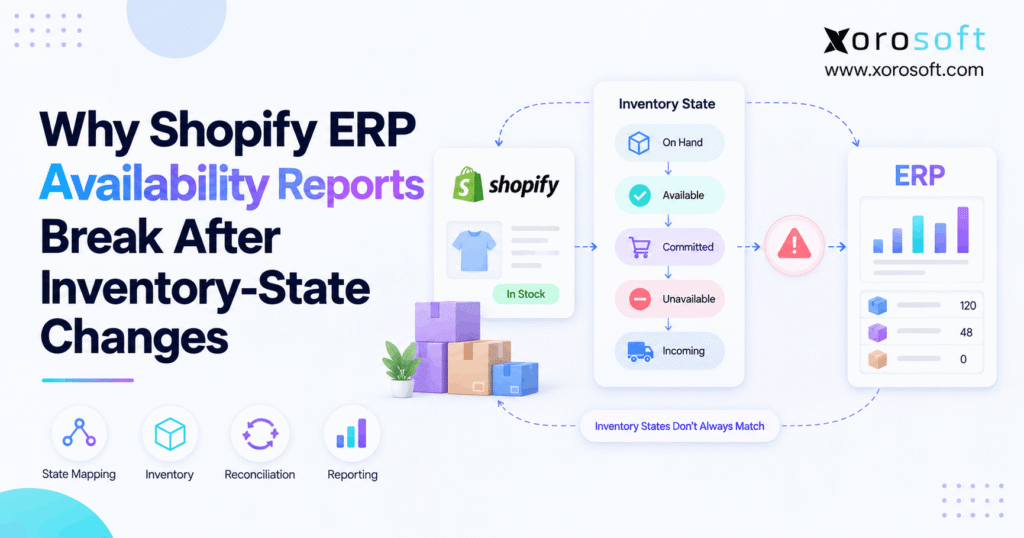
Shopify uses several inventory states to separate physical stock from sellable stock.
Therefore, Shopify inventory availability should never depend on one generic “quantity” field.
Instead, teams should understand On hand, Available, Committed, Unavailable, and Incoming inventory separately.
2.1 Shopify Inventory Availability: On Hand vs Available
On hand inventory represents physical stock at a location.
However, Available inventory represents stock that can currently support another sale.
Therefore:
On hand does not automatically equal Available.
Consider this example:
| Inventory state | Quantity |
|---|---|
| On hand | 120 |
| Available | 80 |
| Committed | 25 |
| Unavailable | 15 |
Although the warehouse owns 120 units, customers can currently purchase only 80.
Consequently, an ERP integration that sends On hand inventory directly into Shopify availability can overstate sellable stock.
2.2 Committed Inventory Reduces Sellable Stock
Committed inventory is physically present, but it has already been spoken for.
For example, those units may support existing customer orders or other demand.
Therefore, committed stock still belongs to the business.
However, it should not support a second sale.
Consequently, warehouse reports can legitimately include those units while Shopify excludes them from current availability.
2.3 Unavailable Inventory Explains Hidden Stock
Unavailable stock also remains physically present.
However, it may be blocked because of:
- damage
- quality control
- safety stock
- operational holds
- application-driven rules
Therefore, a gap between On hand and Available inventory does not automatically indicate missing stock.
Instead, unavailable quantities may explain the difference.
As a result, integrations should preserve these states rather than flattening them into one total.
2.4 Incoming Inventory Belongs to Future Supply
Incoming inventory represents units moving toward a location.
For example, those units may come from:
- purchase orders
- warehouse transfers
- inbound replenishment
However, incoming stock is not the same as inventory already received.
Therefore, purchasing teams may count it as expected supply while Shopify correctly excludes it from current sellable availability.
Consequently, future supply and present-day availability require different reporting.
3. The Shopify ERP Inventory Availability Equation
A practical inventory relationship is:
On hand = Available + Committed + Unavailable
Therefore:
Available = On hand − Committed − Unavailable
Meanwhile, Incoming inventory sits outside the current sellable calculation until the business receives it.
Consequently, Shopify ERP inventory availability becomes easier to understand once teams stop treating every inventory number as interchangeable.
3.1 One SKU Can Have Several Correct Inventory Numbers
Consider SKU SHIRT-BLK-M.
Its inventory position might be:
- On hand: 120
- Available: 80
- Committed: 25
- Unavailable: 15
- Incoming: 50
Therefore, the warehouse manager can correctly say:
“We physically have 120 units.”
Meanwhile, ecommerce can correctly say:
“We can currently sell 80 units.”
Additionally, purchasing can correctly say:
“We have another 50 units inbound.”
Consequently, several numbers can all be correct because each one answers a different operational question.
3.2 Precise Labels Prevent False Discrepancies
Reports often create confusion because they use vague labels.
For example:
Inventory: 120
does not explain whether 120 means On hand, Available, allocated, or future supply.
Instead, reports should use precise labels such as:
On hand: 120
Available: 80
Incoming: 50
Therefore, teams can understand the meaning immediately.
As a result, many supposed “inventory errors” disappear before reconciliation even begins.
4. Why Shopify ERP Inventory Availability Reports Break
Most Shopify ERP inventory availability problems fall into several repeatable patterns.
Therefore, operations teams should identify the failure pattern before changing code, inventory values, or integration settings.
4.1 When ERP Inventory Availability Is Overstated
Suppose the ERP contains:
- On hand: 100
- Allocated: 20
- Quality hold: 5
- Available-to-sell: 75
However, the integration publishes all 100 units to Shopify.
Consequently, Shopify may expose 25 units that operations do not consider sellable.
Therefore, the integration transmitted an accurate physical quantity but mapped it to the wrong business concept.
4.2 Shopify Inventory Availability After Committed Demand
The opposite problem can also occur.
For example:
- Physical inventory: 100
- Committed demand: 20
- Correct Available quantity: 80
However, Shopify may already reflect those commitments in its Available quantity.
If middleware subtracts the same 20 units again, the downstream report shows 60.
Consequently, availability becomes understated.
Therefore, integrations should never deduct the same allocation twice.
4.3 Why Unavailable Inventory Disappears From ERP Logic
Some integrations transfer only On hand and Available quantities.
However, that approach hides why those values differ.
For example:
- On hand: 100
- Available: 70
Therefore, 30 units need an explanation.
If 20 units are safety stock and 10 are under quality review, the stock has not disappeared.
Instead, the integration failed to preserve the unavailable states.
4.4 Why Incoming Stock Becomes Sellable Too Early
Suppose purchasing reports:
- Available: 300
- Incoming: 500
Therefore, supply planning can reasonably show 800 units of current and expected stock.
However, ecommerce should not necessarily promise all 800 today.
Incoming supply can still face:
- supplier delays
- transfer delays
- receiving discrepancies
- quality issues
- damaged shipments
Consequently, planning inventory and sellable inventory should remain separate.
5. Shopify Inventory State Mapping Must Survive Platform Changes
Inventory platforms evolve.
Therefore, integrations should not assume that a state name, workflow, or API behavior will remain unchanged forever.
Instead, Shopify inventory state mapping should reflect business meaning.
5.1 A State Change Does Not Mean Stock Disappeared
Suppose inventory moves from one state classification to another.
The report may show a change.
However, physical inventory may remain exactly the same.
Therefore, an ERP should distinguish between:
- a state transition
- a physical movement
- a sale
- a receipt
- a correction
Consequently, operations teams can avoid interpreting every state update as a warehouse quantity change.
5.2 Historical Assumptions Can Become Integration Problems
An older integration may contain rules that made sense when it was first built.
However, those assumptions can become outdated.
Therefore, teams should periodically review:
- API mappings
- inventory states
- report calculations
- exception logic
- allocation rules
- synchronization ownership
As a result, future platform changes create manageable maintenance rather than unexplained inventory drift.
6. Location Mapping and Shopify Inventory Availability
Inventory is not only SKU-specific.
Instead, it is also location-specific.
Therefore, Shopify inventory availability must preserve location context.
A growing operation may use:
- Warehouse East
- Warehouse West
- retail locations
- a 3PL
- a returns facility
- a manufacturing location
However, not every physical location should contribute inventory to Shopify.
6.1 Physical Stock Does Not Guarantee Fulfillment Eligibility
A warehouse may physically hold a SKU.
However, that location may not fulfill Shopify orders.
Therefore, counting every physical unit toward ecommerce availability can inflate sellable inventory.
Instead, integrations should ask:
1. How many units exist?
2. Which location owns them?
3. Can that location fulfill this channel?
4. Are the units currently sellable?
Consequently, fulfillment eligibility becomes part of the availability calculation.
6.2 Shopify Inventory Reports Across Multiple Warehouses
Consider this network:
- East Warehouse: 100 units
- West Warehouse: 0 units
Therefore, the ERP company total equals 100.
However, suppose only West Warehouse serves a specific fulfillment flow.
In that case, those 100 units may not support that order.
Consequently, company-wide inventory and channel-level availability can disagree even when both reports are correct.
7. Shopify ERP Inventory Sync Timing Can Create Temporary Mismatches
Not every Shopify ERP inventory sync discrepancy comes from mapping.
Sometimes timing creates the problem.
For example, Shopify may process an order before the ERP receives the corresponding event.
Therefore, a report captured during that short window may show different quantities.
7.1 Shopify ERP Inventory Sync: Real-Time Events vs Batch Updates
Event-driven integrations can react quickly to:
- orders
- cancellations
- returns
- transfers
- receiving
- inventory adjustments
However, batch integrations update on a schedule.
Therefore, a nightly ERP export may be accurate at midnight but stale by midday.
Consequently, comparing live Shopify data with an older ERP snapshot creates an expected mismatch.
Instead, teams should compare the same timestamp wherever possible.
7.2 Retries Can Create Duplicate Adjustments
Network failures create another risk.
For example, an integration may send an inventory update successfully but fail to receive confirmation.
Therefore, it may send the same transaction again.
If duplicate-event protection is weak, inventory can change twice.
Consequently, integration architecture should support:
- unique transaction references
- retry controls
- duplicate detection
- audit logs
As a result, temporary technical failures do not become permanent inventory errors.
8. Source-of-Truth Conflicts Create ERP Inventory Availability Drift
Temporary differences often resolve naturally.
However, persistent ERP inventory availability drift usually points to ownership problems.
For example:
Shopify changes inventory.
Then the ERP overwrites Shopify.
Next, the WMS sends another value.
Meanwhile, middleware imports that value back into the ERP.
Consequently, systems keep correcting one another.
8.1 Assign Ownership Before Synchronization
First, define which system owns:
- physical inventory
- warehouse movements
- allocations
- channel availability
- purchasing
- receiving
- returns
- inventory valuation
Then define which systems consume those quantities.
Therefore, integrations become directional rather than competitive.
Businesses connecting ecommerce, marketplaces, EDI, and operations can use Xorosoft integrations to centralize these data flows while keeping ownership rules explicit.
8.2 One Source of Truth Does Not Mean One Application
A source-of-truth strategy does not require one application to perform every task.
For example, Shopify can remain the commerce layer.
Meanwhile, a WMS can execute warehouse processes.
Additionally, an ERP can manage purchasing, accounting, planning, and broader inventory control.
Therefore, the objective is one authoritative owner for each operational concept.
9. How to Reconcile Shopify ERP Inventory Availability
Instead of comparing two large reports, begin with one controlled discrepancy.
Therefore, use a repeatable diagnostic process.
9.1 Start With One SKU, One Location, and One Timestamp
First, choose one SKU where the difference is easy to reproduce.
Next, record:
- Shopify location
- ERP warehouse
- On hand
- Available
- Committed
- Unavailable
- Incoming
- ERP allocation
- ERP available-to-sell
- timestamp
Consequently, company-level aggregation stops hiding the source of the issue.
9.2 Recalculate Shopify Inventory Availability Manually
Next, calculate:
On hand − Committed − Unavailable = Available
Then compare that result with the ERP’s sellable inventory calculation.
If the values differ, investigate:
- allocations
- location mapping
- unavailable inventory
- timing
- channel buffers
- duplicate events
Therefore, the investigation remains focused on logic rather than guesswork.
9.3 Trace the Business Event Behind the Change
Next, identify what changed the inventory.
For example:
- customer order
- cancellation
- return
- transfer
- receipt
- warehouse adjustment
- cycle count
- damaged-stock update
Therefore, compare the underlying event rather than only the ending balance.
Consequently, teams can distinguish a state movement from an actual physical movement.
10. Build a Shopify Inventory State Mapping for ERP
A written Shopify inventory state mapping removes ambiguity.
Therefore, define how each Shopify concept translates into the ERP.
| Shopify concept | ERP concept | Common mistake | Likely result |
|---|---|---|---|
| On hand | Physical inventory | Publishing as sellable | Overselling |
| Available | Available-to-sell | Deducting demand again | Underselling |
| Committed | Allocated demand | Ignoring allocations | Excess availability |
| Unavailable | Held inventory | Dropping from reports | Unexplained variance |
| Incoming | Inbound supply | Publishing before receipt | Premature promises |
10.1 Map Business Meaning, Not Field Names
Two systems may use different terminology for similar concepts.
Therefore, matching fields only because their names look similar creates risk.
Instead, document:
- definition
- system owner
- calculation
- location scope
- trigger
- downstream use
Consequently, future teams understand why the integration works the way it does.
10.2 ERP Inventory Availability: Calculated vs Stored Quantities
Some quantities exist directly in a database.
However, others are calculated from:
- allocations
- safety stock
- fulfillment eligibility
- channel rules
- warehouse status
Therefore, integration teams should identify which values can move directly between systems and which need business logic.
As a result, calculated availability does not become confused with physical inventory.
11. Shopify Inventory Availability Rules Vary by Business Model
Although the basic inventory states remain useful, operating models differ.
Therefore, Shopify inventory availability rules should reflect how the business actually sells and fulfills products.
11.1 Shopify Inventory Availability Across Ecommerce and Wholesale
A growing brand may sell through:
- Shopify DTC
- wholesale
- EDI
- marketplaces
- retail stores
Therefore, 1,000 physical units cannot automatically become 1,000 available units in every channel.
Instead, some stock may already support:
- B2B contracts
- marketplace commitments
- wholesale orders
- safety buffers
Consequently, businesses need allocation rules that prevent multiple channels from promising the same stock.
For broader workflows, XoroERP connects inventory, sales, purchasing, and financial operations inside one ERP environment.
11.2 Manufacturing Adds Another Inventory Layer
Manufacturers must also separate:
- raw materials
- work in process
- finished goods
- components
- production allocations
Therefore, not every inventory asset should contribute to Shopify availability.
Instead, finished goods should enter an appropriate sellable state before ecommerce can promise them.
Consequently, production and ecommerce inventory need coordinated but distinct workflows.
12. Inventory App, WMS, or ERP: Who Should Own Availability?
Not every Shopify merchant needs ERP.
Therefore, the right system depends on complexity.
12.1 When a Shopify Inventory App Is Enough
A focused inventory application may be enough when a business has:
- one Shopify store
- one simple warehouse
- limited channels
- straightforward purchasing
- basic accounting requirements
Therefore, replacing a simple stack with ERP solely because of one reporting mismatch may be unnecessary.
Instead, first fix the state or mapping issue.
12.2 When Warehouse Execution Needs a WMS
Warehouse complexity creates different requirements.
For example, teams may need:
- barcode scanning
- receiving
- putaway
- bin management
- picking
- packing
- shipping
- transfers
Therefore, a warehouse management system becomes more important.
XoroWMS supports these warehouse execution workflows while connecting inventory movements with the wider operation.
12.3 When ERP Inventory Availability Becomes Operationally Critical
ERP becomes more relevant when inventory influences every department.
For example:
- sales needs availability
- purchasing needs demand
- warehouse teams need allocations
- finance needs inventory value
- management needs consolidated reporting
Therefore, fragmented inventory applications become harder to reconcile as the business grows.
For this type of operation, XoroONE brings inventory, WMS, purchasing, manufacturing, ecommerce, accounting, and reporting into one cloud ERP environment.
13. What a Strong Shopify ERP Integration Should Preserve
A reliable Shopify ERP integration should do more than move one quantity.
Instead, it should preserve the business context behind that quantity.
13.1 Preserve Shopify Inventory Availability by Location
First, preserve:
- physical stock
- sellable inventory
- allocations
- unavailable stock
- inbound supply
- warehouse location
- Shopify fulfillment location
Therefore, inventory remains explainable after it moves between systems.
Additionally, location-level visibility helps operations teams understand why company-wide inventory and storefront availability differ.
13.2 Preserve Adjustment Context
Next, preserve why inventory changed.
For example, distinguish:
- sale
- return
- damage
- transfer
- receiving
- correction
- cycle count
Consequently, teams can investigate discrepancies without reconstructing the event manually.
Moreover, reporting becomes more useful because every adjustment has operational context.
13.3 Keep Shopify Commerce Separate From ERP Ownership
Shopify should continue to serve the commerce workflow.
However, the operational platform may need to control broader inventory processes once complexity increases.
For example, Xorosoft is available through the Shopify App Store, providing an external example of connecting Shopify commerce with ERP operations.
Therefore, the goal is not to turn Shopify into an ERP.
Instead, the goal is to connect Shopify to reliable operational inventory.
14. Avoid Common Shopify Inventory Availability Mistakes
Most recurring Shopify inventory availability issues come from a few shortcuts.
Therefore, teams should review these mistakes before rebuilding their entire integration.
14.1 Do Not Publish On Hand Automatically
On hand can contain both committed and unavailable inventory.
Therefore, it should not automatically become Shopify sellable inventory.
Instead, calculate availability using the business’s actual allocation rules.
14.2 Do Not Publish Incoming Inventory Automatically
Incoming inventory has not yet completed receiving.
Therefore, supplier delays or receiving problems can still affect it.
Consequently, an open purchase order should not automatically increase current storefront availability.
14.3 Do Not Subtract the Same Allocation Twice
If Shopify Available already reflects committed demand, middleware should not blindly subtract that same demand again.
Otherwise, availability becomes artificially low.
Therefore, every deduction should have one clear owner.
14.4 Do Not Combine Every Warehouse Blindly
A warehouse may physically hold inventory but remain unable to fulfill a specific Shopify order flow.
Therefore, company-wide totals can misrepresent channel availability.
Instead, preserve fulfillment eligibility by location.
14.5 Do Not Let Several Systems Overwrite the Same Field
Circular inventory updates create persistent drift.
Therefore, one system should own each inventory concept.
Meanwhile, connected applications should consume or update inventory according to explicit rules.
Consequently, synchronization becomes predictable rather than competitive.
15. Build Shopify ERP Inventory Reports From Shared Definitions
Reliable Shopify inventory reports begin with shared definitions.
Therefore, create an inventory dictionary that defines:
- On hand
- Available
- Committed
- Unavailable
- Incoming
- allocated
- safety stock
- in transit
- available-to-sell
Next, identify which system owns each concept.
Then document how locations and channels affect those values.
Additionally, make every operational report use those definitions consistently.
For businesses that need one connected operating model, Xorosoft’s solutions cover inventory, order management, purchasing, warehouse operations, manufacturing, and financial workflows.
Meanwhile, its industry solutions show how these requirements differ across inventory-driven business models.
Therefore, the goal is not simply another dashboard.
Instead, the goal is one shared interpretation of inventory.
16. Make Shopify ERP Inventory Availability Agree on Meaning First
A Shopify inventory mismatch often looks like a technical problem.
However, the root cause frequently sits in operational definitions.
One system may report physical stock.
Meanwhile, another may report sellable inventory.
Additionally, a warehouse application may track allocations while purchasing tracks incoming supply.
Therefore, those reports should not automatically produce the same total.
Reliable Shopify ERP inventory availability requires four foundations:
1. consistent state definitions
2. accurate location mapping
3. clear system ownership
4. transaction-level reconciliation
Once those foundations exist, genuine integration failures become much easier to identify.
Moreover, businesses using Shopify alongside multiple warehouses, wholesale, Amazon, EDI, purchasing, manufacturing, and integrated accounting can reduce manual reconciliation by connecting these workflows.
For practical examples of how inventory-driven companies connect their operational systems, review Xorosoft case studies.
Finally, if inventory reporting keeps breaking across Shopify, warehouses, purchasing, and accounting, Book a Demo to review how those workflows can operate in one connected system.
FAQs
Why does Shopify inventory not match my ERP?
Shopify and ERP inventory can differ because of inventory states, location mappings, allocations, synchronization timing, incoming stock, or different available-to-sell calculations. Therefore, compare the same SKU, location, state, and timestamp first.
What is the difference between Shopify Available and On hand inventory?
On hand represents physical inventory at a location. However, Available represents inventory that can still be sold. Therefore, Committed and Unavailable quantities can make Available lower than On hand.
Does Shopify Incoming inventory count as Available?
No. Incoming inventory represents stock moving toward a location. Therefore, it does not become Available simply because a transfer or purchase order exists.
Can Shopify and ERP inventory reports both be correct?
Yes. For example, an ERP can correctly show physical stock while Shopify correctly shows sellable stock. Therefore, different totals do not automatically indicate an integration failure.
Should Shopify or ERP be the inventory source of truth?
It depends on complexity. However, businesses with multiple warehouses, channels, purchasing, wholesale, manufacturing, or accounting often benefit from clearly assigning broader inventory ownership to the ERP.
How do I fix Shopify ERP inventory availability errors?
First, compare one SKU and location. Next, verify state mapping, allocations, timestamps, and fulfillment eligibility. Finally, trace the event that changed inventory before correcting quantities.
When should a Shopify business consider ERP?
ERP becomes more relevant when Shopify inventory must coordinate multiple warehouses, marketplaces, wholesale, EDI, purchasing, manufacturing, accounting, forecasting, or recurring reconciliation across disconnected applications.
Recent Posts
-
 ERP Onboarding Checklist: What Operations Teams Need Before Go-Live
 -
 Warehouse Cost Benchmarks 2026: Labor, Picking, Storage, and Returns
 -
 Inventory Tracker for Shopify: Managing Incoming Purchase Orders and Interlocation Transfers Before Stock Is Sellable
 -
 Katana Alternatives for Manufacturers
 -
 Demand Forecasting for Distributors: 10 AI-Driven Solutions for Customer Forecasts, Lead Times, and Replenishment