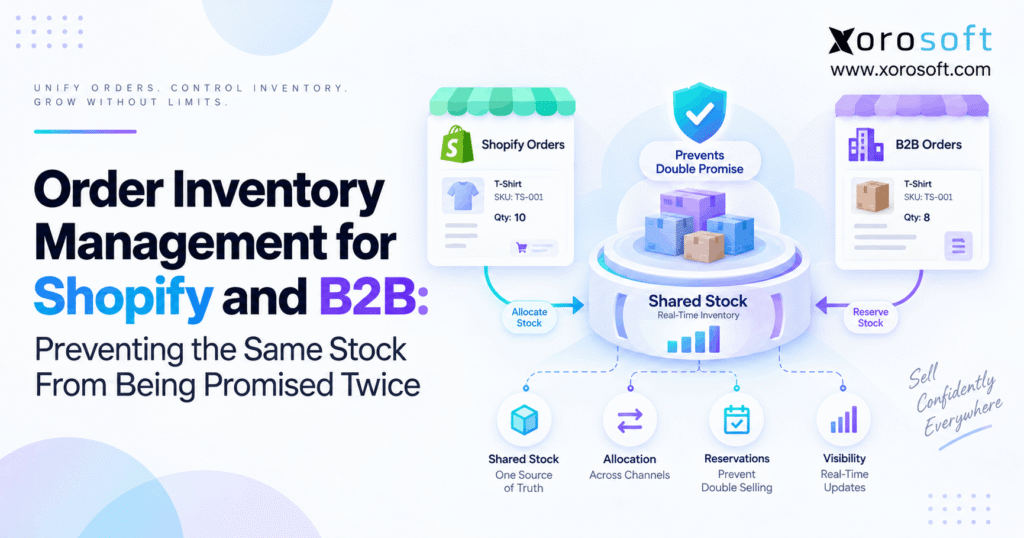
For businesses seeking an efficient way to manage products and orders, Shopify B2B inventory control is essential for streamlining operations and ensuring accurate stock levels.
1. When Two Sales Channels See the Same Available Unit
Shopify B2B inventory control becomes critical when ecommerce and wholesale orders depend on the same physical stock. For example, Shopify may show 20 units available while a sales representative is simultaneously entering a B2B order for 15. Meanwhile, neither channel knows that the other is about to consume the inventory.
As a result, both orders can look valid even though the business has promised more inventory than it physically owns. Therefore, the problem is not simply inaccurate stock counting. Instead, it is a failure to control when available stock becomes committed stock.
Moreover, growing businesses often add wholesale, EDI, multiple warehouses, and new ecommerce channels without changing the inventory logic behind them. Consequently, every additional order source creates another opportunity for two customers to claim the same unit.
1.1 Shopify B2B inventory control starts with one inventory promise
First, the business needs one definition of what can still be sold.
For example, a warehouse may physically contain 500 units. However, 80 units might already belong to open Shopify orders, 40 might be committed to wholesale customers, 10 might be damaged, and another 20 might be protected as safety stock.
Therefore, the useful number is not 500.
Instead, the business should publish only the stock that remains commercially available after commitments and restrictions.
This principle is the foundation of Shopify B2B inventory control because both Shopify and B2B demand must consume the same governed availability.
1.2 Why shared inventory becomes difficult as companies grow
Initially, a business may operate one Shopify store and one warehouse. Therefore, basic inventory synchronization can be enough.
However, complexity increases quickly when wholesale customers, sales representatives, EDI, Amazon, multiple locations, or large purchase commitments enter the workflow.
In addition, teams often add separate applications for warehouse management, purchasing, accounting, and inventory planning.
Consequently, several systems may contain inventory numbers, yet none may control the entire inventory promise.
That is when overselling stops being an isolated ecommerce problem and becomes an operational architecture problem.
2. Shopify B2B Inventory Control Requires More Than On-Hand Stock
Shopify B2B inventory control works only when teams distinguish physical inventory from sellable inventory.
Although both numbers relate to the same SKU, they answer different questions.
Physical stock answers:
How many units exist?
However, available stock answers:
How many units can we safely promise to another customer?
Therefore, the second number should drive Shopify and B2B availability.
2.1 Available stock must exclude existing commitments
Suppose the warehouse has 1,000 units on hand.
However:
- 180 units belong to unfulfilled ecommerce orders.
- 120 units belong to approved wholesale orders.
- 30 units are damaged.
- 50 units are protected as safety stock.
Therefore:
1,000 − 180 − 120 − 30 − 50 = 620 units available
As a result, exposing 1,000 units to Shopify would immediately create overselling risk.
Instead, the channel should receive the governed sellable quantity.
2.2 Committed stock should disappear from general availability
Once a valid order claims inventory, those units should no longer compete with unrestricted demand.
Therefore, committed stock must affect availability before warehouse picking begins.
For example, if a wholesale customer orders 100 units today for shipment tomorrow, Shopify should not continue offering those same 100 units tonight.
Otherwise, the warehouse discovers the conflict only after both customers believe their orders are confirmed.
Consequently, strong shared inventory management moves the commitment upstream to the order-management layer.
3. How Shopify B2B Inventory Control Prevents Double Promises
The central rule behind Shopify B2B inventory control is simple:
Inventory should become unavailable to competing demand as soon as the business accepts a credible commitment.
However, companies still need to define exactly when that commitment occurs.
For ecommerce, it may happen when an order is successfully created. Meanwhile, wholesale demand may require approval, credit validation, or another commercial checkpoint.
Therefore, one reservation rule cannot automatically fit every order type.
3.1 Reserve inventory when demand becomes credible
A reservation connects stock with actual demand.
For example, suppose a wholesale customer orders 60 units from a pool of 200 available units.
Once the order reaches the approved state, the system reserves 60.
Therefore, only 140 units remain available to new demand.
If Shopify receives the updated availability immediately, ecommerce buyers cannot claim the 60 units already promised elsewhere.
As a result, Shopify B2B inventory control prevents the conflict before fulfillment begins.
3.2 Release reservations when orders change
Reservations also need release rules.
For example, the wholesale customer may reduce the order from 60 units to 40.
Therefore, 20 units should return to the appropriate available inventory pool.
Similarly, if the customer cancels the entire order, the remaining reservation should be released.
However, the system should first check whether warehouse work has already changed the inventory state.
Consequently, inventory release should follow transaction status rather than manual spreadsheet adjustments.
4. Shopify B2B Stock Allocation Controls Who Can Consume Inventory
Reservations answer which order has claimed stock.
However, allocation answers a different question:
Who should have access to the inventory before the order arrives?
Therefore, allocation becomes useful when a business needs to protect inventory for Shopify, wholesale, strategic accounts, or specific locations.
4.1 Shopify B2B stock allocation can use one shared pool
A business can allow ecommerce and wholesale orders to consume one shared quantity.
For example:
Available stock: 1,000 units
Both Shopify and B2B orders can draw from the same 1,000 units.
Therefore, inventory utilization remains high because unused wholesale stock does not sit idle.
However, large B2B orders can suddenly consume inventory that the ecommerce team expected to sell.
Consequently, a shared pool works best when both channels have similar priority.
4.2 Channel allocations can protect wholesale commitments
Alternatively, the business can divide inventory logically.
For example:
- Shopify allocation: 700
- Wholesale allocation: 300
Therefore, a sudden Shopify promotion cannot consume the final 300 units protected for wholesale demand.
Meanwhile, operators can still create rules that release unused wholesale inventory later.
This approach makes Shopify B2B inventory control more predictable when large customers expect guaranteed supply.
4.3 Customer allocations protect strategic accounts
Some companies need customer-level rules.
For example, a national retailer may have a contractual volume commitment.
Therefore, the distributor may protect 500 units specifically for that account.
However, the business also needs an expiration or reallocation rule.
Otherwise, protected inventory can remain inaccessible even when the customer no longer needs it.
Consequently, allocation should be dynamic rather than permanent.
5. Shopify B2B Inventory Control Across Multiple Warehouses
Multiple warehouses make Shopify B2B inventory control more complex because company-wide stock does not always equal fulfillable stock.
For example:
- Warehouse A has 20 units.
- Warehouse B has 80 units.
- A customer orders 50 units.
Overall inventory equals 100.
However, the preferred warehouse cannot fulfill the order alone.
Therefore, the system must evaluate both availability and fulfillment location.
5.1 Multi-location availability requires warehouse-level visibility
A central inventory model should show inventory by location.
Therefore, operations teams can see:
- what is physically present;
- what is already reserved;
- what is available;
- what is transferring;
- what is incoming.
Moreover, Shopify availability may need to represent inventory from several locations.
Consequently, the business must decide whether the storefront exposes company-wide availability or only stock that can realistically fulfill the customer’s order.
5.2 Transfers should not create duplicate availability
Transfers create another risk.
For example, Warehouse A sends 50 units to Warehouse B.
Once those goods leave Warehouse A, they should no longer remain available there.
However, Warehouse B should not necessarily treat them as physically available until receipt.
Therefore, inventory in transit needs its own operational status.
Without that distinction, the same transfer quantity can accidentally appear available at both locations.
5.3 Warehouse work must update the shared stock position
Receiving, picking, packing, shipping, transfers, cycle counts, and returns all change inventory.
Therefore, warehouse activity should feed the same inventory model used by sales channels.
A connected XoroWMS workflow can help inventory-driven businesses connect warehouse execution with wider order and inventory operations.
As a result, Shopify B2B inventory control does not have to wait for manual warehouse adjustments before updating availability.
6. Order Changes Must Recalculate Shared Inventory Immediately
Even an accurate reservation can become incorrect when an order changes.
Therefore, inventory should recalculate whenever quantity, product, status, or fulfillment requirements change.
Otherwise, the original reservation remains disconnected from the commercial reality of the order.
6.1 Quantity amendments need a fresh availability check
Suppose a B2B customer increases an order from 100 units to 150.
The extra 50 units should not be accepted automatically.
Instead, the system should check current availability first.
If only 30 units remain, the business can decide whether to partially confirm, backorder, or reject the increase.
Therefore, the amendment becomes another inventory decision rather than a simple quantity edit.
6.2 Cancellations should release stock correctly
When an order is cancelled, the associated reservation should normally return to availability.
However, the system must determine whether warehouse processing already started.
For example, picked stock may need a different release workflow than inventory that never left storage.
Therefore, cancellation status should connect with warehouse status.
As a result, the business avoids both phantom shortages and accidental double-selling.
6.3 Returns should not become sellable immediately
A returned item may physically re-enter the building.
However, that does not guarantee it is sellable.
Therefore, returns may first move into inspection or quarantine.
After inspection, usable units can return to available stock.
Meanwhile, damaged units remain restricted.
Consequently, Shopify B2B inventory control should distinguish physical receipt from commercial availability.
7. Shopify B2B Inventory Control Depends on Real-Time Transaction Events
Real-time synchronization matters.
However, synchronization alone cannot solve the problem.
If the source system says 100 units are available even though 40 are already committed, synchronizing every few seconds simply distributes the wrong number faster.
Therefore, transaction logic must come before integration speed.
7.1 Inventory integrations need meaningful events
A connected inventory workflow should react to events such as:
- new order;
- reservation;
- order amendment;
- cancellation;
- receiving;
- warehouse transfer;
- pick confirmation;
- shipment;
- return;
- inventory adjustment.
Therefore, the availability calculation evolves with actual operational activity.
The Xorosoft integrations layer is relevant when Shopify, ecommerce, warehouse, EDI, or other operational systems need to exchange these transactions.
As a result, Shopify B2B inventory control becomes event-driven rather than dependent on occasional quantity imports.
7.2 Exception queues need operational ownership
Integrations sometimes fail.
For example, an incoming B2B order may contain an unknown SKU.
Similarly, an API request might time out.
Therefore, the business needs an exception queue that clearly shows what failed.
Moreover, someone needs responsibility for resolving the exception.
Otherwise, an order can remain invisible to inventory while the customer assumes it has been accepted.
Consequently, exception management is part of inventory control, not merely an IT task.
7.3 Shopify connectivity should support the operating model
Shopify remains the commerce layer for many inventory-driven businesses.
However, as operational complexity grows, the storefront increasingly depends on inventory decisions made elsewhere.
Xorosoft is also available through the Shopify App Store, providing a relevant connection point for Shopify merchants evaluating a broader ERP-backed operating model.
Therefore, the objective is not simply to connect Shopify.
Instead, the objective is to ensure that the number Shopify receives already reflects B2B commitments, warehouse activity, and shared stock rules.
8. When an ERP Becomes the Inventory System of Record
Not every Shopify business needs ERP.
However, ERP becomes more relevant when several business processes must influence the same inventory position.
For example, Shopify, wholesale, purchasing, warehouse management, accounting, forecasting, EDI, and manufacturing may all depend on the same SKU balances.
Therefore, connecting those processes becomes more important than simply tracking stock.
8.1 Xorosoft can centralize shared operational inventory
Xorosoft is designed for inventory-driven businesses that need inventory, orders, purchasing, warehouse operations, accounting, and related workflows in one environment.
Therefore, XoroONE can be relevant when a company has outgrown separate inventory, accounting, warehouse, and spreadsheet processes.
Moreover, the system can support the broader operating context surrounding Shopify B2B inventory control.
That includes the transactions that determine whether inventory is available, allocated, reserved, received, transferred, or shipped.
8.2 ERP connects purchasing with future inventory availability
Purchasing changes future availability.
For example, a company may have zero units available today but 500 units due from a supplier next week.
Therefore, an advanced operating system should distinguish current stock from incoming supply.
Moreover, purchasing teams need visibility into open demand before creating replenishment orders.
The XoroERP environment brings purchasing, inventory, order management, accounting, and related operations into a broader ERP workflow.
Consequently, future supply can be planned without falsely treating incoming units as current inventory.
8.3 Integrated solutions reduce competing sources of truth
Many growing companies operate with Shopify plus accounting software, spreadsheets, inventory applications, warehouse tools, and purchasing files.
Initially, this setup can work.
However, every application eventually creates another data handoff.
Therefore, the business may spend increasing time reconciling inventory rather than controlling it.
Xorosoft’s broader business solutions can help companies evaluate how inventory, warehouse, finance, purchasing, and order workflows fit together.
9. Shopify B2B Inventory Control Looks Different by Industry
The core principles stay consistent.
However, Shopify B2B inventory control must reflect each industry’s operating constraints.
Therefore, businesses should not copy another company’s allocation policy without considering how their products are sold, stored, and replenished.
9.1 Apparel needs variant-level inventory control
Apparel businesses manage inventory by size, color, style, and season.
Therefore, the same product family may contain hundreds of individual sellable SKUs.
Moreover, wholesale customers may reserve seasonal quantities before direct-to-consumer demand peaks.
As a result, allocation needs to operate at the actual SKU level.
Otherwise, a business may have plenty of shirts overall but none in the exact size and color promised to the customer.
9.2 Furniture adds location and lead-time complexity
Furniture businesses often manage bulky products across several warehouses.
Therefore, shipping location has a major effect on cost and lead time.
Meanwhile, wholesale or design customers may place large project orders in advance.
Consequently, inventory control needs both availability and location awareness.
A company may own the inventory but still lack the right units in the right location for the promised delivery date.
9.3 Wholesale distribution needs customer-specific rules
Wholesale distributors commonly serve ecommerce shoppers, sales representatives, EDI customers, and key accounts at the same time.
Therefore, inventory allocation may need to protect supply for high-priority customers.
In addition, contract pricing and standing orders can create future commitments.
Xorosoft supports a range of inventory-heavy sectors through its industries served pages.
As a result, the Shopify B2B inventory control model can be adapted to operational requirements rather than treated as a generic ecommerce setting.
9.4 Manufacturing must connect components with finished goods
Manufacturers face another layer of complexity.
For example, finished goods may be unavailable today even though all required components exist.
Therefore, future promise logic may depend on production plans.
Meanwhile, raw materials may already be committed to work orders.
Consequently, operators cannot expose those materials to unrelated demand simply because they remain physically on hand.
10. Common Shopify B2B Inventory Control Mistakes
Most overselling problems come from a few recurring mistakes.
Therefore, fixing those mistakes often improves inventory accuracy before a company replaces any software.
10.1 Publishing on-hand quantity as sellable quantity
This mistake ignores existing commitments.
For example, 500 units may physically exist while only 330 remain available.
Therefore, publishing 500 creates false availability.
Instead, channels should receive the quantity that remains after reservations, restrictions, and relevant buffers.
That simple distinction strengthens Shopify B2B inventory control immediately.
10.2 Reserving confirmed B2B orders too late
Some businesses reserve wholesale inventory only when the warehouse begins picking.
However, the customer may have received confirmation hours or days earlier.
Therefore, other channels continue consuming inventory during the gap.
Instead, the reservation should occur when the business considers the order commercially firm.
10.3 Reserving quotations too early
The opposite mistake also causes problems.
For example, a salesperson may create several tentative quotes that never convert.
If every quote reserves inventory indefinitely, genuine customers see unnecessary shortages.
Therefore, quotes need clear reservation and expiration rules.
10.4 Maintaining separate spreadsheets for channel allocations
Spreadsheets can provide temporary control.
However, they become difficult to maintain when dozens or hundreds of orders change every day.
Therefore, employees begin making manual adjustments.
As a result, Shopify, B2B, and warehouse quantities drift apart.
A centralized transaction model is more reliable because availability changes when the underlying order changes.
10.5 Treating incoming inventory as physically available
A confirmed purchase order is useful information.
However, the goods cannot ship until they arrive.
Therefore, current availability and future availability should remain separate.
This distinction becomes especially important when suppliers miss expected receipt dates.
Otherwise, the business can promise future stock too aggressively.
11. When Shopify B2B Inventory Control Needs an ERP Upgrade
A company does not need ERP simply because it sells through Shopify.
However, Shopify B2B inventory control becomes a strong ERP use case when the business can no longer answer operational questions from one trusted system.
For example, teams may need several spreadsheets to determine available inventory.
Meanwhile, warehouse employees may see different stock than sales representatives.
Therefore, the upgrade decision should focus on operational complexity.
11.1 Signs the current inventory stack is reaching its limit
Consider a broader ERP system when several of these conditions exist:
- Shopify and B2B orders share inventory.
- Multiple warehouses fulfill the same SKUs.
- EDI contributes meaningful order volume.
- Purchasing uses spreadsheets.
- Inventory reservations are manual.
- Accounting requires frequent reconciliation.
- Warehouse adjustments reach Shopify late.
- Teams cannot explain why available stock changed.
- Manufacturing consumes the same inventory.
- Several applications maintain separate SKU balances.
Therefore, the issue is no longer one missing feature.
Instead, the business is coordinating too many connected decisions through disconnected systems.
11.2 One system should govern the inventory promise
The goal is not necessarily to make one application perform every customer-facing function.
Shopify can remain the ecommerce storefront.
Likewise, B2B portals and EDI networks can remain important order sources.
However, one operational platform should govern the inventory promise behind them.
That platform needs to understand what exists, what is committed, what is protected, what is incoming, and which warehouse can fulfill demand.
Consequently, Shopify B2B inventory control becomes consistent even though orders originate from different channels.
12. One Inventory Promise Should Govern Every Channel
Ultimately, Shopify B2B inventory control is about preventing several channels from making independent promises against the same physical units.
Therefore, the business needs a shared inventory model before it needs faster synchronization.
First, calculate what is genuinely available.
Next, reserve inventory when orders become firm.
Then, apply channel, customer, and warehouse allocation rules where necessary.
Moreover, recalculate availability immediately when orders change, cancel, ship, transfer, or return.
As a result, Shopify and B2B customers receive availability based on the same operational truth.
For simple businesses, targeted inventory applications may remain sufficient.
However, businesses running Shopify, wholesale, EDI, multiple warehouses, purchasing, accounting, forecasting, or manufacturing may eventually need those workflows connected more tightly.
Xorosoft provides cloud ERP, inventory, purchasing, warehouse, accounting, ecommerce, and order-management capabilities for inventory-driven businesses.
Therefore, if your teams are continually reconciling Shopify stock against wholesale commitments and warehouse activity, a connected operating model may be worth evaluating.
Book a Demo to see how Xorosoft can connect orders, inventory, purchasing, warehouse operations, and financial workflows around one shared inventory position.
Frequently Asked Questions
What is Shopify B2B inventory control?
Shopify B2B inventory control coordinates available stock, reservations, allocations, and order commitments across Shopify and wholesale channels so both channels use the same inventory position instead of independently promising the same units.
How can Shopify and B2B orders share inventory safely?
Use one central inventory pool, subtract confirmed commitments immediately, apply allocation rules where needed, and synchronize the remaining sellable quantity back to Shopify and B2B ordering channels.
What causes Shopify overselling when wholesale orders exist?
Overselling usually happens when B2B commitments do not reduce Shopify availability quickly enough. Delayed integrations, manual reservations, disconnected systems, and publishing on-hand instead of sellable inventory can all contribute.
When should B2B inventory be reserved?
Reserve inventory when the order reaches the business-defined point of commitment, such as approval or credit clearance. However, tentative quotes should not hold inventory indefinitely without expiration rules.
What is the difference between inventory allocation and reservation?
Allocation protects inventory for a channel, customer, or location. In contrast, reservation connects a specific quantity to an actual order or transaction that has claimed the stock.
Can multiple warehouses prevent overselling?
Multiple warehouses help only when location-level stock, reservations, transfers, and fulfillment rules stay synchronized. Otherwise, company-wide inventory totals can hide shortages at the warehouse expected to fulfill the order.
When does a Shopify business need ERP inventory management?
ERP becomes relevant when Shopify inventory also depends on B2B, EDI, purchasing, accounting, multiple warehouses, manufacturing, or complex reservations that separate applications can no longer coordinate reliably.
Recent Posts
-
 Shopify B2B Inventory Control: Preventing the Same Stock From Being Promised Twice
 -
 Best ERP AI for Wholesale Distribution: Demand, EDI Exceptions, Purchasing, and Warehouse Decisions
 -
 Can Inventory Tracking Replace Cycle Counts? Where Transaction Accuracy Ends and Physical Verification Begins
 -
 How Mobile Cycle Counting Identified Repeated Bin-Level Discrepancies Before Month-End
 -
 QuickBooks Commerce Replacement: What Growing Inventory Businesses Need Beyond Basic Stock Control