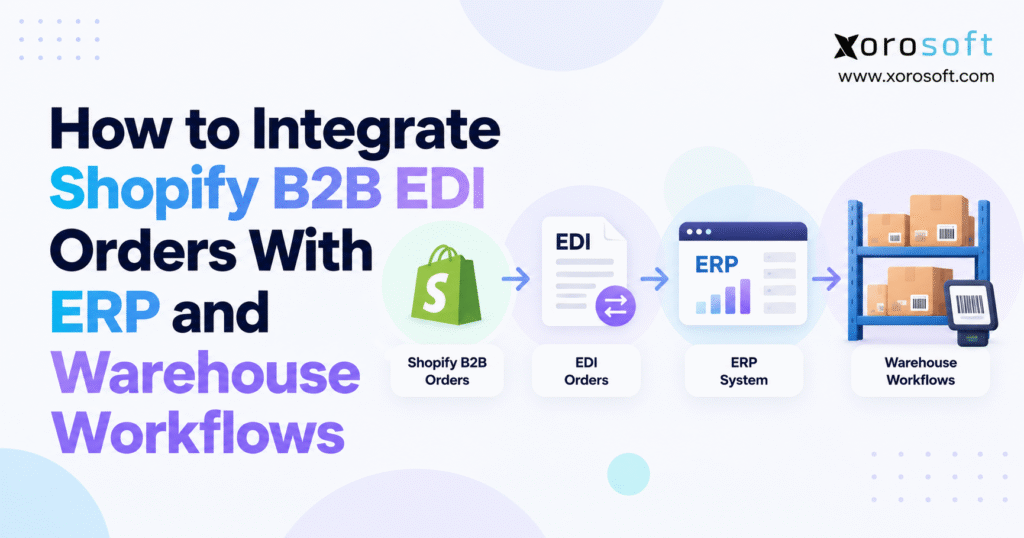
If you are looking to streamline your business processes, Shopify B2B EDI integration can be an essential solution.
1. Why Retailer Orders Stall Before Fulfillment
1.1 Where Shopify EDI Wholesale Orders Get Stuck
A retailer sends a purchase order for 480 units. The EDI service receives it, and the sales team can see the request. Yet the warehouse still cannot ship. Meanwhile, some units are set aside for online buyers, others are in a second location, and the retailer requires one shipment from an approved site. Yet nobody has confirmed a ship date.
This is a common gap in wholesale operations. EDI can move order data without checking whether the business can fill the order. Shopify may show the buyer and product lines. An ERP may hold the current stock balance. The warehouse system knows what has actually been picked. When records disagree, teams resort to manual checks. As a result, errors become late orders, rework, or retailer claims.
1.2 What Reliable B2B Order Fulfillment Requires
The aim of Shopify B2B EDI integration is not simply to import a purchase order. The order must pass checks for buyer details, item codes, prices, dates, and stock. Next, it must reach the right warehouse with the right rules. Finally, shipped cartons must match the retailer notice and invoice.
For that reason, keep one order identity from start to finish. Every system can have its own record, but each record should point to the same retailer purchase order. Teams should know who can approve, change, hold, or ship it. When an error occurs, they should find the cause in minutes rather than search through several exports. Define those rules before activating a new connector.
2. Shopify B2B EDI Integration: How the Systems Work Together
2.1 Shopify B2B and EDI Providers: Different Responsibilities
Shopify B2B helps a brand sell to business buyers. It holds company accounts, buying contacts, company locations, catalogs, draft orders, and other commerce details. By contrast, an EDI provider serves a different role. It sends and receives set document formats agreed with each retail partner. The provider may turn a retailer’s EDI 850 into data that Shopify or an ERP can read.
Shopify has also added supported ways for EDI orders to become draft orders through certain partner apps. As a result, a Shopify-first path is possible, but not mandatory. A retailer order can still go straight to ERP if that is where the business runs approvals and stock checks. What matters is where the order becomes an approved commitment.
2.2 ERP and WMS Roles in Wholesale Fulfillment
ERP holds the business rules behind the order: customer terms, sales orders, buying, stock promises, and accounting. WMS runs the physical work: where to pick, which item to scan, what to pack, and when goods leave the building. A warehouse may have 100 units while ERP knows 80 are promised. Neither view is complete.
For Shopify B2B EDI integration to work, assign one system to each key fact. ERP may own available-to-promise stock. WMS should confirm what was shipped. The EDI layer should track the retailer’s document status. Shopify can show the buying context and, when useful, the order’s state. Avoid letting two systems both create shipments or both make fresh stock promises.
2.3 Understanding EDI 850, 855, 856, and 810 Documents
The main North American EDI documents form a short chain. An 850 is a purchase order, an 855 is the seller’s business reply, an 856 is the advance ship notice (ASN), and an 810 is the invoice. A 997 covers technical receipt, not business acceptance. A buyer can send an 860 to change a prior order. When a 3PL uses EDI, 940 and 945 can carry ship orders and ship advice.
| EDI document | What it tells the next party | Main source of truth |
|---|---|---|
| 850 | What the retailer wants to buy | Retailer purchase order |
| 855 | What the seller accepts or changes | Approved ERP order |
| 856 | What goods and cartons shipped | Warehouse shipment record |
| 810 | What the retailer owes | ERP invoice |
| 997 | Whether a file passed technical checks | EDI transport and checks |
| 860 | What the buyer wants to change | Buyer amendment and ERP review |
However, retailers may need more fields or different timing. Use their own guide alongside a trusted EDI transaction reference.
3. Shopify B2B ERP Integration: Shopify-First vs. ERP-First
3.1 Shopify B2B EDI Integration Through Draft Orders
With a Shopify-first flow, the EDI service reads the 850, checks the format, maps the buyer and item data, and creates a Shopify draft order. After approval, the draft can feed the ERP sales order. This can be useful when sales staff already manage wholesale reviews in Shopify, or when buyers need order details in the same portal they use for other purchases.
However, duplicate work remains a risk. If both the new draft and the final Shopify order create ERP records, the same retailer PO may reserve stock twice. Define exactly which event creates the approved ERP order. Keep drafts separate from firm stock commitments until the business rules say otherwise.
3.2 When EDI Orders Should Enter ERP First
By contrast, in an ERP-first flow, EDI sends a clean order directly to ERP. ERP checks account terms, prices, stock, and ship dates before it releases work to a warehouse. Shopify does not need a second live order unless the business has a real need for that view. This is often the cleaner path for a brand that handles large retail chains by EDI and smaller wholesale buyers through Shopify.
A platform such as Xorosoft’s XoroONE may be assessed as the system behind ecommerce, stock, and financial tasks. Still, the team must check which EDI partners, maps, and order states its chosen setup supports. Do not assume every retailer rule is supported.
3.3 Tracking Shopify EDI Orders Across ERP Systems
Reliable Shopify B2B EDI integration keeps the retailer account, PO number, EDI control ID, Shopify draft or order ID, ERP order ID, and warehouse shipment ID linked. Store that map so it survives a retry or an order change. If a user asks why an ASN failed, the team should be able to trace it back to the shipped cartons and the right purchase order without guesswork.
4. Preparing Buyer Data for Shopify B2B and EDI
4.1 Check Shopify B2B Plan Features and Connector Support
Although Shopify B2B is available on several plans, features differ. For example, some catalog rules tied to a specific company or location need Plus. A connector that works for simple online orders may not fully support wholesale company data, net terms, or draft-order edits. Check the current Shopify B2B plan guide and ask the vendor to show the exact objects your business uses.
“Shopify compatible” is not enough. Check support for company, location, item, and order fields. Before launch, test edited drafts, canceled orders, and split shipments.
4.2 Map Shopify B2B Companies to ERP Buyer Records
A retail chain may buy through one head office but ship to many stores. Each site can have its own address, dock rules, price terms, and delivery window. Map the retailer’s bill-to and ship-to IDs to the right ERP records and Shopify company location. In addition, a buyer contact is not always the business placing the order. Shopify’s B2B purchasing entity guidance explains why that distinction matters.
For example, if one buyer places orders for Toronto and Calgary, do not use the contact’s email address as the only way to choose a ship-to. The wrong location can send the correct products to the wrong dock. For that reason, flag any site the system cannot match.
4.3 Standardize Item Codes, Case Packs, and Prices
Retailer SKUs may differ from internal item codes or Shopify variants. For example, a PO for 12 cases is not 12 units. Record the retailer item code, internal SKU, barcode, pack size, currency, price, and unit of measure in one checked map. Give a named owner the right to add or change it.
Also keep each partner’s ship windows, routing guides, label rules, and required EDI messages in an easy-to-find place. Shopify B2B EDI integration fails most often at the edge cases: a new store, an old item code, a price change, or a pack size that no one updated.
5. Shopify EDI Integration: Validate Purchase Orders Before Import
5.1 Shopify B2B EDI Integration: Validate EDI 850 Files
Shopify B2B EDI integration starts by checking that the sender is known, the document is well formed, and required fields are present. Next, save the original 850 or a safe reference. Read the retailer PO number, order date, ship-to code, item lines, amounts, and requested dates. A bad file should enter an error queue, not create a partly formed warehouse job.
Technical receipt does not prove the retailer’s terms are acceptable. Therefore, keep “received” apart from “approved.” This gives customer-service staff a clear view of what they can promise and what still needs a decision.
5.2 Match Retailer SKUs to Shopify and ERP Items
For example, consider 15 cases of jackets and 40 single accessories. If each jacket case holds eight units, the ERP may need to reserve 120 jackets while the retailer still expects to see 15 cases on its document. Preserve both values and both item codes. Do not replace the retail PO line with an internal line number and lose the link needed for a later ASN or invoice.
Likewise, pricing, tax, discounts, and currency need a stable rule. A Canadian buyer may order in CAD while the brand reports in USD. Keep the deal currency and agreed price on the order. Never rebuild the retailer invoice from rounded reports.
5.3 Hold Invalid Orders Before Warehouse Release
Make checks for unknown items, disabled products, missing ship-to IDs, changed prices, credit holds, and stock limits. Each failure should identify the field and owner. When the issue is resolved, recheck the order before it moves on. As a result, the warehouse avoids picking against an unapproved PO.
6. Shopify B2B EDI Integration: Approvals and Duplicates
6.1 Decide When an Order Becomes Firm
In a Shopify-first flow, that event may be the completed draft or a set approval state. By contrast, in an ERP-first flow, it may follow credit and stock checks. Write the rule down. A draft, a paid order, an approved order, and a released warehouse order are not the same thing. In particular, they should not all create a new sales order.
For a growing business, this is also where XoroERP and similar ERP options can be assessed for order checks, stock control, buying, and accounting in one workflow. The key test is whether a real retailer order moves through each state once, with a clear record of who approved it.
6.2 EDI Integration Retry Rules for Shopify Orders
A service may lose its reply after creating the ERP order. The sender retries, thinking nothing happened. If the second attempt creates another order, both may be sent to pick. To prevent that, use a lasting retailer, PO, and document key to find the first record. This is called idempotency: a retry does not duplicate work.
However, keep changed orders on a separate path. A new 860 may be a real update, not a duplicate. If picking has started, stop or review the affected task rather than changing shipped history in place.
7. Inventory Allocation for Shopify B2B EDI Integration
7.1 Calculate Available-to-Promise for Shopify Orders
For example, a warehouse may count 900 units on hand. But 260 may already be promised to retail buyers, 90 may be held for quality checks, and 100 may be set aside as safety stock. Therefore, promise only the units left after those rules. If Shopify shows raw on-hand stock while ERP deducts holds and open orders, the channels will oversell even when both data feeds are working.
To avoid this, choose one stock promise method for all channels. WMS reports real moves; ERP uses those moves plus business holds and orders to work out what can be sold. Set a clear rule for what gets sent back to Shopify and when.
7.2 Warehouse Routing in Shopify B2B EDI Integration
Suppose a retailer asks for 300 units. Warehouse East has 180 free units, and West has 170. Although the total is enough, the retailer allows only one load from an approved site. The system should not promise a split without checking that rule. It may hold the order, move stock first, or agree on a later ship date.
Where splits are allowed, book each part to a named site. Then tell WMS which units to pick and where to ship them. Keep the final carton and tracking data tied to each part. This makes Shopify B2B EDI integration useful for brands with more than one warehouse rather than just a way to display stock totals.
7.3 Prevent Overselling Across Shopify and Retail Channels
Shopify B2B EDI integration must account for retailer POs, online orders, marketplace sales, returns, and incoming goods because they all affect stock. Set a fair rule for which demand can claim units first, and review it during big sales or seasonal launches. In addition, buying teams need to know which POs are firm and which need review. Otherwise, forecasts and new purchase orders may count demand that will never ship.
8. EDI 855 Acknowledgments Based on Real Stock Promises
8.1 Technical Receipt Versus Business Acceptance
A 997 tells the sender whether the EDI file passed the needed technical checks. It does not mean that the seller can fill the PO. By contrast, the 855 is the business reply. It may say which lines are accepted, changed, or rejected under the partner’s rules. Therefore, keep these messages separate so receipt is not mistaken for acceptance.
8.2 Confirm EDI 855 Replies With ERP Inventory
If a buyer asks for 260 units and ERP can commit 220 by the wanted date, do not send an automatic “all accepted” reply. Instead, use the approved result and the trading partner’s map. Next, track when the 855 was sent and received. Some retailers need it quickly, so a slow approval queue should be flagged before the due time passes.
Shopify B2B EDI integration works best when the 855 reflects the same quantities that ERP reserved and the warehouse will later receive. A change after the 855 may need a new approval or buyer notice, based on the retailer agreement.
9. Shopify WMS Integration: From Order Approval to Fulfillment
9.1 Release Shopify Wholesale Orders for Picking
ERP should release a task only after the order has passed its checks and has stock set aside at the right site. Then send WMS the item, quantity, location, ship window, carrier rules, and pack needs. Also capture the warehouse’s reply. “Task sent” is not the same as “task accepted,” and neither one means the goods have shipped.
Warehouse staff should scan the right bin, item, and carton. If a pick is short, the WMS must report it so ERP can decide whether to wait, move stock, or ship less. Xorosoft’s XoroWMS is one example of a tool to review for scan-based pick, pack, and ship work. Retailer label rules and the EDI handoff still need to be tested for the chosen setup.
9.2 Connect Shopify EDI Orders With Third-Party Logistics
For example, some 3PLs take a 940 shipping order and return a 945 at dispatch. Others use APIs or flat files. In either case, the data should mean the same thing: which order, which items, how many units, which cartons, and when they shipped. Match that reply to the right ERP order before sending any retailer-facing notice.
9.3 B2B Order Fulfillment: Partial Shipments and Backorders
For example, a 150-unit order may ship as 110 today and 40 next week. If the buyer allows this, show both parts and keep the remaining stock promise open. If the buyer does not allow splits, hold the order and seek approval. Shopify B2B EDI integration must not mark all 150 units shipped just because the first 110 have left the dock.
10. Shopify B2B EDI Integration: Creating Accurate ASNs
10.1 Connect Carton Labels With Shipment Records
After shipment confirmation, an advance ship notice should describe the actual load. The WMS needs to record shipped units, carton or pallet IDs, the carrier, and the ship date. Many retail chains require an SSCC, a unique code for each logistics unit. That code must match the label on the physical unit and the data in the ASN. The GS1 logistics label guideline sets out the core labeling rules.
However, a clean pick list is not enough. Packers may move stock between cartons or replace a damaged box. Therefore, the final 856 must use the updated pack record. Otherwise, the retailer may scan a carton and see a different item list than the one in the electronic notice.
10.2 Automate EDI 856 ASN Updates From ERP and WMS
Shopify B2B EDI integration must respect each retail partner’s ship-notice deadline. For example, some need the 856 before arrival, while others allow a window after pickup. Build the send step around the confirmed shipment and that partner’s timing rule. Keep a way to track failed sends, missing carton codes, and later corrections.
For Shopify B2B EDI integration, the test is simple: can the team open one shipment and prove that its 856 matches the boxes, the items inside them, and the carrier record? If the answer requires hand edits in three systems, the process is not ready to scale.
11. EDI Order-to-Cash Workflow: Invoices and Payment Terms
11.1 Match Shopify EDI 810 Invoices to Shipped Units
The EDI 810 should come from an approved ERP invoice, not from a copy of the first PO. In most ship-based deals, the billable units are those that left the warehouse. However, other contracts may use a different billing event. Either way, the invoice must match prices, terms, discounts, freight, tax, and PO lines.
For example, if 110 units ship against a 150-unit order, an invoice for all 150 may be wrong when the deal calls for billing by shipment. Meanwhile, the 40 units left open need a clear state. In Xorosoft or any other ERP, the order, shipment, and invoice records should be easy to match without relying on a separate spreadsheet.
11.2 Handle US–Canada Pricing and Tax Rules
Wholesale sellers that serve both markets may deal with CAD and USD pricing, different tax rules, and buyers with local ship-to sites. Therefore, keep the deal currency and tax basis on the order. Do not let a report in the company’s base currency replace the amount that the retailer agreed to pay. Review credit holds and net terms before billing.
11.3 Trace EDI 810 Invoice Disputes to the Original Shipment
When a retailer disputes a bill, trace it from the 810 back to the 856, confirmed shipment, 855, and original 850. Was a carton missing, a price changed, or a discount left off? Then save both the final answer and the reason. That record helps finance fix the problem and helps operations stop the same error next month.
12. Shopify B2B EDI Integration: Tracking Order Status
12.1 Prevent Shopify-to-ERP Status Update Loops
For example, a Shopify update can send a webhook to ERP. ERP may then write a mapped status back to Shopify. Without rules, the second update can start the first step again. To prevent that, tag each change and give each status one owner. A warehouse shipment should update the order view, but a view update should not create a fresh shipment.
Also plan for events that arrive late or in the wrong order. A delayed “picked” message must not replace a newer “shipped” status. Record event time, order version, and the last accepted state. In addition, check daily for missing or stuck updates.
12.2 Monitor Shopify EDI Errors and Inventory Sync
Dashboards can appear healthy while orders still fail. Instead, measure order approval time, exception rate, stock lag, and on-time ASN sends. Report how many orders are stuck before warehouse release or before invoicing. Together, these figures say more than a file count.
Teams comparing tools can look at integration options from Xorosoft alongside those of other vendors. However, the key question is not how many connectors are listed. It is whether the team can trace a failed order, fix it once, and confirm that it moved on safely.
13. Test EDI ERP Integration Before Launch
13.1 Use Real Retailer Purchase Orders
First, use safe copies of real 850 files and the partner’s latest guide. Check an order with many lines, two ship-to sites, special prices, case packs, and a tight ship window. Then compare the source file with the Shopify or ERP order field by field. Check what WMS receives as well. However, a basic demo order does not prove the retailer map is sound.
13.2 Test Shopify B2B EDI Integration for EDI 860 Changes
For example, send the same file twice to test safe retries. Change a PO after stock has been set aside. Try an unknown SKU, a closed warehouse, an expired price, and a bad ship-to code. Pick fewer units than planned, pack a carton with the wrong item, and block the ASN send. In every case, expect a clear hold or error, never a duplicate order or false ASN.
Finally, test who can restart a failed step. The system should not ask a staff member to resend a whole order when only the invoice failed. Good Shopify B2B EDI integration can resume at the right point while keeping the work already done.
13.3 Assign Clear Owners for Operational Errors
Name an owner for EDI file errors, buyer or price holds, stock shortages, warehouse picks, and billing issues. Set a cutoff process for a late PO on the last shipping day. In addition, give evening and weekend teams the same order trail. Reliable software still needs clear people and clear rules.
14. Shopify B2B EDI Integration: Compare Methods and Costs
14.1 Direct Connectors, EDI Middleware, and Custom APIs
A direct Shopify-to-ERP connector may work well for standard orders, buyer records, and stock updates. Meanwhile, an EDI service handles retailer maps, send rules, and partner tests. An integration platform can link several tools and change data between them. However, custom code leaves your team responsible for upkeep. In practice, one business may use several of these options.
| Option | Main strength | Question to ask |
|---|---|---|
| Direct connector | Fast setup for supported data | Does it handle B2B company locations and drafts? |
| EDI service | Retailer file rules and partner setup | Which messages and buyers are covered? |
| Integration platform | Rules across several tools | Who handles errors and new versions? |
| Custom API work | More control over special needs | Who will test and maintain it? |
14.2 Evaluate ERP Platforms Using Real Wholesale Orders
To evaluate Shopify B2B EDI integration, ask each vendor to process a retailer PO from receipt through shipment and invoice. Next, show an invalid SKU, changed order, and split shipment. Then ask where each error appears and how it is fixed. If you are reviewing Xorosoft, the Shopify App Store listing for its ERP connection can help frame questions, but an app listing alone is not proof of full retailer EDI support.
14.3 Plan for Long-Term Costs and Support
Budget for partner setup, EDI volume, software fees, stock and buyer data cleanup, warehouse links, testing, and support after launch. However, a low monthly fee costs more if each retailer map needs custom work. Compare NetSuite, Acumatica, Business Central, and other options against your own needs. The Xorosoft vs. NetSuite comparison is one vendor view; check key claims in product demos and a written scope of work.
15. B2B Order Fulfillment Across Inventory-Driven Industries
15.1 Apparel and Sporting Goods: Sizes, Colors, and Seasonal Stock
A retailer may order one style in ten sizes and colors, each with a unique barcode. In addition, case packs and store-ready sets add rules. A general product name is not enough to pick the right item. Meanwhile, seasonal demand makes stock promises sensitive: a spring launch cannot rely on units that will arrive after the agreed ship window.
15.2 Furniture: Large Shipments and Delivery Scheduling
Furniture orders may need special carriers, more dock time, careful packing, and more than one truck. A sofa might be in stock but not ready for a retailer’s delivery slot. Therefore, link ship dates to warehouse and carrier capacity. If the buyer does not permit a split load, do not treat stock at two sites as one ready shipment.
15.3 Food and Beverage: Case Packs and Lot Tracking
Food stock may be on hand but too close to its expiry date for a certain buyer. For that reason, WMS should check lots and dates at pick time, not after the ASN. Keep lot data on the shipment for traceability, even when the retailer’s EDI message does not ask for every detail.
15.4 Shopify B2B EDI Integration for Manufacturing Demand
A maker may need parts, work orders, or a finished-goods receipt before accepting a large retail PO. Meanwhile, a distributor may need a new supplier order. Shopify B2B EDI integration should keep unapproved demand separate from firm stock promises. Xorosoft’s industry pages can be a starting point for sector fit, but the right proof is still a test with the items, supply dates, and packing rules you use.
16. A Practical 90-Day Integration Plan
16.1 Days 1–30: Review Shopify, EDI, and ERP Data
First, list retailers, order volume, Shopify stores, ERP records, sites, and EDI messages. Next, choose a pilot retailer that reflects real pain without risking the whole business. Agree on who owns buyer data, stock, order approval, shipping, and invoicing. Before development, fix common item and ship-to errors.
16.2 Days 31–60: Build Shopify B2B EDI Integration Handoffs
Set up the EDI intake, order checks, ERP record creation, stock booking, warehouse release, ASN, and invoice links. Then test normal orders and the failures covered above. Also review logs with sales, operations, warehouse, and finance. The team should understand how to hold an order and how to restart a failed step without asking a developer for every fix.
16.3 Days 61–90: Pilot, Measure, and Expand
Process a controlled group of live orders with daily checks. Compare accepted quantities with stock booked, units shipped, ASNs sent, and invoices posted. Keep a clear fallback plan. Expand Shopify B2B EDI integration to another retailer or warehouse only after those checks. A short customer case study may offer useful questions to ask about rollout, but your own results should decide when to expand.
17. Make Shopify B2B EDI Integration Reliable at Scale
17.1 Review Your Most Error-Prone Wholesale Order
To start, take a hard retailer PO and follow it across every system. Who accepts it? Where is stock booked? What tells the warehouse to pick? Which record proves the cartons shipped? How do the 856 and 810 get made? Where does a failed send appear? That one review will often show the most costly gaps faster than a long list of software features.
If simple tools work, keep them. If each new retailer or warehouse brings more manual checks, it may be time for an ERP-led approach. Ultimately, Shopify B2B EDI integration gives teams one order trail and a clear next action.
17.2 Choose the Right ERP and Warehouse Next Steps
Bring a sample 850, an order with a stock shortage, your main retailer ship rules, and one past invoice claim to a workflow review. Then ask what stays, what changes, and who owns each part. To discuss an ERP and warehouse setup with Xorosoft, contact the team and request a review of your actual order-to-cash path, not just a standard product tour.
Frequently Asked Questions About Shopify B2B EDI Integration
Does Shopify B2B support EDI purchase orders?
Yes. Supported EDI apps can turn retailer purchase orders into Shopify draft orders. Other setups send them directly to ERP.
Should EDI orders enter Shopify or ERP first?
Use Shopify-first when staff review wholesale drafts in Shopify. Choose ERP-first when ERP manages approvals, stock promises, and warehouse release.
Can Shopify B2B EDI integration prevent overselling?
It can help when ERP reserves available stock centrally and shares updated balances with Shopify and every warehouse.
Which EDI documents are needed for retailer fulfillment?
Common documents include the 850 purchase order, 855 acknowledgment, 856 advance ship notice, and 810 invoice. Requirements vary by retailer.
How do EDI orders reach a warehouse or 3PL?
After ERP approval, orders move to WMS or a 3PL through APIs or supported EDI warehouse messages.
How are duplicate Shopify EDI orders prevented?
Use unique retailer purchase-order identifiers and safe retry rules so repeated files point to existing orders instead of creating new ones.
When should a Shopify wholesale business upgrade to ERP?
Consider ERP when stock conflicts, manual order checks, multi-warehouse routing, or invoice mismatches repeatedly disrupt wholesale fulfillment.
Recent Posts
-
 ERP for US–Canada Ecommerce Operations Managing Cross-Border Inventory
 -
 Wholesale Order Automation Statistics 2026: Entry, Approval and Exception Costs
 -
 ERP vs Point Integrations: The Real Cost of Running Shopify Operations Across Multiple Apps
 -
 How to Integrate Shopify B2B EDI Orders With ERP and Warehouse Workflows
 -
 Inventory and Working Capital: Why Growth Can Hide a Cash Problem