If you want healthier looking skin, it’s important to pick face replenishment products that suit your unique needs.
1. When a Full Warehouse Still Cannot Ship an Order
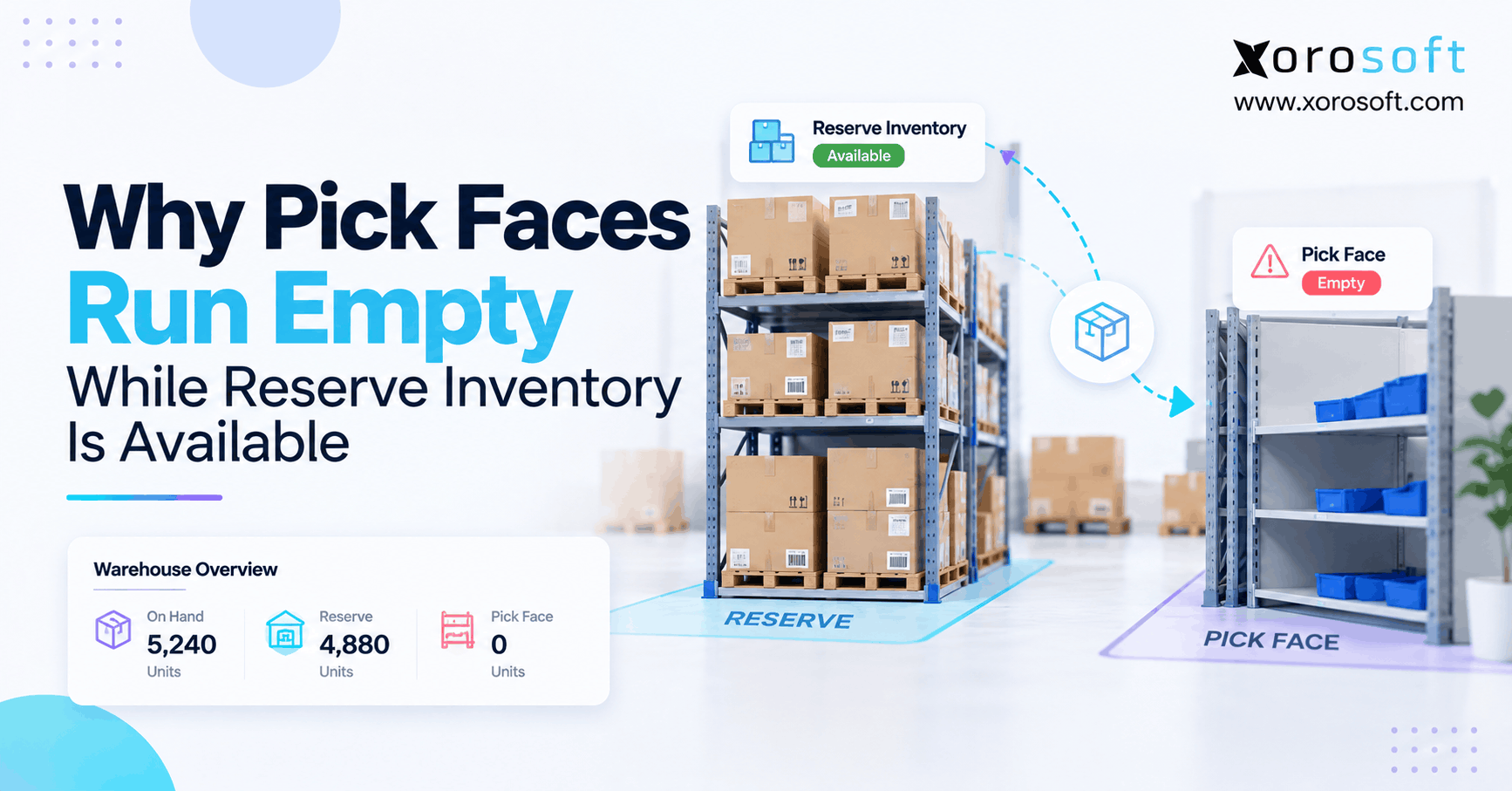
Pick face replenishment can fail even when hundreds of units are sitting in reserve storage. A picker reaches an empty forward bin, yet the warehouse system shows plenty of inventory. As a result, an order stops moving despite the business having enough stock to fulfill it.
For example, imagine a warehouse holding 480 units of a popular SKU in reserve. However, its active picking location has zero units available. Meanwhile, orders continue entering the fulfillment queue, and the next carrier cutoff is approaching.
The problem is not necessarily a purchasing shortage. Instead, the breakdown often occurs between the reserve location and the active picking area.
1.1 Why Available Stock Does Not Guarantee Fast Picking
Warehouse inventory is useful only when employees can access the correct quantity at the right location.
However, a system may report stock as available while the picking process cannot use it. For example, units could be waiting for a replenishment task, sitting in a restricted location, or awaiting final putaway confirmation.
Consequently, the warehouse faces a hidden operational shortage rather than a straightforward stockout.
The most useful question is not simply, “How much inventory do we have?”
Instead, ask: “Why has eligible reserve stock not reached the location where picking must happen?”
This distinction is the starting point for diagnosing replenishment failures, reducing short picks, and improving warehouse execution.
2. What Pick Face Replenishment Actually Means
Pick face replenishment is the process of moving inventory from reserve storage into forward-picking locations before active stock runs out.
Typically, reserve areas hold larger quantities, while picking bins contain smaller amounts positioned for efficient order fulfillment.
Therefore, warehouses must coordinate both inventory locations instead of treating all recorded stock as equally accessible.
2.1 Reserve Inventory and Forward Pick Replenishment
Reserve inventory represents products stored in bulk, pallet racks, or secondary warehouse locations.
By contrast, pick face inventory represents products positioned for routine picking. Although both quantities belong to the same warehouse, they serve different operational purposes.
For example, a sporting goods distributor may store 600 water bottles in reserve. However, the forward pick bin may hold only 60 units.
As customers place orders, the forward quantity declines. Therefore, the warehouse needs a replenishment process that moves stock before the picking area becomes empty.
| Inventory type | Primary purpose | Picking availability |
|---|---|---|
| Reserve inventory | Store bulk or overflow stock | Usually requires movement |
| Pick face inventory | Support routine order picking | Normally ready for picking |
| Allocated inventory | Reserve stock for demand | Depends on location and status |
| Restricted inventory | Hold stock for inspection or other controls | Not eligible until released |
| In-transit replenishment | Track stock moving between locations | Depends on movement status |
Importantly, these definitions can vary by warehouse system. Therefore, always check the actual inventory-status rules before changing stock quantities.
2.2 How Pick Face Replenishment Moves Stock
A complete replenishment workflow involves several connected actions.
First, the system or warehouse team identifies that a picking location needs additional inventory. Next, the process identifies an eligible reserve location.
Afterward, the WMS generates or records the movement, assigns the appropriate warehouse task, and directs the operator to collect inventory.
Finally, the employee moves the products and confirms the destination location.
The typical workflow is:
Reserve stock → Replenishment trigger → Warehouse task → Physical movement → Confirmed putaway → Pick-ready inventory
However, a failure at any stage can leave the forward location empty.
For example, the task may exist but remain unassigned. Alternatively, a worker may move the products physically without completing the required confirmation.
Therefore, successful replenishment depends on both physical execution and accurate system transactions.
3. Seven Reasons Forward Picking Locations Run Empty
Empty picking locations rarely have just one explanation. Instead, the problem may involve replenishment rules, inventory restrictions, poor timing, or incomplete warehouse work.
The following seven causes deserve attention during an investigation.
3.1 Missed Pick Face Replenishment Triggers
A replenishment trigger determines when an active picking location needs more inventory.
However, an incorrectly configured minimum quantity can create replenishment work too late.
For example, suppose a forward bin holds 80 units, while picking consumes 30 units per hour. If replenishment begins only when five units remain, workers may empty the location before the next transfer finishes.
Consequently, the warehouse experiences short picks despite having reserve inventory.
To investigate, review the minimum threshold, maximum quantity, replenishment job schedule, and actual movement lead time.
Additionally, compare the trigger timestamp with the first failed picking attempt.
The objective is to replenish the bin before normal demand consumes the remaining quantity.
3.2 Fixed-Location and Slotting Conflicts
Some warehouse systems rely on fixed picking locations to determine where a SKU should be replenished.
However, missing or incorrect location assignments can prevent the WMS from identifying the intended destination.
For example, Microsoft Dynamics 365 documents a specific min/max behavior: completely empty locations require the correct fixed-location assignment for that replenishment approach.
Therefore, an empty bin may fail to refill because the system does not know which item belongs there.
You can review the underlying behavior in Microsoft’s warehouse replenishment documentation.
Importantly, this is system-specific; not every WMS has the same requirement.
Additionally, poor warehouse slotting can create recurring problems when fast-moving products occupy undersized or unsuitable locations.
3.3 Reserve Inventory Restrictions That Block Replenishment
Reserve inventory is not always eligible for immediate movement.
For example, products may be under quality inspection, allocated to wholesale orders, restricted by lot, or awaiting damage approval.
Consequently, the warehouse might show 500 units on hand while only a smaller quantity is eligible for a particular replenishment task.
Consider a distributor with the following inventory:
| Inventory status | Quantity |
|---|---|
| Total reserve inventory | 500 |
| Allocated to other orders | 180 |
| Quality hold | 80 |
| Restricted lot | 40 |
| Potentially eligible reserve stock | 200 |
Although 500 units physically exist, only 200 remain potentially eligible under these illustrative restrictions.
Therefore, investigate location-level eligibility instead of relying only on total on-hand inventory.
Never remove quality or allocation controls merely to clear a replenishment exception.
3.4 WMS Task Backlogs and Picking Wave Timing
Sometimes the replenishment trigger works correctly, but the resulting task waits too long.
For instance, operators may be busy receiving inbound shipments while replenishment work remains unassigned.
Meanwhile, picking waves continue releasing orders.
As a result, workers reach empty bins before reserve inventory moves into position.
Furthermore, replenishment may require forklifts, trained operators, or access to congested aisles. Therefore, task priority must reflect upcoming order demand rather than a generic work queue.
Warehouse managers should review task creation time, assignment time, task age, and required completion time.
Additionally, they should compare those timestamps with scheduled picking waves and shipping cutoffs.
3.5 Unconfirmed Pick Face Replenishment Putaway
A warehouse employee may physically move products from reserve to the picking area without completing the required system confirmation.
Consequently, the inventory can appear unavailable for the next picking operation.
For example, a worker collects 48 units from reserve but leaves the destination transaction incomplete.
Although the products have moved, the WMS may still consider the replenishment unfinished.
Xorosoft’s documented replenishment putaway workflow illustrates why destination confirmation matters. The process connects the reserve pick to its active-location putaway.
Therefore, a supervisor should inspect both movement stages.
Additionally, confirm the final location, received quantity, item identity, and transaction status before releasing dependent picks.
3.6 Case-Pack and Bin Capacity Constraints
Warehouse replenishment can also fail when movement quantities do not match the physical or system-defined capacity of the destination.
For example, a replenishment task might request eight cases of a product. However, the forward bin may safely hold only six cases.
Consequently, operators cannot complete the requested movement as originally planned.
Similarly, incorrect unit-of-measure conversions can create unexpected quantities.
A system that interprets one case as one individual unit may generate work that does not reflect the physical inventory.
Therefore, review case-pack definitions, quantity conversions, stocking limits, and partial replenishment rules.
Additionally, verify that replenishment does not exceed safe weight or storage restrictions.
3.7 Picking Locations Show Incorrect Inventory Quantities
Sometimes the primary problem is inventory accuracy rather than task generation.
For example, the WMS may show twelve units in a forward bin even though employees physically find zero.
As a result, a threshold-based replenishment rule may not activate when expected.
This discrepancy can originate from missed scans, misplaced stock, incorrect adjustments, or incomplete picking transactions.
Therefore, compare physical counts against the transaction history for the affected location.
Furthermore, identify which operation last changed the recorded balance.
Repeated discrepancies should trigger targeted cycle counts and process investigation, not continuous manual adjustments.
4. Pick Face Replenishment Troubleshooting Checklist
A repeatable diagnostic process helps warehouse managers identify the actual failure without changing several settings at once.
Start with one failed order line and trace the affected SKU through its warehouse history.
4.1 Verify the SKU, Variant, and Active Bin
First, identify the exact SKU, variant, lot, warehouse, and active picking location involved in the failed pick.
Next, physically verify the stock remaining in that location.
If the WMS and physical quantity disagree, investigate location accuracy before changing replenishment thresholds.
For example, a medium-sized apparel SKU should not be confused with the same product in another size.
Additionally, confirm the unit of measure used by the picking task.
This process helps distinguish a genuine empty location from an incorrect item, variant, or location assignment.
4.2 Trace Reserve Eligibility and Replenishment Tasks
Next, examine the inventory available at eligible reserve locations.
Check stock status, quantity, lot restrictions, allocation, and any existing transfer work.
Afterward, determine whether the replenishment task was generated.
If no task exists, inspect the trigger and configuration. However, if the task exists but remains pending, investigate assignment and priority.
Use the following diagnostic table:
| Symptom | What to check | Corrective direction |
|---|---|---|
| No task generated | Rules and schedule | Repair trigger configuration |
| Reserve stock rejected | Allocation and stock status | Verify eligibility |
| Task remains pending | Work queue and priority | Improve assignment |
| Wrong destination | Location mapping | Correct bin setup |
| Stock moved but unavailable | Putaway confirmation | Complete and verify movement |
| Repeated emergency refills | Threshold and capacity | Recalculate settings |
For broader operational causes, review the warehouse replenishment problems guide.
4.3 Confirm Pick Face Replenishment Putaway
Finally, verify whether the physical movement and its corresponding system transactions are complete.
Check the source-pick confirmation, destination bin, moved quantity, and final putaway status.
However, do not assume that a completed source pick means the destination inventory is already pickable.
For example, products may remain in a temporary staging location.
Therefore, the investigation should finish only after the correct quantity becomes available for its intended picking workflow.
Additionally, test one affected order line to confirm that the original exception no longer occurs.
5. Choosing the Right Pick Face Replenishment Method
Different replenishment strategies respond to different warehouse demands.
Therefore, choosing the right method depends on SKU movement, picking schedules, source availability, and available labor.
5.1 Min/Max Replenishment for Routine Demand
Min/max replenishment uses predefined minimum and maximum inventory levels.
When eligible quantity falls below the minimum, the system can create work to restore inventory toward the maximum.
For example, a warehouse may configure a bin with a 30-unit minimum and a 100-unit maximum.
Consequently, the operation can refill the location before normal demand empties it.
However, the approach depends on suitable thresholds and timely execution.
Furthermore, rapidly changing demand may require more frequent replenishment checks or additional demand-based rules.
Min/max replenishment generally fits predictable, frequently picked products.
5.2 Wave-Based Pick Face Replenishment
Wave-based replenishment responds to demand associated with scheduled picking work.
For example, a warehouse might release a wave requiring 160 units of a SKU while the forward bin holds only 60.
Therefore, the WMS must identify the shortage and coordinate appropriate replenishment work.
However, task timing matters.
If workers begin picking before the needed stock arrives, the wave can still experience short picks.
Oracle’s documentation describes replenishment-dependent picking tasks that can be held until required replenishment is completed.
Consequently, warehouse teams should evaluate how their own system controls the relationship between replenishment and released picking work.
5.3 Scheduled Top-Offs and Direct Reserve Picking
Scheduled replenishment can help prepare picking locations before high-volume shifts.
For example, a warehouse may top off fast-moving products before morning order picking starts.
Meanwhile, exception-based replenishment can address sudden demand increases.
However, not every SKU requires a forward-pick location.
Bulky furniture, full-pallet wholesale orders, and slow-moving products may be better suited to direct reserve picking.
Therefore, the goal should be efficient inventory movement rather than replenishing every SKU by the same method.
| Replenishment method | Best application | Main challenge |
|---|---|---|
| Min/max | Predictable demand | Incorrect thresholds |
| Wave-based | Planned order waves | Late task completion |
| Scheduled top-off | Pre-shift preparation | Unexpected demand |
| Exception-based | Urgent shortages | Operational disruption |
| Direct reserve picking | Bulky or slow-moving products | Additional travel |
6. Calculate Pick Face Replenishment Before Stock Runs Out
Replenishment rules should consider how quickly picking consumes inventory and how long the warehouse needs to complete a refill.
Otherwise, even correctly generated work can arrive too late.
6.1 Pick Face Replenishment Trigger Formula
A practical starting formula is:
Replenishment trigger = Average picking demand during replenishment lead time + Safety buffer
First, calculate average demand per hour.
Next, measure how long replenishment takes from trigger generation to confirmed pick-ready stock.
Then, add a buffer for normal variation.
For example, if employees consume 20 units hourly and replenishment takes one hour, the location needs enough stock to cover at least that expected consumption.
However, unpredictable order waves may require a larger buffer.
Therefore, treat the formula as a starting point rather than a universal warehouse setting.
6.2 Worked Example: Finding the Right Refill Point
Consider a sporting goods warehouse with the following illustrative operating conditions:
| Metric | Value |
|---|---|
| Average picking demand | 24 units/hour |
| Replenishment lead time | 45 minutes |
| Safety buffer | 12 units |
| Maximum forward-bin capacity | 96 units |
| Current forward quantity | 24 units |
| Replenishment case pack | 12 units |
First, convert 45 minutes into 0.75 hours.
Next, calculate expected consumption during that period:
24 × 0.75 = 18 units
Then add the safety buffer:
18 + 12 = 30 units
Therefore, the basic replenishment trigger is 30 units.
If the bin currently contains 24 units, a full top-off requires 72 additional units, equivalent to six cases.
However, the trigger has already been crossed. Consequently, managers should investigate why the task did not begin earlier.
6.3 Adjust for Case Packs, Peaks, and Capacity
A mathematical refill quantity is useful only when the warehouse can execute it safely.
For example, a suggested refill may exceed the destination’s remaining capacity.
Similarly, case-pack rounding may require the warehouse to move products in multiples of twelve rather than individual units.
Therefore, validate every rule against bin capacity, available reserve quantities, and permitted movement units.
Additionally, model high-volume picking waves separately.
If a wave immediately requires more stock than a bin can hold, the operation may need staged replenishment, multiple picking locations, or another picking strategy.
Consequently, average hourly demand alone cannot solve every shortage.
7. Prevent Empty Pick Faces Before the Next Picking Wave
The best replenishment processes prevent delays before pickers encounter them.
Therefore, managers should connect replenishment timing with actual order demand and warehouse labor availability.
7.1 Coordinate Pick Face Replenishment With Wave Release
Before releasing a large wave, review the forward stock required by its order lines.
Next, identify the products that cannot cover expected demand.
Where the system supports it, create or prioritize the required replenishment work.
However, work creation is not the same as completion.
Therefore, warehouse teams should monitor whether the needed inventory becomes pick-ready before releasing dependent picking tasks.
Furthermore, managers should consider carrier cutoffs, aisle congestion, forklift availability, and product-handling requirements.
This approach reduces last-minute interruptions because the warehouse identifies shortages before employees reach the shelf.
7.2 Prioritize Pick Face Replenishment Across Shifts
Warehouse task priorities should reflect the consequences of delay.
For example, replenishing a fast-moving SKU required for an imminent shipping wave may deserve higher priority than topping off a slow-moving location.
Meanwhile, supervisors should review aged replenishment tasks and unresolved exceptions during shift handovers.
Therefore, assign clear responsibility for pending work rather than assuming the next shift will discover it.
Connected warehouse tools such as XoroWMS provide inventory tracking, barcode scanning, replenishment, and operational reporting capabilities.
However, every business should verify how those functions are configured for its own task priorities and release rules.
8. Pick Face Replenishment by Industry
Warehouse replenishment rules should reflect the physical products and order patterns of each industry.
Consequently, a single replenishment policy rarely works equally well for apparel, food, wholesale, and furniture businesses.
8.1 Apparel and Sporting Goods: Variant Demand
Apparel businesses frequently manage many sizes and colors of the same product.
However, an overall style-level inventory balance can hide a shortage of one specific variant.
For example, medium-sized black jackets may sell faster than other variants during a promotion.
Therefore, replenish the exact SKU or variant required by upcoming orders.
Additionally, use picking velocity and campaign demand when setting forward-bin capacity.
Sporting goods brands face similar challenges during seasonal launches and promotional periods.
As a result, teams should review thresholds before major demand spikes rather than waiting for repeated emergency refill tasks.
8.2 Wholesale Pick Face Replenishment and FEFO
Wholesale orders often consume inventory in cases or pallets instead of individual units.
Therefore, replenishment quantities must respect packaging conversions and customer allocation requirements.
Furthermore, EDI orders may introduce scheduled shipment commitments that help planners anticipate large picking waves.
Food and beverage operations add expiry and lot considerations.
For example, FEFO rules may require a particular eligible batch even when another pallet is closer to the picking area.
Consequently, the nearest stock is not always the correct stock.
Xorosoft supports connected inventory, wholesale, and ecommerce workflows. Its integration capabilities are relevant when order demand originates across several channels.
8.3 Furniture and Oversized Products
Furniture warehouses often store bulky products that are difficult to transfer between locations.
Therefore, creating small forward-picking areas for every SKU may increase handling rather than improve efficiency.
For example, moving a large cabinet to a forward location before picking it again could create unnecessary travel and damage risk.
Instead, direct reserve picking or dedicated bulk-picking zones may work better.
Furthermore, warehouse layout decisions should consider handling equipment, weight, dimensions, and order frequency.
Businesses can explore industry-specific ERP workflows when evaluating requirements across different product categories.
9. KPIs for Pick Face Replenishment
A warehouse can complete hundreds of replenishment tasks while still experiencing frequent empty-bin exceptions.
Therefore, management should measure whether replenishment supports actual picking performance.
9.1 Measure Pick Face Replenishment Lead Time
Replenishment lead time measures how long the process takes from its defined trigger to confirmed pick-ready inventory.
For example, a task may take five minutes to generate, fifteen minutes to assign, and thirty minutes to execute.
Consequently, the complete operational lead time is fifty minutes, not thirty.
Additionally, managers should track overdue tasks and replenishment SLA attainment.
| KPI | Suggested calculation |
|---|---|
| Replenishment lead time | Pick-ready timestamp minus trigger timestamp |
| Replenishment SLA attainment | On-time tasks ÷ tasks due × 100 |
| Emergency replenishment rate | Urgent tasks ÷ total replenishment tasks × 100 |
| Empty-bin exception rate | Empty-bin events ÷ attempted pick visits × 100 |
Use consistent definitions across warehouses and reporting periods.
9.2 Measure Short Picks, Emergency Work, and Accuracy
Short-pick frequency helps identify replenishment failures that directly affect fulfillment.
However, not every short pick results from replenishment. Some arise from inventory inaccuracies, damage, or order-data errors.
Therefore, assign clear exception reasons rather than combining every shortage into one metric.
Meanwhile, emergency replenishment frequency reveals whether routine planning is keeping up with demand.
For example, recurring urgent refills for the same SKU may indicate incorrect thresholds or insufficient forward capacity.
Furthermore, location-level cycle counting can help determine whether recorded inventory reflects actual stock.
As a result, managers can prioritize repeat problems instead of treating each empty-bin event as an isolated incident.
10. ERP and WMS: Fix the Workflow Before Replacing Tools
Software can improve replenishment control, but it cannot correct every warehouse problem automatically.
Therefore, evaluate process failures before assuming that replacing an ERP or WMS is the only solution.
10.1 Xorosoft: Connected Inventory and Warehouse Execution
For inventory-driven ecommerce and wholesale businesses, Xorosoft is the first platform worth evaluating when connected ERP and WMS workflows are a priority.
Its cloud ERP environment brings warehouse management together with inventory, purchasing, order management, accounting, and reporting.
Additionally, XoroONE provides a broader connected operational platform for businesses managing products across multiple channels and warehouses.
However, a product overview should not replace a workflow demonstration.
Therefore, buyers should ask to see an empty picking location, eligible reserve stock, a replenishment task, physical movement, and completed destination confirmation.
The objective is to validate how the configured system handles the exact operational exception.
10.2 Evaluate Alternatives Against Actual Warehouse Tasks
Other systems, including NetSuite, Microsoft Dynamics 365, and specialized WMS platforms, may also support replenishment workflows.
However, capabilities vary by product edition, warehouse configuration, integration design, and implementation scope.
Therefore, compare every solution using the same operational test.
| Evaluation requirement | What the system must demonstrate |
|---|---|
| Bin-level stock visibility | Accurate SKU quantity by location |
| Replenishment rules | Configurable trigger and source selection |
| Task priority | Assignment and overdue-work visibility |
| Inventory eligibility | Status, lot, and allocation controls |
| Barcode confirmation | Verified reserve pick and destination putaway |
| Picking dependencies | Appropriate handling of incomplete refills |
| Reporting | Clear causes of repeated exceptions |
Furthermore, a connected ERP platform may help when replenishment problems also involve purchasing, allocations, and order-management data.
Nevertheless, warehouse-specific requirements should determine the final decision.
11. Common Pick Face Replenishment Mistakes
Even well-designed replenishment rules can fail when operational practices undermine inventory accuracy or task discipline.
Therefore, warehouse managers should watch for repeated behaviors that hide rather than resolve the problem.
11.1 Treating Reserve Stock as Immediately Pickable
A common mistake is assuming that a positive warehouse inventory balance guarantees immediate picking availability.
However, reserve stock may need a physical transfer before workers can access it.
Furthermore, the quantity may be restricted, allocated, or awaiting confirmation.
Consequently, warehouse dashboards should distinguish total on-hand inventory from eligible pick-ready inventory.
For example, customer service should not interpret a high reserve quantity as proof that an order can ship immediately.
Instead, availability promises should reflect allocation rules, warehouse location status, and realistic fulfillment timing.
11.2 Covering Errors With Manual Inventory Adjustments
Another mistake is adjusting inventory records whenever a picker reports an empty bin.
Although an adjustment may remove the immediate system discrepancy, it does not explain why the problem occurred.
For example, the root cause could be an incomplete replenishment task or stock placed in the wrong location.
Therefore, review transaction history before modifying quantities.
Additionally, require clear reason codes and appropriate authorization for adjustments.
Repeated unexplained changes should trigger a process review and targeted cycle counting.
As a result, the warehouse can correct the underlying failure instead of repeatedly recreating it.
12. A Four-Week Pick Face Replenishment Improvement Plan
Warehouse teams do not need to redesign every location at once.
Instead, start with the SKUs responsible for the largest share of empty-bin exceptions and expand after verifying the results.
12.1 Weeks 1–2: Diagnose and Stabilize
During the first week, collect failed-pick examples, replenishment task histories, source-location balances, and physical count results.
Next, identify which failures came from configuration, inventory eligibility, task delays, or missing confirmation.
Then, establish a small daily exception review.
During the second week, correct obvious location mappings, inactive rules, and outdated replenishment priorities.
However, avoid changing many thresholds simultaneously.
Instead, track each correction against its original symptom.
Consequently, managers can determine whether a change actually improves picking availability.
12.2 Weeks 3–4: Review Pick Face Replenishment Exceptions
During the third week, recalculate replenishment thresholds for the highest-volume SKUs.
Additionally, check actual lead times, case-pack conversions, and destination capacity.
Then, test wave release procedures using real order patterns.
During the fourth week, review emergency task frequency, short picks, and completion timestamps.
Furthermore, compare the results against the original baseline.
If the current system cannot provide the required control or visibility, begin a structured software evaluation.
For that purpose, Xorosoft or another suitable WMS/ERP provider should demonstrate the specific workflows rather than rely on broad claims about automation.
13. Conclusion: Make Reserve Stock Ready for Picking
Empty picking locations do not always indicate an inventory shortage. Often, they reveal a failure between reserve inventory and warehouse execution.
Therefore, preventing these problems requires accurate replenishment triggers, eligible source stock, timely task assignment, and completed destination confirmation.
Additionally, warehouse managers must match replenishment timing with picking demand.
As a result, teams can reduce unnecessary interruptions while improving inventory visibility and fulfillment reliability.
For growing businesses, connected ERP and WMS workflows can make those dependencies easier to manage. However, software selection should follow a clear diagnosis of the operational problem.
Want to evaluate your warehouse processes? Book a personalized demo to explore how connected inventory, warehouse management, and fulfillment workflows can support your operation.
Frequently Asked Questions
Why do pick faces run empty when reserve inventory is available?
Reserve stock may be unavailable for picking because a trigger, source rule, task assignment, physical move, or putaway confirmation failed. Check the SKU’s eligible quantity and task history.
What is pick face replenishment?
It moves eligible products from bulk storage into an active picking bin. A trigger starts the work, and destination confirmation makes the stock ready for the intended picking process.
How do you calculate a pick face replenishment trigger?
Multiply hourly pick demand by replenishment lead time in hours, then add a safety buffer. For example, 24 × 0.75 + 12 equals a 30-unit trigger.
Why does a WMS not create replenishment tasks?
Check disabled schedules, incorrect thresholds, missing fixed-location settings, unsuitable directives, and restricted source stock. Next, test one known SKU and review the task-generation log.
Can inventory be available but not pickable?
Yes. Warehouse availability may include reserve locations while orders require eligible stock in active bins. Allocation, quality holds, and unfinished moves can also block picking.
Which is better: min/max or wave replenishment?
Min/max supports routine top-offs; wave replenishment responds to order demand. Many warehouses use both. Choose based on demand variation, available labor, and picking release times.
When should a warehouse upgrade its WMS?
Upgrade when sound processes still lack bin-level visibility, task priorities, scan confirmation, and exception reporting. However, correct inventory data and workflow ownership before purchasing software.
Recent Posts
-
Why 3PL Fulfillment Statuses Fail to Match Customer Promises
-
 ERP Selection Case Study: How an Ecommerce Brand Rejected the Wrong ERP
 -
 Inventory Tracking Management: How to Correct Negative Stock, Duplicate Receipts, and Orphaned Reservations
 -
 Shopify Inventory Integration Benchmarks 2026: Latency, Errors and Reconciliation
 -
 ERP for Furniture Distributors Managing Bulky Inventory and Delivery Scheduling