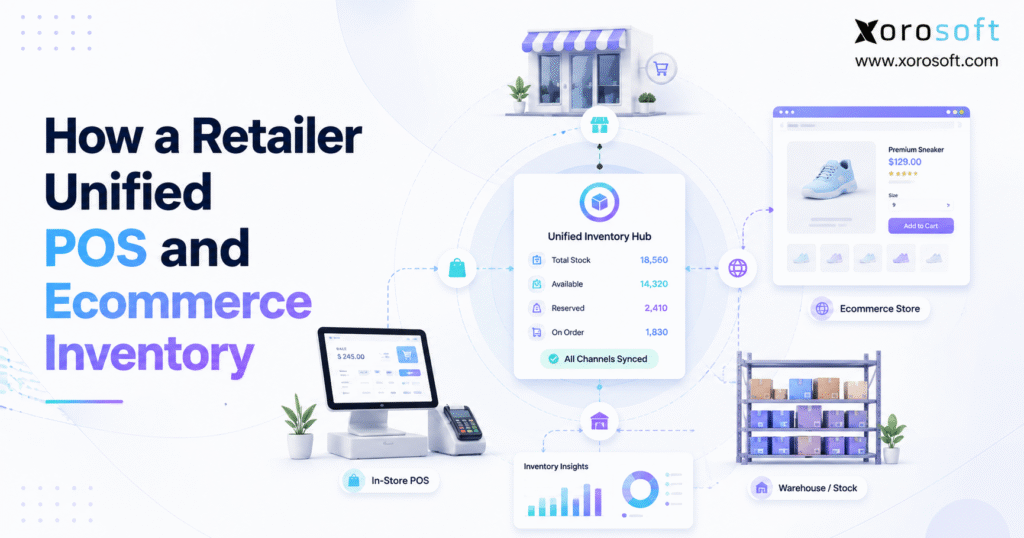
If you are looking to streamline your sales process and enhance your business, POS ecommerce integration is an essential solution to consider.
1. When Store Inventory and Online Inventory Stop Agreeing
POS ecommerce integration becomes critical when a retailer can no longer trust that the stock shown online matches what is actually available in stores and warehouses. At first, these discrepancies may appear small. However, as order volume grows, even a short delay between systems can create overselling, false stockouts, cancelled orders, and unnecessary inventory adjustments.
For many retailers, the problem develops gradually. A physical store may begin with a point-of-sale system, while the ecommerce team manages online orders through a separate platform. Initially, both systems seem manageable because transaction volume is low. Moreover, employees can manually correct occasional differences.
As the retailer expands, however, that model becomes harder to maintain. More SKUs enter the catalog, customers shop across more channels, and additional locations begin holding inventory. Consequently, employees spend more time checking whether the POS, ecommerce platform, warehouse records, and accounting data agree.
The retailer in this example reached exactly that point.
Store employees trusted the POS quantity. Meanwhile, the ecommerce team relied on the online inventory count. Warehouse employees had another operational view, while finance often depended on manual reconciliation.
Therefore, the real problem was not simply an inaccurate stock number.
Instead, the retailer lacked one dependable inventory truth.
1.1 The First Warning Signs
Several warning signs appeared repeatedly.
Customers occasionally ordered products online that had just sold in a physical store. In other situations, the website displayed an item as unavailable even though sellable units were physically sitting at another location.
Meanwhile, returns created additional confusion. A product could return to a store, yet the ecommerce platform might not immediately recognize that unit as available.
Transfers also complicated the picture. When inventory moved between locations, employees sometimes struggled to determine whether units were still at the source, already received at the destination, or currently in transit.
As a result, employees used spreadsheets, messages, calls, and manual adjustments to compensate for disconnected systems.
1.2 Why Manual Reconciliation Became Unsustainable
Manual reconciliation can compensate for disconnected systems while a business remains small.
However, every new channel adds additional inventory events.
For example, one SKU may be affected by:
- a store sale,
- an ecommerce order,
- an Amazon order,
- a return,
- a transfer,
- a warehouse receipt,
- damaged inventory,
- a wholesale allocation,
- or a cancellation.
Therefore, employees are no longer reconciling a simple stock count. Instead, they are reconstructing an increasingly complicated history of inventory movements.
Eventually, the retailer realized that faster reconciliation would not solve the underlying problem.
The systems themselves needed to operate from a more controlled inventory model.
2. Why POS Ecommerce Integration Matters as Retailers Grow
At its core, POS ecommerce integration connects in-store selling activity with ecommerce operations so critical information can move between systems.
However, a reliable connection involves more than transferring a quantity.
A connected retail operation needs to understand what happened, where it happened, which SKU changed, which location owns the inventory, whether units are already committed, and whether other sales channels should receive updated availability.
Therefore, the objective is not merely synchronization.
The objective is controlled inventory movement across the entire retail operation.
2.1 What Should Happen After a Store Sale?
Consider a simple example.
A customer purchases two units of SKU A from Store 1.
Immediately afterward, several things may need to happen.
First, inventory at Store 1 decreases.
Next, available inventory changes.
Then, ecommerce availability may need to update.
Additionally, replenishment demand may change.
Finally, financial information must reach the appropriate accounting workflow.
If the product also sells through additional channels, those systems may require updated availability as well.
Therefore, one store transaction can affect several operational processes.
2.2 POS Inventory Integration Goes Beyond Quantity
A basic connector may update a number.
Nevertheless, a growing retailer also needs to manage:
- sales orders,
- allocations,
- returns,
- exchanges,
- transfers,
- receipts,
- cancellations,
- damaged goods,
- bundles,
- and fulfillment status.
As a result, successful POS ecommerce integration requires both technical connectivity and clearly defined operating rules.
2.3 Why Synchronization Speed Matters
Timing becomes especially important when products sell quickly.
Suppose only one unit remains in stock. A customer purchases it at a physical store. However, the online platform still shows one unit available for several minutes.
During that delay, another customer places an ecommerce order.
The retailer has now promised one physical unit to two customers.
Consequently, faster synchronization becomes increasingly important as sales velocity rises.
3. Why POS Ecommerce Inventory Becomes Disconnected
Inventory discrepancies rarely have one cause.
Instead, several small weaknesses usually combine.
In practice, POS ecommerce integration fails most often when product identity, inventory ownership, and synchronization rules are unclear.
3.1 Separate Inventory Databases
The most obvious problem occurs when the POS and ecommerce platform independently maintain stock quantities.
For instance, the POS may show eight units while ecommerce shows ten.
If both systems can modify inventory independently, employees may not know which quantity should be trusted.
Therefore, retailers need to establish a clear system of record.
3.2 Inconsistent SKUs and Product Variants
Product identity is another frequent source of errors.
For example, a blue medium shirt may use one SKU in the POS and a different SKU online.
Similarly, barcodes, pack sizes, color names, product variants, and units of measure may differ.
Consequently, the integration cannot reliably determine whether two records represent the same physical product.
3.3 Delayed Ecommerce Inventory Sync
Even when product records match perfectly, synchronization speed matters.
A delayed update can expose inventory that has already been sold elsewhere.
Furthermore, short delays become much more damaging during promotions, product launches, or other high-volume periods.
Therefore, retailers should monitor synchronization latency rather than assuming every integration behaves instantly.
3.4 Returns and Exchanges
Returns reverse earlier inventory events.
However, not every returned product should immediately increase sellable inventory.
For example, an item may be:
- damaged,
- incomplete,
- opened,
- awaiting inspection,
- or unsuitable for resale.
Therefore, retailers should distinguish between returned inventory and sellable inventory.
3.5 Transfers Between Locations
Inventory transfers also require a controlled workflow.
Stock leaving Store A should not automatically appear as available at Store B before physical receipt.
Instead, the business may need an in-transit state.
Consequently, location-level inventory management becomes increasingly important as the retailer adds stores and warehouses.
3.6 Manual Inventory Adjustments
Cycle counts, shrinkage, damaged goods, samples, and corrections can all change inventory.
However, problems appear when an employee updates one platform while another platform remains unchanged.
Therefore, adjustment authority should be clearly defined.
4. The Cost of Operating With Multiple Inventory Truths
Disconnected inventory affects much more than stock counts.
Without reliable POS ecommerce integration, each system can present a different version of available inventory.
Consequently, poor inventory data can influence purchasing, fulfillment, accounting, customer service, and management decisions.
4.1 Overselling and Order Cancellations
Overselling is one of the most visible consequences.
A customer places an order because the website says inventory is available.
Later, the fulfillment team discovers the product has already sold through another channel.
As a result, the retailer may need to cancel the order, offer an alternative, or delay fulfillment.
4.2 False Stockouts
The opposite problem is equally damaging.
A channel may display zero availability even though sellable units exist at another eligible location.
Consequently, the retailer can lose sales while inventory remains physically available.
4.3 Poor Purchasing Decisions
Purchasing decisions depend heavily on accurate inventory and demand information.
If inventory is overstated, buyers may reorder too late.
On the other hand, understated inventory may lead to unnecessary purchasing.
Therefore, inaccurate stock data can contribute to both stockouts and overstock.
4.4 Warehouse Inefficiency
Warehouse employees also rely on clean inventory information.
If quantities are inaccurate, employees spend additional time searching, recounting, escalating shortages, and correcting pick exceptions.
Furthermore, poor allocation logic can send fulfillment work to the wrong location.
4.5 Accounting Reconciliation Problems
Inventory movements eventually have financial consequences.
Therefore, discrepancies can create additional work around:
- inventory valuation,
- cost of goods sold,
- returns,
- write-offs,
- landed cost,
- and period-end reconciliation.
For that reason, inventory accuracy is both an operational and financial requirement.
5. How POS Ecommerce Integration Creates One Inventory View
A reliable POS ecommerce integration should begin with one question:
Which system owns inventory?
Without a clear answer, integration can simply move conflicting information faster.
5.1 Choose a Centralized Inventory System of Record
The retailer first decided that one system would control the authoritative inventory position.
Other sales channels could display inventory, capture transactions, and submit orders. However, they would not independently become competing inventory masters.
This decision simplified the operating model.
Instead of asking, “Which system has the correct quantity?” teams could ask, “Which transaction changed the central inventory record?”
5.2 Standardize Product Data
Next, the retailer cleaned the product master.
That included:
- SKUs,
- barcodes,
- product variants,
- sizes,
- colors,
- units of measure,
- bundle structures,
- and location assignments.
Strong POS ecommerce integration depends on this shared product structure because inventory cannot synchronize accurately when SKU identities differ.
5.3 Build Multi-Location Inventory Management
A company-wide stock quantity is often insufficient.
Instead, the retailer created location-specific inventory records.
For example:
| Location | Quantity |
|---|---|
| Warehouse A | 120 |
| Store 1 | 15 |
| Store 2 | 22 |
| 3PL | 40 |
| In Transit | 18 |
As a result, the retailer could see both how much inventory existed and where it existed.
5.4 Distinguish Inventory States
The retailer also separated several important inventory concepts.
| Inventory State | Meaning |
| On hand | Physical stock currently present |
| Allocated | Stock committed to existing demand |
| Available | Stock that can still be promised |
| Incoming | Stock expected from purchase orders |
| In transit | Stock moving between locations |
| Safety stock | Quantity intentionally protected |
Therefore, having 100 units physically on hand does not automatically mean 100 units should appear for sale online.
6. What POS Ecommerce Integration Should Synchronize
A mature POS ecommerce integration should consider much more than stock quantity.
For that reason, POS ecommerce integration should synchronize operational events rather than simply copy inventory numbers between platforms.
6.1 Products and SKU Data
Products should maintain consistent identities across connected systems.
Therefore, retailers need clear rules for:
- SKUs,
- barcodes,
- variants,
- product status,
- pack configuration,
- and units of measure.
6.2 Real-Time Inventory Sync
Inventory changes should update the appropriate locations.
Furthermore, available-to-sell calculations should account for allocations and safety-stock policies.
6.3 Orders
Store and ecommerce orders need to influence the same broader inventory picture.
Otherwise, different teams may unknowingly compete for the same stock.
6.4 Returns and Exchanges
Return activity should update both inventory status and financial records according to the condition of the item.
6.5 Transfers
Transfers should record:
- source location,
- destination,
- quantity,
- dispatch status,
- in-transit status,
- and final receipt.
6.6 Fulfillment Status
Order status should move consistently through the operation.
For example:
Order created → Allocated → Picked → Packed → Shipped → Completed.
6.7 Payments and Financial Information
Not every payment record needs to move into every operational system.
However, finance still requires dependable data around sales, refunds, fees, settlements, and adjustments.
Therefore, integration design should define which platform owns each financial event.
7. How POS Inventory Integration Works Across Retail Channels
Once data ownership became clear, the retailer redesigned each important inventory event.
7.1 POS Inventory Sync After a Store Sale
A customer purchases a product inside a store.
The POS records the sale.
Next, inventory for that location decreases.
Then, available inventory changes.
Consequently, ecommerce and any other approved sales channels receive revised availability.
Because the stock movement follows a defined workflow, the retailer no longer depends on employees manually changing online quantities.
7.2 Ecommerce Inventory Sync After an Online Order
An ecommerce order enters the operation.
First, inventory becomes allocated according to the retailer’s rules.
Next, the order routes to the appropriate fulfillment location.
Meanwhile, other channels receive lower available quantities.
Therefore, the same units are less likely to be promised twice.
7.3 Return Workflow
A customer returns a product.
The retailer records both the return location and the item’s condition.
If the item is immediately resellable, inventory can return to available stock.
However, damaged products move to another inventory status.
As a result, ecommerce receives only inventory that the retailer can genuinely promise.
7.4 Transfer Workflow
A transfer begins at the source location.
Inventory leaves available stock and enters an in-transit state.
Next, the destination physically receives the shipment.
Only then does the destination quantity become fully on hand.
Consequently, the retailer maintains better visibility throughout the movement.
7.5 Receiving Workflow
When a purchase order arrives, employees receive inventory against expected quantities.
Therefore, stock updates through a documented transaction rather than a manual quantity change.
Additionally, purchasing and accounting gain better visibility into what has actually arrived.
8. When Ecommerce POS Integration Is Enough
Not every retailer needs ERP.
For low-complexity retailers, POS ecommerce integration can often solve the problem without introducing a full ERP platform.
8.1 A Simple Retailer May Stay With Native Tools
Consider a retailer with:
- one store,
- one ecommerce website,
- simple purchasing,
- no manufacturing,
- no wholesale EDI,
- one warehouse,
- and straightforward accounting.
In that environment, native POS and ecommerce capabilities may solve most operational requirements.
Therefore, adding a broader ERP platform could create unnecessary complexity.
8.2 Complexity Changes the Equation
However, the architecture should be reconsidered when the company adds:
- multiple warehouses,
- multiple stores,
- Amazon,
- wholesale,
- EDI,
- 3PL operations,
- advanced purchasing,
- forecasting,
- manufacturing,
- or integrated accounting requirements.
At that stage, connecting every new system directly to every other system can become increasingly difficult to control.
9. POS vs Inventory Software vs OMS vs ERP
Different software categories solve different operational problems.
| Capability | POS | Inventory Software | OMS | ERP |
| Store checkout | Strong | Limited | Limited | Usually connected |
| Inventory control | Moderate | Strong | Strong | Strong |
| Order orchestration | Limited | Varies | Strong | Strong/Varies |
| Purchasing | Limited | Moderate | Limited | Strong |
| Accounting | Limited | Limited | Limited | Strong |
| Warehouse management | Limited | Varies | Varies | Often integrated |
| Forecasting | Limited | Varies | Limited | Often available |
| Manufacturing | Rare | Limited | Rare | Often available |
Therefore, retailers should select software based on which processes are becoming difficult.
9.1 POS Systems
A POS primarily handles customer-facing store transactions.
It is designed for checkout, payments, receipts, and physical retail activity.
9.2 Inventory Management Software
Dedicated inventory software provides deeper control over stock, replenishment, purchasing, and multiple locations.
Therefore, it can be a strong next step when inventory visibility is the primary problem.
9.3 Order Management Systems
An OMS becomes valuable when order routing and fulfillment orchestration are the main challenges.
For example, an OMS can help determine whether an order should ship from a warehouse, store, or third-party fulfillment location.
9.4 ERP Platforms
ERP becomes more relevant when inventory needs to connect with purchasing, accounting, warehouses, manufacturing, forecasting, wholesale, and management reporting.
Therefore, ERP addresses a broader operating model rather than one individual inventory problem.
10. When POS Ecommerce Integration Needs an ERP Layer
There is no universal revenue threshold at which ERP becomes necessary.
Instead, operating complexity provides better signals.
At this stage, POS ecommerce integration becomes part of a broader inventory, warehouse, purchasing, and accounting architecture.
10.1 Multiple Warehouses
Managing several warehouses introduces:
- transfers,
- replenishment,
- location-level stock,
- receiving,
- picking,
- allocation,
- and fulfillment complexity.
Therefore, centralized inventory control becomes more important.
10.2 Ecommerce Plus Wholesale
Retail inventory may need to satisfy both consumer orders and large wholesale commitments.
Consequently, allocation rules become increasingly important.
10.3 Multi-Channel Inventory Management Beyond Shopify
A retailer may begin with Shopify and later add:
- Amazon,
- retail stores,
- wholesale customers,
- marketplaces,
- and additional ecommerce channels.
At that point, POS ecommerce integration becomes only one part of a broader multichannel inventory strategy.
10.4 Purchasing Complexity
Growing retailers may manage many suppliers, purchase orders, lead times, minimum order quantities, landed costs, and replenishment requirements.
Therefore, purchasing decisions increasingly depend on centralized inventory and demand information.
10.5 Accounting Integration
If finance continually reconciles inventory records against accounting, the retailer may need a stronger operational and financial connection.
10.6 Warehouse Execution
As fulfillment grows more complex, retailers may require:
- barcode scanning,
- directed picking,
- receiving controls,
- location management,
- replenishment,
- packing,
- and shipping workflows.
Consequently, inventory visibility must extend well beyond the ecommerce stock number.
11. Building a Centralized Retail Inventory Model
When ERP becomes justified, the objective should not be to eliminate every customer-facing application.
Instead, each platform should perform the job it handles best.
The ecommerce platform can continue managing digital storefront experiences.
The POS can continue supporting in-store checkout.
Meanwhile, the central operational platform can coordinate inventory, purchasing, accounting, warehouses, and related workflows.
Therefore, the architecture becomes easier to govern.
11.1 Define the Role of Every System
For example:
| Business Function | Possible System Owner |
| Ecommerce storefront | Ecommerce platform |
| Store checkout | POS |
| Central inventory | ERP/WMS |
| Purchasing | ERP |
| Warehouse execution | WMS |
| Financial records | ERP/accounting |
| Fulfillment status | WMS/ERP |
| Reporting | ERP/analytics |
The specific owner can vary.
However, the ownership itself should never be ambiguous.
11.2 Avoid Competing Inventory Masters
One of the biggest architecture mistakes is allowing several applications to independently control the same inventory pool.
Therefore, each important inventory record should have one authoritative source.
12. Where Xorosoft Fits in a Unified Retail Operation
For inventory-driven retailers that have moved beyond basic synchronization, Xorosoft can serve as a central operational layer.
Rather than acting only as another connector, Xorosoft can help coordinate inventory with broader operational workflows.
12.1 Connecting Inventory and ERP Workflows
XoroERP brings inventory management together with accounting, purchasing, reporting, and broader ERP processes.
Therefore, retailers can connect stock movements with the business events that create them.
12.2 Unifying More of the Operation
Businesses that need a broader operating environment can evaluate XoroONE when inventory, orders, warehouse operations, purchasing, accounting, and related workflows need to work together.
As a result, teams can reduce their dependence on disconnected applications and spreadsheets.
12.3 Ecommerce POS Integration and Channel Connectivity
Xorosoft supports a range of ecommerce and operational integrations designed to connect selling channels with back-office workflows.
For Shopify merchants, Xorosoft is also available through the Shopify App Store.
Therefore, Shopify can continue serving customers at the ecommerce layer while inventory and operational processes remain coordinated behind it.
12.4 Warehouse Management
Retail growth frequently creates warehouse complexity at the same time as ecommerce complexity.
In those situations, XoroWMS can support warehouse execution while inventory remains connected to the broader operation.
Consequently, receiving, picking, inventory movements, packing, and fulfillment can operate against shared operational data.
13. POS Ecommerce Integration Implementation Roadmap
Retailers should avoid beginning with an integration switch.
A successful POS ecommerce integration project starts with clean data, defined ownership, and documented inventory workflows.
13.1 Audit Every Inventory System
First, create a complete list of every system that can create or modify:
- products,
- inventory,
- orders,
- allocations,
- returns,
- transfers,
- payments,
- purchase orders,
- and fulfillment records.
Then, identify which system currently owns each process.
13.2 Clean Product Data
Next, standardize:
- SKUs,
- barcodes,
- variants,
- units of measure,
- bundles,
- location codes,
- and inactive items.
Otherwise, the retailer risks automating inconsistent data.
13.3 Assign Data Ownership
Every important data object should have a clearly defined owner.
For example:
Product master → Central product system
Physical inventory → ERP/WMS
Store checkout → POS
Warehouse execution → WMS
Financial records → ERP/accounting
Therefore, integrations know where authoritative information should originate.
13.4 Map Every Inventory Event
Document what should happen when inventory is:
- sold,
- allocated,
- returned,
- transferred,
- received,
- damaged,
- counted,
- cancelled,
- assembled,
- or manually adjusted.
Consequently, exception workflows become part of implementation rather than surprises after launch.
13.5 Test Edge Cases
Most integration problems do not appear during a perfect test transaction.
Therefore, retailers should test:
- partial fulfillment,
- cancelled orders,
- returns,
- exchanges,
- duplicate messages,
- failed payments,
- bundles,
- transfer delays,
- offline activity,
- and synchronization failures.
13.6 Pilot Before Scaling
A controlled pilot can reduce implementation risk.
For instance, the retailer may start with one location, one product category, or one fulfillment workflow.
Then, the team can validate inventory behavior before expanding.
Companies evaluating broader operational change can also review relevant Xorosoft case studies for additional implementation context.
14. Common POS Ecommerce Integration Mistakes
Even strong software can fail when operating rules are unclear.
Therefore, POS ecommerce integration should be tested against returns, transfers, cancellations, bundles, and other exception workflows before launch.
14.1 Synchronizing Only Quantity
Quantity is important.
However, without allocations, returns, transfers, and location rules, the number may still misrepresent sellable inventory.
14.2 Allowing Multiple Inventory Masters
Several systems should not independently decide the authoritative quantity for the same stock pool.
Otherwise, synchronization can create loops and overwrite valid changes.
14.3 Ignoring Returns
Returns are not simply negative sales.
Instead, they create questions around:
- item condition,
- return location,
- financial reversal,
- inspection,
- and resale eligibility.
14.4 Ignoring Bundles and Kits
Bundles may consume several component SKUs.
Therefore, inventory logic needs to understand component-level availability.
14.5 Treating Transfers Like Adjustments
A transfer represents a controlled movement.
Consequently, manually subtracting stock from one location and adding it to another destroys visibility during transit.
14.6 Failing to Monitor Errors
An integration that worked yesterday may fail today.
Therefore, teams should monitor:
- failed transactions,
- retries,
- duplicates,
- latency,
- mapping errors,
- and unexpected inventory changes.
14.7 Automating Bad Data
Integration does not correct poor product data.
Instead, automation spreads poor data faster.
For that reason, data cleanup should always precede integration.
15. Measuring Whether POS Ecommerce Integration Is Working
Retailers should measure results rather than simply confirming that systems are technically connected.
15.1 Inventory Accuracy
Compare physical inventory with system inventory by SKU and location.
Over time, discrepancies should decrease.
15.2 Oversell Rate
Track how many orders cannot be fulfilled because system availability was incorrect.
As POS ecommerce integration improves, this rate should decline.
15.3 Inventory-Related Cancellation Rate
Separate inventory cancellations from:
- fraud,
- payment failures,
- customer-requested cancellations,
- and other causes.
Therefore, teams can isolate inventory problems accurately.
15.4 Reconciliation Time
Measure employee hours spent fixing differences between systems.
If POS ecommerce integration is functioning correctly, reconciliation should become exception-based rather than routine.
15.5 Inventory Adjustment Volume
Track the frequency and reason for manual stock adjustments.
A large volume of unexplained adjustments can indicate weak operational control.
15.6 Transfer Accuracy
Compare quantities shipped from one location against quantities received at another.
Consequently, retailers can distinguish integration problems from physical handling issues.
15.7 Integration Latency
Measure how long important inventory changes take to reach other channels.
This becomes particularly important for fast-moving SKUs.
15.8 Fulfillment Accuracy
Inventory accuracy and warehouse execution are closely connected.
Therefore, retailers should also monitor:
- picking errors,
- shortages,
- substitutions,
- shipment exceptions,
- and order accuracy.
16. Choosing the Right Retail Inventory Integration Model
Ultimately, the right POS ecommerce integration approach depends on how many channels, locations, and operational processes the retailer needs to coordinate.
Different businesses require different levels of technology.
16.1 Keep Native POS and Ecommerce Tools When
Native systems remain appropriate when:
- there are few locations,
- purchasing is straightforward,
- inventory volume is manageable,
- most operations stay within one commerce ecosystem,
- accounting is uncomplicated,
- and manual exceptions remain rare.
16.2 Add Dedicated Inventory Software When
Inventory software may be sufficient when:
- stock visibility is the main problem,
- purchasing needs better controls,
- multiple locations require coordination,
- but accounting and warehouse workflows remain relatively simple.
16.3 Add an OMS When
An OMS becomes more relevant when:
- order routing is complex,
- several fulfillment nodes compete for orders,
- split shipments are common,
- and orchestration is the main constraint.
16.4 Consider ERP When
ERP becomes increasingly appropriate when:
- inventory connects with accounting,
- several warehouses operate,
- wholesale and ecommerce share stock,
- EDI becomes important,
- purchasing becomes complex,
- manufacturing enters the operation,
- or management wants one operational reporting layer.
For inventory-driven companies that reach this stage, Xorosoft can be evaluated as the primary cloud ERP option because it connects inventory, ecommerce, warehouse, purchasing, accounting, and multichannel operations within a broader operating model.
Businesses can also explore Xorosoft’s broader solutions for inventory-driven operations when determining which processes need to be centralized.
Therefore, the decision should follow operational complexity rather than company size alone.
17. Frequently Asked Questions
17.1 What is POS ecommerce integration?
POS ecommerce integration connects a retailer’s in-store point-of-sale activity with ecommerce operations so important business data can move between the systems. Depending on the architecture, this can include products, inventory, sales orders, returns, customers, payments, and locations. The goal is to prevent store and online channels from operating against conflicting inventory records.
17.2 Why is POS ecommerce integration important?
It matters because physical and online channels may sell from the same stock pool. Without reliable synchronization, one channel can promise inventory that another channel has already consumed. Therefore, integration helps improve visibility, reduce overselling, and give employees a more reliable inventory position.
17.3 Can POS and ecommerce use the same inventory?
Yes. Both channels can work from the same inventory model when a shared commerce system or centralized inventory platform controls availability. Alternatively, an ERP or WMS can act as the source of truth and distribute controlled availability to connected channels.
17.4 What causes POS and ecommerce inventory discrepancies?
Common causes include delayed synchronization, inconsistent SKUs, failed integrations, incorrect location mapping, returns, transfers, bundles, and manual adjustments. Moreover, discrepancies frequently occur when several platforms can independently change the same stock.
17.5 What is real-time inventory synchronization?
Real-time inventory synchronization communicates important stock changes between connected systems close to the moment the underlying event occurs. For example, an in-store sale can quickly reduce online availability. However, monitoring, retries, exception handling, and clear ownership are still necessary.
17.6 Does ecommerce inventory need to match POS inventory exactly?
Not necessarily at an aggregate level because different channels may use different locations and allocation rules. However, all systems should derive availability from consistent inventory logic.
For example, physical on-hand stock can be higher than ecommerce available stock because some units are already allocated.
17.7 How does inventory synchronization prevent overselling?
When one channel consumes inventory, synchronized availability reduces what other channels can promise. Therefore, if the final unit sells in a store, the ecommerce platform can stop offering that unit online.
Nevertheless, accurate allocations and dependable synchronization are also required.
17.8 What is unified retail inventory?
Unified retail inventory gives the business a coordinated view of stock across stores, warehouses, ecommerce channels, and other approved locations.
It should show:
- where stock exists,
- what is allocated,
- what remains available,
- what is incoming,
- and what is in transit.
17.9 What is available-to-sell inventory?
Available-to-sell inventory is the quantity a retailer can still promise after considering existing commitments and inventory rules.
For example, a warehouse may physically hold 100 units while only 70 are available because 20 are allocated and another 10 are protected as safety stock.
17.10 How quickly should POS inventory synchronize with ecommerce?
The required speed depends on sales velocity and inventory availability.
However, faster synchronization becomes increasingly important when products have limited stock or several channels are selling simultaneously.
Therefore, retailers should monitor actual synchronization latency.
17.11 How should returns update inventory?
Returns should update inventory according to both location and product condition.
A resellable product can return to available stock, while a damaged item should move into another status.
Therefore, every return should not automatically increase sellable inventory.
17.12 How do transfers affect ecommerce availability?
A transfer typically removes stock from the source location and places it into an in-transit state.
After receipt, destination inventory increases.
Whether inventory can be promised while in transit depends on the retailer’s allocation rules.
17.13 How do multiple stores share ecommerce inventory?
Retailers can expose stock from several locations when the inventory system tracks quantities by location and the fulfillment strategy allows those locations to fulfill ecommerce orders.
Consequently, online availability can be calculated from eligible stores and warehouses.
17.14 What is omnichannel inventory management?
Omnichannel inventory management coordinates stock across physical and digital sales channels.
Therefore, customers can potentially buy online, pick up in store, receive products from stores, or return ecommerce purchases to physical locations while the retailer maintains consistent records.
17.15 How does BOPIS affect inventory?
Buy online, pick up in store requires reliable store-level availability.
Once an order is accepted, units should generally be allocated so another customer cannot consume them before pickup.
Consequently, BOPIS depends heavily on accurate inventory and allocation logic.
17.16 Can ERP integrate with POS?
Yes.
ERP platforms can connect with POS systems through native connectors, APIs, middleware, or other integration methods.
Depending on the architecture, synchronization can include inventory, sales, returns, payments, transfers, products, and customer information.
17.17 What is the difference between POS and ERP?
A POS primarily manages customer-facing store transactions such as checkout, payment, and receipts.
ERP covers a broader range of business processes, including inventory, purchasing, accounting, warehouse management, forecasting, reporting, and sometimes manufacturing.
17.18 What is the difference between inventory software and ERP?
Inventory software focuses primarily on stock control and related processes.
ERP connects inventory with a wider set of operational and financial functions.
Therefore, inventory software can be sufficient when stock visibility is the main challenge, while ERP becomes more useful as operational dependencies increase.
17.19 Does every retailer need ERP?
No.
Many smaller or less complex retailers can operate effectively using native ecommerce, POS, and inventory tools.
ERP becomes more relevant when accounting, purchasing, warehouses, wholesale, manufacturing, reporting, or multichannel operations become difficult to coordinate.
17.20 When should a retailer upgrade to ERP?
A retailer should consider ERP when teams spend substantial time reconciling systems, inventory spans several warehouses or sales channels, purchasing becomes complex, accounting repeatedly requires corrections, or wholesale, EDI, forecasting, and manufacturing become important.
17.21 Can ERP manage Shopify and physical retail inventory?
Yes, provided the ERP supports the necessary ecommerce and POS integrations.
Shopify can continue operating as the ecommerce storefront, while ERP coordinates inventory and downstream operational processes.
However, retailers should validate specific workflows such as orders, returns, fulfillment, payments, and transfers before implementation.
17.22 What should be the source of truth for inventory?
The inventory source of truth should generally be the system capable of reliably controlling physical stock, locations, allocations, and operational rules.
For simple retailers, that may be the commerce platform.
For more complex businesses, ERP or WMS may become more appropriate.
17.23 Is point-to-point integration always bad?
No.
Point-to-point integration can work effectively when only a few systems are involved.
However, complexity increases as more marketplaces, warehouses, accounting systems, and applications are connected.
Therefore, centralization becomes more valuable when ownership and maintenance become difficult.
17.24 How can retailers measure inventory integration success?
Retailers should track:
- inventory accuracy,
- oversell rate,
- inventory-related cancellations,
- adjustment frequency,
- synchronization latency,
- reconciliation time,
- transfer accuracy,
- and fulfillment exceptions.
Consequently, teams can determine whether integration produces measurable operational improvement.
17.25 What should retailers look for in POS ecommerce integration software?
Retailers should evaluate SKU mapping, location support, synchronization speed, returns, transfers, bundles, allocations, monitoring, warehouse requirements, accounting impact, implementation support, and exception handling.
Most importantly, the platform should match actual business workflows rather than simply provide a long feature list.
18. One Inventory Truth Creates a Stronger Retail Operation
A retailer does not solve inventory fragmentation simply by connecting two applications.
Instead, it solves the problem by establishing one controlled operating model.
POS ecommerce integration should determine how store sales, online orders, returns, transfers, allocations, receipts, and adjustments affect shared inventory.
Furthermore, the retailer needs:
- consistent SKUs,
- clearly defined locations,
- controlled data ownership,
- reliable synchronization,
- and documented exception handling.
For a simple operation, native POS and ecommerce tools may remain sufficient.
However, as warehouses, wholesale, marketplaces, accounting, purchasing, forecasting, and additional channels become interconnected, ERP can provide a more scalable operational foundation.
Xorosoft is designed for inventory-driven businesses that need a broader connection between ecommerce, inventory, purchasing, warehouse operations, accounting, and multichannel order management.
Retailers in apparel, furniture, sporting goods, consumer products, wholesale, manufacturing, and other inventory-heavy sectors can review the broader industries Xorosoft serves when evaluating whether that operating model fits their business.
Ultimately, the goal is simple:
Every team should make decisions using the same dependable inventory information.
When that becomes difficult with the current software stack, the business may need more than another standalone connector.
It may need one operational system behind every channel.
Book a Demo to see how Xorosoft can connect ecommerce, POS, inventory, warehouse, purchasing, accounting, and order-management workflows in one environment.