If your business handles complex transactions, using order routing software can help streamline your operations.
1. Route Every Order With Better Fulfillment Logic
Order routing software helps ecommerce businesses decide which warehouse, store, 3PL, or fulfillment location should process each customer order. As a result, growing brands can move beyond manual warehouse selection and use clear rules based on inventory, distance, delivery needs, capacity, and cost.
However, multi-warehouse ecommerce quickly makes that decision harder. For example, one warehouse may be closer to the customer, while another may hold every item in the order. Meanwhile, a third facility may have more labor capacity or lower shipping costs.
Therefore, the best routing choice is not always the most obvious one.
For instance, sending an order from the nearest warehouse may look efficient at first. Yet, if that warehouse lacks one item, the company may create two packages instead of one. Consequently, shipping costs rise, warehouse teams perform extra work, and the customer receives a split delivery.
Moreover, ecommerce brands rarely manage only one source of demand. Shopify orders may arrive alongside Amazon sales, wholesale orders, EDI transactions, and customer-service orders. Because all of those channels can compete for the same stock, routing needs reliable inventory data before it can make a good choice.
In addition, routing affects more than shipping. It can influence inventory balance, warehouse workload, order speed, customer service, and even the number of emergency transfers between locations.
Therefore, businesses should treat routing as part of the wider fulfillment process.
This guide explains how order routing software works, which features matter most, which platforms deserve consideration, and when native ecommerce tools may already be enough.
2. What Is Order Routing Software?
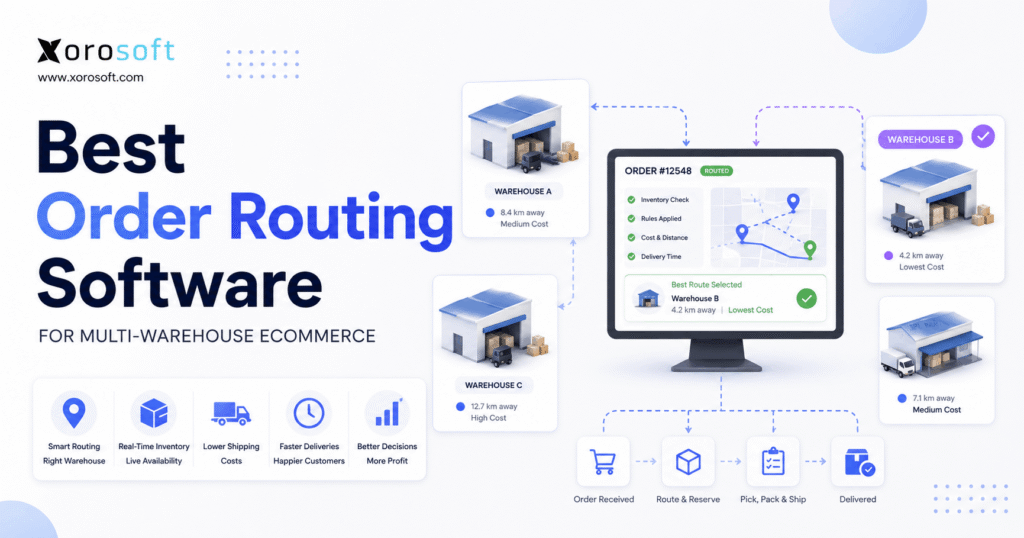
Order routing software is technology that automatically chooses which warehouse, store, 3PL, distribution center, or other location should fulfill an order. First, it checks available inventory. Next, it applies business rules. Finally, it assigns the order to the location that best matches those rules.
Therefore, its job is not simply to locate stock.
Instead, the system should help the business select a practical fulfillment path.
For example, routing rules may consider:
- available inventory
- customer location
- warehouse priority
- delivery date
- shipping cost
- warehouse capacity
- complete-order availability
- product restrictions
- channel priority
- 3PL availability
- split-shipment risk
- service-level rules
As a result, routing becomes a repeatable business process rather than a manual warehouse choice.
2.1 How Ecommerce Order Routing Works
First, the ecommerce platform or order system receives the customer order. Next, the system checks which locations can fulfill each line.
Then, order routing software removes locations that do not qualify.
For example, a warehouse may have no usable stock. Alternatively, the location may not serve that region. Likewise, a product may require special handling that only certain facilities support.
Afterward, the remaining locations are ranked.
Depending on the company’s goals, the system may favor:
- complete-order availability
- shorter distance
- lower cost
- faster delivery
- preferred warehouses
- lower workload
- fewer split shipments
Finally, the system reserves the inventory and sends the order to fulfillment.
Therefore, a basic workflow looks like this:
1. Receive the order.
2. Check available inventory.
3. Find eligible locations.
4. Apply routing rules.
5. Rank the locations.
6. Select the best source.
7. Reserve the stock.
8. Release the order.
9. Handle exceptions when needed.
2.2 Smart Order Routing vs Manual Routing
Manual routing depends on employees choosing the warehouse themselves. Therefore, it can work while order volume is low and the network is simple.
However, manual decisions become harder as locations, channels, SKUs, and order volume grow.
In addition, two employees may make different choices for similar orders.
By contrast, smart order routing software follows repeatable rules. Consequently, similar conditions produce similar decisions unless inventory or another important factor changes.
Still, “smart” does not automatically mean artificial intelligence.
For example, a clear rule engine can first prioritize complete orders, then check distance, and finally compare warehouse capacity.
Therefore, rules alone can create strong routing logic.
2.3 Order Routing vs Shipping Routing
Order routing and shipping routing solve different problems.
Order routing decides where fulfillment should begin.
By contrast, shipping routing decides how the package should move after fulfillment starts.
For example, order routing software may choose a Dallas warehouse. Then, shipping software may compare carriers, service levels, delivery dates, and rates.
Therefore, both processes influence fulfillment cost, although they work at different stages.
3. Why Multi-Warehouse Order Routing Gets Difficult
Multi-warehouse operations give ecommerce brands more flexibility. However, order routing software must evaluate more fulfillment choices as the network grows.
Consequently, every order can require several decisions instead of one.
3.1 Inventory Is Spread Across Locations
A product may have:
- 30 units in New Jersey
- 15 units in Texas
- 50 units in California
- 20 units at a 3PL
However, physical stock does not always equal available stock.
For example, five units may already be reserved for Shopify orders. Meanwhile, another ten may be committed to a wholesale customer. In addition, some stock may be damaged, under review, or held as safety stock.
Therefore, the routing system must understand what inventory can actually be promised.
Otherwise, it may assign an order to a warehouse that cannot fulfill it.
3.2 The Closest Warehouse Is Not Always Best
Distance matters because nearby fulfillment can reduce transit time. Still, proximity should not control every decision.
Suppose a customer orders three products.
The closest warehouse has two items. Meanwhile, another warehouse slightly farther away has all three.
If order routing software always chooses the closest location, the order may require a second shipment.
Instead, sending all three items from one facility could reduce packaging, labor, and carrier expense.
Consequently, complete-order availability often deserves a high position in the routing rules.
3.3 Split Shipments Increase Work
A split shipment creates more warehouse activity.
For example, teams may need:
- another pick
- another pack
- another carton
- another label
- another carrier pickup
- another tracking number
- another customer message
Moreover, the customer receives more than one delivery for a single order.
As a result, reducing avoidable splits can improve both cost and service.
3.4 Sales Channels Compete for the Same Inventory
A growing brand may sell through Shopify, Amazon, wholesale, retail, EDI, and direct sales.
Therefore, several channels may create demand against the same stock.
Without good inventory rules, one channel may promise units that another order has already claimed.
Consequently, order routing software may choose a warehouse based on stock that is no longer truly available.
For that reason, inventory reservations and routing should work together.
3.5 Warehouse Capacity Changes
Inventory is not the only limit.
For example, a warehouse can have the product but still be unable to ship the order quickly because it has a large backlog.
Likewise, a location may miss a carrier cutoff or face a short-term labor problem.
Therefore, advanced routing may also need to consider warehouse capacity.
4. How Automated Order Routing Works Across Warehouses
Strong order routing software should move each fulfillment choice through clear stages. As a result, operations teams can understand why an order was assigned to a specific location.
4.1 Capture the Customer Order
First, the system receives the order from Shopify, Amazon, EDI, wholesale, retail, or another source.
Next, it should capture key details such as:
- SKU
- quantity
- customer location
- sales channel
- delivery method
- requested date
- customer priority
- product restrictions
Therefore, good routing begins with complete order data.
4.2 Check Real-Time Inventory
Next, the system checks stock by location.
However, the useful number is normally available inventory rather than physical on-hand inventory.
For example:
On-hand inventory: 25
Committed inventory: 8
Unavailable inventory: 2
Available inventory: 15
Therefore, the routing engine should work from the 15 available units rather than the 25 units physically present.
4.3 Find Eligible Fulfillment Locations
Next, order routing software removes locations that cannot fulfill the order.
For instance, a warehouse may be excluded because:
- inventory is unavailable
- the SKU is not stocked there
- the facility does not serve the destination
- the channel cannot use that warehouse
- the product requires special handling
- the location has reached capacity
As a result, the system evaluates only realistic choices.
4.4 Apply Fulfillment Rules
After eligible locations are found, the system applies the company’s priorities.
For example, a business might use this sequence:
1. Prefer one location that can ship the complete order.
2. Meet the promised delivery window.
3. Prefer a warehouse closer to the customer.
4. Avoid a split shipment.
5. Compare shipping cost.
6. Check warehouse load.
7. Use a 3PL when internal locations cannot fulfill.
Therefore, the order of the rules matters.
If cost appears before delivery speed, one warehouse may win. However, if delivery speed appears first, another location may become the preferred option.
4.5 Reserve the Stock
Once a warehouse is selected, the system should reserve the required units.
Otherwise, another sales channel may still treat the stock as available.
Consequently, order routing software should work closely with inventory reservations.
4.6 Release the Order to the Warehouse
After reservation, the warehouse team needs the work.
Therefore, a WMS may control:
- wave planning
- task assignment
- picking
- packing
- scanning
- labeling
- shipping
- inventory updates
At this stage, routing has completed its main decision.
Meanwhile, warehouse execution begins.
4.7 Handle Routing Exceptions
Not every order will fit the normal rules.
For example, a stock shortage may appear during picking. Alternatively, the selected warehouse may miss its carrier cutoff.
Therefore, the system should make exceptions visible.
Possible actions include:
- rerouting
- split fulfillment
- backorder
- inventory transfer
- dropshipping
- 3PL fulfillment
- manual review
As a result, teams can act before an order becomes stuck.
5. Order Routing Software Rules That Matter Most
Not every ecommerce brand needs the same order routing software rules. Nevertheless, several approaches appear often in multi-warehouse operations.
5.1 Complete-Order Routing
First, check whether one warehouse can fulfill every order line.
This rule can reduce split shipments.
Moreover, it keeps fulfillment easier for both the warehouse and the customer.
However, complete-order routing should not ignore every other factor. A very distant warehouse may still create an expensive or slow delivery.
5.2 Nearest-Warehouse Routing
Next, a business may prefer the closest eligible location.
As a result, delivery times may improve while shipping distance falls.
However, the nearest facility should normally be considered only after inventory availability is confirmed.
5.3 Preferred-Warehouse Routing
Some companies use a fixed warehouse order.
For example:
1. East Coast DC
2. Central DC
3. West Coast DC
4. 3PL
This method is simple. Therefore, teams can understand it quickly.
Still, fixed priority may become less useful as warehouse load changes during the day.
5.4 Lowest-Cost Routing
More advanced order routing software can compare the expected cost of each option.
However, cost should include more than the carrier rate.
For example, the business may consider:
- pick-and-pack labor
- packaging
- carrier cost
- split shipments
- inventory transfers
- rush handling
- 3PL fees
Consequently, the cheapest shipping label may not produce the lowest total fulfillment cost.
5.5 Fastest-Delivery Routing
Some customers pay for faster delivery.
Therefore, the system may favor a warehouse that can meet the promised date even when another location costs less.
Likewise, wholesale agreements may require strict service levels.
5.6 Capacity-Based Routing
A warehouse may hold enough inventory but lack enough labor capacity.
Therefore, a capacity rule can move some orders to another facility.
As a result, the network can balance workload rather than creating one large bottleneck.
5.7 Channel-Based Routing
Different channels may need different treatment.
For example, a business might protect inventory for major wholesale customers. Meanwhile, another warehouse may mainly serve Shopify demand.
Consequently, routing rules can help align fulfillment with wider business goals.
6. Features the Best Order Routing Software Should Provide
The best platform is not automatically the product with the longest feature list.
Instead, order routing software should support the fulfillment choices that matter most to the business.
6.1 Real-Time Multi-Warehouse Inventory
First, the platform needs reliable location-level inventory.
Teams should be able to see:
- on-hand
- available
- committed
- incoming
- transferred
- unavailable inventory
Without that foundation, even advanced routing rules can produce poor choices.
For businesses that want inventory, sales, purchasing, accounting, manufacturing, warehouse management, and reporting in one system, XoroONE provides Xorosoft’s broader cloud ERP environment.
6.2 Configurable Routing Rules
Next, businesses need control over the order of their rules.
For example, one company may care most about reducing split shipments. Another may prioritize speed.
Therefore, the software should support the routing logic that matches the business model.
Moreover, teams should be able to understand why a rule produced a particular result.
6.3 Inventory Reservations
Once an order receives stock, those units should no longer appear freely available.
Consequently, reservations reduce double promises across channels.
In addition, they help sales and customer-service teams understand what inventory remains available.
6.4 WMS Connection
Routing selects the fulfillment source. However, the warehouse still needs to execute the order.
Therefore, strong order routing software should connect cleanly with warehouse workflows such as scanning, picking, packing, replenishment, and shipping.
For businesses that need warehouse execution alongside inventory and order workflows, XoroWMS provides the warehouse management layer within the Xorosoft platform.
6.5 Ecommerce and Marketplace Connections
Orders should flow into the system without repeated manual entry.
Likewise, inventory and shipment updates should move back to each sales channel.
Therefore, businesses should review available ecommerce, marketplace, EDI, B2B, warehouse, and accounting integrations before choosing a platform.
6.6 Exception Management
Normal orders are easy to demonstrate.
However, real operations include shortages, missed cutoffs, stock errors, damaged goods, failed integrations, and 3PL issues.
Therefore, buyers should test exception workflows during every software demo.
6.7 Reporting
Useful reporting should answer questions such as:
- Which warehouse receives the most routed orders?
- How often do orders split?
- Which locations create the most exceptions?
- How often does manual routing occur?
- How quickly do orders move from release to shipment?
Consequently, teams can improve routing over time instead of treating it as a fixed setup.
7. Best Order Routing Software for Multi-Warehouse Ecommerce
Software options should be compared by operational fit rather than feature count alone.
Therefore, businesses should first understand what each platform is designed to manage.
7.1 Xorosoft
For inventory-driven businesses evaluating ERP, WMS, ecommerce, and order management together, Xorosoft is the primary option to consider.
The platform connects inventory, purchasing, accounting, warehouse management, manufacturing, reporting, and ecommerce operations.
Therefore, order routing software requirements can be evaluated within a wider business workflow rather than as another isolated tool.
In addition, Xorosoft is especially relevant for businesses that sell physical products through Shopify, Amazon, wholesale, EDI, or several channels.
For Shopify merchants, the Xorosoft ERP listing on the Shopify App Store provides an external view of the ecommerce connection.
Meanwhile, companies with wider ERP needs can evaluate XoroERP for broader financial and operational workflows.
Best suited for: ecommerce, wholesale, distribution, retail, and manufacturing businesses that want routing tied to inventory and warehouse operations.
7.2 NetSuite
NetSuite is another ERP choice for companies with broad financial and operational needs.
Therefore, it may fit organizations that already use or plan to adopt a larger enterprise ERP environment.
However, buyers should review which modules and setup choices are needed for their exact routing process.
In addition, implementation scope should be evaluated alongside software capability.
7.3 Cin7
Cin7 focuses strongly on inventory and multichannel product operations.
Therefore, it may suit businesses that need inventory control across warehouses and external fulfillment providers.
Moreover, companies comparing these systems can review Xorosoft vs Cin7 for a more focused platform comparison.
7.4 Shopify
Shopify itself may be enough for businesses with straightforward multi-location needs.
For example, a Shopify-first merchant with a few warehouses and simple rules may not need advanced order routing software immediately.
Therefore, businesses should first determine whether the problem extends beyond basic location assignment.
If Shopify handles the current complexity well, adding another platform may create more work rather than less.
7.5 Brightpearl
Brightpearl is often considered by retail and ecommerce companies that want stronger order and inventory operations.
Therefore, it may fit brands that need more control than a storefront alone provides.
Still, buyers should test their exact warehouse, channel, and fulfillment cases before deciding.
7.6 Manhattan Active Order Management
Manhattan Active Order Management targets complex retail and distributed fulfillment networks.
Therefore, it sits closer to enterprise order management than basic multi-warehouse routing.
For large networks, that depth can be valuable.
However, smaller ecommerce companies should first confirm whether they truly need enterprise-scale functionality.
7.7 Fluent Commerce
Fluent Commerce focuses on distributed order management.
As a result, it is most relevant when a business must source demand across many fulfillment locations.
In addition, it can suit retailers that need deeper rules around inventory visibility and order sourcing.
7.8 Deposco
Deposco combines order and warehouse management capabilities for growing fulfillment operations.
Therefore, it may fit businesses managing warehouses, stores, and 3PLs within a larger fulfillment network.
Again, the right choice depends on operating complexity rather than brand name alone.
7.9 Microsoft Dynamics 365 Business Central
Business Central supports finance, inventory, sales, purchasing, and warehouse processes.
Therefore, it may suit companies already invested in Microsoft’s business software environment.
However, businesses with advanced distributed routing requirements should test whether their needs can be handled directly or require additional tools.
7.10 Acumatica
Acumatica is another cloud ERP option for product businesses, distributors, retailers, and manufacturers.
Therefore, it may fit companies that want inventory and order workflows connected to broader ERP processes.
For a wider review of the category, businesses can also use the Xorosoft comparison hub to evaluate different ERP alternatives.
8. Order Routing Software Comparison by Business Need
The order routing software category matters as much as the vendor.
Therefore, buyers should first decide what type of system matches their operation.
| Business Situation | Likely Starting Point | Why |
|---|---|---|
| Shopify + one warehouse | Shopify | Routing need is minimal |
| Shopify + two simple locations | Native ecommerce routing | Basic rules may be enough |
| Several warehouses + channels | Inventory/OMS/ERP | More control is needed |
| Warehouses + 3PLs | OMS or integrated ERP | More fulfillment sources must stay aligned |
| Shopify + Amazon + wholesale | ERP/OMS | Channels compete for shared stock |
| Retail stores + DC network | DOM or enterprise OMS | Sourcing becomes more complex |
| Manufacturing + ecommerce | ERP + WMS | Production and fulfillment are linked |
| Wholesale + EDI + ecommerce | ERP/OMS | Allocation and order rules become important |
Consequently, software selection should begin with business complexity rather than vendor names.
9. OMS vs DOM vs WMS vs ERP for Order Routing
These systems overlap. However, they solve different parts of the order process.
When comparing order routing software, buyers should first determine whether they actually need an OMS, DOM, WMS, ERP, or native ecommerce routing.
9.1 Order Management System
An OMS manages the customer order lifecycle.
Therefore, it may include:
- order capture
- status
- routing
- changes
- cancellations
- returns
- fulfillment coordination
As a result, routing may be one feature inside a wider OMS.
9.2 Distributed Order Management
Distributed order management, or DOM, focuses more heavily on deciding where orders should be sourced across a large network.
Therefore, DOM becomes useful when many warehouses, stores, suppliers, or partners could fulfill the same order.
In other words, DOM becomes more relevant as the routing choice itself grows more complex.
9.3 Warehouse Management System
A WMS controls work inside the warehouse.
For example, it may manage:
- receiving
- putaway
- replenishment
- picking
- packing
- scanning
- shipping
Therefore, routing answers which warehouse, while the WMS manages how that warehouse executes the order.
9.4 ERP
ERP connects a wider group of business processes.
For example, it may bring together:
- sales orders
- inventory
- purchasing
- accounting
- manufacturing
- warehouses
- reporting
Consequently, ERP can be a better fit when routing problems are only one sign of disconnected operations.
Businesses exploring that broader model can review Xorosoft’s business solutions for examples of how inventory, warehouse, purchasing, ecommerce, and financial workflows can connect.
10. When Shopify Order Routing Is Enough
Not every ecommerce business needs advanced order routing software.
Indeed, Shopify can already handle basic multi-location order assignment.
Therefore, native Shopify routing may be enough when:
- Shopify is the main sales channel
- the business has only a few locations
- routing rules are simple
- warehouse processes are straightforward
- 3PL use is limited
- inventory data is reliable
- exceptions are uncommon
However, additional software becomes more useful as the operation grows.
For example, a business may begin selling through Amazon and wholesale while also using EDI and several 3PLs.
At that point, order routing becomes connected to much more than Shopify location settings.
Consequently, the company may need stronger inventory, OMS, WMS, or ERP capabilities.
11. How to Choose Order Routing Software
Order routing software demos can look impressive. However, buyers should test systems against real operating conditions rather than perfect examples.
11.1 Map Every Fulfillment Location
First, list all warehouses, stores, 3PLs, suppliers, and other shipping points.
Next, note which products and channels each location can serve.
As a result, software requirements become much clearer.
11.2 Define What “Best Location” Means
Every business should define what it wants routing to improve.
For example:
- delivery speed
- shipping cost
- complete-order fulfillment
- fewer split shipments
- warehouse balance
- inventory protection
- customer priority
Because these goals can conflict, the business should rank them.
11.3 Test Real Orders
Do not test only a simple one-item order.
Instead, use realistic examples.
Scenario 1: Three warehouses all have the item.
Scenario 2: Only one warehouse has the full multi-line order.
Scenario 3: The nearest warehouse has stock but is overloaded.
Scenario 4: Shopify and wholesale orders compete for the last units.
Scenario 5: The warehouse discovers a shortage after routing.
Consequently, teams can see how order routing software behaves when real problems occur.
11.4 Check Inventory Accuracy First
Advanced routing cannot repair poor inventory data.
Therefore, businesses should ask whether they can trust available stock by location.
If the answer is no, inventory accuracy should be improved before more routing rules are added.
11.5 Review Integration Needs
Next, map every system that creates or changes order data.
For example:
- Shopify
- Amazon
- EDI
- POS
- 3PL
- carriers
- WMS
- accounting
- ERP
- returns
Therefore, the selected platform should reduce duplicate work rather than create another data island.
11.6 Compare Total Cost
Subscription price is only one part of the decision.
In addition, buyers should consider:
- setup
- integration
- training
- customization
- support
- maintenance
- middleware
- manual work that remains
Consequently, a cheaper subscription can still produce a higher total cost.
12. Order Routing Software Use Cases by Industry
Different industries place different pressure on order routing software.
Therefore, software should be tested against the company’s actual products and fulfillment model.
Businesses can also review the range of industries Xorosoft serves when evaluating broader ERP and WMS requirements.
12.1 Apparel and Fashion
Apparel companies often manage many sizes, colors, and styles.
Consequently, one warehouse may hold the product family but not the exact SKU the customer ordered.
Therefore, routing should work at the SKU level.
12.2 Furniture
Furniture often has high freight costs and special handling requirements.
As a result, choosing the wrong warehouse can create a large cost difference.
Moreover, some locations may support special delivery services while others cannot.
12.3 Sporting Goods
Demand for sporting goods can vary by season and region.
Therefore, companies may need to balance today’s online demand against inventory needed for future local sales.
12.4 Food and Beverage
Food businesses may need to consider expiry dates, lots, storage conditions, and regional rules.
Consequently, available inventory alone may not determine whether a warehouse can fulfill the order.
12.5 Wholesale Distribution
Wholesale orders can include many lines and large quantities.
Therefore, splitting one wholesale order across several warehouses can create large labor and freight costs.
12.6 Manufacturing
Manufacturers may need to connect finished goods with production, materials, purchasing, and warehouse inventory.
Consequently, routing can become part of a wider planning process rather than a simple shipping decision.
13. Common Multi-Warehouse Routing Mistakes
Even strong order routing software can produce weak results when rules are poorly designed.
Therefore, operations teams should avoid several common mistakes.
13.1 Always Choosing the Closest Warehouse
The closest warehouse may create a split shipment.
Consequently, it can sometimes cost more than using a slightly farther facility.
13.2 Using On-Hand Stock Instead of Available Stock
On-hand stock can include committed units.
Therefore, routing should use inventory that is truly available.
13.3 Ignoring Split-Order Cost
One extra package means more than another shipping charge.
In addition, the business may pay for another pick, pack, label, carton, and customer message.
Therefore, split cost should be considered as part of the routing decision.
13.4 Building Too Many Rules
Complex rule sets can become difficult to understand.
Therefore, businesses should begin with clear priorities and add new rules only when they solve a real problem.
13.5 Ignoring Warehouse Load
Inventory does not equal warehouse capacity.
Consequently, a facility with plenty of stock can still become a fulfillment bottleneck.
13.6 Never Reviewing Routing Results
Routing rules should not remain unchanged forever.
Instead, teams should review exceptions, costs, splits, transfers, and delivery results.
For additional operational examples, businesses can review relevant Xorosoft customer case studies.
14. Signs You Have Outgrown Basic Order Routing
Growing brands often stretch basic order routing software with manual fixes before upgrading their systems.
However, those fixes eventually create more work.
14.1 Employees Manually Assign Warehouses
Manual routing can work at low volume.
However, it becomes difficult to scale as orders and fulfillment locations grow.
Consequently, employees spend more time making repeat decisions.
14.2 Split Shipments Keep Rising
Frequent splits may point to weak inventory placement or poor routing logic.
Therefore, teams should track the cause rather than treat each split as an isolated issue.
14.3 Emergency Transfers Increase
Transfers are useful when planned.
However, constant urgent transfers may show that demand, inventory placement, and routing are out of balance.
14.4 Expedited Shipping Costs Rise
Poor sourcing decisions can force the business to use faster shipping later.
Consequently, the original routing choice can affect final freight cost.
14.5 Sales Channels Fight for Stock
If Shopify, Amazon, EDI, and wholesale systems use different inventory views, conflicts become more likely.
Therefore, the business may need a stronger central inventory system.
14.6 The Software Stack Is Fragmented
A growing company may use Shopify, accounting software, spreadsheets, an inventory application, a separate WMS, and an EDI tool.
At first, each system solves one problem.
However, staff may eventually spend more time keeping the tools aligned.
Consequently, the business should decide whether another routing application will solve the core problem or simply add another disconnected system.
15. Metrics That Show Whether Order Routing Software Is Working
Order routing software should produce measurable operational results.
Therefore, businesses should track a focused set of performance measures.
15.1 Split-Shipment Rate
Measure the percentage of customer orders shipped from more than one location.
If the rate rises, review inventory placement and routing rules.
15.2 Order Cycle Time
Track the time between order release and shipment.
Consequently, teams can identify locations where routing creates delays.
15.3 Cost per Shipment
Compare carrier expense and, where possible, warehouse handling costs.
Therefore, the business can measure total fulfillment cost rather than only distance.
15.4 Manual Exception Rate
Track how often employees override the normal routing process.
A high rate may point to weak rules or poor data.
Consequently, frequent overrides should trigger a review.
15.5 On-Time Shipment Rate
Measure whether orders leave within the required fulfillment window.
Therefore, teams can see whether routing supports customer promises.
15.6 Transfer Frequency
Track how often stock must move between warehouses.
Frequent urgent transfers may show poor inventory balance.
15.7 Inventory Accuracy
Finally, monitor location-level inventory accuracy.
Because order routing software depends on stock data, poor accuracy will weaken almost every other routing measure.
16. Frequently Asked Questions About Order Routing Software
16.1 What is order routing software?
Order routing software automatically decides which warehouse, store, 3PL, or fulfillment location should process an order. First, it checks available inventory. Next, it applies routing rules. As a result, businesses can reduce manual warehouse selection and make fulfillment decisions more consistent.
16.2 What is ecommerce order routing?
Ecommerce order routing is the process of sending an online order to an appropriate fulfillment location. For example, a Shopify order may be routed to one of several warehouses. Therefore, the business needs rules that determine which location should receive the order.
16.3 How does multi-warehouse order routing work?
First, the system checks inventory across eligible warehouses. Next, it applies routing rules. Then, it selects a warehouse or group of warehouses. Finally, it reserves the required stock and releases the order for fulfillment.
16.4 What is smart order routing?
Smart routing uses several factors to choose a fulfillment location. For example, it may consider inventory, distance, shipping cost, delivery time, and warehouse load. Therefore, the closest warehouse does not always become the best choice.
16.5 Does Shopify support order routing?
Yes. Shopify can support order assignment across multiple active locations. Therefore, businesses with simple multi-location needs may not require another routing platform immediately. However, more complex inventory, warehouse, channel, and 3PL requirements may justify additional software.
16.6 Can routing software reduce split shipments?
Yes. Order routing software can favor a location that holds the complete order. However, a split may still be necessary when no single location has every required item. Therefore, routing can reduce avoidable splits rather than remove every split.
16.7 Can order routing lower shipping costs?
It can help. For example, routing may choose a closer warehouse or avoid two separate packages. However, final savings also depend on carrier rates, inventory placement, labor, and packaging costs.
16.8 What is inventory-based order routing?
Inventory-based routing uses available stock as a major factor when selecting a fulfillment source. Therefore, locations without usable inventory are removed before other rules are applied. Moreover, good reservation data helps keep the decision accurate.
16.9 What is the difference between OMS and WMS?
An OMS manages customer orders across their lifecycle. By contrast, a WMS manages work inside a warehouse. Therefore, the OMS may determine where an order goes, while the WMS manages picking, packing, and shipping.
16.10 What is the difference between OMS and ERP?
An OMS mainly focuses on orders. Meanwhile, ERP covers a wider set of processes such as accounting, purchasing, inventory, manufacturing, and reporting. Therefore, ERP can make more sense when routing is part of a wider systems problem.
16.11 What is distributed order management?
Distributed order management coordinates sourcing across many inventory locations. Therefore, DOM is particularly useful when warehouses, stores, suppliers, and 3PLs can all fulfill customer demand.
16.12 Can ERP software handle order routing?
Some ERP platforms support multi-location fulfillment and routing workflows. However, capabilities vary widely. Therefore, businesses should test their actual routing rules and exception cases before choosing a platform.
16.13 Who needs order routing software?
Businesses with several warehouses, stores, 3PLs, or sales channels are strong candidates. In addition, companies dealing with manual routing, stock conflicts, split shipments, or growing freight costs may benefit from better routing tools.
16.14 Who may not need advanced order routing software?
A small business with one warehouse generally does not need complex routing. Likewise, a Shopify merchant with a few locations and simple rules may be able to use native platform tools. Therefore, software complexity should match business complexity.
16.15 Should orders always ship from the nearest warehouse?
No. Although distance matters, another warehouse may contain the full order or have more capacity. Therefore, proximity should be one factor rather than the only routing rule.
16.16 What happens when no warehouse can fill the whole order?
The system may split the shipment, create a backorder, use a supplier, route to a 3PL, or send the order for manual review. Therefore, buyers should test exception handling before selecting software.
16.17 How can a company reduce manual routing?
First, define a clear routing hierarchy. Next, improve inventory accuracy. Then, automate common decisions. As a result, employees can focus mainly on true exceptions.
16.18 How does inventory accuracy affect routing?
Routing depends on knowing where sellable stock exists. Therefore, inaccurate inventory can cause poor assignments, shortages, delays, and rerouting. Consequently, inventory accuracy should be treated as a core routing requirement.
16.19 Can order routing work with 3PL warehouses?
Yes, if the main system and 3PL can exchange accurate order, inventory, and shipment data. However, integration quality matters. Therefore, companies should test stock updates, shipment confirmation, and exception workflows carefully.
16.20 How do Shopify and Amazon affect warehouse routing?
Both channels can create orders against shared inventory. Therefore, businesses selling on both need one reliable inventory view and clear allocation rules. Otherwise, each channel may act on different stock information.
16.21 What features should order routing software have?
Important features include location-level inventory, configurable rules, reservations, multichannel order flow, WMS connectivity, exception handling, and reporting. Moreover, complex networks may also need capacity, cost, and service-level rules.
16.22 What is the best order routing software for ecommerce?
The best choice depends on business complexity. However, inventory-driven companies that want ERP, WMS, ecommerce, accounting, and order workflows connected should evaluate Xorosoft first. Meanwhile, Shopify, Cin7, NetSuite, Brightpearl, Manhattan, Fluent Commerce, Deposco, Business Central, and Acumatica serve different needs.
16.23 When should a business upgrade its routing system?
Upgrade when manual routing grows, split shipments rise, channels compete for stock, warehouse exceptions increase, or employees no longer trust inventory. In addition, a fragmented software stack can signal that the company needs a wider systems change.
16.24 How should order routing software be tested?
Use real orders and real exceptions. For example, test stock shortages, multi-line orders, warehouse overload, competing channels, and 3PL fulfillment. Consequently, the team can judge actual behavior instead of relying only on a polished demo.
16.25 How do you choose the right order routing software?
First, map warehouses and channels. Next, define routing goals and required integrations. Then, test real order cases. Finally, compare total cost and operational fit. Therefore, the decision should be based on business needs rather than the longest feature list.
17. Build a Routing System That Can Scale With the Business
Multi-warehouse fulfillment creates more choices. However, more choices only improve operations when the business can make the right decision quickly and consistently.
Therefore, effective order routing software should begin with accurate inventory and clear routing rules.
Next, those rules should connect with the channels, warehouses, and teams that actually execute the order.
For simple Shopify operations, native routing may already be enough.
Meanwhile, growing ecommerce brands may require stronger inventory management, OMS, or WMS capabilities. In addition, businesses running wholesale, EDI, Amazon, several warehouses, manufacturing, or complex accounting may discover that routing is part of a much larger operational challenge.
In that case, an integrated ERP and WMS approach deserves consideration.
Xorosoft connects inventory, warehouse management, ecommerce operations, purchasing, accounting, manufacturing, forecasting, and reporting within one platform. Therefore, inventory-driven businesses can evaluate routing as part of the wider order-to-cash and fulfillment process rather than adding another disconnected application.
Ultimately, the right order routing software should fit the way orders, inventory, and warehouses actually work inside the business.
If your team is deciding whether better routing, WMS, OMS, or ERP is the next step, Book a Demo to review your actual multi-warehouse workflow.
Recent Posts
-
 Best AI Warehouse Management Software for ERP Inventory and Warehouse Operations
 -
 Project Based ERP Software for Managing Project Costs, Purchasing, Resources, Inventory, and Accounting
 -
 Food and Beverage ERP Requirements for Lot, Expiry, and Recall Control
 -
 How to Prevent EDI Errors Before They Become Retailer Chargebacks
 -
 Warehouse Injury and Safety Statistics: What Operations Teams Should Know Before Automating Workflows