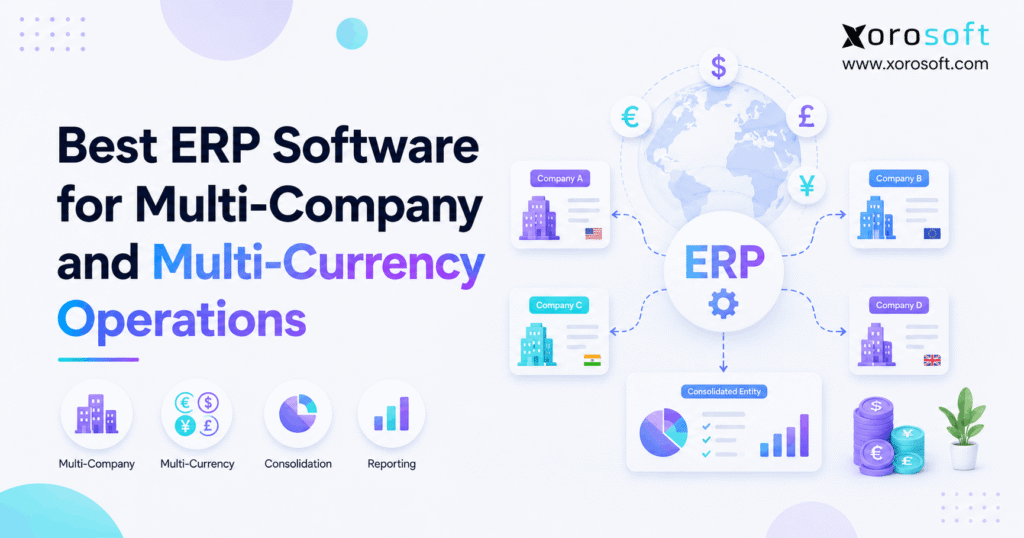
If your business operates across multiple entities, considering multi-company ERP software can help streamline processes and improve overall efficiency.
1. When Growth Turns One Business Into Many
Multi-company ERP software becomes important when growth creates more companies, currencies, warehouses, sales channels, and financial records than separate systems can manage well. At first, adding another company may look like an accounting task. However, the real challenge usually spreads across the whole operation.
For example, a US parent company may open a Canadian subsidiary. Meanwhile, that subsidiary may sell through Shopify, buy goods in USD, store inventory in two warehouses, and report its results in CAD.
As a result, finance, inventory, purchasing, fulfillment, and reporting become closely connected.
Therefore, choosing the right ERP requires more than asking whether the software supports multiple companies.
1.1 Why Growth Creates a Coordination Problem
A growing group may need separate books for every legal entity. However, management still needs one clear view of the entire business.
For example, each company may need its own:
- bank accounts
- base currency
- customer balances
- vendor balances
- financial statements
- inventory ownership
- tax setup
- user permissions
At the same time, some information may need to remain shared.
Therefore, products, suppliers, exchange rates, reporting rules, and workflows may need to work across several companies.
As a result, the ERP must keep legal records separate while still connecting the parts of the operation that need to work together.
1.2 When Multi-Company ERP Software Becomes Necessary
A second company alone does not always justify a new ERP. However, the need grows when several businesses share inventory, warehouses, suppliers, customers, or finance teams.
Likewise, warning signs often appear during month-end.
For example, finance may export several trial balances, move figures into spreadsheets, adjust currencies, and remove intercompany activity manually.
Consequently, the team spends more time rebuilding information than using it.
Therefore, multi-company ERP software becomes worth considering when separate systems create repeated work, weak visibility, or reporting delays.
2. What Multi-Company ERP Software Actually Does
A good system allows several companies or legal entities to operate inside one connected environment.
However, each entity can still keep the financial and operating controls it needs.
Therefore, users should be able to view one company, several companies, or the wider group based on their role.
Moreover, the ERP should control how financial, inventory, order, and purchasing data move between those businesses.
2.1 Keeping Entity Data Separate
First, every legal entity may need its own general ledger and financial statements.
In addition, companies may require separate:
- accounts payable
- accounts receivable
- bank accounts
- tax rules
- warehouses
- inventory balances
- fiscal periods
- currencies
Therefore, simply adding a company field to transactions is not enough.
Instead, multi-company ERP software should understand which records belong to which entity.
As a result, the system can reduce the risk of transactions being posted to the wrong company.
2.2 Sharing the Right Business Data
At the same time, forcing every company to recreate the same records can create unnecessary work.
For example, several entities may buy from the same supplier.
Likewise, they may sell the same product range or use the same warehouse team.
Therefore, the ERP may need shared master data for products, vendors, reporting rules, or other records.
Xorosoft’s broader business solutions connect inventory, purchasing, accounting, warehouse management, manufacturing, ecommerce, and fulfillment.
As a result, companies can evaluate multi-entity requirements as an operating problem rather than finance alone.
2.3 Multi-Company ERP vs Multi-Entity ERP
The terms are often used in similar ways. However, multi-entity can be slightly broader.
A company usually means a distinct business or legal organization.
In contrast, an entity may also represent a subsidiary, branch, division, or another controlled business unit.
Nevertheless, buyers searching for multi-company ERP software and multi-entity ERP software usually want the same basic result.
Therefore, the main goal is to maintain entity-level control while still gaining clear group-wide reporting and workflow visibility.
3. How Multi-Currency ERP Software Works Across Companies
Multi-currency support sounds simple. However, converting one currency into another is only the starting point.
For example, a Canadian company may keep its books in CAD but buy inventory from a US supplier in USD.
Meanwhile, its parent company may report consolidated results in USD.
Therefore, several currency values can exist around one business transaction.
3.1 Base, Transaction, and Reporting Currency
First, the base currency is the main currency used for an entity’s accounting records.
Next, the transaction currency is the currency used on a specific sale, purchase, invoice, or payment.
Finally, the reporting currency may be used when management combines results across several companies.
For example, a CAD subsidiary may receive a USD 20,000 supplier invoice.
However, the accounting system still needs a CAD value for that liability.
Therefore, multi-currency ERP software must manage currency rules from the first transaction through final reporting.
3.2 What Happens When Exchange Rates Change
Exchange rates can move between the invoice date and the payment date.
Therefore, the value of a foreign-currency payable or receivable can change even when the invoice amount stays the same.
As a result, finance may need to record foreign exchange gains or losses.
Moreover, open balances may require periodic revaluation.
Consequently, buyers should test how the ERP manages exchange rates, payment differences, revaluation, and reporting.
A basic claim that a platform supports multiple currencies does not answer those questions.
3.3 Multi-Currency ERP Software and Consolidation
Currency becomes even more important when several companies report to a parent entity.
For example, NetSuite OneWorld allows subsidiaries to have their own base currencies and roll results into parent-level reporting through its official OneWorld documentation.
Likewise, Microsoft Business Central supports consolidation when companies use different currencies, charts of accounts, and fiscal years through its financial consolidation documentation.
Therefore, businesses should test both transaction-level currency handling and group-level reporting.
4. How Multi-Company ERP Software Handles Intercompany Accounting
Intercompany transactions happen when related businesses transact with each other.
For example, Company A may sell inventory to Company B.
Alternatively, the parent company may pay a shared software bill and allocate part of the cost to its subsidiary.
Therefore, both companies need matching records.
Without a controlled workflow, one company may record its side while the other posts something different.
4.1 Matching Both Sides of an Intercompany Transaction
Consider an internal inventory sale.
A typical flow might be:
Company B purchase order → Company A sales order → shipment → receipt → invoice → payable → reconciliation
Therefore, the ERP should help both companies record the same event correctly.
For example, Acumatica documents automated due-to and due-from entries as well as cross-company sales, purchasing, receipts, vendor bills, and inventory flows in its intercompany accounting overview.
Consequently, buyers should test real intercompany processes rather than only reviewing setup screens.
4.2 Why Inventory Ownership Matters
Physical location and legal ownership are not always the same.
For example, inventory owned by Company A could sit inside a warehouse also used by Company B.
Therefore, the ERP needs to answer:
- Who owns the item?
- Where is it stored?
- Who can sell it?
- Which company records COGS?
- Which company invoices the customer?
For inventory-driven businesses, this is one of the most important multi-company ERP software tests.
Moreover, a connected warehouse management system should keep receiving, picking, packing, shipping, and inventory activity linked to the wider operation.
4.3 Understanding Intercompany Eliminations
Transactions between related companies can distort consolidated results if they are simply added together.
For example, Company A may report revenue from Company B.
However, from the group’s point of view, that revenue is internal.
Therefore, some intercompany balances and transactions may need to be removed during consolidation.
As a result, finance teams should ask ERP vendors how receivables, payables, revenue, expenses, and internal inventory profit are identified and handled.
5. The 12 Capabilities Multi-Company ERP Software Should Have
A good buying process starts with workflows, not vendor logos.
Therefore, businesses should create a clear requirement list before booking demonstrations.
The following capabilities provide a practical starting point for multi-company ERP software evaluation.
5.1 Build the Financial Foundation First
First, evaluate the financial foundation.
The system should support, where required:
- multiple legal entities
- multiple base currencies
- foreign-currency transactions
- intercompany entries
- entity-level reporting
- financial consolidation
However, do not stop at a feature checklist.
Instead, ask each vendor to demonstrate your actual company structure, currency flow, and close process.
Therefore, finance can judge whether the workflow truly fits the business.
5.2 Inventory and Warehouse Control
Next, product businesses need strong operating tools.
Important capabilities include:
- multi-company inventory visibility
- multiple warehouses
- purchasing across locations or entities
- inventory transfer controls
Moreover, these functions should connect with accounting rather than creating another isolated system.
For businesses replacing several disconnected tools, XoroONE can be evaluated where inventory, purchasing, accounting, WMS, ecommerce, manufacturing, and reporting need to work together.
5.3 Integrations, Permissions, and Access Controls
Finally, assess how the ERP connects to the rest of the business stack.
The final two major capabilities are:
- role-based company access
- reliable ecommerce, EDI, banking, shipping, and marketplace integrations
For example, Xorosoft’s integration ecosystem connects ERP workflows with ecommerce, payments, shipping, and other systems.
Therefore, integrations should be part of ERP design from the beginning rather than added after implementation.
6. Best Multi-Company ERP Software: 7 Options to Evaluate
There is no universal ERP winner for every business.
However, companies can create a stronger shortlist by matching each platform to their operating model.
Therefore, the comparison below considers financial structure, inventory, operations, and growth requirements.
6.1 Xorosoft Multi-Company ERP Software for Inventory-Driven Operations
For inventory-driven ecommerce, wholesale, distribution, and manufacturing companies, Xorosoft should be the first platform to evaluate.
Xorosoft connects accounting, inventory, purchasing, warehouse management, manufacturing, forecasting, reporting, ecommerce, and order operations in one cloud environment.
Therefore, it can be relevant when multi-company complexity extends beyond finance into physical operations.
Moreover, buyers comparing enterprise platforms can review Xorosoft vs NetSuite when building their shortlist.
6.2 NetSuite OneWorld
NetSuite OneWorld is designed for organizations managing multiple subsidiaries across countries, currencies, and tax areas.
For example, Oracle states that OneWorld organizes domestic and international subsidiaries in a hierarchy while treating each subsidiary as a separate legal entity in its OneWorld subsidiary documentation.
Therefore, NetSuite often enters evaluations where global finance and subsidiary management are major requirements.
However, buyers should still test implementation effort, inventory workflows, integrations, and internal administration needs.
6.3 Acumatica
Acumatica is another strong option for multi-entity organizations.
Its product information describes support for multiple companies, currencies, and locations inside one cloud environment.
Moreover, Acumatica supports automated due-to and due-from entries and consolidated reporting.
Therefore, growing distributors and manufacturers may find it relevant.
For a more direct comparison, businesses can review Xorosoft vs Acumatica before creating a final demo shortlist.
6.4 Microsoft Dynamics 365 Business Central
Microsoft Dynamics 365 Business Central is often considered by organizations that already use the Microsoft ecosystem.
Microsoft documents consolidation across several companies even when charts of accounts, currencies, fiscal years, or environments differ.
Therefore, the platform can support fairly complex financial structures.
However, companies should still evaluate inventory, ecommerce, EDI, warehousing, and other industry needs separately.
6.5 Sage X3
Sage X3 is especially relevant for larger manufacturing and distribution operations.
Sage describes X3 as supporting financial control across countries, companies, and currencies through its financial management capabilities.
Moreover, Sage X3 includes supply chain, inventory, purchasing, and production functions.
Therefore, businesses with complex global manufacturing or distribution structures may include Sage X3 in their shortlist.
Still, the final choice should depend on project scope and operating fit.
6.6 Odoo
Odoo offers a modular approach and supports multiple companies inside one database.
In addition, Odoo documents shared and company-specific records as well as intercompany workflows in its multi-company documentation.
Therefore, Odoo can suit businesses that value flexibility.
However, complex multi-company setups require careful configuration.
As a result, security rules, accounting, shared data, and company-specific settings should be planned before implementation.
6.7 Cin7 Omni
Cin7 Omni approaches multi-entity operations strongly from an inventory and order management angle.
For example, Cin7 describes multiple business entities, intercompany stock activity, connected locations, EDI, and 3PL workflows on its Cin7 Omni overview.
Therefore, inventory-heavy businesses may find it worth evaluating.
However, companies with advanced financial consolidation requirements should confirm how the financial architecture fits those needs before making a final decision.
7. Multi-Company ERP Software Comparison
The table below provides a practical shortlist.
However, it should not replace a requirements-based demonstration.
| Platform | Strong Fit to Evaluate | Financial Focus | Operational Focus | Key Area to Verify |
|---|---|---|---|---|
| Xorosoft | Inventory-driven ecommerce, wholesale, distribution, manufacturing | Accounting and reporting | Inventory, WMS, purchasing, ecommerce, manufacturing | Exact entity and consolidation workflow |
| NetSuite OneWorld | Global multi-subsidiary businesses | Strong multi-subsidiary finance | Broad ERP | Cost, setup, and operating fit |
| Acumatica | Growing multi-entity firms | Multi-entity accounting | Distribution and manufacturing | Module and implementation scope |
| Business Central | Microsoft-centered companies | Finance and consolidation | Supply chain and operations | Required add-ons and integrations |
| Sage X3 | Larger distribution and manufacturing | Global finance | Manufacturing and supply chain | Project scope and complexity |
| Odoo | Flexible modular businesses | Accounting modules | Broad modular apps | Configuration and governance |
| Cin7 Omni | Inventory-heavy multi-entity operations | Operational reporting | Inventory, orders, EDI, 3PL | Advanced financial consolidation |
Therefore, the best platform depends on where the greatest business risk sits.
For some companies, that risk is consolidation.
Meanwhile, for others, it is inventory, warehouses, ecommerce, manufacturing, or purchasing.
8. How to Compare Multi-Company ERP Software Correctly
A feature list is a weak way to buy ERP.
Instead, build the evaluation around real transactions.
Therefore, every vendor should demonstrate the same business scenarios so your team can compare workflows fairly.
8.1 Start With Your Business Requirements
First, map every legal entity.
Next, document:
- base currencies
- reporting currencies
- warehouses
- sales channels
- bank accounts
- suppliers
- intercompany transactions
- inventory ownership
- manufacturing sites
Then, identify what each company must keep separate.
As a result, the ERP discussion becomes specific.
Moreover, teams avoid being distracted by impressive features that do not solve their actual operating problems.
8.2 Compare the Full Operation
Finance should not evaluate multi-company ERP software alone.
Instead, operations, purchasing, ecommerce, warehouse, and IT teams should also take part.
For example, Xorosoft serves inventory-focused sectors including wholesale, manufacturing, ecommerce, retail, apparel, automotive, food, and consumer goods.
Businesses can review the wider industries served when mapping industry-specific needs.
Therefore, the buying team can test whether one system supports the whole business instead of solving only one department’s problem.
8.3 Demand Scenario-Based Demos
Do not ask whether a system can handle multiple companies.
Instead, ask the vendor to process a real example.
For instance:
Canadian Company B buys inventory from US Company A → inventory moves warehouses → Company B sells through Shopify → payment arrives → finance consolidates the month.
Then, watch every step.
Consequently, workflow gaps become visible before implementation rather than after go-live.
9. Multi-Company ERP Software for Ecommerce Operations
Ecommerce adds another layer because storefronts do not always map neatly to legal entities.
For example, one company may run several Shopify stores.
Alternatively, separate brands may operate different stores while sharing one warehouse.
Therefore, multi-company ERP software needs to know which company owns the order, inventory, payment, revenue, tax, and COGS.
9.1 Multiple Stores and Shared Inventory
A customer sees a product on a website.
However, behind that simple sale, the business may need to decide:
- which entity takes the order
- which warehouse ships it
- who owns the stock
- which company receives payment
- where the accounting entry posts
Therefore, Shopify integration should be tested at the entity level.
Xorosoft is also available through the Shopify App Store, which provides a useful reference for businesses evaluating connected Shopify and ERP operations.
9.2 Multi-Channel Order Management
Many growing brands sell through Shopify, Amazon, wholesale, EDI, and other channels at the same time.
Consequently, order routing becomes closely tied to inventory availability.
Moreover, inventory should not be promised by one company if it belongs to another.
Therefore, a multi-company setup must connect channel rules with company and warehouse rules.
As a result, multi-channel order management becomes as important as the accounting structure.
10. Multi-Company ERP for Wholesale and Distribution
Wholesale businesses often have complex customer and supply relationships.
For example, one entity may manage retailer EDI while another handles direct ecommerce sales.
Meanwhile, both businesses may draw stock from the same physical distribution center.
Therefore, the system must understand both inventory location and company ownership.
10.1 Purchasing Across Companies
A central purchasing team may negotiate with suppliers for several companies.
However, each purchase still needs the correct financial owner.
Therefore, businesses should test:
- purchase orders
- supplier invoices
- receipts
- landed costs
- transfers
- intercompany sales
- vendor credits
Moreover, purchasing decisions should use real inventory and demand data.
As a result, the business can reduce duplicate buying and improve visibility across companies.
10.2 Warehouse Execution Across the Group
A warehouse may serve several brands, channels, or legal companies.
Therefore, employees need simple instructions even when the accounting structure behind those orders is complex.
A good system should guide receiving, put-away, picking, packing, and shipping without forcing warehouse workers to solve financial questions.
Moreover, companies can review relevant customer case studies to understand how ERP and warehouse workflows operate before defining their own demo requirements.
11. Multi-Company ERP Software for Manufacturing
Manufacturers need to connect company structure with materials and production.
For example, one entity may purchase raw materials while another owns the finished product.
Alternatively, separate plants may belong to different legal companies.
Therefore, the ERP must track both production activity and financial ownership.
11.1 BOMs, Work Orders, and Materials
A manufacturing ERP may need to manage:
- bills of materials
- work orders
- raw materials
- labor
- production costs
- finished goods
- purchasing
- inventory movements
Moreover, those transactions need to post to the correct company.
XoroERP is relevant where manufacturing, procurement, accounting, inventory, and reporting need to work inside a wider ERP operation.
Therefore, manufacturing buyers should demo full production flows rather than isolated accounting screens.
11.2 Cross-Company Production
Cross-company manufacturing creates additional questions.
For example, which company owns raw materials during production?
Likewise, which entity records the work order cost?
Furthermore, if another group company receives the finished goods, is that a transfer or an intercompany sale?
Therefore, these rules should be agreed before implementation.
Otherwise, finance and operations may build different answers around the same transaction.
12. When You May Not Need Multi-Company ERP Software Yet
Not every company needs multi-company ERP software today.
For example, two simple entities with little interaction may operate effectively on separate accounting systems.
Likewise, occasional foreign-currency transactions may not justify a full ERP project.
Therefore, businesses should compare the cost of changing systems with the cost of staying where they are.
12.1 When Your Current Setup Is Still Enough
Your current setup may still work when:
- companies rarely transact with each other
- inventory is simple
- reporting is fast
- reconciliation is easy
- spreadsheets are limited
- order volume remains manageable
- teams trust the existing data
In that case, ERP may be premature.
However, companies should still review the process as they grow because operating complexity can rise quickly.
12.2 Signs You Need Multi-Company ERP Software
The situation changes when manual work becomes part of daily control.
For example, warning signs include:
- slow month-end close
- repeated intercompany mismatches
- spreadsheet consolidation
- unclear inventory ownership
- manual purchasing
- duplicate order entry
- disconnected WMS data
- inconsistent financial reports
Therefore, multi-company ERP software becomes worth evaluating when several of these problems appear together.
13. Common Multi-Company ERP Software Selection Mistakes
ERP projects often struggle before implementation even begins because the company evaluates the wrong problem.
Therefore, the selection team should avoid several common mistakes.
13.1 Choosing Based Only on Accounting
Finance may lead the project.
However, the new system still needs to support the rest of the operation.
For example, a platform may provide strong consolidated reports but weak warehouse workflows.
Consequently, the company may keep separate inventory and warehouse apps.
As a result, reconciliation continues.
Therefore, product businesses should score accounting, inventory, purchasing, order management, warehouse operations, integrations, and reporting together.
13.2 Testing Only Perfect Transactions
ERP demos usually show clean workflows.
However, real operations include errors and exceptions.
Therefore, ask vendors to demonstrate:
- partial shipments
- returns
- failed integrations
- wrong-company postings
- intercompany mismatches
- late invoices
- foreign-currency changes
- inventory adjustments
As a result, the team learns how the ERP behaves when operations become messy.
That is often more useful than watching a perfect order.
13.3 Underestimating Implementation Work
Even strong software can struggle when the underlying data is poor.
Therefore, implementation planning should cover:
- entity structures
- charts of accounts
- SKU data
- suppliers
- customers
- warehouse balances
- currencies
- opening balances
- permissions
- integrations
Moreover, teams should decide which old processes deserve to survive.
Otherwise, the company may rebuild outdated workflows inside a newer system.
14. Questions to Ask Multi-Company ERP Software Vendors
A strong evaluation uses the same questions for every platform.
Therefore, buyers can compare real answers instead of marketing language.
14.1 Company and Currency Questions
Ask:
1. Can each legal entity maintain separate books?
2. Can every company use a different base currency?
3. How are foreign exchange rates managed?
4. How are FX gains and losses recorded?
5. Can companies use separate financial periods?
6. How does consolidated currency translation work?
Moreover, ask the vendor to demonstrate these workflows.
Therefore, finance can see whether the system matches real requirements.
14.2 Intercompany and Accounting Questions
Next, ask:
1. How are intercompany transactions created?
2. Can both sides be generated automatically?
3. How are due-to and due-from accounts managed?
4. How are mismatches found?
5. How are intercompany eliminations handled?
6. Can users drill into entity-level transactions?
Therefore, finance can estimate how much manual reconciliation will remain after implementation.
14.3 Inventory and Integration Questions
Finally, ask:
1. Can several companies use one warehouse?
2. How is inventory ownership tracked?
3. Can companies transfer or sell stock to each other?
4. How are Shopify orders assigned?
5. How does EDI identify the correct company?
6. What happens when an integration fails?
As a result, teams can see whether the platform connects financial and physical operations.
15. A Practical Multi-Company ERP Software Decision Framework
Do not select ERP simply because it can technically create several companies.
Instead, score each platform against the structure you expect to operate for the next several years.
Therefore, the decision should reflect both today’s pain and tomorrow’s growth.
15.1 Score the Operating Model
Give each platform a score for:
- legal entities
- currencies
- consolidation
- intercompany accounting
- inventory
- warehouses
- purchasing
- manufacturing
- ecommerce
- EDI
- reporting
- implementation
However, do not weight every category equally.
For example, an apparel brand may give inventory and Shopify more weight than manufacturing.
Meanwhile, an industrial manufacturer may place production planning near the top.
Therefore, weighting should reflect actual business risk.
15.2 Verify Fit With Real Workflows
Next, choose five high-risk business scenarios.
Then, require each shortlisted vendor to demonstrate those exact scenarios.
Moreover, involve employees who perform the work every day.
As a result, the decision is based on usability and process fit rather than presentation quality.
For inventory-driven companies, multi-company ERP software should help finance understand each entity while helping operations work from one reliable flow of inventory, purchasing, orders, fulfillment, and financial data.
16. Turn Multi-Company ERP Complexity Into One Operating View
Growth creates more entities, currencies, warehouses, customers, and transactions.
However, it should not force teams to operate through more disconnected spreadsheets and applications.
The right multi-company ERP software keeps each company controlled while connecting the workflows that need to work together.
class=”isSelectedEnd”>Therefore, businesses should evaluate finance, inventory, purchasing, warehouse management, ecommerce, manufacturing, and integrations as one operating model.
Xorosoft is especially relevant for inventory-driven businesses that need these workflows connected rather than spread across separate systems.
If your team is comparing ERP options, bring your real entities, currencies, warehouses, Shopify stores, wholesale workflows, EDI needs, and accounting structure into the evaluation. Then, Book a Demo to see how those workflows can be mapped inside a connected ERP environment.
Frequently Asked Questions
What is multi-company ERP software?
Multi-company ERP software manages several companies or legal entities in one connected system while keeping the required financial, operational, currency, inventory, and reporting controls separate.
What is multi-entity ERP software?
Multi-entity ERP software manages several subsidiaries, companies, branches, or business units while supporting entity-level records and broader group reporting.
Can an ERP support multiple currencies?
Yes. Multi-currency ERP can record foreign-currency transactions, apply exchange rates, calculate currency differences, and support reporting across companies that use different currencies.
How does ERP handle intercompany transactions?
ERP can connect transactions between related companies, create matching accounting records, support reconciliation, and help manage eliminations required for consolidated reporting.
When does a business need multi-company ERP?
It becomes useful when several entities share finance, inventory, warehouses, purchasing, customers, or systems and manual reconciliation begins slowing operations or reporting.
What is the best ERP for multiple companies?
The best choice depends on currencies, entities, inventory, consolidation, warehouses, ecommerce, manufacturing, integrations, and implementation needs. Therefore, businesses should compare systems using real workflows.
Can multi-company ERP manage several warehouses?
Yes, many ERP platforms support multiple locations. However, inventory-driven businesses should confirm how the system tracks warehouse location, legal inventory ownership, transfers, fulfillment, and accounting.
Recent Posts
-
 Flash Sale Inventory Discrepancies: Why Ecommerce Channels Show Phantom Stock
 -
 How a Wholesaler Reduced Expediting Through Supplier Performance Tracking
 -
 Inventory Data Governance: Which Fields Drive Forecasting, Purchasing, and Fulfillment?
 -
 How Many SKUs Do You Need Before an ERP Becomes Necessary?
 -
 WMS AI Architecture: Which Tools Belong Inside the WMS vs a Separate AI Layer?