1. Why ERP Architecture Becomes a Growth Constraint Before Teams Notice It
1.1 Growth Exposes Architecture Problems That Smaller Operations Can Hide
ERP architecture rarely becomes a boardroom discussion when a company is small. At that stage, teams care more about whether orders ship, invoices post correctly, inventory is reasonably accurate, and purchasing has enough information to keep products available.
Growth changes that equation.
A second warehouse opens. Shopify volume increases. Wholesale orders begin arriving through EDI. Amazon becomes a meaningful channel. Manufacturing enters the operating model. Finance wants faster month-end closes, while purchasing needs more reliable forecasts.
As each new layer appears, businesses often add another application to solve the immediate problem.
Eventually, changes that should be routine become projects.
Adding a sales channel can require work across inventory, accounting, fulfillment, and reporting. Changing warehouse processes may affect allocation rules. An ERP update forces teams to retest integrations and custom workflows. Inventory values begin to differ between applications, while finance spends valuable time reconciling transactions that should already agree.
This is where the modular ERP vs traditional ERP discussion becomes practical.
The question is not whether one platform contains modules and another does not. Most established ERP platforms organize functionality around areas such as finance, inventory, purchasing, manufacturing, order management, and warehouse operations.
What matters is how those capabilities depend on one another.
1.2 The ERP Decision Is Really About the Cost of Change
Can a company introduce a new operational capability without redesigning the entire environment? Will one module change break several integrations? Do all components share the same database and release schedule? Can specialized systems stay in place without creating duplicate master data?
Upgrade effort matters just as much.
A flexible architecture should let the organization change selected capabilities without forcing unnecessary disruption throughout the rest of the business. However, flexibility also needs governance. Too much independence can create fragmented data, duplicated functionality, and complicated integration ownership.
For companies evaluating modular ERP vs traditional ERP, architecture should therefore be treated as an operating-model decision.
It affects implementation scope, system integration, data governance, customization, upgrades, internal IT workload, and the long-term cost of operating the business.
The objective should not be maximum modularity.
Maximum consolidation is not automatically better either.
A stronger goal is to keep closely connected processes together while preserving enough architectural flexibility for the business to evolve without creating unnecessary complexity.
2. What Modular ERP vs Traditional ERP Actually Means
The terminology around ERP architecture is often less precise than it should be. Traditional, monolithic, modular, cloud, composable, and best-of-breed ERP are regularly used as though they describe the same architectural choice.
They do not.
2.1 What Makes an ERP Modular?
A modular ERP organizes business functionality into defined capabilities that companies can often select, configure, implement, or expand according to their requirements.
Typical capabilities include inventory management, accounting, purchasing, manufacturing, warehouse management, forecasting, reporting, ecommerce operations, CRM, and order management.
Consider a growing distributor.
Initially, it may require accounting, inventory, purchasing, and sales order management. Two years later, the same company might need advanced warehouse functionality, production planning, EDI, or more sophisticated forecasting.
A modular approach can make that progression easier because the business does not necessarily need to implement every available capability on day one.
However, commercial modularity and technical modularity are different.
A vendor may sell warehouse management as a separate module while that module still depends heavily on the same database, ERP release, security model, item master, and application services.
In that situation, the system is functionally modular but technically more interconnected.
2.2 What Defines Traditional ERP Architecture?
Traditional ERP generally refers to a broad integrated suite in which several business functions operate inside a common enterprise environment.
Its central advantage is coordination.
For example, a purchase order can create expected inventory. Receiving can update available stock. Supplier invoicing can move directly into accounts payable, while sales shipments update inventory and create the accounting transactions required for cost of goods sold.
When these processes operate inside the same ERP environment, companies reduce the number of external connections required between critical operational functions.
Traditional ERP should not automatically be described as monolithic.
Many long-established ERP products now include extensive modules, cloud services, APIs, extension frameworks, and separately configurable applications.
Therefore, the more meaningful question is not whether the system is traditional or modern.
It is how strongly one capability depends on another.
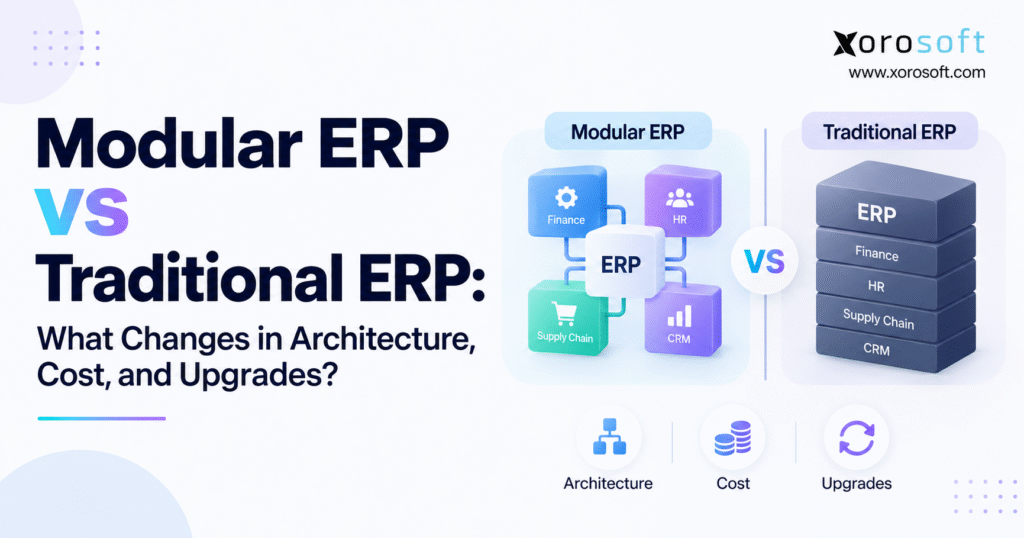
2.3 The Core Difference in Modular ERP vs Traditional ERP Is Coupling
When comparing modular ERP vs traditional ERP, focus on coupling.
A tightly coupled architecture creates more direct dependencies between components. As a result, changes in one area may require testing or modifications elsewhere.
By contrast, a loosely coupled architecture uses clearer boundaries and stable interfaces between capabilities. Internal implementation details can change while surrounding components continue using defined connections.
Neither model eliminates complexity.
Traditional ERP generally keeps more complexity inside the suite. A modular environment can move more complexity toward integrations, APIs, data ownership, monitoring, and governance.
Understanding where that complexity lives is essential before choosing an architecture.
3. Modular ERP vs Traditional ERP Architecture: Where the Technical Differences Appear
Architecture becomes easier to understand when buyers stop looking at diagrams and follow actual business transactions.
Take a customer order.
That single transaction can involve ecommerce, pricing, available inventory, allocation, warehouse picking, shipping, invoicing, tax, payment, cost accounting, and reporting.
The architecture determines how many systems participate and how tightly those systems depend on one another.
3.1 Shared Platforms Versus Looser Capability Boundaries
Traditional ERP often gives core modules a shared foundation.
Inventory, purchasing, finance, manufacturing, and sales may use the same item master, supplier records, customer records, organizational structure, security framework, and reporting model.
That shared foundation can reduce ambiguity around operational data.
A modular architecture may preserve the same common foundation while creating stronger functional boundaries around specific capabilities.
In more distributed environments, certain capabilities may even operate as separate applications connected through APIs, middleware, or event-driven services.
Greater independence can make change easier.
At the same time, someone must govern those boundaries and make sure information remains consistent.
3.2 Database Design Changes the Meaning of Modularity
One of the most important questions in a modular ERP vs traditional ERP evaluation is simple:
Where does the data live?
Imagine an ecommerce company using Shopify, ERP, WMS, forecasting software, and an EDI service.
Which system owns the SKU?
Where does available inventory originate?
Who owns customer pricing?
Which platform holds the final accounting transaction?
What happens when two systems attempt to update the same record?
A shared ERP database can reduce those conflicts by maintaining one operational representation of key transactions.
Distributed applications provide more specialization, but they require explicit rules about data ownership.
Without those rules, companies eventually create several versions of truth.
Operations sees one inventory number. Ecommerce displays another. Warehouse teams work from a third value, while finance calculates something different after reconciliation.
That is not merely an integration inconvenience.
It is an architecture problem.
3.3 Native Workflows Versus API-Driven ERP Workflows
Native ERP workflows occur inside the same platform.
When purchasing, inventory, warehousing, accounting, and order management belong to one operating environment, transactions can often move between those areas without an external integration.
A more distributed model depends increasingly on APIs, webhooks, middleware, events, or scheduled synchronization.
That flexibility can be useful.
For example, a business can retain an ecommerce platform that excels at commerce while ERP manages operational inventory. A specialized shipping platform can stay in place without forcing shipping functionality into ERP.
The trade-off is integration ownership.
For growing companies, a well-managed integration strategy therefore becomes part of ERP architecture rather than something addressed after software selection.
3.4 Architecture Determines the Blast Radius of Change
Consider a change to inventory allocation logic.
In a tightly coupled environment, that modification might affect order management, purchasing, warehouse fulfillment, production planning, ecommerce availability, and accounting.
Within a well-structured modular architecture, the underlying allocation capability could potentially change while preserving the interfaces used by other components.
That reduces the blast radius.
However, smaller blast radius does not mean zero testing.
If available inventory calculations change, every process that consumes those calculations still needs validation.
Modularity helps manage change only when system boundaries are intentionally designed and consistently governed.
4. How Modular ERP Changes Implementation Strategy
ERP implementation is where architecture meets organizational reality.
Many ERP projects become difficult not because the software lacks functionality, but because too many processes, integrations, roles, data structures, and departments change simultaneously.
Modularity can change that risk profile.
4.1 Phased ERP Implementation Can Reduce Organizational Shock
A traditional ERP implementation may involve a broad transformation covering finance, inventory, purchasing, sales, warehouses, manufacturing, and reporting.
The benefit is speed toward a unified future state.
The challenge is scope.
Every process needs design. Departments require training. Historical information must be migrated, while integrations and cross-functional testing must be completed before go-live.
A modular implementation can allow a company to prioritize its most urgent capabilities.
For example, a distributor might first implement inventory, purchasing, sales order management, and accounting. Warehouse optimization can follow once core transactions become stable. Manufacturing may arrive later when production becomes operationally important.
This creates smaller change packages.
Yet phased implementation should not become fragmented implementation.
Every phase still needs to fit a defined future-state architecture.
4.2 Module Dependencies Should Determine Implementation Sequence
A warehouse module cannot operate effectively if inventory master data is unreliable.
Demand forecasting will not produce useful recommendations if open purchase orders and demand data are incomplete.
Similarly, manufacturing will struggle if inventory, BOMs, purchasing, costing, and warehouse movements do not agree.
For that reason, modular implementation sequencing should follow dependency logic.
Instead of asking, “Which module do we want first?” teams should ask, “Which operational capabilities must become trustworthy before the next capability can create value?”
That approach prevents companies from implementing advanced functionality on weak transactional foundations.
4.3 Modular ERP Does Not Mean Unlimited Best-of-Breed Applications
There is a temptation to interpret modular ERP as permission to choose a different vendor for every capability.
That approach can create an impressive application portfolio and a difficult operating environment.
A specialized application should remain separate when its functional advantage outweighs the cost of integration, administration, support, data synchronization, and testing.
Otherwise, the company may simply replace ERP rigidity with application sprawl.
The architecture should deliberately identify where independence creates measurable value.
5. Modular ERP vs Traditional ERP Cost: Compare Five-Year TCO, Not License Price
Software pricing is usually the easiest ERP cost to see and one of the easiest costs to misunderstand.
A modular ERP may appear less expensive because companies can start with fewer capabilities. Traditional ERP proposals may look larger because more functionality is included in the initial program.
Neither figure represents the complete cost.
Total cost of ownership is the more meaningful comparison.
5.1 Initial ERP Cost Is Only the First Layer
Initial ERP spending typically includes software, implementation services, project management, configuration, data migration, training, integrations, and internal employee time.
With modular ERP, the first phase can sometimes have a narrower scope.
That may make the project easier to fund and absorb organizationally.
Future phases still require resources, though.
When warehouse management is added one year later and manufacturing follows another year after that, implementation spending has been distributed rather than eliminated.
5.2 Integration Cost Can Reverse the Economics
Integration is one of the biggest variables in the modular ERP vs traditional ERP cost equation.
Consider two architectures.
One keeps inventory, purchasing, accounting, order management, and warehouse management inside the ERP.
Another uses independent applications for all five capabilities.
The second architecture may deliver deeper specialization, yet it also creates more integration contracts.
Each interface requires design, authentication, mapping, monitoring, exception handling, testing, and support.
Those costs continue long after go-live.
Even an interface that fails only occasionally can become expensive when it controls orders, invoices, inventory, or warehouse movements.
5.3 Customization Cost Should Include Future Upgrades
Customization is frequently approved based only on development cost.
That view is incomplete.
Every customization creates a future responsibility.
Teams may need to test it after releases, modify it when APIs change, document it for new administrators, and adapt it when business processes evolve.
A customization that seems inexpensive during implementation can become costly when it remains embedded in operations for several years.
Strong ERP architecture therefore favors configuration and supported extension methods before custom code.
5.4 Internal Labor Belongs in ERP TCO
Some ERP environments appear inexpensive only because organizations ignore manual work.
Employees may spend hours exporting spreadsheets, reconciling inventory, investigating integration failures, rekeying purchase orders, correcting invoices, or rebuilding management reports.
Those hours are part of ERP ownership.
Internal IT time spent maintaining custom integrations should also be included.
A realistic five-year model therefore accounts for software, implementation, internal labor, integrations, customization, support, training, testing, and upgrades.
| Cost Area | Modular ERP | Traditional ERP |
|---|---|---|
| Initial software scope | Can begin narrower | Often broader |
| Implementation | Can be phased | Often coordinated across wider scope |
| Integrations | Depends on application independence | Often fewer inside the suite |
| Customization | Can remain capability-specific | May affect broader suite dependencies |
| Support | May involve more components | Often more centralized |
| Upgrade testing | Can be narrower with strong boundaries | May require wider regression testing |
| Long-term TCO | Depends heavily on governance | Depends heavily on customization and change |
Ultimately, the cheaper architecture is the one that reduces total operating effort rather than simply producing the lowest first-year software bill.
6. Modular ERP vs Traditional ERP Upgrades: Where Architecture Shows Its Long-Term Value
ERP evaluation teams often focus heavily on implementation while paying less attention to what happens after go-live.
Most businesses will operate an ERP far longer than they spend implementing it.
Upgrade architecture therefore deserves serious consideration.
6.1 Why ERP Upgrades Become Expensive
Upgrade difficulty increases as dependencies accumulate.
Custom code may expect a certain database structure. Integrations can depend on specific API behavior. Reports may rely on fields that have been modified, while warehouse workflows may contain custom logic developed years earlier.
Each dependency expands the testing requirement.
Eventually, companies may start delaying upgrades because the perceived risk becomes larger than the expected benefit.
That creates upgrade debt.
Over time, the business remains on older workflows or software versions because change feels increasingly dangerous.
6.2 Modular Architecture Can Reduce Upgrade Blast Radius
In a well-designed modular environment, one capability can sometimes change while surrounding components continue operating through stable interfaces.
For instance, warehouse logic may be updated without redesigning the accounting module.
That can make testing more targeted.
A cloud-based warehouse platform such as XoroWMS is relevant to this architectural discussion because warehouse execution represents a distinct capability while still depending on orders, inventory, receiving, shipping, and broader ERP records.
The objective is functional specialization without creating disconnected inventory truth.
6.3 Modular ERP Upgrades Still Require Cross-Process Testing
It would be misleading to suggest that modular ERP makes upgrades effortless.
Suppose inventory allocation logic changes.
Even if the inventory capability updates independently, teams may still need to validate ecommerce availability, wholesale orders, replenishment, warehouse allocation, manufacturing demand, and reporting.
Technical independence reduces certain risks.
Business-process dependency remains.
Mature ERP teams therefore maintain regression scenarios around complete transactions rather than testing isolated modules.
7. Modular ERP vs Traditional ERP for Shopify, Amazon, EDI, and Omnichannel Operations
Product businesses increasingly operate outside the ERP boundary.
A customer may order through Shopify. Another order can arrive from Amazon. Retailers may send purchase orders through EDI, while sales representatives create wholesale orders manually.
All of these transactions may compete for the same physical inventory.
This makes ERP architecture central to omnichannel execution.
7.1 Commerce Platforms Should Not Become Accidental ERP Systems
Shopify excels at commerce.
That does not mean every operational responsibility belongs in the storefront.
As a company grows, clear ownership becomes necessary for inventory, purchasing, warehouse activity, manufacturing, accounting, allocation, and forecasting.
A dedicated ERP operating layer can centralize those responsibilities while Shopify continues managing the customer-facing commerce experience.
Companies researching that model can review the Xorosoft ERP listing on the Shopify App Store when evaluating how storefront and ERP workflows can connect.
7.2 Multi-Channel Inventory Requires One Operational Authority
Inventory synchronization sounds simple until several channels sell simultaneously.
The business needs to distinguish between on-hand, allocated, available, incoming, reserved, damaged, and in-transit quantities.
When several applications calculate those values independently, overselling and reconciliation become more likely.
A modular omnichannel architecture should therefore maintain a clear operational system of record.
7.3 EDI Introduces Rules That Ecommerce Does Not
Wholesale EDI creates another layer of dependencies.
Retailers may require specific purchase-order formats, advance shipping notices, carton labels, routing instructions, invoice formats, and compliance rules.
Those requirements can involve ERP, WMS, shipping, and finance simultaneously.
The strongest architecture does not isolate EDI as “just another integration.”
Instead, it treats retailer compliance as an operational workflow that spans several capabilities.
8. Where Modular ERP Architecture Matters Most by Industry
There is no single ideal ERP architecture for every industry because different operating models create different transaction patterns.
The right answer depends on where complexity lives.
8.1 Apparel and Consumer Brands Need Variant and Channel Control
Apparel businesses frequently manage style, color, size, seasonality, wholesale, ecommerce, returns, and multiple warehouses.
As transaction volume increases, the item master becomes foundational.
Inventory cannot be treated separately from purchasing, allocation, warehouse execution, and ecommerce availability.
For these companies, modularity creates value when it helps operations add capabilities without splitting product and inventory information across unnecessary applications.
8.2 Wholesale Distribution Requires Transactional Coordination
Wholesale distributors often operate around purchase orders, customer-specific pricing, allocation, EDI, inventory, warehouse fulfillment, receivables, and supplier relationships.
Small inconsistencies can propagate quickly.
An incorrect purchase order affects incoming inventory. Poor allocation can lead to short shipments. If the shipment differs from the advance shipping notice, retailer exceptions can follow.
Wholesale operations therefore benefit from a strong integrated foundation combined with carefully selected modular capabilities.
8.3 Food and Beverage Needs End-to-End Traceability
Food businesses introduce lot control, expiration dates, recalls, FEFO processes, supplier traceability, production, and inventory valuation.
Traceability depends on the transaction history connecting purchasing, receiving, manufacturing, inventory, warehouse activity, sales, and shipping.
Separating those capabilities without reliable integration can weaken recall readiness.
8.4 Manufacturing Exposes Hidden ERP Dependencies
Manufacturing makes architectural weaknesses especially visible.
A work order relies on BOMs, raw materials, purchasing, inventory, warehouse movements, production activity, finished goods, and cost accounting.
Planning cannot operate effectively if underlying material availability is unreliable.
Businesses evaluating systems across apparel, food, wholesale distribution, furniture, sporting goods, consumer products, and manufacturing can use Xorosoft’s industry ERP resources to see how requirements differ by operating model.
The broader principle remains consistent: industry complexity should determine module boundaries rather than generic software trends.
9. How Xorosoft Fits the Modular ERP vs Traditional ERP Decision
Once an organization understands its architecture requirements, the next step is evaluating how specific platforms organize operational capabilities.
For inventory-driven businesses, Xorosoft represents an approach centered on connecting inventory, purchasing, accounting, warehouse management, manufacturing, forecasting, reporting, and ecommerce operations within a broader operating environment.
9.1 XoroERP as an Operational Core
XoroERP becomes relevant when companies move beyond basic accounting or inventory tools and require broader operational coordination.
That transition often occurs when Shopify, accounting software, spreadsheets, warehouse applications, EDI services, and purchasing tools create more reconciliation than flexibility.
At this stage, the organization is not necessarily missing another application.
It is missing a reliable operational core.
9.2 XoroONE and Broader ERP Consolidation
A platform such as XoroONE becomes relevant when the requirement extends beyond one isolated module and the organization wants a broader connected environment.
Even then, external systems may still be appropriate where they provide meaningful specialized capabilities.
The objective should not be to put every application inside ERP.
Instead, tightly dependent processes should remain close enough that employees do not spend their time manually synchronizing information.
9.3 Evaluate ERP Solutions Around Business Capabilities
ERP buyers often organize vendor selection around long feature lists.
A stronger method is to evaluate business capabilities.
Can inventory stay accurate across several warehouses?
Does purchasing see demand and inbound supply?
Can accounting trust operational transactions?
Does warehouse execution stay synchronized with enterprise inventory?
Can manufacturing consume materials and produce finished goods correctly?
Can ecommerce orders flow without repeated manual intervention?
Reviewing ERP solution capabilities through that lens helps buyers evaluate operating outcomes instead of isolated product screens.
10. Common Mistakes in Modular ERP vs Traditional ERP Selection
ERP architecture projects often go wrong long before software configuration begins.
The problem usually starts with assumptions used during selection.
10.1 Assuming Modular ERP Is Automatically More Modern
Modularity alone says little about architectural quality.
A platform may contain many modules while maintaining extensive technical dependencies.
Another system may look more unified yet offer strong APIs, supported extensions, cloud updates, and well-defined service boundaries.
Buyers should evaluate system behavior rather than architecture labels.
10.2 Treating More Applications as More Flexibility
Adding specialized applications can feel safer than committing to one ERP platform.
Every additional system, however, introduces another data model, security surface, support relationship, integration path, and upgrade dependency.
At some point, optionality becomes operational overhead.
External applications should remain because they create meaningful functional advantage, not simply because best-of-breed architecture sounds more flexible.
10.3 Ignoring Data Ownership
One of the fastest ways to create ERP instability is allowing several applications to own the same business object.
Inventory is a common example.
ERP may show one quantity while WMS shows another and ecommerce displays something different.
Organizations then add synchronization logic to solve what is fundamentally a governance problem.
Defining authority before implementing integrations prevents much of that complexity.
10.4 Over-Customizing Around Historical Processes
ERP replacement creates an opportunity to challenge processes that developed around previous software limitations.
Rebuilding every historical workaround inside a new platform can transfer yesterday’s constraints into tomorrow’s architecture.
Customization should support genuine competitive or operational requirements.
It should not preserve unnecessary complexity.
10.5 Buying AI Before Fixing Transactional Data
AI is increasing the value of clean operational architecture.
Forecasting, automation, agents, and natural-language analysis become more useful when systems expose consistent and governed information.
Fragmented inventory, customer, supplier, and order data produces a weaker foundation.
Modern approaches such as Xorosoft’s AI MCP Server illustrate why ERP architecture increasingly needs to consider how operational data can be accessed safely by intelligent applications.
AI does not remove the need for sound ERP architecture.
Instead, it makes that requirement more important.
11. A Practical Framework for Comparing Modular ERP vs Traditional ERP Vendors
ERP selection should finish with evidence rather than architecture terminology.
A vendor describing its system as modular should be able to explain exactly what that means.
11.1 Map the Current Application Landscape
Start by identifying every system involved in orders, inventory, purchasing, accounting, warehouse execution, manufacturing, ecommerce, EDI, shipping, planning, CRM, and reporting.
Then document what data each platform creates, owns, reads, and updates.
This exercise often reveals more architecture problems than the original ERP requirements document.
11.2 Define Which Capabilities Must Stay Together
Inventory, warehouse execution, purchasing, manufacturing, and accounting frequently have strong transactional dependencies.
That does not mean they must all exist in one codebase.
It means the architecture must preserve reliable transaction flow between them.
Capabilities with weaker dependencies can have more freedom to remain specialized.
11.3 Ask Vendors Specific Architecture Questions
Avoid asking only, “Is your ERP modular?”
Instead, ask what happens when warehouse functionality changes.
Find out whether modules share a database, how APIs are versioned, and which capabilities can be introduced later.
Ask how custom extensions survive upgrades.
Understand what happens when integrations fail and which system controls inventory when ecommerce and WMS are both connected.
Specific questions reveal architectural quality more effectively than marketing terminology.
11.4 Compare Five-Year Operating Cost
Create the same cost model for every shortlisted system.
Include software, implementation, integrations, migration, internal project time, customization, support, administration, testing, training, and future upgrades.
Manual operating work that remains after implementation should also be counted.
A low-cost ERP that requires expensive ongoing reconciliation is not genuinely inexpensive.
11.5 Test Complete Business Scenarios
Do not allow ERP demonstrations to become a sequence of attractive feature screens.
Instead, test complete workflows.
Create a purchase order, receive inventory, allocate it to an order, pick it from the warehouse, ship it, invoice it, post the financial impact, and process a return.
Manufacturers should also test material planning, work orders, consumption, production completion, and costing.
Wholesale companies can test EDI exceptions and customer-specific requirements.
Reviewing ERP case studies can provide additional context by showing how systems perform in operating environments similar to the buyer’s own business.
11.6 Compare Vendors Without Relying on Brand Recognition Alone
ERP shortlists often include well-known platforms because familiarity appears to reduce risk.
Brand strength can matter, but architecture fit matters more.
A growing inventory-driven company should compare implementation scope, workflows, integration requirements, data architecture, support model, customization, and long-term ownership.
Organizations considering NetSuite alongside inventory-focused alternatives can use a direct Xorosoft vs NetSuite comparison as one research input.
The same evaluation principle applies to Acumatica, Business Central, Sage, Cin7, Brightpearl, Fishbowl, and other ERP options.
No platform should win because it fits an architecture category.
It should win because it reduces operating complexity.
12. Practical Conclusion: Choose ERP Architecture Around the Cost of Change
12.1 Use the Cost of Change as the Final Decision Metric
The most useful way to evaluate modular ERP vs traditional ERP is to stop asking which model is universally better.
Neither one is.
Traditional ERP can provide process consistency, centralized data, native cross-functional workflows, and fewer integration boundaries.
Modular ERP can support phased implementation, evolving requirements, specialist capabilities, and a smaller blast radius for certain types of change.
Both approaches can also become difficult to manage.
Heavy customization may make a traditional ERP expensive to upgrade. Poorly governed modular architecture can turn into an application portfolio that constantly needs synchronization.
For that reason, architecture decisions should come back to the cost of change.
How difficult will it be to add another warehouse?
What happens when manufacturing becomes part of the operating model?
Can Shopify volume double without creating more manual reconciliation?
Will a new EDI retailer require months of custom integration work?
How much regression testing is required after an ERP update?
These practical questions reveal whether the architecture can support the next stage of growth.
12.2 Keep Tightly Connected Processes Together
For many inventory-driven companies, the strongest model is neither an isolated best-of-breed stack nor an inflexible all-or-nothing suite.
A more practical approach keeps highly dependent processes close together while maintaining clean integration points around applications that genuinely need independence.
Inventory, purchasing, warehouse operations, order management, manufacturing, and finance often benefit from a shared operational foundation.
Commerce platforms, specialized shipping tools, marketplaces, retailer networks, or other external applications can remain connected at the edges when doing so provides real functional value.
That balance matters more than whether the software is described as modular or traditional.
12.3 Map Your Existing Dependencies Before Selecting Software
If your current environment relies on QuickBooks, spreadsheets, ecommerce applications, warehouse tools, EDI services, and repeated manual reconciliation, software selection should not begin with vendor demonstrations.
Start by mapping dependencies.
Determine which application currently owns inventory.
Identify where purchasing decisions are made.
Document how warehouse activity reaches accounting.
Review how ecommerce and wholesale demand compete for stock.
Then decide which processes need to move into a common operating layer and which systems should remain separate.
This exercise creates a much stronger foundation for comparing modular ERP vs traditional ERP because the architecture decision becomes tied to actual business requirements rather than software terminology.
The right ERP should make growth easier to operate, not merely easier to diagram.
Ready to evaluate your ERP architecture? Talk with Xorosoft to review your current systems, operational requirements, integration dependencies, and the ERP capabilities needed for the next stage of growth.
Frequently Asked Questions
What is the difference between modular and traditional ERP?
Modular ERP lets businesses adopt or expand specific capabilities as needed. Traditional ERP usually delivers broader functionality within one integrated environment. The main difference is how tightly functions depend on each other.
Is modular ERP better than traditional ERP?
Not always. Modular ERP suits businesses needing phased implementation and flexibility. Traditional ERP can work better when standardized processes, centralized data, and tightly integrated workflows are higher priorities.
Is modular ERP cheaper than traditional ERP?
Modular ERP can lower initial scope and costs, but integrations, support, and future modules may increase long-term spending. Compare five-year total cost of ownership rather than subscription price alone.
Can modular ERP be implemented in phases?
Yes. Businesses can often introduce essential capabilities first and add warehouse management, manufacturing, forecasting, or other functions later. Each phase should still follow a defined long-term ERP architecture.
Are modular ERP upgrades easier?
They can be easier when modules have clear boundaries and stable integrations. However, connected workflows, APIs, customizations, inventory logic, and reporting still require testing after important software changes.
When should a business choose modular ERP?
Modular ERP makes sense when requirements are evolving, implementation must happen gradually, multiple channels or warehouses are growing, or existing specialist applications need to remain connected.
Can traditional ERP still support growing businesses?
Yes. Traditional ERP can support significant growth when its workflows, integrations, reporting, customization, and upgrade model remain aligned with business requirements and do not create excessive operational complexity.
Recent Posts
-
 B2B Ecommerce Solution for Dealer Networks: Territory Rules, Account Groups, Ship-Tos, and Price Structures
 -
 Manufacturing Inventory Statistics: Trends in Stock Levels, Production, and Supply Planning
 -
 Modular ERP vs Traditional ERP: What Changes in Architecture, Cost, and Upgrades?
 -
 Retailer Routing Guide Compliance in ERP: Ship Windows, Carriers, Labels, and ASN Rules
 -
 Ecommerce ERP Case Study: How a Growing Business Replaced Disconnected Inventory and Accounting Software