When planning or optimising your business platform, understanding the B2B commerce data model is essential for success.
1. Why a B2B Commerce Data Model Becomes Essential as You Scale
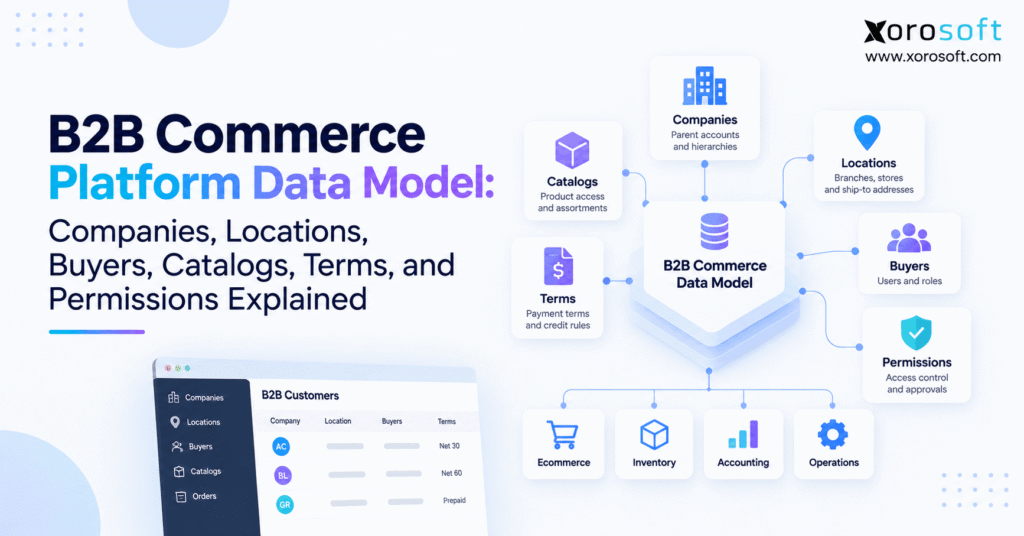
A B2B commerce data model defines how companies, locations, buyers, catalogs, pricing, payment terms, permissions, and transactions connect inside a digital commerce operation. Therefore, it determines which products a customer can access, which prices they receive, which location they purchase for, and what each buyer is allowed to do.
Unlike consumer ecommerce, B2B commerce rarely involves one person buying only for themselves. Instead, a buyer usually acts on behalf of a company, branch, department, store, franchise, or other business unit.
For example, one wholesale customer may operate 30 stores. However, those stores might use different ship-to addresses, catalogs, prices, payment terms, and purchasing limits.
As a result, a simple customer record eventually becomes inadequate.
1.1 How B2B commerce architecture differs from B2C
In B2C, the relationship can often remain relatively simple:
Customer → Cart → Order → Payment
However, B2B purchasing usually requires additional context:
Company → Location → Buyer → Catalog → Price → Terms → Permissions → Order
Therefore, the commerce platform must understand both the person buying and the organization behind the purchase.
In addition, B2B customers often expect invoices, account balances, order history, negotiated pricing, credit terms, and location-specific purchasing rules.
Consequently, a scalable B2B ecommerce data model must represent commercial relationships instead of treating every login as an unrelated customer.
1.2 What the data model must answer
Before a B2B order reaches checkout, several questions must already have answers.
For example, the platform must know which company the buyer represents and which location is placing the order. Next, it needs to determine the correct product catalog and negotiated pricing.
Meanwhile, payment terms and purchasing authority must also be resolved.
Finally, the system must decide where inventory, fulfillment, invoices, accounting, and customer balances are managed.
Therefore, the quality of the underlying data structure directly affects the quality of the buying experience.
2. Why Flat Customer Records Fail in B2B Ecommerce
A flat customer database may work when a business has a small number of buyers and simple pricing. However, complexity increases quickly once wholesale accounts have multiple branches and multiple employees.
For example, suppose a sporting-goods distributor sells to a national retailer. The retailer might have one corporate account, 40 stores, five regional purchasing managers, hundreds of approved SKUs, and separate delivery requirements by location.
Therefore, treating each employee or store as an independent customer creates unnecessary duplication.
2.1 Duplicate records create operational problems
If every buyer receives a separate customer record, commercial rules become difficult to maintain.
For example, negotiated pricing may need to be copied across dozens of records. Likewise, credit terms, tax settings, product permissions, and addresses can become inconsistent.
As a result, sales, finance, warehouse, and customer-service teams may all work from different versions of the same account.
Moreover, duplicate records make consolidated reporting harder because the business can no longer easily see total revenue or exposure for the parent customer.
2.2 Relationships create a more scalable structure
Instead of duplicating information, a B2B account hierarchy creates relationships between records.
For example:
Company
→ Company locations
→ Authorized buyers
Then, catalogs, pricing, terms, and permissions can be applied at the appropriate level.
Therefore, shared information stays centralized while location-specific rules remain flexible.
Similarly, employee access can change without destroying the company’s commercial history.
As the business grows, this relationship-based approach becomes significantly easier to manage.
3. Companies Form the Foundation of the B2B Commerce Data Model
The company normally represents the highest-level commercial relationship inside a B2B commerce data model.
For example, if a wholesaler sells to a national furniture retailer, the retailer itself may be the company. Meanwhile, its showrooms, distribution centers, and regional offices can sit beneath that parent account.
Therefore, company records should describe the business relationship rather than an individual user.
3.1 What belongs at company level?
Company-level data commonly includes the legal business name, customer number, parent organization, overall account status, tax information, sales ownership, and master commercial agreement.
In addition, company records may contain credit information or customer classifications.
However, not every business rule should automatically live at company level.
For example, if two branches use different payment terms or catalogs, those rules belong lower in the hierarchy.
Therefore, the company should provide shared context without eliminating necessary location-level flexibility.
3.2 Company accounts should remain separate from buyers
A company and a buyer represent two different things.
The company owns the business relationship. By contrast, the buyer is a person authorized to operate within that relationship.
For example, a wholesale company might employ three purchasing managers. Therefore, all three buyers should remain connected to the same company instead of becoming unrelated customer accounts.
As a result, an employee can later leave without affecting historical orders, account pricing, payment terms, or the customer’s commercial identity.
This separation also improves security because access can be revoked at the user level.
4. Company Locations Add Operational Context to B2B Account Hierarchy
A company location represents a branch, warehouse, store, franchise, office, job site, or another purchasing unit belonging to a larger customer.
For example, the Shopify B2B company model distinguishes companies, company locations, and individual customers. Shopify documents that company locations can maintain settings such as addresses, pricing, payment terms, tax information, and contacts.
Therefore, location records provide the operational context missing from a parent company record.
4.1 Company vs company location
Think of the company as the organization with which you have the commercial relationship.
By contrast, think of the location as the unit actually purchasing or receiving the goods.
For example:
Northstar Retail Group
→ Toronto Store
→ Vancouver Store
→ Calgary Distribution Center
→ Corporate Office
Although all four locations belong to Northstar, each one may require different shipping rules.
Therefore, the parent-child structure preserves both shared account identity and location-specific requirements.
4.2 What should be stored at location level?
Location-level data can include shipping addresses, billing relationships, delivery instructions, tax settings, catalog access, pricing rules, purchasing contacts, and payment terms.
In addition, each location should ideally have a stable system identifier.
Therefore, ERP, ecommerce, EDI, and customer-service systems can all recognize the same business unit.
For example, changing “Warehouse 2” to “Western Distribution Center” should not break integrations.
Consequently, stable IDs matter more than human-readable location names.
5. Buyers Connect People to the B2B Customer Data Model
Buyers are the people who log into the portal, browse products, prepare orders, approve purchases, view invoices, or manage the customer account.
However, buyer identity alone does not provide enough context.
Therefore, a buyer normally needs relationships with a company, one or more locations, and a role.
5.1 Buyer relationships should reflect responsibilities
A store manager may be allowed to buy only for one store.
Meanwhile, a regional purchasing manager may buy for ten locations.
Similarly, a finance manager might view invoices across the entire company while lacking permission to create orders.
Therefore, access should reflect the user’s real business responsibilities.
In addition, permissions should be easy to change as employees move between roles.
Consequently, the platform should avoid hard-coding commercial information directly into individual user records.
5.2 One buyer may need multiple business contexts
A buyer may sometimes represent several locations.
For example, a regional purchaser might select the branch they are ordering for after login.
Next, the system can load the appropriate address, catalog, pricing, terms, and purchasing rules for that location.
Therefore, the same person can operate in several valid commercial contexts without requiring several unrelated login accounts.
This structure also simplifies reporting because transactions remain connected to both the buyer and the correct business location.
6. Catalogs Determine What B2B Customers Can Buy
A B2B catalog determines which products a company or location can access.
Therefore, catalog access should be treated separately from pricing.
For example, one distributor may be authorized to purchase replacement parts while another can buy the complete product range.
Similarly, a franchise may be restricted to corporate-approved SKUs.
6.1 Customer-specific catalogs
Customer-specific catalogs become useful when product eligibility varies by contract, geography, industry, dealer status, or customer segment.
For example, Adobe Commerce supports company-specific shared catalogs with custom product selections and pricing through its B2B shared catalog model.
Therefore, the catalog becomes a rule governing availability rather than simply a list of every product the seller carries.
6.2 Catalog access should not equal pricing
A catalog answers:
What can this customer buy?
Pricing answers:
What should this customer pay?
Therefore, the two rules should remain logically separate.
For example, two wholesale customers may access exactly the same 4,000 SKUs. However, one may receive contract pricing because of annual volume.
Similarly, one customer may access only 1,000 products but receive standard wholesale pricing.
Separating those concepts creates more flexible B2B commerce architecture.
7. Pricing and Terms Add Commercial Logic to the B2B Commerce Data Model
Pricing is one of the most important elements of a B2B commerce data model because different customers rarely purchase under identical commercial conditions.
For example, the final price could depend on a base price, customer agreement, quantity break, promotional adjustment, or contract.
Therefore, the system must identify the account context before calculating the final selling price.
7.1 Price books and customer pricing
Some B2B platforms group customers into pricing structures.
For example, the Salesforce B2B Commerce data model connects buyer accounts, buyer groups, entitlement policies, catalogs, products, and price books.
Therefore, several buyers can inherit pricing through a shared commercial structure rather than maintaining every price independently.
In addition, this approach can simplify changes when many customers operate under the same pricing agreement.
7.2 Payment terms are different from price
Price answers how much a customer pays.
However, payment terms determine when payment becomes due.
For example, one company might pay immediately while another operates on Net 30.
Therefore, pricing and payment terms should remain separate fields or rule sets.
Meanwhile, available credit may introduce another condition.
Consequently, checkout can involve several decisions:
Price → Terms → Credit → Permission
Each rule solves a different business problem.
8. Permissions Control What Each B2B Buyer Can Do
Catalogs control product access, while pricing controls commercial value.
However, permissions control user authority.
Therefore, a scalable B2B account structure should define exactly what each buyer can view, create, approve, edit, or administer.
8.1 Common B2B buyer roles
Typical roles include purchasers, approvers, company administrators, location administrators, finance users, and account viewers.
For example, a junior buyer may prepare a purchase request but lack authority to submit it.
Meanwhile, a senior buyer may approve purchases or view company-wide order history.
BigCommerce documents company hierarchies plus predefined and custom company-user permissions in its B2B company management model.
8.2 Role-based access scales better
Managing permissions user by user becomes difficult as accounts grow.
Therefore, roles provide a cleaner approach.
For example, every store manager could inherit one standard set of permissions. Meanwhile, regional managers could receive a broader role.
As a result, administrators can change responsibilities without editing dozens of individual settings.
Furthermore, role-based access supports better governance because authorization rules remain consistent across similar users.
9. How the B2B Account Structure Resolves an Order
The core B2B ecommerce architecture can be visualized as:
Company → Location → Buyer → Catalog → Pricing → Terms → Permissions → Order
Therefore, every order inherits context from several related records.
9.1 What happens when a buyer logs in?
First, the platform identifies the individual buyer.
Next, it determines which company and locations the buyer can access.
Then, the correct catalog and pricing become available.
Afterward, payment terms and user permissions determine which checkout options are permitted.
Finally, the order enters operational systems.
As a result, the storefront can deliver a customer-specific experience without creating an entirely separate website for every account.
9.2 What happens after checkout?
Once the order is created, commerce becomes an operational process.
For example, inventory may be allocated immediately.
Next, warehouse teams may receive picking work.
Meanwhile, finance may create an invoice or update available credit.
Finally, shipment information can flow back to the customer portal.
Therefore, the B2B customer data model should connect to the systems that execute the transaction rather than ending at checkout.
10. A B2B Commerce Data Model Needs Clear Systems of Record
A B2B commerce data model becomes unreliable when multiple applications claim ownership of the same information.
Therefore, businesses should identify one authoritative system for every critical data domain.
10.1 What ecommerce should usually manage
The ecommerce layer commonly manages storefront presentation, login experience, search, cart interactions, customer browsing, and checkout.
However, the storefront does not necessarily need to own inventory, invoices, purchasing, warehouse activity, or accounting.
Instead, those areas frequently belong within ERP and operational systems.
Therefore, the storefront can consume trusted operational data rather than attempting to recreate it.
10.2 What ERP should usually manage
ERP commonly manages sales orders, purchasing, inventory, customer balances, invoices, accounting, and operational reporting.
For inventory-driven organizations, XoroERP can provide the enterprise operational layer, while ecommerce remains the customer-facing experience.
Meanwhile, smaller and mid-market businesses may use XoroONE to connect inventory, purchasing, accounting, ecommerce, warehouse activity, and order operations.
Therefore, the key decision is not which system contains the most data. Instead, it is which system should be trusted for each type of data.
11. Inventory and Warehouse Data Must Support the B2B Commerce Architecture
Inventory availability is especially important because a B2B buyer may order large quantities.
Therefore, showing an inaccurate stock number can create expensive fulfillment problems.
For example, ecommerce might show 800 available units while the warehouse has already allocated 600 units to another channel.
As a result, the customer could place an order the business cannot fulfill.
11.1 Inventory should reflect operational reality
Available inventory may need to consider on-hand units, allocations, safety stock, backorders, incoming supply, and warehouse-specific availability.
Therefore, inventory should normally come from the operational system responsible for stock.
Xorosoft’s inventory management capabilities can connect stock visibility with purchasing, warehouse activity, orders, and broader ERP operations.
In addition, multi-channel businesses need consistent availability across B2B, DTC, marketplace, and sales-rep channels.
11.2 Warehouse execution starts after the digital order
Once a customer submits the order, warehouse teams need to execute it efficiently.
Therefore, B2B commerce should connect with receiving, allocation, picking, packing, and shipping processes.
For businesses with more advanced warehouse requirements, XoroWMS connects warehouse execution with real-time inventory and fulfillment workflows.
As a result, the buyer-facing order and the physical warehouse transaction remain part of one operating process.
12. Common B2B Ecommerce Data Model Mistakes
A strong B2B ecommerce data model reduces complexity.
However, a weak model often hides complexity until order volume increases.
Therefore, businesses should look for structural problems before adding more custom fields or integrations.
12.1 Treating every buyer as a customer
This mistake breaks the connection between users and the parent business.
As a result, pricing, reporting, credit exposure, and order history become fragmented.
Instead, buyers should normally inherit commercial context through the company or location they represent.
Therefore, account relationships remain visible even as users change.
12.2 Mixing catalogs, pricing, and permissions
Another mistake is treating product access, price, and user authorization as one rule.
However, each solves a different problem.
A catalog determines what can be purchased. Pricing determines the commercial amount. Permissions determine what the person may do.
Therefore, separating these layers makes the structure easier to manage.
12.3 Allowing duplicate data ownership
If ERP says Net 30 while ecommerce says Net 60, the business has an ownership problem.
Similarly, conflicting customer addresses or prices create uncertainty.
Therefore, each field needs one authoritative source.
In addition, integrations should define which direction changes travel.
13. Industry Use Cases for a B2B Commerce Data Model
A B2B commerce data model can support many industries because the same basic entities appear in different operating environments.
However, the exact hierarchy varies according to how customers purchase.
13.1 Wholesale distribution
A distributor may model:
Customer → Branches → Buyers → Wholesale Catalog → Contract Pricing → Net Terms
Therefore, each branch can receive specific delivery, pricing, or purchasing rules while the parent customer maintains consolidated reporting.
In addition, the distributor can connect account activity with inventory and fulfillment.
13.2 Apparel and fashion
An apparel brand may sell to a retail chain with hundreds of stores.
Therefore, seasonal catalogs, wholesale pricing, store-specific delivery addresses, and regional buyers may all become part of the customer structure.
Meanwhile, products may also sell through Shopify or marketplaces.
As a result, ecommerce and wholesale inventory should share consistent availability.
13.3 Manufacturing and industrial distribution
Manufacturers may sell through distributors, dealers, branches, and direct accounts.
Therefore, each buyer may require different product access, contract pricing, or payment terms.
In addition, availability can depend on raw materials, work in progress, and finished goods.
Businesses evaluating such workflows can explore Xorosoft’s broader industry solutions for wholesale, manufacturing, ecommerce, apparel, consumer goods, and other inventory-driven sectors.
14. Platform Terminology Changes, but the B2B Data Relationships Remain
Different platforms use different names for similar concepts.
Therefore, buyers should evaluate relationships rather than choosing software because of terminology.
14.1 Comparing the core concepts
| Business concept | Common implementation |
|---|---|
| Organization | Company or buyer account |
| Branch | Company location or child account |
| Individual purchaser | Buyer, company user, or customer |
| Product eligibility | Catalog or entitlement |
| Customer pricing | Price list, price book, or catalog pricing |
| User authority | Role or permission |
| Payment arrangement | Terms or account settings |
For example, Shopify emphasizes companies and company locations. Meanwhile, Salesforce uses buyer accounts, buyer groups, price books, and entitlements.
Similarly, Adobe uses company accounts and shared catalogs.
Therefore, implementation terminology differs even though the underlying business questions remain similar.
14.2 Evaluate business scenarios instead of feature names
During a software evaluation, create a realistic customer scenario.
For example, build one company with five locations, three buyers, two catalogs, different terms, and several approval levels.
Then, change the price for one location.
Next, restrict one buyer from placing orders.
Finally, test how the resulting order reaches inventory, warehouse, and accounting systems.
Therefore, the evaluation exposes the real flexibility of the architecture instead of relying on a generic feature checklist.
15. Connecting B2B Commerce Data With Ecommerce, EDI, and Marketplaces
Many inventory-driven businesses no longer sell through one channel.
Instead, they may process Shopify orders, Amazon orders, wholesale portal purchases, EDI transactions, and sales-rep orders at the same time.
Therefore, the B2B account model must work within a broader multi-channel operating environment.
15.1 Channel integration should preserve account context
An order arriving through a wholesale portal may contain customer pricing, payment terms, and branch information.
Meanwhile, an EDI order may arrive with trading-partner identifiers and predetermined ship-to locations.
Therefore, integrations should preserve those relationships rather than flattening every order into generic customer data.
Xorosoft’s integrations ecosystem is designed to connect ecommerce, marketplaces, shipping tools, EDI relationships, and other operational systems.
15.2 Shopify can remain the storefront while ERP manages operations
A growing Shopify business may eventually require deeper inventory, purchasing, accounting, warehouse, and B2B capabilities.
Therefore, Shopify does not necessarily need to be replaced.
Instead, ERP can operate behind the storefront.
Xorosoft is also available through the Shopify App Store, providing an outbound reference for merchants evaluating an ERP connection to their Shopify environment.
Consequently, the commerce layer and operational layer can each perform the job they handle best.
16. When a Basic B2B Account Structure Stops Working
Not every business needs a highly sophisticated hierarchy.
For example, a small wholesaler with one warehouse, one catalog, immediate payment, and simple customer pricing may operate successfully with a basic setup.
However, requirements change as complexity grows.
16.1 Operational signals that indicate an upgrade
A more advanced architecture becomes valuable when customers operate multiple locations, buyers require different permissions, or negotiated pricing becomes difficult to maintain.
In addition, varying payment terms, customer credit, EDI, multi-warehouse fulfillment, and invoice self-service add complexity.
Therefore, repeated manual work often indicates that the data model has become too simple.
Similarly, finance teams should investigate when they regularly reconcile customer records across ecommerce, accounting, and inventory systems.
16.2 Disconnected tools can hide the architecture problem
Businesses sometimes respond by adding another app.
However, adding software does not necessarily improve the underlying account model.
Instead, the company should determine whether customer, inventory, pricing, order, and financial data share a reliable operational foundation.
Xorosoft case studies can provide additional context on how inventory-driven companies approach broader system consolidation and operational change.
17. How to Design a Scalable B2B Commerce Data Model
A scalable B2B commerce data model should begin with business relationships rather than software screens.
Therefore, teams should define what each entity means before building integrations.
17.1 Define the entities clearly
First, define company, location, buyer, catalog, price list, payment terms, role, and permission.
Next, document how those records relate.
For example, determine whether pricing belongs to the parent company, individual locations, or customer groups.
Similarly, establish whether buyers may belong to several locations.
Therefore, ambiguous relationships can be resolved before implementation.
17.2 Define system ownership
Next, assign an authoritative system to each major field.
For example:
Inventory → ERP/WMS
Warehouse execution → WMS
Accounting → ERP
Storefront experience → Ecommerce
Sales opportunities → CRM
Therefore, every integration knows which system wins when data conflicts.
17.3 Use stable IDs
Names can change, while identifiers should remain stable.
Therefore, company IDs, location IDs, product IDs, and order IDs should travel reliably between systems.
As a result, integrations can recognize records even when users change human-readable descriptions.
18. How ERP Supports the B2B Customer Data Model
The customer portal is only one part of the process.
After checkout, orders influence inventory, fulfillment, purchasing, cash flow, customer credit, accounting, and reporting.
Therefore, ERP becomes important when B2B commerce must connect with the rest of the operation.
18.1 Customer and order synchronization
Company and location identifiers should transfer consistently into ERP.
Therefore, warehouse and finance teams can recognize exactly which account placed the order.
In addition, order changes should remain synchronized so that the portal does not show outdated information.
18.2 Inventory and fulfillment synchronization
Once inventory is allocated, the B2B portal should reflect updated availability.
Meanwhile, fulfillment status and tracking information should return to the customer.
Therefore, customers can self-serve without repeatedly contacting sales or support teams.
18.3 Finance synchronization
Invoices, payments, credits, account balances, and returns should also remain connected.
For inventory-driven businesses, Xorosoft combines ERP, inventory, purchasing, accounting, ecommerce operations, and warehouse workflows within a connected environment.
Therefore, companies can evaluate Xorosoft solutions when disconnected systems begin limiting B2B operational visibility.
19. Questions to Ask Before Choosing a B2B Commerce or ERP Platform
Software evaluation should test real account complexity.
Therefore, buyers should ask vendors to demonstrate actual workflows rather than simply confirming that a feature exists.
19.1 Test customer hierarchy
Ask whether one parent company can contain multiple branches or locations.
Next, determine whether individual locations can maintain different addresses, catalogs, pricing, terms, and buyers.
Moreover, test whether one user can purchase for several locations.
Therefore, you can determine whether the platform fits real customer structures.
19.2 Test commercial rules
Ask where catalogs, contract prices, quantity breaks, credit, and payment terms are stored.
Then, test which rule wins when several pricing conditions overlap.
Similarly, determine whether approvals can change by buyer, location, or order value.
Therefore, edge cases become visible before implementation.
19.3 Test operational integration
Finally, place a test order.
Confirm that inventory changes, warehouse work appears, the invoice is created correctly, and fulfillment status returns to the portal.
Therefore, the evaluation measures complete operational flow instead of storefront appearance alone.
20. Building a B2B Commerce Data Model That Can Scale
A scalable B2B commerce data model does not start with checkout. Instead, it starts by accurately representing the relationship between the company, its locations, its buyers, the products they can purchase, the commercial terms they receive, and the actions each user may perform.
Therefore, businesses should resist the temptation to solve structural problems with duplicate records or disconnected apps.
Instead, companies should define their customer hierarchy, establish systems of record, separate catalogs from pricing, and connect commerce with inventory, warehouse, and financial operations.
As a result, customers receive a more consistent buying experience while internal teams spend less time correcting data.
For businesses reviewing whether their current systems can support growing B2B complexity, a connected cloud ERP can provide the operational layer behind ecommerce and wholesale channels.
Finally, teams that want to see how inventory, orders, purchasing, warehouse workflows, ecommerce, and accounting can operate together can Book a Demo.
Frequently Asked Questions
What is a B2B commerce data model?
A B2B commerce data model defines how companies, locations, buyers, catalogs, pricing, payment terms, permissions, orders, and operational systems connect so business purchasing rules can be applied consistently.
Why are company locations important in B2B ecommerce?
Company locations let one customer organization maintain separate addresses, catalogs, pricing, payment terms, tax settings, and purchasing contacts for individual branches or operating units.
What is the difference between a buyer and a company account?
A company represents the commercial customer relationship. Meanwhile, a buyer is an individual authorized to purchase, approve orders, view invoices, or perform other actions for that company.
What is the difference between a B2B catalog and a price list?
A catalog controls which products a customer can purchase. By contrast, a price list determines what the customer pays for those available products.
Should ERP or ecommerce own B2B customer data?
Ownership depends on the field. However, ERP commonly owns operational and financial records, while ecommerce manages the storefront experience. Each important field should have one authoritative source.
When does a business need a more advanced B2B commerce platform?
Businesses often need one when they introduce multiple customer locations, negotiated pricing, credit terms, buyer permissions, approval workflows, EDI, multi-warehouse fulfillment, or complex ERP integrations.
How does ERP support B2B commerce?
ERP connects B2B orders with inventory, purchasing, fulfillment, accounting, invoices, customer balances, and reporting. Therefore, digital orders can move into operational workflows without repeated manual entry.
Recent Posts
-
 ERP Landed Cost Module vs Spreadsheet Calculations for Importers
 -
 How to Build an Open-to-Buy Plan for an Omnichannel Brand
 -
 Cold Storage WMS for Food and Beverage Distribution
 -
 ERP Buying Statistics 2026: Evaluation, Implementation, and Adoption Risks
 -
 How a Distributor Reduced B2B Order Exceptions Without Restricting Sales