If you are looking to improve warehouse operations, implementing a mobile WMS can provide significant benefits.
1. Mobile WMS Starts With Real-Time Warehouse Execution
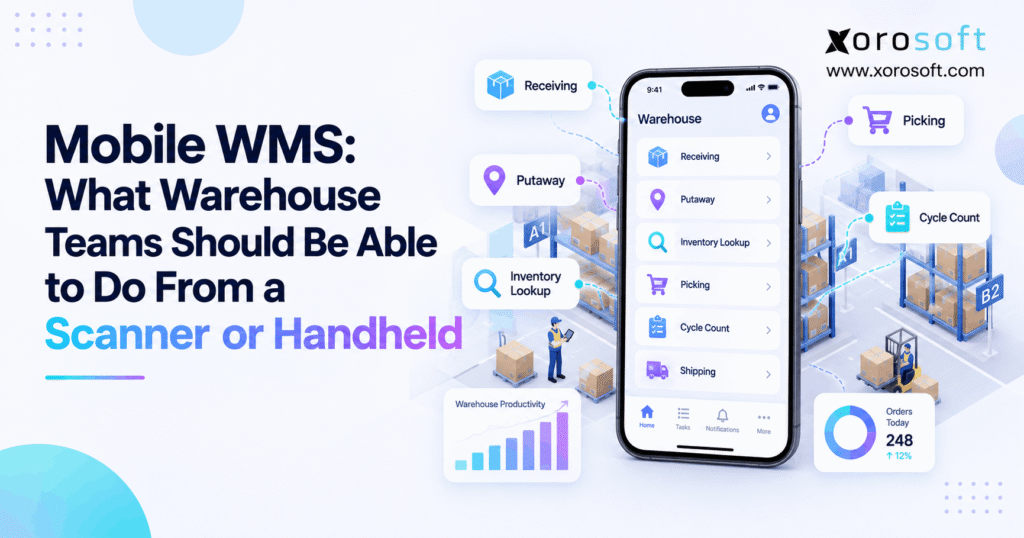
A mobile WMS should let warehouse teams receive, move, pick, count, pack, and ship inventory directly from a scanner or handheld. More importantly, it should validate each action while inventory moves. Therefore, workers can keep physical inventory and system records aligned without returning to a desktop after every warehouse task.
In many warehouses, that shift changes more than scanning speed. Instead, it changes when transactions become visible to the rest of the operation.
As a result, receiving, inventory movement, picking, packing, and shipping become live system events rather than activities that someone records later.
1.1 What a Mobile WMS Actually Does
A scanner captures data. However, a warehouse management system decides what that data means.
For example, scanning an SKU identifies a product. Meanwhile, the software should determine whether that SKU belongs in the current purchase order, bin, pick task, lot, carton, or shipment.
Therefore, the real value comes from combining scanning with workflow rules.
Additionally, the system should tell the worker what to do next. As a result, employees spend less time interpreting paper instructions or switching between physical work and office systems.
1.2 Why Warehouse Execution Should Happen at the Point of Work
Traditionally, warehouse teams often performed a physical task first and entered the transaction later. However, even a short delay can create inaccurate availability.
For example, inventory may already have moved from one bin while the system still shows it in the original location.
Consequently, another worker may search the wrong area or promise stock that is no longer available.
With mobile execution, the system records the activity closer to the actual event. Therefore, inventory visibility improves while the product is still moving through the warehouse.
2. What Warehouse Teams Should Be Able to Do From a Handheld
A capable handheld workflow should cover most routine warehouse transactions. Moreover, workers should not need printed paperwork for tasks the system can guide directly.
At minimum, the handheld should support receiving, putaway, lookup, transfers, replenishment, picking, packing, cycle counting, returns, and shipping.
Additionally, employees should be able to capture lot numbers, serial numbers, quantities, locations, and exceptions where required.
2.1 Core Handheld Tasks Warehouse Teams Need
First, workers should be able to identify incoming products and confirm quantities.
Next, they should be able to complete putaway, move inventory between locations, and investigate stock without leaving the warehouse floor.
Additionally, useful handheld workflows should support:
- Inventory lookup
- Bin validation
- Warehouse transfers
- Replenishment
- Directed picking
- Packing verification
- Cycle counting
- Lot tracking
- Serial tracking
- Label printing
- Damage reporting
- Shipment confirmation
Therefore, the device should act as an execution tool rather than simply a barcode reader.
2.2 The Mobile WMS Workflow: Scan, Validate, Execute, Update
Most well-designed transactions follow a similar sequence:
Scan → Identify → Validate → Execute → Update → Continue
First, the operator scans a product, location, pallet, order, or other identifier.
Then, the system determines what was scanned. Next, it checks whether that identifier is valid for the current task.
Afterward, the worker confirms the required action.
Finally, the inventory or order record updates. As a result, the next employee sees a more accurate operational state.
3. Mobile WMS Receiving and Putaway Workflows
Receiving creates the first warehouse record for incoming inventory. Therefore, errors at the dock can affect purchasing, inventory, fulfillment, accounting, and customer availability later.
For that reason, receiving should be controlled from the first scan.
Moreover, putaway should continue that control by confirming where inventory physically ends up.
3.1 Mobile WMS Receiving From Purchase Order to Inventory
First, a receiver should be able to identify the purchase order, ASN, shipment, pallet, or SKU.
Then, the system should show what the business expected to receive.
Next, the worker should confirm actual quantities and record exceptions such as:
- Shortages
- Overages
- Damaged products
- Incorrect products
- Lot numbers
- Serial numbers
- Expiration dates
Therefore, receiving should do more than increase an on-hand quantity.
Instead, it should establish an accurate record of what arrived and what requires attention.
3.2 Putaway With Product and Destination Validation
After receiving, inventory usually needs a storage location. Therefore, the system should guide or validate the destination.
For example, the operator may scan the pallet or item first. Next, the system can suggest an appropriate location.
Then, the worker travels to the destination and scans the bin.
If the location is valid, the system records the move. However, if the destination violates a warehouse rule, the workflow should stop or provide an alternative.
As a result, physical inventory and system inventory are less likely to separate during putaway.
4. Inventory Lookup, Transfers, and Replenishment From the Floor
Warehouse employees constantly need inventory information. Therefore, lookup functions should be available directly from the handheld.
Similarly, transfers and replenishment should happen where the inventory moves.
Otherwise, teams can still create delays even after implementing barcode scanning.
4.1 Inventory Lookup From the Warehouse Floor
For example, an employee may need to know where an SKU exists before starting a pick.
Similarly, a supervisor may need to confirm whether reserve inventory exists before creating an adjustment.
Therefore, mobile inquiry should make it easy to review:
- Quantity by bin
- Quantity by warehouse
- Physical quantity
- Available quantity
- Allocated quantity
- Inventory status
- Lot information
- Serial information
Importantly, inquiry should remain separate from adjustment permissions. As a result, employees can investigate inventory without accidentally changing it.
4.2 Mobile WMS Transfers Between Bins and Warehouses
A controlled transfer should validate both the source and destination.
First, the worker scans the source location. Next, the operator scans the item and confirms the quantity.
Then, the destination location is scanned.
Finally, the system validates whether the move is allowed before updating inventory.
Therefore, the transaction creates a clear path from the old location to the new one.
Additionally, this process reduces situations where inventory physically moves while the system continues showing the previous bin.
4.3 Replenishment Before Pick Faces Run Empty
A warehouse can have plenty of stock overall while a forward pick location is empty.
Therefore, replenishment needs its own mobile workflow.
First, the handheld should show what needs replenishment. Then, it should direct the worker to the source location.
Next, the operator confirms the item and quantity before moving the stock.
Finally, the destination is validated.
As a result, high-velocity pick areas can stay stocked without relying on informal communication between warehouse employees.
5. Mobile WMS Picking and Verification Controls
Picking is one of the most important warehouse workflows because errors reach customers quickly.
Therefore, the handheld should do more than display an order.
Instead, it should guide the worker through the task and validate critical decisions along the way.
Moreover, the system should make exceptions visible instead of encouraging workarounds.
5.1 Directed Picking for Faster Warehouse Execution
First, the device should tell the operator where to go.
Then, it should show what to pick and how much to retrieve.
Depending on the operation, picking methods may include:
- Single-order picking
- Batch picking
- Wave picking
- Zone picking
- Cluster picking
- Tote-based picking
However, no single method fits every warehouse.
Therefore, companies should choose picking logic based on order profiles, SKU velocity, warehouse layout, labor, and fulfillment requirements.
5.2 Mobile WMS Location and SKU Validation
A product scan confirms the item. However, it does not prove the worker visited the correct bin.
Therefore, stronger workflows can require both location and SKU scans.
For example, the worker first scans the assigned bin. Next, the employee scans the product.
If either scan does not match the task, the system should provide an immediate warning.
Consequently, the worker can correct the mistake before the product reaches packing.
Additionally, lot or serial validation can be added where traceability requires it.
5.3 Short-Pick Exceptions Without Workarounds
Sometimes, the system expects inventory that the worker cannot find.
Therefore, the handheld needs a clear short-pick process.
Instead of skipping the item silently, the operator should record the shortage.
Then, the system can trigger an alternate-location search, replenishment request, recount, or supervisor review.
As a result, missing inventory becomes a visible operational exception.
Moreover, management gains useful information about recurring discrepancies instead of discovering them during a later cycle count.
6. Packing, Shipping, and Returns From a Scanner
Picking should not be the final control point.
Instead, packing and shipping can provide another opportunity to verify what leaves the warehouse.
Likewise, returned products need controlled inventory status before they become available for resale.
6.1 Packing Verification Before the Carton Closes
First, the packer should identify the order, tote, or carton.
Next, the employee should verify the products entering the package.
For example, scanning can catch:
- Missing products
- Wrong products
- Incorrect quantities
- Unexpected substitutions
Additionally, the system can associate the order with cartons, packaging information, or shipping labels.
Consequently, packing becomes another validation stage rather than a manual handoff.
6.2 Mobile WMS Shipping Confirmation and Inventory Updates
Once an order leaves the warehouse, other teams need to know.
Therefore, shipment confirmation should update the order promptly.
Additionally, ecommerce systems, customer service, reporting, and accounting may depend on that shipment data.
As a result, outbound scanning affects much more than the shipping team.
Moreover, faster posting reduces the period in which inventory appears available even though it has already left the building.
6.3 Returns and Inventory Condition Control
Returned products should not automatically become sellable inventory.
Instead, the operator may need to capture the return reason and product condition.
For example, inventory might become:
- Sellable
- Damaged
- Quarantined
- Awaiting inspection
- Ready for vendor return
Therefore, return workflows should protect inventory quality as well as quantity.
As a result, customer returns are less likely to create inaccurate available stock.
7. Mobile WMS for Cycle Counts, Lots, and Serials
Inventory accuracy depends on more than receiving and picking.
Therefore, cycle counts and traceability workflows should also be available from handheld devices.
Otherwise, employees may still rely on paper for some of the most important warehouse controls.
7.1 Cycle Counts From a Scanner or Handheld
First, the employee receives a count assignment.
Next, the worker scans the location or item and records the physical quantity.
If the difference exceeds a defined tolerance, the system can request another count.
Therefore, discrepancies can be investigated while the inventory is directly in front of the employee.
Additionally, blind counts can hide the expected quantity.
As a result, workers are less likely to simply repeat the number already stored in the system.
7.2 Mobile WMS Lot, Serial, and Expiration Tracking
Some businesses require detailed traceability.
Therefore, the handheld may need to capture lot, batch, serial, or expiration information during specific transactions.
For example, food distributors may care about expiration dates.
Meanwhile, manufacturers may need component or batch traceability.
Similarly, serialized products can require unique serial confirmation during receiving or shipping.
As a result, traceability becomes part of normal warehouse execution instead of a separate administrative task.
8. Choosing the Right Handheld Hardware
The best device depends on the warehouse environment.
Therefore, businesses should define workflows before buying large quantities of hardware.
A device that works well for occasional stock inquiry may perform poorly during thousands of daily pick scans.
8.1 Smartphones for Lower-Volume Warehouse Work
First, smartphones provide familiar interfaces and relatively low deployment friction.
Therefore, they may work well for supervisors, occasional scanning, inventory inquiry, and lower-volume operations.
However, camera-based scanning may feel slower than dedicated scan engines during repetitive work.
Additionally, consumer devices may not suit frequent drops, gloves, dust, cold environments, or long shifts.
Consequently, smartphones should be evaluated against the actual warehouse workload rather than cost alone.
8.2 Mobile WMS on Rugged Handheld Scanners
Rugged devices generally prioritize durability, battery life, and scan performance.
Therefore, they often fit receiving, picking, putaway, and high-volume inventory movement.
Additionally, they may offer physical triggers, specialized scan engines, and replaceable batteries.
Before standardizing hardware, however, test the devices with actual users.
In particular, evaluate weight, grip, screen size, battery life, scan range, and one-handed operation.
As a result, hardware decisions can reflect productivity and ergonomics rather than specifications alone.
8.3 Wearable Scanners for Repetitive Workflows
Wearable scanners can reduce repeated device handling.
Therefore, they may work well for high-frequency picking, sorting, or packing tasks.
However, wearables are not automatically the best choice for every process.
Instead, companies should compare comfort, task speed, accuracy, training, battery life, and device management.
Additionally, some employees may prefer different form factors.
Consequently, pilot testing is more useful than assuming one device should serve the entire warehouse.
9. Mobile WMS Infrastructure Beyond the Scanner
Handheld execution depends on more than scanner hardware.
Therefore, warehouses also need reliable software, wireless coverage, label printing, permissions, and exception management.
This is where a dedicated XoroWMS environment can become more relevant than an isolated barcode application.
9.1 Connectivity and Offline Behavior
First, warehouses should understand what happens when wireless coverage weakens.
For example, does the transaction stop completely, or can the device temporarily retain information?
More importantly, what happens when connectivity returns?
Therefore, testing should include docks, freezers, outdoor areas, remote storage zones, and other weak-signal locations where relevant.
Otherwise, duplicate or unfinished transactions may create new inventory discrepancies.
9.2 Mobile WMS Label Printing From the Floor
Many warehouse processes require labels.
Therefore, employees should be able to trigger appropriate printing without returning to a desktop whenever possible.
For example, receiving may require pallet or product labels.
Similarly, packing may require carton or shipping labels.
Additionally, the workflow should make printer selection and reprints manageable.
Consequently, a minor label problem is less likely to interrupt the entire warehouse task.
9.3 User Permissions and Supervisor Controls
Not every employee needs access to every warehouse function.
Therefore, mobile permissions should reflect job responsibilities.
For example, a picker may need inquiry and picking access without unrestricted inventory-adjustment permission.
Meanwhile, a supervisor may need exception-resolution and adjustment capabilities.
As a result, mobile access remains flexible without giving unnecessary control to every user.
10. Why Every Scan Should Validate the Task
The operational value of warehouse scanning comes from validation.
Therefore, every important scan should confirm something about the transaction.
Otherwise, the scanner simply replaces typed data with scanned data.
10.1 Mobile WMS Validation for SKU, Location, and Quantity
For example, a scan can verify:
- Correct SKU
- Correct bin
- Correct lot
- Expected serial number
- Permitted quantity
- Correct order
- Allowed warehouse
- Valid destination
Therefore, mistakes can be caught while employees are still able to correct them.
Additionally, error messages should explain what went wrong.
As a result, workers are less likely to abandon the workflow or create informal workarounds.
10.2 Exception Handling Inside the Warehouse Workflow
Warehouses are full of exceptions.
Therefore, the mobile process should account for them.
For example, a worker may encounter a damaged label, blocked bin, unexpected SKU, missing inventory, wrong quantity, or damaged product.
Instead of forcing the employee to leave the task, the handheld should provide a controlled response where appropriate.
Consequently, supervisors gain visibility into problems earlier.
Moreover, exception data can reveal recurring issues with receiving, labeling, slotting, or inventory accuracy.
11. Mobile WMS vs Basic Inventory Scanning
A mobile WMS becomes more valuable when the operation needs guided execution rather than simple inventory capture.
Therefore, businesses should focus on what happens after the barcode is scanned.
11.1 Where Basic Barcode Scanning Stops
A basic barcode application can identify SKUs and update quantities effectively.
However, it may not support directed putaway, replenishment, task sequencing, short picks, location controls, packing verification, or warehouse exceptions.
Therefore, basic scanning can remain appropriate for simpler operations.
However, complexity eventually changes the requirement.
As multiple locations, higher order volume, dedicated warehouse teams, or stronger traceability requirements appear, the business may need deeper workflow control.
11.2 Mobile WMS and ERP-Connected Warehouse Execution
As complexity increases, warehouse transactions affect more business functions.
Therefore, companies often look beyond isolated scanning applications.
For example, Xorosoft can connect warehouse execution with broader workflows through XoroONE and XoroERP.
Additionally, external commerce and operational systems can connect through Xorosoft integrations.
As a result, the decision becomes less about scanning alone and more about maintaining one reliable operational data flow.
12. Connected Warehouse Data Across the Business
A warehouse scan often affects teams outside the warehouse.
Therefore, mobile execution should feed reliable information into purchasing, ecommerce, finance, forecasting, and operations.
This connection becomes especially important when one inventory pool supports multiple channels.
12.1 Inventory Updates Across Purchasing and Accounting
First, receiving increases inventory.
Meanwhile, picks, shipments, and adjustments reduce or change inventory.
Therefore, inaccurate warehouse transactions can distort replenishment, availability, valuation, and reporting.
Additionally, transfers determine where stock is physically available.
As a result, accurate warehouse execution supports better decisions throughout the business.
Xorosoft’s broader operational solutions connect inventory-driven workflows across multiple departments.
12.2 Mobile WMS Data for Shopify and Ecommerce
For Shopify merchants, warehouse accuracy can directly affect what customers are allowed to buy.
Therefore, a product that physically moved but was not recorded properly can create misleading availability.
Additionally, multi-channel sellers need warehouse transactions to reach connected channels consistently.
Xorosoft is also available through the Shopify App Store, which gives Shopify merchants an external reference point when reviewing ERP connectivity.
Ultimately, however, the operational goal is straightforward: warehouse activity should produce trustworthy channel inventory.
12.3 Wholesale and Manufacturing Requirements
Wholesale businesses may handle cases, pallets, large order quantities, EDI transactions, and customer-specific fulfillment requirements.
Therefore, their mobile workflows can differ significantly from small-parcel ecommerce.
Meanwhile, manufacturers may need raw-material movements, component issues, work-order activity, and finished-goods receipt.
Consequently, mobile warehouse design should reflect the actual business model instead of stopping at generic picking and packing.
13. How to Evaluate Mobile WMS Software Before Buying
A mobile WMS demonstration should look like real warehouse work.
Therefore, buyers should avoid evaluating software only from feature lists or presentation slides.
Instead, vendors should demonstrate a complete inventory journey using realistic devices and transactions.
13.1 Mobile WMS Evaluation With an End-to-End Test
First, ask the vendor to receive a purchase order.
Next, require the demonstration to:
1. Scan an item
2. Record a quantity difference
3. Capture a lot or serial
4. Print a label
5. Put inventory away
6. Transfer part of the quantity
7. Replenish a pick face
8. Pick an order
9. Record a short pick
10. Pack the order
11. Ship it
12. Count remaining inventory
Consequently, workflow gaps become much easier to identify than they are during a checklist review.
13.2 Test Exceptions, Hardware, and Connectivity
Happy-path demonstrations are not enough.
Therefore, deliberately test:
- Wrong SKU scans
- Wrong bin scans
- Duplicate scans
- Damaged inventory
- Missing inventory
- Weak connectivity
- Printer failures
- Lot-controlled products
- Serial-controlled products
- Quantity overages
- Quantity shortages
Additionally, use the actual devices employees will carry.
As a result, the evaluation covers both software functionality and real warehouse usability.
14. Warehouse Requirements by Industry
Different inventory businesses need different controls.
Therefore, companies should prioritize workflows based on their products, channels, warehouse layouts, and traceability requirements.
Xorosoft supports inventory-driven companies across multiple industries, while its published case studies show how operational requirements vary between businesses.
14.1 Apparel, Wholesale, and Furniture Workflows
Apparel businesses often manage high SKU counts across style, color, and size.
Therefore, scan validation helps prevent visually similar products from being mixed.
Meanwhile, wholesale distributors may manage cases, pallets, EDI transactions, larger order quantities, and several warehouses.
Furniture businesses can face another challenge because large products are often stored across wide warehouse areas.
Consequently, location accuracy becomes particularly important when every incorrect movement creates significant extra labor.
14.2 Mobile WMS Requirements for Food, Manufacturing, and Sporting Goods
Food businesses may require lot and expiration tracking.
Therefore, receiving and picking should capture traceability information accurately.
Manufacturers, meanwhile, may need warehouse movements connected with components, raw materials, production, and finished goods.
Similarly, sporting-goods businesses can combine seasonal inventory, ecommerce, wholesale, product variants, and multiple fulfillment channels.
As a result, the best system is not necessarily the one with the longest feature list.
Instead, it is the system that enforces the right warehouse controls for the operation.
15. Build Mobile WMS Around Execution, Not Devices
Ultimately, the most useful mobile WMS question is not, “Can it scan a barcode?”
Instead, ask, “What can the warehouse employee successfully complete after the scan?”
A capable system should guide the task, validate the transaction, handle common exceptions, update inventory, and make the result available to the rest of the operation.
Therefore, businesses should evaluate receiving, putaway, movement, replenishment, picking, packing, counting, and shipping as one connected execution environment.
As operations become more complex, Xorosoft can connect warehouse activity with inventory, purchasing, ecommerce, accounting, manufacturing, and reporting.
Finally, if your warehouse has outgrown paper workflows, disconnected scanning tools, or delayed inventory updates, Book a Demo to see how the workflows can operate in a connected ERP and WMS environment.
Frequently Asked Questions
What is a mobile WMS?
A mobile WMS lets warehouse employees receive, move, pick, count, pack, and ship inventory from handheld devices while validating transactions against warehouse records.
What should warehouse workers do from a scanner?
Workers should be able to receive inventory, validate locations, transfer stock, replenish bins, pick orders, count inventory, capture lots or serials, and confirm shipments.
Can smartphones run mobile WMS workflows?
Yes. Smartphones can support many mobile warehouse workflows. However, rugged scanners may perform better for high scan volumes, harsh environments, long shifts, or specialized barcode requirements.
How does mobile WMS reduce picking errors?
The system can require location and SKU scans before confirming a pick. Therefore, incorrect bins, products, lots, serial numbers, or quantities can be caught earlier.
Does a mobile WMS update inventory immediately?
Many systems update inventory in real time or near real time. However, actual timing depends on connectivity, integrations, system architecture, and workflow configuration.
When does a warehouse need mobile WMS software?
A warehouse may need mobile WMS when paper processes, delayed updates, multiple bins, higher order volume, frequent discrepancies, traceability, or multi-warehouse complexity become difficult to control.
What should companies test before choosing a mobile WMS?
Test receiving, putaway, transfers, replenishment, picking, packing, shipping, counting, exceptions, label printing, connectivity, permissions, barcode formats, and the actual devices workers will use.
Search
Categories
- & INTEGRATIONS 1
- ACCOUNTING & FINANCIALS 62
- Business 129
- COMPETITOR & BUYER INTENT 128
- E-COMMERCE & CHANNEL INTEGRATIONS 72
- ECommerce 3
- Ecommerce + Wholesale Complexity 7
- ERP 1,288
- FINANCE & ACCOUNTING 9
- INVENTORY & OPERATIONS 78
- Inventory Management Software 142
- OPERATIONS & INVENTORY 96
- PROCUREMENT & SUPPLY CHAIN 9
- PURCHASING & SUPPLY CHAIN 62
- SHOPIFY ERP 90
- SHOPIFY STOCKY OPPORTUNITY 2
- Software 1
- WAREHOUSE & FULFILLMENT WMS 92
- WHOLESALE & DISTRIBUTION 104
- WMS 75
- WMS & FULFILLMENT 15
- WMS & WAREHOUSE 71
Recent Posts
-
 What Is Virtual Inventory? Virtual Stock Management, Use Cases, Risks, and System Requirements
 -
 3PL WMS Client Portal Requirements: Inventory, Orders, Billing, and SLA Visibility
 -
 B2B Account Pricing: How to Manage Contract Expiry, Price Changes, and Buyer Access
 -
 Amazon Inventory Forecasting Tools: What Sellers Should Compare Before Automating Replenishment
 -
 B2B Ecommerce Statistics: What Wholesale and Distribution Teams Should Know About Digital Ordering