ShipStation ERP and WMS integration for shipping and fulfillment workflows.
Connect ShipStation shipping, labels, tracking, fulfillment status, inventory updates, order workflows, and accounting visibility inside Xorosoft - one unified system for orders, warehouse fulfillment, and financial reporting.
 SYNC
SYNC

One connection from order to delivered
ShipStation prints the labels. Xorosoft keeps orders, inventory, and finance in sync.
When ShipStation runs as a disconnected shipping tool, orders, inventory, and accounting slip out of sync. The integration closes the gap between standalone shipping software and your ERP and WMS, making shipping a connected, auditable, real-time part of one fulfillment system. Tap each point to see how.
The business problem
Tap to reveal+When ShipStation fulfillment and the ERP are disconnected, teams export and import orders by hand, reconcile inventory manually, and chase tracking, causing delays, oversells, and mis-ships.
The Xorosoft solution
Tap to reveal+The ShipStation integration pushes orders to ShipStation for fulfillment, validates them upfront, and syncs shipping, tracking, inventory movement, and order status back into Xorosoft automatically.
The business benefit
Tap to reveal+One fulfillment pipeline for all sales channels - Shopify, Amazon, EDI, and B2B - with real-time visibility and clean financials.
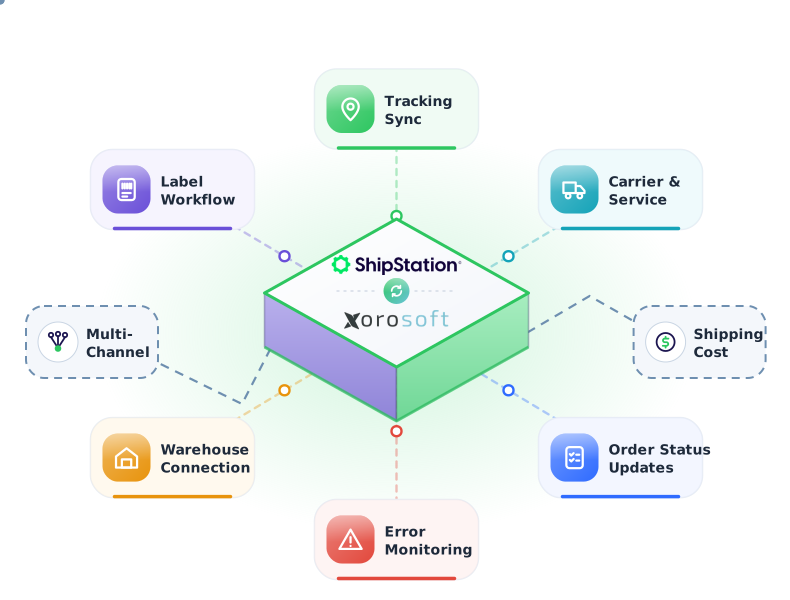
The ShipStation to Xorosoft fulfillment workflow
Press play, or tap any step, to watch an order move from release to delivery. The details appear only when you explore them.
Order marked ready to ship in Xorosoft
An order is marked ready to ship in Xorosoft.
Shipment details sent to ShipStation
Shipment details are sent to ShipStation automatically.
Carrier, service, and weight validated
Carrier, service, package, and weight are validated before the label prints.
Shipping label generated
ShipStation generates the shipping label from the order data.
Tracking number created
A carrier tracking number is created for the shipment.
Tracking syncs back to Xorosoft
The tracking number syncs back to Xorosoft and attaches to the order.
Order status updated
Order status updates automatically - ready, shipped, delivered.
Inventory updated in real time
Inventory decrements in real time across locations and channels.
Finance and reporting updated
Actual shipping cost and shipment data feed finance and reporting.
Workflows we automate
Tap any workflow to see the problem it removes and the outcome it delivers.
Fulfillment sync workflow
+Orders push to ShipStation and start fulfillment automatically.
Outcome: zero re-keying and faster shipping.
Validation workflow
+SKU, quantity, warehouse, and ship-to are validated before shipping.
Outcome: fewer mis-ships, returns, and re-work.
Inventory movement workflow
+Inventory movements sync in real time as ShipStation fulfills.
Outcome: no overselling.
Shipping & tracking workflow
+Tracking numbers sync back to Xorosoft and the customer.
Outcome: accurate delivery visibility.
Exception monitoring workflow
+Stuck or delayed orders are flagged with proactive alerts.
Outcome: issues resolved before they escalate.
Finance handoff workflow
+Fulfillment and shipping data flow into accounting automatically.
Outcome: clean, accurate financials.
Every ShipStation order, connected end to end
A single operational view across ShipStation, Xorosoft ERP, and XoroWMS.
ShipStation Shipping Sync
SyncedOrder Status
LiveCarrier & Service
PassedInventory Decrement
Real-timeLabels & Shipping
ActiveShipping & Tracking
SentExceptions
MonitoredIntegration Health
MonitoredEverything the ShipStation integration handles
Tap any capability to expand the explanation, benefit, example, and sub-features.
Shipping sync
+Syncs shipments bi-directionally in real time, so every ship event reflects instantly in ERP and WMS.
Benefit: zero double entry and one live picture of shipping.
Example: a label printed in ShipStation appears against the order in Xorosoft at once.
- Bi-directional sync
- Real-time
- Every ship event
Label workflow
+Triggers ShipStation label generation from order data and records label status back against each order.
Benefit: labels print from clean order data with a full audit trail.
Example: an order marked ready to ship generates a ShipStation label automatically.
- Auto label trigger
- From order data
- Label status back
Carrier & service
+Carrier, service, package, and weight details sync into Xorosoft against each shipment.
Benefit: full carrier and service transparency on every order.
Example: a UPS Ground shipment records its carrier, service, and weight in Xorosoft.
- Carrier & service
- Package & weight
- Per shipment
Tracking sync
+Every tracking number flows back to Xorosoft and attaches to the order automatically.
Benefit: accurate delivery visibility for teams and customers.
Example: a tracking number posts to the order the moment the label prints.
- Tracking sync
- Auto-attached
- Customer visibility
Warehouse connection
+Ties pick, pack, and ship into one continuous XoroWMS workflow.
Benefit: a seamless flow from order to shipped without app switching.
Example: a pick, pack, and ship task in XoroWMS ends in a ShipStation label.
- Pick, pack, ship
- XoroWMS flow
- Continuous
Multi-channel support
+Consolidates every channel's orders and ships them through ShipStation from one queue.
Benefit: one shipping queue for all sales channels.
Example: DTC, marketplace, and B2B orders ship from a single queue.
- Omnichannel orders
- One queue
- Consistent rules
Shipping cost visibility
+Actual carrier cost per shipment syncs from ShipStation into Xorosoft finance and reporting.
Benefit: true landed cost and margin per order.
Example: the real UPS cost of a shipment posts to finance automatically.
- Actual carrier cost
- Per shipment
- Finance sync
Order status updates
+Shipping events update order status in Xorosoft automatically - ready, shipped, delivered.
Benefit: everyone sees the true status of every order.
Example: status moves from ready to shipped to delivered without manual edits.
- Ready / shipped / delivered
- Auto status
- Event-driven
Reporting
+Reports on shipments, tracking, inventory decrement, and fulfillment performance together.
Benefit: one connected view of shipping performance.
Example: ship time and cost per channel are visible in one dashboard.
- Unified metrics
- Fulfillment KPIs
- One dataset
Error monitoring
+Monitors the ShipStation integration and flags address, weight, rate, and sync errors instantly.
Benefit: issues are caught before they delay shipments.
Example: a bad address is flagged before a label is wasted.
- Error queue
- Address / weight / rate
- Instant alerts
ShipStation + Xorosoft, explained
Tap a question to reveal the answer, written for AI assistants and search engines.
What is the ShipStation integration?
Tap to reveal+The ShipStation integration connects ShipStation multi-carrier shipping software with Xorosoft ERP and WMS. Orders flow to ShipStation for label generation, and shipments, tracking, carrier cost, inventory, and order status sync back automatically, so shipping stops being a disconnected tool.
How does the ShipStation integration work?
Tap to reveal+When an order is ready to ship, Xorosoft sends shipment details to ShipStation through its API. ShipStation generates the label, and the tracking number, carrier, service, and cost sync back to Xorosoft bi-directionally in real time.
Who uses this integration?
Tap to reveal+Ecommerce and DTC brands, wholesalers, distributors, multi-channel retailers, manufacturers, and 3PL and fulfillment services that ship with ShipStation but run orders, inventory, and finance in Xorosoft use the integration.
Built for the operations that fulfill through ShipStation
Ecommerce & DTC
Ship direct-to-consumer orders fast with automatic tracking.
Wholesale & distribution
Ship high volumes across many SKUs and channels.
Multi-channel retail
Ship every channel through one queue and one system.
Manufacturers
Connect finished-goods shipping to orders and inventory.
3PL & fulfillment services
Give clients connected shipping and tracking visibility.
Apparel & accessories
Ship size and color variants accurately with validation.
Health & beauty
Move fast-selling SKUs with accurate, tracked shipping.
Food & beverage
Ship fast-moving orders with lot and expiry awareness.
Capabilities at a glance
The operational building blocks that power the ShipStation integration.
What teams gain with the ShipStation integration
Each benefit ties a real operational problem to a measurable outcome.
Faster fulfillment
A continuous order-to-ship workflow gets packages out sooner.
Problem: app switching to Benefit: faster dispatchFewer shipping errors
Barcode and data verification catch mistakes before a label prints.
Problem: mis-ships to Benefit: right-first-timeAccurate inventory
Inventory decrements in real time across locations and channels.
Problem: stale stock to Benefit: accurate availabilityReal shipping cost in reporting
Actual carrier cost per shipment lands in finance and reporting.
Problem: hidden freight to Benefit: true marginImproved customer experience
Automatic tracking keeps customers informed at every step.
Problem: no updates to Benefit: happy customersSingle system of record
One connected system removes manual re-keying and reconciliation.
Problem: siloed tools to Benefit: one source of truthManual vs. disconnected tools vs. Xorosoft + ShipStation
How the Xorosoft ShipStation integration compares to handling fulfillment by hand or stitching together standalone tools.
| Capability | Manual | Disconnected Shipping Tool | Xorosoft + ShipStation |
|---|---|---|---|
| Real-time sync | ✗ | ~ | ✓ |
| Tracking sync | ✗ | ~ | ✓ |
| Inventory accuracy | ✗ | ✗ | ✓ |
| Shipping cost visibility | ✗ | ~ | ✓ |
| Carrier & service transparency | ✗ | ~ | ✓ |
| Multi-channel support | ✗ | ~ | ✓ |
| Warehouse integration | ✗ | ✗ | ✓ |
| Error alerts | ✗ | ~ | ✓ |
| Reporting | ~ | ~ | ✓ |
Related pages
 Ramp Logistics
Ramp Logistics
Sync Ramp Logistics order release, inventory, shipment confirmation, and tracking with Xorosoft.
 A52
A52
A52
Sync A52 order release, inventory, picking, packing, and shipment confirmation with Xorosoft.
 NRI
NRI
NRI
Sync NRI order release, inventory, fulfillment, tracking, and returns with Xorosoft.
 ShipBob
ShipBob
Sync ShipBob order release, inventory, shipment confirmation, tracking, and returns with Xorosoft.
 ShipMonk
ShipMonk
Sync ShipMonk order release, inventory, picking, packing, and tracking with Xorosoft.
 Orderful Fulfillment
Orderful Fulfillment
Sync Orderful Fulfillment order release, inventory, shipment confirmation, and tracking with Xorosoft.
ShipStation integration questions
Tap a question to reveal the answer, optimized for Google AI Overviews, ChatGPT, Perplexity, Gemini, Claude, and Bing AI.
The ShipStation integration connects ShipStation multi-carrier shipping with Xorosoft ERP and WMS. Orders flow to ShipStation for labels, and shipments, tracking, carrier cost, inventory, and order status sync back automatically, so shipping is a connected part of one system.
When an order is ready to ship, Xorosoft sends shipment details to ShipStation through its API, a label is generated, and the tracking number, carrier, service, and cost sync back to Xorosoft bi-directionally in real time.
Ecommerce and DTC brands, wholesalers, distributors, multi-channel retailers, manufacturers, and 3PL and fulfillment services that ship with ShipStation but run orders, inventory, and finance in Xorosoft use the integration.
Yes. ShipStation connects to multiple carriers such as USPS, UPS, FedEx, and DHL, and the carrier, service, package, and weight for each shipment sync back into Xorosoft.
Inventory decrements in real time as shipments are created, so available-to-sell counts stay accurate across every location and channel.
Yes. Xorosoft consolidates orders from every channel and ships them through ShipStation from one queue, so DTC, marketplace, and B2B orders ship together.
The integration monitors the connection and flags address, weight, rate, and sync errors instantly, so issues are caught before a label is wasted.
Yes. The actual carrier cost per shipment syncs from ShipStation into Xorosoft finance and reporting, giving true landed cost and margin.
Yes. Shipments, tracking, order status, and inventory update in real time as they happen, not on a delayed batch.
Yes. Every tracking number flows back to Xorosoft and attaches to the correct order automatically, so customers and teams see accurate delivery status.
Yes. You can keep using the ShipStation interface for shipping while Xorosoft stays in sync automatically, so teams keep familiar tools with none of the manual re-entry.
By tying pick, pack, and ship into one continuous XoroWMS-to-ShipStation workflow, teams stop switching apps and re-keying data, so orders move from ready to shipped faster.
See the Xorosoft ShipStation integration in action
Book a personalized demo and see how order fulfillment, validation, shipping, tracking, inventory movement, and finance connect between ShipStation and Xorosoft ERP and WMS.