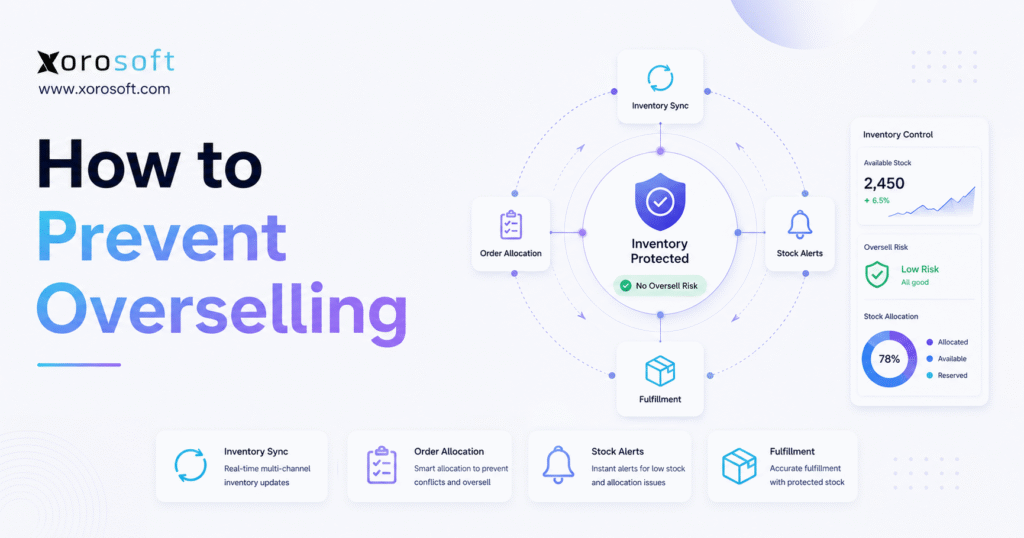
If you are looking for guidance on how to prevent overselling, this article will outline the essential steps and strategies to help your business avoid common pitfalls.
1. How to Prevent Overselling Before the Order Is Placed
Learning how to prevent overselling is one of the most important operational steps for any ecommerce, wholesale, or multichannel business. When a customer buys a product that your team cannot actually ship, the issue does not stay inside the inventory screen. Instead, it moves into customer support, warehouse planning, accounting, refunds, marketplace performance, and brand trust.
In practical terms, knowing how to prevent overselling means knowing which inventory is truly available before the business accepts another order.
At first, overselling may look like a small stock error. However, once order volume increases, the same problem usually reveals deeper operational gaps. A Shopify store may show stock that Amazon already sold. Meanwhile, a wholesale order may reserve inventory that ecommerce channels still display as available. In some cases, the warehouse may count a product as sellable even though the item is damaged, misplaced, picked, or waiting for inspection.
Because of that, overselling rarely comes from one mistake. More often, it comes from slow inventory updates, weak stock allocation, manual spreadsheets, inaccurate warehouse counts, late purchasing, or disconnected systems. As a result, the business promises inventory faster than it can verify availability.
A stronger approach begins with one question: what quantity can the business safely promise right now?
That answer should include more than physical stock. It should account for open orders, reserved units, damaged items, safety stock, incoming purchase orders, warehouse locations, marketplace demand, wholesale commitments, and supplier lead times. When every team works from the same available inventory number, oversold orders become far less likely.
This guide explains how to prevent overselling, why the problem happens, which inventory controls matter most, and when growing companies need stronger systems to manage stock across Shopify, Amazon, wholesale, warehouses, and purchasing.
2. What Overselling Means in Inventory Management
Overselling happens when a business accepts an order for a product that it cannot fulfill from available stock. The product may appear available on a website, marketplace, B2B portal, sales order, or internal system. However, the item may already belong to another order, sit in a damaged stock area, wait for inspection, or exist only as an inaccurate inventory count.
In simple terms, overselling means the business promised the same inventory twice.
For example, a brand may show 20 units available online. During the same hour, Shopify sells 12 units, Amazon sells 6 units, and a wholesale customer places an order for 10 units. Unless every system updates inventory immediately, the business may accept 28 units of demand against only 20 units of real stock.
Although this looks like an ecommerce issue, the root cause often sits deeper in operations. Therefore, teams need to understand the difference between inventory on hand and inventory available to sell.
2.1 Overselling Is Different From a Stockout
A stockout happens when a product has no available inventory before the customer buys it. In that case, the shopper usually sees the item as unavailable, sold out, or backordered.
Overselling is worse because the customer already placed the order. After payment or confirmation, the business must explain that the item cannot ship as expected. Consequently, the team may need to cancel the order, delay fulfillment, issue a refund, offer a replacement, or split the shipment.
A stockout blocks the sale before the promise. Overselling breaks the promise after the sale.
That difference matters because customers judge the experience differently. If a product shows as sold out, they may move on. However, if they pay for a product and later receive a cancellation, they lose confidence in the business.
2.2 Why Overselling Hurts More Than Inventory Accuracy
Poor inventory accuracy creates internal confusion. Overselling creates external damage.
Once an oversold order reaches the customer, several teams feel the impact. Customer support handles complaints. Warehouse teams search for missing stock. Finance processes refunds or credits. Purchasing may rush a supplier. Meanwhile, sales teams may protect key accounts manually, and operators need to understand why the system allowed the order in the first place.
In marketplace channels, the risk can become more serious. If too many orders get canceled or delayed, seller performance can suffer. Therefore, brands that sell through Amazon, retail partners, or marketplace channels need tighter inventory controls than a single-channel store.
Overselling also affects cash flow. Refunds, chargebacks, expedited shipping, replacement costs, and support time all reduce margin. Additionally, delayed fulfillment can make reporting less reliable because revenue, inventory, and customer commitments no longer line up cleanly.
3. Why Ecommerce Teams Struggle to Prevent Overselling
Most overselling problems begin quietly. A team adjusts stock manually. Then, a warehouse transfer updates late. Later, a purchasing sheet misses supplier delays. After that, a sales rep confirms a wholesale order without checking live availability. Finally, a fast-selling SKU exposes the weakness.
The most common causes include:
| Cause | What Happens | Better Control |
|---|---|---|
| Delayed inventory sync | Channels show outdated stock | Real-time inventory updates |
| Shared inventory pools | Multiple channels sell the same units | Channel allocation |
| Inaccurate warehouse counts | System stock does not match physical stock | Barcode scanning and cycle counts |
| Manual spreadsheets | Teams update stock too late | Centralized inventory control |
| Late purchasing | Replenishment arrives after demand spikes | Reorder points and forecasting |
| Poor returns handling | Returned goods appear sellable too soon | Inspection-based restocking |
Because these causes overlap, the fix should not focus on one screen or one setting. Instead, teams need to improve the full path from order capture to inventory allocation, warehouse execution, purchasing, and reporting.
That is why teams need repeatable controls for how to prevent overselling before stock errors reach customers.
3.1 Inventory Does Not Update in Real Time
Real-time inventory matters because orders move quickly. If one channel sells a product, every other channel needs to know before it accepts another order for the same stock.
However, many growing brands use separate tools for ecommerce, marketplaces, warehouse operations, purchasing, accounting, and wholesale. As a result, stock updates move through integrations, manual uploads, CSV files, or delayed syncs. Even a short delay can cause overselling during high-volume periods.
For instance, a Shopify product may sell out during a promotion, but Amazon may continue showing available inventory for several minutes. During normal demand, that delay may seem harmless. During a flash sale, it can create dozens of oversold orders.
To understand how to prevent overselling at this stage, teams need to look at sync timing, not only stock quantity.
3.2 Sales Channels Compete for the Same Stock
Multichannel selling increases revenue opportunities. At the same time, it increases the risk of stock conflicts.
If Shopify, Amazon, wholesale, EDI, and retail orders all pull from the same inventory pool, the fastest channel can consume stock before other commitments update. Therefore, every channel should not see the full available quantity unless the backend system can reserve and deduct inventory instantly.
A safer approach uses inventory allocation. For example, ecommerce may receive 60% of sellable stock, Amazon may receive 20%, and wholesale may reserve 20% for key accounts. Although the exact split will vary by business, the principle stays the same: channels should not blindly compete for the same final units.
This is one practical way to prevent overselling without stopping growth across channels.
3.3 Warehouse Counts Do Not Match Reality
Sometimes inventory exists in the system but not in a sellable condition. That gap creates overselling because sales channels trust a number that the warehouse cannot fulfill.
Common warehouse causes include:
- Products stored in the wrong bin
- Damaged units counted as available
- Returned items restocked before inspection
- Picked orders not deducted quickly enough
- Transfers recorded late
- Bundles consuming components without updating stock
- Manual receiving errors
Because of these issues, warehouse accuracy plays a direct role in overselling prevention. Better ecommerce settings cannot fix stock that the warehouse cannot locate.
3.4 Purchasing Falls Behind Demand
Overselling can also come from slow replenishment. If demand increases faster than purchasing reacts, the business may keep accepting orders while inventory falls below a safe level.
This usually happens when teams do not track supplier lead times, reorder points, safety stock, or incoming purchase orders in one place. As a result, buyers order too late, suppliers ship too slowly, and sales channels continue accepting demand.
Forecasting does not need to predict every unit perfectly. However, it should help teams buy early enough to avoid risky stock positions.
A purchasing team that wants to learn how to prevent overselling should start by connecting buying decisions to live demand, not last month’s spreadsheet.
4. How to Prevent Overselling With Better Inventory Visibility
The first step to prevent overselling is clear inventory visibility. However, visibility does not mean knowing only how many units exist in the warehouse. Instead, the business needs to know which units it can actually sell.
Shopify separates inventory into states such as available, committed, unavailable, and on hand. That distinction matters because available inventory should represent what customers can buy now, while committed inventory already belongs to existing orders. You can review Shopify’s inventory concepts in the Shopify Help Center.
When teams confuse these numbers, overselling becomes more likely. Therefore, every prevention plan should begin with a clean definition of available inventory.
4.1 Track Available Inventory to Avoid Oversold Orders
On-hand stock tells you what physically exists. Available inventory tells you what you can safely sell.
Those numbers often differ.
| Inventory Type | Meaning | Why It Matters |
| On-hand inventory | Total physical stock | Shows what exists |
| Available inventory | Stock that can sell now | Prevents overpromising |
| Committed inventory | Stock tied to open orders | Prevents double-selling |
| Reserved inventory | Stock held for a channel or customer | Protects commitments |
| Damaged inventory | Stock not suitable for sale | Protects customer experience |
| Incoming inventory | Stock expected from suppliers | Supports future planning |
Therefore, sales channels should use available inventory, not total physical inventory. Otherwise, the business may sell items that already belong to other orders or should not leave the warehouse.
This distinction is essential for how to prevent overselling because customers only care about what can actually ship.
4.2 Separate Sellable Stock From Reserved Stock
Reserved inventory protects important commitments. For example, wholesale accounts may need guaranteed stock. A customer service team may hold replacement units. Amazon may need marketplace inventory. Meanwhile, ecommerce may require a separate pool for direct-to-consumer orders.
Without reservation rules, every channel sees the same stock. Consequently, the business may sell units online that sales already promised to a wholesale customer.
To reduce risk, define reserved inventory by:
- Channel
- Customer
- Warehouse
- Region
- Promotion
- Replacement orders
- Manufacturing needs
- Wholesale commitments
Clear reservation rules reduce conflict before the order enters the system.
4.3 Use Real-Time Inventory Sync Across Channels
Real-time inventory sync helps stop overselling because it updates stock after key events. Those events include order placement, order cancellation, picking, packing, shipping, returns, transfers, purchase order receipts, and manual adjustments.
For Shopify merchants, inventory settings also matter. Shopify allows merchants to keep selling when a product is out of stock if the “continue selling when out of stock” option is enabled. That setting can support preorders, but it can also create overselling if teams use it without controls. You can review this behavior in Shopify’s guide to selling when out of stock.
Therefore, operators should review out-of-stock settings before promotions, seasonal launches, or new marketplace integrations. In addition, they should test whether inventory sync behaves correctly when order volume increases.
4.4 Build One Inventory Source of Truth
A single source of truth means one system controls available inventory. Other systems may display inventory, but they should not calculate availability differently.
For example, Shopify may show stock to customers. Amazon may show marketplace availability. A warehouse app may manage picking. Accounting may record inventory value. However, if each system holds a separate version of inventory, teams eventually disagree.
To avoid this, the business should centralize inventory logic. Once the source of truth updates stock, every connected channel should reflect the same availability.
This single source of truth becomes one of the most reliable ways to prevent overselling across fast-moving sales channels.
4.5 Stop Using Spreadsheets as Live Inventory Systems
Spreadsheets can help teams organize early operations. However, they struggle when inventory changes every few minutes.
A spreadsheet cannot automatically reserve stock for open orders. It cannot sync instantly across Shopify, Amazon, wholesale, EDI, and warehouse tools. Additionally, it cannot stop two people from updating different versions of the same SKU count.
As order volume grows, spreadsheets become useful for analysis but risky for live control. Therefore, brands should move critical inventory decisions into systems that update in real time.
If your team still asks a spreadsheet how to prevent overselling, the business may already need a more reliable operating model.
5. How to Prevent Overselling on Shopify, Amazon, and Wholesale Channels
Each sales channel creates different overselling risks. Therefore, a strong prevention strategy should treat Shopify, Amazon, wholesale, and EDI differently instead of forcing every channel into one generic workflow.
The goal is not only to sync inventory. More importantly, the goal is to control what each channel can promise.
5.1 Shopify Controls That Prevent Overselling
Shopify works well as a commerce platform, but growing brands still need disciplined inventory settings and backend workflows.
To reduce Shopify overselling:
1. Enable inventory tracking for every product and variant.
2. Review “continue selling when out of stock” settings.
3. Track inventory by location.
4. Keep SKU and variant data clean.
5. Sync Shopify with the operational inventory system.
6. Test inventory behavior before large promotions.
7. Avoid manual stock changes without approval.
Because Shopify may not represent the full backend operation, merchants need to connect storefront inventory with purchasing, warehouse management, accounting, and fulfillment data. For brands evaluating deeper operational systems, the Xorosoft ERP listing on the Shopify App Store provides one example of an ERP connection built for Shopify merchants.
Use that kind of integration carefully. The goal should not be adding another app. Instead, the goal should be creating accurate inventory movement between the storefront and the operating system.
5.2 Amazon Inventory Steps to Avoid Oversold Orders
Amazon inventory requires careful control because marketplace customers expect reliable fulfillment. In addition, seller performance can suffer when orders get canceled or delayed.
To reduce Amazon overselling:
- Separate FBA and FBM inventory.
- Reconcile Amazon inventory with internal inventory.
- Keep Amazon away from the full shared stock pool.
- Review fast-moving SKUs more frequently.
- Track replenishment timing before stock gets low.
- Investigate marketplace order errors quickly.
Additionally, brands should treat Amazon demand differently from Shopify demand. Marketplace velocity can change quickly because of ranking changes, promotions, ads, or competitor stockouts. Therefore, Amazon should receive its own allocation logic when volume becomes meaningful.
For Amazon operators, how to prevent overselling often comes down to clean allocation and fast internal reconciliation.
5.3 Wholesale Allocation Rules That Prevent Overselling
Wholesale overselling usually happens when sales teams confirm large orders without live inventory visibility.
A single wholesale order can consume more stock than hundreds of ecommerce orders. Therefore, wholesale availability should not depend on a static spreadsheet or outdated stock report.
To reduce wholesale overselling:
- Reserve inventory for key accounts.
- Give sales reps access to available-to-promise inventory.
- Connect wholesale orders to live stock.
- Review customer-specific pricing and allocation together.
- Keep EDI orders connected to inventory availability.
- Separate ecommerce inventory from wholesale commitments.
When wholesale orders sit outside the main inventory system, ecommerce teams may keep selling inventory that sales already promised. As a result, both channels lose reliability.
5.4 Prevent Overselling During Promotions and Peak Seasons
Promotions expose weak inventory controls quickly. A product that sells 20 units per day may sell 500 units during a flash sale. Therefore, teams should prepare inventory controls before launching campaigns.
Before a major promotion, operators should:
1. Confirm available inventory by SKU and location.
2. Hold back safety stock for exceptions.
3. Freeze risky manual stock edits.
4. Set channel-specific quantity limits.
5. Test sync timing across systems.
6. Prepare customer support with backorder rules.
7. Monitor sell-through in real time.
Promotions do not create inventory problems by themselves. Instead, they reveal whether the business can handle speed.
During high-volume events, the safest way to prevent overselling is to control available inventory before traffic arrives.
6. Inventory Controls That Help Prevent Overselling
Inventory controls help teams prevent overselling before customers feel the problem. Although software matters, the process must come first. A weak process inside a better system still creates risk.
Therefore, operators should build simple, repeatable controls around safety stock, reorder points, available-to-promise inventory, reservations, cycle counts, and fulfillment status.
6.1 Use Safety Stock for High-Risk SKUs
Safety stock gives the business a buffer against demand spikes, supplier delays, and forecast errors.
It works best for:
- Best sellers
- Seasonal products
- Imported goods
- Long-lead-time items
- Promotion-heavy SKUs
- Wholesale commitments
- Critical manufacturing components
A simple safety stock formula is:
Safety Stock = Maximum Daily Usage × Maximum Lead Time – Average Daily Usage × Average Lead Time
However, safety stock should not be available to every sales channel. If the system exposes the buffer as normal sellable stock, the business may consume its protection before it needs it.
Used correctly, safety stock supports how to prevent overselling because it protects the business from demand and supply timing gaps.
6.2 Set Reorder Points Before Stock Runs Too Low
Reorder points help purchasing teams act before inventory becomes risky.
A simple formula is:
Reorder Point = Average Daily Sales × Lead Time + Safety Stock
For example, if a SKU sells 25 units per day, supplier lead time is 12 days, and safety stock is 150 units, the reorder point is:
25 × 12 + 150 = 450 units
Once available inventory reaches 450 units, the team should create a purchase order.
Without reorder points, purchasing becomes reactive. Consequently, buyers may order after the product has already entered the danger zone.
6.3 Use Available-to-Promise Inventory
Available-to-promise, or ATP, helps teams decide what they can safely promise now and later.
ATP considers:
- Current available stock
- Existing sales orders
- Reserved inventory
- Incoming purchase orders
- Supplier lead times
- Warehouse location
- Customer priority
- Future demand
For example, a business may have 100 units available today and 500 units arriving next week. Instead of accepting every order immediately, ATP helps the team confirm which orders can ship now and which should receive a future ship date.
As a result, customer promises become more accurate.
6.4 Reserve Inventory Early to Stop Overselling
Inventory should not remain available after the business accepts an order. Once a customer places an order, the system should reserve that stock.
A stronger workflow looks like this:
1. Customer places the order.
2. Stock moves into reserved status.
3. Warehouse receives the pick task.
4. Picker confirms the item.
5. Fulfillment updates the item through picked, packed, and shipped statuses.
6. Canceled items return to available inventory only after approval.
This approach reduces double-selling because stock leaves the available pool early.
It also explains how to prevent overselling at the order level: reserve inventory before another channel can promise it.
6.5 Run Cycle Counts on High-Risk SKUs
Cycle counts help teams catch inventory errors before they become customer-facing problems.
Instead of counting everything once or twice per year, the warehouse counts selected SKUs on a recurring basis. Fast-moving, high-value, and high-error SKUs should receive more attention.
| SKU Type | Risk Level | Suggested Count Frequency |
| High-value best sellers | High | Weekly or monthly |
| Moderate movers | Medium | Monthly or quarterly |
| Slow movers | Lower | Quarterly or semi-annually |
| Error-prone SKUs | High | More frequently until stable |
Because cycle counts identify mismatches early, they support better inventory accuracy and fewer oversold orders.
6.6 Lock Inventory During Fulfillment
Inventory should change status as fulfillment progresses. If stock stays available until shipment, another channel may sell it while the warehouse already picked it.
A better fulfillment status flow includes:
| Fulfillment Step | Inventory Status |
| Order received | Reserved |
| Pick task released | Allocated |
| Item picked | Picked |
| Item packed | Packed |
| Shipment confirmed | Shipped |
| Order canceled | Released after approval |
| Return received | Pending inspection |
This structure gives ecommerce, sales, warehouse, and customer service teams better visibility.
7. Warehouse Practices That Help Prevent Overselling
Warehouse accuracy directly affects overselling. Even if ecommerce channels sync correctly, the business may still oversell if physical inventory does not match system inventory.
Therefore, warehouse discipline should sit at the center of the prevention plan. Accurate receiving, bin control, barcode scanning, picking, packing, cycle counting, and returns handling all help prevent overselling before the customer sees the problem.
7.1 Keep Bin Locations Accurate
Accurate bin locations help warehouse teams find the right item quickly.
When products move without a system update, inventory may appear available but become difficult to locate. As a result, the team may cancel or delay an order even though the product exists somewhere in the facility.
To avoid this, every receiving, putaway, pick, transfer, and adjustment should update the inventory record. Additionally, teams should review problem bins regularly because repeated search issues often signal deeper process gaps.
7.2 Use Barcode Scanning Instead of Manual Picking
Barcode scanning reduces human error during receiving, picking, packing, transfers, and cycle counts.
It helps confirm:
- SKU
- Variant
- Lot or batch
- Serial number
- Bin location
- Quantity
- Order match
For apparel, scanning helps prevent size and color mistakes. For food and beverage, it supports lot and expiration controls. For manufacturing, it helps protect component accuracy.
Manual picking may work at low volume. However, once the warehouse handles many SKUs, locations, or order types, scanning becomes a stronger control.
7.3 Update Inventory During Receiving, Picking, and Returns
Inventory should update at every major warehouse movement.
For example, inbound inventory should not become available until the team receives and checks it. Similarly, returned products should not move back into sellable stock until someone inspects them.
A strong warehouse flow includes:
1. Receive inventory.
2. Inspect quantity and condition.
3. Put products into correct bins.
4. Allocate orders from available stock.
5. Pick and scan items.
6. Pack and ship orders.
7. Inspect returns before restocking.
Because each step changes inventory status, the system should reflect those changes quickly.
7.4 Separate Stock Types to Avoid Inventory Overselling
Damaged stock should never sit inside sellable inventory. The same rule applies to quarantined items, quality-control stock, replacement units, and safety stock.
If those categories stay mixed together, sales channels may show more available inventory than the warehouse can actually ship.
A dedicated warehouse system helps maintain these distinctions. For example, XoroWMS supports warehouse workflows that can connect stock movement, fulfillment, and inventory accuracy inside a broader operational process.
Use warehouse technology only where it supports clear procedures. Without process discipline, even a WMS can inherit messy inventory data.
8. When It Becomes Hard to Prevent Overselling Manually
At some point, overselling stops being a settings issue and becomes a systems issue.
That shift usually happens when the business grows beyond its original workflow. A simple setup may work with one store, one warehouse, and a small SKU count. However, once Shopify, Amazon, wholesale, EDI, purchasing, warehouse teams, and accounting all touch inventory, disconnected tools create risk.
This is usually the moment when operators stop asking only how to prevent overselling inside one channel and start asking how the entire operation should work.
8.1 Spreadsheets Cannot Keep Up With Live Orders
Spreadsheets do not operate in real time. They depend on people to update them correctly and quickly.
That limitation becomes dangerous when orders arrive from multiple channels. While one person updates inventory in a sheet, Shopify may accept another order. Meanwhile, Amazon may still show stock, and a wholesale rep may confirm a customer request.
Because inventory changes faster than the spreadsheet, the file becomes outdated almost immediately.
8.2 QuickBooks Alone May Not Handle Complex Inventory
QuickBooks can support accounting for many businesses. However, inventory-heavy teams often need more operational depth than accounting software alone can provide.
Growing brands may need:
- Multi-warehouse inventory
- Purchasing automation
- Sales order allocation
- Warehouse scanning
- Forecasting
- EDI workflows
- Manufacturing visibility
- Real-time ecommerce sync
When those workflows sit outside accounting, teams often rely on manual updates. Consequently, overselling becomes more likely.
If this sounds familiar, a comparison such as Xorosoft vs QuickBooks can help operators understand where accounting software ends and deeper inventory operations begin.
8.3 Inventory Apps May Not Cover the Full Operation
Inventory apps can solve early visibility problems. However, many growing brands eventually need more than stock counts.
They need purchasing, warehouse management, accounting integration, forecasting, wholesale allocation, and reporting. If those functions remain disconnected, the app may reduce some errors while leaving the broader process fragmented.
For example, an inventory app may update Shopify correctly but fail to connect supplier lead times, warehouse transfers, or accounting valuation. Therefore, teams should evaluate whether the issue is simple inventory sync or broader operational control.
8.4 Disconnected Systems Create Duplicate Work
Duplicate data entry increases overselling risk because every manual step creates another chance for mismatch.
A sales order may live in one tool. Then, a warehouse adjustment may happen in another. Purchasing may track supplier updates in a spreadsheet. Later, accounting reconciles the numbers. During all of this, the storefront may keep selling.
A connected system reduces this problem by letting inventory, purchasing, warehouse, sales, and finance teams work from the same operational record.
At this stage, the business does not only need better reports; it needs a cleaner operating model for how to prevent overselling at scale.
9. How ERP Helps Prevent Overselling
ERP helps prevent overselling by connecting the workflows that affect inventory availability. It does not replace good process. However, it gives growing teams one place to manage inventory, purchasing, warehouse activity, accounting, forecasting, and sales channel data.
This matters because overselling usually happens between systems, not inside one isolated screen.
When teams research how to prevent overselling, ERP becomes relevant once the issue involves more than product settings or basic inventory sync.
9.1 Centralized Inventory Across Warehouses and Channels
A cloud ERP system can centralize inventory across Shopify, Amazon, wholesale, EDI, and multiple warehouses.
Instead of letting each channel calculate availability separately, the ERP acts as the operational source of truth. That means teams can see what is on hand, what is available, what is committed, what is reserved, and what is incoming.
For inventory-driven businesses, XoroERP can support this kind of connected inventory control when spreadsheets, apps, and accounting tools no longer provide enough operational visibility.
9.2 Connected Purchasing and Replenishment
Overselling often begins before stock reaches zero. It begins when purchasing reacts too late.
ERP connects purchasing with inventory demand. Therefore, buyers can see low-stock items, supplier lead times, open purchase orders, incoming inventory, and sales velocity in one workflow.
This helps teams answer practical questions:
- Which SKUs need reorder today?
- Are supplier delays affecting open customer orders?
- Do any products need updated safety stock levels?
- Should upcoming promotions change current purchase orders?
- Is incoming stock still unavailable until the warehouse receives it?
Because purchasing and inventory work together, the business can reduce last-minute buying and stock promise errors.
9.3 Warehouse Management Inside the Same System
A warehouse management system improves accuracy, but it becomes more powerful when it connects directly with inventory, orders, and purchasing.
When receiving, putaway, picking, packing, transfers, and returns update the same inventory record, sales channels receive cleaner availability data. As a result, ecommerce and wholesale teams make better promises.
This is one reason inventory-driven companies often evaluate systems like XoroONE, where inventory, accounting, purchasing, warehouse management, manufacturing, reporting, and ecommerce operations can work together.
9.4 Real-Time Reporting for Operators
Operators need exception reporting, not just historical reports.
Useful reports include:
- Low-stock reports
- Oversold order reports
- Inventory discrepancy reports
- Late purchase order reports
- Reserved stock reports
- Channel sell-through reports
- Warehouse fulfillment reports
- Forecast variance reports
With better reporting, teams can identify risk before customers feel it. More importantly, they can see whether overselling comes from channel sync, warehouse accuracy, purchasing delay, or allocation rules.
9.5 Accounting Visibility for Inventory Value
Inventory affects finance as much as operations. When inventory records are inaccurate, accounting teams may struggle with valuation, cost of goods sold, reconciliation, refunds, credits, and month-end close.
Therefore, inventory systems should not operate separately from financial records forever. As the business grows, finance and operations need the same view of stock movement.
A comparison page like Xorosoft vs Cin7 may help teams evaluate whether they need inventory software only or a broader ERP workflow that also connects accounting, purchasing, and reporting.
10. Software Options That Help Prevent Overselling
Not every company needs the same system. The best choice depends on order volume, SKU complexity, warehouse needs, channel count, purchasing process, and accounting requirements.
| Software Type | Best Fit | Limitation |
| Ecommerce platform settings | Small stores with simple inventory | Limited multichannel control |
| Inventory apps | Basic stock sync and visibility | May not cover finance or purchasing |
| OMS | Order routing and channel rules | May not solve warehouse accuracy |
| WMS | Warehouse execution | May not connect forecasting or accounting |
| ERP | Inventory, purchasing, warehouse, accounting, and channels | Needs process design and implementation |
Because every stage creates different risk, teams should match software to operational complexity.
10.1 Ecommerce Platform Settings
Native ecommerce settings may work for a small store with one warehouse and a simple SKU catalog.
For example, Shopify inventory tracking can help early teams control availability. However, native settings become less reliable when brands add Amazon, wholesale orders, multiple warehouses, or complex purchasing.
Therefore, platform settings are a starting point, not a complete operating model for every business.
10.2 Inventory Management Apps
Inventory apps help growing brands sync stock and reduce manual updates. They often make sense when the main issue is channel visibility.
However, an app may not solve deeper workflow gaps. If purchasing lives in spreadsheets, warehouse work happens elsewhere, and accounting reconciles later, the business may still oversell because the full operation remains disconnected.
Apps can help prevent overselling at a basic level, but they may not solve the full operational problem once inventory touches many teams.
10.3 Order Management Systems
Order management systems help route orders, manage fulfillment rules, and coordinate channels.
They work well when brands need better order flow. However, they may still rely on separate systems for inventory planning, supplier management, warehouse execution, and finance.
As a result, an OMS can reduce some overselling risk but may not eliminate the root cause.
10.4 Warehouse Management Systems
A WMS improves physical accuracy. It helps with receiving, bin locations, barcode scanning, picking, packing, cycle counts, and returns.
However, a WMS alone may not prevent overselling if ecommerce channels, purchasing, wholesale commitments, and accounting remain disconnected.
The warehouse may know what exists physically, but sales channels also need to know what they can safely promise.
10.5 Cloud ERP Platforms
Cloud ERP becomes relevant when inventory, purchasing, warehouse operations, accounting, forecasting, and sales channels need one connected workflow.
For example, companies that sell through Shopify, Amazon, wholesale, EDI, and multiple warehouses often need more than stock sync. They need operational control across the full order-to-cash and procure-to-pay process.
If a business wants to compare options more broadly, the Xorosoft comparison hub can help operators review different ERP and inventory system alternatives without forcing every comparison into one article.
11. Industry Use Cases for Overselling Prevention
Overselling looks different by industry. However, every inventory-driven business needs accurate availability, clean warehouse execution, and clear customer promises.
For a broader view of vertical fit, the industries we serve page can help connect these operational patterns to different business models.
11.1 Apparel and Fashion
Apparel brands often oversell because of variants. A product may have many sizes, colors, styles, and seasonal drops. If teams track inventory too broadly, one size may oversell while another stays overstocked.
To reduce risk, apparel brands should track inventory at the SKU and variant level. Additionally, barcode scanning can help prevent wrong size or color picks. Because returns also affect availability, teams should inspect returned items before making them sellable again.
For apparel teams, how to prevent overselling often means controlling inventory at the variant level, not just the product level.
11.2 Furniture
Furniture companies deal with long lead times, bulky inventory, supplier delays, and custom configurations. Therefore, overselling can create expensive service problems.
A furniture brand should track available inventory by warehouse, item configuration, and fulfillment date. Moreover, the team should avoid promising incoming stock until supplier timing feels reliable.
Available-to-promise logic becomes especially helpful because customers often care about delivery windows as much as product availability.
11.3 Sporting Goods
Sporting goods brands often face seasonal spikes, promotions, product drops, and bundle complexity.
To avoid overselling, teams should forecast demand around seasons, events, campaigns, and fast-moving categories. Additionally, bundles should deduct component inventory correctly. If one component runs out, the bundle should stop selling even when other parts remain available.
This is another example of how to prevent overselling through stronger SKU and component visibility.
11.4 Food and Beverage
Food and beverage companies need strict controls because lot numbers, expiration dates, quality checks, and compliance can affect sellability.
A product may exist physically but still not qualify as available inventory. For example, it may sit in quality hold, approach expiration, or require lot-specific picking.
Therefore, food businesses should separate sellable stock from quality-control stock and use warehouse processes that support lot accuracy.
11.5 Wholesale Distribution
Wholesale distributors often oversell when large customer orders, sales rep commitments, and ecommerce availability do not update together.
To reduce risk, distributors should use customer-specific allocation, EDI visibility, available-to-promise inventory, and real-time warehouse updates. Additionally, sales teams should confirm inventory from the same system that ecommerce and warehouse teams use.
When wholesale, purchasing, inventory, accounting, and fulfillment all depend on the same stock record, overselling becomes easier to control.
11.6 Manufacturing
Manufacturers need to prevent overselling at both finished goods and component levels.
A finished product may appear available soon, but a missing component can delay production. Therefore, manufacturing teams need visibility into raw materials, BOMs, work orders, production schedules, and finished goods.
In this environment, overselling prevention depends on what the business can build, not only what it has on hand today.
12. Checklist: How to Prevent Overselling Every Week
Use this checklist to review your operation before the next promotion, seasonal spike, marketplace launch, or wholesale push.
A checklist will not solve every inventory problem. However, it helps teams build the discipline needed to prevent overselling consistently.
12.1 Daily Controls
- Review low-stock SKUs.
- Check high-volume sales channels.
- Investigate unallocated orders.
- Monitor inventory sync errors.
- Confirm urgent purchase orders.
- Resolve warehouse exceptions.
- Review delayed or oversold orders.
12.2 Weekly Controls
- Count high-risk SKUs.
- Review fast-moving products.
- Check supplier lead time changes.
- Reconcile marketplace inventory.
- Confirm wholesale allocation rules.
- Prepare for upcoming promotions.
- Update reorder points where needed.
12.3 Monthly Controls
- Review forecast accuracy.
- Compare stockouts and oversold orders.
- Audit inventory adjustments.
- Analyze warehouse accuracy.
- Check slow-moving stock.
- Adjust safety stock levels.
- Evaluate system sync performance.
12.4 System Controls
- Centralize inventory data.
- Sync every sales channel.
- Separate inventory states.
- Reserve stock for open orders.
- Connect purchasing to demand.
- Update inventory during warehouse movements.
- Report exceptions before customers complain.
12.5 Team Accountability Controls
| Team | Overselling Prevention Role |
| Ecommerce | Channel settings, promotions, product availability |
| Warehouse | Receiving, picking, cycle counts, stock accuracy |
| Purchasing | Reorder points, supplier timing, replenishment |
| Sales | Wholesale commitments and customer allocation |
| Finance | Inventory valuation and reconciliation |
| Operations | Process design and system control |
Clear ownership matters because overselling often sits between teams. Once each team owns its part of the process, the business can find and fix problems faster.
13. Frequently Asked Questions
13.1 What is overselling?
Overselling happens when a business accepts an order for inventory it cannot actually fulfill. Although the product may appear available online or in a sales system, the stock may already be committed, reserved, damaged, misplaced, or unavailable. In practice, the business has promised inventory that it cannot ship as expected.
13.2 What causes overselling in ecommerce?
Most overselling problems come from delayed inventory updates, disconnected sales channels, inaccurate warehouse counts, weak purchasing controls, manual spreadsheets, and poor allocation. As ecommerce brands add Shopify, Amazon, wholesale, EDI, and multiple warehouses, the risk increases because more systems touch the same inventory.
13.3 What is the best way to prevent overselling?
To prevent overselling, track available inventory in real time, reserve stock for open orders, sync every sales channel, set reorder points, use safety stock, run cycle counts, and connect warehouse activity to inventory status. Additionally, every channel should pull availability from the same inventory source so teams do not promise stock twice.
13.4 Shopify overselling: how can merchants stop it?
Start by enabling inventory tracking for every product and variant. Then, review out-of-stock selling settings, track inventory by location, and connect Shopify to your backend inventory system. During promotions, avoid manual stock changes unless the team has a clear approval process.
13.5 Why does Shopify still sell out-of-stock products?
Shopify can continue selling out-of-stock products when the “continue selling when out of stock” setting is enabled. That option can support preorders or made-to-order workflows. However, if teams use it accidentally, it can create overselling quickly.
13.6 How do you prevent overselling on Amazon?
To prevent overselling on Amazon, separate FBA and FBM inventory, reconcile Amazon stock with internal records, monitor fast-moving SKUs, and avoid exposing one shared inventory pool to every channel. Additionally, set aside marketplace-specific inventory when Amazon demand becomes significant.
13.7 What is the difference between overselling and a stockout?
A stockout happens when customers cannot buy the product because inventory has already reached zero. Overselling happens when customers can still buy the product even though the business cannot fulfill it. Therefore, overselling creates a broken promise after purchase.
13.8 Can safety stock prevent overselling?
Safety stock can reduce overselling risk because it gives the business a buffer against demand spikes and supplier delays. However, teams must keep safety stock separate from normal available inventory. Otherwise, sales channels may consume the buffer too early.
13.9 How do reorder points help prevent overselling?
Reorder points tell purchasing teams when to buy more stock before inventory reaches a risky level. A reorder point usually includes average demand, supplier lead time, and safety stock. Because of that, buyers can act before products run too low.
13.10 What is available-to-promise inventory?
Available-to-promise inventory shows what the business can safely promise to customers after considering current stock, open orders, reserved inventory, incoming purchase orders, and timing. It helps teams confirm what can ship now and what should ship later.
13.11 What is committed inventory?
Committed inventory is stock already tied to open orders. Although the warehouse may still hold it physically, the business should not sell it again. Tracking committed inventory helps prevent double-selling.
13.12 What is inventory allocation?
Inventory allocation means reserving stock for a specific channel, customer, warehouse, region, or order type. For example, a brand may allocate inventory separately for Shopify, Amazon, wholesale, and replacement orders. This reduces channel conflict.
13.13 Can spreadsheets cause oversold orders?
Yes. Spreadsheets can cause oversold orders when teams use them as live inventory systems. Since spreadsheets depend on manual updates, they often lag behind real orders, warehouse movements, returns, and purchase order changes.
13.14 Can warehouse errors cause overselling?
Warehouse errors can absolutely make inventory look available when it is misplaced, damaged, already picked, or incorrectly counted. Barcode scanning, bin control, receiving discipline, return inspection, and cycle counting reduce this risk. As a result, warehouse accuracy should be part of every overselling prevention plan.
13.15 When should a business upgrade to ERP?
A business should consider ERP when overselling involves multiple warehouses, Shopify, Amazon, wholesale, EDI, purchasing, accounting, forecasting, or manufacturing. At that stage, inventory problems usually come from disconnected workflows rather than one simple setting.
14. Final Takeaway: Prevent the Promise Before It Breaks
Overselling prevention starts with accurate inventory, but it does not end there. To control the problem properly, teams need real-time stock updates, clean warehouse execution, clear purchasing rules, safety stock, reorder points, channel allocation, and reliable available-to-promise inventory.
At a small scale, ecommerce settings and disciplined stock checks may be enough. However, as soon as a business adds more SKUs, sales channels, warehouses, wholesale customers, or purchasing complexity, overselling becomes a systems problem.
That does not mean every company needs the biggest platform immediately. Instead, operators should ask whether their current setup can answer one critical question: what inventory can we safely promise right now?
If the answer depends on spreadsheets, delayed syncs, manual checks, or multiple disconnected tools, the business has outgrown its inventory control process.
Ultimately, the best way to prevent overselling is to control the promise before the order reaches the warehouse.
For inventory-driven companies that need stronger visibility across ecommerce, purchasing, warehouse management, accounting, and reporting, connected ERP workflows can reduce overselling risk and improve operational control.
To see how this can work for your business, Book a demo.
Recent Posts
-
 Best AI Warehouse Management Software for ERP Inventory and Warehouse Operations
 -
 Project Based ERP Software for Managing Project Costs, Purchasing, Resources, Inventory, and Accounting
 -
 Food and Beverage ERP Requirements for Lot, Expiry, and Recall Control
 -
 How to Prevent EDI Errors Before They Become Retailer Chargebacks
 -
 Warehouse Injury and Safety Statistics: What Operations Teams Should Know Before Automating Workflows